Forex Trade Panel MT5

5
  • ユーティリティ
  • Swan Htet
    Swan Htet
    こんにちは!私はMetaTraderプラットフォーム向けに、自動売買システム、カスタムEA(エキスパートアドバイザー)、およびトレード管理パネルを専門に開発しています。私の目標は、シンプルで信頼性の高い執行ロジックとリスク管理ツールを構築し、トレードのワークフローを可能な限りスムーズにすることです。私が開発したすべてのツールは、ここMQL5マーケットでのみ公開されています。システムの仕組みについて質問がある場合や、設定のサポートが必要な場合は、「Send Message(メッセージを送る)」ボタンをクリックしていただければ、すぐに対応いたします。お立ち寄りいただきありがとうございました!
  • バージョン: 2.35
  • アップデート済み: 12 11月 2026

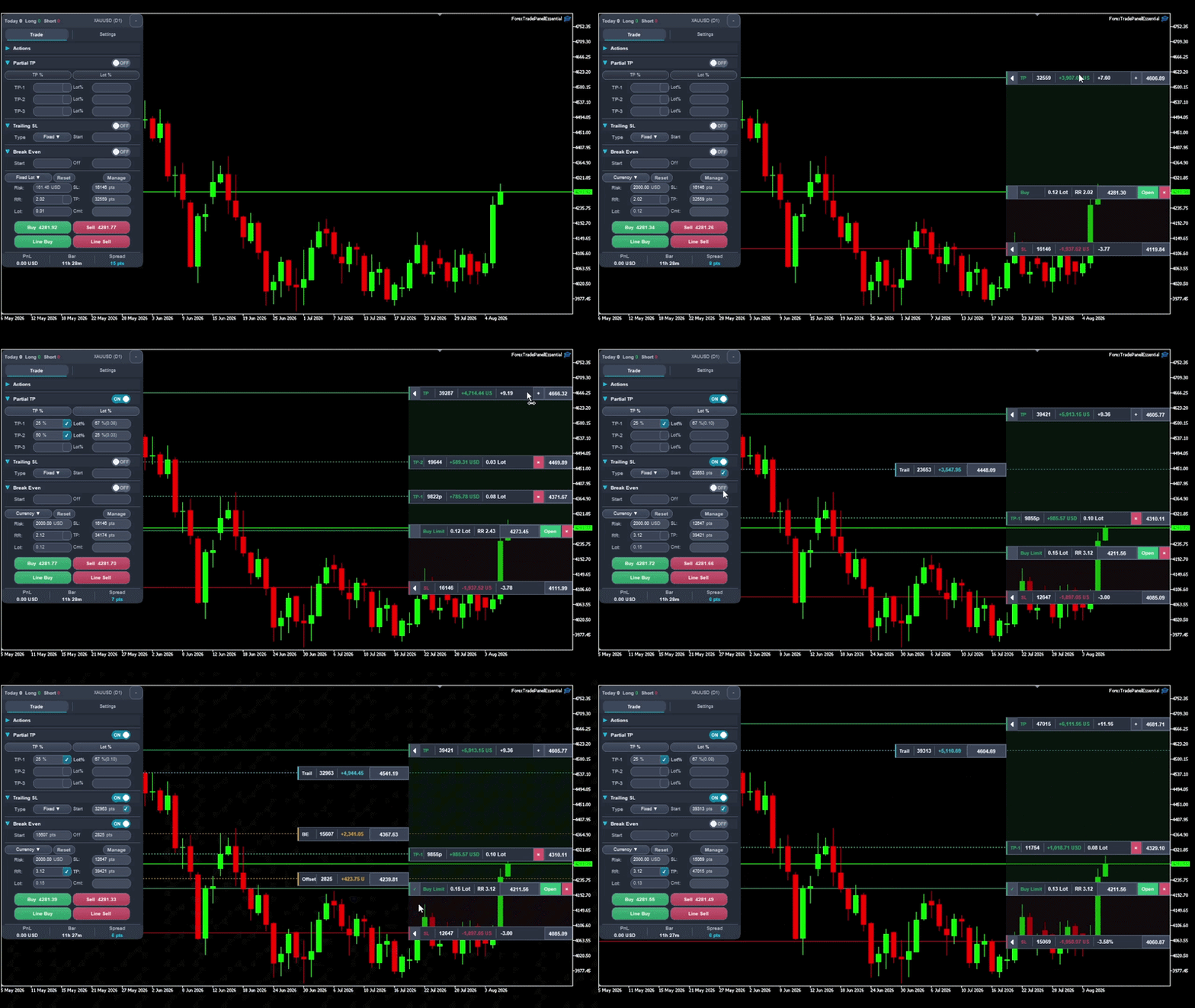
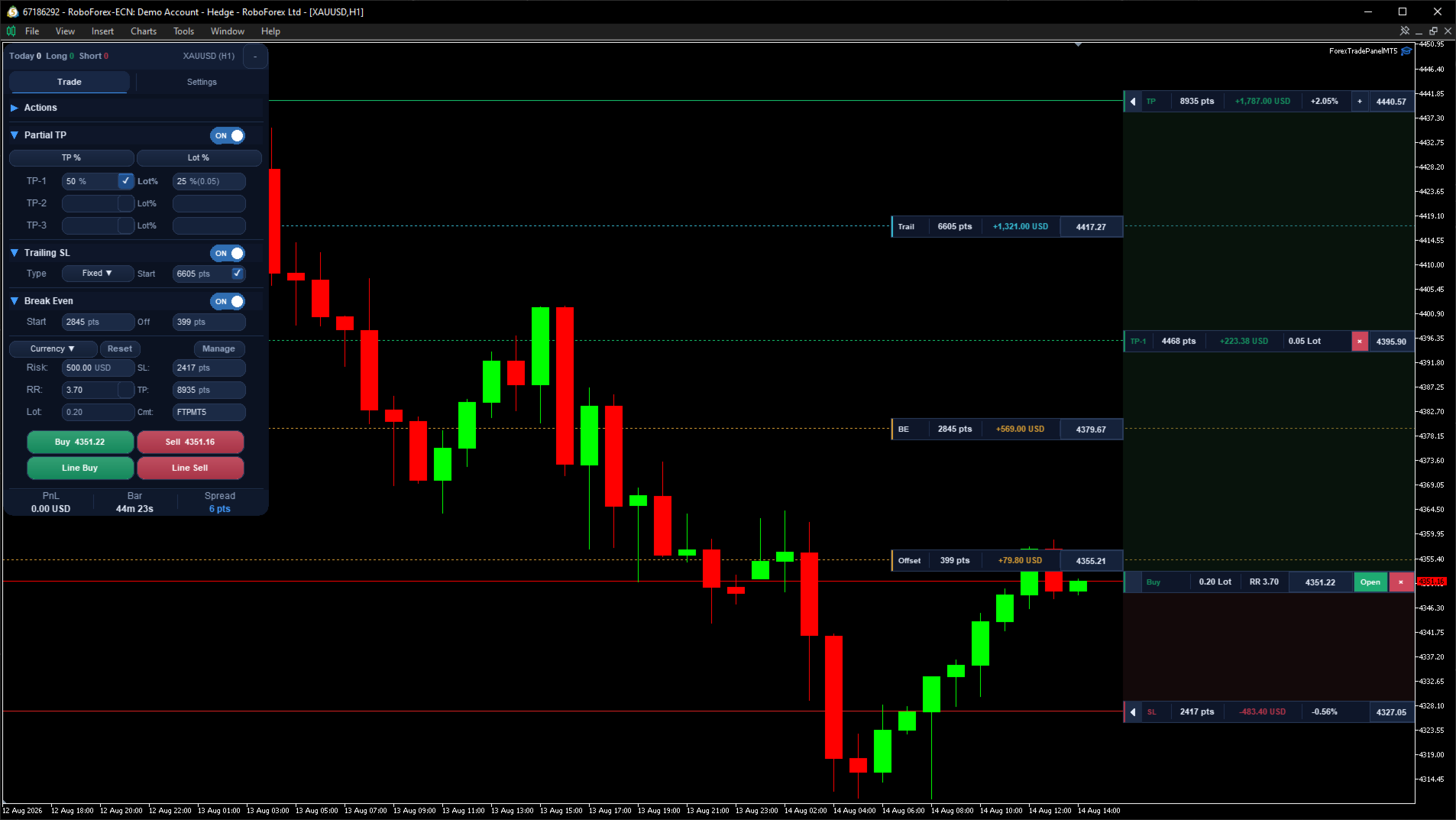
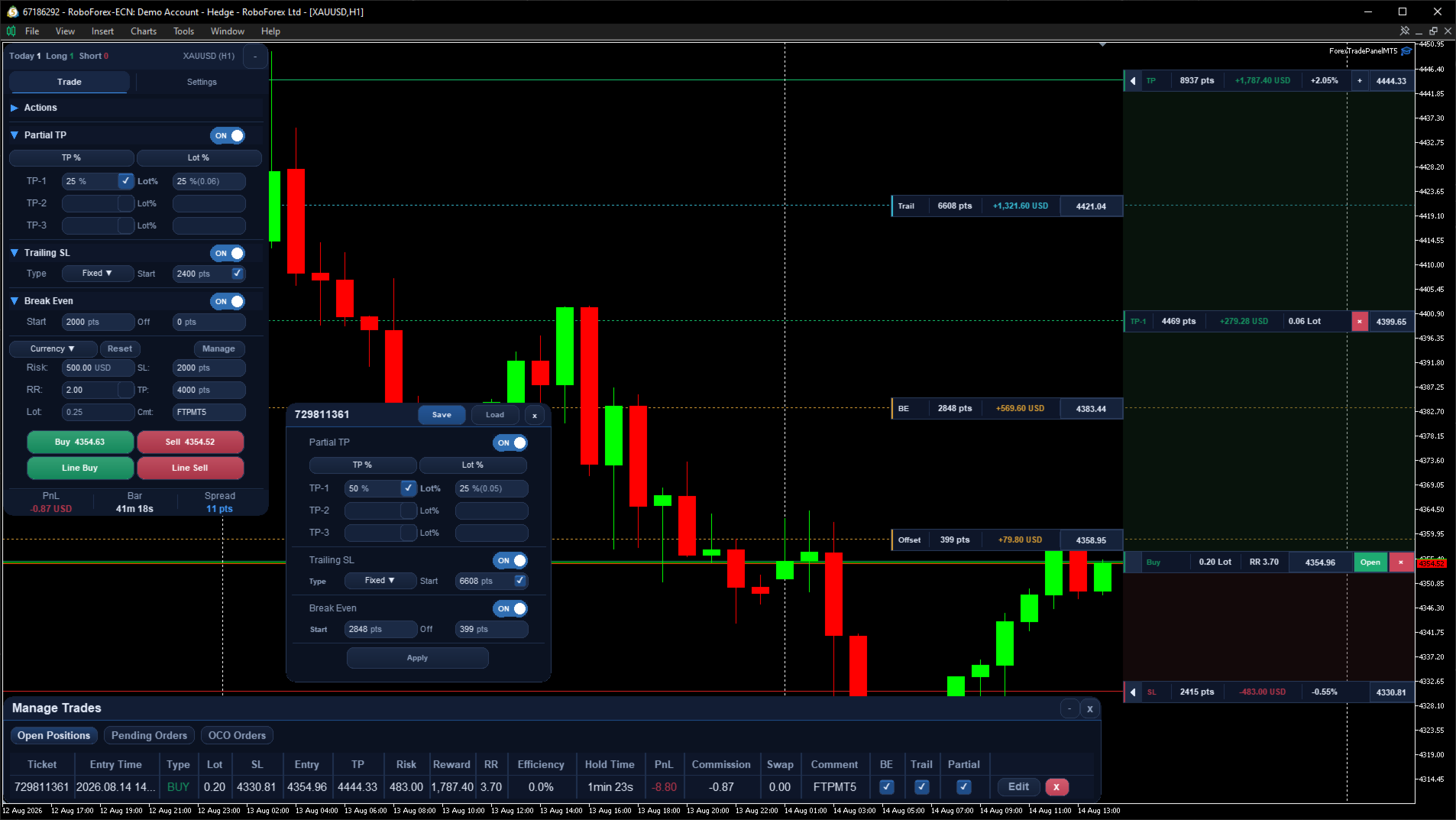
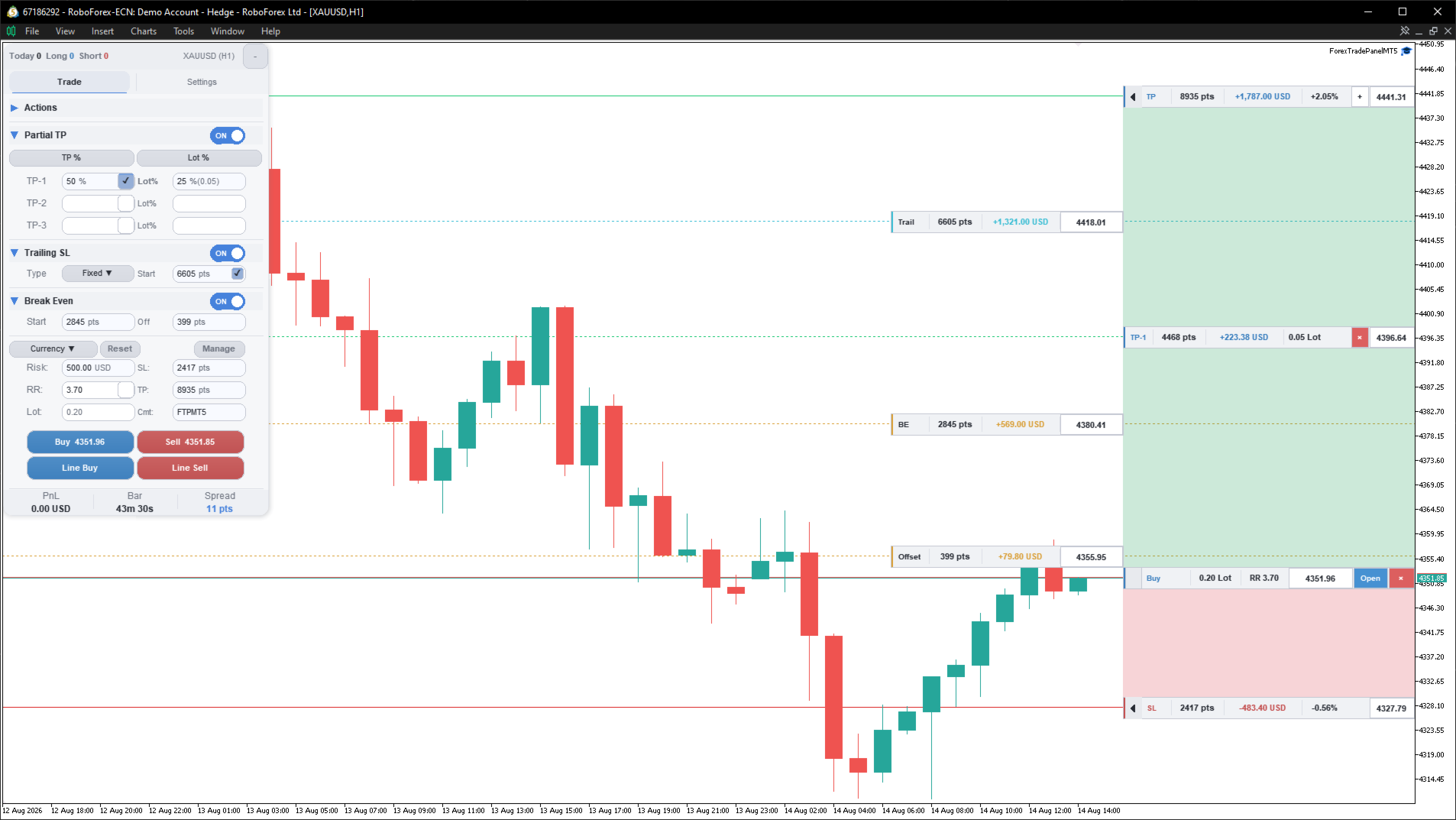
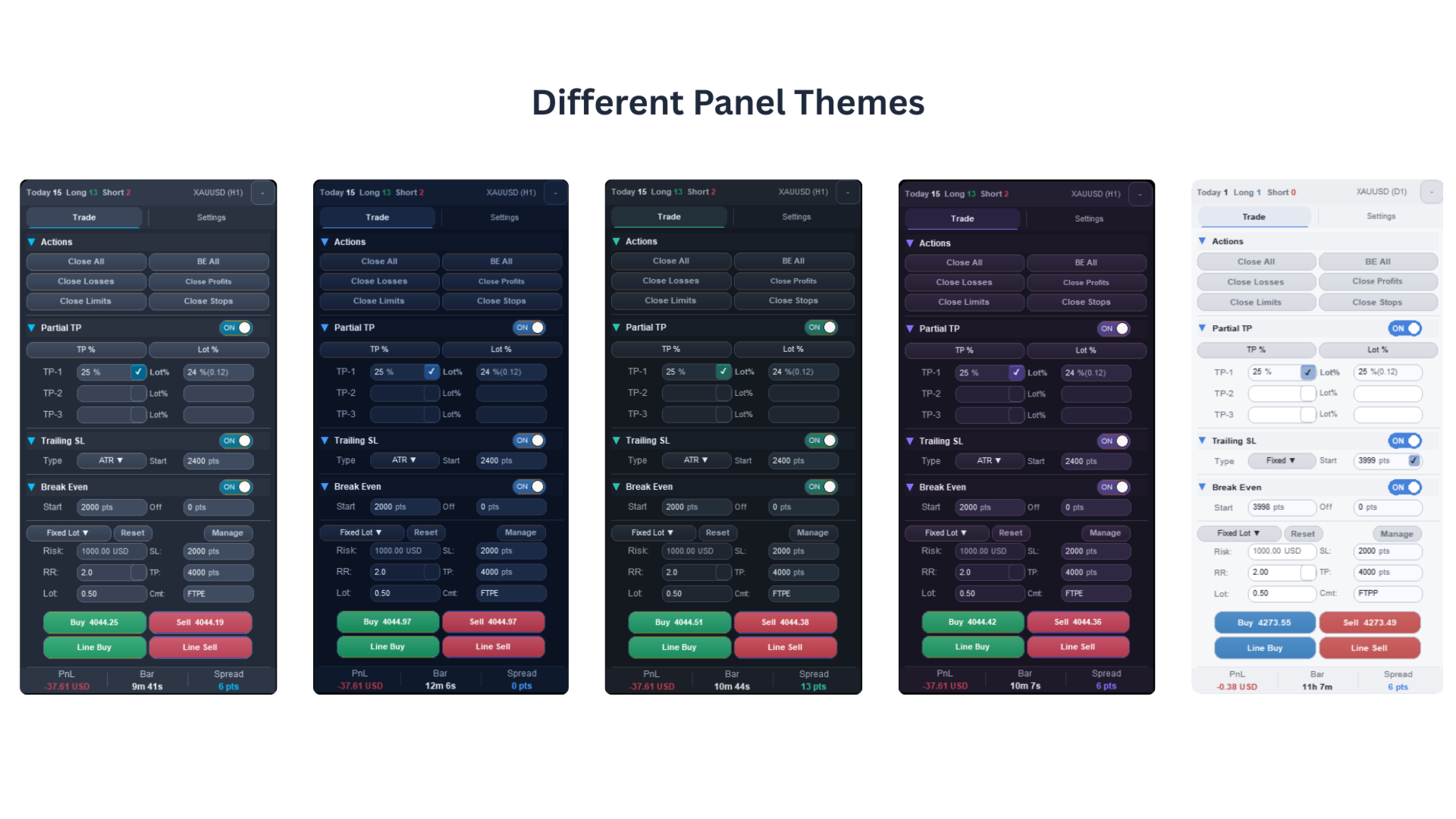
チャートからトレードの準備と管理ができます。ロットサイズは選択したリスク設定から計算できます。チャート上に視覚的な Buy / Sell ラインを置いて移動し、そこから注文を送信できます。


ポジションサイズのオプション:
  • 固定ロット
  • 金額リスク
  • 残高のパーセント
  • 有効証拠金のパーセント

部分利確:
  • チャート上で最大3つの部分利確レベル
  • 各レベルで、指定価格の一部ポジションを決済できます
  • トレードラインでレベルを視覚的に調整できます

トレーリングストップのモード:
  • 固定距離トレーリング
  • ローソク足の高値/安値トレーリング
  • ATRトレーリング
  • フラクタルトレーリング
  • 移動平均トレーリング

ブレイクイーブンは、相場が有利に動いた後、ストップロスをエントリー付近へ移せます。
視覚的な両建て待機注文は、一方が約定したら反対側を取り消す OCO(一方取消)に対応しています。

ホットキー:
  • チャート時間足の変更、次/前の銘柄切り替え用キーを割り当て
  • 全決済、利益決済、損失決済、指値/逆指値の取消、ブレイクイーブンなどの一括操作用キーを割り当て
  • Line Buy と Line Sell 用キーを割り当て
  • 設定パネルからホットキーセットを保存・読み込み

これは MQL5 Market での私の最初のアプリです。完全版パネルをコミュニティに無料で共有しています。 このパネルがお役に立てば、ぜひレビューをお願いします。将来の更新を支える最良の方法です。設定の詳細はスクリーンショットと製品コメントをご確認ください。MQL5 メッセージで直接ご連絡いただくこともできます。
レビュー 16
Trendtrader2015
515
Trendtrader2015 2026.11.08 12:11 

Very nice panel with constant updates and everything for free !!!

Nokay
98
Nokay 2026.11.03 14:43 

Hello, friend. This tool is fantastic! Could you provide some detailed instructions on how to use the software? There are still many features I haven’t tried yet. Also, is it possible to turn off the sound effects?

Miklós Medek
18
Miklós Medek 2026.10.23 21:26 

Hello! First of all, congratulations on your excellent work with Forex Trade Panel MT5! I really appreciate the effort you have put into developing such a comprehensive and useful trading tool. I particularly like the Partial Take Profit and Break Even features — they work very well and are genuinely helpful in managing trades. Thanks :)

おすすめのプロダクト
Important! Demo version will work only on EURGBP. One Click Trader  is a tool designed for MetaTrader 4 platform, which enables you to take your trading to the next level. It enables you to open, manage and close your trades in simple an efficient way by just one click of your mouse button. "-"   ,  "+"  change OCT window size  Up arrow minimizes the OCT panel Down arrow maximizes the OCT panel Right arrow displays the next panel with additional features Left arrow hides the panel with additiona
FREE
Trade mgr
Roberto Mubonane Muiambo
This Tool is designed to automate one of the most critical aspects of trade management — setting and managing Stop Loss, Take Profit , and Trailing Stop levels — directly on your MetaTrader 5 platform. Key Features: Automatic SL, TSL and TP Placement: Instantly sets initial Stop Loss and Take Profit levels on any new position based on customizable parameters, helping to enforce disciplined risk and reward management. Dynamic Trailing Stop: Automatically moves the Stop Loss to lock in profits
FREE
One Click Trading – Auto TP SL Developer TraderLinkz Version 1.00 Category Utility What it does Adds missing TP and SL to your manual trades and pending orders Sets them once per ticket Lets you move TP and SL afterward Works on hedging and netting accounts Scans on every tick and reacts on trade events Why you want it You place faster entries You get consistent risk and exit targets You reduce fat finger errors You keep full manual control Quick start Attach the EA to any chart Keep TP and SL e
FREE
OneClick RiskSizer: One-Click Trading Panel with Percentage-Risk Position Sizing Stop calculating lot sizes by hand. OneClick RiskSizer sizes every position automatically from your risk % and Stop Loss, for faster, more reliable execution than manual math or third-party tools. Key features One-click BUY and SELL buttons, always visible on the chart. Lot size calculated automatically from your risk % and SL distance, via OrderCalcProfit/OrderCalcMargin, not a rough points estimate. Draggable SL a
FREE
すべてのストップロスとテイクプロフィットを削除 — SL/TPレベルを即座に削除するシンプルな解決策 ワンクリックですべてのストップロスとテイクプロフィットレベルを削除! すべてのストップロスとテイクプロフィットを削除 は、すべての未決済ポジションに設定された SL および TP レベルを迅速かつ効率的に削除したいトレーダー向けに設計された便利なスクリプトです。そのシンプルな操作と即時の実行は、ダイナミックな市場条件で欠かせないツールとなります。 主な利点: • 時間の節約: 各ポジションを手動で編集する必要はありません — すべて自動で処理されます。 • 複数シンボルのサポート: スクリプトは、すべての取引中のシンボルのレベルを削除します。 • 使いやすさ: スクリプトをチャートにドラッグするだけで完了! • 信頼性: 実行前に各ポジションをチェックし、正確な動作を保証します。 使用方法: スクリプトを MetaTrader 5 のチャートにドラッグします。 スクリプトがすべてのポジションの SL および TP レベルを自動的に削除します。 取引の完全な自由を楽しみましょう! 対象ユ
FREE
Trade assistant pro v8
Ahmed Mohammed Bakr Bakr
2 (1)
FREE FREE FREE Trade Assistant MT5 – Professional Trading & Risk Management Panel Trade Assistant MT5 is an advanced trading panel designed to help traders execute orders faster, safer, and more professionally . It simplifies manual trading by combining smart order management , precise risk control , and one-click execution , making it ideal for both beginners and advanced traders. This tool does not trade automatically . Instead, it empowers you with full control while applying professional-gra
FREE
CloseAllPosition
Konstantin Chernov
4 (2)
A script for closing positions If you need to quickly close several positions, this script will make all the routine for you! The script does not have any input parameters. Allow AutoTrading before running the script. Usage: Run the script on a chart. If you need to specify the maximal deviation and the number of attempts to close positions, use the script with input parameters https://www.mql5.com/en/market/product/625 You can download MetaTrader 4 version here: https://www.mql5.com/en/market/
FREE
Look Back My Trading History Look Back My Trading Historyは、MT5の取引履歴を強調表示することにより、これまでのエントリーポイントをトレーダーが簡単に振り返ることを可能にするためのツールです。 トレーディングを学び始めたばかりの人にとって、トレーディングスキルを向上させるための最も効率的な方法の1つは、自分の取引履歴を振り返ることです。 ただし、MT5チャートに表示される標準の取引履歴の矢印は小さすぎて即座に見つけることが難しく、トレーダーは自分が行った取引、とりわけ過剰取引などの愚かな間違いについて再認識する機会を失いがちです。 トレードの良し悪しに関係なく取引履歴を明確にして、それらを直視した上で深い考察を繰り返すことで、長期的な目線で見た場合にトレーディングに対する正しい姿勢を養う事ができます。 Look Back My Trading Historyの利点   取引履歴を振り返る最も簡単な方法であること 自らの取引履歴を振り返り、過去から学ぶ、そのためのルーティン構築のきっかけを提供します。 最小限かつ重要な情報を提供

FREE
Hello, Every one  A script to close all market positions and/or pending orders. ----------------------------------------------------------------------------------- This is Close All      market positions and/or pending orders button  You can close all orders in 1 second by one click  For advanced version:  Advanced:  https://www.mql5.com/en/market/product/77763           https://www.mql5.com/en/market/product/89311 Key:  1 Close all button: The script will close All orders market + pending
FREE
Lot by Risk MT5
Sergey Vasilev
4.88 (16)
Lot by Risk tradingパネルは、手動取引用に設計されています。 これは、注文を送信するための代替手段です。 パネルの最初の特徴は、管理線を使用した注文の便利な配置です。 第二の特徴は、ストップロスラインの存在下で与えられたリスクのための取引量の計算です。 制御線はホットキーを使用して設定されます: 利益を取る-デフォルトではTキー; 価格-デフォルトではPキー; ストップロス-デフォルトでは、Sキー; 取引パネルの設定で自分でキーを設定できます。 操作のアルゴリズム: 1)-レベルを希望の場所に配置します(すべてのレベルを配置する必要はありません); 2)-リスクを指定します(オプション); 3)-緑の送信注文ボタンをクリックします; 4)-注文が行われるのを待っているか、エラーメッセージ付きのアラートが表示されます; 5)-マジックでExpert Advisorにリンクされている現在のシンボルのすべての注文を閉じる場合は、注文を閉じるボタンをクリックします。 注文を送信ボタンを何度も押すべきではありません。 一度で十分です。 注文後、ボタンは「
FREE
Auto_StopLoss_TakeProfit MT5 is a highly useful and time-saving free utility Expert Advisor designed for traders. Often, during fast-paced manual trading or when opening pending orders, traders forget to set a Stop Loss (SL) or Take Profit (TP), which can lead to massive account drawdowns. This tool automatically attaches Stop Loss and Take Profit to your open positions and pending orders based on your predefined point settings. Key Features: Automatic SL & TP: Instantly adds Stop Loss and Take
FREE
Bneu Trade Manager
Marvinson Salavia Caballero
Bneu Trade Manager is a professional trading utility Expert Advisor for MetaTrader 5 designed to help manual traders plan, execute, protect and manage trades directly from a visual chart dashboard. It combines drag-and-drop trade planning, risk-based position sizing, one-click execution, pending orders, automated trade management for both EA and manual trades, protection tools, templates, reporting and performance analytics in one organized panel. The latest version includes a reorganized dash
FREE
LotMaster — trading assistant for MetaTrader 5 LotMaster is a manual trading panel for MetaTrader 5. It helps you prepare a trade quickly: place the entry, Stop Loss and Take Profit lines, see the calculated lot and risk before clicking the button, and send the order in one click. The EA does not trade by signals and does not make decisions for the trader — it calculates and executes what you set with the lines. How it works Press Lines — three dotted lines appear on the chart: the blue entry li
FREE
Close Manager
ELITE FOREX TRADERS LLC
One-Click Trade Manager for MetaTrader 5 The Close Manager Buttons EA is a powerful utility designed to give you full control of your open positions and pending orders with just one click. Forget about manually closing trades one by one during fast market moves—this EA does it instantly, safely, and efficiently. Key Features Close All Trades – instantly close every open position Close Only Buy Trades – exit only BUY positions while keeping SELL trades running Close Only Sell Trades – exit only
FREE
Risk Manager – Account Protection Tool Risk Manager is an Expert Advisor for MetaTrader 5 designed to protect your trading account by applying automatic risk management rules. This tool does not open trades . It continuously monitors your account and enforces predefined limits to help prevent excessive losses and maintain disciplined trading. Risk Manager works in the background and can manage positions opened by manual trading or other Expert Advisors. It is particularly useful for: • Manual tr
FREE
` Account Limit Guard MT5 ` is a free account-level daily limit protection utility for MetaTrader 5. It is not a trading strategy, does not open trades, does not generate signals, and does not rely on any specific indicator. Its purpose is simple: monitor your account-level daily loss and automatically apply protection once your configured limit is reached. For prop / funded-challenge traders   Need more than a daily-loss cap?   Prop Firm Risk Guardian (MT5)   is the full prop-challenge p
FREE
Phoenix Breakeven Button
PHOENIX GLOBAL INVESTMENTS LTD
相場が激しく変動している最中に、複数の建玉について手動でストップロスをブレークイーブンに移動させるのは時間がかかり、誤ってまだ含み損の状態にある建玉に適用してしまうこともよくあります。 「Phoenix Breakeven Button」を使えば、ワンクリックで利益が出ているすべての建玉のストップロスをブレークイーブンに移動させ、まだ含み損の状態にある建玉は自動的にスキップします。 利益を守る仕組み - ワンクリックで、口座内のすべてのオープンポジションにブレークイーブン保護を適用 - 現在損失が出ているポジションを自動的に検出してスキップ - ブレークイーブンでは、ストップを正確なエントリー価格に設定します。ストップがヒットした場合はスプレッドが発生しますが、パネルでは「無料の保護」と暗示することなく、この点を明確に表示します - 成功または失敗時にサウンドアラートが鳴り、変更された内容、スキップされたポジション、すでに保護済みのポジションに関する詳細なログが記録されます カスタマイズ機能 パネルの配置位置とオフセット、「すでに保護済み」チェックのための調整可能なブレーク

FREE
資金提供/チャレンジ口座の限度の内側にとどまるために。Prop Firm Risk Guardian は、限度までどれだけ近いか、そして今この瞬間に自分のルールが許す最大ロットはいくつかを、リアルタイムで示す規律パネルです。 チャレンジを終わらせる3つの数値を追跡します: 限度に対する日次損失(残バッファとリセットまでのカウントダウン付き)、トレーリング高値基準または初期残高基準で切替できる最大ドローダウン、そして利益目標への進捗。SAFE/CAUTION/LOCKDOWN の状態が状態表示帯とアクセントを色付けし、危険度を一目で体感できます。 主役は「撃てる最大ロット(MAX LOT NOW)」。1トレードのリスク%(残高比)と、拘束側の限度までの残りバッファ×バッファ割合、この2つの小さい方をプラットフォーム自身の損益計算で逆算し、ハードロット上限で頭打ちにしてブローカーのロット刻みへ切り捨てた値です。上限であって推奨ではありません。ストップ距離のバーをドラッグすると、ロットが即座にリサイズされます。表示するのは、設定したリスク率・ストップ幅・残りバッファから逆算したロット上限
FREE
Close All – Fast Trade Manager for MetaTrader 5 Close All is a fast, simple trade manager built for scalpers, news traders, and manual traders. Instead of closing trades one by one, it sends close orders to your broker all at the same time in milliseconds. What It Does Close ALL: Closes every open trade immediately with one click. Winners Only: Closes only profitable trades so you can bank your profit instantly. Losers Only: Closes only trades in loss to cut drawdown and protect your accou
FREE
SL TP Manager MMS
Muhammad Masood Sarkar
5 (2)
SL TP Manager is a compact on-chart panel that sets the stop loss or take profit of all open trades on a symbol in one click, or moves every stop loss to break-even. It is designed for traders who scale in with several positions and do not want to edit each trade one by one. HOW IT WORKS - Type a price in the SL box and click Set SL: the stop loss is applied to every open trade on the chart's symbol. - Type a price in the TP box and click Set TP: the take profit is applied the same way. - Clic
FREE
Панель облегчает работу трейдера во время постановки стоп лоссов и тейк профитов. Отображает информацию о потенциальных профитах и лоссах.  Удобно работать когда требуется массовая установка стопов и профитов. Создавалось как инструмент плавного набора позиции на m1 и быстрого перевода стопов в безубыток. Выглядит эстетично, вписывается в родной интерфейс MT5 идеально. Рекомендуемый брокер ByBit MT5. описание кнопок панели и функций: BE SELL - перевод в безубыток всех Sell сделок открытых на
FREE
Risk calculator for MetaTrader 5. Precision Position Calculator is a MetaTrader 5 utility that helps calculate trade volume based on the risk configured by the user. The panel allows the user to work with Entry, Stop Loss and up to three Take Profit levels directly on the chart. Main description Precision Position Calculator is a utility for MetaTrader 5 designed to help calculate the volume of a trade before opening it. The panel allows the user to configure risk, select the order type, set th
FREE
TradeCloserPanel MT5 is a high-performance, intuitive utility designed to provide traders with unprecedented control over their open positions on the MetaTrader 5 platform. In today's fast-moving markets, especially when trading highly volatile assets like Gold (XAUUSD), the ability to execute exit strategies instantly and precisely is critical. TradeCloserPanel addresses this need with a feature-rich interface that allows you to manage multiple trades simultaneously, saving you valuable time a
FREE
Strifor RiskManager
Strifor (Mauritius) Ltd
5 (11)
Strifor Risk-Manager — リアルタイムのプロフェッショナルリスク管理 Strifor Risk-Manager は、厳格なリスク管理と規律を重視するトレーダーのための強力なツールです。 日次・週次・月次の取引結果を自動で監視し、リミット超過を警告、取引システムの安定性を維持します。 対象: スキャルピング、デイトレード、スイング、中期システム、手動および自動取引に対応。 主な機能: 柔軟なリミットシステム 日次リスク: %またはUSD 週次リスク: %またはUSD 月次リスク: %またはUSD 計算優先度: %または固定値 リミット増加制限 (Cap flex by max limit) 取引結果の追跡 各期間の現在の損益表示 手数料とスワップ考慮 利益を使用して利用可能リミットを増加可能 損失をゼロまで考慮 (Use net loss) 詳細設定 現在の残高または手動設定基準から計算 オープンポジションの含める/除外 シンボル別フィルタリング 週の開始日: 月曜日 / 日曜日 表示モード: 完全 / コンパクト パネル位置: マージンと角選択 チャート上表示
FREE
SHINO Trade Manager – Smart Risk Management EA (Auto SL, TP & Trailing Stop + Telegram Alerts) Take full control of your trades and eliminate emotional decision-making with SHINO Trade Manager , a powerful and lightweight Expert Advisor designed to automate your risk management on MetaTrader 5. Whether you are a scalper, day trader, or swing trader, this EA ensures every position is protected and managed with precision — 24/7. Protect Your Capital Automatically Never leave a trade unprotec
FREE
Ultimate MT5 Auto SL/TP Assistant EA Our MT5 Expert Advisor is designed to automatically apply predefined SL and TP levels to any order you place – Fast, accurate, and fully automated, no manual errors, no delays. Perfect for scalpers, intraday traders, and anyone who values precision and speed. Auto SLTP Auto SL TP this is Utilities  Scalper Auto SL TP fast Open Close  https://www.mql5.com/en/market/product/158389
FREE
Free Global Stop Loss and Take Profit Setter with Break Even Free one click Stop Loss and Take Profit tool for manual trading. Apply a fixed SL and TP to every open position on the symbol, or move them all to break even, with a single button. It only modifies Stop Loss and Take Profit levels — it never opens or closes a trade. Set your SL and TP distance in points, click once, and every position on the current symbol is protected. The break even button moves stops to entry (or a configurable num
FREE
The SmartTrader Panel  is a powerful and intuitive trading panel designed to streamline trade execution and risk management in MetaTrader. With its sleek and user-friendly interface, traders can quickly manage their positions, calculate risk metrics, and execute trades with precision. Key Features: One-Click Trading: Easily place Buy or Sell orders with a single click. Risk Management: Automatically calculates risk percentage, risk-reward ratio, and potential profit/loss. Customizable Trad
FREE
Trading Panel is an on-chart control panel for MetaTrader 5. You attach it to a chart and get a compact dark-themed window for placing market orders and closing groups of trades in one click. Features Instant Buy and Sell: Two large buttons show the live Ask and Bid prices and place a market order immediately. Order size control: It starts at your broker’s minimum lot automatically, or you can set your own size. Whatever you type is corrected to fit the broker’s minimum, maximum and step, so ord
FREE
NS Financas Automatic Clear All Chart Indicators Script Automatically remove all indicators from your chart offered for free by NS Financas! Don't waste any more time deleting the indicators one by one. With this script it is possible in one click to remove all indicators from the screen to adjust your new strategy while still using the settings of your graph, in addition to the possibility of configuring keyboard shortcuts for quick access to the script. Take the opportunity to visit our cha
FREE
このプロダクトを購入した人は以下も購入しています
Trade Assistant MT5
Evgeniy Kravchenko
4.43 (216)
取引 ごとのリスクの 計算、新規注文 の 簡単 な 設置、部分的 な 決済機能 を 持 つ 注文管理、 7 種類 のトレーリングストップなど 、便利 な 機能 を 備 えています 。 追加の資料と説明書 インストール手順   -   アプリケーションの手順   ライン機能 チャート上にオープニングライン、ストップロス、テイクプロフィットを表示します。この機能により、新規注文を簡単に設定することができ、注文を出す前にその特徴を確認することができます。   リスク計算 リスク計算機能は、設定されたリスクとストップロス注文のサイズを考慮して、新規注文のボリュームを計算します。ストップロスの大きさを自由に設定できると同時に、設定したリスクを守ることができます。 Lot calc ボタン - リスク 計算 を 有効 / 無効 にします 。 Risk フィールドでは 、必要 なリスクの 値 を 0 から 100 までのパーセンテージまたは 預金通貨 で 設定 します 。 設定」 タブで 、 リスク 計算 の 種類 を 選択 します :「 $ 通貨」、「 % 残高」、「 % エクイティ 」、「
Trade Manager EAへようこそ。これは、取引をより直感的、正確、そして効率的にするために設計された究極の リスク管理ツール です。これは単なるオーダー実行ツールではなく、包括的な取引計画、ポジション管理、リスク管理のためのソリューションです。初心者から上級者、迅速な実行を必要とするスキャルパーまで、Trade Manager EAはあらゆるニーズに対応し、為替、指数、商品、暗号通貨などさまざまな市場で柔軟に対応します。 Trade Manager EAを使用すると、複雑な計算が過去のものになります。市場を分析し、エントリーポイント、ストップロス、テイクプロフィットのレベルをチャート上のラインでマークし、リスクを設定するだけで、Trade Managerが最適なポジションサイズを即座に計算し、SLとTPをピップ、ポイント、口座通貨でリアルタイムに表示します。すべての取引が簡単かつ効果的に管理されます。 主な機能: ポジションサイズ計算機 :定義されたリスクに基づいて取引サイズを瞬時に決定します。 簡単な取引計画 :エントリー、ストップロス、テイクプロフィットを設定するためのド
Farmed Hedge Yield Farming | All Markets (Manual - Hybrid - Semi/Automated EA) VERIFIED TRADING RESULTS - Farmed Hedge Yield Axi Copy:  https://www.mql5.com/en/signals/2356376 - Farmed Hedge Yield Exn Copy:   https://www.mql5.com/en/signals/2356404 - Farmed Hedge Yield V Copy:  https://www.mql5.com/en/signals/2357156 IMPORTANT NOTICE: FarmedHedge is a MANUAL-FOCUSED TRADING UTILITY ,not a fully automated EA. Results shown on this Signal include manual trades and overall strategic management.
Telegram to MT5 Multi-Channel Copier   は、 Telegram と Discord チャンネルのトレードシグナルを MetaTrader 5 へ自動コピーします。ボット不要、ブラウザ拡張不要、手動コピー不要。Telegram や Discord にシグナルが届くと、EA が数秒であなたのターミナルに注文を出します。 さらに、チャンネルをコピーする前に、内蔵バックテスターでそのチャンネルがあなたの口座でどう動いたかを確認できます。 製品は 2 つのコンポーネントで構成されます:Telegram チャンネルを監視する Windows アプリと、MT5 ターミナルでシグナルを執行する本 EA です。MT4 版もあります   こちら . 購入前にお試しください:   アプリは無料でダウンロードできます。ご自身のチャンネルを接続し、各シグナルがどのように読み取られるかをご確認ください。Backtest タブと実際の取引には、購入またはレンタルした EA が必要です。このページの無料デモはストラテジーテスターでのみ動作し、テスターでは Telegram と D
Local Trade Copier EA MT5
Juvenille Emperor Limited
4.94 (150)
Local Trade Copier EA MT5 は、同一の Windows PC または Windows VPS 上で稼働する複数の MetaTrader 5 口座間で、取引をコピーおよび管理するための高速で柔軟なトレードコピーツールです。 ローカルでの取引同期に加え、Receiver 側でロットサイズ、リスク管理、取引フィルター、シンボルマッピング、取引管理、口座保護を個別に設定できます。 Transmitter と Receiver のターミナルは約 1分 で設定でき、同一ブローカーまたは異なるブローカーの口座間で、手動取引や EA による取引をコピーできます。適切な条件下では、ローカルの MetaTrader ターミナル間で取引情報を 0.5秒未満 で同期できます。実際の約定速度は、ブローカーのレイテンシー、ネットワーク状況、PC/VPS の性能、ターミナルの負荷によって異なります。 ご購入前に無料デモをお試しください Local Trade Copier EA MT5 の完全機能版無料デモ を、MT5 デモ口座で 1回につき4時間 テストできます。 Local Trad
TradePanel MT5
Alfiya Fazylova
4.88 (173)
Trade Panelは多機能なトレーディングアシスタントです。アプリには手動取引用の50以上のトレーディング機能が搭載されており、ほとんどの取引作業を自動化することができます。 アプリの説明書: https://www.mql5.com/en/blogs/post/756482 デモ口座用アプリの試用版: https://www.mql5.com/en/blogs/post/750865 アプリのインストール方法: https://www.mql5.com/en/blogs/post/756239 アプリをビジュアルモードでテストする方法: https://www.mql5.com/en/blogs/post/770277 VPSのMetaTraderにアプリをインストールする方法: https://www.mql5.com/en/blogs/post/770190 取引。 ワンクリックで取引操作を行うことができます: リスクを自動計算して指値注文やポジションを開く。 複数の注文やポジションをワンクリックで開く。 注文のグリッドを開く。 保留中の注文やポジションをグループごとに閉じる
自分の取引ルールで Telegram のシグナルをコピー Telegram to MT5 Signal Trader は、Telegram の公開・非公開チャンネルやグループから、テキスト形式の取引シグナルを MetaTrader 5 へ自動でコピーします。1つのデスクトップアプリで複数の配信者と MT5 口座を管理し、 配信者ごとにリスクと取引設定を個別に指定 できます。 シグナルのコピーに Telegram ボットや API 設定は必要ありません。 電話番号または QR コードでご自身の Telegram アカウントにログインし、すでに参加しているチャンネルやグループを選ぶだけです。ボットの作成や、Telegram API トークン、API ID、API hash の入力は不要です。 ポジションサイズを選び、複数の利確水準に分けて決済し、建値へのストップ移動やトレーリングストップを自動化できます。配信者のシグナルを受け取りながら、実際の取引方法は自分で管理できます。 本製品は、この MT5 エキスパートアドバイザ(EA)と、必須の Windows 連携アプリで構成されます。 インス
EA Overfitter
Stephen J Martret
5 (4)
That backtest looks great. But will it still be making money tomorrow, next week, next month? EA Overfitter re-runs your EA on 100 price histories it has never seen. One score tells you if the edge is real. A backtest tells you what an EA did on one price history — the one that happened to occur. What you cannot tell from it is how much of that result was the strategy and how much was the particular path. EA Overfitter answers that. It builds up to 100 synthetic price histories your EA has n
Strategy Ledger Pro
Abdullah Uygar Tuna
5 (15)
日本語に対応しました。 Strategy Ledger Pro は、MetaTrader 5 用の読み取り専用の口座分析パネルです。口座の成績をエキスパートアドバイザー(EA)、戦略、銘柄、マジックナンバーごとに分け、それぞれが実際にどれだけ貢献しているかを明らかにします。 パネルは 11 言語に対応しています:English、Français、Deutsch、Español、Italiano、Português、Русский、Türkçe、中文、日本語、한국어。 デモをダウンロードする前に。 Market では、有料製品のデモはストラテジーテスター内でのみ実行されます。このパネルはご自身の口座の取引を分析しますが、ストラテジーテスターには読み取る口座履歴がないため、デモは空のパネルで起動し、その旨を表示します。これはデモの仕組みによるもので、製品の制限ではありません。 この説明内の動画では、実口座でのパネルの動作をご覧いただけます。 すべての機能を解説した詳しい マニュアル (英語)と、情報交換やお知らせのための AureusAI Trading Suite グループをご用意し
Exp COPYLOT CLIENT for MT5
Vladislav Andruschenko
3.97 (35)
MetaTrader 5 用のプロフェッショナル取引コピー機 MetaTrader 向けの高速・高性能・信頼性の高い 取引コピー機 です。 COPYLOT は、MT4 と MT5 のターミナル間で Forex 取引をコピーでき、 Hedge 口座と Netting 口座の両方に対応しています。 COPYLOT MT5 版の対応構成: - MT5 Hedge → MT5 Hedge - MT5 Hedge → MT5 Netting - MT5 Netting → MT5 Hedge - MT5 Netting → MT5 Netting - MT4 → MT5 Hedge - MT4 → MT5 Netting MT4 版 完全な説明 + DEMO + PDF 購入方法 インストール方法 ログファイルの取得方法 テストと最適化の方法 Expforex のすべての製品 MT4 ターミナルへのコピーも可能です(MT4 → MT4、MT5 → MT4): COPYLOT CLIENT for MT4 COPYLOT は、2台、3台、さらには10台のターミナル間で同時に動作できる、プロフェッ
The product will copy all telegram signal to MT5 ( which you are member) , also it can work as remote copier.  Easy to set up, copy order instant, can work with almost signal formats, image signal,  s upport to translate other language to English Work with all type of channel or group, even channel have "Restrict Saving Content", work with  multi channel, multi MT5 Work as remote copier: with signal have ticket number, it will copy exactly via ticket number. Support to backtest signal. How to s
News Trade EA MT5
Konstantin Kulikov
4.55 (11)
僕自身が数年間使っている便利なロボットをご紹介します。半自動モードでも完全自動モードでもお使いいただけます。 >>> Chat <<< 当プログラムは経済指標カレンダーで発表されるニュースをもとにした取引の柔軟な設定が可能です。戦略テスターでは確認不可です。実際の取引のみです。 最新の設定アーカイブをダウンロードしてください: https://www.mql5.com/en/blogs/post/747929 シグナルモニタリング: https://www.mql5.com/en/signals/author/test-standart 当該エキスパート・アドバイザーのためのカスタマイズ設定セットを作る場合は、ブログの全パラメータの説明を参照してください :   https://www.mql5.com/en/blogs/post/748545 。 基本的なデフォルト設定について 一つのチャートからGBPとの通貨ペア(GBPUSD、EURGBP、GBPJPY、GBPCAD、GBPAUD、GBPCHF)で取引をします。GBPは最もボラティリティの高い通貨のため、取引が成功するチ
================================================================================ POC BREAKOUT - V20.72. Full Professional Grade Toolkit ================================================================================ POC Breakout is a full MetaTrader 5 trading dashboard for discretionary traders who want breakout signals, Point of Control (POC) context, volume profiles, order flow, market structure, news, alerts, and advanced trade planning in one professional workspace. Attached directly to you
次回アップデート — バージョン 2.52 近日公開!【新機能】 市場分析とトレードワークフローを強化する、4つの主要な新機能にご期待ください 皆様のトレードニーズに応える4つの新機能により、市場分析を次のレベルへと引き上げます。新機能をご紹介します: 1. TRADE OVERVIEW DASHBOARD 2. CONFLUENCE AT ZONE 3. STRONG & WEAK HIGH/LOW 4. OTE 1. TRADE OVERVIEW DASHBOARD 市場全体の状況をより簡単に把握できるダッシュボードです。トレード判断をサポートするガイダンスを提供し、市場分析とトレード計画を体系的に行えるよう支援します。すべてを1つの画面で確認できます。 マルチタイムフレーム市場概要(Multi-Timeframe Market Overview) 市場の方向性と価格構造をより明確に把握 市場状況をすばやく確認 体系的な市場分析とエントリー計画のためのガイダンス 2. CONFLUENCE AT ZONE 価格が重要なゾーンに入るとき…いくつのサポート要因が一致しているかを確認で
EA Auditor
Stephen J Martret
5 (7)
EA Auditor is an independent analysis tool for traders evaluating Expert Advisors and trading signals on MetaTrader 5. It audits backtest reports, reviews posted developer signals, and cross-verifies the two against each other to help traders assess strategies before committing capital. The MQL5 market offers a wide range of Expert Advisors from many developers, with varying approaches, quality, and transparency. EA Auditor provides a consistent, data-driven framework for reviewing them, answer
Telegram To MT5 — シグナルコピア Telegram チャンネルのトレードコールを、実際の MT5 注文に変換します — 自動で、好きなだけの口座に対応し、リスクとルールは完全にあなたの管理下に置けます。 Telegram To MT5 は、あなたが Telegram で既にフォローしている VIP / シグナルチャンネルを MetaTrader 5 端末に接続します。無料の付属デスクトップアプリがメッセージを読み取り(ボットを禁止しているチャンネルでも可能)、この EA があなたの口座でそれらを執行します — あなた自身のリスク設定、シンボルマッピング、テイクプロフィット処理、セッションおよびニュースフィルターを適用します。 これはシグナルコピアであり、ブラックボックス戦略ではありません。どのチャンネルを信頼するか、各トレードのロットと管理方法をあなたが決めます。 ステップバイステップの設定と付属アプリのインストールガイド 仕組み [あなたの Telegram チャンネル] -> [付属デスクトップアプリ] -> [MT5 + この EA] -> 注文 付属デスクトッ
TelegramからMT5へ: 究極のシグナルコピーソリューション Telegram to MT5 を使えば、取引がシンプルになります。DLL を必要とせず、Telegram のチャンネルやチャットから MetaTrader 5 プラットフォームに取引シグナルを直接コピーできる最新ツールです。この強力なソリューションは、正確なシグナル実行、豊富なカスタマイズオプション、時間の節約、そして効率性の向上を実現します。 [ Instructions and DEMO ] 主な特徴 直接的なTelegram API統合 電話番号とセキュアコードで認証します。 ユーザーフレンドリーな EXE ブリッジを通じてチャット ID を簡単に管理できます。 複数のチャネル/チャットを追加、削除、更新して、同時に信号をコピーします。 高度なフィルターによる信号解析 例外的な単語 (例: 「レポート」、「結果」) を含む不要な信号をスキップします。 柔軟な SL および TP 形式 (価格、ピップ、ポイント) をサポートします。 価格ではなくポイントを指定するシグナルのエントリ ポイントを自動的に計算します。
AW Shepherd Safety MT5
AW Trading Software Limited
5 (5)
AW Shepherd Safety EA は、保有中のポジションを管理するエキスパートアドバイザーです。最初の注文はトレーダーがパネルから発注し、その後は EA がバスケットを自動で管理します。トレンドフィルターを通してリカバリー注文を追加し、TakeProfit、トレーリング、またはストップでサイドを決済し、決済の水準をチャートに表示します。 買いと売りは別々に管理され、両方のサイドを同時に保有できます。リカバリー注文は、価格が一定の間隔だけ動いたというだけでは発注されず、Parabolic SAR、2本の MA、またはローソク足の色でポジション方向への反転が確認されてから発注されます。Orders Magic number が一致していれば、手動や他の EA で発注したポジションも管理の対象になります。 EA によるポジション管理の流れ: 1 トレーダーが Open Buy または Open Sell ボタンで、Order Size 欄のロットで最初の注文を発注します。 2 価格がポジションに不利な方向へ Minimal step between recovery orders
HINN MAGIC ENTRY – the ultimate tool for entry and position management! SIMPLE. FASTEST. INTUITIVE. MAX AUTOMATED. Place orders by selecting a level directly on the chart! full description   ::  demo-version  :: 60-sec-video-description Key features: - Market, limit, and pending orders - Automatic lot size calculation - Automatic spread and commission accounting - Unlimited partitial take-profits  - Breakeven and trailing stop-loss and take-profit  functions - Invalidation leves - Intuitive, a
News Filter EA: Advanced Algo Trading Assistant News Filter EA is an advanced algo trading assistant designed to enhance your trading experience. By using the News Filter EA , you can integrate a Forex economic news filter into your existing expert advisor, even if you do not have access to its source code. In addition to the news filter, you can also specify trading days and hours for your expert. The News Filter EA also includes risk management  and equity protection features. MT4 Version Ma
MT5 to Telegram Signal Provider は、Telegramのチャット、チャンネル、またはグループに 指定された シグナルを送信することができる、完全にカスタマイズ可能な簡単なユーティリティです。これにより、あなたのアカウントは シグナルプロバイダー になります。 競合する製品とは異なり、DLLのインポートは使用していません。 [ デモ ] [ マニュアル ] [ MT4版 ] [ Discord版 ] [ Telegramチャンネル ]  New: [ Telegram To MT5 ] セットアップ ステップバイステップの ユーザーガイド が利用可能です。 Telegram APIの知識は必要ありません。必要な全ては開発者から提供されます。 主な特長 購読者に送信する注文の詳細をカスタマイズする機能 例えば、Bronze、Silver、Goldといった階層型のサブスクリプションモデルを作成できます。Goldサブスクリプションでは、すべてのシグナルが提供されます。 id、シンボル、またはコメントによって注文をフィルターできます 注文が実行されたチャート
RETAILBERG FOOTPRINT CHART PRO — Order-Flow Workspace for MetaTrader 5 Version 7.00  |  Professional System  |  31 tools  |  One chart A full 150-page illustrated User Manual is included. Please read the full manual to understand this feature packed footprint chart elements and ui. https://www.mql5.com/en/blogs/post/777982 DEMO / STRATEGY TESTER — PLEASE READ FIRST
Timeless Charts
Samuel Manoel De Souza
5 (9)
Timeless Charts is an all-in-one trading utility for professional traders. It combines custom chart types such as Seconds Charts and Renko with advanced order flow analysis using Footprints , Clusters , Volume Profiles , VWAP studies, and anchored analysis tools for deeper market insight. Trading and position management are handled directly from the chart through an integrated trade management panel , while Market Replay and Virtual Accounts provide environments for practicing trading skills and
VirtualTradePad PRO SE MT5 — MetaTrader 5向けプロフェッショナル取引コントロールセンター VirtualTradePad PRO SE は、 MetaTrader 5 向けのプレミアムなチャートベースの取引パネルであり、トレード管理ワークスペースです。より速い執行、明確なポジション管理、構造化されたトレード管理、視覚的なレベル計画、そしてチャート上で完結するプロフェッショナルなワークフローを求めるトレーダー向けに設計されています。 これは単なる BUY / SELL パネルではありません。PRO SE は、手動取引、予約注文、ポジション管理、部分決済、バスケット損益管理、平均化レベル、ATMルール、シグナル監視、リアルタイム市場情報、ストラテジーテスター (Strategy Tester) ワークフロー、VPS向け運用を、1つの連携されたインターフェースに統合します。 MT4版 | 完全な説明とスクリーンショット | 購入方法 | インストール方法 | ログファイルの取得方法 | テストと最適化の方法 | Expforex のすべての製品 PRO
Trader Evolution
Siarhei Vashchylka
5 (7)
" Trader Evolution " - A utility designed for traders who use wave and technical analysis in their work. One tab of the utility is capable of money management and opening orders, and the other can help in making Elliott wave and technical analysis. Manual (Be sure to read before purchasing) | Version for MT4 Advantages 1. Trading in a few clicks. Immediate and pending orders are available in the panel 2. Money management. The program automatically selects the appropriate lot size 3. Simplifies
Trade copier MT5
Alfiya Fazylova
4.61 (57)
Trade Copierは、取引口座間の取引をコピーして同期するように設計された専門的なユーティリティです。 コピーは、同じコンピューターまたはvps にインストールされている、サプライヤーのアカウント/端末から受信者のアカウント/端末に行われます。 購入する前に、デモ アカウントでデモ バージョンをテストできます。 デモ版 こちら 。 詳細な説明は こちら 。 主な機能と利点: MT5ネッティングアカウントを含む、MT5> MT5、MT4> MT5、MT5> MT4のコピーをサポートします。 高いコピー速度(0.5秒未満)。 ベンダーモードと受信者モードは同じ製品内に実装されています。 チャートから直接リアルタイムでコピーを制御できる、簡単で直感的なインターフェイス。 接続が切断されたり、端末が再起動されたりしても、設定と位置が失われることはありません。 コピーするシンボルを選択できます。また、受信者のシンボルを置き換えることもできます(例:EURUSD> USDJPY)。 各シンボルごとにコピーの個別設定を行うことができます。 バックコピーをサポートします。 特定の注文のみのコピー
AW Trade Manager
AW Trading Software Limited
AW Trade Manager は、チャート上のリスクリワードツールを備えた MetaTrader 5 用のトレードパネルです。トレードは Entry、Stop Loss、Take Profit の線をマウスでドラッグして計画します。ラベルには価格、距離、金額が表示され、ゾーンで利益と損失を示し、ロットはリスクから計算されます。発注前には確認ウィンドウに、リスク、証拠金、ポジションのルールを含むトレード全体が表示されます。 マニュアルと説明 -> こちら / 無料 LIVE デモ版 -> こちら エントリー後のポジション管理のために、パネルにはブレークイーブン、トレーリング、部分決済、時間による決済、非表示の水準が用意されています。これらは Rules タブですべての新規トレードに対して、またはポジションのウィンドウで個別のポジションに対して有効にします。個々のトレードとは別に、口座のリスク制限、バスケット、スケジュールされたタスク、アラート、MT5 の経済指標カレンダーが機能します。 特長: チャート上のトレードプラン: ラベル、ゾーン、R:R 付きの Entry、Stop Los
MetaTrader 5 用トレーディングパネル — チャートとキーボードから行うプロフェッショナルなワンクリック取引 アクティブトレーダーのために設計された高機能 Trading Panel。標準の MetaTrader 操作よりも、はるかに速く、直感的に、そして効率的に取引を実行できます。 本パネルは、ポジション管理、未決注文管理、利益コントロール、執行スピードをひとつのプロフェッショナルなワークスペースに集約した実践的なソリューションです。 これは単なる補助ツールではありません。MetaTrader 5 のための本格的な trading cockpit です。チャートから直接操作し、キーボードで素早くコマンドを実行し、自動計算や視覚的なガイドを活用することで、手動トレードをより速く、より明確に、より快適にします。 このパネルを使えば、チャート上からワンクリックで注文を実行でき、標準の MetaTrader コントロールと比べて最大 30 倍速く取引操作を行うことができます。 新しいプレミアム版が利用可能です: VirtualTradePad PRO SE で取引ワークフローを強
チャート型トレードアシスタント&リスク管理パネル マルチモードSL&TP(ATR、リスクリワード比R:R、ポイント、口座通貨)、リアルタイム分析、経済指標カレンダーを搭載した多機能チャート上ツール Ergotick Trade Manager は、裁量トレーダー、プロップファーム挑戦中のトレーダー、およびスキャルパー向けに設計された、オールインワンのプロフェッショナルなトレード用パネルです。ロット数の自動・瞬時計算、マルチモードでのストップロス(SL)やテイクプロフィット(TP)の設定、高度な一括決済(Basket)管理、口座のリアルタイム統計、そしてチャート上に経済指標を表示するニュースカレンダー機能を、MetaTrader 5の洗練された1つのユーザーインターフェースに統合しました。 ポジションサイズの計算に手動で時間を取られるのはもう終わりにしましょう。ミリ秒単位でロットサイズを自動計算し、適切にリスク管理された注文を瞬時に執行するとともに、内蔵された「日次損失制限保護」機能で大切な資金を保護します。 主な特徴 1. インタラクティブなビジュアルツール&自動ロット数計算機能 チャ
RS Trade Copier - 超高速 で動作するローカルトレードコピー機。 真の グラフィカルインターフェース搭載。口座番号の手動入力はもう終わりです。200項目を超える長大なパラメータリストとも、これでおさらばです。 複数のMT5とMT4ターミナル間で取引操作をコピーするための、信頼性が高く柔軟なツールです。経験豊富なトレーダーやシグナルサービス、個人投資家に適しています。1つまたは複数のシグナルソース(Provider)から1つまたは複数のレシーバー(Client)へ、高い精度と最小限の遅延で 取引を同期 します。シンプルな自動設定と高度な手動設定の両方をサポートしています。手動または他のEAで開かれた注文に干渉しません。すべての処理は MT5内でローカルに 行われ、サードパーティサーバーを使用しません。 RS Trade Copierと他のソリューションの比較 RS Trade Copier 他のソリューション 設定 ビジュアルステップバイステップウィザード。 設定時間は約1分。 200以上の分かりにくい入力パラメータ。 設定時間は約20分。 速度 非同期トレード操作。 5
フィルタ:
Trendtrader2015
515
Trendtrader2015 2026.11.08 12:11 

Very nice panel with constant updates and everything for free !!!

Swan Htet
2794
開発者からの返信 Swan Htet 2026.11.08 14:26
Thanks a lot bro, this mean a lot to. I will try my best to deliever much more useful stuff for you guys. Enjoy!
Nokay
98
Nokay 2026.11.03 14:43 

Hello, friend. This tool is fantastic! Could you provide some detailed instructions on how to use the software? There are still many features I haven’t tried yet. Also, is it possible to turn off the sound effects?

Swan Htet
2794
開発者からの返信 Swan Htet 2026.11.04 09:03
Hey friend, thank you so much! Reviews like yours really make my day Since this is the free version, there isn't a full user guide for it yet, sorry about that. I'm working on a paid version right now and it will come with a detailed guide covering every feature step by step. It should be out soon! Until then, if you get stuck on any feature, just message me and I'll gladly walk you through it. About the sound effects: great idea, and you're not the only one who asked! The next update will have a "Sound effects" on/off switch in Settings Thanks again for the kind words and for using the panel. Happy trading!
smv062025
126
smv062025 2026.10.27 20:27 

ユーザーは評価に対して何もコメントを残しませんでした

Swan Htet
2794
開発者からの返信 Swan Htet 2026.10.28 05:34
Hello Brother, Thank you so much for you kind words. I will try my best to publish a lot more trading utilities for you guys. Thanks for you support brother.
Miklós Medek
18
Miklós Medek 2026.10.23 21:26 

Hello! First of all, congratulations on your excellent work with Forex Trade Panel MT5! I really appreciate the effort you have put into developing such a comprehensive and useful trading tool. I particularly like the Partial Take Profit and Break Even features — they work very well and are genuinely helpful in managing trades. Thanks :)

Swan Htet
2794
開発者からの返信 Swan Htet 2026.10.24 08:34
Hello Brother, I am glad that you like it. Thanks for you kind work man, these mean a lot to me. I will try my best to deliver a lot more trading tools. Enjoy Bro!
Hidayat Faturrakhman
20
Hidayat Faturrakhman 2026.10.19 06:03 

ユーザーは評価に対して何もコメントを残しませんでした

Swan Htet
2794
開発者からの返信 Swan Htet 2026.10.19 13:14
Thanks for your review brother. I really appreciate it. Enjoy
Iyad Nayef Mohammad Hasan
453
Iyad Nayef Mohammad Hasan 2026.10.19 04:37 

Honestly, this work is fantastic in every sense of the word. It even leaves complet space for conducting technical analysis and zooming in to manage trades. However, I would love for the author to add one feature: a tool to switch between currency pairs directly from within the same panel. If that were added, the work would be 1000.00% perfect.

Swan Htet
2794
開発者からの返信 Swan Htet 2026.10.19 13:18
Thank you so much for your support brother, it mean a lot to me. If you mean to switch between different pairs from market watch list withint the same panel, you can find that in hotkey setting tab. If you need help I am always here brother, just let me know. Thanks
ostrov2017
31
ostrov2017 2026.10.14 16:12 

Great job!Thanks!

Swan Htet
2794
開発者からの返信 Swan Htet 2026.10.14 16:13
Thank you for your review bro. It mean a lot to me. Thanks
Nandgowli Prem
19
Nandgowli Prem 2026.10.05 19:31 

i just love it may god bless you brother

Swan Htet
2794
開発者からの返信 Swan Htet 2026.10.06 04:11
Thank you! I'm so glad you love the trade panel. Wishing you all the best with your trades!
ljfm
34
ljfm 2026.10.05 02:42 

Great order management tool. Testing it but really a great tool.

Swan Htet
2794
開発者からの返信 Swan Htet 2026.10.05 14:27
I am glad to know you enjoy this tool bro. Thanks a lot for your support. This mean a lot to me.
LEE.27
16
LEE.27 2026.10.03 07:48 

ユーザーは評価に対して何もコメントを残しませんでした

Swan Htet
2794
開発者からの返信 Swan Htet 2026.10.05 14:26
Hey bro, Thank you so much for your kind words. Thanks for your support bro.
gaoliver
14
gaoliver 2026.09.30 12:54 

Muito boa essa boleta. Muito útil.

Swan Htet
2794
開発者からの返信 Swan Htet 2026.09.30 13:55
Thank you so much for your review. Really appreciate it!
Wojciech
166
Wojciech 2026.09.23 18:57 

Thank you for this panel. I appreciate the fact that it has been crafted with care and great attention to detail. Despite its many features, it remains simple and intuitive to use. It has everything I need for trading. I do a lot of work at night, so I also appreciate being able to choose from the available dark themes. An added bonus is that it is completely free. If you value convenience and simplicity in trading—without unnecessary complexity—then this is the panel for you.

Swan Htet
2794
開発者からの返信 Swan Htet 2026.09.24 03:33
Thanks for your detail review bro. I am glad this tool help you. I will be always here to support.
lyrazecora
14
lyrazecora 2026.09.01 11:51 

ユーザーは評価に対して何もコメントを残しませんでした

Swan Htet
2794
開発者からの返信 Swan Htet 2026.09.01 23:17
Thank you so much, I am glad this tool help you with your trading.
Isabella
181
Isabella 2026.08.29 11:19 

sehr überlegte Struktur und Ausführung. 5*

Swan Htet
2794
開発者からの返信 Swan Htet 2026.08.29 12:48
Thanks for the 5 stars, Isabella! Thrilled you like the structure. Happy trading!
kyawthuraa
14
kyawthuraa 2026.08.29 06:52 

ユーザーは評価に対して何もコメントを残しませんでした

Swan Htet
2794
開発者からの返信 Swan Htet 2026.08.29 12:49
Thanks, bro! Glad the visual trade lines help your scalping. Thanks for your support brother.
ynaraku
15
ynaraku 2026.08.18 11:08 

This is the most impressive part in the trading panel I downloaded. Well done, author!

Swan Htet
2794
開発者からの返信 Swan Htet 2026.08.18 11:13
Thank you so much for the kind words and the 5-star rating! Really appreciate the support.
レビューに返信