GOM Trade Manager Pro
- ユーティリティ
- バージョン: 1.4
- アップデート済み: 20 8月 2026
- アクティベーション: 10

GOM Trade Manager Pro gives you the ability to manage/execute trades without having to manually do every step yourself. It also provide stackable triggers and protection against spread widening.
Works on all instruments Forex, Commodities, & Crypto.
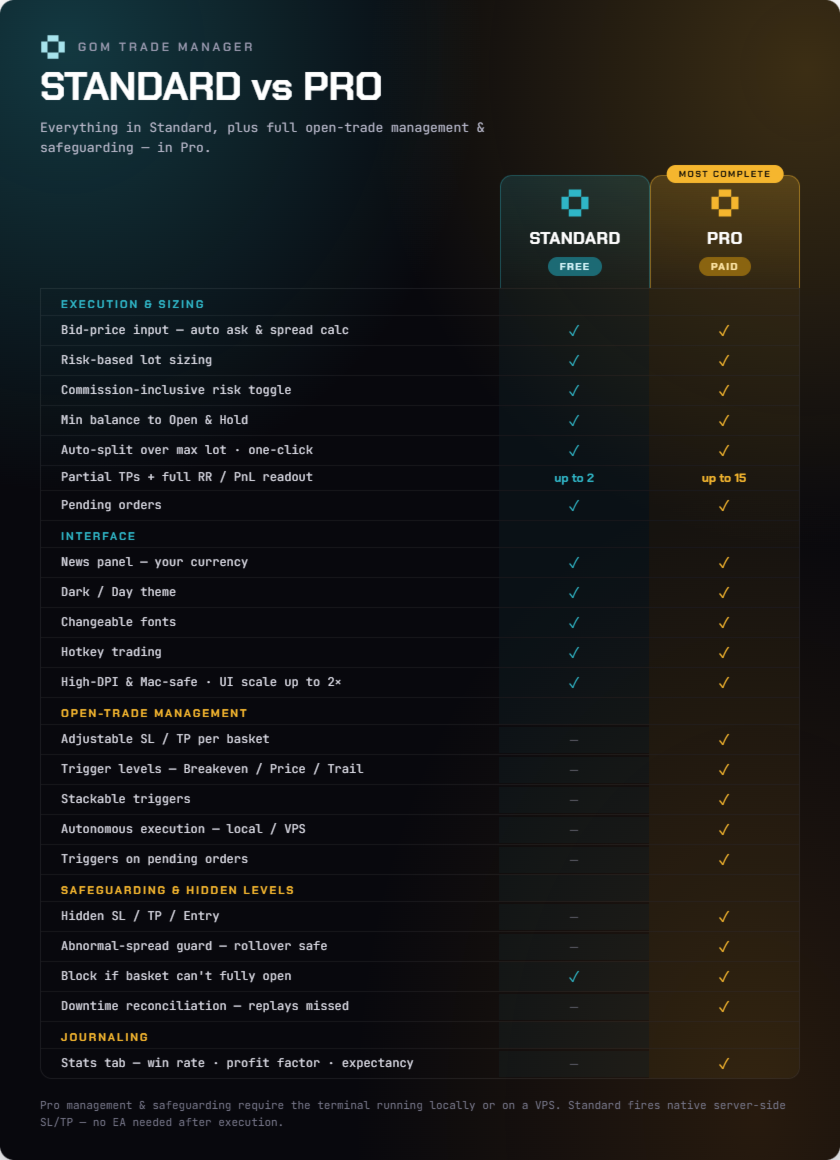
Has all the features of GOM Trade Manager (Free):
- Partials.
- Lot calculations based on risk you inputted.
- Full detail readout of RR / Money you will lose or gain.
- News panel — shows news for your chart's currencies. MT5 built-in calendar, no setup.
- Ability to set Pending Orders.
- Dark / Day Theme
- Changeable fonts
- Commission included risk calculations
- Hotkeys Trading
------------------------------------------NOTABLE PRO FEATURES------------------------------------------
Notable features separated into 3 main functions:
1. Execution & Information
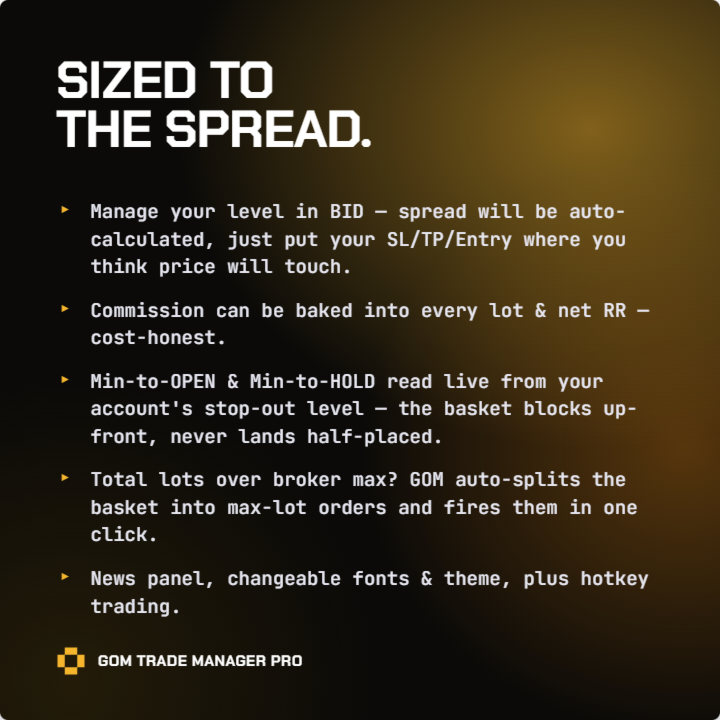
- You set everything based on bid price, which is the price of the candles you see on the chart. So instead of having to keep worrying about how much spread you need to add on top of your SELL SL/TP, just input the bid level where you think price will touch.
The EA will do the rest. The EA calculates the ask price for you based on average normal spread + average slight deviation. If you want actual level, you can change them in the trade management panel. - Calculate Minimum Amount needed to open your trade & Minimum amount to hold your trade until stop loss hits. Limiting your account balance to this amount helps cap your loss from events like weekend gaps or sudden news spikes, where you would lose more than your stop loss amount.
- If your entry lots are above max lot, the TM will automatically divide your trades into max lots on execute. One button execution.
- Built-in Stats tab reads your account history: net P&L, win rate, profit factor, expectancy, win/loss streaks, and per-symbol breakdown.
2. Opened Trade Management & Autonomous Planned Adjustments
- Easily adjustable SL/TP per trade basket.
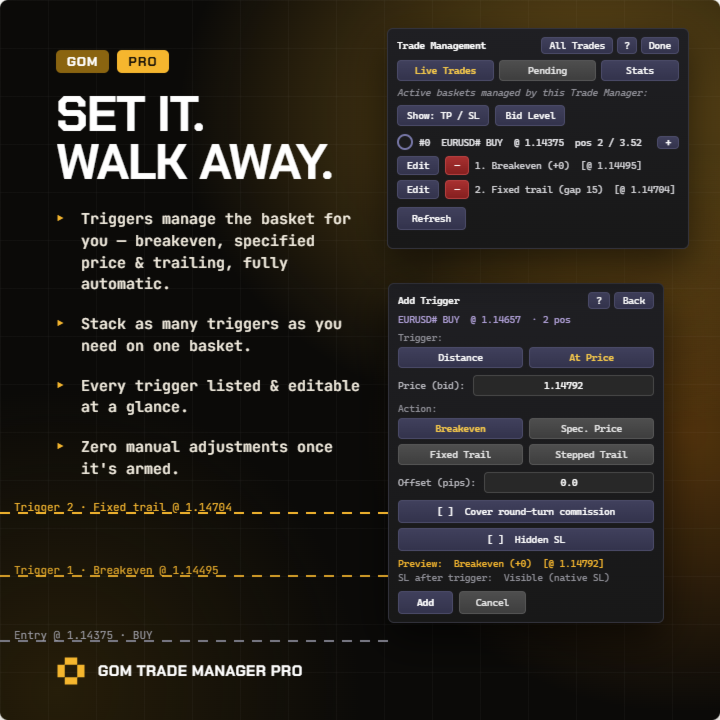
- You can add trigger level. Once price hits this level, you can tell the EA to change the SL to either Breakeven/ Specified Price/ or Trailing (Fixed or Step).
Once trigger level gets hit the EA will do it for you automatically. This require either Algo Trading ON with local terminal opened or a use of VPS. - You can stack triggers and you can also change from visible SL/TP to hidden in between triggers. Each trigger added is visible in the trade management panel. You can also add triggers to Pending Orders.
3. Safeguarding
- Blocks execution up-front if your balance can't open the whole basket — so you never end up with a half-placed basket.
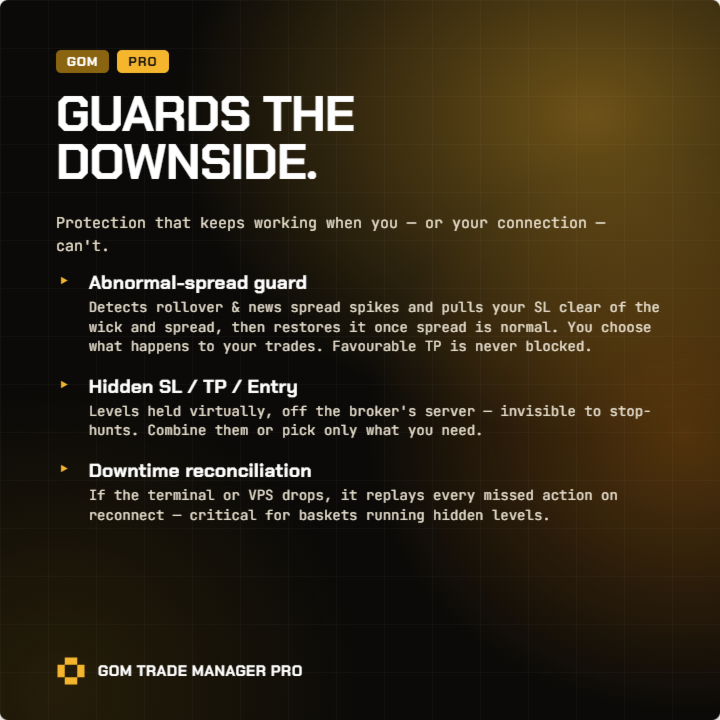
- Protects you from abnormal spread. EA detects abnormal spreads and moves your SL far away during that period. This is especially useful for SELLs, especially during rollover where your SL could get hit even when bid price is not at the level you planned.
The EA will then bring back the SL when spread comes back to normal. You have the ability to choose what happens to your trades once spread comes back to normal. Favorable TP is not blocked here. - Hidden SL / TP and Entry are available. You can combine them or choose what you want.
- Reconciliation against servers going down. Internal reconciliation for when there is downtime and the EA was not operating normally. It will replay back what it missed when it comes back online. This is especially important for trades with hidden levels.
-------------------------------------***Must Read Before Use***------------------------------------
- Hedging account only. Does not support Netting Account yet. Netting Accounts are accounts that merge everything into one combined position per symbol.
- Every price level you modify is based on bid level, you do not have to calculate ask price for your Sells TP/SL or your Buy Limit/Stop Entries. Just place your TP/SL on where you think price would touch.
- Please make sure, when you attach the Trade Manager you click "Allow Algo Trading". Also your terminal's "Algo Trading" button needs to be green when you place a trade through the Trade Manager.
- VPS is recommended here, but not necessary. You can actually just open your MT5 Terminal and allow algo trading for the duration your trade is opened, however this may not be suitable if your trades are opened overnight.
- If you have any questions no matter what, please feel free to contact me, I will try my best to answer as soon as possible.
- If you want any additional features, or if you found a bug. Please message me I will try my best on the features. As for the bugs, I personally use it too so I will fix it right away.
- Feel free to try out the FREE version first.
Please use this mql5 blog for how to Install to EA, back test and using VPS server for running it 24/7
https://www.mql5.com/en/forum/366161
What is VPS Server (For those who are new)?
Basically, VPS server allows your EA (in this case, the Trade Manager) to run without you having to turn on your computer 24/7. It uploads your MT5 terminal to the cloud so it can run 24/7 on its own. You can turn it on and off of course and you can also make adjustments to your EA settings and re-upload your terminal accordingly.