PinMetrics MT4

PinMetrics – MT4

Pin Bar Size Statistics Dashboard | Wick Ratio Analysis | Performance Metrics

Stop guessing which pin bars work. Let the data reveal the edge. 🎯

📖 Overview

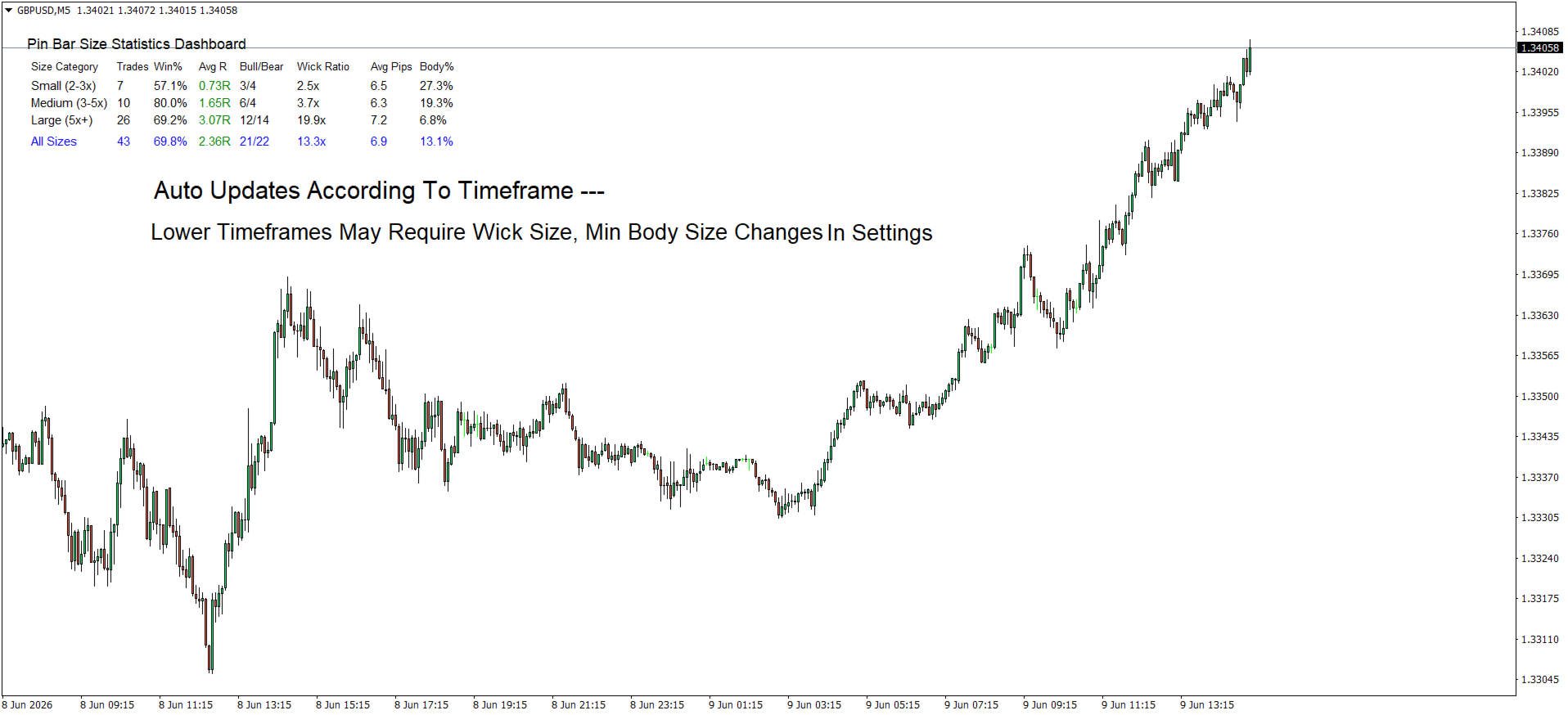
PinMetrics is a professional MetaTrader 5 indicator that automatically detects and analyzes pin bar patterns, categorizing them by wick-to-body ratio. It provides comprehensive performance statistics for each size category, helping traders identify which pin bar patterns offer the most reliable trading opportunities.

Not all pin bars are created equal. PinMetrics tells you exactly which size category has the highest win rate and best R-multiple on your current pair and timeframe.

✨ Key Features

Feature Benefit
Size-Based Classification Automatically sorts pin bars into Small (2-3x), Medium (3-5x), and Large (5x+) based on wick-to-body ratio
Real-Time Statistics Dashboard Displays Trades, Win %, Avg R, Bull/Bear ratio, Wick Ratio, Avg Pips, and Body % for each category
Direction Detection Automatically identifies bullish (hammer) vs bearish (shooting star) pin bars
Volume Confirmation Option Optionally require higher volume on pin bars – stronger rejection signals
Risk Management Integration Configure risk percentage per trade for position sizing context
Adjustable Thresholds Customize wick ratio boundaries, min bar size, and detection sensitivity
Clean Dashboard Layout Professional table format with color-coded R-multiples (green for positive, red for negative)
"All Sizes" Summary Row Overall performance across all detected patterns
Auto-Detection Scans up to 1000 bars and updates automatically on each new bar

📊 Dashboard Breakdown

Column Description
Size Category Small (2-3x) / Medium (3-5x) / Large (5x+)
Trades Number of pin bars detected in this category
Win % Percentage of patterns that resulted in profitable moves
Avg R Average risk multiple (green for positive, red for negative)
Bull/Bear Bullish pin bars vs bearish pin bars
Wick Ratio Average wick length relative to body (e.g., 4.2x)
Avg Pips Average total bar size in pips
Body % Average body as % of total range (lower = cleaner rejection)

🔍 Pin Bar Detection Criteria

Condition Requirement
Small body Body occupies ≤33% of total bar range
Long wick Dominant wick comprises ≥60% of total range
Direction Long lower wick = Bullish (Hammer) / Long upper wick = Bearish (Shooting Star)
Minimum size Configurable minimum bar size in pips (default: 10 pips)
Volume confirmation Optional – requires higher volume than previous bar

📈 Size Classification System

Category Wick Ratio Description Typical Performance
Small 2–3x Moderate wick extension Baseline win rate
Medium 3–5x Significant wick extension Higher win rate & R
Large 5x+ Extreme wick extension Highest win rate & R-multiple

Why Larger Wick Ratios Perform Better

Factor Small (2-3x) Medium (3-5x) Large (5x+)
Rejection force Moderate Strong Extreme
Stop loss distance Tighter Moderate Wider
Risk-reward potential 1.5-2.5R 2-4R 3-6R
Typical win rate 50-60% 55-65% 60-70%
Best timeframe Lower (M15-H1) Higher (H1-H4) Highest (H4-Daily)

⚙️ Input Parameters (MT5)

Dashboard Settings

Parameter Default Description
DashboardX 20 Horizontal position (pixels from left edge)
DashboardY 30 Vertical position (pixels from top edge)
DashboardColor White Dashboard background color
TextColor Black Text color for dashboard content
FontSize 9 Base font size

Pin Bar Pattern Settings

Parameter Default Description
SmallWickRatio 2.0 Small pin bar threshold (wick ≥2× body)
MediumWickRatio 3.0 Medium pin bar threshold (wick ≥3× body)
LargeWickRatio 5.0 Large pin bar threshold (wick ≥5× body)
MaxBodyRatio 0.33 Maximum body as % of total range (33%)
MinWickPercentage 0.60 Minimum dominant wick as % of total range (60%)
RequireVolumeConfirmation false Require higher volume on pin bar
MinPinBarSizePips 10.0 Minimum pin bar total size in pips

Risk Management

Parameter Default Description
RiskPercentage 1.0 Risk per trade as % of account balance
MaxHistoryBars 1000 Maximum bars to analyze

🎯 How to Use PinMetrics

Step 1: Attach to Chart

Drag PinMetrics onto any MT5 chart (recommended: H1, H4, or Daily).

Step 2: Let It Scan

The indicator automatically scans up to 1000 bars and categorizes every pin bar it finds.

Step 3: Read the Dashboard

Look for the category with the highest win rate and best Avg R:

  •  Large (5x+) category showing 66% win rate and +2.10R? → Prioritize those setups.

  • ⚠️ Small (2-3x) category showing 45% win rate? → Be selective or avoid.

Step 4: Trade with Context

Strongest pin bars occur when:

  • Forming at key support/resistance levels

  • Following a strong trend (counter-trend pin bars)

  • Aligned with higher timeframe bias

  • Accompanied by volume spikes

📈 Practical Trading Applications

Entry

  • Bullish pin bar at support → Buy on break of the pin bar's high

  • Bearish pin bar at resistance → Sell on break of the pin bar's low

Stop Loss

Place stop loss beyond the pin bar's extreme (the wick tip).

Take Profit Targets

  • 1st target – Recent swing high/low

  • 2nd target – Next support/resistance level

  • 3rd target – 2× risk amount (minimum for valid setup)

Position Sizing

text

Risk Amount = Account Balance × (RiskPercentage / 100) Position Size = Risk Amount ÷ Stop Loss Distance (in pips × pip value)

⚠️ False Signal Warning Signs

Sign Why It's Weak
Pin bar in middle of a range No clear rejection level
Very small total range (<10 pips) Not enough momentum
Equal wicks on both sides Indecision, not rejection
Low volume (if confirmation enabled) May be random noise
Against higher timeframe trend Lower probability of follow-through

🐛 Troubleshooting

Problem Solution
No pin bars detected Lower  MinPinBarSizePips  or check chart timeframe (H1+ recommended)
Dashboard not showing Adjust  DashboardX  /  DashboardY  values
Volume confirmation too strict Set  RequireVolumeConfirmation = false
Too many/few patterns Adjust  MaxBodyRatio  or  MinWickPercentage
Small timeframe noise Switch to H1, H4, or Daily for cleaner patterns

📦 Installation (MT5)

  1. Download  PinMetrics.mq5  or  .ex5

  2. In MT5: File → Open Data Folder → MQL5 → Indicators

  3. Copy the file into the Indicators folder

  4. Restart MT5 or right-click in Navigator → Refresh

  5. Drag PinMetrics onto your chart

📄 License

This indicator is provided for educational and personal trading use only. Redistribution or commercial use without permission is prohibited.

PinMetrics – Measure. Analyze. Trade with data. 🎯


作者のその他のプロダクト
S/Rゾーン - MetaTrader 5向け製品概要 概要 サポート/レジスタンスゾーン は、MetaTrader 5(MT5)向けの直感的なインジケーターで、チャート上の水平線周りにカスタマイズ可能なゾーンを自動的に作成することでテクニカル分析を強化します。これらのゾーンは、ユーザーが指定したピップ数で定義され、主要なサポートとレジスタンスエリアを視覚的に強調し、トレーダーが重要な価格範囲や反転ポイントを迅速に特定するのに役立ちます。 主な特徴 動的ゾーン作成 : 水平線周りにゾーンを自動生成し、ゾーンの幅を調整可能なピップ数(デフォルト:10ピップ)で定義します。 サポートとレジスタンスの識別 : 現在の価格と線との関係に基づいてゾーンを色分け(サポート:ライムグリーン、レジスタンス:トマト)し、視覚的に素早く認識できます。 カスタマイズ可能な外観 : ゾーンの透明度(0~255)、色、サポート/レジスタンスラベルの表示オプション(フォントサイズと色を調整可能)をカスタマイズ可能。 ラインのフィルタリング : ユーザーが定義したプレフィックスで水平線をフィルタリングし、特定の線に
FREE
エンハンスド・バー・タイマー は、MetaTrader 5(MT5)向けの多機能でカスタマイズ可能なインジケーターで、現在のローソク足に関するリアルタイム情報(次のバーのカウントダウンタイマー、ローソク足の詳細、出来高、スプレッド)を提供します。ユーザーが指定したチャートウィンドウの隅に表示され、マルチラインまたはシングルライン形式を選択可能で、トレーダーは重要な市場データを一目で監視でき、意思決定と取引効率を向上させます。 主な機能 リアルタイム・バー・タイマー :次のバーまでのカウントダウンを時間、分、オプションで秒単位で表示し、テキストカラー、フォントサイズ、フォントタイプをカスタマイズ可能。 ローソク足情報 :現在のローソク足の方向(上昇/下降)、ピップ数でのサイズ、ボディサイズ、ヒゲのサイズ、変化率を表示し、ローソク足の方向に応じて色分けされたテキストを提供。 出来高およびスプレッドデータ :現在のバーの出来高(百万または千単位)とスプレッドをオプションで表示し、重要な市場コンテキストを提供。 柔軟な表示オプション :詳細情報を表示するマルチライン形式またはコンパクトなシング
FREE
Clean Chart Toggle
Liam Alex Thomas Webb
5 (1)
クリーンチャートトグル は、MetaTrader 5(MT5)のチャート体験を向上させるために設計された使いやすいインジケーターです。チャート上のインジケーターやオブジェクトの表示を簡単に管理できます。チャートウィンドウの左上にあるボタン一つで、すべてのインジケーターや描画オブジェクトを瞬時に非表示または表示でき、チャートの雑然さを軽減し、価格動向や特定の分析ニーズに集中することができます。 主な機能 ワンクリックトグルボタン :MT5チャートウィンドウの左上に配置されたボタンで、ワンクリックですべてのインジケーターや描画オブジェクトを非表示または表示できます。 カスタマイズ可能な表示 :すべてのインジケーターやオブジェクトを表示するか、チャートをクリアにして生の価格データに焦点を当てるかを切り替え可能。 MT5とのシームレスな統合 :MetaTrader 5と完全互換で、簡単なセットアップとスムーズなパフォーマンスを保証。 ユーザーフレンドリーな設計 :直感的なインターフェースで最小限の設定が必要、初心者から経験豊富なトレーダーまで利用可能。 パフォーマンス最適化 :軽量かつ効率的で
FREE
Smart Fib Retracement Zones For MT5 インジケーター は、主要なフィボナッチ・リトレースメントデータを即座に視覚化するための究極のMetaTrader 5コンパニオンです。必要な場所、つまりゾーン上にリアルタイムで表示します。 このツールは、フィボナッチ・リトレースメントゾーンに、レベル分類、ピップ距離、リトレースメント率、ゾーンの強さなどの実用的なデータを自動的に重ねて表示します。インジケーター内の各ゾーンにすっきりと配置されます。デイトレードでのスキャルピングや日足チャートでの主要なフィボナッチレベルの分析を行う場合でも、このインジケーターは標準的なフィボナッチ・リトレースメントをインテリジェントなゾーンに変換し、チャートの情報価値を即座に高めます。 主な特徴 フィボナッチ・リトレースメントからの自動ゾーン作成 主要なフィボナッチレベル(23.6%、38.2%、50%、61.8%、78.6%)からゾーンを即座に生成。 スイングの高値と安値を自動検出し、正確なリトレースメントゾーンを作成。 カスタマイズ可能なフィボナッチレベル 表示および監視するフィ
Clean Chart Toggle – MQL5 One-Click Chart Clutter Remover | Instant Clean Mode One click. Zero clutter. Instant clarity.   Overview Clean Chart Toggle   is a simple yet powerful MetaTrader 5 utility indicator that instantly hides all chart clutter with a single click. Perfect for traders who need a clean workspace for analysis, screenshots, or presentations, this indicator toggles between normal and clean chart modes with visual feedback and customizable controls. Stop wasting time manuall
FREE
MetaTrader 5向け強化サポート/レジスタンスレベル情報インジケーター 強化サポート/レジスタンスレベル情報インジケーター と出会いましょう!これは、重要なS/R(サポート/レジスタンス)情報をリアルタイムで視覚化する究極のチャート companion です。このMT5ツールは、あなたの手動で配置した水平線に重要なS/Rメトリック—サポート/レジスタンスの分類、タッチ数、リアルタイムのピップ距離、レベルの強さ、歴史的な年齢—を自動的にラベル付けし、各レベルの下にコンパクトにまとめて表示します。 トレーダーによる、トレーダーのためのこのツールは、あなたが手動で配置したレベルを、アクション可能な情報豊富な表示に変換し、トレードを効率化し、数秒で意思決定を向上させる設計です。 機能概要 強化S/R情報インジケーターは、自信を持ってトレードするためのスマートな機能を満載しています: 自動レベル情報 すべてのOBJ_HLINE水平線を即座に識別し、それぞれをサポートまたはレジスタンスレベルとして分類—手動でのタグ付けは不要です。 詳細なレベルメトリック 各線に対して、価格のタッチ数、
スマート供給需要レクタングルツールインジケーターは、MT5のための究極の相棒です。重要な供給と需要のデータを瞬時に視覚化し、必要な場所—ゾーン上にリアルタイムで表示します。 このツールは、ゾーン分類、ピップ距離、強度、ゾーンサイズなどの豊富で実践的なデータを自動的にゾーン上に重ねて表示します。もう散らかりや推測は不要—明確で動的な洞察があなたの意思決定をサポートします。 トレーダーのために作られ、精密さで動きます。 イントラデイのスキャルピングでも、毎日のチャートの主要なゾーン分析でも、このインジケーターは手動で描いたゾーンを瞬時にインテリジェントなゾーンに変え、ワークフローを中断せずにチャートの情報価値を即座に高めます。 **機能一覧** **自動レベル検出** - チャート上のすべてのゾーンを瞬時に認識。 - 供給または需要として分類—手動タグ付け不要。 **豊富なリアルタイムメトリクス** 表示内容: - ゾーンサイズ - 現在の価格からのライブピップ距離 - ゾーンの強度スコア - ゾーンの年齢(ゾーンが存在した期間) **ライブアップデート** - 価格の動きに合
キャンドルパターン確率ダッシュボードは、主要なキャンドルパターンのリアルタイム統計を分析・表示するための直感的なインジケーターです。このツールは、エングルフィング、キャラクターチェンジ(CHOCH)、インバランス、ピンバー、インサイドバーなどのパターンを検出し、チャート上のカスタマイズ可能なダッシュボードでそのパフォーマンス指標を表示します。トレーダーは、パターンの信頼性、勝率、リスク・リワード比率に関する洞察を得ることができ、データ主導のトレーディング戦略に欠かせないツールです。 ### 主な機能 - **パターン検出**: エングルフィング、CHOCH、インバランス、ピンバー、インサイドバーの5つの主要なキャンドルパターンを、ユーザーが設定可能な条件に基づいて自動的に識別。 - **インタラクティブダッシュボード**: 総取引数、勝率、平均Rマルチプル、期待値をリアルタイムで表示する、MT5チャート上のクリーンでカスタマイズ可能なパネル。 - **リスク管理の統合**: ユーザーが指定した口座残高の割合に基づくリスク計算を行い、取引全体で一貫したリスク管理を確保。 - **カ
フィルタ:
レビューなし
レビューに返信