MTF Trend Dashboard
- インディケータ
- バージョン: 1.0
- アクティベーション: 5

MTF TREND DASHBOARD — Multi-Timeframe Trend Analysis Indicator
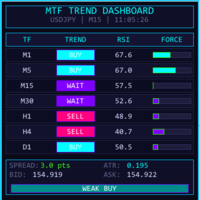
MTF Trend Dashboard is a professional-grade, all-in-one multi-timeframe trend analysis panel for MetaTrader 5. It eliminates the need to switch between charts — instead, it displays the trend direction, momentum, strength, and a composite score for all 9 timeframes simultaneously on a single, beautifully designed dashboard.
In one glance you can instantly know:
- Which direction the market is trending on every timeframe
- How strong that trend is (scored 0–100)
- Whether Scalpers, Intraday traders, Swing traders, and Position traders all face the same opportunity
- How many timeframes agree on the same direction (Market Confluence)
It is designed to work on any instrument — Forex, Gold (XAUUSD), Crypto, Indices, and Commodities.
KEY FEATURES
- ✅ 9 Timeframes monitored simultaneously — M1, M5, M15, M30, H1, H4, D1, W1, MN
- ✅ 4 Indicators per timeframe — EMA Stack, ADX, RSI, MACD Histogram
- ✅ Composite Score 0–100 per timeframe — objective, number-based signal
- ✅ 5 Signal outputs — STRONG BUY / BUY / NEUTRAL / SELL / STRONG SELL
- ✅ 4 Trader-Type Signal Cards — Scalper, Intraday, Swing, Position
- ✅ Market Confluence Meter — shows how many of 9 TFs agree on direction
- ✅ Score Breakdown Table — full detail row per timeframe for deep analysis
- ✅ Live real-time updates — refreshes on every tick + every 1 second
- ✅ Works on any instrument — Auto-detects Forex / Gold / Crypto / Index
- ✅ Zero repainting — all signals based on live current bar values
- ✅ Clean chart — hides MT5's default overlays for a professional look
- ✅ Fully customizable — font size, colors, panel position, indicator periods
HOW THE SCORING WORKS
Each of the 9 timeframes receives an objective composite score from 0 to 100 points:
| Component | Condition | Points |
|---|---|---|
| EMA Stack | Full bull stack (P > EMA20 > EMA50 > EMA200) | 40 pts |
| EMA Stack | Full bear stack (P < EMA20 < EMA50 < EMA200) | 40 pts |
| EMA Stack | Partial 2-of-3 alignment | 20 pts |
| EMA Stack | Fully mixed / sideways | 0 pts |
| ADX (14) | ≥ 25 — strong trend | 20 pts |
| ADX (14) | ≥ 20 — moderate trend | 10 pts |
| ADX (14) | < 20 — weak / no trend | 0 pts |
| RSI (14) | Bull trend + RSI 50–75 (momentum zone) | 20 pts |
| RSI (14) | Bear trend + RSI 25–50 (momentum zone) | 20 pts |
| RSI (14) | Overbought >75 bull / Oversold <25 bear | 5 pts |
| RSI (14) | Mismatched or sideways | 0 pts |
| MACD Hist | Bull trend + positive histogram | 20 pts |
| MACD Hist | Bear trend + negative histogram | 20 pts |
| MACD Hist | Mismatch or sideways | 0 pts |
Maximum possible score: 100 pts (Full EMA stack + Strong ADX + RSI in zone + MACD aligned)
Signal Thresholds
| Signal | Condition |
|---|---|
| STRONG BUY | Score ≥ 75, BULLISH trend |
| BUY | Score ≥ 50, BULLISH trend |
| NEUTRAL | Score < 50 or no clear direction |
| SELL | Score ≥ 50, BEARISH trend |
| STRONG SELL | Score ≥ 75, BEARISH trend |
DASHBOARD LAYOUT EXPLAINED
LEFT PANEL — The Main Matrix
The left panel shows all 9 timeframes in columns and all indicators in rows.
GROUP ROW — Color-coded group headers:
- 🔵 SCALP (M1–M15) — Blue
- 🟢 INTRADAY (M30–H4) — Teal
- 🟣 SWING+POS (D1–MN) — Purple
INDICATOR ROW — TF names M1 through MN
DATA ROWS:
- TREND — BULL / BEAR / SIDE (large font, color coded)
- EMA STACK — Shows the exact EMA alignment (e.g. P>20>50>200)
- ADX — Value + strength label (WEAK / WK+ / MOD / STR)
- RSI — Value + zone (OB / BULL / NEUT / BEAR / OS)
- MACD HIST — POS (green) or NEG (orange-red)
- ATR % — Volatility as % of price
SCORE ROW — Large colored number 0–100 with heat bar behind it
SIGNAL ROW — Final signal per TF with colored pill background
CONFLUENCE BAND — Single-line summary of how many TFs agree, with 9 color-coded blocks showing each TF's direction
SCORE BREAKDOWN TABLE — One detailed row per TF with all values in columns
RIGHT PANEL — Trader Signal Cards
Four cards, one per trading style, each monitoring 3 relevant timeframes:
| Card | Timeframes | Best For |
|---|---|---|
| SCALPER | M1 + M5 + M15 | Quick 1–15 minute trades |
| INTRADAY | M30 + H1 + H4 | Same-day trades |
| SWING | H4 + D1 + W1 | Multi-day trades |
| POSITION | D1 + W1 + MN | Long-term trades |
Each card shows:
- Score /100 — Average of the 3 TF scores
- Agreement — How many of the 3 TFs agree: [+][+][-]
- Direction — BULLISH / BEARISH / MIXED
- Signal — STRONG BUY / BUY / NEUTRAL / SELL / STRONG SELL
MARKET CONFLUENCE METER — Shows exactly how many of the 9 TFs are BULLISH, BEARISH, or SIDEWAYS, with a probability label (HIGH / MEDIUM / LOW PROBABILITY).
SIGNAL LEGEND — Color-coded reference guide always visible.
HOW TO IDENTIFY THE TREND
Step 1 — Check the Confluence Meter (Right Panel)
This is your first filter. Look at "X / 9 TF agree":
- 7–9 TFs agree → HIGH PROBABILITY — The market has a very clear directional bias. Excellent condition to trade.
- 5–6 TFs agree → MEDIUM PROBABILITY — Good trend, worth looking for entry.
- 3–4 TFs agree → LOW PROBABILITY — Mixed signals. Caution required.
- 0–2 TFs agree → NO CLEAR SIGNAL — Market is ranging or consolidating. Wait.
Also check the 9 colored blocks — each block represents one TF:
- 🟢 Green block = That TF is BULLISH
- 🔴 Red block = That TF is BEARISH
- ⬛ Dark block = That TF is SIDEWAYS
If you see all green blocks (M1 through MN) → The strongest possible uptrend across all timeframes.
Step 2 — Identify Your Trading Style Card (Right Panel)
Look at the card that matches how you trade:
SCALPER (M1+M5+M15):
- Signal = STRONG BUY or BUY → Look for BUY entries on M1/M5 charts
- Agreement = [+][+][+] → All 3 short TFs aligned → highest confidence
- Agreement = [+][+][-] → 2 of 3 aligned → acceptable but use caution
INTRADAY (M30+H1+H4):
- Signal = STRONG BUY → Strong intraday uptrend, bias is bullish all day
- Signal = BUY → Bullish lean, look for pullback entries on M15/M30
SWING (H4+D1+W1):
- Signal = STRONG BUY → Multi-day upswing in progress
- Signal = NEUTRAL → Market consolidating, no swing trade setup
POSITION (D1+W1+MN):
- Signal = STRONG BUY → Long-term bull trend, suitable for position trades
Step 3 — Check the Matrix for Alignment Across Trader Types
The most powerful trades happen when all 4 trader-type cards agree:
SCALPER → STRONG BUY ✅ INTRADAY → STRONG BUY ✅ SWING → STRONG BUY ✅ POSITION → BUY ✅
This means the market is trending bullish from M1 all the way to Monthly — the highest-probability trade setup.
Step 4 — Verify with the Score Matrix (Left Panel)
Look at the SCORE row in the matrix:
- Score 80–100 (Green) → Strong trend, good momentum — prime entry zone
- Score 50–74 (Gold) → Moderate trend — valid but be selective
- Score 0–49 (Red) → Weak or no trend — avoid trading this TF
Key rule: For a BUY trade, you want the entry timeframe score ≥ 60 and the higher timeframe score ≥ 50.
Step 5 — Read the SIGNAL Row for Final Confirmation
Each TF shows its final signal:
- STRNG BUY (bright green pill) → Best BUY signal
- BUY (mid-green pill) → Valid BUY signal
- NEUTRAL (gold pill) → No signal — skip this TF
- SELL (orange pill) → Valid SELL signal
- STRNG SEL (red pill) → Best SELL signal
TRADE SETUP EXAMPLES
Example 1 — High-Confidence Scalp BUY
Conditions:
- Confluence Meter → 7/9 BULLISH (HIGH PROB)
- SCALPER card → STRONG BUY, Agreement [+][+][+]
- M1 Score = 80, Signal = STRONG BUY
- M5 Score = 85, Signal = STRONG BUY
- M15 Score = 75, Signal = STRONG BUY
Action: Look for a BUY entry on the M1 or M5 chart. Use the ATR % from the Score Breakdown to size your Stop Loss (typically 1.5–2× the M1 ATR value).
Example 2 — Intraday BUY Setup
Conditions:
- Confluence Meter → 6/9 BULLISH (MED PROB)
- H1 Score = 80, Signal = STRONG BUY
- H4 Score = 75, Signal = STRONG BUY
- INTRADAY card → STRONG BUY, [+][+][+]
- M15 Score = 60, Signal = BUY (entry TF)
Action: Wait for price to pull back on M15. When M15 shows BUY signal, enter long. Target the next resistance. Stop below the M15 ATR.
Example 3 — Swing SELL Setup
Conditions:
- Confluence Meter → 5/9 BEARISH
- SWING card → SELL, [+][+][-] (H4+D1 bearish, W1 neutral)
- D1 Score = 70, Signal = SELL
- H4 Score = 65, Signal = SELL
- H1 Score = 55, Signal = SELL (entry confirmation)
Action: Look for a SELL entry on H4 or H1. Place Stop above the recent swing high. Target next major support.
Example 4 — Conflicted Market (AVOID)
Conditions:
- Confluence Meter → 3/9 (LOW PROB)
- SCALPER → STRONG BUY
- INTRADAY → NEUTRAL
- SWING → SELL
Action: Do NOT trade. Short-term and long-term signals conflict. Wait until at least 5/9 TFs agree on the same direction.
BEST PRACTICES FOR TRADING WITH THIS DASHBOARD
The Golden Rule
Trade WITH the higher-timeframe direction. Enter on the lower timeframe.
Always check that your trading style card matches the next higher card:
- Scalper entry → Must align with INTRADAY card
- Intraday entry → Must align with SWING card
- Swing entry → Must align with POSITION card
Confluence Thresholds by Trading Style
| Style | Minimum Confluence | Ideal Confluence |
|---|---|---|
| Scalper | 4/9 | 6/9+ |
| Intraday | 5/9 | 7/9+ |
| Swing | 5/9 | 7/9+ |
| Position | 6/9 | 8/9+ |
Score Requirements by Trade Type
| Trade Type | Entry TF Score | Higher TF Score |
|---|---|---|
| Scalp | ≥ 60 | ≥ 50 |
| Intraday | ≥ 65 | ≥ 55 |
| Swing | ≥ 70 | ≥ 60 |
| Position | ≥ 75 | ≥ 65 |
When to WAIT (Do Not Trade)
- Confluence below 4/9
- SCALPER and SWING cards show opposite signals
- Entry TF score below 50
- All 4 trader cards show NEUTRAL
- EMA Stack shows "MIXED" on your entry timeframe
UNDERSTANDING THE EMA STACK
The EMA Stack display tells you exactly how the EMAs are aligned:
| Display | Meaning | Signal |
|---|---|---|
| P>20>50>200 | Price above all EMAs, stacked bull | ✅ Full BULL — strongest |
| P<20<50<200 | Price below all EMAs, stacked bear | ✅ Full BEAR — strongest |
| P>20>50 | Price above 20 & 50, but 50<200 | ⚠️ Partial bull — cautious |
| P<20<50 | Price below 20 & 50, but 50>200 | ⚠️ Partial bear — cautious |
| 20>50>200 | EMAs stacked bull but price below 20 | ⚠️ Retracement in uptrend |
| 20<50<200 | EMAs stacked bear but price above 20 | ⚠️ Pullback in downtrend |
| MIXED | No clear alignment | ❌ Avoid — sideways market |
UNDERSTANDING ADX VALUES
| ADX Value | Label | Meaning |
|---|---|---|
| ≥ 40 | STR | Very strong trend — momentum is high |
| 25–39 | MOD | Good trending conditions |
| 20–24 | WK+ | Borderline — trend forming |
| < 20 | WEAK | No trend — ranging market |
Tip: ADX does not show direction, only strength. Always combine with the EMA Stack direction.
UNDERSTANDING RSI ZONES
| RSI Zone | Label | Meaning |
|---|---|---|
| > 70 | OB | Overbought — bull momentum fading |
| 55–70 | BULL | Bull momentum zone — best for BUY |
| 45–55 | NEUT | Neutral — no clear momentum |
| 30–45 | BEAR | Bear momentum zone — best for SELL |
| < 30 | OS | Oversold — bear momentum fading |
INSTALLATION
- Copy MultiTF_TrendDashboard.mq5 to your MQL5/Indicators/ folder
- Open MetaEditor and compile (F7)
- In MT5, open any chart and attach the indicator from the Navigator panel
- The dashboard will appear immediately on the chart
Recommended chart setup:
- Attach to the chart of the instrument you want to trade (e.g. XAUUSD, EURUSD)
- Use any timeframe chart — the dashboard reads all 9 TFs independently
- Recommended chart size: 1280×720 or larger for best display
INPUT PARAMETERS
Indicator Periods
| Parameter | Default | Description |
|---|---|---|
| InpEMA20 | 20 | Fast EMA period |
| InpEMA50 | 50 | Medium EMA period |
| InpEMA200 | 200 | Slow EMA period |
| InpADXPer | 14 | ADX period |
| InpRSIPer | 14 | RSI period |
| InpATRPer | 14 | ATR period |
| InpMACDFast | 12 | MACD fast EMA |
| InpMACDSlow | 26 | MACD slow EMA |
| InpMACDSig | 9 | MACD signal period |
Layout
| Parameter | Default | Description |
|---|---|---|
| InpX | 5 | Panel left edge (pixels from chart left) |
| InpY | 42 | Panel top edge (pixels from chart top) |
| InpFS | 9 | Base font size (8–11 recommended) |
| InpBreak | true | Show Score Breakdown table below matrix |
Colors
| Parameter | Default | Description |
|---|---|---|
| InpBull | LimeGreen | Bullish signal color |
| InpBear | Red-Orange | Bearish signal color |
| InpNeut | Gold | Neutral signal color |
COMPATIBILITY
- Platform: MetaTrader 5 only
- Instruments: All — Forex, Gold, Silver, Crypto, Indices, Commodities, Stocks
- Account Types: Works on any broker, any account type
- Resources: Low CPU usage — throttled to max 1 redraw per second
- Chart Type: Works on any chart type (Candlestick, Bar, Line)
FREQUENTLY ASKED QUESTIONS
Q: Does this indicator repaint? A: No. All values are calculated from the current live bar (bar index 0) and update on each tick in real time. There is no look-ahead or repainting.
Q: Can I use this on Gold (XAUUSD) and Crypto? A: Yes. The indicator auto-detects the instrument type and adjusts ATR display units accordingly. It works identically on all instruments.
Q: What timeframe should I set the chart to? A: Any timeframe. The dashboard reads all 9 TFs independently regardless of the chart's current timeframe. Most traders set it to M5 or M15 for convenience.
Q: How do I size my Stop Loss using this indicator? A: Use the ATR % value from the Score Breakdown table for your entry timeframe. A typical Stop Loss is 1.5–2.0× the ATR value. For example, if M5 ATR% = 0.08% and your entry price is 4650, the ATR in price = 4650 × 0.0008 = 3.72 pts, so SL = ~5.5–7.5 pts.
Q: The panel is too wide for my screen. What should I do? A: Reduce InpFS from 9 to 8. This will shrink all fonts and column widths proportionally. You can also set InpBreak = false to hide the Score Breakdown table.
Q: Can I change the colors? A: Yes. Use InpBull , InpBear , and InpNeut inputs to change the three signal colors. All other colors are professionally themed and do not need adjustment.
Q: Why do higher timeframes (W1, MN) update slowly? A: This is normal — W1 and MN candles close once per week/month, so their scores only change significantly at those intervals. They represent the long-term background bias, not short-term signals.
MTF Trend Dashboard — Professional multi-timeframe trend analysis for serious traders.