
Risk Calculator VortexLab
- ユーティリティ
-
Jose Luis Heredia Padilla
 CEO & Fundador de VortexLab
Laboratorio de desarrollo de indicadores avanzados, estrategias cuantitativas y Expert Advisors (EAs) para MetaTrader 5.
Enfoque en precisión técnica y resultados consistentes.
Santa Cruz de la Sierra, Bolivia 🇧🇴 - バージョン: 1.6
- アップデート済み: 10 6月 2026
━━━━━━━━━━━━━━━━━━━━━━━━━━━━━━━ 🔰 𝗥𝗜𝗦𝗞 𝗖𝗔𝗟𝗖𝗨𝗟𝗔𝗧𝗢𝗥 𝗩𝗢𝗥𝗧𝗘𝗫𝗟𝗔𝗕 ━━━━━━━━━━━━━━━━━━━━━━━━━━━━━━━
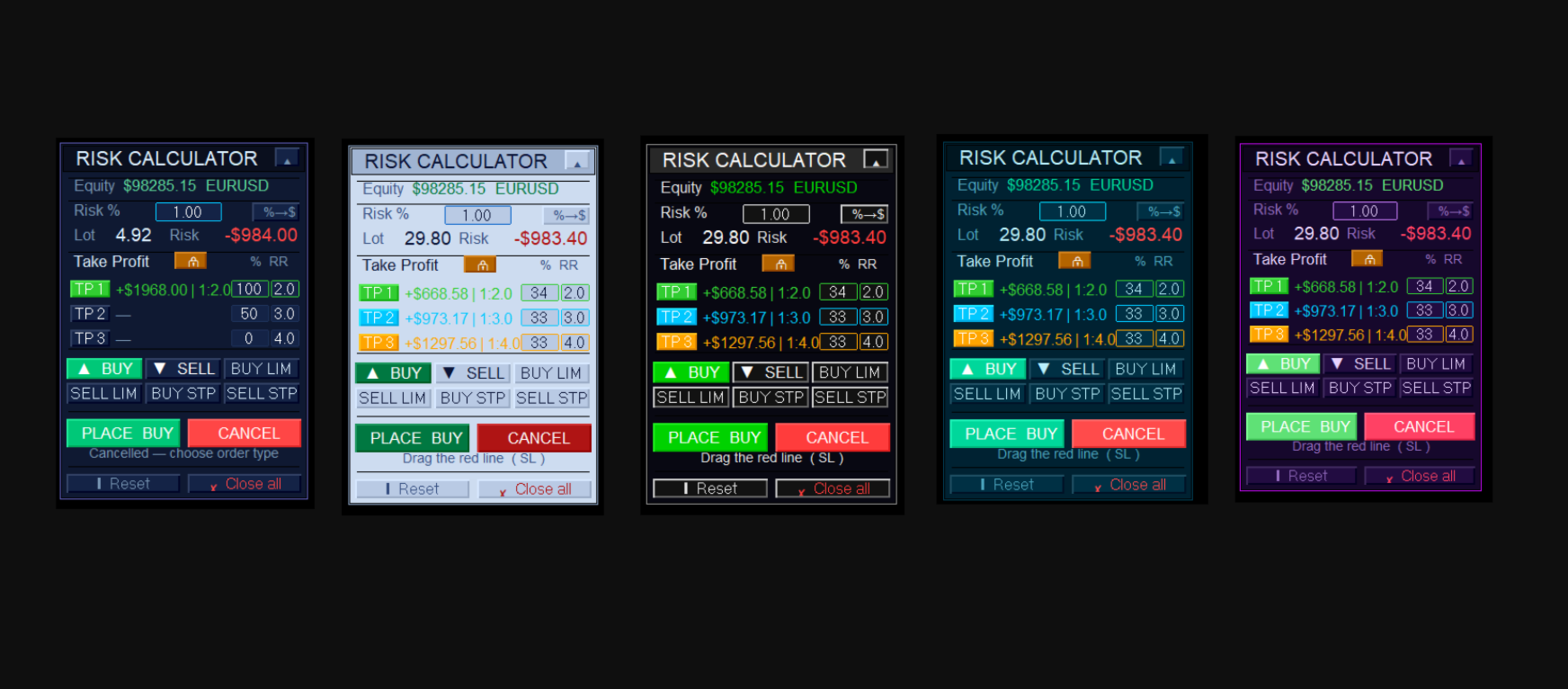
𝗣𝗿𝗼𝗳𝗲𝘀𝘀𝗶𝗼𝗻𝗮𝗹 𝗿𝗶𝘀𝗸 𝗺𝗮𝗻𝗮𝗴𝗲𝗺𝗲𝗻𝘁 𝗮𝗻𝗱 𝗼𝗿𝗱𝗲𝗿 𝗲𝘅𝗲𝗰𝘂𝘁𝗶𝗼𝗻 𝘁𝗼𝗼𝗹 𝗳𝗼𝗿 𝗠𝗲𝘁𝗮𝗧𝗿𝗮𝗱𝗲𝗿 𝟱. Calculates lot sizes automatically, visualizes your Stop Loss and Take Profit levels directly on the chart, and executes orders with up to 3 partial targets in one click.
───────────────────────────────────────── ◆ 𝗪𝗛𝗔𝗧 𝗠𝗔𝗞𝗘𝗦 𝗜𝗧 𝗗𝗜𝗙𝗙𝗘𝗥𝗘𝗡𝗧 ◆ ─────────────────────────────────────────
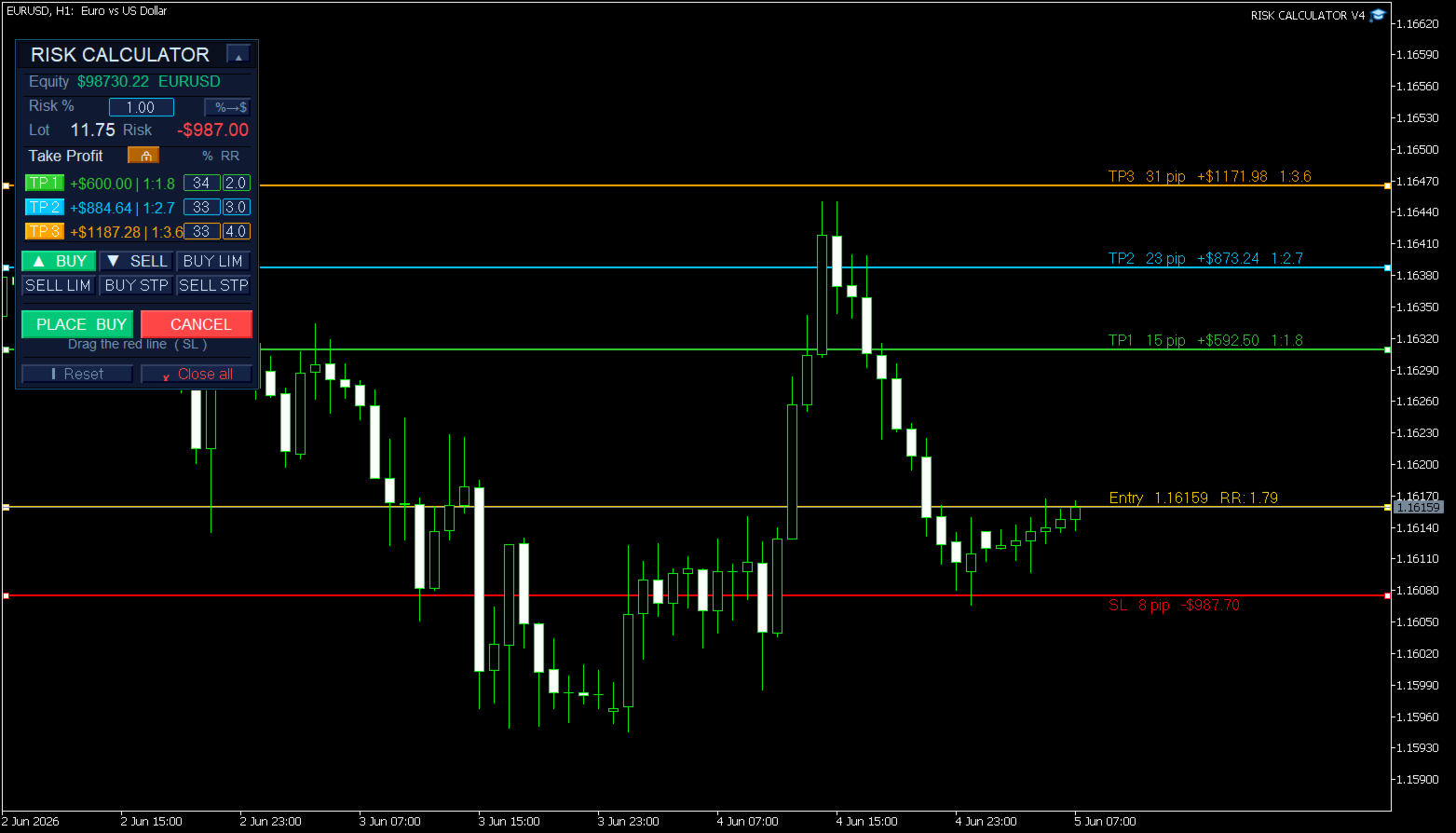
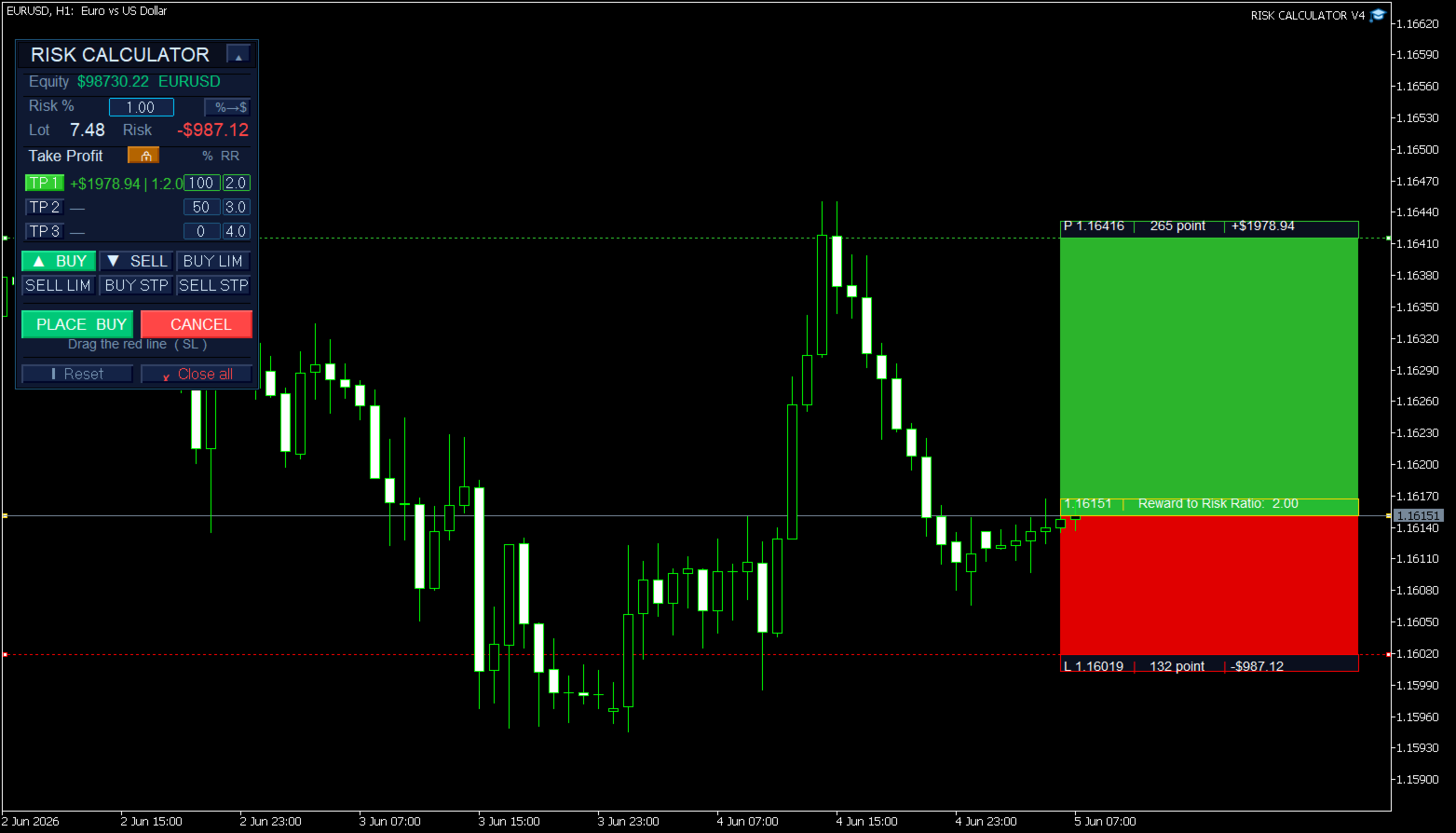
Most risk calculators only show numbers on a panel. 𝗥𝗶𝘀𝗸 𝗖𝗮𝗹𝗰𝘂𝗹𝗮𝘁𝗼𝗿 𝗩𝗼𝗿𝘁𝗲𝘅𝗟𝗮𝗯 shows your risk zones 𝗱𝗶𝗿𝗲𝗰𝘁𝗹𝘆 𝗼𝗻 𝘁𝗵𝗲 𝗰𝗵𝗮𝗿𝘁 — as draggable lines or colored boxes — so you can see exactly what you are risking and what you stand to gain 𝗯𝗲𝗳𝗼𝗿𝗲 𝗽𝗹𝗮𝗰𝗶𝗻𝗴 𝗮𝗻𝘆 𝘁𝗿𝗮𝗱𝗲.
───────────────────────────────────────── ◆ 𝗞𝗘𝗬 𝗙𝗘𝗔𝗧𝗨𝗥𝗘𝗦 ◆ ─────────────────────────────────────────
【 𝗔𝗨𝗧𝗢𝗠𝗔𝗧𝗜𝗖 𝗟𝗢𝗧 𝗖𝗔𝗟𝗖𝗨𝗟𝗔𝗧𝗜𝗢𝗡 】
The lot size updates in 𝗿𝗲𝗮𝗹 𝘁𝗶𝗺𝗲 as you drag the Stop Loss line. Set your risk as a 𝗽𝗲𝗿𝗰𝗲𝗻𝘁𝗮𝗴𝗲 of account balance or as a 𝗳𝗶𝘅𝗲𝗱 𝗱𝗼𝗹𝗹𝗮𝗿 𝗮𝗺𝗼𝘂𝗻𝘁. No manual calculations needed.
【 𝗨𝗣 𝗧𝗢 𝟯 𝗧𝗔𝗞𝗘 𝗣𝗥𝗢𝗙𝗜𝗧𝗦 】
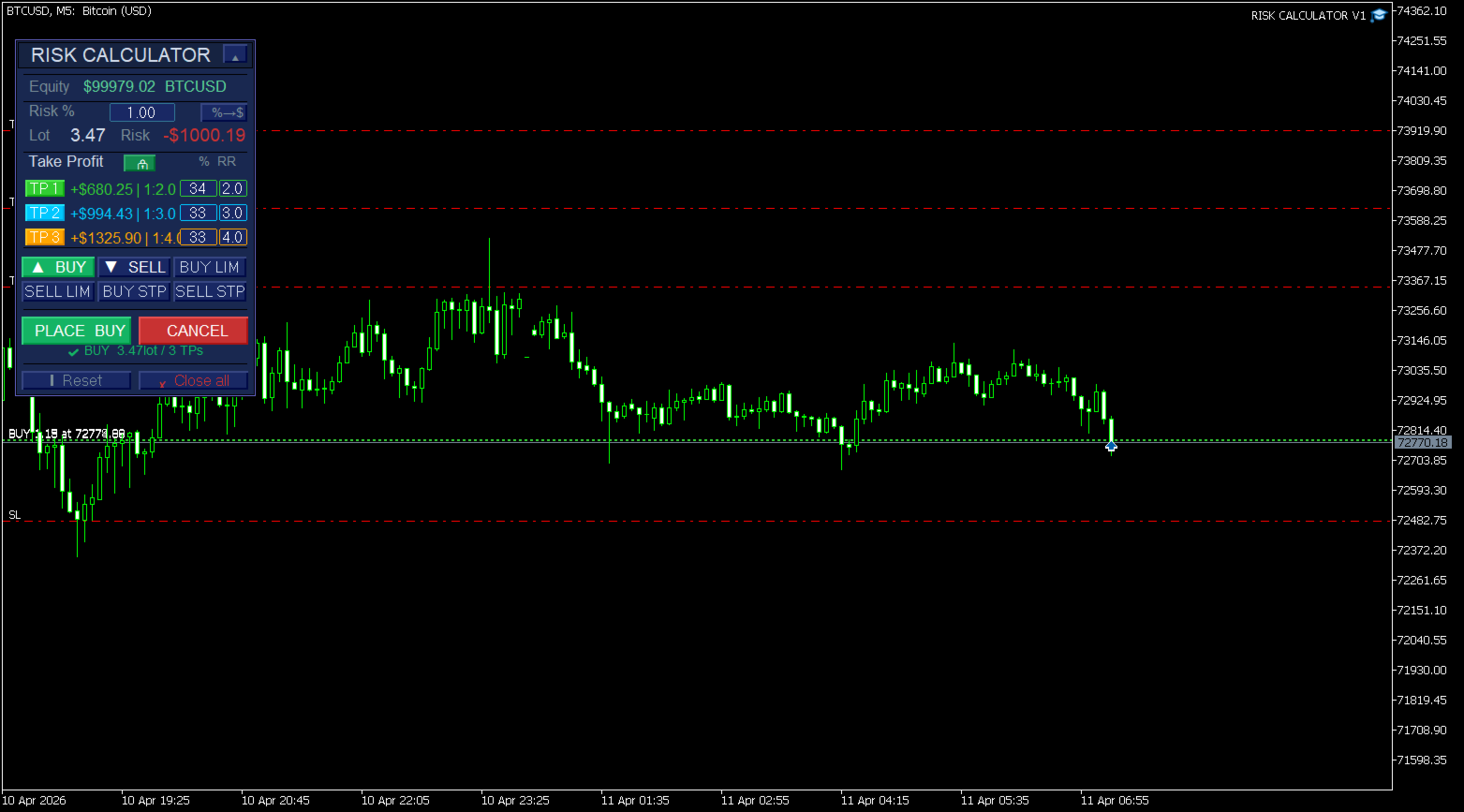
Configure up to 3 independent Take Profit levels, each with its own 𝗥𝗶𝘀𝗸:𝗥𝗲𝘄𝗮𝗿𝗱 𝗿𝗮𝘁𝗶𝗼 and 𝗽𝗼𝘀𝗶𝘁𝗶𝗼𝗻 𝘀𝗶𝘇𝗲 𝗽𝗲𝗿𝗰𝗲𝗻𝘁𝗮𝗴𝗲. Execute all 3 with a single click on PLACE ORDER.
【 𝗧𝗪𝗢 𝗩𝗜𝗦𝗨𝗔𝗟 𝗠𝗢𝗗𝗘𝗦 】
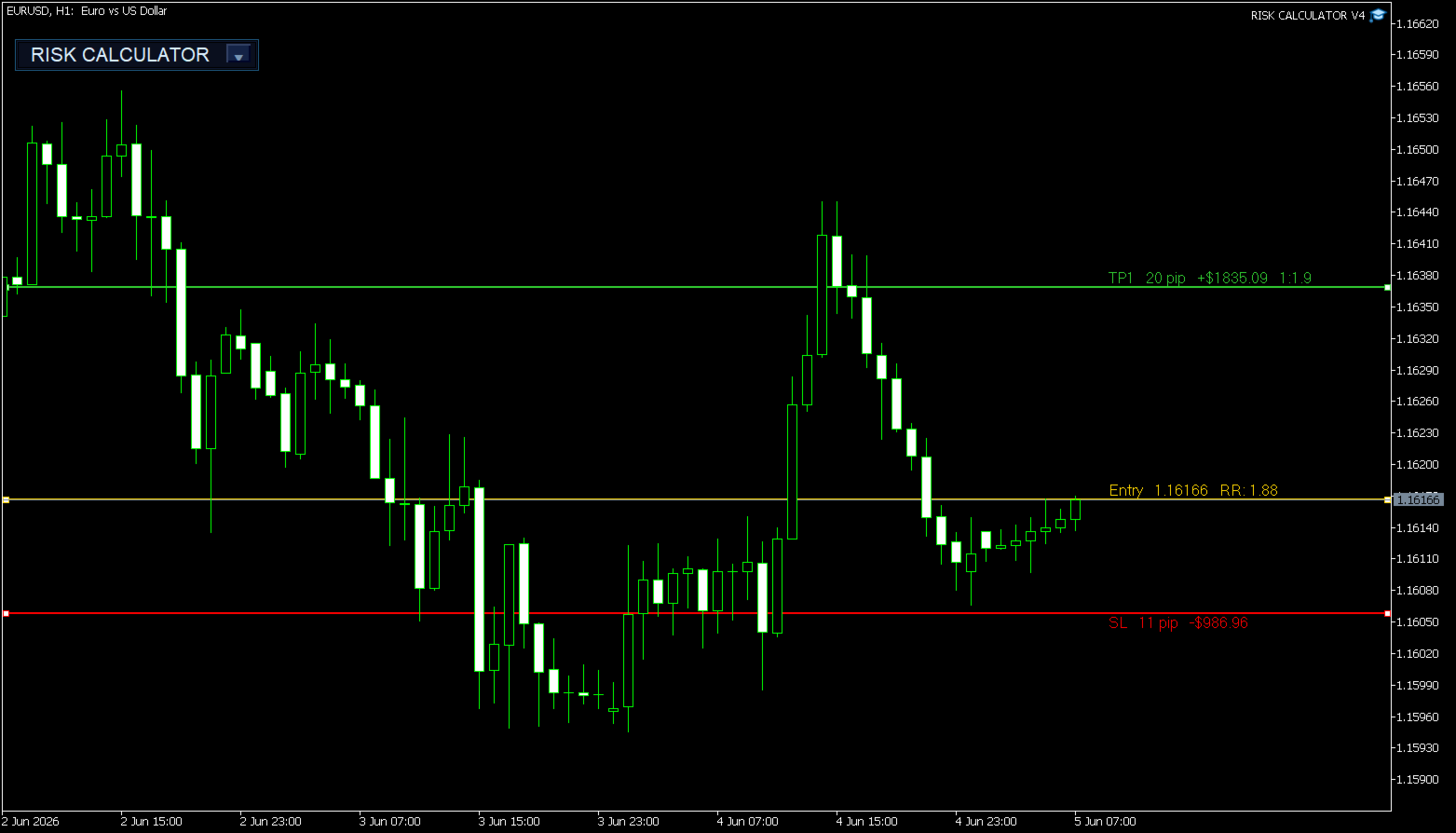
▸ 𝗟𝗶𝗻𝗲𝘀 𝗠𝗼𝗱𝗲 — clean horizontal lines with live pip count, dollar value and R:R ratio displayed on each line.
▸ 𝗕𝗼𝘅𝗲𝘀 𝗠𝗼𝗱𝗲 — vivid colored zones fill the chart between Entry and each TP/SL level, with info labels on every edge.
【 𝗗𝗥𝗔𝗚𝗚𝗔𝗕𝗟𝗘 𝗟𝗘𝗩𝗘𝗟𝗦 】
Drag the Stop Loss and Entry lines directly on the chart — 𝗻𝗼 𝗱𝗼𝘂𝗯𝗹𝗲-𝗰𝗹𝗶𝗰𝗸 𝗿𝗲𝗾𝘂𝗶𝗿𝗲𝗱. All values recalculate instantly.
【 𝗗𝗬𝗡𝗔𝗠𝗜𝗖 𝗢𝗥 𝗟𝗢𝗖𝗞𝗘𝗗 𝗧𝗣 】
🔓 𝗗𝘆𝗻𝗮𝗺𝗶𝗰 — TP lines follow the SL automatically, keeping your R:R ratio constant.
🔒 𝗟𝗼𝗰𝗸𝗲𝗱 — TP lines become independently draggable for custom targets.
【 𝗔𝗟𝗟 𝗢𝗥𝗗𝗘𝗥 𝗧𝗬𝗣𝗘𝗦 】
Market Buy · Market Sell · Buy Limit · Sell Limit · Buy Stop · Sell Stop — all from the same panel.
【 𝟭𝟯 𝗣𝗔𝗡𝗘𝗟 𝗧𝗛𝗘𝗠𝗘𝗦 】
Dark · Light · Midnight · Charcoal · Ocean · Forest · Sunset · Purple · Gold · Slate · Sky · Ice · Mint
【 𝗦𝗘𝗦𝗦𝗜𝗢𝗡 𝗣𝗘𝗥𝗦𝗜𝗦𝗧𝗘𝗡𝗖𝗘 】
All settings saved 𝗽𝗲𝗿 𝘀𝘆𝗺𝗯𝗼𝗹 and restored automatically on next chart open.
【 𝗖𝗢𝗟𝗟𝗔𝗣𝗦𝗜𝗕𝗟𝗘 𝗣𝗔𝗡𝗘𝗟 + 𝗖𝗟𝗢𝗦𝗘 𝗔𝗟𝗟 】
Minimize the panel with one click. Close all positions and pending orders for the symbol instantly.
───────────────────────────────────────── ◆ 𝗤𝗨𝗜𝗖𝗞 𝗦𝗧𝗔𝗥𝗧 ◆ ─────────────────────────────────────────
𝟭. Attach the EA to any chart 𝟮. Select 𝗕𝗨𝗬 or 𝗦𝗘𝗟𝗟 𝟯. Drag the 𝗿𝗲𝗱 𝗦𝗟 𝗹𝗶𝗻𝗲 to your stop level 𝟰. Lot size and all targets calculate 𝗮𝘂𝘁𝗼𝗺𝗮𝘁𝗶𝗰𝗮𝗹𝗹𝘆 𝟱. Adjust TPs if needed 𝟲. Press 𝗣𝗟𝗔𝗖𝗘 𝗢𝗥𝗗𝗘𝗥
───────────────────────────────────────── ◆ 𝗧𝗥𝗔𝗗𝗘 𝗘𝗫𝗔𝗠𝗣𝗟𝗘 ◆ ─────────────────────────────────────────
Account: $𝟱,𝟬𝟬𝟬 │ Risk: 𝟭% = $𝟱𝟬 │ SL: 𝟮𝟬 pips ▸ TP1: 40 pips — 50% of lot → potential gain: 𝗿𝗲𝘄𝗮𝗿𝗱 $𝟱𝟬 ▸ TP2: 80 pips — 50% of lot → potential gain: 𝗿𝗲𝘄𝗮𝗿𝗱 $𝟭𝟬𝟬
The EA calculates the exact lot so a full SL hit costs exactly $50. Two orders placed automatically: RC_TP1 and RC_TP2 with their own lot and comment.
───────────────────────────────────────── ◆ 𝗜𝗡𝗣𝗨𝗧 𝗣𝗔𝗥𝗔𝗠𝗘𝗧𝗘𝗥𝗦 ◆ ─────────────────────────────────────────
𝗥𝗜𝗦𝗞 𝗦𝗘𝗧𝗧𝗜𝗡𝗚𝗦
- Risk % per trade — percentage of balance to risk (default: 1.0)
- Fixed risk in $ per trade — fixed dollar risk (default: 10.0)
- Magic number — unique identifier for EA orders
𝗢𝗥𝗗𝗘𝗥 𝗖𝗢𝗠𝗠𝗘𝗡𝗧
- Enable comment on orders
- Comment base text (e.g. "RC")
- Append TP number — adds _TP1, _TP2, _TP3
𝗖𝗛𝗔𝗥𝗧 𝗩𝗜𝗦𝗨𝗔𝗟
- Visual style — Lines or Boxes
- SL / TP1 / TP2 / TP3 / Entry colors
- Line thickness
- Panel theme (13 options)
───────────────────────────────────────── ◆ 𝗖𝗢𝗠𝗣𝗔𝗧𝗜𝗕𝗜𝗟𝗜𝗧𝗬 ◆ ─────────────────────────────────────────
✔ Forex · Indices · Metals · Crypto · Stocks · Futures ✔ Auto-detects pip size and tick value per instrument ✔ Uses broker minimum lot if calculated lot is too small ✔ All MT5 brokers and account types
───────────────────────────────────────── ◆ 𝗦𝗨𝗣𝗣𝗢𝗥𝗧 ◆ ─────────────────────────────────────────
For questions, bug reports or suggestions, use the 𝗖𝗼𝗺𝗺𝗲𝗻𝘁𝘀 section of this product page or contact 𝗩𝗢𝗥𝗧𝗘𝗫𝗟𝗔𝗕 directly through the MQL5 profile.
𝗢𝗽𝗲𝗿𝗮𝘁𝗲 𝘄𝗶𝘁𝗵 𝗰𝗼𝗻𝘁𝗿𝗼𝗹𝗹𝗲𝗱 𝗿𝗶𝘀𝗸 𝗮𝗻𝗱 𝗰𝗼𝗻𝘀𝗶𝘀𝘁𝗲𝗻𝘁 𝗿𝗲𝘀𝘂𝗹𝘁𝘀.
━━━━━━━━━━━━━━━━━━━━━━━━━━━━━━━━━━━━━━━━














































ユーザーは評価に対して何もコメントを残しませんでした