TelegramNotifyEA MT4

MT4の毎取引に対する即時・プロフェッショナルなTelegramアラート + 自動パフォーマンスレポート

このEAは何をしますか?

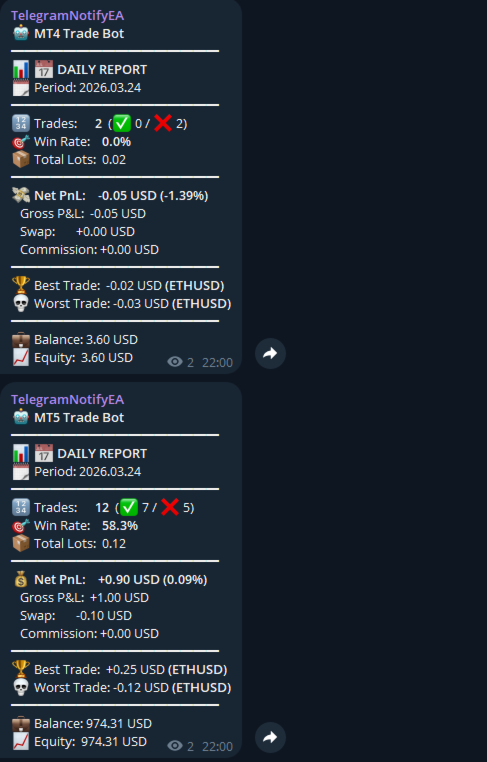
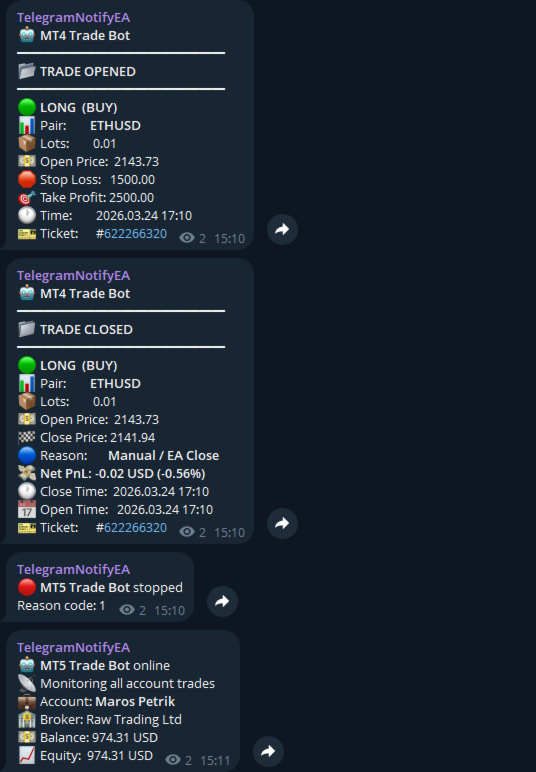
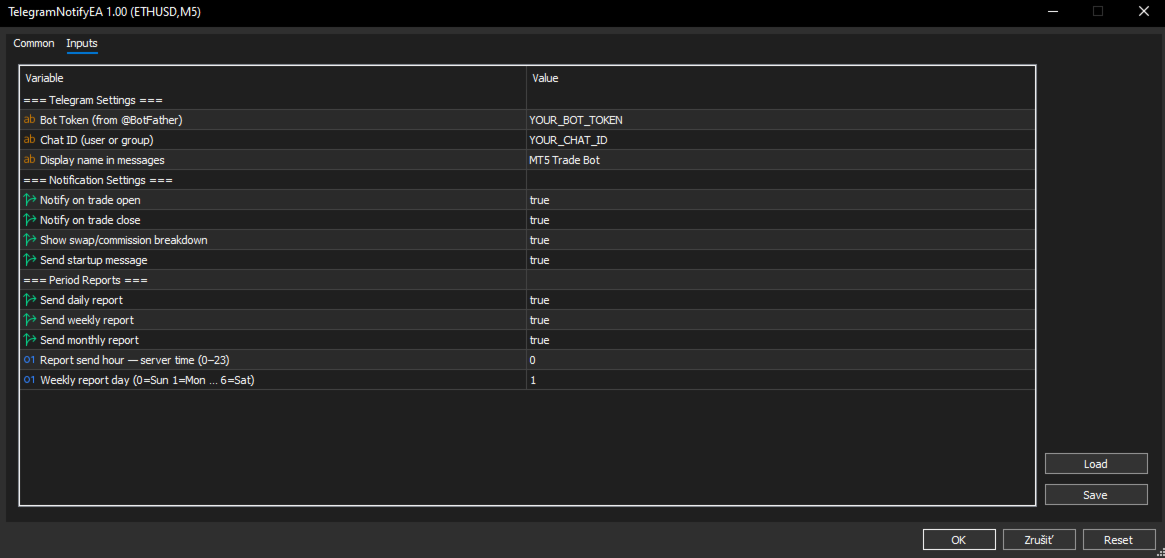
このエキスパートアドバイザーは、MT5アカウント上で取引が開かれるか閉じられる瞬間に、Telegram(プライベートチャット、グループ、またはチャンネル)に明確で美しく整形されたメッセージを直接送信します。また、オプションで毎日・毎週・毎月のパフォーマンスレポートも自動配信します。

主な機能

  • すべての取引の開倉・閉倉をリアルタイムで通知
  • 完全な取引詳細:方向、シンボル、ロット数、開閉価格、SL/TP、チケット番号
  • 純利益/損失を表示(オプションでSwap + 手数料の内訳も表示)
  • 明確な閉倉理由(Stop Loss、Take Profit、EA、手動、モバイル、マージンコールなど)
  • オプションの日次 / 週次 / 月次レポート(勝率、最良・最悪取引、総ロット数、口座残高/エクイティ)
  • EAをチャートに貼り付けたときの起動メッセージと削除時の停止メッセージ
  • どのチャートでも動作 — 口座全体を監視
  • 軽量設計(レポート有効時のみ1つのタイマー)
  • ヘッジ口座およびMT4 VPSに完全対応

3分で設定完了

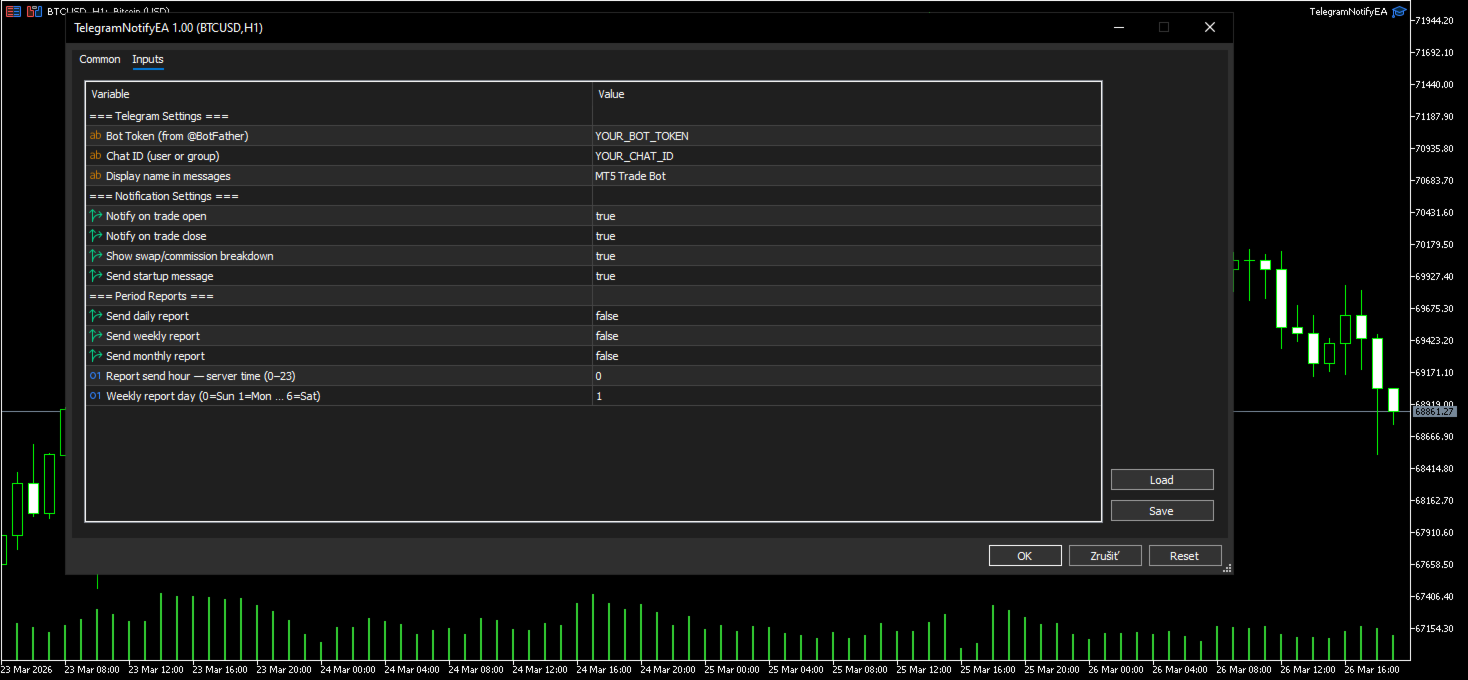
プログラミングは一切不要です。Telegramボットを作成し、Chat IDを取得してEAの入力パラメータに貼り付け、https: //api. telegram. org へのWebRequestを許可するだけで準備完了です。

スクリーンショット付き完全ステップバイステップ設定ガイド:
https://www.mql5.com/en/blogs/post/768386

技術情報

  • プラットフォーム:MetaTrader 4
  • WebRequest権限のみ必要
  • 純粋なMQL5 — 外部DLLや依存関係なし

MT4ターミナルをプロフェッショナルなトレーディングコマンドセンターに変身させましょう。
即時Telegramアラートと詳細なパフォーマンスレポートで、プラットフォームを開かずに24/7情報を把握できます。

TelegramNotifyEA v1.00 • MT4向けプロフェッショナルTelegram連携

おすすめのプロダクト
ORB-Williams FPOトレーディングロボットは、TobyCrabelを含むさまざまなOpeningRange Breakout(ORB)戦略と、より良いエントリーシグナルのための追加のトレンドインジケーターを、前者の出口戦略と組み合わせた結果です。LarryWilliamsの収益性の高いオープニング(FPO)。 シグナルに関する私の実際の自動取引の結果を見ることができます:https:// www.mql5.com/en/signals/1481106 ?source = Site + Signals + Favorites オープニングレンジブレイクアウト(ORB)は価格変動レンジであり、セッションごとにサポートレベルとレジスタンスレベルの組み合わせを生成し、バンドからのブレイクアウトを優先して位置付けます。または長くなり、それが故障したとき、それは売るか不足するという合図です。 これらのレベルは、特にシステムが持ついくつかのパラメーターに依存するため、これらのパラメーターに与える値に応じて、システムの結果は大幅に異なる可能性があります。問題のパラメータは「no_t
Tento jedinečný indikátor vám ukazuje rozsah, v ktorom sa pohybujú maloobchodní klienti. Spravidla, ak sa cena udržiava na priemernej úrovni, neskôr dosiahne vrchol a potom sa vráti na opačnú stranu. Indikátor je vhodný pre všetky grafy s možnosťou nastavenia pákového efektu, teda ak zoberieme do úvahy, že retailoví klienti sa pohybujú na trhu s pákovým efektom 500 až 100 páka. Indikátor je vhodný pre väčšie časové rámce H1,H4... s väčšími pákami 100,50,25  ale aj pre malé grafy M5,M15 s pákami
Universal Scalper Pro   is a high-performance automated trading system engineered for one purpose:  May get  consistent profit generation.    [ read full : i used the inputs for more profitable mentioned as Hint [underlined]]  Unlike restrictive EAs that lock you into a single pair, this universal engine works on   ANY Symbol   (XAUUSD, EURUSD, GBPUSD, Indices) and   ANY Timeframe . It is designed to adapt to market volatility, securing quick profits while protecting your capital with institutio
Gold Strike Predator
Ignacio Agustin Mene Franco
GoldStrike Predator – Professional Expert Advisor for XAUUSD GoldStrike Predator is an advanced, high-precision Expert Advisor (EA) designed exclusively for trading the XAUUSD pair (Gold vs. US Dollar) on the MetaTrader 4 platform. Developed with a sophisticated hybrid architecture, it combines multiple layers of technical and predictive analysis to identify high-probability opportunities in the gold market, one of the world's most volatile and profitable instruments. Trading Strategy The sys
Pending Order Grid EA MT4
Francisco Manuel Vicente Berardo
The Pending Order Grid is a multi-symbol multi-timeframe Expert Advisor that enables multi-strategy implementation based on pending order grids.  General Description   The Pending Order Grid allows the performing of a user-defined strategy through the creation of pending order grids. The Expert Advisor places pending orders of a given type (Buy Limit, Sell Limit, Buy Stop, or Sell Stop) at equidistant price levels to form each grid. The user might set up different grids to exist simultaneously
Renko Smart EA
Salah Eddine Elkouchi
2 (1)
Renko chart Removes a lot of the noise that is normally generated in the normal chart, and gives  a direct picture of the prices that being charged. This removes much of the noise from the candlestick charts and allows Traders to focus on actual market movements. It can also help Traders  trading larger or smaller price movements. For example, if you are using 50 point bricks, it takes a while to form a bullish or bearish brick. This tells Traders of the market that the it is moving, and that t
This is a must have tool for a serious trader. It saves your precious time spent for opening/closing trades, creating pending trades and modifying your TP/SL in bulk according to either pips or price. If you need to quickly open several pending orders (Buy Stop, Sell Stop) at a certain distance from each other, this script will do all the routine for you! The first time you use this handy tool, you will realize it has already paid for itself. Instructions: Drag and drop this script onto a chart.
This EA uses indicators to move the level line, the rules are if the price is below the level line then it is a buy signal, and if the price is above the level then a sell signal, trailing stop is to modify the stop loss, or to bring up a stop loss if previously sl = 0, this EA can accept manual orders via Android or home PC. if the condition is floating you can help this ea using manual orders which you think are good...
This is a simple arrow system based on Engulfing Candlestick Pattern. It gives you alerts on your smartphone when there is an engulfing candlestick pattern happens. Which type of alerts available? 1. It paints on chart Up/Down Arrows. 2. Popup message and sound alert in trading terminal window. 3. Push notification or Alert on your Android and IOS mobile phones (requires MT4 or MT5 app installed!) *Note: Use it on higher timeframes like H4 (4 hours), D1 (1 Day) then find trade opportunities on s
Introducing the "KFX Trade Manager" expert advisor for MetaTrader 4 (MT4), a comprehensive solution for advanced trade management and risk control. This powerful tool is designed to enhance your trading experience by automating various aspects of order handling, profit optimization, and alert notifications. With the "KFX Trade Manager," you can take your trading to the next level and streamline your operations for improved efficiency and better risk management. Key Features: Trade Management Set
Trade Assistance EA – Manual Trade Control Panel for MetaTrader 4 Trade Assistance EA is a lightweight and intuitive manual trading tool designed to give you full control over your trades directly from the chart. It helps traders execute, manage, and exit trades with just a click — no coding or complex setup required. ️ Key Features One-Click Buy/Sell Buttons Instantly open market buy or sell orders with preset lot size, Stop Loss, and Take Profit. Smart SL & TP Input Boxes Easily modify and
KT Candlestick Patterns Scanner is a Multi-Symbol and Multi-Timeframe scanner that fetches and shows various candlestick patterns on 28 currency pairs and 9 time-frames concurrently . The scanner finds the candlestick patterns by loading the KT Candlestick Patterns indicator as a resource in the background. Features The scanner can find the candlestick patterns on 252* combinations of symbols and time-frames from a single chart. Open the signal's chart loaded with a predefined template with a s
Gold EA Macro Trend v1
Jose Pablo Morales Del Valle
Kruler GOLD EA – Macro Aligned An MT4 Expert Advisor for XAUUSD and major Forex pairs (excluding JPY crosses) designed to capture sustained trends while staying selective in choppy markets. It combines multi-timeframe market context, dynamic risk management and an adaptive trailing system to let winners run while protecting equity. Recommended execution timeframe: M30. Instructions Open MetaTrader 4 → File → Open Data Folder → MQL4\Experts and copy the EA file there. Restart MT4 and attach Gold
AegisGold V4.4 - Product Description (MQL5 Market Compliant) ## Short Description Professional XAUUSD EA with multi-factor resonance scoring, 3-tier exit architecture (breakeven + partial TP + chandelier trailing), news filtering, and ATR-based risk management. ## Full Description ### Overview AegisGold is a professional-grade Expert Advisor designed specifically for XAUUSD (Gold) trading. It utilizes a **multi-factor resonance scoring system** that evaluates multiple technical indicators s
****************** ******* ******* *** FREE Trail for Demo *** ****************** ******* ******* 1. Search "ShootingAlert_bot in Telegram 2. Start it 3. Enjoy it EA Alert is using Telegram to do various actions: 1. Check Account Info 2. Check Order 3. Place Order 4. Modify Order 5. Switch user to help trade 6. Check Market Info 7. Show Chart 8. Show Chart with your template It is very useful for order management, especially while you are Working at office or Dine out with friends . It use
Rira Renko
Vitor Palmeira Abbehusen
RENKO on Time Chart This indicator is an enhanced Renko, so you can watch the Renko bricks on the chart to understand price movement more clearly the other improvement is automated box size according to ATR (Average True Range) period you can set the ATR number as you want and the box size of Renko changes automatically based on price movement Inputs Mode: Box size is the input to specify the size of the Renko box you want to print on the chart. This input lets you choose the fixed box siz
In Forex trading, the 1-day relative performance statistic gives an overview of the movements of various currency pairings in a single day. For traders who want to quickly make trading decisions and comprehend short-term market movements, this statistic is essential. Here's a thorough explanation of the 1-day relative performance, its importance, and a closer look at several particular Finviz cases. Understanding 1-Day Relative Performance The percentage change in a currency pair's value between
LEVELS MANAGER: DESCRIPTION Level Master:取引の効率を高める Level Masterは、取引戦略を強化し、取引結果を改善するために細心の注意を払って作られた、高度なマーケットメーカーツールです。この洗練されたツールは、市場を積極的に監視し、明確に定義されたルールに基づいて取引を実行することで際立っており、トレーダーが取引の旅の他の重要な側面に集中できるようにしながら、Level Masterが巧みに取引ポートフォリオを管理します。特に変動が激しい横ばい市場で優れた能力を発揮し、トレンド条件下での強力なパフォーマンスを維持します。 使いやすくカスタマイズ可能 高度にカスタマイズ可能なフレームワークを誇るLevel Masterは、トレーダーが特定の要件に合わせて取引戦略を調整できるようにします。直感的なインターフェースを備え、経験豊富なトレーダーと初心者の両方に最適なソリューションです。他のユーティリティとは異なり、Level Masterの特徴は、戦略テスターとの互換性です。 LEVELS MANAGER:入力設定 一般設定(
The CSM System is currently fully automated with all the special features and functions, controlled and regularly monitored. Its evolution, parameters and the individual algorithms are professionally evaluated and optimized by experienced development group of programmers who are developing new updated versions of system. Unlike the other systems, we focused to create the system where the backtesting successful results matching the real life situation. Our core lies in identification of these bi
Bot   DataSource AC   is an automatic trading tool developed by the author based on the DataSource AC indicator. https://www.mql5.com/en/market/product/108165   indicator DataSource AC. The bot must be launched on the   EURUSD H1   time period; it is optimized for this environment. Although if we consider the bot as a tool, then you can optimize the bot on any other time frame and currency pair. The principle of optimization when used on H1 is the following: we optimize at opening prices for 3
Минимальный депозит 500 евро. Под каждую валютную пару нужны отдельные настройки робота. Форекс является очень опасным делом. И никто не застрахован от потерь. Но нужно максимально стараться минимизировать риски потери денег. Тайм фрейм 15 минут. Робот торгует круглосуточно. В сутки может быть до нескольких десятков сделок. Поэтому ваш терминал тоже должен работать круглосуточно. Счет для торговли должен быть со спредом около нуля. Проверьте какие счета предлагает ваш брокер и выберите с минима
Just $30 for six months!!!. This will draw Order Blocks just by clicking on a candle. It will use the body or the wicks. It can also draw the mean threshold of the candle open/close or high/low. As a drawing tool, it is not active all the time after adding it to the chart. Activate by pressing 'b' twice on the keyboard within a second. If activated but then decided not to draw, deactivate by pressing 'b' once.  Box color depends if candle is above or below current price. Settings/Inputs: Number
This is a rarely working EA.  I recommend this EA for institutional funds. I recommend it only for pair EURUSD. Working timeframe M1 . Orders 1-3 series per month - is optimal. Public monitoring https://www.mql5.com/en/signals/616195 Strategy EA sells when is expensive and buys when cheap. If % bulls in a moment  <x   EA is searching for buys. If % bulls in a moment  >y  EA is searching for sells. For opening EA orders, used Market Structure High (MSH) - Market Structure Low (MSL). Parameters
EA Golden HARTLEY is a robust trading strategy designed for XAUUSD or GOLD  and M30 time frame. The EA creates pending stop trade orders using indicators Linear Regression Smoothed Moving Average, BB Range and parameters based on the market environment. It uses fixed SL, PT and exit from the position after time cut off. The EA was tested with several Monte Carlo robustness tests and optimized. Backtest was done on ticks data with a 15-year history 2007-2023. There is no need to set any paramete
Gold Go Goal
Kittipong Runganotipanich
GOLD GO GOAL ( GGG SYSTEM ) NEW RELEASES..!! Updated June 2020 Pure Indicator Technical Not  Martingale Not  Hedging Not  Grid Less  risk / More  reward Lots Size : 200 $ / 0.01 standard lots Currency : best on GOLD (XAUUSD) & SILVER (XAGUSD) **********  : ( not recommended ) NZD , JPY , CHF  Time Frame : H1 ( recommended ) or higher Survive on Sideway / Strong gain on Trend / Lower Drawdown ( less than 30% )
NC Night EA is an ultra-short-term EA system based on moving average during the night swing market, supporting single currency or multi-currency operations. Short-term operation when oscillating at night. According to the average movement of the swing period, judge the timing of entry. Set the stop loss range by yourself and the risk is more controllable The risk level can be flexibly set. Of course, risk and profit are often proportional too. Parameters MoneyManagementType: Fund management mod
フィボナッチリトレースと拡張ラインツール DiNapoliポイント取引方法とゴールデンセクション取引を使用するトレーダーにとって理想的なMT4プラットフォームのフィボナッチリトレースと拡張ラインツール 主な特長: あなたはフィボナッチリトレースメントの複数のセットを直接描くことができ、重要なリターンポイント間の関係は一目瞭然です。 2.フィボナッチ拡張を描画することができます。 3.フィボナッチフォールドバックとラインの延長は、簡単な観察と数値表示のために左右に動かすことができます。 4.チャートは非常に爽やかな 5.数字キーでサイクルを切り替えることができます。 ファンクションキー: 1。 [戻るを押す、要求に応じて描画する、最大8つのグループにする 2。拡張]を描くには[押す] 3。 \を押すと、現在のサイクルの下にあるすべての拡張機能と折り畳みが削除されます 4。フォールドバックを移動して削除して展開する (1)最初のフォールドバックセットのF5行をクリックします。 一度クリックすると(黄色に変わります)、キーボードのDeleteキーを押すと、フォーカ
Thank you for visiting us. We would like to introduce our new BLACK OUT EA which comes along with a moving average indicator for better trading This EA open and closes trades for you, no need to stress yourself. You can trade on any broker using any time frame . there are no restrictions!! You can easily increase your Lot size on the EA settings Backtest was done for two months. stay tuned for more !!!
Elystron – Advanced  Trading Engine for XAUUSD Elystron is a professional trading system designed to manage losses through a structured recovery approach while targeting consistent net profit per cycle. Unlike traditional grid systems, Elystron treats every position as an independent cycle, applying a reverse recovery mechanism that ensures losses are compensated before profit is taken.  How It Works • Each trade creates an independent recovery cycle   • A reverse pending order is placed at
ブログ: https://www.mql5.com/en/blogs/post/769823 MT4: https://www.mql5.com/en/market/product/176181 MT5: https://www.mql5.com/en/market/product/176182 VOLUME BUBBLE [tambangEA] は、トレーダーがチャート上で異常な市場動向を直接把握できるよう設計された、高機能なビジュアルボリュームプレッシャーインジケーターです。 このインジケーターは、異常なデルタ/ボリュームの動きを検出し、価格変動の周囲に明確なバブルマーカーとして表示します。各バブルはボリュームプレッシャーイベントを表しており、トレーダーは強い参加、不均衡、モメンタムプレッシャー、または潜在的な吸収がどこで発生しているかを素早く確認できます。 このツールは、ローソク足ごとの生ボリュームデータを手動で分析することなく、市場の参加状況を視覚的に素早く把握したいトレーダー向けに設計されています。 主なコンセプト ほとんどの価格チャートは価格の動きのみを表示します
このプロダクトを購入した人は以下も購入しています
Trade Manager EAへようこそ。これは、取引をより直感的、正確、そして効率的にするために設計された究極の リスク管理ツール です。これは単なるオーダー実行ツールではなく、包括的な取引計画、ポジション管理、リスク管理のためのソリューションです。初心者から上級者、迅速な実行を必要とするスキャルパーまで、Trade Manager EAはあらゆるニーズに対応し、為替、指数、商品、暗号通貨などさまざまな市場で柔軟に対応します。 Trade Manager EAを使用すると、複雑な計算が過去のものになります。市場を分析し、エントリーポイント、ストップロス、テイクプロフィットのレベルをチャート上のラインでマークし、リスクを設定するだけで、Trade Managerが最適なポジションサイズを即座に計算し、SLとTPをピップ、ポイント、口座通貨でリアルタイムに表示します。すべての取引が簡単かつ効果的に管理されます。 主な機能: ポジションサイズ計算機 :定義されたリスクに基づいて取引サイズを瞬時に決定します。 簡単な取引計画 :エントリー、ストップロス、テイクプロフィットを設定するためのド
Local Trade Copier EA MT4
Juvenille Emperor Limited
4.96 (111)
Local Trade Copier EA MT4 は、同一の Windows PC または Windows VPS 上で稼働する複数の MetaTrader 4 口座間で、取引をコピーおよび管理するための高速で柔軟なトレードコピーツールです。 ローカルでの取引同期に加え、Receiver 側でロットサイズ、リスク管理、取引フィルター、シンボルマッピング、取引管理、口座保護を個別に設定できます。 Transmitter と Receiver のターミナルは約 1分 で設定でき、同一ブローカーまたは異なるブローカーの口座間で、手動取引や EA による取引をコピーできます。適切な条件下では、ローカルの MetaTrader ターミナル間で取引情報を 0.5秒未満 で同期できます。実際の約定速度は、ブローカーのレイテンシー、ネットワーク状況、PC/VPS の性能、ターミナルの負荷によって異なります。 ご購入前に無料デモをお試しください Local Trade Copier EA MT4 の完全機能版無料デモ を、MT4 デモ口座で 1回につき4時間 テストできます。 Local Trad
Exp COPYLOT CLIENT for MT4
Vladislav Andruschenko
4.69 (65)
MetaTrader 4向け 高機能トレードコピーソフト MetaTrader 4 用の、高速・安定・高機能なトレードコピーソフトです。 COPYLOT は、 MetaTrader 4 と MetaTrader 5 間でFX取引をコピーでき、さまざまな口座タイプや運用スタイルに合わせて柔軟に同期できます。 COPYLOT MT4版の対応コピー方式: MetaTrader 4 → MetaTrader 4 MetaTrader 5 Hedge → MetaTrader 4 MetaTrader 5 Netting → MetaTrader 4   MT5版 詳細説明 + DEMO + PDF 購入方法 インストール方法 ログファイルの取得方法 テストと最適化の方法 Expforexの全製品 MetaTrader 5版 を使えば、 MetaTrader 5 → MetaTrader 5 および MetaTrader 4 → MetaTrader 5 のコピーにも対応します: COPYLOT CLIENT for MT5 COPYLOT は、2台、3台、さらには10台規模のターミナル環境でも
Trade Assistant MT4
Evgeniy Kravchenko
4.43 (197)
取引 ごとのリスクの 計算、新規注文 の 簡単 な 設置、部分的 な 決済機能 を 持 つ 注文管理、 7 種類 のトレーリングストップなど 、便利 な 機能 を 備 えています 。 追加の資料と説明書 インストール手順 - アプリケーションの手順 - デモアカウント用アプリケーションの試用版 ライン機能 チャート上にオープニングライン、ストップロス、テイクプロフィットを表示します。この機能により、新規注文を簡単に設定することができ、注文を出す前にその特徴を確認することができます。   リスク計算 リスク計算機能は、設定されたリスクとストップロス注文のサイズを考慮して、新規注文のボリュームを計算します。ストップロスの大きさを自由に設定できると同時に、設定したリスクを守ることができます。 Lot calc ボタン - リスク 計算 を 有効 / 無効 にします 。 Risk フィールドでは 、必要 なリスクの 値 を 0 から 100 までのパーセンテージまたは 預金通貨 で 設定 します 。 設定」 タブで 、 リスク 計算 の 種類 を 選択 します :「 $ 通貨」、「 % 残
TradePanel MT4
Alfiya Fazylova
4.84 (95)
Trade Panelは多機能なトレーディングアシスタントです。アプリには手動取引用の50以上のトレーディング機能が搭載されており、ほとんどの取引作業を自動化することができます。 アプリの説明書: https://www.mql5.com/en/blogs/post/756482 デモ口座用アプリの試用版: https://www.mql5.com/en/blogs/post/750865 アプリのインストール方法: https://www.mql5.com/en/blogs/post/756239 アプリをビジュアルモードでテストする方法: https://www.mql5.com/en/blogs/post/770277 VPSのMetaTraderにアプリをインストールする方法: https://www.mql5.com/en/blogs/post/770190 取引。 ワンクリックで取引操作を行うことができます: リスクを自動計算して指値注文やポジションを開く。 複数の注文やポジションをワンクリックで開く。 注文のグリッドを開く。 保留中の注文やポジションをグループごとに閉じる
Trade Indicator Assistant is a powerful MT4 utility designed to turn indicators into automated trading systems. Its main feature is the ability to automatically detect an indicator’s   BUY and SELL signal buffers , without requiring you to know the buffer numbers, search through indicator settings, or modify the indicator source code. Bonus Indicator: After purchasing Trade Indicator Assistant, contact me to receive Trade Signal Pro completely free as a bonus indicator. [Download Demo Version]
コピー機->便利で高速なインターフェースインタラクション、ユーザーはすぐに使用できます     ->>>> WindowsコンピュータまたはVPS Windowsでの使用を推奨 特徴: 多様でパーソナライズされたコピー取引設定:1. 異なるシグナルソースに異なるロットモードを設定できます。2. フォワードコピー取引とリバースコピー取引に異なるシグナルソースを設定できます。3. シグナルはコメントで設定できます。4. 契約ロットに応じてロットを調整するかどうか 多様でパーソナライズされたコピー注文設定2:1.品種ごとに異なるロットモードを設定できます2.順方向コピー注文と逆方向コピー注文に異なる品種を設定できます3.コメントでシグナルを設定できます4.契約ロットに応じてロットを調整するかどうか コメントフィルタリング、MAGICフィルタリング、シグナルロットフィルタリング、ローカル製品フィルタリング 勤務時間設定 逆同期SLAVE終了 注文バインド機能: 任意の注文を設定されたシグナルソース注文にバインドできます (テーブルをダブルクリックして編集します) アカウントリスク管理 基本
Telegram to MT4 Multi-Channel Copier   は、 Telegram と Discord チャンネルのトレードシグナルを MetaTrader 4 へ自動コピーします。ボット不要、ブラウザ拡張不要、手動コピー不要。Telegram や Discord にシグナルが届くと、EA が数秒であなたのターミナルに注文を出します。 さらに、チャンネルをコピーする前に、内蔵バックテスターでそのチャンネルがあなたの口座でどう動いたかを確認できます。 製品は 2 つのコンポーネントで構成されます:Telegram チャンネルを監視する Windows アプリと、MT4 ターミナルでシグナルを執行する本 EA です。MT5 版もあります   こちら . セットアップガイドとアプリのダウンロード:   https://www.mql5.com/en/blogs/post/768988 Telegramのシグナルチャンネルをバックテストする方法 をご覧ください。 現在の価格は今後値上げされます。 仕組み アプリはあなた自身の Telegram アカウントで接続するため、フォロ
無料トライアル版ダウンロード Copy Cat More (コピーキャット・モア) MT4 トレードコピー (Trade Copier) は単なるローカルのトレードコピーではありません。今日のトレード課題のために設計された 完全なリスク管理・執行フレームワーク (risk management and execution framework) です。プロップファーム (prop firm) のチャレンジから個人のポートフォリオ管理まで、堅牢な執行、資金保護、柔軟な設定、高度なトレード処理の組み合わせによって、あらゆる状況に適応します。 このコピーは   マスター (Master、送信側) と スレーブ (Slave、受信側)   の両モードで動作し、成行注文・指値注文、トレードの変更、部分決済、そして両建て決済 (Close By) 操作をリアルタイムで同期します。デモ口座と実口座、トレード用ログインと投資家ログインの両方に対応し、永続的トレードメモリ (Persistent Trade Memory) システムにより、EA・端末・VPS が再起動しても復旧を保証します。一意の
FCK CurrencyStrength Pro
Patel Hitendrakumar Mahendrabhai
Hi Friends, " FCK Currency Strength Pro " is a auto & semi auto trading expert with direction of pair. Buy-Sell separate or multi currency in one click. The strategy of  FCK Currency Strength Pro  is a combination of custom indicator, Trendlines, Support & Resistance levels ( Price Action ) and most important secretive trading algorithm mentioned above. Download News Ex4 and csv file You need the following SDSnews.ex4 in MQL4/Libraries and the daylightsavings.csv in MQL4/Files. Only 4 of 5 copi
The product will copy all telegram signal to MT4   ( which you are member  ) , also it can work as remote copier.  Easy to set up, copy order instant, can work with almost signal formats, image signal, s upport to translate other language to English Work with all type of channel or group, even channel have "Restrict Saving Content", work with  multi channel, multi MT5 Work as remote copier: with signal have ticket number, it will copy exactly via ticket number. Support to backtest signal. How to
News Filter EA: Advanced Algo Trading Assistant News Filter EA is an advanced algo trading assistant designed to enhance your trading experience. By using the   News Filter EA , you can integrate a Forex economic news filter into your existing expert advisor, even if you do not have access to its source code. In addition to the news filter, you can also specify   trading days   and   hours   for your expert. The News Filter EA also includes   risk management   and   equity protection   features
RS Trade Copier - 超高速 で動作するローカルトレードコピー機。 真の グラフィカルインターフェース搭載。口座番号の手動入力はもう終わりです。200項目を超える長大なパラメータリストとも、これでおさらばです。 複数のMT4とMT5ターミナル間で取引操作をコピーするための、信頼性が高く柔軟なツールです。経験豊富なトレーダーやシグナルサービス、個人投資家に適しています。1つまたは複数のシグナルソース(Provider)から1つまたは複数のレシーバー(Client)へ、高い精度と最小限の遅延で 取引を同期 します。シンプルな自動設定と高度な手動設定の両方をサポートしています。手動または他のEAで開かれた注文に干渉しません。すべての処理は MT4内でローカルに 行われ、サードパーティサーバーを使用しません。 RS Trade Copierと他のソリューションの比較 RS Trade Copier 他のソリューション 設定 ビジュアルステップバイステップウィザード。 設定時間は約1分。 200以上の分かりにくい入力パラメータ。 設定時間は約20分。 速度 非同期トレード操作。*
Take a Break pauses your Expert Advisors when trading is a bad idea: before news, after a daily loss, outside your trading hours, or when a rule you wrote yourself says so. When the pause is over, your EAs simply continue. Account protection for all your EAs in one tool: news filter, drawdown and equity protection, time filter and custom rules. One EA on one chart protects the whole account, the free indicator gives every chart its own rules on top. Free demo | What is new in 26.09 | Support Ass
TelegramからMT4へ: 究極のシグナルコピーソリューション Telegram to MT4 は、DLLを必要とせず、TelegramのチャンネルやチャットからMetaTrader 4プラットフォームに取引シグナルを直接コピーできる最先端のユーティリティです。この堅牢なソリューションは、比類のない精度とカスタマイズオプションにより、シグナルのシームレスな実行を保証し、時間を節約し、効率性を向上させます。 [ Instructions and DEMO ] 主な特徴 直接的なTelegram API統合 電話番号とセキュアコードで認証します。 ユーザーフレンドリーな EXE ブリッジを使用して、チャット ID を簡単に取得および管理します。 複数のチャネル/チャットを追加、削除、更新して、同時に信号をコピーします。 高度なフィルターによる信号解析 カスタム例外語 (例: 「レポート」、「概要」) を含む不要な信号をスキップします。 柔軟な SL および TP 形式 (価格、ピップ、ポイント) をサポートします。 シグナルが価格ではなくポイントを指定する場合、エントリ ポイントを自動
Trade Manager は、リスクを自動的に計算しながら、取引を迅速に開始および終了するのに役立ちます。 過剰取引、復讐取引、感情的な取引を防止する機能が含まれています。 取引は自動的に管理され、アカウントのパフォーマンス指標はグラフで視覚化できます。 これらの機能により、このパネルはすべてのマニュアル トレーダーにとって理想的なものとなり、MetaTrader 4 プラットフォームの強化に役立ちます。多言語サポート。 MT5バージョン  |  ユーザーガイド + デモ Trade Manager はストラテジー テスターでは機能しません。 デモについてはユーザーガイドをご覧ください。 危機管理 % または $ に基づくリスクの自動調整 固定ロットサイズを使用するか、ボリュームとピップに基づいた自動ロットサイズ計算を使用するオプション RR、Pips、または価格を使用した損益分岐点ストップロス設定 トレーリングストップロス設定 目標に達したときにすべての取引を自動的に終了するための 1 日あたりの最大損失 (%)。 過度のドローダウンからアカウントを保護し、オーバートレードを防ぎま
MT4 to Telegram Signal Provider は使いやすく、完全にカスタマイズ可能なツールで、Telegramに信号を送信し、あなたのアカウントを信号提供者に変えることができます。 メッセージのフォーマットは 完全にカスタマイズ可能です! しかし、簡単な使用のために、あらかじめ定義されたテンプレートを選択し、メッセージの特定の部分を有効または無効にすることもできます。 [ デモ ]   [ マニュアル ] [ MT5バージョン ] [ Discordバージョン ] [ Telegramチャンネル ]  New: [ Telegram To MT5 ] セットアップ ステップバイステップの ユーザーガイド が利用可能です。 Telegram APIの知識は必要ありません。開発者が必要なものをすべて提供します。 主要機能 購読者に送信される注文の詳細をカスタマイズする機能 例えばブロンズ、シルバー、ゴールドなど、階層型のサブスクリプションモデルを作成できます。ゴールドサブスクリプションでは、すべての信号が得られますなど。 ID、シンボル、またはコメントによる注文のフ
Trade Copier Global: The name speaks for itself. This copier allows you to copy orders between MT4 terminals even if they are not installed on the same computer. Features Copying trades between MT4 terminals around the world with a short delay. Automatically recognizes symbol prefixes. Can connect many Slaves to the same Master. Supports pending and market orders. Supports partial order close (with limitations, see below) Can send messages and notifications to the Slaves from the Master Several
VirtualTradePad mt4 Extra
Vladislav Andruschenko
4.85 (61)
ワンクリックで取引できるトレーディングパネル。ポジションと注文の操作!チャートまたはキーボードから取引。 手動取引用の取引パネル。チャート(チャートウィンドウ)またはキーボードから取引できます。開閉、リバース、ロックポジションと注文を処理する МetaТrader4のメインオーダーのトレーディングコントロールパネル:売買、売却、売却、売却、売却、閉じる、削除、修正、トレーリングストップ、ストップロス、takeproft 新しいプレミアム版が利用可能です: VirtualTradePad PRO SE   で取引ワークフローを強化できます。 MetaTrader 5   と   MetaTrader 4   に対応した次世代のプロ向け取引パネルです。 MT5のバージョン 完全な説明 +DEMO +PDF 購入する方法 インストールする方法    ログファイルの取得方法    テストと最適化の方法    Expforex のすべての製品 シンボルウィンドウからの取引とキーボードからの取引! あなたはMetaTrader 4ターミナル - バーチャルコントロールパネルVirtualTr
MetaTrader 4 用の通貨強弱インジケーター この 通貨強弱インジケーター は最大 28 の主要通貨ペアを読み取り、USD、EUR、GBP、JPY、CHF、CAD、AUD、NZD の 8 通貨それぞれについて 1 つの数値を出します。どの通貨が主導しているかを調べるためにチャートを次々と開く必要はなく、MetaTrader 4 のチャート上の 1 つのパネルを見るだけで、買われている通貨と売られている通貨が分かります。 パネルに表示される内容 8 通貨それぞれの強弱バーとパーセンテージ(強い順) マルチタイムフレーム マトリクス:通貨ごとに 3 つの時間足を横並びで表示し、M15、H1、H4 が一致しているかをエントリー前に確認できます 各行の強弱履歴。20 から 60 まで上げてきた通貨と、90 から 60 まで下げてきた通貨は同じではありません ベストペア :強弱差が最も大きい組み合わせを並べ替えて表示。クリックするとそのペアのチャートが開きます 避けるペア :2 つの通貨が同じ方向に動くと取引の余地がありません。隠さず一覧に出します ワンクリックで開く 28 ペアパネル。
Trade Dashboard simplifies how you open, manage, and control your trades, with built-in lot size calculation. It allows you to execute trades, manage risk, and control positions directly on the chart, with tools such as partial close, breakeven, and trailing stop. Designed to reduce manual work and help you stay focused on your trading decisions. A demo version is available for testing. Detailed explanations of features are provided within the MQL5 platform. Installation instructions are include
Smart Copy Local MT4
Kyra Nickaline Watson-gordon
5 (7)
Smart Copy is an Easy-to-Use EA that supports Multi Copying Metatrader4 and Metatrader5 and Local/Remote Copying. (Remote Version is coming soon) Free version is available on Smart Copy Local Free MT4 Specifications :     Real Time, Multi Terminal - Multi Account - MT4/MT5 trade copying     Copy from netting to hedge and hedge to netting is supported.     Fast and instant copy     All settings are input visually.     Easy modifying symbol names, prefix, suffix     Enable/Disable copying s
Want automatically to put the pending order, take profit and stop loss? This EA will do it on your behalf! The Fibo Heart EA strategy will place limit order after the ‘check point’ breakout. The position will be triggered when the price make a successful retest. If not, the pending order will automatically deleted after price hit certain level. You also have option to enable market order (instant execution) and custom take profit in the inputs setting. This EA must be attached with Fibo Heart In
Unlimited Trade Copier Pro is a tool to copy trade remotely to multiple MT4, MT5 and cTrader accounts at different computers/locations over internet. This is an ideal solution for you if you are a signal provider and want to copy your trades to other receivers globally on your own rules. One provider can copy trades to multiple receivers and one receiver can get trade from multiple providers as well. The provider can even set the subscription expiry for each receiver, so that receiver will not b
King Trade Copier MT4
Mohammed Maher Al-sayed Mohammed Ahmed Saleh
5 (1)
King Trade Copier は、同じコンピューターまたは VPS 上で動作する MetaTrader ターミナル同士を接続します。ある口座で建てた取引が、ほかの口座にも現れます。このファイルは両方の役割を備えているため、同じダウンロードでも、Mode に設定した値によって送信側にも受信側にもなります。 各チャートでは、パネルがこのターミナルが送信中か受信中かを表示し、相手側の口座名を示し、応答した受信側の数を数え、最後のシグナルからの経過時間を表示します。コピーされなかった注文は、消えてしまうのではなく、その理由がパネルに残ります。 コピーされる内容 成行注文、新規と決済 指値・逆指値注文:発注、変更、削除 Stop Loss と Take Profit、最初の値とその後のすべての変更 部分決済と追加ボリューム 変更は一つずつ個別に追跡されるため、建値に移動してからトレールされるストップも、注文が建っている間は同じように受信側の口座に届きます。 速度と無人運用 送信側では、スケジュールに基づく定期的な確認は行いません。注文が変わった瞬間に更新が書き込まれ、受信側は 1 ミリ秒
This is a program in the form of an EA that attaches to a chart in MetaTrader 4. Then, by using API from Bittrex, Binance websites, it downloads the history of altcoins. By selecting a pair name, the EA automatically downloads all time frames history (Daily,H12,H4,H2,H1,M30,M15,M5,M3,M1) so there is no need to attach multiple EAs to different charts. You can select one pair from Bittrex and 4 pairs from Binance exchange with one running EA and create up to 15 timeframes for 5 different pairs. Th
Strategy Builder offers an incredible amount of functionality. It combines a trade panel with configurable automation (covert indicators into an EA), real-time statistics (profit & draw down) plus automatic optimization of SL, TP/exit, trading hours, indicator inputs. Multiple indicators can be combined into an single alert/trade signal and can include custom indicators, even if just have ex4 file or purchased from Market. The system is easily configured via a CONFIG button and associated pop-up
Grid Manual MT4
Alfiya Fazylova
4.71 (17)
「Grid Manual」は、注文のグリッドを操作するための取引パネルです。 ユーティリティはユニバーサルで、柔軟な設定と直感的なインターフェイスを備えています。 それは、損失を平均化する方向だけでなく、利益を増やす方向でも注文のグリッドで機能します。 トレーダーは注文のグリッドを作成して維持する必要はありません。 すべてが「Grid Manual」によって行われます。 注文を開くだけで十分であり、「Grid Manual」は注文のグリッドを自動的に作成し、非常に閉じるまでそれに付随します。 完全な説明とデモバージョン ここ。 ユーティリティの主な機能と機能 ユーティリティは、モバイル端末から開かれた注文を含め、あらゆる方法で開かれた注文を処理します。 「制限」と「停止」の2種類のグリッドで機能します。 グリッド間隔の計算には、固定と動的(ATRインジケーターに基づく)の2つの方法で機能します。 オープンオーダーグリッドの設定を変更できます。 チャート上の各注文グリッドの損益分岐点を表示します。 各注文グリッドの利益率を表示します。 ワンクリックでグリッドから収益性の高い注文を閉じるこ
取引したい主要エリアを特定したら、サポートとレジスタンス、または供給と需要のゾーンを自動的に取引します。この EA を使用すると、1 回のクリックで買いゾーンと売りゾーンを描画し、価格が反転すると予想される場所に正確に配置できます。EA はそれらのゾーンを監視し、ゾーンに指定した価格アクションに基づいて自動的に取引を行います。最初の取引が行われると、EA は、ターゲット エリアとなる、配置した反対のゾーンで利益を出して終了します。その後、2 つの選択肢があります。取引を終了して新しいゾーンを描画してエントリーするか、利益を出して終了し、すぐに反対方向に取引を反転して、「常に市場に参加する」スタイルの戦略を作成します。 入力と戦略を含む完全なマニュアルはこちら: https://www.mql5.com/en/blogs/post/760256 この EA は、市場で固定またはハード ストップ ロスを使用しないポジション トレーダーまたはドル コスト平均法の取引戦略向けに設計されています。代わりに、次の利用可能なサポートまたはレジスタンス ゾーンで同じ方向に新しい取引を行うことで、
これは視覚的な取引パネルであり、取引を簡単に配置および管理し、人為的エラーを回避し、取引活動を強化するのに役立ちます。使いやすい視覚的なインターフェースと、健全なリスクおよび位置管理アプローチを組み合わせています。 [ インストールガイド | 更新ガイド | トラブルシューティング | よくある質問 | すべての製品 ] 驚くほど使いやすい チャートから簡単に取引 正確なリスク管理との取引、手間のかからない 資本の保存が最優先事項です 気をつけずに利益を上げましょう できるだけ早くリスクのない取引をお楽しみください 開かれているすべての取引の自動トレーリングストップ 最初のストップロスは、取引が行われるとすぐに配置されます EAは、取引を行った後に次のタスクを実行します。 最初のストップロス/テイクプロフィットは自動的に配置されます できるだけ早くフリーライドにロックします(オプション) ストップロスを初めて損益分岐点に移動します(オプション) 停止するまで、希望の方法を使用してストップロスを追跡します その他のクールな機能は次のとおりです。 優れたターミナルアクティビティレポート
作者のその他のプロダクト
Kalman Trend Filter — プロフェッショナル適応型トレンド平滑化指標 MetaTrader 5 で最も正確かつ数学的に最適なトレンド推定器。 航空宇宙・ロボット工学・クオンツトレーディングで実績のある古典的 カルマンフィルター(Kalman Filter) を採用。市場のノイズを賢く除去し、クリーンで高度に適応的なトレンドラインをリアルタイムで描きます。 なぜカルマンフィルターなのか? 単純移動平均や他の平滑化ツールとは異なり、カルマンフィルターは「真のトレンド」を継続的に推定しながら、自動的に感度を調整します。 完全無リペイント(Non-Repainting) ・厳密に因果的 — 過去の値は一切変わりません。 統計的に意味のある信頼区間(1σ ≈ 68%、2σ ≈ 95%)を提供します。 主な機能 リアルタイムで色分けされたトレンドライン(DodgerBlue = 強気、OrangeRed = 弱気) 上下の信頼バンド(幅は自由に調整可能) カルマンゲイン(Kalman Gain)の任意表示(上級者・デバッグ用) 全価格タイプ対応(終値、中央値、典型値、加重など
FREE
Kalman Trend Filter — プロフェッショナル適応型トレンド平滑化指標 MetaTrader 4 で最も正確かつ数学的に最適なトレンド推定器。 航空宇宙・ロボット工学・クオンツトレーディングで実績のある古典的 カルマンフィルター(Kalman Filter) を採用。市場のノイズを賢く除去し、クリーンで高度に適応的なトレンドラインをリアルタイムで描きます。 なぜカルマンフィルターなのか? 単純移動平均や他の平滑化ツールとは異なり、カルマンフィルターは「真のトレンド」を継続的に推定しながら、自動的に感度を調整します。 完全無リペイント(Non-Repainting) ・厳密に因果的 — 過去の値は一切変わりません。 統計的に意味のある信頼区間(1σ ≈ 68%、2σ ≈ 95%)を提供します。 主な機能 リアルタイムで色分けされたトレンドライン(DodgerBlue = 強気、OrangeRed = 弱気) 上下の信頼バンド(幅は自由に調整可能) カルマンゲイン(Kalman Gain)の任意表示(上級者・デバッグ用) 全価格タイプ対応(終値、中央値、典型値、加重など
FREE
Drawdown Protector EA は、MetaTrader 4 用に設計された包括的なリスク管理およびアカウント保護システムです。この先進的なエキスパートアドバイザー(EA)は、複数の安全メカニズム、利益確定機能、および時間ベースのコントロールを通じて、取引アカウントの自動監視と保護を提供します。デイトレーダー、スウィングトレーダー、またはアルゴリズムトレーダーであっても、この EA は究極のセーフティネットおよび利益ガーディアンとして機能します。 コア保護機能 ドローダウン保護 最大日次ドローダウン %: 指定されたパーセンテージを超える日次損失が発生した場合、すべての取引を自動的にクローズ 最大総ドローダウン %: アカウントの最高エクイティピークからの全体的なドローダウンを保護 リアルタイム監視: アカウントのエクイティを継続的に追跡し、ドローダウンを計算 スマート計算: 日次ドローダウンは各取引日の開始時に自動的にリセット 利益保護 最大日次利益 %: 目標に到達した場合、すべての取引をクローズして日次利益を確保 最大総利益 %: 総利益目標に到達した場合、全体的な
Spread Monitoring System BRIEF DESCRIPTION A spread monitoring and analysis panel that records spread data per minute, stores it without a time limit, and shows when a symbol is cheap or expensive to trade. OVERVIEW Spread is a real trading cost, and it is not constant. It widens around news releases, at rollover, during low-liquidity hours, and it varies by broker. Most traders only see the current spread number in the Market Watch window, with no record of how it behaved five minutes ago, l
導入 レンジブレイクアウト取引は、外国為替取引で最も信頼性の高い戦略の一つであり、市場が大きな動きをする前に自然に統合する傾向を利用します。RangeD Breakout は、この古典的な概念を現代的なリスク管理技術とインテリジェントなフィルタリングシステムで強化します。 多くのブレイクアウト戦略がイントラデイレンジに焦点を当てるのとは異なり、この EA は特にデイリーレンジを対象とし、これらはより信頼性が高く、偽のブレイクアウトが少ない傾向があります。戦略は、低ボリュームの時間帯での統合期間の後、市場が最終的に方向を選択し、決定的に動くという前提に基づいています。 主要な機能と改善点 インテリジェントなレンジ検証 高度なブレイクアウト確認 サポートペア: XAUUSD, USDJPY, GBPUSD, US30, ETHUSD タイムフレーム: M5 最小残高: 500$ SetFiles: リンク EA を 24/7 稼働させるために VPS を使用してください(強く推奨)
Introducing  Trend Sniper Pro. Its Range Breakout sýstem developer to catch daily trend of the market No  Martingale,  No  Grid , No Averaging, No AI Live Signals - Link  (FusionMarkets)       FEATURES RangeFilter,Trading Hours,Take Profit,Trailing Stoploss Option to use Fixed Lots or Risk % Trading on USDJPY Note:  Its very important to use  RAW, ECN or Zero SPREAD  accounts for best results! How to Setup: Download the EA on your MT5 terminal  Open the chart M5 timeframe. Load the EA onto th
Drawdown Protector EA は、MetaTrader 5  用に設計された包括的なリスク管理およびアカウント保護システムです。この先進的なエキスパートアドバイザー(EA)は、複数の安全メカニズム、利益確定機能、および時間ベースのコントロールを通じて、取引アカウントの自動監視と保護を提供します。デイトレーダー、スウィングトレーダー、またはアルゴリズムトレーダーであっても、この EA は究極のセーフティネットおよび利益ガーディアンとして機能します。 コア保護機能 ドローダウン保護 最大日次ドローダウン %: 指定されたパーセンテージを超える日次損失が発生した場合、すべての取引を自動的にクローズ 最大総ドローダウン %: アカウントの最高エクイティピークからの全体的なドローダウンを保護 リアルタイム監視: アカウントのエクイティを継続的に追跡し、ドローダウンを計算 スマート計算: 日次ドローダウンは各取引日の開始時に自動的にリセット 利益保護 最大日次利益 %: 目標に到達した場合、すべての取引をクローズして日次利益を確保 最大総利益 %: 総利益目標に到達した場合、全体的
MT5の毎取引に対する即時・プロフェッショナルなTelegramアラート + 自動パフォーマンスレポート このEAは何をしますか? このエキスパートアドバイザーは、MT5アカウント上で取引が開かれるか閉じられる瞬間に、Telegram(プライベートチャット、グループ、またはチャンネル)に明確で美しく整形されたメッセージを直接送信します。また、オプションで毎日・毎週・毎月のパフォーマンスレポートも自動配信します。 主な機能 すべての取引の開倉・閉倉をリアルタイムで通知 完全な取引詳細:方向、シンボル、ロット数、開閉価格、SL/TP、チケット番号 純利益/損失を表示(オプションでSwap + 手数料の内訳も表示) 明確な閉倉理由(Stop Loss、Take Profit、EA、手動、モバイル、マージンコールなど) オプションの日次 / 週次 / 月次レポート(勝率、最良・最悪取引、総ロット数、口座残高/エクイティ) EAをチャートに貼り付けたときの起動メッセージと削除時の停止メッセージ どのチャートでも動作 — 口座全体を監視 軽量設計(レポート有効時のみ1つのタイマー) ヘッジ口座およ
ボラティリティ加重クラウド(VWC) — 適応型トレンド&ボラティリティ指標 Volatility Weighted Cloud (VWC) は、次世代の適応型インジケーターです。滑らかな価格クラウド、動的に調整されるボラティリティバンド、そしてリアルタイムでトレンドに合わせて色付けされたローソク足を組み合わせ、市場の方向性と強さを 再描画なし で明確に表示します。 従来の固定幅クラウドやボリンジャーバンドとは異なり、VWCはパーセンタイルランキングシステムにより、現在のボラティリティ状況に応じてバンド幅を自動調整します。これにより、穏やかな市場から高ボラティリティ市場まで幅広く対応し、高確率のトレンド転換をより正確に捉えることができます。 主な特徴: 適応型ボラティリティクラウド — CloseベースとOpenベースの2本の平滑化ラインで構成されるクリーンな塗りつぶしクラウド 動的適応バンド — ボラティリティのパーセンタイルランキングに基づき、インテリジェントに拡大・縮小する上下バンド(固定倍数なし) 再描画なしのトレンド検出 — 信号は確定したクローズバーのみで生成され、最高
Spread Monitoring System は、軽量で常時稼働するインジケーターです。各完了した M1 足の最小・最大・平均スプレッド(pips)を継続的に記録し、チャート上にライブオーバーレイパネルを直接表示します(別ウィンドウ不要)。 機能 各ティックで現在のスプレッドをサンプリングし、現在の足の統計を蓄積します。新しい M1 バーが開くと、完了した足のデータが内部履歴バッファに保存されます(上限なし)。すべてのデータはチャート下部に固定されたコンパクトなパネルで 200ms ごとに更新されます。 パネル構成 タイトルバー — 通貨ペア、タイムフレーム、MA期間、保存バー数、経過時間 現在足行 — 現在スプレッド + オープン中の足の Min/Max/Avg 履歴行 — 全保存バーの全体 Min/Max/Avg MA行 — 設定期間の平滑化 Min/Max/Avg ライン 棒グラフ — 履歴全体のピクセル棒グラフ(現在バーは強調表示) 技術的特徴 固定オブジェクトプールを使用し、CPU負荷を極力低減。 4桁・5桁ブローカー両対応、スプレッドは常にpips表示。 色、MA期間
フィルタ:
レビューなし
レビューに返信