TimeGap Block SMC MultiTF
- インディケータ
- バージョン: 4.1
- アクティベーション: 5

TimeGap Block SMC v3.00
Professional Time Gap Analysis Indicator for MetaTrader 5
TimeGap Block SMC is a professional MetaTrader 5 indicator designed to identify and analyze Time Gap zones within market structure. It automatically detects price areas where the market moved too quickly, spending very little time inside a particular price range. These areas often become significant support and resistance zones and can provide valuable trading opportunities when price revisits them.
The indicator is based on Smart Money Concepts (SMC) and focuses on market inefficiencies rather than traditional candlestick patterns. It helps traders identify institutional price behavior and areas where supply and demand became temporarily unbalanced.
TimeGap Block SMC can be used on any symbol and any timeframe, from scalping to swing trading.
What is a Time Gap?
A Time Gap is a price area where the market moved rapidly without spending enough time inside the range.
Such movements leave behind zones of inefficient price discovery. When price eventually returns to these areas, the market often reacts in one of two ways: it either rejects the zone and resumes the original trend or fills the imbalance before continuing in the opposite direction.
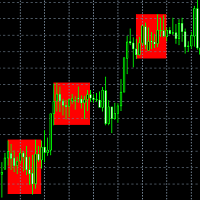
TimeGap Block automatically detects these areas and displays them directly on the chart, allowing traders to monitor important market structure levels without manual analysis.
Features
The indicator continuously analyzes historical price data and automatically plots all detected Time Gap zones.
Main features include:
- Automatic Time Gap detection
- Historical zone analysis
- Strength classification for each zone
- Color-coded visualization
- Filled or outlined zones
- Background or foreground display
- Mitigation (zone fill) tracking
- Sound, Push and E-mail alerts
All parameters can be adjusted to match different trading styles.
Main Parameters
Universal Search Range defines how many historical bars are analyzed.
Historical Depth determines how much historical data is used to search for Time Gap zones.
Minimum Time Gap Bars specifies the minimum duration required for a valid Time Gap.
Price Zone Percent controls the width of the detected price zone.
Maximum Time In Zone defines how long price is allowed to remain inside the zone before it is no longer considered a Time Gap.
Users can also choose whether zones are displayed behind the chart and whether they are filled with color.
Reading the Zones
Each detected Time Gap is assigned a relative strength.
Yellow zones represent the strongest areas. They usually originate from powerful impulsive moves and tend to generate the most significant market reactions.
Orange zones indicate medium-strength areas that often serve as valuable confirmation levels.
Gray zones represent weaker imbalances and are generally best used together with additional technical confirmation.
Trading Applications
One of the most common approaches is waiting for price to return to a previously identified Time Gap.
If price shows a clear rejection from the zone, it may provide an opportunity to enter in the direction of the prevailing trend.
Another approach is trading confirmed breakouts. When price completely fills a Time Gap and closes beyond its boundaries, the move may indicate continued momentum.
The best results are typically achieved when Time Gap analysis is combined with overall market structure, liquidity zones, Order Blocks, Fair Value Gaps and other Smart Money concepts.
Recommended Settings
For scalping, traders generally prefer a smaller historical search range and more sensitive Time Gap detection.
The default settings are well suited for most intraday trading strategies.
For H4 and Daily charts, increasing both the search depth and the minimum Time Gap duration helps identify only the most significant institutional price zones.
Installation
Copy the indicator file into the MQL5/Indicators folder and restart MetaTrader 5 (or refresh the Navigator window).
Attach TimeGap Block SMC to any chart and adjust the settings if necessary.
After loading, the indicator will automatically analyze historical data and display all detected Time Gap zones.
Trading Recommendations
TimeGap Block is designed as a professional analytical tool rather than a standalone trading system.
The highest-quality setups usually occur when several market factors align, including trend direction, market structure, liquidity levels and confirmation from price action.
Like any technical analysis tool, TimeGap Block should always be used together with proper risk management and position sizing.
Multi-Timeframe Edition
For traders who require a deeper view of market structure, an advanced Multi-Timeframe TimeGap Block edition is also available.
The premium version analyzes multiple timeframes simultaneously and automatically detects areas where Time Gap zones overlap across different timeframes. These confluence zones often carry greater market significance and help reduce false trading signals.
Additional features include:
- Simultaneous multi-timeframe analysis
- Automatic confluence detection
- Signal prioritization
- Advanced alert system
- Enhanced market structure visualization
Developer: Evgeny Koshtenko
Platform: MetaTrader 5
Version: 3.00