Xzoneia Telegram To MT5 Trader

Key Features (Visual Block/Badges):

  • 📲 Instant Telegram-to-MT5 Trade Execution

    • Copy signals to MT5 in real time—no missed trades, no lag.

  • Session-Aware: Only Trade When You Want

    • Fully customizable trading hours and session filters (trade 24/7, or only during your best hours).

  • 🏆 Smart Multi-TP & SL Management

    • Supports up to 5 Take Profits, advanced SL logic, and dynamic SL moves after each TP hit.

  • 🔒 Break-Even & Trailing Stop Engine

    • Protect profits with automatic break-even and trailing stops—hands-free risk management.

  • 💼 Full Risk Control—Your Way

    • Fixed lot or risk % per trade, with full Telegram override and per-TP split.

  • 🛡️ Failsafe Filters & Duplication Guards

    • Skip old or duplicate messages. Never overtrade or repeat signals by mistake.

  • 💬 Custom Symbol Mapping

    • Trade any broker, any symbol, any naming—customizable for gold, crypto, indices, and more.

  • 🤖 Non-EA Trade Protection

    • Apply your risk/money management even to manual trades—no more forgotten SL/TP!

  • Built-in Debugging & Transparent Logging

    • Powerful logging for easy troubleshooting and total peace of mind.

  • Ready for Prop Firms, Brokers, and Signal Channels

    • Designed for serious traders, signal providers, and automation fans.

 USER GUIDE:


Xzoneia Telegram to MT5 Trader 5.22

Full User Guide to All Inputs

1. Telegram Information

Telegram Group ID (needs - )
Enter your Telegram group’s ID number for trade signals.

Bot ID Token
Enter your Telegram bot’s API key here.

Do not process messages older than (seconds)
Limits processing to only recent messages. For example, if set to 60 , only messages newer than 60 seconds will be accepted.

2. Account Config

Unique magic number for each EA instance
A unique number that identifies orders from this EA. Each chart or EA copy should use a different number to avoid order conflicts.

Manual Account Balance 0.0 = full account balance
Set to 0.0 to use your full account balance for risk calculations, or enter a value to use a specific portion (e.g., 1000.0 ).

3. Trading Session Settings

Trading limited to session times

  • true : The EA will only trade during defined session windows.

  • false : The EA can trade at any time.

Time used (true = Local/computer false = Broker/Chart)

  • true : Session checks use your PC’s time.

  • false : Session checks use broker/chart time.

Days of the week format:

  • 0=Sun 1=Mon 2=Tues 3=Wed 4=Thurs 5=Fri 6=Sat

For each session (Session 1 to Session 8):

  • Session X active days
    List the days as numbers, separated by commas (e.g., 1,2,3,4,5 for Mon–Fri).

  • Session X Active
    Set to true to enable this session, false to ignore it.

  • Start Time (Format "HH:MM" 24-hour)
    Enter the session start time (e.g., 09:00 ).

  • End Time (Format "HH:MM" 24-hour)
    Enter the session end time (e.g., 17:00 ).

4. Order Mode

Order Mode
Choose how the EA takes trade instructions:

  • Use EA default TP/SL/BE/risk settings : All trades use settings from the EA input panel.

  • Override from Telegram message : Telegram message settings (TP, SL, BE, risk) override the EA’s defaults.

5. EA Default Settings

Select Number of Active TPs

For each Take Profit (TP) level:

  • TP1 Active / TP2 Active / TP3 Active / TP4 Active / TP5 Active
    Set to true to activate this TP level, false to disable it.

Master SL (points)

Master SL distance
Sets your main/default stop loss in points (e.g., 300 ).

Use Break Even settings

Enable Break Even

  • true : The EA will move SL to break even at the target.

  • false : No break even SL move.

6. TP Settings (TP1, TP2, TP3, TP4, TP5)

For each TP:

  • Fixed lots or Risk %

    • TP_FixedLots : Uses a fixed lot size.

    • TP_RiskPercent : Uses a risk percentage per TP.

  • Fixed lots Size for TPx

    • Enter your fixed lot size (e.g., 0.01 ).

  • Risk % for TPx

    • Enter the risk percentage for this TP (e.g., 0.25 = 0.25%).

  • TPx Close (0 = open)

    • The TP level in points (e.g., 200 for TP1, 300 for TP2).

    • Enter 0 to leave TP open.

7. Telegram Message Settings

Number of TPs to honor from message
Choose how many TPs (TP1–TP5) from the Telegram message are used.

Use Risk % from Telegram message

  • true : Use the risk % sent in the Telegram message.

Max trade risk allowed %
Maximum risk allowed for a single trade from a message (e.g., 4.0 ).

Default trade risk %
If not specified in the message, this risk % will be used for all trades.

InPrkRiskSplitMode
How the EA divides risk between TP levels:

  • Divide total risk evenly across TPs : Splits the risk % evenly between all TPs.

  • Each TP uses full risk % : Each TP uses the full risk % value entered.

Enable/disable Break-Even
Allows the message to turn break-even logic on or off.

Use B.E from message (over ride Defaults)
Allows the message to override the EA’s break-even setting.

8. SL Movement Settings Per TP Level

For each TP:

  • MoveSLAfterTP1 / MoveSLAfterTP2 / MoveSLAfterTP3 / MoveSLAfterTP4 / MoveSLAfterTP5

    • Options:

      • Dont Move : Do not change SL when this TP is hit.

      • SL to Entry : Move SL to entry price after this TP is hit.

      • SL to TP1 : Move SL to TP1 level after this TP is hit.

      • SL to TP2 : Move SL to TP2 level after this TP is hit.

      • SL to TP3 : Move SL to TP3 level after this TP is hit.

      • SLTPS_TO_TP4 : Move SL to TP4 level after this TP is hit.

Symbols Excluded from SL Movement (separate with comma)
List any symbols where SL movement rules should not be applied (e.g., btcusd,xauusd ).

9. Break Even Shared Defaults

Break even activate
The number of points profit needed before break even triggers (e.g., 200 ).

Break even offset
How many extra points beyond entry the SL is set at break even (e.g., 0 = entry, 10 = entry + 10 points).

10. Trailing Settings in Pips

Enable/Disable Trailing Stop

  • true : Trailing stop is active.

  • false : Trailing stop is off.

Start trailing after this many points
Trailing SL will only activate after this profit is reached (e.g., 100 ).

Distance from current price
How far SL trails behind price (e.g., 50 ).

Every X amount of points trailing stop will move
SL will update after price moves this distance from last update (e.g., 100 ).

Trailing stop is only used for these pairs (separate with comma)
Apply trailing only to the listed symbols (e.g., xauusd,btcusd ). Leave blank for all.

11. Non EA-Trades

True = EA will manage manually placed trades

  • true : EA will manage all trades, including manual ones.

  • false : Only EA-placed trades are managed.

Auto set SL/TP defaults for non-EA trades

  • true : Automatically assigns SL/TP to all trades, including manual ones.

Default SL (points) for non-EA trades (0=skip)
SL distance to use for manual trades if enabled.

Default TP (points) for non-EA trades (0=skip)
TP distance to use for manual trades if enabled.

Use default BE settings for non-EA trades

  • true : Break even rules apply to manual trades.

Default BE trigger (points)
Profit required for break even to trigger on manual trades.

Default BE offset (points)
Offset for break even SL on manual trades.

12. Predefined Symbol Shortcuts

Customize Gold symbol
Enter your broker’s code for gold (e.g., XAUUSD ).

Customize BTC symbol
Broker symbol for Bitcoin (e.g., BTCUSD ).

Customize EUR/USD symbol
Broker symbol for EUR/USD.

Customize GBP/USD symbol
Broker symbol for GBP/USD.

Customize NAS100 symbol
Broker symbol for NASDAQ-100.

Customize US500 symbol
Broker symbol for S&P 500.

13. Individual Custom Symbol Slots

Example: "dow"
Example of using custom mapping for an index (e.g., Dow Jones = US30).

InpCustomSymbol2_Name / InpCustomSymbol2_Map
Set your custom name and corresponding broker symbol.

(Repeat for each custom slot as needed.)

14. Multi-Symbol Custom Mappings

InpCustomMappings
Map multiple custom names to broker symbols (e.g., gold=XAUUSD / nas100=NAS100 / dow=US30 ). Separate with slashes.

15. Slippage

Enable custom slippage - false all orders will place at market

  • true : Uses your custom slippage tolerance.

  • false : All trades use market execution (no custom slippage).

Slippage amount from Market
Number of points allowed for slippage.

"points" for slippage
Use “points” unless your broker requires “pips”.

16. Default Pending without Limit or Stop

Orders outside slippage range will be pending orders

  • true : Orders outside slippage tolerance are placed as pending.

  • false : All orders are market orders.

Orders more than x from market price will be pending
Number of points away from market before using pending orders (e.g., 500 ).

17. Admin Debugging logs

Enable Debugging Prints

  • true : Prints debug info in Experts tab (slows EA down).

  • false : Debug printing is off.

18. If more than one entry price

TwoPricesOption
How the EA should handle signals with multiple entry prices:

  • FirstPrice : Use the first entry price in the message.


おすすめのプロダクト
セミオートマーティンシステム 導入 このツールは半自動マーティン取引に使用され、パネルをクリックして注文すると、EAがポジションを管理します トランザクションの方向を決定し、残りはEA管理に任せてください 自動マーティン、設定されたグリッドに従って倉庫を追加し、この機能を無効にすることもできます ワンクリック清算 1つのキーロック機能 時間制御 警告音プロンプト 特性 トレーディングチャート:任意 取引可能な通貨:任意 自動テイクプロフィットクロージング バックテストに使用できます クリアパネルディスプレイ パラメータ 主な設定パラメータ LogLevel = LOG_LEVEL_INFO; //ログの書き込みレベル UseAutoMagic = true; //マジックナンバーを使用するかどうか MagicNumber = 6; //マジックナンバー0-2000を設定します ロット= 0.01; //初期取引量 UseMartin = true; // Martin関数を使用するかどうか ブースター= 1.7; //増加の倍数 NetGap = 10; //グリッドの
Smart Trade Manager Pro is the ultimate all-in-one trading panel designed to give you complete control over your manual trading. Built for both professional traders and prop-firm challenges (like FTMO), it brings TradingView-style visual planning directly into your MetaTrader 5 charts. KEY FEATURES: 1. Visual Chart Planning (TradingView Style) Plan your trades visually before execution! The EA draws interactive Profit/Loss boxes directly on the chart. Drag the edges of the boxes to seamlessly
# Higher-Lower Pending Bot - Advanced Multi-Pending Orders System ## Revolutionize Your Trading with Smart Pending Order Automation Welcome to the **Higher-Lower Pending Bot** - the most sophisticated pending order management system available on MQL5. Designed for traders who want to maximize opportunities while minimizing manual effort, this EA combines intelligent order placement with comprehensive profit tracking in one powerful package. ## What Makes Our Bot Unique? ### Smart D
Local Account Monitor MT5 is a read-only local monitoring utility for traders who run multiple MetaTrader terminals on the same PC or the same Windows VPS . It combines Agent mode and Dashboard mode so you can monitor local accounts from one place, spot stale terminals quickly, review account health states, and inspect risk details without switching between many terminals. Public channel:   CLICK HERE What it is for Monitoring multiple local MT5 terminals from one dashboard Quickly identifying
FREE
TradingX Hotkeys
Johannes Stephanus Lombard
Inputs Available Lotsizes Partial Close % You can change lotsizes as you require On an open chart click once to select chart to be able to use hotkeys on specific chart. All Pairs can be used with this expert We created this expert to be able to still trade C300 with a 0.06 Lotsize If you enter a 0.6 lot and close 0.90% you can trade with 0.06 Lot Keys to be used: B -Buy S -Sell C -Close Profitable D -Breakeven (Note if stoploss is set it won't break even) P -Partial close X -Close all
Telegram Control Center(TCC)は、MetaTrader 5のユーティリティ型エキスパートアドバイザーで、取引口座をTelegramに接続します。売買の開始や管理は行いません。口座を監視し、リアルタイムアラートを送信し、Telegramコマンドでポジションをリモート制御できます。 主な機能 - 残高、純資産、証拠金、全オープンポジションのリアルタイム監視 - ポジションの開設・決済・変更時のTelegram即時通知 - 設定可能なしきい値によるエクイティドローダウンアラート - MT5経済カレンダーを利用したニュースフィルターと重要イベントの事前警告 - パスワード保護付きTelegramコマンドによるリモートポジション管理 - 任意シンボルのチャートスクリーンショットをTelegramへ直接送信 - 接続状況とニュースフィルター状態を表示するチャート上ステータスバー - グローバル変数TCC_NEWS_WINDOW_ACTIVEを通じた他のEAとの連携 - 1チャートへのアタッチで全口座(全シンボル・全マジックナンバー)を監視 - 特定EA専用のマジックナ
FREE
Telegram Notify MT5 Telegram Notify MT5 is an utility tool to bridge your MetaTrader 5 activities to your Telegram chat/channel. It is useful for monitoring your MetaTrader 5 account by sending a notification to your particular Telegram chat/channel when someone/EA is placing trades, modifying order's TP/SL, closing trades and etc. This EA does not place any trade for your account. This EA also could be a convenient tool for monitoring other's EA trading activities or a tool for publishing your
This Expert Advisor monitors all open positions across all symbols in MetaTrader 5. Whenever a Stop Loss (SL) or Take Profit (TP) is manually set or adjusted on any position, the EA automatically applies that value to all other open positions , regardless of symbol or order type (Buy/Sell). This ensures consistent and synchronized SL and TP levels across your account. Perfect for mobile trading via tablet or smartphone!
Trade Manager は、リスクを自動的に計算しながら、取引を迅速に開始および終了するのに役立ちます。 過剰取引、復讐取引、感情的な取引を防止する機能が含まれています。 取引は自動的に管理され、アカウントのパフォーマンス指標はグラフで視覚化できます。 これらの機能により、このパネルはすべてのマニュアル トレーダーにとって理想的なものとなり、MetaTrader 5 プラットフォームの強化に役立ちます。多言語サポート。 MT4バージョン  |  ユーザーガイド + デモ Trade Manager はストラテジー テスターでは機能しません。 デモについてはユーザーガイドをご覧ください。 危機管理 % または $ に基づくリスクの自動調整 固定ロットサイズを使用するか、ボリュームとピップに基づいた自動ロットサイズ計算を使用するオプション RR、Pips、または価格を使用した損益分岐点ストップロス設定トレーリングストップロス設定 目標に達したときにすべての取引を自動的に終了するための 1 日あたりの最大損失 (%)。 過度のドローダウンからアカウントを保護し、オーバートレードを防ぎます
皆さん、こんにちは 人々の目から見ると、投資は難しくてリスクの高いビジネスであると考えられています。 しかし、知識とスキルを身につけて投資を行えば、市場があなたに害を及ぼすことはありません。 資本市場でのフィルター書き込みは、この分野の専門家が生産性を向上させ、時間を節約するために行うアクションの 1 つです。 多数のシンボルが活動するため、保存される情報とデータの量は非常に多くなります。 この市場で活動する人々は、一連の情報を必要とする場合があり、問題の機密性を考慮して、できるだけ早く情報を入手する必要があります。 この情報は通常、市場の将来を予測するのに役立ち、非常に重要です。 コマンドによる Fitler の書き込みにより、要求された条件に一致するシェアが検索されます。 選択した機能をフィルタリングすると、すべての取引可能な株式が検索され、適切な株式が表示されます。 資本市場では各人が取引の戦略を持っており、フィルタリングすることで戦略に沿って取引を進めることが容易であり、 その後、さまざまな時間枠で戦略の結果を確認できます。 フィルタリングの利点 1- 高速: 各株式の
Telegram Sender Osw MT5
William Oswaldo Mayorga Urduy
ユーザーマニュアル: Telegram Sender Osw Telegram Sender Oswは、MetaTraderからTelegramへの取引シグナルの送信を自動化するために設計されたエキスパートアシスタント(EA)です。シグナルプロバイダーやアカウント管理に最適で、重要なデータ(価格、ストップロス、テイクプロフィット、取引量)を瞬時にプロフェッショナルに送信します。 1. パラメータ設定 一般設定と接続 EAの有効化:システムを起動(true)または一時停止(false)します。 ボットトークン:@BotFatherから取得した英数字コード。 チャットID:送信先のチャンネル、グループ、またはプライベートチャットの識別子。 送信サブグループ/スレッドID:Telegramグループで「トピック」機能を使用している場合にのみ、これらのオプションを有効にしてください。 送信ロジック(送信タイプ) 自動:新しいポジションまたはコマンドを検出するとすぐに送信します。 ボタン:チャート上で「Telegramを送信」ボタンが手動で押された場合にのみ送信します。 カスタマイ
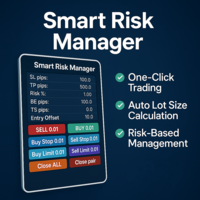
Smart Risk Manager – Master Your Trades with Precision and Confidence! Take full control of your manual trading with a sleek, powerful, and intuitive panel designed for traders who value speed, accuracy, and smart risk management. Smart Risk Manager lets you place trades or pending orders in seconds — all while automatically calculating the optimal lot size based on your predefined risk percentage. No more guesswork. Just clean execution. ــــــــــــــــــــــــــــــــــــــــــــــــــــــــ

Trade2Telegram
Strifor (Mauritius) Ltd
5 (3)
Trade2Telegram — MetaTraderからTelegramへの自動取引通知用プラグインです。 このツールは、資金を管理するトレーダー、シグナルチャンネルを運営する人、または教育コミュニティをリードする人向けに設計されています。プラグインは、ターミナル上のすべての取引操作をコピーし、選択したTelegramのチャット、グループ、またはチャンネルに公開します。 ポジションのオープンやクローズ、ストップロス(SL)やテイクプロフィット(TP)の変更、未決注文の発動、または部分決済が行われた際に、メッセージは自動的に送信されます。 メッセージ形式はカスタマイズ可能で、以下の情報を含めることができます:銘柄、取引方向、取引量、エントリー・エグジット価格、SL/TPレベル、ポイントおよび金額での結果。ハッシュタグやコメントの追加、サーバー時間またはローカル時間の選択にも対応しています。 このプラグインは、サードパーティのサービスを使用せず、Telegram Bot APIを直接利用して動作します。接続は簡単で、ボットのトークンと目的のチャットまたはチャンネルのIDを提供するだけです
FREE
Session Panel for MT5 Session Panel is a free MT5 indicator that gives you a fast and convenient live overview of the major trading sessions directly from the chart. Monitor Tokyo, London, and New York session times, see which session is currently active, track countdowns to the next session, and view session overlap information in one compact dashboard. Built for traders who want better market timing, clearer session awareness, and a cleaner chart workflow in live market conditions. Session Pan
FREE
Phantom Currency Heatmap Pro Real-Time Currency Heatmap & Trade Recommender for MetaTrader 5 Stop guessing which pairs to trade! The **Phantom Currency Heatmap Pro** is an essential visual tool for manual traders. It analyzes the 8 major currencies (USD, EUR, GBP, JPY, AUD, CAD, CHF, NZD) across all 28 major pairs to calculate their true underlying strength in real-time. By pairing the strongest currency against the weakest currency, you give yourself the highest probability of catching a str

Close All Pro MT5 – Fast PnL Control is a powerful trade manager MT5 utility that gives you total control over your trades. With a single click, you can close all MT5 orders, monitor real-time profit and loss, and manage your floating PnL directly from a clean on-chart panel. The tool is lightweight, responsive, and built to help traders save time, reduce emotional stress, and maintain focus. Whether you trade manually or through an EA, this MT5 profit panel provides the visibility and precisio

Сообщения в Telegram из MT5 о торговых событиях: Открытие/закрытие сделок; Выставление/удаление отложенных ордеров. Версия утилиты для MT4 здесь: https://mql5.com/8bjjy Настройки  Telegram: Создайте своего бота. Для этого напишите для пользователя  @BotFather команду  /newbot , и следуйте инструкциям. В результате вы получите Token бота, примерно такой:   1245680170:BBGuDFVkTYIPtjSaXMgQEhdfg7BOQ6rl8xI.  Узнайте свой ID в  Telegram, для этого напишите пользователю  @userinfobot любое сообщение.
Description Manzano Risk Manager Pro is a risk management tool for MetaTrader 5 designed to monitor open positions and execute automatic or manual closures when user-defined conditions are reached. Its purpose is to help maintain control over account risk and reduce execution errors during trading. The product does not open trades or modify any trading strategy. Main Features Automatic position closing The system allows you to define profit and loss limits and automatically close positions when
The MT5 to Binance trading panel is the perfect tool for cryptocurrency traders looking to maximize their purchases on Binance and Binance US exchanges. To get started, simply input your API Key and Secret Key created in the client area of Binance and select the Enable Spot & Margin Trading and Enable Futures checkboxes and start trading Once launched, the trading panel automatically loads all Spot and Futures symbols into the Symbols section. To start trading, select your desired instrument fr
TREND RISK MONITOR EA - USER GUIDE ---------------------------------------------------- 1. OVERVIEW The Trend Risk Monitor is not a trading robot that opens new positions. Instead, it is a sophisticated risk management utility designed to work alongside another Expert Advisor (EA) on your trading account. Its primary purpose is to actively monitor trades opened by a specific EA (identified by a "Magic Number") and provide a real-time assessment of the market risk associated with each open posit
It is a utility that posts customized messages on Telegram based on account trading activity. Once the utility is on the chart, with each new position opened from the same chart symbol the utility is added, a customized message will be sent to the Telegram group defined in the input parameters. The utility will post to the Telegram group if a new position is opened and if it is the same symbol as the chart the utility is running on. If you are using an Expert Advisor for Buy and Sell and want to
HELIOS Trade Panel — MetaTrader 5 用のオールインワン取引管理センター。高速取引、資金保護、ポジション管理、強力なマルチ時間枠アラートスキャナーを1つのパネルに統合。   ワンクリック取引 • リスク%による自動ストップロス計算付き BUY / SELL 成行注文 • マウスでの予約注文設定:Entry / SL / TP ラインを直接チャートでドラッグ • ポジション開設後の自動可視化(線 + 損益ゾーン) • チャート上の入場ラベル横に「編集」()と「確認」()ボタン ️ 資金保護 • Margin Guard:有効証拠金不足時、ロットが自動的に利用可能数量に減少(5% 安全バッファ付き)— 「資金不足」エラーがなくなる • Daily Drawdown Lock:日次損失閾値到達時、リセットまで新規エントリーをブロック • Tick-Value ロット計算:ポジションは常に設定したリスク% に一致 ポジション管理 • 損益分岐点(BE)、オフセットpipsを設定可能 • トレーリングストップ、起動距離設定 • 部分利確 TP1 /
This tool will perform Trailing stop loss and Break even management for orders. Helps you limit or reduce the time spend watching orders on the screen, especially when you need to go to sleep. Just add this EA to 1 chart, you can manage all pairs. You can filter orders by comment, magic number, symbol and order ticket number. When Breakeven it can add shift/offset pips (to cover the commission...). You can try in strategy tester before purchase. The EA will add Buy and Sell alternately, so you
Advanced Account Dashboard & Risk Monitor (MT5) This script provides a real-time on-chart dashboard for monitoring account performance, risk exposure, and execution conditions in MetaTrader 5. It is designed for traders who want clear visibility of account health and risk awareness during live trading or VPS operation. The script does not open trades and does not interfere with any strategy logic . Key Features Account Metrics Live equity, balance, and floating profit/loss Open position count an
FREE
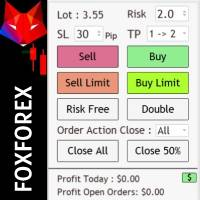
Risk management settings Automatic lot size calculation based on risk Open Buy and Sell positions with one click based on settings Open positions graphically (Buy Limit – Buy Stop – Sell Limit – Sell Stop) Risk-free open positions Open new trades with TP and SL from previous open trades Close all open trades with one click Save 50% of open trades' profit Setting to close open positions based on Sell or Buy positions Real-time display of open positions' profit/loss and daily profit/loss
King ElChart Manual Trade Panel
Mohammed Maher Al-sayed Mohammed Ahmed Saleh
King Chart – Manual Trading Panel for MetaTrader 5 Overview King Chart is a simple yet powerful manual trading panel built for traders who want speed, precision, and clarity. It enables quick order execution, clear lot control, and real-time account monitoring  all directly on your MT5 chart. Main Features Multi-Lot Trade Execution 3 Buy and 3 Sell buttons for instant execution Each button is tied to a custom lot size field Designed for flexible scaling in or out of trades Position Management D
The TELEGRAM BROADCAST utility helps to instantly publish your trading in the Telegram channel. If you have long wanted to create your Telegram channel with FOREX signals, then this is what you need. ATTENTION. This is a DEMO version, it has limitations - sending messages no more than 1 time in 300 seconds PAID version:  https://www.mql5.com/en/market/product/46865 https://t.me/moneystrategy_mql TELEGRAM BROADCAST can send messages: Opening and closing deals; Placing and deleting pending o
FREE
Just Copier MT5
Agung Imaduddin
4.75 (4)
"Just copier" is designed to copy trading without any complicated settings. The copy can be done in one PC. One EA can be set as master (provider) or slave (receiver). The receiver lot can be set to multiple providers lots. Please also check this product at fxina.hostingerapp.com.  Any type of copy is available. MT4 -> MT5 MT4 -> MT4 MT5 -> MT5 MT5 -> MT4 If you want to copy MT4 -> MT5 or MT5 -> MT4, please purchase "Just copier" for MT4 and "Just copier" for MT5 separately. Just Copier can copy
Use for risk management and opening positions as per the user settings. The user is allowed to set the stop loss and take profits in pips. The user can also choose the risk percentage per trade that he/she wants to use while opening the trade. The volume of the trade that the user wants to sent shall be calculator according to the stoploss and the risk percentage that the user has selected.
AZ Trade Recovery Assistant MT5 combines manual trading flexibility with intelligent automated management.This advanced on-chart panel isn’t just for trade execution — it’s a complete trade management assistant. You can open or close positions instantly, adjust lot size, manage trailing stops, and modify Take Profit or Stop Loss — all directly from the panel. It’s built for traders who want full control of their trades with smart automation running in the background. What truly makes this assist
このプロダクトを購入した人は以下も購入しています
Farmed Hedge Yield Farming | All Markets (Manual - Hybrid - Semi/Automated EA) MULTI-ASSET SUPPORT Trade any asset available on your broker - Forex: Major, Minor, Exotic pairs - Crypto: BTC, ETH, XRP, SOL, BNB - Stocks: Apple, Tesla, Amazon, Google, etc. - Commodities: Gold, Silver, Oil, Gas - Indices: US30, NAS100, SPX500, DAX40 - Any CFD your broker offers VERIFIED TRADING RESULTS - Farmed Hedge Yield Axi Copy:  https://www.mql5.com/en/signals/2356376 - Farmed Hedge Yield Exn Copy:   https:/
Quant AI Agents is NOT AN Expert Advisor. Quant AI Agents   is a   multi-agent AI trading framework   that turns natural-language strategy prompts into live.  WANT THE SAME RESULTS AS MY LIVE SIGNAL?   Use the exact same brokers I do:   IC MARKETS , IC TRADING   .  Unlike the centralized stock market, Forex has no single, unified price feed.  Every broker sources liquidity from different providers, creating unique data streams. Other brokers can only achieve trading performance equivalent to 60
YuClusters
Yury Kulikov
4.93 (43)
Attention: You can view the program operation in the free version  YuClusters DEMO .  YuClusters is a professional market analysis system. The trader has unique opportunities to analyze the flow of orders, trade volumes, price movements using various charts, profiles, indicators, and graphical objects. YuClusters operates on data based on Time&Sales or ticks information, depending on what is available in the quotes of a financial instrument. YuClusters allows you to build graphs by combining da
Footprint Chart Pro — Professional OrderFlow EA for MetaTrader 5 Version 6.34 | Professional tool for real traders | Institutional-Grade Visualization DEMO USERS - PLEASE SELECT EVERY TICK / REAL TICK WHEN TESTING AND YOU HAVE DOWNLOADED HISTORICAL DATA. IF YOU SEE A WAITING SCREEN AND IT IS NOT DOWNLOADING, IT MEANS YOU HAVE LOW HISTORICAL DATA. TRY 1 MIN AND 5 MIN FIRST ON 1 DAY DATA. ONE DAY DATA SHOULD BE THE NEWEST AND MOST CURRENT DATE. PLEASE WAIT UNTIL THE MARKET HAS ROLLED OVER PERIOD.
This is exactly what the name says. Visual strategy builder . One of a kind. Turn your trading strategies and ideas into Expert Advisors without writing single line of code. Generate mql source code files with a few clicks and get your fully functional Expert Advisors, which are ready for live execution, strategy tester and cloud optimization. There are very few options for those who have no programming skills and can not create their trading solutions in the MQL language. Now, with Bots Builde
The product will copy all telegram signal to MT5 ( which you are member) , also it can work as remote copier.  Easy to set up, copy order instant, can work with almost signal formats, image signal,  s upport to translate other language to English Work with all type of channel or group, even channel have "Restrict Saving Content", work with  multi channel, multi MT5 Work as remote copier: with signal have ticket number, it will copy exactly via ticket number. Support to backtest signal. How to s
Trade Copier Pro MT5 is a tool to copy trade remotely to multiple MT4, MT5 and cTradfer accounts at different computers/locations over internet. This is an ideal solution for you if you are a signal provider and want to copy your trades to other receivers globally on your own rules. One provider can copy trades to multiple receivers and one receiver can get trade from multiple providers as well. The provider can even set the subscription expiry for each receiver, so that receiver will not be abl
Custom Alerts AIO:マルチマーケット監視を一括で実現 — 設定不要ですぐに使えるインテリジェントツール 概要 Custom Alerts AIO は、追加のインジケーター設定が不要で、インストール後すぐに利用できる高機能マーケットスキャナーです。FX Power、FX Volume、FX Dynamic、FX Levels、IX Power を内部にすべて統合し、主要なすべての資産クラス(為替、金属、指数、暗号資産)を一括監視できます。MetaTrader の仕様により、株式は個別のシンボルとして追加可能ですが、一般的には利用頻度は低めです。 1. なぜ Custom Alerts AIO を選ぶべきか 追加ライセンス不要 • 必要なすべての Stein Investments インジケーターが内蔵されており、すぐに使用可能です。 • チャートに表示されるグラフィックは省略されており、アラート生成に特化した構成です。 市場を広範囲にカバー • 為替、金属、暗号資産、株価指数に対応(株式は手動追加可能)。 • シンボル名を入力する必要はなく、プロパティで資産クラス
The product will copy all  Discord  signal   to MT5   ( which you are member  ) , also it can work as remote copier.  Easy to set up. Work with almost signal formats, support to translate other language to English Work with multi channel, multi MT5. Work with Image signal. Copy order instant, auto detect symbol. Work as remote copier: with signal have ticket number, it will copy exactly via ticket number. How to setup and guide: Let read all details about setup and download Discord To MetaTrader
ATTENTION For a free trial version, visit my website. Manual QUANTUM RiskGuard Management — Your ultimate ally for uncompromising trading. Lot Calculator — Automatic lot size calculation. Quantum — Automatic risk to maximize profits and reduce drawdowns. Automatic Journal — Included and freely downloadable from my website. Automatic Screenshot — Two screenshots: one at entry and one at exit. Partial Profit — Smartly managed partial exits. Smartphone Trading — Place orders from your mobile, mana
The core idea: using the user interface, you configure the parameters the chart must meet before entering a position (or positions), choose which entry models to use, and set the rules for when trading and planning should end. Lazy Trader  handles the rest: it  takes over all the routine chart watching and execution! full description  :: 3 key videos [1] ->  [2]   ->  [3] What can it do? - Understands Larry Williams market structure - Understands swing market structure by Michael Huddleston
Gamma Edge Pro MT5 — GexBot Classic API Integration Gamma Edge Pro   brings institutional-grade   Gamma Exposure (GEX) data   directly onto your MetaTrader 5 chart — the same data used by professional options traders to anticipate price magnets, hedging flows, and dealer positioning. Powered by the   GexBot Classic API , this indicator automatically maps options market data from US-listed instruments onto any   MT5 CFD instrument   — Forex pairs, Gold, indices, and more — with intelligent price
FUTURES ORDERFLOW FOOTPRINT CHART Professional OrderFlow EA for MetaTrader 5 Version 1.01| Professional tool for real traders | Institutional-Grade Visualization STRATEGY TESTER USERS - PLEASE SELECT EVERY REAL TICK WHEN TESTING AND YOU HAVE DOWNLOADED HISTORICAL DATA. IF YOU SEE A WAITING SCREEN AND IT IS NOT DOWNLOADING, IT MEANS YOU HAVE LOW HISTORICAL DATA. TRY 1 MIN AND 5 MIN FIRST ON 1 DAY DATA. ONE DAY DATA SHOULD BE THE NEWEST AND MOST CURRENT DATE. PLEASE WAIT UNTIL THE MARKET HAS ROL
PineChart
Muhammad Minhas Qamar
Developed by MMQ —  PineChart: Run PineScript Inside MT5 With A Modern Charting Experience An MQL5 Expert Advisor that runs Pine Script indicators and strategies directly inside MetaTrader 5. PineChart includes a full Pine Script interpreter so you can use your existing Pine Script v5/v6 source code without manually rewriting anything in MQL5. Links [  Website  |  Documentation  |  Demo ] NOTE: Downloading demo through MQL5 will give you limited functionality. To experience PineChart fully, dow
The Performance Logger is a utility for MetaTrader 5 designed to track and report account metrics. It identifies trades based on specific criteria and provides summaries of account activity. Main Functions Automated Reporting : Generates summaries of account performance and sends them to specified communication channels (Telegram or Discord) on a weekly, monthly, or yearly basis. Strategy Analysis : Organizes performance data based on the specific Expert Advisor or strategy used for each trade.
VOLUME BUBBLES ORDERFLOW FOOTPRINT PROFESSIONAL Expert Advisor for MetaTrader 5 Complete Feature Documentation Introduction: Volume Bubbles OrderFlow Footprint Professional is an advanced order flow visualization tool designed for the MetaTrader 5 platform. It provides institutional-grade market analysis through real-time volume bubbles visualization, volume profiling, and sophisticated order flow analysis. This Expert Advisor transforms raw market data into actionable trading intelligence, hel
What Exactly Is A Smart Trading Tool? Smart Trading Tool   was developed for fast and comfortable trading of the financial markets especially for   ORDER BLOCKS TRADERS .   It provides traders functionalities, such as: A Drawing Tool One-Click Trading Panel Automated Lot Sizes Calculation   based on your risk appetite & Money Management ( Watch this video , how this tool can help manage your risk per trade better!) Built in PRICE LEVELS (Fibonacci, Round Numbers, Daily hi-low, etc) Shows Trading
Mt5 To InterativeBrokers Copier allows you to copy deals from MT5 account to Interactive Brokers. With this, you can run your EA strategy on a MT5 Demo/Real Account, then copy all the deals to Interactive Brokers account real time. Features: 1. Copy or Invert-Copy deals Realtime from MT5 to IB Account. 2. Synchronizing positions of both accounts periodicaly, in case any missing copying. 3. You can choose only Buy position or Sell position. Symbols Setup: General Format:  {MT Symbol} -> {IB S
ManHedger MT5
Peter Mueller
4.83 (6)
THIS EA IS A SEMI-AUTO EA, IT NEEDS USER INPUT. Manual & Test Version Please TEST this product before BUYING  and watch my video about it. The price of the ManHedger will increase to 250$ after 20 copies sold. Contact me for user support or bug reports or if you want the MT4 version! MT4 Version  I do not guarantee any profits or financial success using this EA. With this Expert Advisor, you can: Implement your own Zone Recovery strategy to capitalize on trending markets. Create Grid trading s
EASY Insight AIO – スマートで手間いらずな取引のオールインワンソリューション 概要 数秒で市場全体——FX、ゴールド、暗号資産、指数、さらには株式まで——を、手作業のチャート確認や複雑なセットアップ・インジケーター導入なしにスキャンできたらどうでしょうか? EASY Insight AIO はAIトレードのための究極のプラグ&プレイ型エクスポートツールです。市場全体のスナップショットを、クリーンなCSVファイルで一括出力。ChatGPT、Claude、Gemini、Perplexityなど、さまざまなAIプラットフォームで即座に解析できます。 ウィンドウの切り替えやグラフのごちゃごちゃしたオーバーレイはもう不要。自動エクスポートされる純粋で構造化されたインサイトだけで、無駄なチャート監視に悩まされず、スマートなデータ主導の判断に集中できます。 なぜEASY Insight AIOなのか? 本当のオールインワン • セットアップ不要、インジケーターのインストール不要、チャートへのオーバーレイ不要。インストールして起動し、エクスポートするだけです。 マルチアセット対
Mentfx Mmanage mt5
Anton Jere Calmes
4.25 (8)
The added video will showcase all functionality, effectiveness, and uses of the trade manager. Drag and Drop Trade Manager. Draw your entry and have the tool calculate the rest. Advanced targeting and close portions of a trade directly available in tool (manage trades while you sleep). Market order or limit order on either side with factored spread. Just draw the entry, the tool does the rest. Hotkey setup to make it simple. Draw where you want to enter, and the stop loss, the tool calculates al
Unlimited Trade Copier Pro MT5 is a tool to copy trade remotely to multiple MT4, MT5 and cTrader accounts at different computers/locations over internet. This is an ideal solution for you if you are a signal provider and want to copy your trades to other receivers globally on your own rules. One provider can copy trades to multiple receivers and one receiver can get trade from multiple providers as well. The provider can even set the subscription expiry for each receiver, so that receiver will n
Trade on crypto exchanges in MT5! GRat_Crypto is a tool for manual and automated trading , including ANY available EA, ANY  cryptocurrency  on most popular crypto exchanges in the familiar MT5 environment 24/7. Features 1. ALL instruments of the 9 most popular crypto exchanges are available: Binance, BingX, Bybit, Coinbase, CoinEx, Kraken,   KuCoin, MEXC and OKX . 2. The ability to place ANY type of order available in MT5, both market and pending, to modify orders and positions, to delete order
FiboPlusWave Series products Ready-made trading system based on Elliott waves and Fibonacci retracement levels . It is simple and affordable. Display of the marking of Elliott waves (main or alternative option) on the chart. Construction of horizontal levels, support and resistance lines, a channel. Superposition of Fibonacci levels on waves 1, 3, 5, A Alert system (on-screen, E-Mail, Push notifications).    Features: without delving into the Elliott wave theory, you can immediately open one of
Crystal Trade Manager – Advanced MT5 Risk and Trade Control Utility Overview Crystal Trade Manager (CTM) is a professional MetaTrader 5 utility designed for risk management, trade automation, and instant execution control. It provides traders with an integrated system for protecting equity, managing daily drawdowns, controlling lot sizes, and applying automation features such as automatic SL/TP, break-even, and trailing stop. The tool is suitable for manual traders, prop-firm challenge particip
Crypto Charting for MT5 – MetaTrader 5 向け暗号資産チャートツール 概要 Crypto Charting for MT5 は、WebSocket を介して暗号資産の OHLC チャートデータをリアルタイムで提供します。複数の取引所に対応し、MT5 上で履歴データの自動更新が可能です。 機能 WebSocket によるリアルタイムデータ 自動履歴データ更新 接続障害時のスケジュール更新 全ての MT5 時間足に対応 OHLCV データ構成 ストラテジーテスターに対応 自動再接続機能付き 対応取引所 Binance、Bybit、OKX、KuCoin、MEXC、Gate.io、Bitget、XT.com 補足情報 ティックデータおよび板情報には、別製品の Crypto Ticks をご覧ください。 注意事項 DLL を使用していません。VPS に適しています。 Strategy Tester では WebRequest 機能は動作しません。 デモをご希望の場合は、MQL5 のプライベートメッセージでご連絡ください。 Full Documentati
System Overview The Golden Remote Trade Copier MT5 is a professional-grade cloud-based system for global signal distribution. It consists of two components: the Master (paid broadcaster) and the Client (free receiver). Together, they synchronize trades across unlimited accounts, brokers, and VPS providers worldwide with millisecond execution accuracy, requiring no local network connection. THE MASTER COMPONENT: WHAT IT DOES This is the core broadcasting component for signal providers who want
Trend Cue Basket Manager
Mohammadreza Faghanimakrani
5 (1)
Trend Cue is a basket-management utility for MetaTrader 5 hedging accounts. You open the first trade. You choose the direction, the timing, and the lot size. Trend Cue then manages the basket that forms around that decision — setting take-profit levels based on real market volatility, optionally building a grid of additional entries, tracking your average price, and protecting your account with drawdown limits that act on the entire basket rather than on individual positions. It works on any ins
Telegram Broadcast MT5
Volodymyr Hrybachov
3.67 (3)
TELEGRAM BROADCASTユーティリティは、取引をTelegramチャネルに即座に公開するのに役立ちます。あなたが長い間FOREX信号であなた自身のテレグラムチャンネルを作りたいと思っていたなら、これはあなたが必要とするものです。 TELEGRAM BROADCASTはメッセージを送信できます: 取引の開始と終了。 保留中の注文の配置と削除。 ストップロスとテイクプロビジョニングの変更(ラストオーダー); 損失を止め、provをトリガーします。 保留中の注文のアクティブ化と削除: 取引レポートの送信; 入金と出金のメッセージを送信する。 ドローダウンまたは利益がN値に達したときにメッセージを送信します。 アカウントの監視-N分ごとに統計を送信します。 独自のテキストを追加して、各メッセージに分単位で遅延を投稿できます。すべてのメッセージは柔軟です。ユーティリティは1つのチャートにのみインストールされますが、すべてのシンボルからメッセージを送信します。設定で任意の記号を非表示にできます。 ユーティリティ構成: [サービス]-> [設定]-> [エキスパートアドバイザ
FuturesGate
Laurent Xavier Richer
MT5 → Futures API Bridge Mirror your MT5 trades into an external futures platform in real time—perfect for running your favorite Expert Advisor (EA) on MT5 while executing on supported external futures accounts. NEW in v2.0: Multi-Symbol Support (Trade Nasdaq, S&P, and Dow from one chart), List-Based Filtering. Click here to read the Full Manual & Setup Guide Key Features Multi-Symbol Control: Manage trades for multiple instruments simultaneously from a single chart instance using the new "
フィルタ:
レビューなし
レビューに返信