 MetaTrader 5
 エキスパート
 インディケータ
 ライブラリ
ライブラリ
 ユーティリティ
 ウィジェット
 ルール
ルール
YouTubeにあるマーケットチュートリアルビデオをご覧ください
ロボットや指標を購入する
仮想ホスティングで
EAを実行
EAを実行
ロボットや指標を購入前にテストする
マーケットで収入を得る
販売のためにプロダクトをプレゼンテーションする方法
MetaTrader 5用取引ユーティリティ - 51
 以下はMetaTrader5での取引を簡素化する取引プログラムです。ユーティリティにカーソルを合わせると、その説明と目的が表示されます。
皆さん、こんにちは
人々の目から見ると、投資は難しくてリスクの高いビジネスであると考えられています。 しかし、知識とスキルを身につけて投資を行えば、市場があなたに害を及ぼすことはありません。 資本市場でのフィルター書き込みは、この分野の専門家が生産性を向上させ、時間を節約するために行うアクションの 1 つです。 多数のシンボルが活動するため、保存される情報とデータの量は非常に多くなります。 この市場で活動する人々は、一連の情報を必要とする場合があり、問題の機密性を考慮して、できるだけ早く情報を入手する必要があります。 この情報は通常、市場の将来を予測するのに役立ち、非常に重要です。
コマンドによる Fitler の書き込みにより、要求された条件に一致するシェアが検索されます。 選択した機能をフィルタリングすると、すべての取引可能な株式が検索され、適切な株式が表示されます。 資本市場では各人が取引の戦略を持っており、フィルタリングすることで戦略に沿って取引を進めることが容易であり、 その後、さまざまな時間枠で戦略の結果を確認できます。
フィルタリングの利点 1- 高速: 各株式の

Cheers, traders! In today's video, dive into the world of advanced trading with our exclusive Trade Panel. This Cyber Monday, we're offering a special deal – get access for only $27 instead of the usual $60!
In this tutorial, we explore a semi-automated trading system that empowers manual traders to seize opportunities effectively. Watch as we demonstrate using real market scenarios, showing you how to set up trades, manage risk, and maximize profits.
Key Features of the Trade Pan

「ローソク足パターン取引パネル」は、ローソク足パターンで取引し、パターンを特定して取引を実行するプロセスを 迅速かつ簡単にしたい トレーダーにとって究極のツールです。さまざまだが重要な入力オプションを備えたこのツールは、ローソク足パターンの手動取引を自動化したい人、手動で以前よりも早く取引できるように支援したい人、または単に見たいパターンを知らせたい人に適しています。
EA を使用したいシンボルで EA をアクティブにすると、チャートの左上隅に表示される 取引パネル を見てみましょう。 ライブ取引では時は金なりであるため、パネルはシンプルになり、トレーダーが必要とする可能性のある主要な機能のみを使用するように思慮深く設計されています。 取引禁止 : 安全上の理由から事前にチェックされています。これは基本的に、ローソク足パターンが表示されたときに EA に Arrow オブジェクトのみを表示し、それ以上は表示しないことを示します。 取引する矢印をクリックします: クリックすると、 矢印オブジェクトをクリックするだけで 、パターンが表示されるたびに半手動で取引できるようになります。 ス
Introducing the BlackWing Signal Provider—an advanced EA designed to enhance your trading experience by facilitating seamless communication between your MetaTrader 5 platform and Telegram channels, groups, or individual users.
Key Features:
1. Real-Time Event Notifications: Receive instant alerts on new trades, modified orders, closed positions, and deleted orders. Stay informed and make well-timed decisions.
2. Interactive Chart Snapshots: Share chart snapshots along with new trades and ord

A very usefull EA helps you control Trailing Stop and Break even point for single order
it works seperately for Buy side and Sell side
the EA displays some information useful when you load to your chart
all you need to do is to change the name of the pair you want to control TP and BEP
it works with all pairs and all types of accounts
if you have any questions you can always write to us at info@auranos.me

Multi-currency trading on one chart!
Creation and management of positions with trailing and breakeven, risk management and other useful functions. To fix profits, the Target profit parameter is provided; if it is greater than zero, all positions will be closed if the set value is exceeded. All positions and orders have set Stop Loss and Take profit. For multi-currency trading, taking into account the impact of news and switching symbols on the chart, it is useful to use the News impact indicato

EquitySafe V1.0 is a powerful risk management tool designed for MetaTrader 5 . It enables traders to effectively manage their risk by setting maximum loss limits based on custom time frames. With this tool, you have the flexibility to define your own time intervals and allocate specific risk thresholds accordingly. This helps you maintain control over your trading account and minimize potential losses. By utilizing EquitySafe, you can ensure that your trading strategy aligns with your risk tole
The tool for exploring seasonal patterns. It compares the chart with charts of other years and compares with the average for other years. Allows you to shift charts if necessary. Explore any year by specifying the zero point. Up to 10 charts in one tool. Works only on the daily chart ! The best for you! Enjoy your work! (It's not indicator - do not download demo it not work) for mt4 Seasonly MT4

Achieve peace of mind with our EA companion! Simply set it and let it roll. Safeguard your trades on sluggish market days and holidays. Get updates on your balance and EA status every Friday evening, for example. Stay in the loop even if your terminal or VPS decides to take a break. Trading made easy – enjoy the tranquility! This EA has several functionalities
Closing of pending or open positions during pre-configured holidays. Automatic closing and reopening of pending positions during the nig
Expert for setting stop loss and take profit simultaneously for all orders or positions of a currency pair Once attached to the graph, the expert panel will appear on which there are buttons for setting and a green horizontal line, if you click on the line you can move it on the graph and choose the stop loss or take profit threshold with it, move the cursor over the panel and the value will be set where you have positioned the horizontal green line, press the button for the setting you want t

バージョンMT 4: https://www.mql5.com/zh/market/product/109262 バージョンMT 5: https://www.mql5.com/zh/market/product/109258 使用方法: https://www.mql5.com/zh/blogs/post/755183 EAの概要: このEAは、2人のブローカーAとBを用いてヘッジ取引を行う。ブローカーAのASKがブローカーBのASKより小さい場合、ブローカーAは購入し、ブローカーBは売却し、2つの口座の損益を観察する。総利益が目標に達すると、口座Aと口座Bは同時に平倉になる。 シーンを適用するには: 1.価格差ヘッジ:異なるブローカーの見積もりが異なり、Aブローカーの見積もりがBブローカーの見積もりより高い場合もあり、Aトレーダーの見積もりがBトレーダーの見積もりより低い場合もある。これはヘッジにお金を稼ぐ機会を提供している。 2.リベートを稼ぐ:手数料の返金サービスを提供する代理店を探して、AB口座が利益がなくても、リベートを稼ぐことができます。 3.プラットフォーム奨励金の使

Multi Take Profit Manager Automatically close portions of your open trades at up to three profit targets. This utility is designed for manual traders who frequently open multiple positions and want to scale out of trades automatically as profit targets are reached. Instead of manually closing positions one by one, the utility can partially close your total open position at predefined Take Profit levels, helping you lock in profits while allowing the remaining positions to continue running. Key F
Supercharge Your Trading with HF TradeCopier !
Are you tired of manual trade execution and missed opportunities? Take your trading efficiency to new heights with the HF TradeCopier ! This cutting-edge solution empowers traders like you to effortlessly copy transactions between different MetaTrader 4 and MetaTrader 5 accounts, saving you time and maximizing your profit potential . With lightning-fast copying speeds of under 0.5 seconds , you can seize market opportunities instantly and s
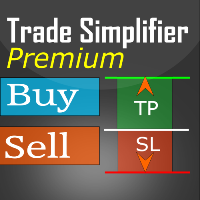
Trade simplifier premium is a trade panel that simplifies trade opening. It is simple and easy to understand, with key features to ease trading. Features include:
Order type selection Fixed lot entry from the chart user interface Easy Take profit entry field on the chart user interface Visual take profit selection and adjustment via the line that appears when you click the Take Profit button Easy Stop loss entry field in points on the chart user interface Visual Stop Loss selection and adjustm

Baby Shark Pro EA works using a series of indicators, mainly the RSI. This is an EA that uses martingale, so use with caution. But Baby Shark Pro EA gives you the ability to change the multiplier parameter, which allows it to decrease the martingale level. Thus, you determine the risk level you want. Unlike most of the other martingale, EA’s This doesn’t place random entries, rather it is riding on market movement RSI > 50. If the market moved the opposite direction after the first entry, th

ATTENTION For a free trial version, visit my website. Manual QUANTUM RiskGuard Management — Your ultimate ally for uncompromising trading. Lot Calculator — Automatic lot size calculation. Quantum — Automatic risk to maximize profits and reduce drawdowns. Automatic Journal — Included and freely downloadable from my website. Automatic Screenshot — Two screenshots: one at entry and one at exit. Partial Profit — Smartly managed partial exits. Smartphone Trading — Place orders from your mobile, mana

Introducing Orders Executor , your powerful and efficient trading companion designed to seamlessly execute orders directly from a user-specified text file . This innovative trading tool streamlines your trading process, providing a convenient and automated solution for executing trades with precision and speed.
Key Features :
**Text File Integration:** Orders Executor is designed to effortlessly read and interpret orders from a plain text file, eliminating the need for manual input. Simpl

The Wall Street Player (Ultimatum version). This EA tailored as a Discipline, Money and Risk Management tool is a powerful Trade Station utility designed for Forex, Cryptos, Commodities, Shares, Deriv synthetic pairs and any CFDs Market. It is designed to fit your strategy as a winner, and take your Edge of the market to the NEXT-LEVEL. The only thing to do is to get It on your chart and appreciate the possibilities and chart management abilities it has to offer for realizing that discipline and
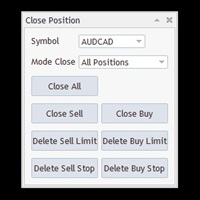
Free until the end of the year.
Customer support : https://t.me/MeToolTrading
The free version will be published at the end of 2024.
Close All With Just One Click MT4: https://www.mql5.com/en/market/product/110795 Close orders with just one click, quickly and neatly. Supported order types: Market order, limit order, stop order .
Note: This software is very fast, there is no warning every time you press the button, please use caution when using, or use it proficiently in a demo account firs

MT5用Binance取引ツール
1. 本製品には、Websocketからのライブチャート、ヒストリカルチャート、そしてMT5ターミナルの再起動時に自動更新される機能が搭載されています。これにより、手動操作なしでスムーズにBinance取引を行うことができます。
スポットと先物で取引、ライブチャート、ヒストリカルデータが利用可能です。
チャート機能:
1. Websocket (wss) 経由のライブOHLCチャート
2. APIからの履歴更新
3. MT5を開くたびにチャートの履歴を自動更新
4. M1からMN1まで、すべての時間枠に対応
5. 利用可能なデータ:始値、高値、安値、終値、実出来高、ティック出来高
6. ストラテジーテスターを使用して、暗号資産データでエキスパートアドバイザーのあらゆる戦略をバックテストできます。
チャートと履歴に関する手順:
1. MT5オプションにURLを追加します。
2. 任意のチャートでユーティリティを起動し、モードをLIVEに設定し、取引所(例:Binance Spot)を選択します。初回実行時のみ「シンボルの作成」を「有効」にして、

Just a panel for drawing levels. Minimal but very useful thing. This is a further development of the free version. This is the version that I use myself and it has many behavior adjustments. ---- 12 types of customized levels. Support for rectangle and line levels. If you need to prevent a level from extending, add "noext" to the end of the name level object. For any update idea please contact me here. ---- This is not an indicator, don't download the demo, it doesn't work For test see free ver

マルチ通貨の前のキャンドルまたは前のバースキャナーは、インジケーター設定から選択したカスタム時間枠でマルチシンボルチャートをスキャンするのに役立ちます。
製品に基づく: https://www.mql5.com/en/market/product/78657
前日の高値安値、前週の高値安値、前月の高値安値、または任意のカスタム時間枠の複数のシンボルをスキャンするために使用できます。 過去4時間チャートの高値安値
ノイズをフィルターし、価格が高値ラインまたは安値ラインに接触したときに方向性のある警告を発します。
戦略はシンプルで、前日、週または月の高値安値に触れると、価格が5分などの短い時間枠で拒否されると見なされます。
さまざまなアラートの種類を選択するオプションがあります
スキャン頻度をミリ秒単位で選択および設定できます
1000 は、相場監視のすべてのシンボルを毎秒スキャンすることを意味します
製品の特徴
1. ターミナルアラート
2.電子メールアラート
3. プッシュ通知
ピボット ポイント マルチ シンボル スキャナーは、フロア、ウッディ、カマリラ、デマーク、またはフィボナッチ ピボット ポイントのマーケットウォッチで利用可能なすべてのシンボルをスキャンします。
任意の時間枠を選択してピボットポイントを計算し、価格がこれらのレベルのサポートとレジスタンスに達したときにアラートを受け取ることができます。
視覚的なピボット ポイントについて この製品に興味があるかもしれません: https://www.mql5.com/en/market/product/110072
さまざまなアラートの種類を選択するオプションがあります
スキャン頻度をミリ秒単位で選択および設定できます
1000 は、相場監視のすべてのシンボルを毎秒スキャンすることを意味します
製品の特徴
1. ターミナルアラート
2.電子メールアラート
3. プッシュ通知

Discover a New Wave Trading Strategy - Suitable for Currency Pairs like AUDUSD.s Strategy Highlights : Specially Designed Trend Indicator Graphics : Our strategy offers a unique graphical interface to help traders identify and capitalize on market fluctuations. Backtesting Validation : Traders are encouraged to backtest currency pairs like AUDUSD.s to validate the effectiveness of our strategy. Flexible Time Frames : Default recommendation is to trade in the 15-minute (M15) time frame,
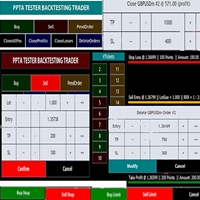
TESTER BACK TESTING AND TRADING MANAGER THE ONLY MT5 TOOL YOU CAN USE FOR BOTH LIVE TRADING AND BACKTESTING All functions can be used in both live trading and backtesting in MT5 Strategy Tester. This is one tool with many functionalities. Your ONLY tool for both trade management (live trading) and Backtesting in MQL5 Strategy Tester. The Tester Backtesting and Trading Manager can help you: 1. Trade Orders: a. Open Market Execution Orders (Buy or Sell)
b. Open Pending Orders (Buy Limit, Buy Stop
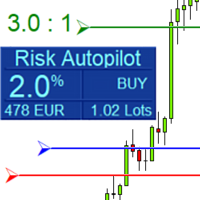
Maximize Your Trading Precision and Risk Management This unparalleled plugin ensures you trade at your desired risk level with automated precision, setting a new standard in efficient trading execution.
Exclusive Offer Limited time opportunity! Get this cutting-edge plugin for only $89 instead of $149 (Offer ends on October 31, 2025). Boost your trading potential now. This special discount won't last!
Streamlined Process 'Risk Autopilot Buttons' streamlines the process of setting StopLo
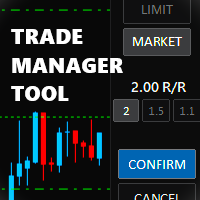
Trade Manager Tool uses adjustable lines displayed on your chart to let you prepare and visualize your order's entry, stop loss and take profit levels before you open a position. It will then use these levels along with your choice of maximum risk preset in order to calculate your optimal position size before sending the order to your broker. While providing an invaluable advantage to manual traders looking to control their risk and simplify their trading process, it also informs their deci

Risk-o-meter is a Risk calculator Panel designed to help people who are new to trading, better understand how much they are risking for potential profit or loss. And also place future orders. Premium Fetaure: 1. Set pending order 2. Set Profit in Cash (RR)
Inputs: 1. Enter your Risk in % or currency 2. Enter your Return Ratio 3. Enter your Lot Size
Results: 1. SL line 2. TP Line
Features: 1. By moving the SL line, lot size will adjust to keep Risk fixed. 2. By moving the TP line, Risk Ration

リスクリワードレシオマネージャーは、規律ある取引とプロフェッショナルなリスク管理を支援するために設計された、視覚的な注文管理ツールとポジションサイズ計算ツールです。トレーダーはチャート上でエントリーレベル、ストップロスレベル、テイクプロフィットレベルを視覚的に設定できるだけでなく、注文発注前にロットサイズとリスクリワードレシオを自動計算します。このツールは、取引準備を標準化し、各ポジションが事前に定義され、管理されたリスクレベルでオープンされることを保証します。 このツールは、通貨ペア、指数、貴金属、コモディティ、暗号通貨など、幅広い取引商品に対応しています。手動取引を行うトレーダーだけでなく、あらゆるポジションにリスク管理ルールを適用する戦略重視のトレーダーにも適しています。計算時間を短縮し、手動によるエラーを回避することで、トレーダーは執行プロセスの一貫性と透明性を維持できます。 リスク対報酬比率マネージャー インストールと入力ガイド EAに関する通知を受け取りたい場合はURLを追加してください( http://www.betasoft.dev ) MT4/MT

アンチグリッドポジションプロテクターは、 ドローダウン回復を期待して負けポジションを増やしたり、意図しないときにヘッジしようとしたりする誘惑からあなたを守るために設計されたユーティリティツールです。
------------------------入力---------------------------- ---- 損失ポジションのヘッジを許可しますか? - これは true/false 入力 (ダブルクリックして値を切り替える) で、 既存の 負け ポジション (同じシンボル上)で 反対方向 の取引 (未決注文または成行執行のいずれか) を開始することを許可または禁止します。 「損失」ポジションを特定する方法 - 2 つのオプション ( ストップロス と 損益 )。 「ストップロス」を選択すると、実行中のポジションのストップロスが損失領域にある場合、ストップロスが損益分岐点レベルを超えていない限り、このツールでは新しい取引を行うことができません。同様に、「PnL」を選択すると、変動ポジションが利益(> $0)でない限り、ツールは同じシンボルで新しい取引を開始することを許可しませ

The SCT(Smart Candle Trigger) mt5 is designed for the manual trader who needs assistance to open and manage orders in defined SUPPLY and DEMAND zones. Trader based on his/her strategy define zones on the charts and SCT will open positions based on candle confirmation of Engulf and PinBar once price come into trader zones. SCT works on all kinds of symbols: currency pairs, indices, metals, commodities, cryptocurrencies, etc. Benefits Save trader time and energy to follow candles of market for co

ATTENTION: the utility cannot work in the Strategy Tester, if you want to try the demo version for free for a week, or have any questions, write me an email! You can find my address on my user profile.
TrendLine Auto Executor is a software capable of identifying the trendlines you have drawn on the chart and opening orders as soon as they are touched or exceeded. The software allows you to manage two orders at a time for each chart by tracking two groups of trendlines, one for each order, and e
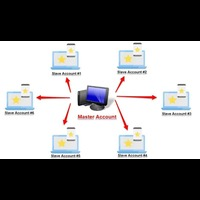
Forex Trade copier MT5. It copies forex trades, positions, orders from any accounts to any other account, MT5 even multiple accounts. The unique copying algorithm exactly copies all trades from the master account to your client account. It is also noted for its high operation speed and Tough error handling. It also can copy from demo account to live account too. It is one of the best free trade copiers that can do , MT5 or to multiple accounts MT5 to multiple accounts Features of Trade Copi
リアルタイムティック&1分データエクスポートレコーダー
残念ながら、ブローカーからの過去の価格データは正確ではありません。つまり、欠落データ (ギャップ) があり、価格が正しくなく、これが不正確なバックテスト結果につながります。
データレコーダーは、オプションのティック/1 分データ、またはその両方をリアルタイムで個別に CSV ファイルに保存します。毎月 1 ファイル。
すべて MT5 形式なので、このデータを簡単にインポートして、バックテスティング用にブローカーから正確なデータと実際のスプレッドを含むカスタムシンボルを作成できます。
記録したい1分チャートにインジケーターを追加し、記録モードを選択するだけで記録が開始されます。
他にご質問やご要望がございましたら、いつでも喜んでお手伝いさせていただきます。

I'm proudly introducing "Spread Eliminator" - Your Ultimate Solution against High Spreads in Forex Trading! Are you tired of hitting Stop Losses or having pending orders triggered at a bad price due to high spreads while trading? All this is now over with our revolutionary EA , Spread Eliminator! Can be used on Prop Firms that enforce high overnight spreads and/or high spreads during high volatile market conditions. Key Features: Smart Spread Monitoring: Spread Eliminator constantly monitors mar

ニュース フィルター プロテクターは、ニュース発表でオープンなポジション/注文が残らないように保護するように設計されています。ニュースが予測不可能なボラティリティや損失の拡大を引き起こす可能性がある今日の世界では、このようなツールはカレンダーを再度確認する必要がないため、心の平安に非常に役立ちます。
各パラメータがどのように機能するかを理解するために、EA の 入力 を見てみましょう。 --------------------------------ニュース設定---------------- ---------------- コンマで区切ってフィルターするニュースの通貨 (つまり、USD、EUR、GBP): フィルターで除外するすべての通貨 (MT5 カレンダー ウィンドウに表示されているように) をカンマで区切って入力します (以下でさらに指定したニュースをフィルターで除外できます)。ただし、最初にこれらのニュースに関連するすべての通貨を挿入する必要があります)。 キーワード #1 (フィルターする特定のニュース - 例: 「給与」): 各キーワードに、MT5 カレンダーの説明

Risk Management Tool - Multi symbols: any symbol you want to manage - Manage manual orders / orders by EA - Limit spread - Open order by timeframe: 1m, 5m, 15m, 30m... - Auto set SL/TP by point range - Close orders by symbol - DCA / Martin option - Limit lot for DCA - Martin feature - Close all order when reach drawdown limit - Can set trading time: open hour - close hour - disable on Friday/Monday

Auto Trailing Assistant (ATA) - Revolutionary Forex Trade Management Utility Core Capability Auto Trailing Assistant is a sophisticated Meta Trader utility that helps traders automatically manage and optimize trading positions with unparalleled precision and flexibility. With its comprehensive set of features, this powerful tool enables traders determine minimum guaranteed profits for each position, displayed very colourfully on the Chart of your Meta Trader. Flexible Position Target

A simple script that closes all current orders.
Terminate once close all positions, so no worries about constantly closing your order.
How to use :
Drag the script from the navigator to the chart, and it will be activated.
Do remember to enable algo trading to use this script.
There are different version of the script that can choose whether to close all buy/sell posiitons, if you need this, do contact me in MQL5.

**MT5** Elevate your risk management game with Equity Savior, the go-to Expert Advisor designed to safeguard your equity during prop firm challenges. This powerful yet user-friendly tool lets you choose your preferred trading session, set a maximum lot size, and establish a daily trade limit effortlessly. Key Features: Session Selection: Tailor your trading approach by selecting specific sessions, aligning with your strategy and prop firm challenge requirements. Max Lot Size Control: Take co

A simple script to remove all indicators from the current chart/ all charts.
How to use: Simply double-click the script, choose either delete all indicators from this chart or all charts, and all is set.
Terminate once perform the deletion, so don't worry about constantly deleting your setup indicator.
Thanks for purchasing, wish you happy trading, thanks!
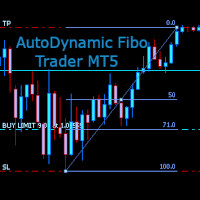
AutoDynamic Fibo Trader is a simple utility that allows the user to place a buy or sell limit or order based on the last fibonacci object drawn on the chart. This is to help the user to significantly reduce the amount of time the user takes to place a trade. All you need to do is draw a fib object with the low and high levels of where you want your stop loss and take profit to be, and decide where an entry level should be by specifying a fibo percentage level. The utility will automatically r

Expert Starco Assistance is designed as a trading assistant and will perform the best performance and most accurate calculations for capital management for your trades.
Features of this expert:
Candle closing timer
The possibility of determining the placement of the profit limit
Ability to calculate volume based on fixed amount, percentage, fixed amount
The possibility of opening a trade in the form of market or limit or stop limit

MetaTrader 5用Crypto Ticks – 暗号通貨のリアルタイムティックデータと板情報の統合 概要
Crypto Ticksは、主要な仮想通貨取引所からのリアルタイムティックデータとオーダーブック(板情報)をMetaTrader 5に直接ストリーミングします。スキャルピング、アルゴリズム戦略、ストラテジーテストを必要とするトレーダー向けに設計されています。 対応取引所 Binance:現物 と先物 KuCoin:現物と先物(チャート板サポート) Bybit:先物およびインバース先物 XT.com:現物と先物 主な機能 WebSocketによるリアルタイムティックデータ Binanceのデータストリーム対応:@ticker, @bookTicker 取引所APIを使用したOHLCV履歴の完全更新 オーダーブックの可視化(最良の買値/売値と深さ) 自動再接続で安定性を確保 キャンドル精度向上のためのデータ置換 MT5再起動時に履歴を自動更新 ティックベースのデータを使ったStrategy Testerに対応 外部DLL不要でVPS対応 補足情報
高精度データを必要とするス

Smart Manager Dashboard - with auto virtual TP and auto virtual SL for all trades. [Converted from MT4 version - All screenshots are from MT4]
-this EA is a powerful trade manager that can manage all symbols and all trades at once , all from one chart so it is a must have tool for every trader who keeps more trades at once. -it mainly does 2 things : INFO ABOUT TRADES and CLOSING TRADES (grouped by their symbol, so with this tool it is very easy and fast to manage even hundreds

Position Manager serves as an expert advisor (EA) designed to enhance your trading experience by providing a user-friendly panel for intuitive management of your positions. This tool empowers you with a seamless interface, allowing for efficient handling of trades and improved control over your trading positions. The primary objective of Position Manager is to simplify and streamline the management of your positions, enabling you to make informed decisions with ease. Through its intuitive design

Welcome! We are delighted to introduce our latest expert, which is a semi-automatic trading system that includes all the features you need for position management. Simply draw a line on a significant trend or supply-demand level, and the expert will take care of the rest for you. It comes with a wide range of risk management and position management tools, such as trailing stop, partial closure, break even, determination of stop loss and take profit levels using ATR, as well as automatic lot sizi

Now, you have your very own SIMPLE LOT SIZE (POSITION SIZING) CALCULATOR ! There's no need to go to other websites just to compute for the exact lot size. It also opens the trade with a click of a button. All inputs on the calculator can be edited. So if you want to change the SL or TP or the lot size, you can do so before placing an order. ========================================== STOP LOSS . Stop loss in Pips (not points). Click on the SL Price text and it will change from green to red or r

Now, you have your very own PROP FIRM AUTO-CLOSER program! Once your account target or drawdown hits, all open orders will close automatically. “One mistake and your prop account is gone. Prop Firm Close All Orders for MT5 ensures that never happens.” All of your OPEN ORDERS will automatically close when: Your ACCOUNT TARGET is hit, OR Your specified ACCOUNT DRAWDOWN is hit, OR WEEKEND CLOSE is set and current time is already past the specified time, OR CLOSE ALL ORDERS button was clicked

Trading without consistent risk parameters is the fastest way to blow an account. Auto SL/TP/BE eliminates the execution gap between entering a trade and having your levels set. The instant a position opens — market order or triggered pending — the EA calculates and applies your predefined SL and TP based on the actual fill price. No delays, no missed trades, no manual errors. Break-Even Automation Once price moves a defined number of pips in your favor, the EA automatically shifts your Stop Los

Welcome to the Wolf Panel , an advanced MetaTrader 5 tool designed to enhance your trading experience. With its intuitive interface and powerful features, the Wolf Panel facilitates quick order entry, enabling traders to act promptly on market opportunities. Among its strengths, the Wolf Panel excels in providing constant control over profits and losses, allowing users to monitor the performance of their trades in real-time. Moreover, the indicator streamlines the closure of all orders at a pred
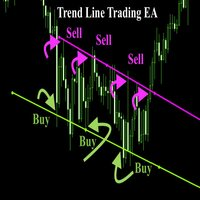
Trend Line Trade Assistant EA Semi-Automated Trading Assistant IMPORTANT : On the main/purchased program a user can click on the Trend line and change it to Buy or Sell, and drag by double clicking on it. Please keep in mind that this option is not available on demo version, due to some restrictions/limitations of Strategy Tester, some Object related operations are not available in the Strategy Tester. But, it will not prevent you from Testing, please drop an Object to chart and it wil

Horizontal Line Trade Assistant EA Semi-Automated Trading Assistant IMPORTANT : On the main/purchased program a user can click on the Horizontal line and change it to Buy or Sell, and drag by double clicking on it. Please keep in mind that this option is not available on demo version, due to some restrictions/limitations of Strategy Tester, some Object related operations are not available in the Strategy Tester. But, it will not prevent you from Testing, please drop an Object to chart

Indicador "MR BEAST - Detectador de Mejores Spikes" para el Índice CRASH 1000 (M1) El indicador "MR BEAST - Detectador de Mejores Spikes" es una herramienta especializada y altamente precisa diseñada exclusivamente para operar en el índice CRASH 1000, con un enfoque específico en el marco temporal de 1 minuto (M1). Desarrollado por el reconocido trader Mr. Beast, este indicador ha sido meticulosamente diseñado para identificar únicamente los mejores spikes, permitiendo a los operadores capitaliz

Indicador "MR BEAST - Detectador de Mejores Spikes" para el Índice CRASH 500(M1) El indicador "MR BEAST - Detectador de Mejores Spikes" es una herramienta especializada y altamente precisa diseñada exclusivamente para operar en el índice CRASH 1000, con un enfoque específico en el marco temporal de 1 minuto (M1). Desarrollado por el reconocido trader Mr. Beast, este indicador ha sido meticulosamente diseñado para identificar únicamente los mejores spikes, permitiendo a los operadores capitalizar

Indicador "MR BEAST - Detectador de Mejores Spikes" para el Índice CRASH 300(M1) El indicador "MR BEAST - Detectador de Mejores Spikes" es una herramienta especializada y altamente precisa diseñada exclusivamente para operar en el índice CRASH 1000, con un enfoque específico en el marco temporal de 1 minuto (M1). Desarrollado por el reconocido trader Mr. Beast, este indicador ha sido meticulosamente diseñado para identificar únicamente los mejores spikes, permitiendo a los operadores capitalizar

Indicador "MR BEAST - Detectador de Mejores Spikes" para el Índice BOOM1000 (M1) El indicador "MR BEAST - Detectador de Mejores Spikes" es una herramienta especializada y altamente precisa diseñada exclusivamente para operar en el índice CRASH 1000, con un enfoque específico en el marco temporal de 1 minuto (M1). Desarrollado por el reconocido trader Mr. Beast, este indicador ha sido meticulosamente diseñado para identificar únicamente los mejores spikes, permitiendo a los operadores capitalizar

Indicador "MR BEAST - Detectador de Mejores Spikes" para el Índice BOOM 500 (M1) El indicador "MR BEAST - Detectador de Mejores Spikes" es una herramienta especializada y altamente precisa diseñada exclusivamente para operar en el índice CRASH 1000, con un enfoque específico en el marco temporal de 1 minuto (M1). Desarrollado por el reconocido trader Mr. Beast, este indicador ha sido meticulosamente diseñado para identificar únicamente los mejores spikes, permitiendo a los operadores capitalizar

Indicador "MR BEAST - Detectador de Mejores Spikes" para el Índice BOOM 300 (M1) El indicador "MR BEAST - Detectador de Mejores Spikes" es una herramienta especializada y altamente precisa diseñada exclusivamente para operar en el índice CRASH 1000, con un enfoque específico en el marco temporal de 1 minuto (M1). Desarrollado por el reconocido trader Mr. Beast, este indicador ha sido meticulosamente diseñado para identificar únicamente los mejores spikes, permitiendo a los operadores capitalizar
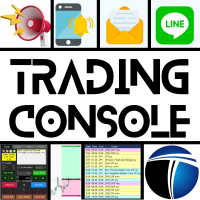
トレーディングコンソールで、あなたのトレードを快適に! このアプリケーションはストラテジーテスターではテストできません。
以下からデモバージョン(デモアカウント用)を取得し、テストしてください。 Download DEMO ver.
1. トレード時に役立つ機能: (1) 経済指標の表示・通知: 経済指標発表の数分前に、アラート・プッシュ通知・メールなどでお知らせします。 アラートの際は、画面の一部が点滅し、気づきやすくなっています。 経済指標を、通貨やキーワードで絞り込み、必要なものだけ通知するようにできます。 経済指標の重要度で色を分けて表示します。 (2) ビジュアライズされたTP/SL注文: 注文の際、損益の見積もりをPoints、Pips、金額で表示します。 注文の際、マウス操作で、「RR値を固定」「個々に変更」の2つの方法でTP値、SL値を指定できます。 注文の際、TPのみ、SLのみの注文も行えます。 注文は、成り行き注文(Autoモード)、値を指定したStop注文、Limit注文(Manualモード)に対応しています。 複数のポジションを持っているとき、TP,SLを一括

The utility is useful for those who are looking for an opportunity not to be present in front of the monitor while a pending order is being processed and closed. Using this utility, you can enter a pending order ticket, set a stop loss and calmly leave the terminal until its logical conclusion. If an order is opened, it will have 2 paths to profit or loss, and if the order is not opened and the scenario does not go according to plan, then upon reaching the price level where the stop loss of the

The Real Ticks Recording Indicator for MetaTrader 5 backtesting is a powerful tool designed to enable traders to simulate their trading strategies with utmost accuracy and realism. This indicator captures and stores real market ticks, allowing you to replay past market conditions with extreme fidelity, thereby enhancing the precision and reliability of strategy tests. Key Features: Real-Time Tick Capture: The indicator records each market price movement in real-time, ensuring an accurate represe
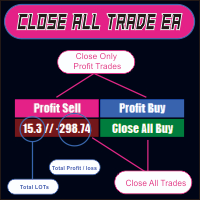
CLOSE ALL TRADE EA is made to make easy the traders instantly close the trades. FEATURES :
- CLOSE ALL TRADES : Traders can close ALL TRADES manually when reaching an AVERAGE PROFIT. Separated button for BUY and SELL trades. - CLOSE PROFIT TRADES : Traders can close PROFITABLE TRADES manually for increase the EQUITY and let the loss trade to reach a PROFIT. Separated button for BUY and SELL trades. - SHOW TOTAL LOSS / PROFIT : Traders will be informed about total LOSS / PROFIT for each BUY /

Rectangle line Trade Execution Assistant Rectangle Line Trade Assistant EA Semi-Automated Trading Assistant IMPORTANT : On the main/purchased program a user can click on the Rectangle line and move/ drag it around the chart, by double clicking on it. Please keep in mind that this option is not available on demo version, due to some restrictions/limitations of Strategy Tester, some Object related operations are not available in the Strategy Tester. But, it will not prevent you from Test

Introducing Risk Boss - master your trading with precision and ease! Elevate your trading strategy with Risk Boss, the most efficient tool designed to revolutionise your approach to risk management. With its intuitive design , it is all about setting you up for success and forget. You can go back on what matters most to you.
Features at a glance:
Seamless Order Creation: initiate pending orders with unparalleled precision. Risk Boss calculates the risk for you, ensuring each decision is inform

HYT (Help Your Trading) は、主に次の 2 つのテクニックを使用して、損失ポジション を平均化 できるように設計されたツールです。 標準平均化。 トレンドの方向に沿ってポジションをオープンすることでヘッジします。 このツールを使用すると、買いと売りの両方において、異なる方向に開かれた複数のポジションを管理できます。 HYT は、次のポジションのサイズ、注文価格、平均化の方向、指定された利益確定レベルでのポジションのクローズを自動的に計算します。 また、希望する利益確定レベルと初期ロットを指定して、「購入」ボタンと「販売」ボタンを使用してポジションを開くオプションも提供します。 使用を開始する には、ツールをチャートにドラッグし、利益確定レベルを設定して、「平均化を開始」ボタンをクリックするだけです。 初期ポジションが大きすぎない ことを確認し、平均を下げるときにツールによってポジション サイズが拡大されるため、追加費用が発生することを覚悟してください。 HYTは 自動取引 も可能です。自動取引を有効にすると、ツールは指定されたパラメータに従ってポジションを開閉しま

The script opens charts of all trading instruments that are listed in the Market Watch.
Convenient to use for choosing a trading instrument for intraday trading (and not only). MT4-version: https://www.mql5.com/en/market/product/113504 You can attach a pre-created template to each chart you open.
For an example of work, see the video for this post.
There are only two settings: Selection of timeframe; Template name. If you do not need to attach a template, you must leave the Name field em
功能介绍
本软件利用键盘快捷键来辅助短线操盘、快速刷单和组合下单,是短线操盘手的利器。 本软件支持快捷下单,批量平仓,批量挂单及平仓与开仓的组合交易,实现一键操作多个交易指令执行。 面对行情剧烈行情波动时,操盘手可从容应对,并快速准确的下单和平仓,让交易变的更简单。 适合人群 热爱交易并希望成为一名操盘手的人。 长时间盯盘,操盘风格为短平快的操盘手。 愿意提高短线操盘胜率并训练强大执行力的操盘手。 希望更加高效把握市场机会,并能快速且准确的执行交易指令的操盘手 安装和配置 先软件需要安装在Experts文件夹中。 在导航中刷新可显示本软件,然后双击在到图表。 输入参数中选择语言及界面主题。 主界面分两个标签栏目: 基本交易和组合交易。基本交易执行的是简单命令,组合交易执行多个命令捆绑。 设置要对应的交易参数之后,要选择启动,那么就按下对应的快捷键执行交易了。 修改快捷键和交易参数必须在非启用状态下,双击对应的表格单元填入参数,或者弹出下拉框选择。 快捷键列表
本软件支持的预设快捷键清单,包括买入、卖出、撤单等常见交易操作的快捷键。 双击快捷键弹出下拉框可以选择自定义快捷键,同时用

The M-Flow MFI (Money Flow Index) Scanner for MT5 is like having a super-smart buddy who keeps an eye on the markets for you, flagging up those overbought (>80) and oversold (<20) opportunities in real-time. It can also be used to spot divergences,which warn of a trend change in price.With the M-Flow Scanner, traders can swiftly identify potential trading opportunities.The scanner continuously monitors up to fifteen financial instruments in real-time,on five different timeframes, providing ins

Like you when I first started trading, It was overwhelming...learning about indicators, about lotsize, leverage and many more things. Its been almost 3 years. I am more knowledgeable in trading. My trading continues to improve as I work on my strategy, technical analysis, trading psychology and trade management. One thing I am not worried about though is being able to close my trades quicky if a trade goes against me or if the trade has reached my take profit level with the help of my Close Trad
MetaTraderプラットフォームのためのアプリのストアであるMetaTraderアプリストアで自動売買ロボットを購入する方法をご覧ください。
MQL5.community支払いシステムでは、PayPalや銀行カードおよび人気の支払いシステムを通してトランザクションをすることができます。ご満足いただけるように購入前に自動売買ロボットをテストすることを強くお勧めします。

取引の機会を逃しています。
- 無料取引アプリ
- 8千を超えるシグナルをコピー
- 金融ニュースで金融マーケットを探索