 MetaTrader 5
 エキスパート
 インディケータ
 ライブラリ
ライブラリ
 ユーティリティ
 ウィジェット
 ルール
ルール
YouTubeにあるマーケットチュートリアルビデオをご覧ください
ロボットや指標を購入する
仮想ホスティングで
EAを実行
EAを実行
ロボットや指標を購入前にテストする
マーケットで収入を得る
販売のためにプロダクトをプレゼンテーションする方法
MetaTrader 4用取引ユーティリティ - 39
 以下はMetaTrader4での外国替取引を簡素化する取引プログラムです。以下のリストのユーティリティにカーソルを合わせて、説明と目的をご覧ください。
Do you think that in markets where the price can change in a split second, placing orders should be as simple as possible? In Metatrader, each time you want to open an order, you have to open a window where you enter the opening price, stop loss and take profit, as well as the trade size. EA Trade Assistant V for MT4 is an advanced tool that allows you to easily plan each transaction and manage them effectively. If you are a scalper and need to quickly open and close trades without setting defe
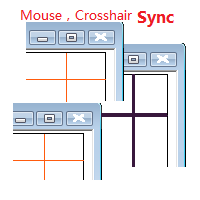
Objective: Mouse Crosshair Synchronization In multiple-charts. Syncronization crosshair for other timeframes. Syncronization mouse for other timeframes.
Use: 1. Download the program and put it in the dir (MQL5/Indicators or MQL4/Indicators). 2. Load this indicator to the charts that need to be synchronized. It just work. 3. Support the left and right keys of the keyboard. When the left and right keys move crosshair on a chart, the same symbol charts will also

Martingale grid panel - a semi-automatic Expert Advisor with a built-in trading panel. The Expert Advisor is activated by standard MT4 tools (or via its own panel) and automatically sets Take Profit, Stop Loss, Trailing Stop. Automatically or manually opens averaging orders. Changes the volume of orders in accordance with the Martingale strategy. Works with all orders of the selected symbol or only those opened from the panel, when the ID number is set. The Expert Advisor (and its Free Demo) are

Simple Trendline Trader is designed to simplify your trading activities and automatically open trade when the trendline you draw touched by the running price, You can choose to set EA to trade buy order or sell order when the trendline touched by running price, you can also set stoploss and takeprofit in pips, when using MM Lot it will automatically calculate your order lot based on the SL distance and set risk per trade from your current equity. This EA include : 1. Trade Mode, BUY or SELL mode

Simple HorizontalLine Trader is designed to simplify your trading activities and automatically open trade when the horizontalline you draw touched by the running price, You can choose to set EA to trade buy order or sell order when the horizontalline touched by running price, you can also set stoploss and takeprofit in pips, when using MM Lot it will automatically calculate your order lot based on the SL distance and set risk per trade from your current equity. This EA include : 1. Trade Mode,

Line Trader Pro is designed to simplify your trading activities and automatically open trade when the trendline or horizontalline you draw touched by the running price, You can choose to set EA to trade buy order or sell order when the trendline or horizontalline touched by running price, you can also set stoploss and takeprofit in pips, when using MM Lot it will automatically calculate your order lot based on the SL distance and set risk per trade from your current equity. This EA include : 1.

This EA is designed to simplify your trading activities and automatically close all open order when the trendline or horizontalline you draw touched by the running price, You can also choose to close only all buy order or close only all sell order or both close all buy and sell order at the same time. This EA include : 1. Close Mode, BUY or SELL mode 2. Time Filter (Broker Time) 3. Advanced Breakeven and Trailing Stops 4. Partial Close 5. Magic Number You can save it as template (for BUY or SELL

Blind Broker System の唯一の目的は、取引計画を隠し、ブローカーに見えないようにすることです。 あなたが本当に彼を「ブラインド」にしたいのであれば、彼があなたのストップロスレベル、テイクプロフィットレベル、ボリュームについて事前に何も知らないことを確認してください - ただこのトレーディングロボットを使用してください.
このプロジェクトの開始とアイデアについて、Henryk Kardas 氏に特に感謝します。 MQL が提供する無料のデモでは、この EA の機能をテストできないことに注意してください。 実際のテストについては、実際のデモ バージョンをダウンロードしてください。
デモ版へのリンク https://www.mql5.com/en/market/product/94190
Blind Broker System は、注文管理の代替システムです。 ある意味、Meta Trader Terminal 内のシステムと同じです。
違いは、ブローカーのサーバーに書き込まれるのではなく、Blind Broker System を通じて送信されたすべて

MAMMA インジケーターは、ストップ、ボリューム、またはリスクのレベルを計算する上級トレーダーだけでなく、初心者にも理想的です。 パラメータを制御し、ツールを取引に適応させるためのコックピットがあります。 このコックピットは、必要に応じて移動したり、単純に縮小して拡大したりできます。 3 つの計算方法があります。 * ロットサイズとストップサイズで何をする予定かを基にリスクを自動計算できます * 予想されるリスクとストップサイズに基づいてロットサイズを設定できます ※想定されるリスクとロットサイズから最適なストップサイズを設定できます。 各計算により、リスクの正確な量を知ることができ、計画されたストップの位置をチャートで直接確認することもできます。 計画を見失わないようにするために、その日の目標と最大損失を設定できます。 最後に、現在の市場または単に現在の日、週、月の進行状況を総合的に確認できます。 ボーナスとして、理想的なストップが提案された新しいオープンポジションごとにアラートを受け取ります。 最後に、コックピットはフランス語と英語の間でプログラミングできます。 ブローカーのサー
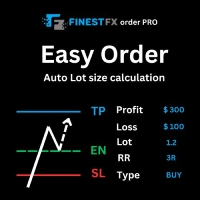
FinestFx order PRO is easy order execution and auto risk management tool developed by FinestFx official Programmer : Mohammed Rafi Just move SL,TP , Entry lines or Type SL,TP on entry columns . Lot are calculated automatically by fill out the loss cut amount. Work with all base currencies Fixed loss amount can be selected. Calculate risk rewards. Market order, limit order, and stop order are selected using buttons Supports FX, CFD, and crypto currency on MT4 Visit the owner website to see its
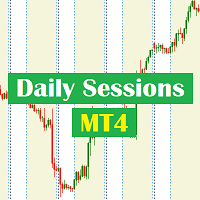
Daily Sessions utility is the best tool to highlight trading sessions , the trader can set any starting hour and ending hour to mark his trading session. Main features :
Customizable session time. Customizable Colors. Customizable vertical lines for the start and end of sessions
Set as many sessions as you want by simply plotting the indicator and changing the Indicator ID.
This is a tool for back testing your strategy manually on the chart , it's very easy to use, it may be useful for both professional and beginner traders. Features : • Simple buttons. • Export : P/L Points , Lots , Order P/L Result , Balance , to CSV file. • Ability to choose Auto or Manual StopLoss & TakeProfit. • Manual lot , or lot by risk can be used.
• Ability to change the chart time frame for live charts without losing the backtest result , you can even clo

The EA is used as an assistant for traders in the Trading Masters group. The EA assists with identifying setups when taking trades using the strategies outline in the Trading Masters Group. The EA has been developed and is intended for use by community members who understand the concepts and would like assistance navigating trade setups. It is recommended to first understand the concepts presented in the Trading Masters group before purchasing this EA so the user can understand and benefit fr

このパネルは、初心者とプロの両方のトレーダーの取引を支援するために作成されました。
主な機能:
すべての時間枠での潜在的な市場の反転に関するシグナル ニュースリリースの5分前に通知 取引セッションの交差を 5 分で通知 電子メール、電話、または端末に通知を送信します 日中の各機器の抵抗線とサポートラインを計算します アベレージング時に各商品のリスクを超えないようにする(各商品の最適な平均値をリアルタイムで計算し、次のアベレージングまでのポイント数を言います) 自動ロット計算で各取引のデポジットから簡単にカスタマイズ可能なリスク管理 損益分岐点まで取引を行い、動きの方向に利益を引き出す組み込みのトレーリング システム 各楽器の量をパーセントで説明し、1 日あたりにどれだけ経過したかを示します。また、預金からこの商品で獲得した割合とポイントの相対的な割合も示します 一括決済注文と未決注文の配置に便利なホット ボタン 特定の商品のすべての取引の損益分岐点またはゼロ点の自動計算 サーバーを操作するには、「 http://ec.forexprostools.com/ 」を許可された U
Auto Take Profit MT4 is designed to take profits in automatic way.
As a trader (manual or auto), you define your own expected profits schema. When you open one or several orders, the AutoTP program calculates profits then update into SL or TP automatically. It also re-calculates and updates accordingly for remaining open positions when a new order opened or an existing position closed. ---------------------------------- (Watch live in this DEMO ONLY signal https://www.mql5.com/en/signa

Here is a powerful trading tool that will allow you to trade manually or automatically in any market, but is especially useful in markets with high volatility and liquidity.
This system has two EAs (Expert Advisors): one for Buy and one for Sell, which work independently. The operation is based on the hedging strategy and the increase in lots based on the Fibonacci sequence, which will allow you to always add the two previous lots: 1, 2, 3, 5, 8, 13...
You decide how you want to trade: you ca

The Screen Shooter utility will help you take screenshots of your trading process.
How it works: The program is a small panel with two modes of operation: the first mode "All Open Charts" - allows you to create screenshots of all charts open in the terminal; the second mode "All TF Curr Chart" - creates, accordingly, screenshots of all timeframes of the current chart (to which this tool is attached). In the second mode, the user can disable unnecessary timeframes using the buttons on the panel (

OrderHelper script is super easy and trader friendly to use. It would boost your trading experience. Because it is designed to open one to multiple orders quickly with just one click. Besides using the OrderHelper script, traders can define various parameters for open orders such as the symbol, order type, lot size, stoploss, takeprofit and more. Basically, with this script traders can manage their open orders more efficiently and save their trading time.
OrderHelper manages: • Open the number

PROTECT YOUR FTMO Account in a simplest way Must-Have Account Protector for any Prop-trading Account and Challenge MT4 / MT5 Expert Advisor that protects your Forex Prop Trading account from an unexpected drawdown! FTMO Protector is a Tool that lets you manage trades and control your profit and loss across multiple Robots and currency pairs using a simple parameters and settings. Use as many EAs and Instruments you need, the Protector will: 1. Calculate your midnight (01:00 System time) Bal

Do you over trade??? Do you lose your account by adjusting the stop loss or not putting stop loss?? Do you cross your daily loss limit and closed your account??? Do you breach your funded account??? Do you fail frequently because of emotion?? So you have to control your emotion in trading. And this EA will do the job for you. You can not repeat those mistake even if you try hard. Just set the EA and relax. This will do major role in funded account. This EA will not open orders/positions. It j

What Is A SmcDrawTools? SmcDrawTools was developed for fast and comfortable trading of the financial markets especially for SMC TRADERS. It provides traders functionalities, such as: All in one place! A very exciting addition to make a trader’s job a whole lot easier. Just a single click and everything you need is right there at your fingertips. What could be more simple?! So, what can this SmcDrawTools do for you?
The Drawing Tool Will Make Your Analysis Easy! As a Trader, you often need to d
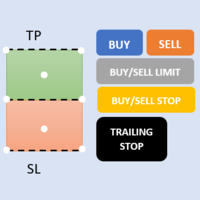
First 5 copies sold for 39$. 2/5 sold. Next price 49$. Not all function work on tester. If you want to test it, write to me a personal message, i send to you a demo version valid for 7 days with full functionality.
The Trade Manager Advace is composed by 4 part: Navigation panel. Execution panel (Here is present the Risk Reward Tool). Management panel. Equity panel.
Input parameters Magic Number : Number (number must be unique, do not use the same number in more one chart). Trailing stop for

Copy Trade EA(Expert Advisor)是一种自动交易软件,可以帮助投资者自动复制其他交易者的交易策略和操作,从而获得类似于其它交易者的交易结果。该软件基于MetaTrader平台,具有易于使用、高效、灵活和自适应的特点,为投资者提供了自动化交易的一站式解决方案。
该软件支持多种交易品种,包括外汇、商品、股票和指数。其主要功能包括:
复制交易:该软件可以在实时模式下复制其他交易者的交易操作,自动将交易操作应用到您的账户中。您可以根据其他交易者的历史表现选择要跟随的交易者,并设置复制比例和风险管理策略,以满足您的投资需求。
风险管理:该软件支持多种风险管理策略,如止损、追踪止损和限价订单,可以帮助投资者最大限度地降低风险和保护资金。此外,该软件还提供了实时的交易报告和交易统计信息,以便投资者对其交易行为进行分析和调整。
自定义设置:该软件支持用户自定义设置,包括复制比例、交易量、止损和追踪止损距离、交易时间和其他参数。这些自定义设置可以根据投资者的偏好和风险承受能力进行调整。
高效运行:该软件基于MetaTrader平台,具有高效、灵活和自适应的特点。该软件
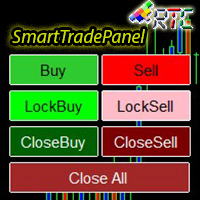
SmartTradePanel は、トレーダーが注文を迅速かつ効率的に実行できるようにする取引ツールです。 提供される高度な機能により、SmartTradePanel は、トレーダーがオープン注文を管理し、取引の潜在的な利益を最適化するのに本当に役立ちます。 この記事では、SmartTradePanel の機能と利点について詳しく説明します。
SmartTradePanel の主な機能の 1 つは、オープン注文の高速実行機能です。 数回クリックするだけで、トレーダーは迅速かつ効率的に取引ポジションを開くことができます。 これは、約定速度が利益を決定する要因となる可能性がある急速に変化する市況で特に役立ちます。
それとは別に、SmartTradePanel では、トレーダーがロック注文を出すこともできます。 ロッキングオーダーは、ポジションが逆転して将来的に利益を生み出すことを期待して、負けたポジションをロックすることを目的とする取引戦略です。 SmartTradePanel を使用すると、トレーダーは数回クリックするだけで簡単にロック注文を出すことができます。
注文の実行と注文
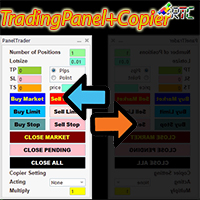
このTradingPanelには、同様の取引パネルと比較して、次のような多くの利点があります。 1. 即座に注文を開始 (市場) し、希望の価格で保留中です。 2. ピップまたはポイント モードで設定できるテイクプロフィット (TP)、ストップロス (SL)、およびトレーリングストップ (TS) 設定。 3. 成行注文のみ、未決注文のみ、または成行注文と未決注文のすべての注文を閉じることができます。 4. マスターとして開いた注文をクライアントとしてパネルにコピーできる CopyTrade も装備し、クライアントからロットスケール値を設定できます。
取引活動を容易にするために、今すぐこの TradingPanelPlusCopier を入手してください。
TradingPanelPlusCopier の使用方法と使用のデモは、説明のビデオ デモで見ることができます。 こんにちは利益!

Beta version of a semi-automatic utility for trading grid strategy. When using, please give feedback on the shortcomings / suggestions.
Good luck to us!
Parameters:
Lot exponent - multiplication of the lot on the next order. Grid pips - grid size. Take profit pip - distance of the take profit line. Magic number - the magic number of the adviser's work. Trading menu - presence/absence of a trading menu. Menu size - the size of the menu (choose the value for your resolution). Menu font size -

HURRICANE EA is a compilation based on the volatility unique to XAUUSD (GOLD), which is a trading tool with simple internal operation logic but not ordinary, which uses martingale + hedging + trending as a set of operating modes. Expert was born by collecting and learning a large amount of historical data, combined with the characteristics of the variety and using it countless times to test the market. Please do not believe that there will be any complex algorithm in the market that can accurate

OrderManager をご紹介:MT4用の革新的なユーティリティ 新しく設計されたOrder Managerユーティリティを使用して、MetaTrader 4での取引をプロフェッショナルなものにしましょう。シンプルさと使いやすさに焦点を当てたこのユーティリティは、各取引に関連するリスクを簡単に定義し、視覚化できます。これにより、情報に基づいた意思決定が可能になり、取引戦略を最適化できます。OrderManagerに関する詳細は、マニュアルをご参照ください。 [ マニュアル ] [ MT5 バージョン ] [ Telegram チャンネル ] New: [ Telegram To MT5 ]
主な特長: リスク管理:取引のリスクを素早く簡単に定義し、より良い意思決定を行い、取引パフォーマンスを向上させます。 視覚表現:オープンなポジションとそれに関連するリスクをグラフィカルに表示し、明瞭かつ簡潔な理解が可能です。 注文変更:数回のクリックで注文を簡単に変更またはクローズし、取引プロセスを効率化し、貴重な時間を節約します。 手のひらの上の最新ニュース:ボタン一つで最新の市場ニュース

MT4 Discord Copier - the perfect tool for those looking to remotely copy trades between multiple MT4 accounts on different computers over the internet! With the added convenience of Discord transactions monitoring, you can now easily share trades with a global group of people on your own terms, all while benefiting from the features of a Discord server . This solution is ideal for both providers and receivers, as providers can effortlessly copy trades to multiple receivers, while re

Calculates correct lot-size by just 4 clicks. It is simple, quick and effective. This tool does everything for you. Set your risk percentage and tool settings to fit your needs. You will have one main button to show simple menu, where you can after clicking on "Calc" button (second click) set your Entry level (third click) and SL level (fourth click). Software will show you info box with all information needed - risk %, risk value, ticks distance and calculated position size. Of course, it draw
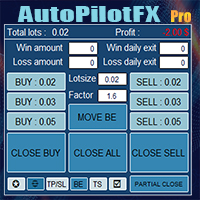
Introducing of AutoPilotFX Pro: Your Ultimate Trading Panel with Advanced Features of order management Take your trading to new heights with our Trade Assistant designed to streamline your trading process and optimize your strategies. Discover the powerful features it offers and learn how it can help you maximize your profits and minimize your risks.
Semi Automated EA for working as your trading assistant with Key Features: Automatic Lot Size Calculation: AutoPilotFX Pro automatically calc

MT4 Discord Copier - the perfect tool for those looking to remotely copy trades between multiple MT4 accounts on different computers over the internet! With the added convenience of Discord transactions monitoring, you can now easily share trades with a global group of people on your own terms, all while benefiting from the features of a Discord server . This solution is ideal for both providers and receivers, as providers can effortlessly copy trades to multiple receivers, while receivers can
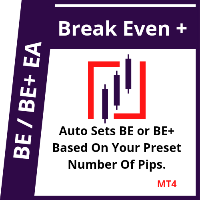
This EA will set breakeven or breakeven-plus for your trades, whether you have manually or automatically set stop loss or not. If your broker charges commissions per trade, you need to set breakeven plus, not just breakeven, in order to cover up those charges and properly let your trades run at zero risk. Inputs:
In the inputs section , set BEPoffsetPips to 0, to use it as a "breakeven" EA. Or set BEPoffsetPips to any amount of pips you want, to use it as a "breakeven-plus" EA. "OnPr

The Expert Advisor helps manage your account equity. You can set the EA to close all trades at the total account profit or buy/sell line profit or close at a certain predetermined loss percentage…
Parameters: Chart Symbol Selection: For Current Chart Only/ All Opened Orders Profit all to close all order USD (0 - not use): Profit in money Profit buy to close buy order USD (0 - not use): Profit in money Profit sell to close sell order USD (0 - not use): Profit in money Loss all to cl

Features Ordering support tool using Fractals, Alligator, and HeikenAshi technical. Submit a stop order to the latest Fractals value emerging in the direction of Alligator's perfect order. Submit an additional stop order every time the Fractals price is updated. If Alligator's perfect order is canceled, cancel the placed stop loss order (leave only the contracted position). Filter entries by HeikenAshi (large), HeikenAshi (small) positive and negative lines. For filled positions, exit at any tim

The "Lot Size" button toggles between fixed and auto lot size modes. Fixed mode uses a predetermined lot size, while auto mode calculates lot size based on a customizable percentage of the account balance, displayed at the bottom. The "Trailing Stop" button enables the activation or deactivation of the trailing stop feature. Initially set to "No Trailing," clicking the button changes it to "Trailing ON" when the trailing stop is active, and "Trailing OFF" when it is inactive. Below the button,

HFT FAST SCALPING EA the High Frequency Trading which use stop orders to enter the trades when market is trending.
best use for
1- Low slippage brokers for us30 and DE40 .
2- LOW OR ZERO COMMISSION BROKERS FOR EUR AND GOLD.
3-Prop firms like ftmo ,tff,.......etc
This EA UNLIKE Other HFT EAs , You can see that in the parameters ,, CHOOSE LOT SIZE , MAX LOT , CHOOSE TIME , COMMENT AND OTHERS .
IT STOPS 3 MINUTES AUTOMATICALLY EVERY 15 MINUTES TO PROTECT THE EQUITY FROM A BIG UNWANTED SLIPPAGE .
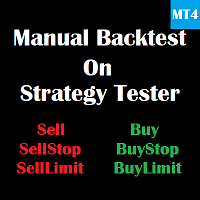
This is a tool for back testing your strategy manually on the Strategy Tester , it's very easy to use, it may be useful for both professional and beginner traders. Features : • Simple buttons and inputs. • Back-test result will show on the strategy tester graph and results tabs.
How to use : • Select the EA in the strategy tester list. • Configure the settings to your needs. • Start the tester and begin trading , input the stop loss and take profit set the lot size

平均化ヘルパー - この種の取引ヘルパー ツールは、次の 2 つのテクニックを使用して、以前は利益がなかったポジションを平均化するのに役立ちます。 標準平均 トレンドに応じてポジションを開くヘッジ このユーティリティは、買いと売りの両方の異なる方向の複数のオープンポジションを一度に整理する機能を備えています 。例えば、売りポジションを1つ、買いポジションを1つオープンしたが、どちらも利益が出ていない場合、あるいは1つは利益が出ているものの利益が十分でない場合、この2つのポジションを平均化してプラスで取引を終了したい場合などです。これは、私の平均化支援ユーティリティが役立ちます。 平均化ヘルパー ユーティリティ - 次のポジションのサイズ、注文価格、ポジションを平均化する方向、指定した利益確定サイズでプラスでポジションをクローズする方向を自動的に計算できます。 このユーティリティでは、「買い」と「売り」ボタンを使ってポジションを開くこともできます。希望する利益確定額と開始ロットを指定するだけです。ユーティリティ自体は、最初に指定した利益確定額でポジションをクローズするか、ポジションを平均

IMPORTANT: Blocks&Levels Alerts indicador.
Gives you the ability to easy draw Blocks and Levels (support and resistance) using key shortcuts and Alerts when price touch them. Please use it and give me feedback!! It really helps! Thank you very much! DESCRIPTION:
Blocks&Levels Indicator, has useful key shortcuts for draw Levels, Blocks Zones, change chart Time Frames, Select or Deselect all drew objects. SETUP:
Just install the Indicator on the Chart
Open and navigate Indicator properties to
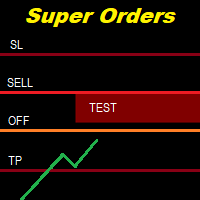
You can place an unlimited number of invisible pending orders using this tool. Orders will be filled under the following conditions: Spread is not greater than the set Max. spread Slippage is not greater than the set Max. slippage
The set trading time was not exceeded
The expiration time was not reached TRADING button is not switched to PAUSE If these conditions are not met, the order will be cancelled. You can also set up a Test Zone with an Off line for each order. The order will be cancel
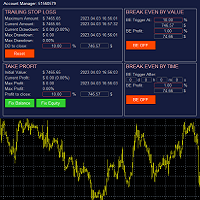
The account manager has a set of functions necessary for trading, which take into account the results of the entire account in total, and not for each individual open position: Trailing stop loss. Take profit. Break-even on the amount of profit. Breakeven by time. Stop Loss Typically, each of these options can be applied to each individual trade. As a result, the total profit on the account may continue to increase, and individual positions will be closed. This does not allow you to get the maxi

私たちの多くは、VPSを使用して24時間365日取引EAを実行していますが、これらの端末が稼働しているかどうかを監視するにはどうしたらよいでしょうか。
もし、クラッシュしたり、アップデートのためにシャットダウンしたらどうする?そのような場合、どのように通知されるのでしょうか?
そこで、ハートビート・モニタリングの出番です。
24時間365日、すべての端末とVPSを監視することができるのです。
では、そのために必要なものは何でしょうか?
1.プロフェッショナルな監視サービスである Cronitorの 無料ユーザー アカウント 。
2.VPS上のチャート上で動作する本ツール。 MT5や接続の問題が発生した場合、メールにて通知されます(より多くの通知方法があります)。
私たちはこの技術的ソリューションを、重要なバックエンドインフラの監視に使用しているので、信頼性と有用性は実証済みです。
私のパートナーのブログ:Daniel Steinで 完全なチュートリアルをお読み ください。
もしご希望であれば、 Nodepingサービス (有料)をご利用ください。
詳細とスクリーンショッ

This indicator is useful for monitoring the performance of individual strategies or even everything of the entire portfolio of strategies directly on your MT4. In this way you can view the equity line and the balance line directly on the chart. In addition, you can set a line based on the percentage number of DD Max that the individual strategy can reach. Try it.
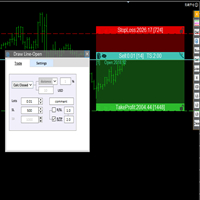
交易者的最佳伙伴! 基本使用设置 基本: 支持语言的选择切换(目前支持中文和英文) 自动识别语言 划线交易
支持英文中文自动选择,自动识别.
1.划线交易 ( 支持拖拉,支持多个订单线 ) 2.手数管理: 两种手数计算模式 ①资金的风险比例,例如设置风险百分比为1的时候,1万美金可交易1手. 计算手数 = 资金(净值或者余额或者剩余保证金) * RISK /10000 ②按亏损金额计算,本设置需要配合止损设置, 计算手数 = ( 当订单被初始下单设置的止损所止损的时候所亏损金额 计算得到的手数,小于最低手数会等于最小手数) ; 3.盈亏比等设置,
设置部分 1. 自动吸附最近高低点 2.高低点偏移 3.自动选择订单习惯 4.SL TP设置方式 5.语言设置

THIS EA IS A SEMI-AUTO EA, IT NEEDS USER INPUT. Manual & Test Version Please TEST this product before BUYING and watch my video about it. Contact me for user support or bug reports, or if you want the MT5 version! MT5 Version I do not guarantee any profits or financial success using this EA.
With this Expert Advisor, you can: Implement your own Zone Recovery strategy to capitalize on trending markets. Create Grid trading strategies, to profit from ranging markets. Place orders easil

Have you developed your own entry strategy or are you using an Expert Advisor to automate your entries? Then do the same with your exits!!! Nothing is as important as the right moment to exit your trades. Either to avoid bigger losses or to get maximum profit. But prices often move unpredictably and quickly, which often becomes a problem for a manual exit. Also, the previously set StopLoss or TakeProfit are usually not suitable to get the maximum out. Stop Manager Pro offers you strategies like

Here is a utility that helps automatically setup stoploss, takeprofit and trailing stops for hand trades. This is not an auto-trading EA, it only supports manual trading of orders, helping you to better monitor your account management. Irrespective of symbol, server, timeframe. SETUP: On/Off: On or Off EA Take profit points: take profit value in points Stoploss points: s toploss value in points Average price of all orders of one type: when this function is enabled, the average take profit f

This EA is fully automated , it is built based on the method of catching the pop-up Alert event and Open Market Orders (BUY/SELL) . Download trial version here: https://www.mql5.com/en/blogs/post/751340
***NOTE: It is recommended to remove the available filter settings, only install the filter for your indicator. Parameters of the EA: -------- <EA Settings> -------- Magic Number: The identifying (magic) number of the currently selected order. Allow Open trade: Enable/ Disable Open Trade

Ultimate Trade Panel MT4 は、MetaTrader 4向けに設計された強力なエキスパートアドバイザーで、MQL4プラットフォーム上でのトレーダーの効率を向上させ、取引活動を合理化します。このツールは使いやすい機能で日々の取引タスクを簡素化し、特定の取引ロジックに依存せずに取引管理の信頼できるパートナーとして機能します。競争優位性を求めるトレーダーのために開発され、自動化とリスク管理ツールを提供して取引体験を最適化します。 注 :Ultimate Trade Panel MT4のデモ版をデモアカウントでダウンロードしてテストしてください。 こちら 。 MT5バージョンはこちらでダウンロードできます: Ultimate Trade Panel MT5 MT4のフルバージョンはこちらでダウンロードできます: Ultimate Trade Panel MT4 詳細なドキュメントはこちら: 設定と入力ガイド 機能: インジケーターマネージャー:入力で指定されたテンプレートに基づいてインジケーターをロードし、ツールバーからインジケーターを変更する手間を省き、迅速な意思決定を

The program is use to copy trading from MT4 to MT4 and MT5 on same Windows PC or VPS . Now you can easy copy trades to any MT4 account or MT5 account. Instants copy, speed smaller 0.1 seconds, easy to setup. Need run EA as Signal provider on one MT4 account, other MT4 / MT5 will run EA as Trade copier. You can download and try demo version on demo account Copi Trade MT4 demo version here Copi Trade MT5 demo version here

The MoneyMint Trade Assist is a game-changer for traders. This all-in-one control panel puts the power of professional trading at your fingertips, empowering you to take your trading to the next level. With its intuitive design and feature-rich functionality, the MoneyMint Trade Assist simplifies the complexities of order entry and exit and gives you the edge you need to succeed. Whether you're an experienced trader or just starting out, this powerful tool will help you maximize your profits and

Trade Closer
Set a trade and only have a profit target in mind? Drag onto the pair of choice, enter your profit target into the box and you're good to go. No need to set a Take profit anymore Your trade will be closed for you once the profit target is hit and will send an alert to your account.
Disclaimer: Only works on the windows version of MT4 and only when the computer terminal is active
This version only supports orders with a single order transaction count of<1. If the single order transaction count is>1, please subscribe to a higher version This EA is not actively profitable, but only uses trading time to increase trading frequency and achieve the goal of saving swap fees.
Working principle: This EA will generate MQL4 Experts Orderhis before the trading deadline of the day_ The today.csv file is used to record the information that has been opened on the current day, generat
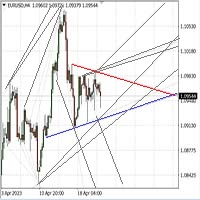
Автомated Trend Line Construction
Features: Draws multiple trend lines representing potential price growth/decline boundaries (gray lines) Identifies and draws price channels (green lines) Identifies potential technical analysis triangles (red and blue lines) Recommended: White chart background, Timeframe - M30 Settings: Interval=200 - Maximum number of bars used in the analysis for line construction The_greatest_distance=5000 - Controls the maximum distance from the current bar's price lev
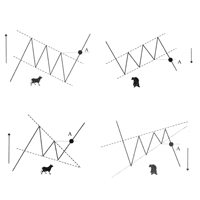
Скрипт проводит анализ трендов, выполняет поиск фигур продолжения и фигур разворота тренда по всем доступным инструментам окна Watch. Скрипт последовательно выводит несколько окон с сообщением о текущем состоянии: 1. Если в торговом терминале сохранено не достаточно цен по каждому инструменту или вам необходимо обновить цены по всем инструментам на актуальные после перерыва в работе, то проведите обновление. 2. Будет проведен анализ текущей тенденции активного графика. 3. На текущем графике п

Multicurrency Hedge is an Automatic Trading Robot based on Standard Deviation. The EA is suitable for both beginners and experienced traders. The Main trade is when the price goes beyond the Standard Deviation on the Main Currency pair, and then the trading on other pairs is executed, the Multicurrency Grid is Activated. Install EA on VPS and on one Currency pair "EURUSD", Timeframe M15, Minimum deposit $1,000, Leverage 1:500.
PARAMETERS:
SD_TIMEFRAME - time frame for signals search;
SD_APRI

[ MT5 Version ] [ Telegram Version ] [ Pro: Telegram + Discord ] Post your MT4 trades to Discord automatically via webhook — no bot setup, no permissions: paste ONE URL and you are live in 60 seconds . And keep every signal UPDATED: the original message is edited when you modify SL/TP or close the trade. Built for signal providers, trading communities and prop-firm teams on Discord. WHY THIS ONE WEBHOOK-BASED — no bot, no tokens: Discord channel → Integrations →

[ MT5 Version ] [ Discord Version ] [ Pro: Telegram + Discord ] Post your MT4 trades to Telegram automatically — and keep every signal UPDATED: this is the only sender that EDITS the original message when you modify SL/TP or close the trade. Your followers always see the real state of every trade. Built for signal providers, VIP channel owners and traders who share their trading. WHY THIS ONE ️ EDITS THE ORIGINAL SIGNAL — modify SL/TP or close the trade and the o

最大 7 つの市場セッション と 3 つの週の範囲 を チャート に表示し、完全にカスタマイズ可能 各セッションとレンジは表示または非表示にすることができ、各トレーダーのニーズに応じて特別な日中または週内の期間に合わせて調整できます 次のいずれかを使用してセッションの開始/終了時間を定義します。 GMT/UTC 時間(任意のタイムゾーンに調整可能) サーバー/ブローカー時間 (チャート時間) 現地時間(コンピュータの時間)
PRO バージョンの機能
名前 : 各セッションと週の範囲を特定の名前で区別します 開始時刻と終了時刻を分単位で指定する : 時:分(HH:mm) または単に時間(HH) 形式で設定できます 週単位範囲の開始日と終了日: 週単位範囲の任意の曜日(日曜日から月曜日まで)間の期間を設定します GMT 時間のタイムゾーン オフセットを調整可能 : タイムゾーン オフセットを GMT 基準時間に設定すると、場所に応じて市場の基準時間を簡単に使用できます。 たとえば、ニューヨーク時間: GMT -5 Android 版または iPhone 版 MetaTrader ア

Left4Trade MT4 Script
A script allows displaying the closure of a trade on the current chart. It helps to see where the trade was opened and closed and how it affects the overall trading result.
When using this script, arrows indicating the opening and closing of trades are displayed on the chart. They can be configured with different colors according to your preferences.
One of the main advantages of using this script is the ability to quickly analyze trading operations, which allows you to
FREE
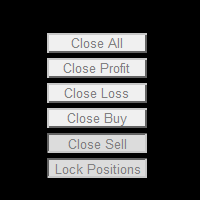
This powerful and user-friendly EA is designed to help you manage your trades with ease and efficiency. With its wide range of features and excellent compatibility, it runs flawlessly on the MetaTrader 4 platform. Key Features: Close All Positions: With just one click, you can close all open positions, regardless of their type and status. Close All Profitable Positions: Instantly close all positions that are currently in profit, ensuring you secure your gains. Close All Losing Positions: Swiftly

Avoid SWAP fees EA MT4 This version only supports orders with a single order transaction count of<10. If the single order transaction count is>10, please subscribe to a higher version This EA is not actively profitable, but only uses trading time to increase trading frequency and achieve the goal of saving swap fees. Working principle: This EA will generate MQL4 Experts Orderhis before the trading deadline of the day_ The today.csv file is used to record the information that has been opened
Avoid SWAP fees EA MT4 This version only supports orders with a single order transaction count of<0.1. If the single order transaction count is>0.1, please subscribe to a higher version This EA is not actively profitable, but only uses trading time to increase trading frequency and achieve the goal of saving swap fees. Working principle: This EA will generate MQL4 Experts Orderhis before the trading deadline of the day_ The today.csv file is used to record the information that has been op
Avoid SWAP fees EA MT4 This version only supports orders with a single order transaction count of=0.01. If the single order transaction count is=0.01, please subscribe to a higher version This EA is not actively profitable, but only uses trading time to increase trading frequency and achieve the goal of saving swap fees. Working principle: This EA will generate MQL4 Experts Orderhis before the trading deadline of the day_ The today.csv file is used to record the information that has been
FREE

StarPlatform è un EA a pulsantiera che permette di aprire e, automaticamente, gestire e chiudere ordini. Apertura di posizione. StarPlatform permette di aprire ordini a mercato e/o piazzare pendenti di tipo LIMIT e STOP. I pendenti possono avere il livello d’ingresso posizionato manualmente oppure calcolato automaticamente in quanto ancorato ai massimi o ai minimi della candela su cui si clicca. Ogni ordine può avere lo Stop Loss piazzato con le stesse modalità del livello d’ingresso (impostat

Phoenix MT4 Telegram Notifier is a trading utility that integrates with both MetaTrader4 and Telegram. The utility publishes all your trades as signals in your channels or groups. This allows you to track in real time what is happening with your account via Telegram.
Notifications for :
Opened order Closed order Modified order
Parameters :
Telegram Bot Token - create a bot on Telegram and get a token Telegram Chat Id - input your Telegram group/channel Id Notify for opened order - notifies wh

Stormtrooper EA 基于货币特性的交易算法。 Stormtrooper 的策略结合了布林通道上、下阻力和支撑,以及行情波动率、分时收盘点位的一种交易算法。
推荐使用货币AUDCAD或NZDCAD进行操作 ,我用 2000 美元和1:500 的杠杆对其进行了测试,请查看下面的真实账户, 结果证明 Stormtrooper 极其稳定、且富有侵略性。 Stormtrooper 首次发布售价599美金,会根据信号展示结果进行逐渐涨价,最终售价为1999美金。(6月30日前特惠价599$,过后将回复原价,欢迎咨询购买.......) Stormtrooper 无论在测试还是实盘中,都展现了持续的稳定性。对此身边的朋友,在用过一段时间后,都给出了极高的评价。如果您对我的EA策略感兴趣,请您直接消息与我联系,以获取更多关于产品的信息以及我推荐的经纪人。相信我,如果选择我的EA策略,一定会收获满意的结果与回报,您将与我实盘真实账户同步。
结果展示
真实账户: https://www.mql5.com/zh/signals/1798191
特征:
建议用于15min时间

Telegram Signal Sender MT4であなたの外国為替シグナル共有の能力を高めましょう。この強力なユーティリティは、Telegramチャンネルにトレードシグナルを送信するプロセスを自動化し、簡素化するために設計されており、新進のシグナルプロバイダーから確立されたプロバイダーまで最適です。Forex FactoryやRedditのr/Forexなどのトレーディングコミュニティで広く称賛され、InvestopediaやMQL5フォーラムでの議論でもシグナルの効率的な配信で注目されており、視聴者を増やしたいトレーダーの間で人気のツールです。ユーザーは、タイムリーかつプロフェッショナルなシグナル配信により、フォロワーのエンゲージメントが30-40%増加し、シグナルを手動で投稿する時間が50%削減されたと報告しています。主な利点には、自動シグナル生成、カスタマイズ可能なリスク管理、公開またはプライベートのTelegramチャンネルに高品質のシグナルを簡単に共有できるユーザーフレンドリーなインターフェースが含まれ、信頼できるシグナルプロバイダーとしての評判を高めます。 Telegr

チャートの任意の場所でマルチシンボルをダブルクリックして、価格アラートを設定し、ターミナルアラートまたはプッシュ通知から通知を受け取ります
1. EA ユーティリティをチャートに追加する
2. <- 左または -> 右矢印キーでチャートをブラウズ
3. チャートの任意の場所をダブルクリックすると、線が追加されます。この線をドラッグして希望の価格を設定すると、アラートが設定されます! 価格がラインに到達すると、ユーティリティの設定に従って端末またはプッシュ通知で通知されます。 ターミナルを再起動しても、このアラートは機能し続けます。
4. マルチシンボルを閲覧し続け、アラートで通知したい多くのチャートに線を追加し続けます.
5. 最初からやり直したい場合は、D を押して、設定したすべてのアラートを削除します。
6. 水平線を削除すると、アラートが無効になります。
MetaTraderマーケットは、履歴データを使ったテストと最適化のための無料のデモ自動売買ロボットをダウンロードできる唯一のストアです。
アプリ概要と他のカスタマーからのレビューをご覧になり、ターミナルにダウンロードし、購入する前に自動売買ロボットをテストしてください。完全に無料でアプリをテストできるのはMetaTraderマーケットだけです。

取引の機会を逃しています。
- 無料取引アプリ
- 8千を超えるシグナルをコピー
- 金融ニュースで金融マーケットを探索