 MetaTrader 5
 エキスパート
 インディケータ
 ライブラリ
ライブラリ
 ユーティリティ
 ウィジェット
 ルール
ルール
YouTubeにあるマーケットチュートリアルビデオをご覧ください
ロボットや指標を購入する
仮想ホスティングで
EAを実行
EAを実行
ロボットや指標を購入前にテストする
マーケットで収入を得る
販売のためにプロダクトをプレゼンテーションする方法
MetaTrader 4用取引ユーティリティ - 36
 以下はMetaTrader4での外国替取引を簡素化する取引プログラムです。以下のリストのユーティリティにカーソルを合わせて、説明と目的をご覧ください。
Local Trade Copier EA は、MAMまたはPAMMアカウントを必要とせずに、外部ソースからのトレードシグナルを実行する必要がある、または同時に複数のアカウントを管理する必要がある個々のトレーダーまたはアカウントマネージャー向けのソリューションです。最大8つのマスターアカウントから無制限のスレーブアカウントにコピーします
[ インストールガイド | アップデートガイド | トラブルシューティング | FAQ | すべての製品 ]
100%セルフホスト インストールと使用が簡単
インストーラー、構成ファイル、サーバー、メモリパイプ、DLLは使用されていません
EAを永久に使用するための1000回のアクティベーション
ローカル実行、ネットワーク遅延なし
それはあなたがこれまでに必要とするすべての機能を実装します:
最大8つのマスターアカウントと無制限のスレーブアカウント
すべてのブローカーおよびDD / NDD / ECN / STP実行で動作します
異なる口座通貨の口座で動作します ライブアカウントとデモアカウントの間で区別なく機能します マスターアカウントとスレーブア

The product will copy all Discord signal to MT4 ( which you are member ) , also it can work as remote copier. Easy to set up. Work with almost signal formats, support to translate other language to English Work with multi channel, multi MT4. Work with Image signal. Copy order instant, auto detect symbol. Work as remote copier: with signal have ticket number, it will copy exactly via ticket number.
How to setup and guide: Let read all details about setup and download Discord To MetaTrader

Set your Entry Stop-loss and Profit with Lot size calculator in one click. We designed this EA to calculate Lot size automatically based on Risk percentage on Account balance Reward options are alliable to 1:1 , 1:2 , 1:3
cancel not executed trader at one single click.
Don't need to go to any position calculator or any lot size calculator get your lot size based on candle price action.

すべてのアクティブおよび保留中の取引の潜在的な損失: ストップロスレベルに達した場合(またはストップロスレベルが設定されていない場合の現在の浮動損失) 私の#1多機能ユーティリティ: 66+機能を含むこのインジケーター | ご質問はこちら お問い合わせ | MT5バージョン 入力設定で 調整できます: 計算方法 : アカウント通貨 / ピップ / ポイント / 残高の% チャート上の位置: 左下 / 右下 / 左上 / 右上
フォント: 色、サイズ、スタイル オプションで スワップと手数料コスト を計算に含めることができます '% / 残高'メソッドを使用する場合の計算ベース:アカウント残高 / 自由なマージン / 現在のエクイティ //-----------------

Description of Monitoring_ExpertAdvisor+Balance_Equity Indicator: Monitoring Expert Advisor is an indicator that analyzes your Account MT4 elaborating the archived operation data in the order history. It is sufficient to connect it to any open and empty graphic window. The orders in the account database are identified by the indicator of their MagicNumber, divided in groups based on their strategy (Expert Advisor) to calculate complex efficiency Objectives: It has the main objective of monitor

スクリプトはMT4のすべてのポジティブオーダーを閉じます -アカウントのすべての収益性の高い注文をすばやく閉じることができます。 このスクリプトは 、収益性の高いすべての注文をすばやく閉じる必要がある場合に 適し ています。
スクリプトには、Profit_in_pipsを設定するための唯一のパラメーターがあります。このスクリプトでは、ポジションを閉じるための条件に該当するように、注文にいくつの利益ポイントを指定する必要があります。 スクリプトは非常に使いやすく 、スクリプトをチャートにドラッグアンドドロップするだけで機能します。 推奨されるロボットスキャルパー - テスト します。 私のページを購読して ください 、私は他の多くの有用な製品を持っています。 スクリプトが気に入ったら 、レビューを残してください。便利な製品を無料で共有する動機付けになります。
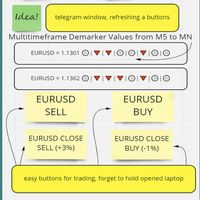
The whole day there is no opportunity to monitor the terminal, but the phone is at hand. This is both an indicator and a utility for trading buttons from Telegram on a fixed lot. You can both scalp on M5 chart or wait for a good entry point on Daily chart. I decided to combine 3 projects into one (MTF Demarker values, profit calculating with cross orders and updating content-info in the buttons themselves), I wanted to make the functionality more easy and convenient than the standard Metatrader
Risk/Reward Toolは、MetaTrader 4でのトレード計画、可視化、執行の方法を革新するために設計されたプロフェッショナルグレードのエキスパートアドバイザーです。精密なリスク管理を重視する裁量トレーダーでも、トレード設定を視覚的にテストする必要のある戦略開発者でも、このツールはエレガントで直感的なインターフェースで必要なすべてを提供します。 基本的なポジション計算機とは異なり、Risk/Reward Toolは視覚的なトレード計画を即時執行機能、リアルタイムの損益モニタリング、包括的なトレード管理機能と組み合わせています。このツールはMT4ストラテジーテスターと完全に互換性があり、実際の資金をリスクにさらすことなくトレード戦略を練習し、アプローチを改善することができます。 ツールの完全なマニュアルはこちら: https://www.mql5.com/en/blogs/post/766244 MT5 version: https://www.mql5.com/en/market/product/158601
主な機能 視覚的なトレード計画 ドラッグ&ドロップ操作可能
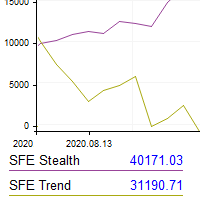
This utility shows the performance of the account (closed operations) in a graphical panel attached to a graph as an indicator. The purpose of the utility is to have a quick and clear view of the performance of transactions organized by different EAs or any desired combination.
The utility has the following features in the current version 1.0:
- Custom groups can be defined, to analyze and compare different performances within the account. The groups can contain filters of two types, filters
XXXX ATR (Average True Range) Position Manager: ATR StopLoss, ATR Target, ATR Breakeven, ATR Trailing StopLoss, with Risk % Calculation / Position.
More about ATR: www.atr-trading.com
Key takeaways One click does it all: SELL and BUY button automatically places ATR stoploss, ATR target, ATR breakeven, ATR trailing stop and Risk % calculation of equity Entire position is calculated based on ATR No more manual position calculations = No more wasted time = No more late entries Position siz

Tetris remains one of the most fun and addictive pieces of software to ever grace the computing scene. That's right, everything that everyone loves about Tetris can now be experienced on MT4 platform. Its beautiful simplicity and surprisingly fast-paced gameplay make it an exceptionally easy thing to just pick up and play on short notice. This version comes with everything everyone loves about Tetris. It has all six of the classic tetrimino shapes, the steadily growing level of challenge tha
FREE

DESCRIPTION: The EA is a trade manager for managing manual or other trades by EA. It can place Stoploss, Takeprofit, Trailing, and Martingale/Average all open positions. Make sure to just place 1 type of open orders for each symbols (Examples: 1 Buy or 1 Sell). The EA will not open the initial trades, but can be backtested to see how it works.
FEATURES: Multicurrency or Single Pair Mode. Placing Stoploss / Takeprofit. Auto Martingale / Average Positions. Trailing for All Open Positions (Singl
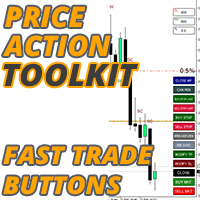
プライスアクションツールキットEAは主にスカルパー向けに設計されていますが、すべての時間枠で使用して、ストップレベルに基づいて正しく計算されたロットサイズで市場に迅速に参入できます。注文)そして市場が動くにつれてストップを調整して利益を上げます。
使用するすべての機能、設定、およびベストプラクティス戦略の完全なリストについては、ここをクリックしてください:https:// www.mql5.com/en/blogs/post/748072
リスクベースのエントリ クイックオーダーボタンを使用すると、アカウントのリスクの割合に基づいてポジションに移動できます。選択したリスクとストップロスまでの距離に基づいて、ロットサイズが自動的に計算されます。そのため、ブローカーが0.01ロットのサイズ設定を使用できることを確認する必要があります。0.10または1.00のロット増分を使用するように強制された場合、ブローカーは機能しません。
高速取引実行ボタン チャート上にクイックトレード実行ボタンを配置し、トレードを即座に自動的に開いたり、閉じたり、調整したりします。通常のエントリーボタンと同様

Trading panel; “Assistant (A)” will help you to instantly place Buy, Sell, Buy Stop and Sell Stop orders for several pairs in a short period of time. The advantage of this panel is that orders are placed immediately with take profit , stop loss , Trailing and No loss restrictions, which, ultimately, has a good effect on your profit, lot and magik for orders, you can set in the corresponding parameters of the panel when adding it to schedule. Buy Stop and Sell Stop are placed with a certain offse

The added video will show you the full functionality, effectiveness, and simplicity of this trade manager. Drag and Drop Trade Manager. Draw your entry and have the tool calculate the rest. Advanced targeting and close portions of a trade directly available in tool (manage trades while you sleep). Market order or limit order on either side with factored spread. Just draw the entry, the tool does the rest. Hotkey setup to make it simple. Draw where you want to enter, and the stop loss, the tool c

すべてのトレーダーは、1 回の取引で 5% (または 7%) を超えるリスクを負ってはならないことを知っています。これはマネー管理の法則であり、トレーダーは異なる取引レベルに対して異なるストップロス値を使用する必要があるため、使用可能な LotSize を毎回計算する必要があります。このインディケータは、チャートに配置する瞬間に適切な LotSize を計算し、「ストップ ロス ライン」を任意の方向にドラッグするたびに計算します。
期間限定オファー: すべてのプレミアム インジケーターはわずか 50$ で利用できます。MQL5 ブログにアクセスすると、プレミアム インジケーターのすべての詳細を確認できます。ここをクリック。
入力 MAX_RISK_PER_TRADE - トレーダーがトレードごとにリスクを負うパーセンテージ。 CUSTOM_BALANCE - リスクの計算に使用される金額を定義します。 0 => 電卓は口座残高を使用します。 ENTRY_PRICE_LINE_COLOR - TP (テイクプロフィット) ラインの色 STOP_PRICE_LINE_COLOR-
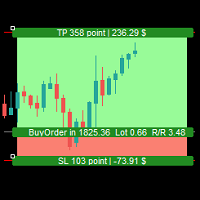
Simple Assistant for Trading
Precise Risk Management in each
Automatic Money Management Visual Trading Open Position Management User friendly and practical
during 15 years of considerable experience in stock market, we have dealt with many professional traders who have been used profitable and unrivalled methods in this market but failed in the long term. The reason is undoubtedly the lack of standard in their manner during their trade. Standard means the accurate repetition of a process….

リスクと取引を最高の精度で管理します。その取引機能は、リアルタイムであらゆる種類の資産に限定されるだけでなく、戦略テスターで使用して、関心のある指標とともにあらゆる戦略をバックテストすることもできます。 、リスクを冒さずに今すぐ戦略を実践し、結果レポートを印刷してパフォーマンスログを実行してください。
私たちのトレーディングアシスタントはインタラクティブなコントロールパネルを備えており、トレードのリスクを管理し、利益と損失の比率を選択し、任意のタイプを配置し、オンデマンドで、またはすべてワンクリックで閉じることができます。また、各操作にかかる可能性のあるすべての費用を考慮に入れて、それらすべてを損益分岐点に配置するオプションもあります。
そのグラフィックツールを使用すると、エントリポイント、ストップロス、テイクプロフィットがどこにあるかを直感的に視覚化できます。あなたはいつでもあなたがどれだけのリスクを冒していてどれだけ稼ぐことができるかを知ることができ、数回クリックするだけであなたが望むリスクと比率を調整することができます。すでに取引時に、あなたはあなたが行っている取引の種類を

The utility is designed to save funds on your trading account. There is support for three levels of minimum equity and free margin. For each level, you can set partial (by a certain percentage) or complete closing of all market orders. The partial close percentage is applied for each order separately based on its current size (i.e. the size at the time the equity or free margin reaches the appropriate level). Upon reaching the last third level, the utility can close all charts, which will make i

Close all your trades or some of them with this script. If you have multiple trades open on a symbol and you want to close all of them just drag the script onto the chart and close the trades without delay. The Script will ask you how many trades you want to remain open... In case you want to close all trades just click OK Say you want to leave 1 position open out of 7, just type in 1 and click ok. Script closes trades faster than EA because it does not wait for the market to move but rather
Layer Master: Professional Grid Trading Tool for MT4
Transform your grid trading with Layer Master - the most intuitive and powerful order management toolkit designed specifically for professional traders. MT5 Version: https://www.mql5.com/en/market/product/129705 FREE - 7 Day Trial Version available. Please contact me to get your Free trial! Master Grid Trading with Precision
Layer Master revolutionizes how you place and manage grid trades. With our visual interface, you can: Deploy hun

リベンジ トレーディング プロテクターは、リベンジ トレーディングの被害に遭う可能性のあるトレーダーにとって、シンプルですが効果的なツールです。私もデイトレーダーなので、リベンジトレードの心理的側面や損失を埋めたいという気持ちは理解しています。
そこで、損失後に忍耐強くなり、不合理な取引決定を下さないように100%確信できるように、私はこのツールを開発しました(私自身も使用しています)。
損失を被った場合、Revenge Trading Protector EA は、 希望するタイムブレークが経過するまで、 別の注文 (指値注文、ストップ注文、成行執行注文のいずれか)を開くことができなくなります。 たとえば、午前 10 時 45 分に損失を出し、30 分のタイム ブレークを設定した場合、午前 11 時 15 分より前に設定した注文は EA によって即座にキャンセルされます。再度許可されると、アラートで通知されます。 30 分が経過する前に取引に参加しようとすると、それぞれ通知されます。
追加機能: 最大株式ドローダウンは、希望する最大株式ドローダウンを超えた場合、残りの

Slow trading, low risk low return strategy open position only buy no stoploss , option ea : close equity target, stop equity target. Take profit step by step. For minimum blance please download excel file, and try ea in demo account before purchase link download how our ea works is * Recommended free swap account (islamic account) * trading with own money * ea will open buy, the price goes down will buy again and so on ea will stop when the highest price is according to settings * floating min

設定した時差で時間ラインを表示します。(30分単位の時差には対応していません。) また、100.000、100.010、100.020のようにキリの良い価格で価格ラインを表示します。 標準ではMT4による時間と価格でグリッドラインが表示されていますが、ブローカーの時間となり価格とともに中途半端な位置で表示されるので、非常に分かりにくいものとなっています。 本インジケーターは ユーザーが設定した時差と価格の分かりやすい位置でグリッドラインを表示します 。他のEAや裁量取引に負荷をかけないよう、軽快に動作するよう実装しております。
MT5版: https://www.mql5.com/ja/market/product/107069
・設定した間隔で時間と価格を表示可能 ・2段表示で見やすい 西暦、日付、時刻を2段で分けて表示。 ・未来の時間も表示 ・3大市場の時間を色分け表示 ・月日、時間の表示形式を設定可能 ・毎日の特別な時間にラインを表示可能 毎日の注目したい時刻にラインを表示することができます。 6本まで設定可能です。 ・詳細な時刻をラベルで表示可能 "F"キーを押すとカーソル
NFTrader Lite Displays Resistance / Support Lines Displays Take Profit and Stop Loss Easy adjust Take Profit/Stop Loss and Lot Size Open Buy/Sell with one click Displays Take Profit/Stop Loss in money value Easy to hide the panel when in trading Take your trading to the next step with easy to use panel display
For more information please visit us at www.nextforce-ig.com

このユーティリティの仕事は、デポジットのドローダウンを防ぐために、すべての金融商品に関する他のアドバイザーの仕事を分析することです。指定されたパラメーターを超えた場合、「エクイティ・プロテクション」はポジションをロックし、クローズし、それに関する通知を送信できます。 「株式プロテクション 」は 現在のシンボルまたはすべてのシンボルに対して機能し、組み込み機能により保留中のポジションを削除したり、アカウントで作業している他のアドバイザーを閉じることもできます。 機会:
アカウントでアクションが開始されたときにあらゆる種類の通知を送信します。 アカウント上のすべての商品を操作するには、1 つのチャートにアップロードするだけで十分です。 選択したマジック ナンバーまたはすべて、現在のシンボルまたはすべてのシンボルを操作します。 ブロックしたり、損失をクローズしたり、単に損失について通知したりできます。 必要に応じて、すべてのシンボルまたは現在のシンボルで他のアドバイザを無効にします。 未決注文だけでなく、ストップロスやテイクプロフィットも削除できます。 カスタマイズ可能なパネル。パネル

Ofir Dashboard is the first level of the Ofir trading solutions. We are building the first full trading application from Telegram. The Dashboard is focused on giving you the best information about your account, positions, risk,... when you are away from keyboard. Everything is accessible from Telegram. More info in my Blog Enjoy!
Ofir Notify, our very successful application for sending Notifications to Telegram (chat, channels, groups) is included in Ofir Dashboard.

TradersToolbox Overwatch-すべての TradersToolbox 実行中のインスタンスの監視ユーティリティです。
これは、シンプルなチャート切り替えユーティリティであり、すべての Traders Toolbox ランニングチャートのマーケットウォッチです。
特徴:
1.カスタマイズ可能なボタンの色、行、列。
2. 3つのシグナルタイプ(ホールド-イエロー/セル-レッド/バイ-グリーン)
3. Traders Toolbox の新規またはクローズされたインスタンスに応じてボタンリストを動的に更新します
4.シングルクリックボタンは、関連するチャートを前面に表示します。
5.売買シグナルは、 Traders Toolbox チャートシグナルと一致するパーセンテージでシグナル強度を示します。
注意:ユーティリティは、 Traders Toolbox / Traders Toolbox Lite と組み合わせてのみ使用でき、独立して機能することはできません。
Traders

僕自身が数年間使っている便利なロボットをご紹介します。半自動モードでも完全自動モードでもお使いいただけます。 >>> Chat <<<
当プログラムは経済指標カレンダーで発表されるニュースをもとにした取引の柔軟な設定が可能です。戦略テスターでは確認不可です。実際の取引のみです。端末の設定メニューを開いて許可URLリストにニュースサイトを追加する必要があります。サービス > 設定 > エキスパート・アドバイザーをクリックしてください。”次のURLの WebRequestを許可する:"にチェックを入れてください。次のURLを追加してください(空白は削除します): https:// nfs.faireconomy.media
最新の設定アーカイブをダウンロードしてください: https://www.mql5.com/en/blogs/post/747929 シグナルモニタリング: https://www.mql5.com/en/signals/author/test-standart 当該エキスパート・アドバイザーのためのカスタマイズ設定セットを作る場合は、ブログの全パラメー
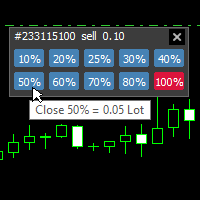
With this tool, you can easily and quickly close part of the trade . Click near the trade to display the closing panel. There are ten preset values for partial closing, but you can set your own values. You can also resize the panel according to Windows settings (125%, 150% ...) See the animation below for how it works. **********************************************************
Note: This tool does not work in the tester.
TradeKeyboard50 is a platform in which you can operate your real and training account in a simple way through your pure computer keyboard without the need to interact with the screen. We developed the platform so that you can trade automatically, semi-automatically and manually, you can open, close, change TakeProfit and StopLoss in multiple financial instruments, from currencies, futures, stocks, CFDs, Cryptos, Shares, in any Metatrader 4 of any Broker.
With the ability to display with differ

Currency Pair Information
Useful indicator to have the following information on the chart: 1. Asset Name 2. Current Spread 3. Current ATR of the actual time frame 4. Time to close of the candle
It is located at the top right of the chart. If you request it, I can add the parameterization of the location of the information.
Other tools:
AMS Forex System
hockfx Price Alert Pro
hockfx
FREE

KT Auto SL TP EAは、すべての手動取引にストップロスとテイクプロフィットを追加し、その後ストップロスを建値(ブレークイーブン)に移動してトレーリングします。 パソコンでもスマートフォンでも、取引を開いてください。すぐにストップロスとテイクプロフィットが設定され、チャート上のラベルに使用中の設定がそのまま表示されます。このEAが自分で取引を開いたり決済したりすることはありません。 主な機能 成行の取引と待機注文に、あなたのストップロスとテイクプロフィットを追加します。対象はチャートの銘柄だけ、または1つのチャートからすべての銘柄を選べます。 管理するのはあなたの手動取引だけで、他のEAの取引には触れません。 新しいティックを待たず、1秒間に約7回取引をチェックします。 待機注文のレベルは注文価格から設定されるため、注文が約定した時点で保護が整っています。 ブローカーの最小ストップレベルより小さい距離は、その最小値まで広げます。 ブレークイーブンとトレーリングストップ 取引が設定した利益に達すると、EAはストップロスをエントリー価格に移動します。オプションのオフセットで数ポイ
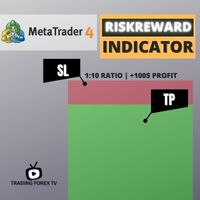
If you are looking for an indicator in the purest Tradingview style to plot your trades with Take Profit (TP) and Stop Loss (SL) as well as the entry point on the chart, Risk Reward Indicator is your indicator for Metatrader 4.
This indicator, among many other functions, allows you to draw and simulate operations, as well as the risk ratio (RB) benefit and the pips that you can win or lose in that operation.
In addition, this indicator includes a calculator where you can indicate the % of ris

The Week7D indicator helps traders identify the day of the week on a price chart. It simply marks each period or each candle as the day of the week at the start of a new trading day. This allows traders to watch how prices move on any given day.
The Week7D indicator has several customization options that traders can use to change the visual representation of the indicator.
The variable "BarCount" changes the number of days during which the indicator will indicate the day of the week in each d
FREE

EA only work XAGUSD symbol Slow trading, low risk low return strategy open position only buy no stoploss , option ea : close equity target, stop equity target. Take profit step by step. For minimum blance please download excel file, and try ea in demo account before purchase link download forex robot ea xagusd miner forex robot to generate profits with very low risk, such as owning a mine but does not require high-spec hardware which is very expensive, rather than buying mining hardware, it is

The Expert Advisor Risk Manager for MT4 is a very important tools for every trader, to manage his trading risk and keep the Balance safe.more than 60% of the Trader lose their investment because they don`t manage the risk very well. With the Risk Manager Expert Advisor, you will be able to control your risk in your trading account. Risk and profit control can be carried out both in monetary terms and in percentage terms.
For the Expert Advisor to work, simply attach it to the currency pa

This robot uses a strategy with hedge definite calculations, so that when it closes it is definitely profitable. how the robot works: 1. the first time the robot will open a buy position, - if the profit position is according to the target it will be closed automatically and re-open a buy position again - if a loss position the robot will open a buy and sell position simultaneously, if the position is still a loss the robot will open a position buy sell together again and close profit short po

This robot uses a strategy with hedge definite calculations, so that when it closes it is definitely profitable. how the robot works: 1. the first time the robot will open a buy position, - if the profit position is according to the target it will be closed automatically and re-open a buy position again - if a loss position the robot will open a buy and sell position simultaneously, if the position is still a loss the robot will open a position buy sell together again and close profit short po

This robot uses a strategy with hedge definite calculations, so that when it closes it is definitely profitable. how the robot works: 1. the first time the robot will open a buy position, - if the profit position is according to the target it will be closed automatically and re-open a buy position again - if a loss position the robot will open a buy and sell position simultaneously, if the position is still a loss the robot will open a position buy sell together again and close profit short po

AW MT4 To Telegram は、MetaTrader 5 口座のイベントを Telegram に送信するユーティリティです。送信対象はポジションのオープンと決済、部分決済、Stop Loss と Take Profit の変更、待機注文、口座アラート、レポートです。ユーティリティ自体は取引を行いません。口座の約定履歴を読み取り、あらゆる変化をプライベートチャット、トピック付きグループ、またはチャンネル向けのメッセージに変換します。 VIP チャンネルには即時に、Free チャンネルには遅延をつけて配信するシグナル販売者や、ドローダウン、証拠金、接続に関するアラートをスマートフォンで受け取りたいトレーダー向けに作られています。 マニュアルと説明 -> こちら / MT5 -> こちら 特長: 最大5つのチャットに対応し、スタイル、イベント、フィルター、遅延、ボタンをチャットごとに個別に設定可能 チャート上の AW Message Designer: 12種類の既成テンプレートとライブプレビュー メッセージはディスク上のキューで待機し、ネットワーク障害の後に再送されます 決済

Simple Order Panel for calculating actual lot size with fixed risk amount. Working on both Market orders and pending orders. Notify Line Application when an order is opened or closed. Automatic set up Stoploss and Takeprofit with Risk Reward Ratio. Open one order with the risk(amount) per trade or separate the bet into three orders in one click. Involuntary modification Stopsloss to Breakeven when the Market takes the first or second-order profit. Filter button Buy or Sell when Moving Averate C
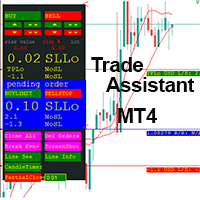
This EA is a trade management tool for Mt4 and Mt5. Mt5 version will find the Mt5 section here: https://www.mql5.com/en/market/product/80399?source=Site +Market+MT5+Utility+New+Rating006. It was to make a way for the trader to make the initial decision of when and which direction to enter. The trader decides in advance whether he wants the robot to take or stop an order. He also decides what new lot size, percent size or money size to use on each trade. On a live chart you can place a t
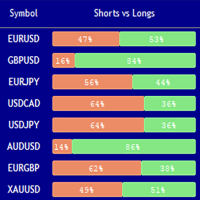
Market Sentiment Indicator Market Sentiment is a Trading Tool which allows you to see the positions of other currency traders. Until now, only institutional traders had access to such data which gave them a serious advantage over retail traders because of obvious reasons. With Market Sentiment, you too will finally know what other traders are doing which makes it easy to beat them on the forex battlefield.
Data comes from MyFxbook Community Outlook data feed and is based on up to 100 000 live
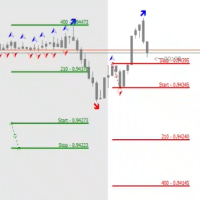
The STP Trade Manager is a utility tailored to the ST Patterns strategy by Vladimir Poltoratskiy ( www.stpatterns.com )
While specifically made for this strategy, it can also be used for other trade management. Especially when you have a need for quickly making trades and risk management.
It is a huge time saver and helps in quickly drawing the different ST Patterns corridors.
People familiar with the ST Patterns strategy will recognize and above all; appreciate the functions of this EA.
This
This tool will assist all those who trade the forex market manually. It will help them in a sense that it will calculate the required margin in order to initiate a trade. This calculator is so simple to use that a that the user only inputs only 2 pieces of information. which are Price and Lot size the trader wishes to take. All other information needed to calculate the calculator will work it out by itself. It will run or calculate on the current opened chart. As the name suggest it's

Currency trading offers a challenging and profitable opportunity for well-educated investors. However, it is also a risky market, and traders must always remain alert to their positions—after all, the success or failure is measured in terms of the profits and losses (P&L) on their trades. It is important for traders to have a clear understanding of their P&L because it directly affects the margin balance they have in their trading account . If prices move against you, your margin bal

Reviewed by Many forex traders spend their time looking for that perfect moment to enter the markets or a telltale sign that screams "buy" or "sell." And while the search can be fascinating, the result is always the same. The truth is, there is no one way to trade the forex markets . As a result, traders must learn that there are a variety of indicators that can help to determine the best time to buy or sell a forex cross rate . Here are four different market indicators that most su

In this section, we go through the top 10 best indicators for forex in more detail so you can see them in action and incorporate them in your trading. To do this we will be using the technical analysis charts and indicators provided by top-rated broker eToro. You can also use these forex indicators for Metatrader 4 . 1. Moving Averages Moving averages is one of the best forex trend indicators there are. They help to smooth price data so you can identify the overall market trends. The levels

Achieving success in the foreign exchange (forex) marketplace can be challenging. Nonetheless, traders from around the globe, both experienced and novice, attempt to do exactly that on a daily basis. Given the above-average failure rate of new entrants to the market, one has to wonder how long-run profitability may be attained via forex trading. Among the many ways that forex participants approach the market is through the application of technical analysis. By definition, technical analysis is

Success comes from knowledge – this is true for most things in life and especially Forex trading. To become successful, a trader needs to learn technical analysis. Technical indicators are a big part of technical analysis. The problem is that, at first sight, names of technical indicators can sound unpleasantly complicated, for example, MACD, RSI or Stochastic. However, we recommend you not to judge a book by its cover. We will provide you with a fair and simple explanation of the most popular t

A forex robot is a type of computer program that’s designed to trade forex automatically. Forex robots follow a specific set of trade signals and settings in determining the best prices at which you can buy or sell a currency pair. They use complex mathematical algorithms to monitor the markets and follow price action. Forex robots can help both beginners and experienced foreign exchange traders maximize their return on investment. They eliminate emotional and psychological biases when trading a

Do you want to have a fully automated trading bot that trades instead of you to make profits all the time?
Get your unlimited account license copy for only £49.99 one time payment!
Features:
Forex Golden Moon EA Automated Forex Trading System For MetaTrader 4 Setup Instructions | Quick & Easy 5 Minute Setup | Set & Forget Unlimited Licenses For All Your MT4 Accounts No Trading Experience Required US Brokers | Non-US Brokers No Trading Account Limitations Optimised SET files included
Here’s
AUTOMATIC TRADE COPIER for local * use . (copy trades between several metatrader terminals on the local computer/ *or GLOBALLY after setting your network /server !)
Can copy trades from one or several main MT4 accounts to several MT4 and MT5 accounts (no limit). For MT4 to MT5 copy you have to also get version for Metatrader 5 here: https://www.mql5.com/en/market/product/80843
- very fast execution (theoretically up to 5ms delay, depends on computer speed)
- user can set speed of copying (re

Alert line pro allows to make alert when price cross these objects: Horizontal lines Trendline Price Zone (Rectangle) Alert when close current bar (have new bar) When the price crosses the alert lines, the software will sound an alarm and send a notification to the MetaTrader 4 mobile, and Telegram with screenshot. You need to settings your MetaQuotes ID of MT4 apps to MetaTrader4 software to get notification to the mobile phone. Sound files must be place in Sounds folder of MT4
Hotkey: Pre

ASTA Trade Manager is a semi-automated trading tool designed to assist professional traders in Exit Strategy Management . This EA will not open trading positions automatically. This version is made to manage manual transactions on 1 chart (pair) only. For the Multipair version, you can check the product at: ASTA Multipair Trade Manager . FEATURES: 1. Entry and Exit Panel Order Panel: Buy, Sell and Pending Orders Exit Button: Close All Order, Close All Buy, Close All Sell Can be used on strategy
ASTA Multipair Trade Manager is a semi-automated trading tool designed to assist professional traders in Exit Strategy Management . This EA will not open trading positions automatically. This version is One Chart System, attach this EA on 1 chart only to manage Exit on all pairs. For single pair version, you can check the product at: ASTA Trade Manager . FEATURES: 1. Entry and Exit Panel Order Panel: Buy, Sell and Pending Orders Exit Button: Close All Order, Close All Buy, Close All Sel

これはMT4で開発されたエンターテインメントゲームであり、このプログラムは無料で提供されています。 ゲームのプレイ方法 ゲームハンドルを使って、ヘビの上下左右の方向を制御し、何か食べるものを探します。一口ごとに一定のポイントを獲得でき、ヘビの体はどんどん長くなり、体が長いほど、遊ぶのが難しくなります。 ヘビの唯一の目標は、最長のヘビに成長することです! ジョイスティックをスライドさせてヘビの位置を制御し、地図上の色付きの点を食べると、長くなります。 コントロール:
S-開始/変更、↑-上、←-左、↓-下、→-右。 入力パラメータでは、ゲーム体験を向上させるためにさまざまな速度を変更できます。
プログラムはから選択する10の速度を提供します。
FREE

Evening Scalper Pro is the state-of-the-art mean-reversion trading system that operates during all trading session. It's very different from most other scalping systems, since it uses a unique trading logic on cross pairs that have a strong mean-reverting tendency with high profit targets. EA not enters the market with market orders, it does not open trades. In terms of a trade duration, it's classical scalping: in and out of the trade within a few hours at the most. The EA uses a number of adv

Support and Resistance Levels by svidoks
This utility draws support and resistance zones to which the price reacts well. It also has a trend indicator that works on the basis of support and resistance zones. You can work with the indicator-advisor both manually and automatically (there is also an external control panel). Group for support, you can also write your Wishlist and wishes - telegram chat Supports all currency pairs
Options: Dist_set_limit - 300, this is the value in pips. When the

The utility allows you to open, monitor and manage open positions on the forex market and only on instruments in which it is possible to create triangulations or those instruments that share the same currency in the numerator or denominator:
ex: EURSUSD --- GBPUSD --- EURGBP The help of operational lines and valuable information on the panel allow the trader to manage trades more easily. Recommended for novice and experienced traders.
External variables
CrossSymbol = choose the cross on which
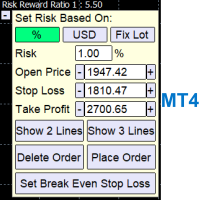
A Trading Assistant EA that can place order at user's desired open, stop loss, and take profit prices with automatically calculated lot size based on user's risk per trade
$30 for the next 25 downloaders, next price: $45 Try it out on demo account for free: Download Demo
Features: Smart Place Order : Automatically determine the Type of Order (Market/Stop/Limit & Buy/Sell) to be placed based on Open, and Stop Loss Price input, then execute it immediately Risk Manager : Set your risk of loss o
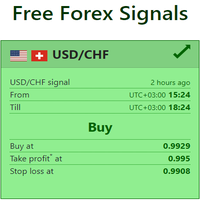
Live Forex Signals サイト信号での取引用に設計されています https://live-forex-signals.com/en と https://foresignal.com/en . Live Forex Signals for MetaTrader 5 https://www.mql5.com/ru/market/product/81448
パラメータ サイトへのサブスクリプションを持っている場合は、ユーザー名とパスワードlive-forex-signals.com/foresignal.com サブスクリプションがない場合は、フィールドを空のままにします; オープンされているお得な情報へのコメント リスクリスクは、取引のための預金の割合として、リスク=0の場合、値ロットが使用されます 取引のためのロット固定ボリューム UseTakeProfitは、サイトから利益を取る使用します 当サイトからのご利用停止のご案内 F r e c h encysignalupdateinminute顧問のサイトへの訪問頻度を指定します MaximumSpreadFo

Pomo Panel is a simple panel to help trader using grid strategy. It is designed with grid strategy in mind.
Its features: Open standard transactions Set up pending transactions Delete all pending transactions Modify multiple Stop-Loss and Target-Profit Calculate Lots of all opened transactions Calculate average Open-Close, High-Low Close All Opened Orders
A tool to notify You via MT4 Mobile App messages, Telegram, and Email when price reach certain Horizontal Line that You place This Line Alarm tool is an Indicator, so it works well in coexistence with other expert advisor on the same chart
$30 for the next 25 downloaders, next price: $45 Try it out on demo account for free: Download Demo
Features:
Line(s) Notification : Place Horizontal Line(s) and be notified when the Price reach them OHLC Line Magnet : Make the horizontal lines more attr

Definition : Market View is a dashboard (scanner) to view price graphs of all symbols and all timeframes at a glance. The utility is designed user friendly and added a wide range of customization options.
Main features of Market View : Visual settings window on the chart Customizable list of symbols and timeframes Different shapes : Real Candles, Schematic Candles, Arrows Customizable number of candles Changeable size of dashboard (scanner)
Highlight timeframes with gaps on candles Open approp

PLEASE NOTE: The "AUTO" function of the EA has NOT yet been activated . It's still ongoing testing. Once it becomes available, clients will get a free upgrade to EA 2.0 Also .... PLEASE follow the instructions below in order for the functions to work properly.
Introduction: The Phoenix Project (EA) Our Expert Advisor is both refined and practical. It is geared towards helping the traders be constantly aware of their risk PER trade while it helps them manage that risk.

CoPilot Pro EA is an add-on EA to allow Telegram Remote, toggle Auto Trading base on various conditions, and additional Order & Risk Management for other EAs. Do you have favorite EAs that trade well, and you want additional control over it? Do you run multiple EAs on same account and you need a way to manage Risks and Orders from account level? Do you want to control your EAs and get notifications from Telegram? CoPilot Pro is the best companion for you! IMPORTANT NOTE: CoPilot uses Advance Ch

BFS Panel Control is an auxiliary panel for comfortable control and management of orders, combining orders of different instruments into related groups, with subsequent closing of groups according to specified conditions of profitability (or loss) and with a possible notification in Telegram. For example, you have a drawdown on several orders of the EURUSD, GBPUSD, USDJPY instruments, while you expect the BTCUSD instrument to grow strongly, you open a position with a large lot on the BTCUSD ins

In a trend trading system, find the right entry and exit points.
In forex trading, a trading strategy is a fixed plan designed to make a decent return by going long or short the market. The main reason a properly researched trading strategy is helpful is because it is verifiable, quantifiable, consistent, and objective.
For each trading strategy, you need to define the assets to be traded, the entry/exit points, and money management rules.
MetaTraderマーケットは、他に類のない自動売買ロボットやテクニカル指標の販売場所です。
MQL5.community ユーザーメモを読んで、取引シグナルのコピー、フリーランサーによるカスタムアプリの開発、支払いシステムを経由した自動支払い、MQL5Cloud Networkなど、当社がトレーダーに対して提供するユニークなサービスについて詳しくご覧ください。

取引の機会を逃しています。
- 無料取引アプリ
- 8千を超えるシグナルをコピー
- 金融ニュースで金融マーケットを探索