 MetaTrader 5
 专家
专家
 指标
指标
 程序库
程序库
 实用工具
实用工具
 窗口小部件
窗口小部件
 规则
规则
MetaTrader 4 交易实用工具 - 39
 以下是可在MetaTrader 4中简化外汇交易的交易程序。将鼠标悬停在下面列表中的工具上,阅读它的描述和用途。
Introducing the Revolutionary Trade Closing Assistant ! Are you tired of manually closing hundreds trades? Are you a scalper , day trader , swing trader and you want to maximize your profits and minimize your losses by closing multiple positions at thesame time under different conditions? Are you a Prop Firm Trader who wishes to avoid hitting maximum daily drawdown? Search no further. This kit is the ultimate solution for all you.
GUIDE TO USE THE KIT 1. Shows the total profit/lo

If you need an advisor on any arrow indicator signals - this utility will definitely help you. You will be able, with the help of this utility to form an unlimited number of EAs on YOUR signals , with your set of settings, with your copyright and complete source code . You will be able to use the resulting EAs unlimitedly , including adding them to the Market and other resources. Free simple version of the generation script to help you understand how it works - here
What does the utility do?

Let Your Ideas Earn For You.
Convert your Ideas and Strategies in to automated trading bots directly on MT4. Visual Strategy Builder with Instant Results on the chart. This One of a kind strategy builder, allows you to specify rules and visually see the signals based on those rule as you create them. Visit the link for Group, User Manual, Video Examples
Why Use LBM
LBM is an essential tool for traders of all levels. It allows traders to create strategies quickly and easily, and to test them i

Do you think that in markets where the price can change in a split second, placing orders should be as simple as possible? In Metatrader, each time you want to open an order, you have to open a window where you enter the opening price, stop loss and take profit, as well as the trade size. EA Trade Assistant V for MT4 is an advanced tool that allows you to easily plan each transaction and manage them effectively. If you are a scalper and need to quickly open and close trades without setting defe
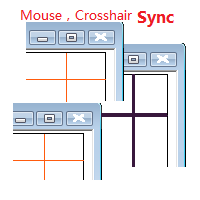
目标: 同品种多周期历史分析时候对齐时间很耗时,鼠标同步使得这一步骤可以自动完成。 使用: 1.下载程序并放在指标目录(MQL5/Indicators 或 MQL4/Indicators)里。
2.在所有需要同步的图表上加载这个指标。它就可以在同品种的图表里起作用了。 3.支持键盘的左右键,左右键在一个图表上移动时,同品种别的图表也会同步移动。
4.按下Ctrl键同时移动鼠标可以暂停或重启当前品种的同步。暂停或重启即使在所有图表关闭的状态下也是起作用的,当看见窗口没有同步时,请按住Ctrl键移动鼠标重启启动同步。 5.在未来时间区域暂停同步,工具会自动把当前品种的所有图表设置为autoscroll。在历史时间区域暂停,当前品种的所有图表会暂停在当时状态。 6.程序最大支持100个图表的鼠标和crosshair同步。

Martingale grid panel - a semi-automatic Expert Advisor with a built-in trading panel. The Expert Advisor is activated by standard MT4 tools (or via its own panel) and automatically sets Take Profit, Stop Loss, Trailing Stop. Automatically or manually opens averaging orders. Changes the volume of orders in accordance with the Martingale strategy. Works with all orders of the selected symbol or only those opened from the panel, when the ID number is set. The Expert Advisor (and its Free Demo) are

Simple Trendline Trader is designed to simplify your trading activities and automatically open trade when the trendline you draw touched by the running price, You can choose to set EA to trade buy order or sell order when the trendline touched by running price, you can also set stoploss and takeprofit in pips, when using MM Lot it will automatically calculate your order lot based on the SL distance and set risk per trade from your current equity. This EA include : 1. Trade Mode, BUY or SELL mode

Simple HorizontalLine Trader is designed to simplify your trading activities and automatically open trade when the horizontalline you draw touched by the running price, You can choose to set EA to trade buy order or sell order when the horizontalline touched by running price, you can also set stoploss and takeprofit in pips, when using MM Lot it will automatically calculate your order lot based on the SL distance and set risk per trade from your current equity. This EA include : 1. Trade Mode,

Line Trader Pro is designed to simplify your trading activities and automatically open trade when the trendline or horizontalline you draw touched by the running price, You can choose to set EA to trade buy order or sell order when the trendline or horizontalline touched by running price, you can also set stoploss and takeprofit in pips, when using MM Lot it will automatically calculate your order lot based on the SL distance and set risk per trade from your current equity. This EA include : 1.

This EA is designed to simplify your trading activities and automatically close all open order when the trendline or horizontalline you draw touched by the running price, You can also choose to close only all buy order or close only all sell order or both close all buy and sell order at the same time. This EA include : 1. Close Mode, BUY or SELL mode 2. Time Filter (Broker Time) 3. Advanced Breakeven and Trailing Stops 4. Partial Close 5. Magic Number You can save it as template (for BUY or SELL

Blind Broker System 的唯一目的是隐藏您的交易计划并使它们对您的经纪人不可见。 如果您真的想让他“失明”并确保他事先不知道您的止损水平、获利水平、交易量 - 只需使用此交易机器人。
特别鸣谢先生 Henryk Kardas 感谢这个项目的发起和想法。 请记住,MQL 提供的免费演示无法让您测试此 EA 的功能。 如需真实测试,请下载真实的演示版。
演示版链接 https://www.mql5.com/en/market/product/94190
Blind Broker System 是另一种管理订单的系统。 在某种意义上,它与 Meta Trader Terminal 内的系统相同。
不同之处在于,所有通过 Blind Broker System 提交的订单不是写入经纪人的服务器,而是写入程序的内存。
经纪人仅在市场订单发生时收到市场订单请求 - 仅此而已。
笔记! 正确操作需要不间断电源,建议使用 VPS(虚拟专用服务器)。
您可以将此系统视为您自己坐在屏幕前进行交易的副本。 在那种情况下,没有人能读懂你的想法。 您做出交易决定并执行它

MAMMA 指标是初学者和高级交易者计算止损、交易量或风险水平的理想选择 。 您有一个驾驶舱来控制参数并使工具适应您的交易。 这个驾驶舱可以移动或简单地缩小以在您需要时放大。 有3种计算方法: 您可以根据您计划使用手数和止损大小自动计算风险 您可以根据预期风险和止损大小设置手数 您可以根据预期风险和手数设置理想的止损尺寸。 每次计算都可以让您知道确切的风险量,您还可以直接在图表上看到计划止损的位置。 为了不忘记您的计划,您可以设定一个目标和当天的最大损失。 最后,您可以综合查看当前市场的进度,或仅查看当天、本周和当月的进度。 作为奖励,您将收到每个新未平仓头寸的提醒,并提供理想的止损建议。 最后,驾驶舱可以在法语和英语之间进行编程。 您还有机会根据 3 个时区显示时间:经纪人的服务器、UTC 参考或您 PC 的时间。 MAMMA 仍然隐藏着一些宝藏,但我已将主要功能介绍给您。 当我开始交易时,MAMMA 是我最想念的工具,它可以保证我的结果稳定。 好交易 再见
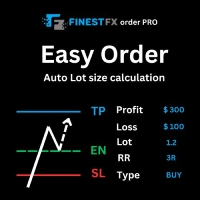
FinestFx order PRO is easy order execution and auto risk management tool developed by FinestFx official Programmer : Mohammed Rafi Just move SL,TP , Entry lines or Type SL,TP on entry columns . Lot are calculated automatically by fill out the loss cut amount. Work with all base currencies Fixed loss amount can be selected. Calculate risk rewards. Market order, limit order, and stop order are selected using buttons Supports FX, CFD, and crypto currency on MT4 Visit the owner website to see its
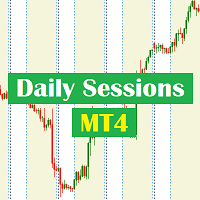
Daily Sessions utility is the best tool to highlight trading sessions , the trader can set any starting hour and ending hour to mark his trading session. Main features :
Customizable session time. Customizable Colors. Customizable vertical lines for the start and end of sessions
Set as many sessions as you want by simply plotting the indicator and changing the Indicator ID.
This is a tool for back testing your strategy manually on the chart , it's very easy to use, it may be useful for both professional and beginner traders. Features : • Simple buttons. • Export : P/L Points , Lots , Order P/L Result , Balance , to CSV file. • Ability to choose Auto or Manual StopLoss & TakeProfit. • Manual lot , or lot by risk can be used.
• Ability to change the chart time frame for live charts without losing the backtest result , you can even clo

The EA is used as an assistant for traders in the Trading Masters group. The EA assists with identifying setups when taking trades using the strategies outline in the Trading Masters Group. The EA has been developed and is intended for use by community members who understand the concepts and would like assistance navigating trade setups. It is recommended to first understand the concepts presented in the Trading Masters group before purchasing this EA so the user can understand and benefit fr

创建此面板是为了帮助交易者(初学者和专业人士)进行交易。
主要功能:
关于所有时间范围内潜在市场逆转的信号 新闻发布前 5 分钟通知 在 5 分钟内通知交易时段的交叉点 将通知发送到电子邮件、电话或终端 计算白天每个工具的阻力和支撑线 平均时不允许超过每个工具的风险(实时计算每个工具的最佳平均值并说出下一次平均之前的点数) 通过自动手数计算从每笔交易的存款轻松定制风险管理 内置跟踪系统,使交易达到盈亏平衡并在移动方向上拉动利润 描述每种仪器的百分比量,每天经过了多少。它还显示了您从存款中获得的相对百分比和点数 方便的热键,用于批量关闭订单和放置挂单 自动计算特定工具上所有交易的盈亏平衡点或零点 要使用服务器,您需要将“ http://ec.forexprostools.com/ ”添加到允许的 URL 列表中(主菜单 -> 工具 -> 设置,EA 选项卡)
Auto Take Profit MT4 is designed to take profits in automatic way.
As a trader (manual or auto), you define your own expected profits schema. When you open one or several orders, the AutoTP program calculates profits then update into SL or TP automatically. It also re-calculates and updates accordingly for remaining open positions when a new order opened or an existing position closed. ---------------------------------- (Watch live in this DEMO ONLY signal https://www.mql5.com/en/signa

Here is a powerful trading tool that will allow you to trade manually or automatically in any market, but is especially useful in markets with high volatility and liquidity.
This system has two EAs (Expert Advisors): one for Buy and one for Sell, which work independently. The operation is based on the hedging strategy and the increase in lots based on the Fibonacci sequence, which will allow you to always add the two previous lots: 1, 2, 3, 5, 8, 13...
You decide how you want to trade: you ca

The Screen Shooter utility will help you take screenshots of your trading process.
How it works: The program is a small panel with two modes of operation: the first mode "All Open Charts" - allows you to create screenshots of all charts open in the terminal; the second mode "All TF Curr Chart" - creates, accordingly, screenshots of all timeframes of the current chart (to which this tool is attached). In the second mode, the user can disable unnecessary timeframes using the buttons on the panel (

OrderHelper script is super easy and trader friendly to use. It would boost your trading experience. Because it is designed to open one to multiple orders quickly with just one click. Besides using the OrderHelper script, traders can define various parameters for open orders such as the symbol, order type, lot size, stoploss, takeprofit and more. Basically, with this script traders can manage their open orders more efficiently and save their trading time.
OrderHelper manages: • Open the number

PROTECT YOUR FTMO Account in a simplest way Must-Have Account Protector for any Prop-trading Account and Challenge MT4 / MT5 Expert Advisor that protects your Forex Prop Trading account from an unexpected drawdown! FTMO Protector is a Tool that lets you manage trades and control your profit and loss across multiple Robots and currency pairs using a simple parameters and settings. Use as many EAs and Instruments you need, the Protector will: 1. Calculate your midnight (01:00 System time) Bal

Do you over trade??? Do you lose your account by adjusting the stop loss or not putting stop loss?? Do you cross your daily loss limit and closed your account??? Do you breach your funded account??? Do you fail frequently because of emotion?? So you have to control your emotion in trading. And this EA will do the job for you. You can not repeat those mistake even if you try hard. Just set the EA and relax. This will do major role in funded account. This EA will not open orders/positions. It j

什么是SmcDrawTools?
SmcDrawTools 是为金融市场的快速和舒适的交易而开发的,特别是为SMC交易者。它为交易者提供了快捷的画图功能。 都在一个地方!一个非常令人兴奋的补充,使交易者的工作更容易。只需点击一下,你需要的一切都在你的指尖。还有什么比这更简单的呢?
那么,这个SmcDrawTools能为您做什么呢? 绘图工具将使您的分析更容易! 作为一名交易员,你经常需要绘制图表作为分析的一部分,比如市场结构,标记市场的高点和低点,结构断裂(BoS), CHoCH,LQ,IDM等。有了我们的SmcDrawTools,你就不必再输入所有这些了。点击!易于分析和快速绘制。
1. 市场用户箭头和POI矩形区域的高点和低点在所有时间框架中显示。 2. CHoCH,BoS,LQ,IDM线和供应区/需求区矩形显示在当前时间帧。 3.可以批量删除某一个类型的画图对象或者全部删除。 4.快速图表设置。
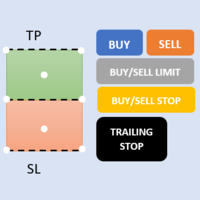
First 5 copies sold for 39$. 2/5 sold. Next price 49$. Not all function work on tester. If you want to test it, write to me a personal message, i send to you a demo version valid for 7 days with full functionality.
The Trade Manager Advace is composed by 4 part: Navigation panel. Execution panel (Here is present the Risk Reward Tool). Management panel. Equity panel.
Input parameters Magic Number : Number (number must be unique, do not use the same number in more one chart). Trailing stop for

Copy Trade EA(Expert Advisor)是一种自动交易软件,可以帮助投资者自动复制其他交易者的交易策略和操作,从而获得类似于其它交易者的交易结果。该软件基于MetaTrader平台,具有易于使用、高效、灵活和自适应的特点,为投资者提供了自动化交易的一站式解决方案。
该软件支持多种交易品种,包括外汇、商品、股票和指数。其主要功能包括:
复制交易:该软件可以在实时模式下复制其他交易者的交易操作,自动将交易操作应用到您的账户中。您可以根据其他交易者的历史表现选择要跟随的交易者,并设置复制比例和风险管理策略,以满足您的投资需求。
风险管理:该软件支持多种风险管理策略,如止损、追踪止损和限价订单,可以帮助投资者最大限度地降低风险和保护资金。此外,该软件还提供了实时的交易报告和交易统计信息,以便投资者对其交易行为进行分析和调整。
自定义设置:该软件支持用户自定义设置,包括复制比例、交易量、止损和追踪止损距离、交易时间和其他参数。这些自定义设置可以根据投资者的偏好和风险承受能力进行调整。
高效运行:该软件基于MetaTrader平台,具有高效、灵活和自适应的特点。该软件
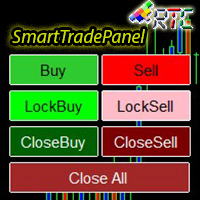
SmartTradePanel 是一种交易工具,可让交易者快速高效地执行订单。 凭借所提供的高级功能,SmartTradePanel 真正帮助交易者管理未结订单并优化其交易的利润潜力。 在本文中,我们将详细讨论 SmartTradePanel 的功能和优势。
SmartTradePanel 的主要功能之一是能够快速执行未结订单。 只需点击几下,交易者就可以快速高效地开立交易头寸。 这在快速变化的市场条件下尤其有用,因为执行速度可能是获利的决定性因素。
除此之外,SmartTradePanel 还允许交易者下达锁定订单。 锁定订单是一种交易策略,其目的是锁定亏损头寸,希望该头寸在未来反转并产生利润。 借助 SmartTradePanel,交易者只需点击几下即可轻松下达锁定订单。
除了订单执行和锁定订单外,SmartTradePanel 还允许交易者关闭任何类型的订单并关闭所有未平仓订单。 这在交易者希望通过快速平仓部分或全部头寸来获利或减少损失的情况下特别有用。
手数设置也可以从输入参数中更改。 在外汇交易中,手数是交易头寸的大小。 通过启用手数设置,SmartTradePan
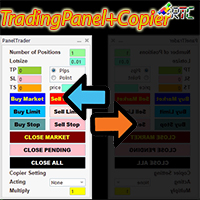
与类似的交易面板相比,该交易面板具有许多优势,包括: 1. 立即(市场)开立订单并以所需价格挂单。 2. TakeProfit (TP), StopLoss(SL), 以及TrailingStop(TS) 设置,可以在pip 或point 模式下设置。 3. 您可以只关闭市价订单,或只关闭挂单,或所有市价订单和挂单。 4. 还配备了 CopyTrade,作为主控打开的订单可以作为客户端复制到面板,其中可以从客户端设置手数比例值。
立即拥有此 TradingPanelPlusCopier 以促进您的交易活动。
TradingPanelPlusCopier的使用方法和demo可以在说明中的视频demo中看到。 问候利润!
与类似的交易面板相比,该交易面板具有许多优势,包括: 1. 立即(市场)开立订单并以所需价格挂单。 2. TakeProfit (TP), StopLoss(SL), 以及TrailingStop(TS) 设置,可以在pip 或point 模式下设置。 3. 您可以只关闭市价订单,或只关闭挂单,或所有市价订单和挂单。 4. 还配备了 CopyTrade,作为主控打

Beta version of a semi-automatic utility for trading grid strategy. When using, please give feedback on the shortcomings / suggestions.
Good luck to us!
Parameters:
Lot exponent - multiplication of the lot on the next order. Grid pips - grid size. Take profit pip - distance of the take profit line. Magic number - the magic number of the adviser's work. Trading menu - presence/absence of a trading menu. Menu size - the size of the menu (choose the value for your resolution). Menu font size -

The Golden Shield EA 是一款基于XAUUSD(GOLD)特有的波动性编译而成,是一种内在运行逻辑简单却又不一般的交易工具,它使用了马丁格尔+对冲+顺势而为一套运行模式。EA通过收集并学习了大量的历史数据,结合品种特性无数次用于测试市场,为此而诞生。 EA的逻辑很简单,当你打开策略,任何时候都可以双向开仓,自动止盈,整体止损;当行情走势缓慢的时候,它会很耐心等待机会,当走势瞬间变大,它也会根据走势的速率、持续性,择机进场补仓,同时它也会顺势补仓。 由于在策略中使用全自动交易,回测数据将不能体现 Golden Shield EA的特性,你可以在任何时间段将它用于模拟盘进行测试1个月~3个月,在此为了展现策略的特性,将向市场提供免费1个月的测试期限(请联系我)。最后它将无视任何的数据大行情,因此它是暴力的,同时它也是一款极具性价比的交易专家。
10个月的实盘成果 展示: https://www.mql5.com/zh/signals/1798191 (您可以通过回测去判断一款产品的价值,但我更愿意用实战去验证自己的成果,让我们一起通过模拟或实盘去见证吧!!) 参

介绍 OrderManager :MT4的革命性工具 使用全新的Order Manager实用程序,像专业人士一样管理您在MetaTrader 4上的交易。Order Manager设计简单,易于使用,可让您轻松定义和可视化每笔交易的风险,从而做出明智的决策并优化您的交易策略。有关OrderManager的更多信息,请参阅手册。 [ 手册 ] [ MT5版本 ] [ Telegram 频道 ] New: [ Telegram To MT5 ]
主要功能: 风险管理:快速轻松地定义您交易的风险,让您做出更好的决策并提高交易性能。 视觉表示:图形化地查看您的交易和相关风险,以清晰简洁地了解您的开放头寸。 订单修改:只需几次点击即可轻松修改或关闭您的订单,简化您的交易过程,为您节省宝贵的时间。 掌握新闻:一键获取最新市场新闻。
不要错过这个MT4交易员的必备工具。用Order Manager提升您的交易体验,将您的交易游戏提升到新的水平。
OrderManager在startegyTester中 不 工作! OrderManager 仅与 Windows 兼容。
请考虑给这个产品一

MT4 Discord Copier - the perfect tool for those looking to remotely copy trades between multiple MT4 accounts on different computers over the internet! With the added convenience of Discord transactions monitoring, you can now easily share trades with a global group of people on your own terms, all while benefiting from the features of a Discord server . This solution is ideal for both providers and receivers, as providers can effortlessly copy trades to multiple receivers, while re

Calculates correct lot-size by just 4 clicks. It is simple, quick and effective. This tool does everything for you. Set your risk percentage and tool settings to fit your needs. You will have one main button to show simple menu, where you can after clicking on "Calc" button (second click) set your Entry level (third click) and SL level (fourth click). Software will show you info box with all information needed - risk %, risk value, ticks distance and calculated position size. Of course, it draw
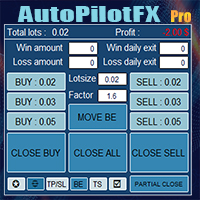
Introducing of AutoPilotFX Pro: Your Ultimate Trading Panel with Advanced Features of order management Take your trading to new heights with our Trade Assistant designed to streamline your trading process and optimize your strategies. Discover the powerful features it offers and learn how it can help you maximize your profits and minimize your risks.
Semi Automated EA for working as your trading assistant with Key Features: Automatic Lot Size Calculation: AutoPilotFX Pro automatically calc

MT4 Discord Copier - the perfect tool for those looking to remotely copy trades between multiple MT4 accounts on different computers over the internet! With the added convenience of Discord transactions monitoring, you can now easily share trades with a global group of people on your own terms, all while benefiting from the features of a Discord server . This solution is ideal for both providers and receivers, as providers can effortlessly copy trades to multiple receivers, while receivers can
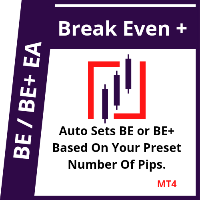
This EA will set breakeven or breakeven-plus for your trades, whether you have manually or automatically set stop loss or not. If your broker charges commissions per trade, you need to set breakeven plus, not just breakeven, in order to cover up those charges and properly let your trades run at zero risk. Inputs:
In the inputs section , set BEPoffsetPips to 0, to use it as a "breakeven" EA. Or set BEPoffsetPips to any amount of pips you want, to use it as a "breakeven-plus" EA. "OnPr

The Expert Advisor helps manage your account equity. You can set the EA to close all trades at the total account profit or buy/sell line profit or close at a certain predetermined loss percentage…
Parameters: Chart Symbol Selection: For Current Chart Only/ All Opened Orders Profit all to close all order USD (0 - not use): Profit in money Profit buy to close buy order USD (0 - not use): Profit in money Profit sell to close sell order USD (0 - not use): Profit in money Loss all to cl

Features Ordering support tool using Fractals, Alligator, and HeikenAshi technical. Submit a stop order to the latest Fractals value emerging in the direction of Alligator's perfect order. Submit an additional stop order every time the Fractals price is updated. If Alligator's perfect order is canceled, cancel the placed stop loss order (leave only the contracted position). Filter entries by HeikenAshi (large), HeikenAshi (small) positive and negative lines. For filled positions, exit at any tim

The "Lot Size" button toggles between fixed and auto lot size modes. Fixed mode uses a predetermined lot size, while auto mode calculates lot size based on a customizable percentage of the account balance, displayed at the bottom. The "Trailing Stop" button enables the activation or deactivation of the trailing stop feature. Initially set to "No Trailing," clicking the button changes it to "Trailing ON" when the trailing stop is active, and "Trailing OFF" when it is inactive. Below the button,

HFT FAST SCALPING EA the High Frequency Trading which use stop orders to enter the trades when market is trending.
best use for
1- Low slippage brokers for us30 and DE40 .
2- LOW OR ZERO COMMISSION BROKERS FOR EUR AND GOLD.
3-Prop firms like ftmo ,tff,.......etc
This EA UNLIKE Other HFT EAs , You can see that in the parameters ,, CHOOSE LOT SIZE , MAX LOT , CHOOSE TIME , COMMENT AND OTHERS .
IT STOPS 3 MINUTES AUTOMATICALLY EVERY 15 MINUTES TO PROTECT THE EQUITY FROM A BIG UNWANTED SLIPPAGE .
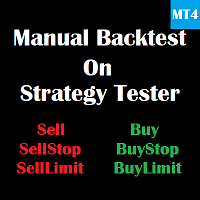
This is a tool for back testing your strategy manually on the Strategy Tester , it's very easy to use, it may be useful for both professional and beginner traders. Features : • Simple buttons and inputs. • Back-test result will show on the strategy tester graph and results tabs.
How to use : • Select the EA in the strategy tester list. • Configure the settings to your needs. • Start the tester and begin trading , input the stop loss and take profit set the lot size

平均助手——这种交易辅助工具将使用两种技术帮助您平均之前无利可图的头寸: 标准平均 对冲,随后根据趋势开仓 该实用程序能够 一次性筛选出多个不同方向的未平仓头寸,包括买入和卖出头寸。例如,您建了一个卖出仓位和一个买入仓位,但两个仓位均未盈利,或者一个仓位亏损,一个仓位盈利但盈利不足,您想对这两个仓位进行平均,以便平仓——我的“平均助手”实用程序可以帮助您。 平均助手实用程序 - 允许您自动计算下一个仓位的规模、下单价格、平均仓位和平仓的方向以及您指定的获利规模。 该实用程序还允许您使用“买入”和“卖出”按钮开仓。您只需指定所需的止盈大小和起始手数即可。实用程序本身将以最初指定的止盈价或平均价平仓,并会尝试以平均价平仓,同时考虑您为平均系列设置的止盈。 事实上,对于那些接受并理解平均线逻辑,同时又了解其风险的人来说,这款工具将是一个非常实用的助手。在 95% 的情况下,这项技术将帮助您全自动平仓并获利。 要开始工作,只需将实用程序拖到图表上,设置平均的 TP 大小并单击“开始平均”按钮,实用程序将尝试通过单个获利来关闭图表上所有未平仓交易。
使用此实用程序时,您初始开仓的交易量不应过大

IMPORTANT: Blocks&Levels Alerts indicador.
Gives you the ability to easy draw Blocks and Levels (support and resistance) using key shortcuts and Alerts when price touch them. Please use it and give me feedback!! It really helps! Thank you very much! DESCRIPTION:
Blocks&Levels Indicator, has useful key shortcuts for draw Levels, Blocks Zones, change chart Time Frames, Select or Deselect all drew objects. SETUP:
Just install the Indicator on the Chart
Open and navigate Indicator properties to

You can place an unlimited number of invisible pending orders using this tool. Orders will be filled under the following conditions: Spread is not greater than the set Max. spread Slippage is not greater than the set Max. slippage
The set trading time was not exceeded
The expiration time was not reached TRADING button is not switched to PAUSE If these conditions are not met, the order will be cancelled. You can also set up a Test Zone with an Off line for each order. The order will be cancel

The account manager has a set of functions necessary for trading, which take into account the results of the entire account in total, and not for each individual open position: Trailing stop loss. Take profit. Break-even on the amount of profit. Breakeven by time. Stop Loss Typically, each of these options can be applied to each individual trade. As a result, the total profit on the account may continue to increase, and individual positions will be closed. This does not allow you to get the maxi

我们中的大多数人使用VPS来运行我们的交易EA,24/7,但如何监控这些终端是否正常运行?
如果他们崩溃了,或者因为更新而关闭了怎么办?我如何得到这方面的通知?
这就是我们的心跳监测发挥作用的地方。
它为您的所有终端和VPS提供24/7的监控。
那么,我们需要什么呢?
1.一个 在Cronitor 的免费用户 账户 ,一个专业的监控服务。
2.2. 这个工具在您的VPS上的图表上运行。 在MT5或连接问题的情况下,您会收到邮件通知(有更多的通知方式)。
我们使用这个技术方案来监控我们关键的后台基础设施,所以它被证明是可靠和有用的。
请 阅读完整的教程 ,在我合作伙伴的博客:Daniel Stein。
如果你愿意,你也可以使用 Nodeping服务 (付费)。
通过我们 在mql5 和 Telegram 上 的 晨间简报,获得每日市场更新的细节和截图!

This indicator is useful for monitoring the performance of individual strategies or even everything of the entire portfolio of strategies directly on your MT4. In this way you can view the equity line and the balance line directly on the chart. In addition, you can set a line based on the percentage number of DD Max that the individual strategy can reach. Try it.
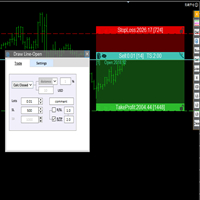
交易者的最佳伙伴! 基本使用设置 基本: 支持语言的选择切换(目前支持中文和英文) 自动识别语言 划线交易
支持英文中文自动选择,自动识别.
1.划线交易 ( 支持拖拉,支持多个订单线 ) 2.手数管理: 两种手数计算模式 ①资金的风险比例,例如设置风险百分比为1的时候,1万美金可交易1手. 计算手数 = 资金(净值或者余额或者剩余保证金) * RISK /10000 ②按亏损金额计算,本设置需要配合止损设置, 计算手数 = ( 当订单被初始下单设置的止损所止损的时候所亏损金额 计算得到的手数,小于最低手数会等于最小手数) ; 3.盈亏比等设置,
设置部分 1. 自动吸附最近高低点 2.高低点偏移 3.自动选择订单习惯 4.SL TP设置方式 5.语言设置

THIS EA IS A SEMI-AUTO EA, IT NEEDS USER INPUT. Manual & Test Version Please TEST this product before BUYING and watch my video about it. Contact me for user support or bug reports, or if you want the MT5 version! MT5 Version I do not guarantee any profits or financial success using this EA.
With this Expert Advisor, you can: Implement your own Zone Recovery strategy to capitalize on trending markets. Create Grid trading strategies, to profit from ranging markets. Place orders easil

Have you developed your own entry strategy or are you using an Expert Advisor to automate your entries? Then do the same with your exits!!! Nothing is as important as the right moment to exit your trades. Either to avoid bigger losses or to get maximum profit. But prices often move unpredictably and quickly, which often becomes a problem for a manual exit. Also, the previously set StopLoss or TakeProfit are usually not suitable to get the maximum out. Stop Manager Pro offers you strategies like

Here is a utility that helps automatically setup stoploss, takeprofit and trailing stops for hand trades. This is not an auto-trading EA, it only supports manual trading of orders, helping you to better monitor your account management. Irrespective of symbol, server, timeframe. SETUP: On/Off: On or Off EA Take profit points: take profit value in points Stoploss points: s toploss value in points Average price of all orders of one type: when this function is enabled, the average take profit f

This EA is fully automated , it is built based on the method of catching the pop-up Alert event and Open Market Orders (BUY/SELL) . Download trial version here: https://www.mql5.com/en/blogs/post/751340
***NOTE: It is recommended to remove the available filter settings, only install the filter for your indicator. Parameters of the EA: -------- <EA Settings> -------- Magic Number: The identifying (magic) number of the currently selected order. Allow Open trade: Enable/ Disable Open Trade

Ultimate Trade Panel MT4 是一款为MetaTrader 4设计的强大专家顾问,旨在简化交易活动并提升MQL4平台上交易者的效率。此实用工具通过用户友好的功能减轻日常交易任务,成为管理交易的可靠助手,而无需依赖特定的交易逻辑。它专为寻求竞争优势的交易者量身定制,提供自动化和风险管理工具以优化交易体验。 注意 :请在您的模拟账户上下载并测试Ultimate Trade Panel MT4演示版, 点击此处 。 您可以在这里下载MT5版本: Ultimate Trade Panel MT5 您可以在这里下载完整的MT4版本: Ultimate Trade Panel MT4 有关详细文档: 设置和输入参数指南 功能: 指标管理器:根据输入模板加载指标,无需通过工具栏更改指标,方便快速决策。 符号管理器:通过市场观察按钮直接切换符号,无需更改图表,实现快速过渡。 时间框架管理器:通过单击按钮更改时间框架,无需浏览工具栏,加快访问速度。 多订单管理器:通过单击执行多个买入和卖出订单,简化放置多个订单的过程。 一键交易:通过单击放置买入/卖出订单,设置止损/止盈,指定手数大

The program is use to copy trading from MT4 to MT4 and MT5 on same Windows PC or VPS . Now you can easy copy trades to any MT4 account or MT5 account. Instants copy, speed smaller 0.1 seconds, easy to setup. Need run EA as Signal provider on one MT4 account, other MT4 / MT5 will run EA as Trade copier. You can download and try demo version on demo account Copi Trade MT4 demo version here Copi Trade MT5 demo version here

The MoneyMint Trade Assist is a game-changer for traders. This all-in-one control panel puts the power of professional trading at your fingertips, empowering you to take your trading to the next level. With its intuitive design and feature-rich functionality, the MoneyMint Trade Assist simplifies the complexities of order entry and exit and gives you the edge you need to succeed. Whether you're an experienced trader or just starting out, this powerful tool will help you maximize your profits and

Trade Closer
Set a trade and only have a profit target in mind? Drag onto the pair of choice, enter your profit target into the box and you're good to go. No need to set a Take profit anymore Your trade will be closed for you once the profit target is hit and will send an alert to your account.
Disclaimer: Only works on the windows version of MT4 and only when the computer terminal is active
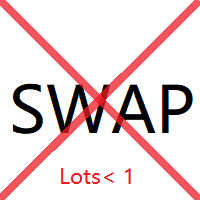
本版本仅支持 单个订单 交易 手数 <1的订单,如果 单个订单 交易 手数 >1,请订阅更高版本 本 EA 并非主动盈利,只利用交易时间增加交易次数达到节省掉期费用的目的。 工作原理:本 EA 在当日交易截止前,会生成 \MQL4\Experts\Orderhis_today.csv 文件用于记录当天已开仓的信息,生成 \MQL4\Experts\Orderhis.csv 文件用于记录运行本 EA 后所有的需要平仓的开仓信息,对需支付掉期费用的已开仓订单进行平仓,然后在交易次日开盘后读取 Orderhis_today.csv 补回前日已关闭的仓位,这样避免产生掉期费用。 1、 注意市场交易时间。市场报价 - 相应品种 - 规格,查看交易时间,根据券商的交易时间调整 EA 参数 2、 本 EA 仅平仓已开仓订单,对于 limit 和 stop 的挂单不做处理 免责声明: 1、 由于交易商、网络等不可控的原因过多,所以本产品不保证每个订单的交易都可以成功。 2、 挂单补仓价格由使用者通过设定回补价差参数自行调整 预期节省测算 以掉期 -9.4 测算,总交易量达 1 手,预计节约
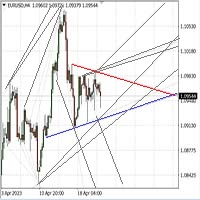
Автомated Trend Line Construction
Features: Draws multiple trend lines representing potential price growth/decline boundaries (gray lines) Identifies and draws price channels (green lines) Identifies potential technical analysis triangles (red and blue lines) Recommended: White chart background, Timeframe - M30 Settings: Interval=200 - Maximum number of bars used in the analysis for line construction The_greatest_distance=5000 - Controls the maximum distance from the current bar's price lev
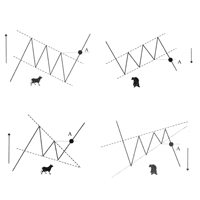
Скрипт проводит анализ трендов, выполняет поиск фигур продолжения и фигур разворота тренда по всем доступным инструментам окна Watch. Скрипт последовательно выводит несколько окон с сообщением о текущем состоянии: 1. Если в торговом терминале сохранено не достаточно цен по каждому инструменту или вам необходимо обновить цены по всем инструментам на актуальные после перерыва в работе, то проведите обновление. 2. Будет проведен анализ текущей тенденции активного графика. 3. На текущем графике п

Multicurrency Hedge is an Automatic Trading Robot based on Standard Deviation. The EA is suitable for both beginners and experienced traders. The Main trade is when the price goes beyond the Standard Deviation on the Main Currency pair, and then the trading on other pairs is executed, the Multicurrency Grid is Activated. Install EA on VPS and on one Currency pair "EURUSD", Timeframe M15, Minimum deposit $1,000, Leverage 1:500.
PARAMETERS:
SD_TIMEFRAME - time frame for signals search;
SD_APRI

[ MT5 Version ] [ Telegram Version ] [ Pro: Telegram + Discord ] Post your MT4 trades to Discord automatically via webhook — no bot setup, no permissions: paste ONE URL and you are live in 60 seconds . And keep every signal UPDATED: the original message is edited when you modify SL/TP or close the trade. Built for signal providers, trading communities and prop-firm teams on Discord. WHY THIS ONE WEBHOOK-BASED — no bot, no tokens: Discord channel → Integrations →

[ MT5 Version ] [ Discord Version ] [ Pro: Telegram + Discord ] Post your MT4 trades to Telegram automatically — and keep every signal UPDATED: this is the only sender that EDITS the original message when you modify SL/TP or close the trade. Your followers always see the real state of every trade. Built for signal providers, VIP channel owners and traders who share their trading. WHY THIS ONE ️ EDITS THE ORIGINAL SIGNAL — modify SL/TP or close the trade and the o

在图表上显示高达 7个市场交易时段 和 3个每周范围 ,完全可自定义 每个时段和范围都可以显示或隐藏,并可根据每位交易者的需要适应特定的日内或周内时间段 使用以下任何一种方式定义时段的开始/结束时间: GMT/UTC 时间(可调整到任何时区) 服务器/经纪人时间(图表时间) 本地时间(您的计算机时间)
专业版功能
名称 : 使用特定名称区分每个时段和每周范围 开盘和收盘时间以分钟为单位 : 可以设置为小时:分钟(HH:mm)或仅小时(HH)格式 每周范围的开始和结束日期 : 为每周范围设置从一周的任何一天(星期日到星期一)到另一天的时间段 可调整的 GMT 时间偏移 : 设置时区偏移以匹配其位置的任何市场基准时间。例如,纽约时间:GMT -5 警报和移动通知 : 发送通知到 MetaTrader 安卓或 iPhone 应用程序*,在每个时段开始/结束时收到通知,还可以在之前提前提醒59分钟 最高和最低线 : 由价格的时段高/低范围定义,可以将它们延长至比时段结束时间长24小时。用于检查它们作为可能的支撑/阻力区域 水平线 : 基于时段范围幅度的比例。在范围内和范围外显示,可以延长至

Left4Trade MT4 Script
A script allows displaying the closure of a trade on the current chart. It helps to see where the trade was opened and closed and how it affects the overall trading result.
When using this script, arrows indicating the opening and closing of trades are displayed on the chart. They can be configured with different colors according to your preferences.
One of the main advantages of using this script is the ability to quickly analyze trading operations, which allows you to
FREE
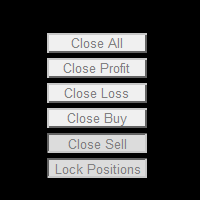
This powerful and user-friendly EA is designed to help you manage your trades with ease and efficiency. With its wide range of features and excellent compatibility, it runs flawlessly on the MetaTrader 4 platform. Key Features: Close All Positions: With just one click, you can close all open positions, regardless of their type and status. Close All Profitable Positions: Instantly close all positions that are currently in profit, ensuring you secure your gains. Close All Losing Positions: Swiftly

本版本仅支持 单个订单 交易 手数 <1 0 的订单,如果 单个订单 交易 手数 >1 0 ,请订阅更高版本 本 EA 并非主动盈利,只利用交易时间增加交易次数达到节省掉期费用的目的。 工作原理:本 EA 在当日交易截止前,会生成 \MQL4\Experts\Orderhis_today.csv 文件用于记录当天已开仓的信息,生成 \MQL4\Experts\Orderhis.csv 文件用于记录运行本 EA 后所有的需要平仓的开仓信息,对需支付掉期费用的已开仓订单进行平仓,然后在交易次日开盘后读取 Orderhis_today.csv 补回前日已关闭的仓位,这样避免产生掉期费用。 1、 注意市场交易时间。市场报价 - 相应品种 - 规格,查看交易时间,根据券商的交易时间调整 EA 参数 2、 本 EA 仅平仓已开仓订单,对于 limit 和 stop 的挂单不做处理 免责声明: 1、 由于交易商、网络等不可控的原因过多,所以本产品不保证每个订单的交易都可以成功。 2、 挂单补仓价格由使用者通过设定回补价差参数自行调整 预期节省测算 以掉期 -9.4 测算,总交易量达 1 手
本版本仅支持 单个订单 交易 手数 < 0.1 的订单,如果 单个订单 交易 手数 >= 0.1 ,请订阅更高版本 本 EA 并非主动盈利,只利用交易时间增加交易次数达到节省掉期费用的目的。 工作原理:本 EA 在当日交易截止前,会生成 \MQL4\Experts\Orderhis_today.csv 文件用于记录当天已开仓的信息,生成 \MQL4\Experts\Orderhis.csv 文件用于记录运行本 EA 后所有的需要平仓的开仓信息,对需支付掉期费用的已开仓订单进行平仓,然后在交易次日开盘后读取 Orderhis_today.csv 补回前日已关闭的仓位,这样避免产生掉期费用。 1、 注意市场交易时间。市场报价 - 相应品种 - 规格,查看交易时间,根据券商的交易时间调整 EA 参数 2、 本 EA 仅平仓已开仓订单,对于 limit 和 stop 的挂单不做处理 免责声明: 1、 由于交易商、网络等不可控的原因过多,所以本产品不保证每个订单的交易都可以成功。 2、 挂单补仓价格由使用者通过设定回补价差参数自行调整 预期节省测算 以掉期 -9.4 测算,总交易量达
本版本仅支持 单个订单 交易 手数 =0.01 的订单,如果 单个订单 交易 手数 >0.01 ,请订阅更高版本 本 EA 并非主动盈利,只利用交易时间增加交易次数达到节省掉期费用的目的。 工作原理:本 EA 在当日交易截止前,会生成 \MQL4\Experts\Orderhis_today.csv 文件用于记录当天已开仓的信息,生成 \MQL4\Experts\Orderhis.csv 文件用于记录运行本 EA 后所有的需要平仓的开仓信息,对需支付掉期费用的已开仓订单进行平仓,然后在交易次日开盘后读取 Orderhis_today.csv 补回前日已关闭的仓位,这样避免产生掉期费用。 1、 注意市场交易时间。市场报价 - 相应品种 - 规格,查看交易时间,根据券商的交易时间调整 EA 参数 2、 本 EA 仅平仓已开仓订单,对于 limit 和 stop 的挂单不做处理 免责声明: 1、 由于交易商、网络等不可控的原因过多,所以本产品不保证每个订单的交易都可以成功。 2、 挂单补仓价格由使用者通过设定回补价差参数自行调整 预期节省测算 以掉期 -9.4 测算,总交易量达 1
FREE

StarPlatform è un EA a pulsantiera che permette di aprire e, automaticamente, gestire e chiudere ordini. Apertura di posizione. StarPlatform permette di aprire ordini a mercato e/o piazzare pendenti di tipo LIMIT e STOP. I pendenti possono avere il livello d’ingresso posizionato manualmente oppure calcolato automaticamente in quanto ancorato ai massimi o ai minimi della candela su cui si clicca. Ogni ordine può avere lo Stop Loss piazzato con le stesse modalità del livello d’ingresso (impostat

Phoenix MT4 Telegram Notifier is a trading utility that integrates with both MetaTrader4 and Telegram. The utility publishes all your trades as signals in your channels or groups. This allows you to track in real time what is happening with your account via Telegram.
Notifications for :
Opened order Closed order Modified order
Parameters :
Telegram Bot Token - create a bot on Telegram and get a token Telegram Chat Id - input your Telegram group/channel Id Notify for opened order - notifies wh
MetaTrader 市场 - 在您的交易程序端可以直接使用为交易者提供的自动交易和技术指标。
MQL5.community 支付系统 提供给MQL5.com 网站所有已注册用户用于MetaTrade服务方面的事务。您可以使用WebMoney,PayPal 或银行卡进行存取款。
