Panel InfoSpread MT5

Description:

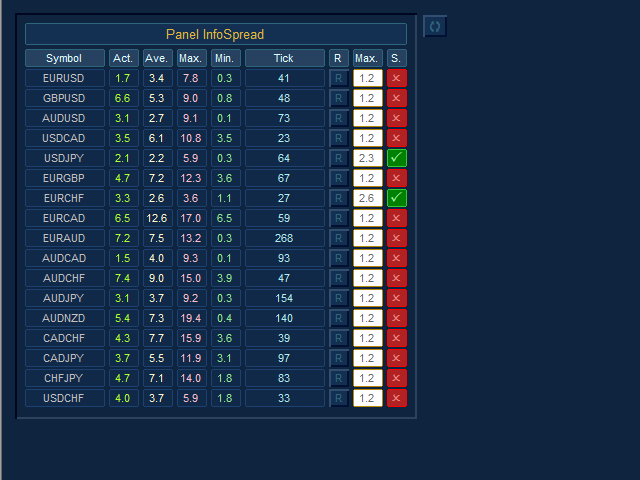
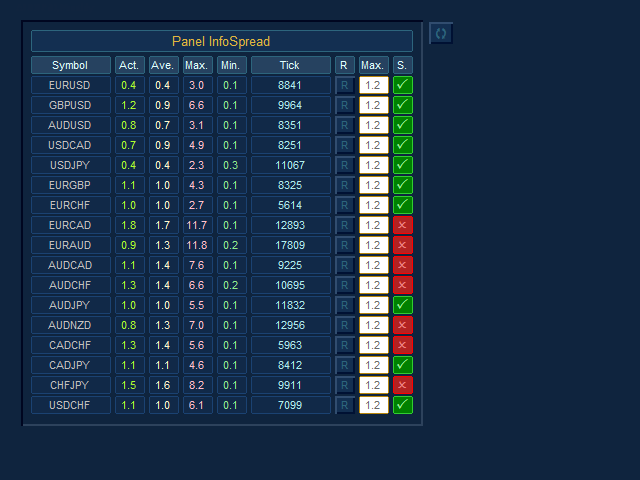
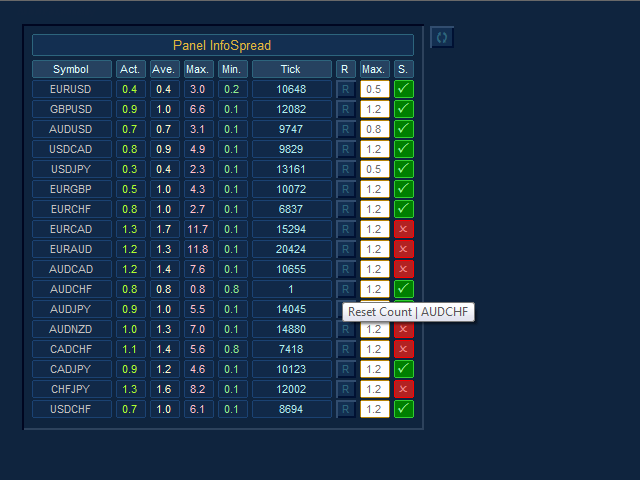
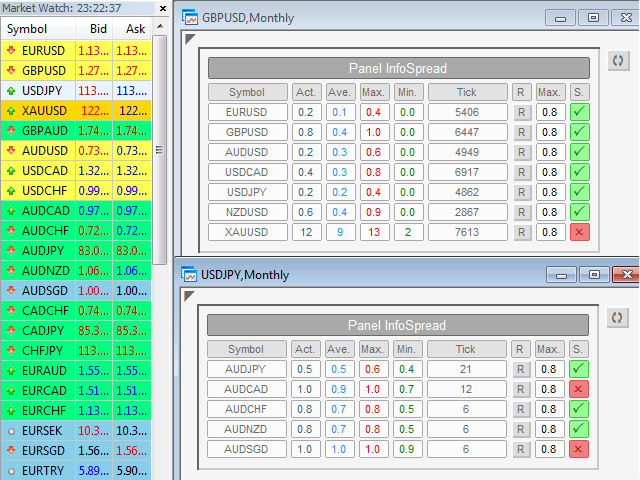
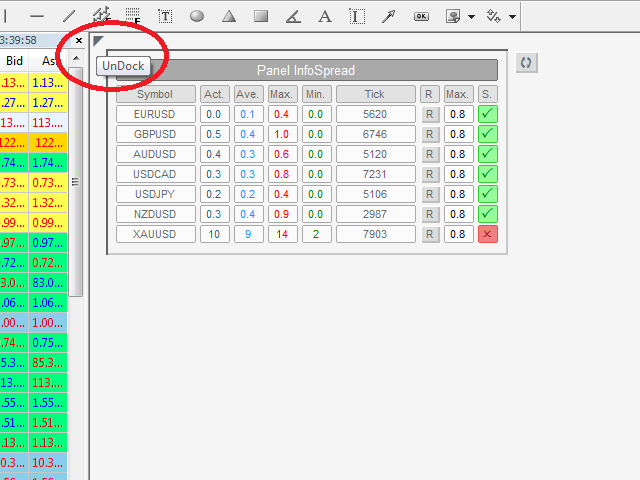
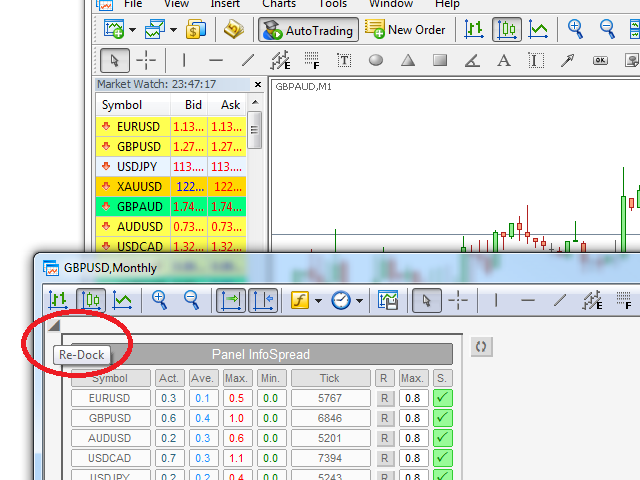
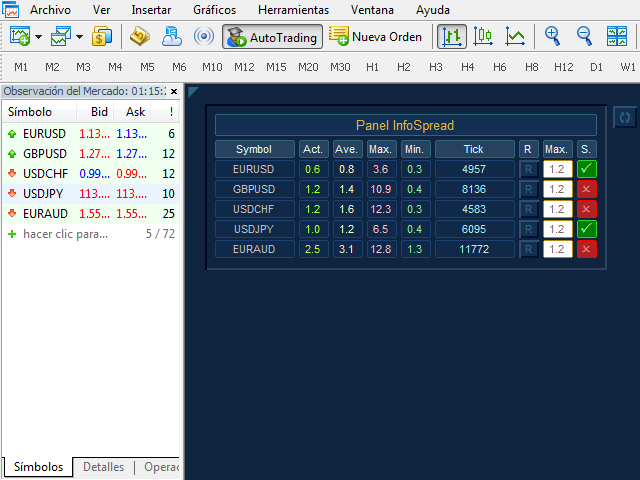
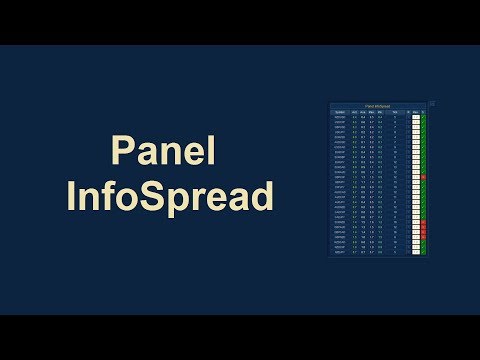
  -  We all want to have the lowest spread and never high, with this utility we can have more information and a clearer idea of when the spread is acceptable or not. The Panel InfoSpread is a utility expert advisor and shows information on different spread options in one or more symbols, can be actual spread, average, minimum, maximum and tick counter. Read and show the symbols that are in the Market Watch window. Also you can put a maximum limit of average spread in every symbol for know when you have a good spread or not. Each symbol has its own tick counter and its button to restart it

Input Parameters:

  -  Coordinates X Upper Left Corner: Put value of the default fixed coordinates X since the upper left corner to show the panel.

  -  Coordinates Y Upper Left Corner: Put value of the default fixed coordinates Y since the upper left corner to show the panel.

  -  Refresh Spreads: Refreshes the spreads information every X set point in seconds (minimum 0.025 sec).

  -  Actual Spread Column: Enabled or Disabled Actual Spread Column.

  -  Average Spread Column: Enabled or Disabled Average Spread Column.

  -  Maximum Spread Column: Enabled or Disabled Maximum Spread Column.

  -  Minimum Spread Column: Enabled or Disabled Minimum Spread Column.

  -  Tick Counter Column: Enabled or Disabled Tick counter column. Count each tick when change value of spread and refresh spread.

  -  Maximum Average Spread Column: Enabled / Disabled set point value of the maximum limit of the average spread Column.

  -  State Maximum Average Spread Column: Enabled / Disabled State of the maximum limit of the average spread Column.

  -  Global Button to Reset All: Enabled or Disabled Button to restart the entire panel.

  -  Global Maximum Average Spread: Maximum allowed global value of the average spread in pips and pipettes.

  -  Pairs List: Select type pairs list, from Market Watch or Entry Manual.

  -  Custom Pairs List with comma separations (,): Write the pairs you want separated by a comma and with the text exactly the same as in the Market Watch window to create the list (If the parameter Pairs List is selected Entry Manual List).

  -  Choose the Panel Skin: Select colors style of the panel.

  -  Panel Colors: The colors of the visual aspect of the panel.

Recommendations:

  -  Only use symbols of currency pairs.

  -  You must open a new chart with any symbol to use the Panel Infospread.

  -  The currency symbols that you want to use in the Panel InfoSpread should be those that are selected in the Market Watch (If the parameter Pairs List is selected Market Watch List).

  -  Do not change the time frame, because the default time frame will be monthly for a better update on the chart.

  -  The recommended seconds to refresh the spread values are 0.3 or less in the Refresh Spreads input (Minimum 0.025 seconds) How much lower the value better precision, but it will depend on your broker, internet, connection, and especially of your computer.

  -  If we manually enter the list of pairs we want, these should also be in the Market Watch (If the parameter Pairs List is selected Entry Manual List).

  -  If we want to modify the parameters of the inputs quickly, we must select the chart with the Panel InfoSpread, and press the “F7” key.

  -  It has a button in the upper left corner to undock or re-dock the chart.

Prodotti consigliati
Pattern Recognition EA
Claudiu-georgian Zavera
Pattern Recognition EA - From Learn to Earn. The market repeats itself. This EA finds every past repeat of the current candle sequence - and lets history vote the direction. ONE SHAPE. EVERY REPEAT IN HISTORY VOTES. The last N candles on your signal timeframe form a shape. The EA scans the history you choose - a fixed number of bars or everything your broker provides - for the SAME shape, and checks what happened next, every single time. Only when enough repeats exist AND a clear majority of t
Recovery Manager Panel MT5 is a manual order management panel for traders who want to manage open positions directly from the chart in a clearer and more organized way. This tool is not a signal robot. It does not predict market direction, generate entry signals, or trade automatically based on market forecasts. Instead, it helps traders work with positions that are already open. You can calculate possible recovery lot sizes, view estimated target levels on the chart, and use available floating
Telegram2MT5 Signal Copier
Salvador Martinez Ramos
Telegram2MT5 Signal Copier — Automatizza la copia dei tuoi segnali Telegram direttamente in MetaTrader 5 Con Telegram2MT5 Signal Copier, ogni segnale che ricevi su Telegram viene eseguito in modo istantaneo e automatico sul tuo conto MetaTrader 5. Veloce, affidabile e completamente personalizzabile. Scarica il file Windows Bridge APP e il tutorial Il file bridge è necessario per collegare il Pannello Web Locale all’EA MT5  Compatibile con Windows 10 & Windows 11 - 64 bit - e con Windows Server
MATTRIX Position Monitor An 8x8 currency matrix dashboard that gives you a live overview of all  your open positions across the 28 Forex majors in one compact panel.  Designed for traders who manage multiple currency exposures and want  to see direction, hedging, profit, and risk at a glance. WHAT YOU SEE: The 8x8 matrix is organized by the Big8 currency hierarchy: EUR, GBP, AUD, NZD, USD, CAD, CHF, JPY. - Lower triangle (28 cells): one cell per Forex major pair   Cell color = direction:    
Trade Manager DaneTrades
Levi Dane Benjamin
4.28 (29)
Trade Manager per aiutarti a entrare e uscire rapidamente dalle operazioni calcolando automaticamente il tuo rischio. Incluse funzionalità che ti aiutano a prevenire l'eccessivo trading, il vendetta trading e il trading emotivo. Le operazioni possono essere gestite automaticamente e i parametri di performance del conto possono essere visualizzati in un grafico. Queste caratteristiche rendono questo pannello ideale per tutti i trader manuali e aiuta a migliorare la piattaforma MetaTrader 5. Suppo
Talents ATR Scalper Utility (MT5) The Talents ATR Scalper Utility is a professional-grade trade execution and management tool built for MetaTrader 5. Inspired by the Biblical Parable of the Talents , this utility is designed to help traders multiply their potential with precision risk control, one-click simplicity, and advanced automation. Whether you’re scalping forex, gold, or indices, this tool delivers speed, consistency, and confidence. Key Features One-Click Trade Preview Click below price
Scalping Scale in
Konstantinos Kalaitzidis
Lo "Scalping Scale in" è uno strumento di utilità progettato per gli scalper che desiderano scalare in una posizione iniziale a distanze fisse senza preoccuparsi del posizionamento S/L e T/P, perché ogni secondo conta durante lo scalping. Come funziona: imposti i valori desiderati nella scheda input dell'EA e, più specificamente, quale rapporto rischio-rendimento vuoi che venga posizionato il T/P, quanto ampio vuoi il tuo S/L (in pip) - quale è anche la distanza del prossimo ordine di fermata
RRtoolBox
David Ruiz Moreno
RRtoolbox - Professional Tools: Risk:Reward Trading Tool (SL/TP Horizontals + Pending orders + Diagonals), Alerts set on trend lines (for alerts on diagonal levels), SelfManagement (BE, partials...), close/cancelling by time, Statistics, Info and trading on chart. One-Click Trading with Visual Risk:Reward Management RRtoolbox is a comprehensive trading panel that combines one-click order execution,  statistics and  powerful visual Risk:Reward tools, alerts set with trendlines, on chart butt
Martingale panel MT5
Mohammadbagher Ramezan Akbari
In this article, we would like to introduce the trade panel product with the Martingale panel. This panel is made in such a way that it can meet the needs of traders to a great extent. This trade panel actually consists of two trade panels at the same time, with the first one you can take positions with certain profit and loss limits, and with the second one, you can have positions with profit limits but without loss limits. When positions lose, a new position will be added based on the settings
LotCalculatorPro
Reynaldo Jr Audencial Pascual
LotCalculatorPro + Smart Trading Panel LotCalculatorPro è un potente assistente di trading all-in-one progettato per semplificare la gestione del rischio, il calcolo della dimensione del lotto e l’esecuzione delle operazioni direttamente dal grafico. Questo strumento aiuta i trader a controllare il rischio, calcolare dimensioni di lotto precise e gestire automaticamente le operazioni grazie a funzionalità intelligenti come Break-Even, chiusura parziale e protezione del profitto/perdita giornalie
Orders Executor
Claudio Aguiar De Aragao
Ti presentiamo Orders Executor, il tuo potente ed efficiente compagno di trading progettato per eseguire ordini senza problemi direttamente da un file di testo specificato dall'utente. Questo innovativo strumento di trading semplifica il tuo processo di trading, fornendo una soluzione comoda e automatizzata per eseguire operazioni con precisione e velocità. Caratteristiche principali: **Integrazione file di testo:**    Orders Executor è progettato per leggere e interpretare facilmente gli ord
Protective stop and tp assistant
Lawrence Chilambe Mkandawire
SL/TP Mover – The Ultimate Position Manager for MetaTrader 5 Take full control of your stop losses and take profits across all open trades – instantly, visually, and automatically.** The Problems Every Trader Faces - Manually adjusting SL/TP on multiple positions is tedious and error‑prone – especially during fast markets. - New trades often open without any SL/TP unless you remember to set them every time. - Scaling in or adding to a position leaves older and newer trades with inconsistent r
RSI Currency Strength Meter is a powerful and elegant multi-currency indicator that measures the real-time relative strength of the 8 major currencies using RSI logic. By calculating the smoothed performance of each currency across its major pairs and applying the RSI formula, it delivers clean and responsive strength lines that make it easy to spot which currencies are truly strong or weak at any moment. This indicator is particularly useful for visualizing currency correlations and divergence
ZenTrade Manager MT5
Ian Paolo Lumba Castro
ZenTrade Manager MT5 Stop Computing. Start Trading. Are you tired of missing perfect entries because you were busy calculating pip distances, lot sizes, or monetary risk? Do you overthink your Stop Loss and Take Profit levels, only to watch the market reverse while you're adjusting lines? ZenTrade Manager MT5 removes the mental load of order management, allowing you to focus 100% on what matters: Reading the Market. You handle the high-level analysis and decide when to enter; ZenTrade handles t
Automatic Trade Calculation Panel   One-Klick-Trading Automatic calculation of Lot sice Atuomatic calulation of Stop-Loss and TakeProfit Up to 3 partial closings Trailingstop (Stop-Loss moves automatically)   The lot size is calculated by the previously determined risk (e.g. 1.0% of the account size) and the distance of the Stop Loss from the entry point. The distance from the Stop Loss to the entry point results from the ATR indicator multiplied by a freely selectable factor. The Stop Loss and
Apex StopLoss Manager
Muhammad Hassan Muhammad Ahmad Atiyah
Apex StopLoss Manager MT5 Script – Stop Loss Control Utility Overview Apex StopLoss Manager is a trade management script for MetaTrader 5 designed to provide precise, rule-based control over Stop Loss behavior on existing open positions . The script focuses on manual execution and accuracy. It does not use automated trading logic, does not open trades, and runs once per attachment . Core Functionality The script provides two independent Stop Loss control functions, both enabled only through exp
Mir Station MT5
Marta Gonzalez
Mir Station MT5  it is a Secure Automated Software for trade Forex market and indices.    The architecture is a Fully Automatic Autonomous Robot Expert capable of independently analyzing the market and making trading decisions      Mir Station MT5   Have neurals nets to used the correct algoritm in the correct market situation   Mir Station MT5         It is an advanced trading system. This is a fully automatic Expert Advisor.      Mir Station MT5   is a plug and play system Mir Sta
ISS Station MT5
Marta Gonzalez
ISS Station MT5      it is a Secure Automated Software for trade Forex market and indices. The architecture is a Fully Automatic Autonomous Robot Expert capable of independently analyzing the market and making trading decisions ISS Station MT5       Have neurals nets to used the correct algoritm in the correct market situation ISS Station MT5           It is an advanced trading system. This is a fully automatic Expert Advisor.        ISS Station MT5       is a plug and play system   ISS Stat
Cos copy trade client
Leatchai Limpapavich
COS COPY TRADE EA: USER MANUAL It must be used in conjunction with the master file. Cos copy trade master | Free Download Trading Utility for MetaTrader 5 1. System Overview & Architecture The COS Copy Trade system is a local, high-speed copying solution designed to replicate trades across accounts running on the same computer . It fully supports copying between different brokers and can mirror trades from an Investor Password account. 2. Installation & Setup Guide Step 1: Deploying the Master
Synchronizer
PATRICK PAARSCH
This Expert Advisor monitors all open positions across all symbols in MetaTrader 5. Whenever a Stop Loss (SL) or Take Profit (TP) is manually set or adjusted on any position, the EA automatically applies that value to all other open positions , regardless of symbol or order type (Buy/Sell). This ensures consistent and synchronized SL and TP levels across your account. Perfect for mobile trading via tablet or smartphone!
DDKiller Pro
Njaratahiry Michael Randrianiaina
Stop Blowing Your Account. Once and For All. DDKiller Pro is the MT5 risk guardian that runs silently on your chart and shuts down trading the moment you hit a limit — whether you're grinding a prop firm challenge or managing your own CFD account. The problem every trader knows: You set your rules. You break them anyway. One revenge trade. One overleveraged position. One session that erases a month of gains. DDKiller Pro removes that decision from your hands entirely. What it does: The second yo
Telegram to mt5 pro
Janet Abu Khalil
3.67 (3)
Telegram to MT5 Pro — Advanced Telegram Signal Copier with Auto-Fix, Multi-TP, Risk Control and Full Trade Management Telegram to MT5 Pro — Copiatore di segnali Telegram professionale Telegram to MT5 Pro è un copiatore di trading ad alte prestazioni che esegue automaticamente i segnali da Telegram direttamente nel tuo account MetaTrader 5, con pieno controllo su rischio, esecuzione e gestione del trading. Il sistema è composto da due componenti: • L’Expert Advisor (EA) che gira all’interno di M
ETM Trade Manager
Daniel Castellon Calero
The Most Complete Trade Management Panel for MT5 ETM — Elite Trade Manager is a professional-grade trade management panel built by an intraday trader, for traders who demand precision and control on every single trade. Whether you're trading your own capital or crushing a prop firm challenge (FTMO, The Funded Trader, MyForexFunds and more), ETM gives you everything you need — from entry to last partial close — without ever touching the keyboard. INSTANT ONE-CLICK EXECUTION Place market, limit
TradeBlitz
Feng Jiang Peng
TradeBlitz: The Intelligent Forex Trading Assistant TradeBlitz is a highly efficient trading assistant tool specifically designed for forex traders. It helps traders make quick decisions and precisely manage risks in the complex and volatile forex market, thereby enhancing trading efficiency and returns. Core Features One-Click Trading: Supports instant one-click opening and closing of positions, allowing traders to swiftly seize market opportunities and capture every crucial moment. Intelligen
Trade Assistant 38 in 1
Makarii Gubaydullin
4.91 (23)
Strumento multifunzionale: Calcolatore di Lotto, Ordini Grid, Rapporto R/R, Gestore di Trade, Zone di Domanda e Offerta, Price Action e molto altro Versione Demo   |   Manuale Utente L'Assistente di Trading   non funziona nel tester di strategie : puoi scaricare la   Versione Demo QUI  per testare l' utilità . Contattami   per qualsiasi domanda  / idee di miglioramento / in caso di bug riscontrato Se hai bisogno di una versione MT4, è disponibile qui Semplifica, accelera e automatizza il tuo  
Easy Trade Executor è uno strumento per il calcolo rapido della dimensione della posizione, l'esecuzione degli ordini e la gestione delle operazioni in MT5. Posiziona i livelli di Open Price, Stop Loss e Take Profit direttamente sul grafico, ottieni il calcolo automatico della dimensione della posizione e apri operazioni con un rischio controllato in pochi clic. Perché scegliere Easy Trade Executor? Easy Trade Executor è stato progettato per i trader che desiderano qualcosa di più del semplice
Prop Calculator Assistant  Smetti di bruciare conti Prop Firm per errori di calcolo. Lascia che l’Assistente gestisca il rischio per te. Prop Calculator Assistant è la dashboard definitiva per la gestione operativa, progettata specificamente per i trader che affrontano challenge (FTMO, ecc.) o che gestiscono capitali finanziati. Sostituisce i calcoli mentali e il posizionamento manuale degli ordini con un’interfaccia visiva di precisione che ti mantiene rigorosamente entro le tue regole. Questo
This tool will perform Trailing stop loss and Break even management for orders. Helps you limit or reduce the time spend watching orders on the screen, especially when you need to go to sleep. Just add this EA to 1 chart, you can manage all pairs. You can filter orders by comment, magic number, symbol and order ticket number. When Breakeven it can add shift/offset pips (to cover the commission...). You can try in strategy tester before purchase. The EA will add Buy and Sell alternately, so you
BossFXTradePanelEA (MT5)  [First 10 copies sold at 50 USD price will increase to 99USD] BossFXTradePanelEA is a fully interactive trade management panel designed for MetaTrader 5, providing traders with an easy-to-use, one-click interface to execute and manage trades. This EA simplifies trade execution , risk management, and position control by combining market orders, stop loss, take profit, trailing stops, and breakeven functionalities into a single, intuitive panel.  Key features include: On
Gli utenti di questo prodotto hanno anche acquistato
Trade Assistant MT5
Evgeniy Kravchenko
4.42 (212)
It helps to calculate the risk per trade, the easy installation of a new order, order management with partial closing functions, trailing stop of 7 types and other useful functions. Additional materials and instructions Installation instructions - Application instructions - Trial version of the application for a demo account Line function -   shows on the chart the Opening line, Stop Loss, Take Profit. With this function it is easy to set a new order and see its additional characteristics bef
Forex Trade Manager MT5
InvestSoft
4.98 (662)
Benvenuto a Trade Manager EA, lo strumento definitivo per la gestione del rischio , progettato per rendere il trading più intuitivo, preciso ed efficiente. Non è solo uno strumento per l'esecuzione degli ordini, ma una soluzione completa per la pianificazione delle operazioni, la gestione delle posizioni e il controllo del rischio. Che tu sia un principiante, un trader avanzato o uno scalper che necessita di esecuzioni rapide, Trade Manager EA si adatta alle tue esigenze, offrendo flessibilità s
Local Trade Copier EA MT5
Juvenille Emperor Limited
4.96 (140)
Sperimenta una copia di trading eccezionalmente veloce con il   Local Trade Copier EA MT5 . Con la sua facile configurazione in 1 minuto, questo copiatore di trading ti consente di copiare i trades tra diversi terminali di MetaTrader sullo stesso computer Windows o su Windows VPS con velocità di copia ultra veloci inferiori a 0.5 secondi. Che tu sia un trader principiante o professionista,   Local Trade Copier EA MT5   offre una vasta gamma di opzioni per personalizzarlo alle tue esigenze speci
Versione Beta Telegram to MT5 Signal Trader è quasi pronto per il rilascio ufficiale in versione alpha. Alcune funzionalità sono ancora in fase di sviluppo e potresti riscontrare piccoli bug. Se riscontri problemi, ti preghiamo di segnalarli, il tuo feedback aiuta a migliorare il software per tutti. Telegram to MT5 Signal Trader è uno strumento potente che copia automaticamente segnali di trading da canali o gruppi Telegram al tuo account MetaTrader 5 . Supporta canali pubblici e privati e cons
TradePanel MT5
Alfiya Fazylova
4.87 (156)
Trade Panel è un assistente commerciale multifunzionale. L'applicazione contiene più di 50 funzioni di trading per il trading manuale e permette di automatizzare la maggior parte delle attività commerciali. Prima dell'acquisto, è possibile testare la versione dimostrativa su un conto demo. Scaricare la versione di prova dell'applicazione per un account dimostrativo: https://www.mql5.com/it/blogs/post/762419 . Istruzioni complete qui . Commercio. Consente di effettuare operazioni di trading con u
AI Agents Supervisor
Ho Tuan Thang
5 (1)
AI Agent Supervisor is NOT an Expert Advisor. AI Agent Supervisor   is a   multi-agent AI risk & portfolio supervisor   that watches every EA on your account and intervenes in real time.  WANT AN AI PORTFOLIO MANAGER WATCHING YOUR FLEET 24/7?   Run your fleet on the same brokers I do:   IC MARKETS , IC TRADING   .  Unlike the centralized stock market, Forex has no single, unified price feed.  Every broker sources liquidity from different providers, creating unique data streams. The Supervisor r
Quant AI Agents
Ho Tuan Thang
5 (1)
Quant AI Agents are independent trading Expert Advisors. Instead of trading using a fixed strategy like other conventional EAs, Quant AI Agents   is a   multi-agent AI trading framework   that turns natural-language strategy prompts into live.  WANT THE SAME RESULTS AS MY LIVE SIGNAL?   Use the exact same brokers I do:   IC MARKETS , IC TRADING   .  Unlike the centralized stock market, Forex has no single, unified price feed.  Every broker sources liquidity from different providers, creating un
FarmedHedge Pair Trading Dashboard
Tanapisit Tepawarapruek
5 (3)
Farmed Hedge Yield Farming | All Markets (Manual - Hybrid - Semi/Automated EA) MULTI-ASSET SUPPORT Trade any asset available on your broker - Forex: Major, Minor, Exotic pairs - Crypto: BTC, ETH, XRP, SOL, BNB - Stocks: Apple, Tesla, Amazon, Google, etc. - Commodities: Gold, Silver, Oil, Gas - Indices: US30, NAS100, SPX500, DAX40 - Any CFD your broker offers VERIFIED TRADING RESULTS - Farmed Hedge Yield Axi Copy:  https://www.mql5.com/en/signals/2356376 - Farmed Hedge Yield Exn Copy:   https:/
Trade Dashboard MT5
Fatemeh Ameri
4.95 (129)
Trade Dashboard simplifies how you open, manage, and control your trades, with built-in lot size calculation. It allows you to execute trades, manage risk, and control positions directly on the chart, with tools such as partial close, breakeven, and trailing stop. Designed to reduce manual work and help you stay focused on your trading decisions. A demo version is available for testing. Detailed explanations of features are provided within the MQL5 platform. Installation instructions are include
Power Candles Strategy Scanner - Strumento di ricerca configurazioni multi-simbolo con ottimizzazione automatica Power Candles Strategy Scanner utilizza lo stesso motore di auto-ottimizzazione che alimenta l'indicatore Power Candles, applicandolo a tutti i simboli presenti nel tuo Market Watch, uno accanto all'altro. Un unico pannello ti indica quali simboli sono statisticamente negoziabili in questo momento, quale strategia è vincente su ciascuno di essi, la coppia ottimale di Stop Loss / Take
Exp COPYLOT CLIENT for MT5
Vladislav Andruschenko
3.91 (33)
Copiatore professionale di trade per MetaTrader 5 Un copiatore di trade veloce, professionale e affidabile per MetaTrader . COPYLOT consente di copiare operazioni Forex tra terminali MT4 e MT5 con supporto per conti Hedge e Netting . La versione MT5 di COPYLOT supporta: - MT5 Hedge → MT5 Hedge - MT5 Hedge → MT5 Netting - MT5 Netting → MT5 Hedge - MT5 Netting → MT5 Netting - MT4 → MT5 Hedge - MT4 → MT5 Netting Versione MT4 Descrizione completa + DEMO + PDF Come acquistare Come installare Come ot
Premium Trade Manager - Gestione dei trade rapida e disciplinata per MetaTrader 5 Premium Trade Manager è per i trader che vogliono tenere il focus sulla decisione mentre il pannello gestisce la routine: dimensionamento, piazzamento, parziali, trailing, news e limiti prop-firm, gestiti con la stessa disciplina su ogni trade. È un pannello rapido sul grafico per MetaTrader 5 che si occupa di tutto il lavoro meccanico in ogni trade. Decidi tu direzione, simbolo e momento; il pannello calcola la di
The product will copy all telegram signal to MT5 ( which you are member) , also it can work as remote copier.  Easy to set up, copy order instant, can work with almost signal formats, image signal,  s upport to translate other language to English Work with all type of channel or group, even channel have "Restrict Saving Content", work with  multi channel, multi MT5 Work as remote copier: with signal have ticket number, it will copy exactly via ticket number. Support to backtest signal. How to s
AntiOverfit PRO MT5
Enrique Enguix
5 (6)
Prima di comprare un EA, verifica se regge davvero oppure se in backtest è sembrato forte solo per fortuna. La maggior parte dei robot viene venduta con un backtest bello da vedere. Curva in crescita. Buon profit factor. Pochi dubbi. Eppure molti di questi EA crollano non appena il mercato smette di muoversi come in quello storico. Perché? Perché un backtest dimostra una cosa sola: che quella strategia ha funzionato su un percorso di prezzo ben preciso. Non dimostra che reggerà su percorsi diver
================================================================================ POC BREAKOUT - V20.72. Full Professional Grade Toolkit ================================================================================ POC Breakout is a full MetaTrader 5 trading dashboard for discretionary traders who want breakout signals, Point of Control (POC) context, volume profiles, order flow, market structure, news, alerts, and advanced trade planning in one professional workspace. Attached directly to you
Timeless Charts
Samuel Manoel De Souza
5 (6)
Timeless Charts è un'utilità di trading completa progettata per trader professionisti. Combina tipi di grafici personalizzati come Grafici a Secondi e Renko con analisi avanzata del flusso ordini tramite Footprints , Clusters , Profili di Volume , studi VWAP e strumenti di analisi ancorata per una visione più approfondita del mercato. Il trading e la gestione delle posizioni vengono eseguiti direttamente dal grafico tramite un pannello integrato di gestione delle operazioni , mentre Market Repla
Trade copier MT5
Alfiya Fazylova
4.56 (45)
Trade Copier è un'utilità professionale progettata per copiare e sincronizzare le transazioni tra conti di trading. La copiatura avviene dal conto/terminale del fornitore al conto/terminale del destinatario, che sono installati sullo stesso computer o vps. PROMOZIONE - Se avete già acquistato il "Trade copier MT5", potete ottenere gratuitamente il "Trade copier MT4" (per la copia MT4 > MT5 e MT4 < MT5). Per maggiori informazioni sulle condizioni, vi preghiamo di contattarci tramite messaggi priv
The News Filter MT5
Leolouiski Gan
4.78 (23)
Questo prodotto filtra tutti gli esperti consulenti e i grafici manuali durante il periodo delle notizie, così non dovrai preoccuparti di improvvisi picchi di prezzo che potrebbero distruggere le tue impostazioni di trading manuali o le negoziazioni effettuate da altri esperti consulenti. Questo prodotto viene fornito anche con un sistema completo di gestione degli ordini che può gestire le tue posizioni aperte e gli ordini in sospeso prima della pubblicazione di qualsiasi notizia. Una volta che
Footprint Chart Pro — Professional OrderFlow EA for MetaTrader 5 Version 6.34 | Professional tool for real traders | Institutional-Grade Visualization DEMO USERS - PLEASE SELECT EVERY TICK / REAL TICK WHEN TESTING AND YOU HAVE DOWNLOADED HISTORICAL DATA. IF YOU SEE A WAITING SCREEN AND IT IS NOT DOWNLOADING, IT MEANS YOU HAVE LOW HISTORICAL DATA. TRY 1 MIN AND 5 MIN FIRST ON 1 DAY DATA. ONE DAY DATA SHOULD BE THE NEWEST AND MOST CURRENT DATE. PLEASE WAIT UNTIL THE MARKET HAS ROLLED OVER PERIOD.
Prop Firm Os
Gayathiri Gopalakrishnan
5 (1)
PROP FIRM OS Structured Trading Assistant for MetaTrader 5 PROP FIRM OS is a structured trading assistant designed for MetaTrader 5 users who prefer rule-based market analysis and organized trading workflows. The Expert Advisor combines market analysis tools, scanner functions, dashboard monitoring, alerts, risk-control settings, and trade management features inside one system. PROP FIRM OS is designed to help traders follow selected rules, filters, and monitoring conditions during trading activ
Working Demo Download Copy Cat More Trade Copier MT5 is a local trade copier and a complete risk management and execution framework designed for today’s trading challenges. From prop firm challenges to personal portfolio management, it adapts to every situation with a blend of robust execution, capital protection, flexible configuration, and advanced trade handling. The copier works in both Master (sender) and Slave (receiver) modes, with real-time synchronization of market and pending orders,
RiskGuard Management
MONTORIO MICHELE
5 (22)
ATTENZIONE  per una versione di prova gratuita visita il mio sito web. Manuale QUANTUM RiskGuard Management — Il tuo alleato definitivo per un trading senza compromessi. Lot Calculator — Calcolo automatico della size. Quantum — Rischio automatico per massimizzare i profitti e ridurre i drawdown. Automatic Journal — Incluso e scaricabile gratuitamente dal mio sito. Automatic Screenshot — Due screenshot: uno in apertura e uno in chiusura del trade. Partial Profit — Uscite parziali gestite in modo
Entry In The Zone with SMC Multi Timeframe is a real-time 2-in-1 market analysis tool that combines market structure analysis and a No Repaint BUY / SELL signal system into a single indicator, built on Smart Money Concepts (SMC) — a widely adopted framework used by professional traders to understand market structure. This indicator helps you see the market more clearly, make decisions based on structure rather than guesswork, and focus on high-probability zones where price is more likely to reac
YuClusters
Yury Kulikov
4.93 (42)
Attention: You can view the program operation in the free version  YuClusters DEMO .  YuClusters is a professional market analysis system. The trader has unique opportunities to analyze the flow of orders, trade volumes, price movements using various charts, profiles, indicators, and graphical objects. YuClusters operates on data based on Time&Sales or ticks information, depending on what is available in the quotes of a financial instrument. YuClusters allows you to build graphs by combining da
Signal Trading View to MT5 Pro
Mirel Daniel Gheonu
4 (1)
Signal TradingView to MT5 Pro Automator Esecuzione professionale istantanea tra TradingView e MetaTrader 5 Automatizza la tua strategia di trading con il ponte di comunicazione più robusto tra gli alert di TradingView e l'esecuzione reale in MT5. Progettato per i trader che richiedono velocità, flessibilità e una gestione del rischio impeccabile, questo Expert Advisor trasforma qualsiasi messaggio di avviso in un preciso ordine a mercato o limite. PUNTI DI FORZA E VANTAGGI Motore di Parsing Univ
HINN MagicEntry Extra
ALGOFLOW OÜ
4.73 (15)
HINN MAGIC ENTRY – the ultimate tool for entry and position management! Place orders by selecting a level directly on the chart! full description   ::  demo-version  :: 60-sec-video-description Key features: - Market, limit, and pending orders - Automatic lot size calculation - Automatic spread and commission accounting - Unlimited partitial take-profits  - Breakeven and trailing stop-loss and take-profit  functions - Invalidation leves - Intuitive, adaptive, and customizable interface - Works
Touch of MIDAS
Carl Gustav Johan Ekstrom
5 (1)
Automated MIDAS Trading for MT5 Touch of MIDAS  combines automatic level detection, one-click curve arming, and a full prop-firm protection layer into one seamless workflow. The EA draws institutional-grade MIDAS curves on every chart, watches the levels you select across every symbol and timeframe, and fires trades the moment price reaches them — with the stop-loss attached, the lot size calculated, and fifteen safety checks already cleared. Built for prop firm traders and serious retail trader
PZ Trade Pad Pro MT5
PZ TRADING SLU
1 (1)
Effortlessly calculate lot sizes and manage trades to save time and avoid costly errors The Trade Pad Pro EA is a tool for the Metatrader Platform that aims to help traders manage their trades more efficiently and effectively. It has a user-friendly visual interface that allows users to easily place and manage an unlimited number of trades, helping to avoid human errors and enhance their trading activity. [ Installation Guide | Update Guide | Troubleshooting | FAQ | All Products ] One of the k
EA Portfolio Analyzer
Jimmy Peter Eriksson
4 (1)
Guida all'installazione:    clicca qui! Analizzare più consulenti esperti insieme Confronta i risultati EA per numero magico Traccia la redditività e i ribassi Filtra i risultati per intervallo di date Curva di equità visiva e metriche dettagliate Pronto all'uso in meno di un minuto Analizzatore di portafoglio EA EA Portfolio Analyzer è uno   strumento di analisi professionale   progettato per monitorare   in tempo reale le prestazioni di più Expert Advisor   in modo chiaro e strutturato. Quand
Seconds Chart MT5
Boris Sedov
4.59 (17)
Seconds Chart - uno strumento unico per creare grafici in secondi su MetaTrader 5 . Con Seconds Chart , puoi generare grafici con timeframe definiti in secondi, ottenendo una flessibilità e una precisione d'analisi ideali, non disponibili nei grafici standard in minuti o ore. Ad esempio, il timeframe S15 indica un grafico con candele di 15 secondi. Puoi utilizzare qualsiasi indicatore e Expert Advisor con supporto per simboli personalizzati. Lavorare con loro è comodo quanto operare sui grafici
Altri dall’autore
Chart Time MT5
Isaac Montesinos Valdes
-   Chart Time Indicator is very simple and easy, but it can be very important to control the time before opening any manual trade. This indicator shows the time on the chart between 3 different options. Input Parameters:   -   Show Time : Select all the time options that you want to see. Local Time (Personal Computer Time), Server time (Broker Time) or GMT Time. Recommendations:   -   Use only one Chart Time Indicator for each Chart.
FREE
BidAskLine MT5
Isaac Montesinos Valdes
5 (2)
Description:     -     BidAskLine Indicator is very simple and easy, but each utility can be important in the probability that we will win in our trade. This utility Indicator shows lines and prices of the Bid, Ask and Spread. Input Parameters:     -     Visual Aspect Options : Select between 2 options with Box or Simple Style.     -     Parameters Bid Price : Select between show or hide line or box objects, change color, style or width line.     -     Parameters Ask Price : Select between show
FREE
BidAskLine
Isaac Montesinos Valdes
5 (5)
Description:   -   BidAskLine Indicator is very simple and easy, but each utility can be important in the probability that we will win in our trade. This utility Indicator shows lines and prices of the Bid, Ask and Spread. Input Parameters:   -   Visual Aspect Options : Select between 2 options with Box or Simple Style.   -   Parameters Bid Price : Select between show or hide line or box objects, change color, style or width line.   -   Parameters Ask Price : Select between show or hide line or
FREE
Chart Time
Isaac Montesinos Valdes
5 (1)
Chart Time Indicator is very simple and easy, but it can be very important to control the time before opening any manual trade. This indicator shows the time on the chart between 3 different options. Input parameters Show Time : Select all the time options that you want to see. Local Time (Personal Computer Time), Server Time (Broker Time) or GMT Time. Recommendations: Use only one Chart Time Indicator for each chart.
FREE
Chart Time Plus
Isaac Montesinos Valdes
5 (1)
Description:   -   Chart Time + Indicator is very simple and easy, but it can be very important to control the time before opening any manual trade. This indicator shows the time in a panel between 3 different options. Can be possible to move the panel with mouse or with fixed coordinates on the chart. Input Parameters:   -   Local Time : Enable Local Time if you want to show it (Personal Computer Time).   -   Server Time : Enable Server Time if you want to show it (Broker Time).   -   GMT Time
Panel InfoSpread
Isaac Montesinos Valdes
-   We all want to have the lowest spread and never high, with this utility we can have more information and a clearer idea of when the spread is acceptable or not. The Panel InfoSpread is a utility expert advisor and shows information on different spread options in one or more symbols, can be actual spread, average, minimum, maximum and tick counter. Read and show the symbols that are in the Market Watch window. Also you can put a maximum limit of average spread in every symbol for know when
Chart Analysis Tool
Isaac Montesinos Valdes
-   Go up one more level with the most important Tools to Analyze the Market, such as drawing Horizontal and Dynamic Lines, Zones, Ratios, Trap Level Strategy, Impulse Projection, Bar Information with precision, automatic drawing of the most important Opening Levels (Open Day , Open Week, Open Month, Open Year), floating boxes on the chart where we can see the Countdown of each bar, the Spread and ATR indicator, an independent Panel with buttons for all options and shows the symbol, Time Frame
Chart Time Plus MT5
Isaac Montesinos Valdes
Description:   -   Chart Time + Indicator is very simple and easy, but it can be very important to control the time before opening any manual trade. This indicator shows the time in a panel between 3 different options. Can be possible to move the panel with mouse or with fixed coordinates on the chart. Input Parameters:   -   Local Time : Enable Local Time if you want to show it (Personal Computer Time).   -   Server Time : Enable Server Time if you want to show it (Broker Time).   -   GMT Time

Chart Analysis Tool MT5
Isaac Montesinos Valdes
-   Go up one more level with the most important Tools to Analyze the Market, such as drawing Horizontal and Dynamic Lines, Zones, Ratios, Trap Level Strategy, Impulse Projection, Bar Information with precision, automatic drawing of the most important Opening Levels (Open Day , Open Week, Open Month, Open Year), floating boxes on the chart where we can see the Countdown of each bar, the Spread and ATR indicator, an independent Panel with buttons for all options and shows the symbol, Time Frames,
Filtro:
Nessuna recensione
Rispondi alla recensione