DH Drawdown Limiter

Account-wide protection for MetaTrader 5:

The Drawdown Limiter monitors the loss, margin level and equity of your account and, when a limit you have set is reached, closes positions and pending orders.

Scope of function

The Drawdown Limiter does not open positions itself. It runs alongside your other Expert Advisors or your manual trading and evaluates account data only.

When the account reaches a configured limit, it sends a message to the MT5 app and, if you have set it up that way, closes the affected positions and pending orders. The trading systems being monitored do not need to be modified.

Who it is for

  • Operators of automated systems, for example grid or martingale strategies, who need a fixed loss limit
  • Prop-firm traders who have to comply with prescribed loss limits
  • Manual traders who cannot watch their account continuously

The three triggers

Three protection layers monitor the account at the same time. Each can be switched on and off individually.

1. Loss limit

Triggers as soon as the loss reaches the configured limit. The limit can be set as a percentage of the account balance or as a money amount.

2. Margin protection

Triggers as soon as the margin level falls below the configured value, that is, before the broker intervenes.

3. Equity level

A lower and an upper level, configurable separately. The lower level limits losses, the upper level secures a profit that has been reached. Example: account balance 10,000, lower level 10% results in a trigger at 9,000.

Important: After installation, all three triggers are set to “Off”. The Drawdown Limiter only becomes active once you switch on at least one trigger.

Behavior of a trigger

For each trigger you choose one of four behaviors:

  • Off: The trigger is switched off.
  • Warn only: Only a warning and an all-clear are reported. Positions are not closed.
  • React + early warning / all-clear: Warning, then the reaction when the limit is reached, then the all-clear.
  • React only: The reaction only, without warning and all-clear.

The warning is issued before the limit, the all-clear once the situation has normalized. If a value fluctuates around a threshold, this does not produce a new message with every swing.

The reaction

When a trigger reaches its reaction limit, the Drawdown Limiter closes positions, pending orders or both, depending on the setting. You then choose what happens next:

Close positions whenever the limit is reached

After closing, monitoring continues as normal. If the limit is reached again, closing is repeated.

Close positions (default)

After closing, a lock applies: every new position and every new pending order is closed again after the configured wait time (default 60 seconds). The lock persists across chart changes and terminal restarts until you release it in the dashboard.

Close positions and shut down the terminal

After closing, the MetaTrader terminal is shut down.

The lock prevents another Expert Advisor from opening new positions immediately after closing.

Closing positions

  • Closing is carried out through the terminal’s group function. If an attempt fails, it is repeated (number of attempts and pause are configurable).
  • On hedging accounts, opposing positions of the same symbol are closed directly against each other, provided the broker and the instrument allow it. This saves a spread.
  • Whether a position is closed is checked on the account, not by the broker’s acknowledgement.

Filter by symbol and magic number

Monitoring can be restricted to specific symbols and magic numbers. The magic number is the identifier by which an Expert Advisor recognizes its positions; 0 stands for positions opened manually. In this way you monitor and close only one specific trading system.

Please note:

  • With a filter set, the dashboard shows the account balance plus the floating results of the filtered positions as equity. The equity levels trigger on this value.
  • Margin protection always refers to the whole account, because positions that are not filtered also tie up margin.

Rollover pause

Around the daily rollover (default 23:55 to 00:10 server time), spreads can briefly rise sharply and distort equity. In this time window the Drawdown Limiter pauses automatically, so that no unintended trigger occurs. The time window and the function are configurable.

Messages

  • Push notifications to the MT5 app, optionally also a popup in the terminal
  • Bundling: Several events within a short time are combined into one message (default: 5 seconds)
  • Account data (account number, equity, balance, margin level, open positions, server time) can be sent along as a second message
  • Individually switchable reasons: reaction triggered, confirmation after closing, warning, all-clear, algo trading switched on or off, connection disrupted or restored, pause switched on or off, account without open positions
  • Custom first line (for example “VPS 1 - Scalper”) to distinguish several accounts

Push notifications require a MetaQuotes ID stored in the MT5 app and notifications switched on in the terminal.

Connection monitoring

The Drawdown Limiter detects a disrupted connection to the broker. A disruption is only reported after a configurable minimum duration (default 2 minutes), so a brief interruption does not trigger a message. While the market is closed, no disruptions are reported.

Dashboard

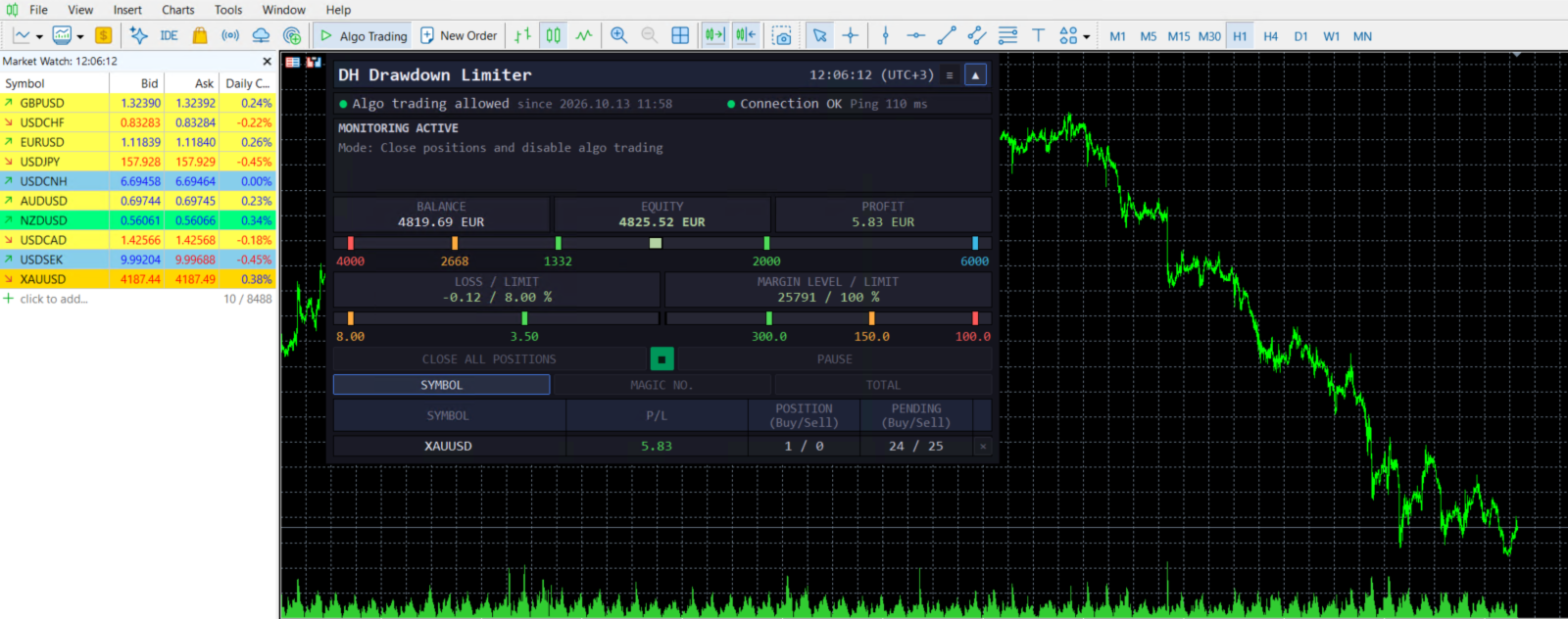
The dashboard is displayed on the chart and contains:

  • Tiles for loss, equity and margin with the current values
  • Scales showing the distance of the account from the configured limits
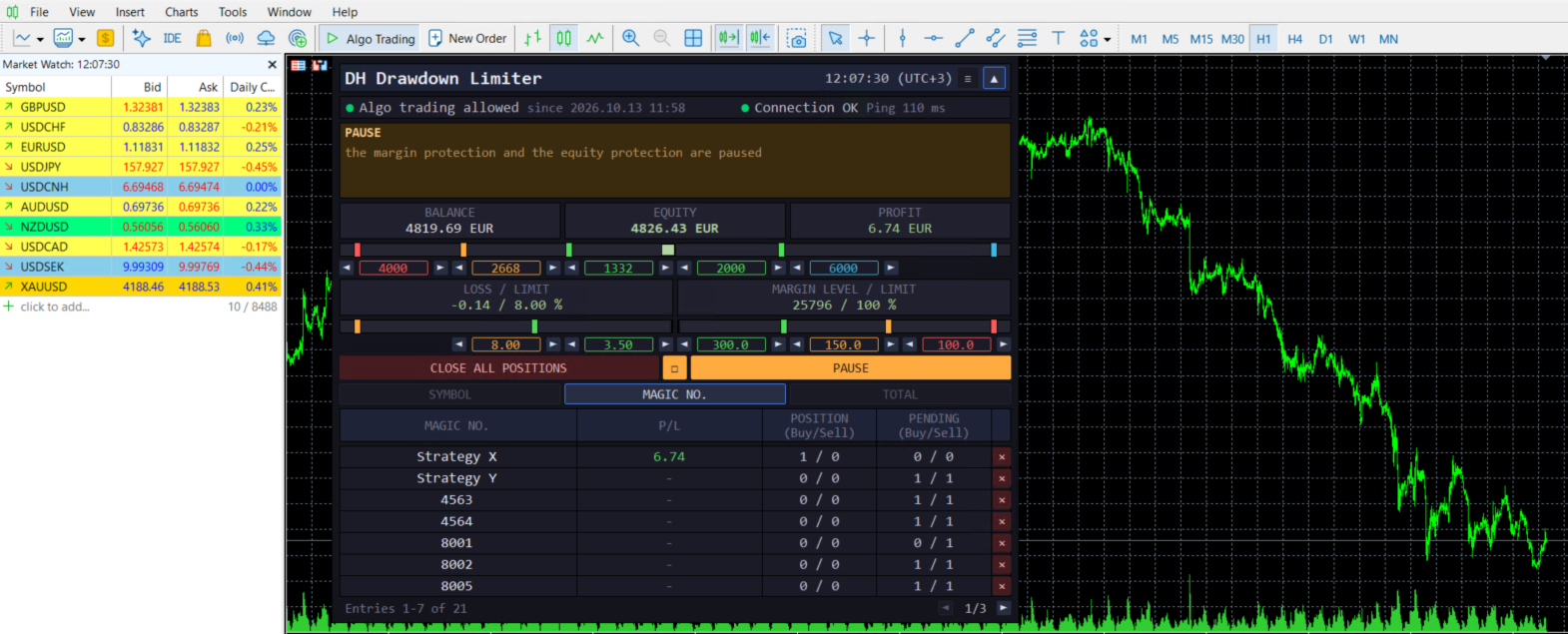
  • Thresholds changeable directly: by entering a value, with the arrows (hold down for faster changes) or by moving the markers on the scale. A change only takes effect after “Apply”.
  • Position table for positions and pending orders, sortable by symbol, magic number or total, with a button for closing each row
  • Manual interventions: pause, close positions by symbol or magic number, close everything at once
  • Names for magic numbers: you assign the name of the Expert Advisor to a number, and the table then shows the name
  • Freely movable and collapsible to a narrow header bar
  • Language of dashboard and messages is configurable (default English, German is available)

Testing in the strategy tester

In the visual strategy tester, two additional buttons appear that open a small demo position. This fills the tiles and scales and lets you observe the trigger. The dashboard’s buttons can be used in the tester. Moving markers and entering values are not possible there (a MetaTrader limitation).

Getting started

  1. Place the Drawdown Limiter on any chart. Symbol and timeframe are irrelevant.
  2. Allow algo trading in the terminal and for the Expert Advisor, otherwise it cannot close positions.
  3. Set at least one trigger from “Off” to “Warn only” or “React” and enter the limit.
  4. Optionally adjust the filter, rollover window and messages.
  5. Check in the dashboard that tiles and scales show the expected values.

Recommendation: Before activating a reaction, first test in the strategy tester or with “Warn only”.

Difference from the direct version

The MQL5 Market version contains three of the five reaction models. Not included is the automatic switching off of the Algo Trading button in MetaTrader. This requires a DLL, which the MQL5 rules do not permit in the Market. If you need this, please contact me, and you will receive the direct version.
Prodotti consigliati
CosmiCLab SMC FIBO CosmiCLab SMC FIBO is a professional trading indicator designed for traders who use Smart Money Concepts (SMC), market structure analysis and Fibonacci retracement levels. The indicator automatically detects market swings and builds Fibonacci levels based on the latest impulse movement. It also identifies market structure changes such as BOS (Break of Structure) and CHOCH (Change of Character), helping traders understand the current market direction. CosmiCLab SMC FIBO also pr
Open Risk Budget Cap
Md Nasar Uddin Redoy
Open Risk Budget Cap enforces a total open stop-loss risk budget across your account. It does not choose direction and does not open discretionary trades on a live chart. Attach it to one chart; the symbol and timeframe do not matter. What it measures Every open position and every pending order is priced to its stop-loss in account currency using OrderCalcProfit. Positions or orders without a stop-loss are counted and shown on the panel as "without stop-loss". They are excluded from the budget
Quando più Expert Advisor condividono un conto, MetaTrader mostra un solo saldo. Un robot che perde in silenzio può nascondersi per mesi dietro uno che guadagna, e lei se ne accorge solo quando se ne accorge il conto. Halberd Portfolio Monitor mette ogni Expert Advisor su una riga propria , per numero magico: operazioni, percentuale di successo, profit factor, risultato netto, drawdown, posizioni aperte e uno stato di salute. La vista del rischio mostra se una strategia è ancora nel suo interval
DDKiller Pro
Njaratahiry Michael Randrianiaina
Stop Blowing Your Account. Once and For All. DDKiller Pro is the MT5 risk guardian that runs silently on your chart and shuts down trading the moment you hit a limit — whether you're grinding a prop firm challenge or managing your own CFD account. The problem every trader knows: You set your rules. You break them anyway. One revenge trade. One overleveraged position. One session that erases a month of gains. DDKiller Pro removes that decision from your hands entirely. What it does: The second yo
Trading Utility for Forex Currency Pairs Only not for Gold  Functions Auto Lot Calculation based on Risk Auto stoploss  Auto TakeProfit Breakeven Auto Close Half % Close in percentage with respect to the PIPs Pending Orders BuyLimit Sell Limit with distances BuyStop Sell Stop    with distances Trading Informations Risk in percentage For Multiple trades Combine Takeprofit and Combine Stoplosses
Tarnix Evenlock
AL MOOSAWI ABDULLAH JAFFER BAQER
A BREAKEVEN STOP THAT STILL LOSES THE COMMISSION IS NOT BREAKEVEN. TARNIX EVENLOCK LOCKS THE REAL ONE. Tarnix Evenlock is a breakeven lock for MetaTrader 5 that counts what the trade really costs. When a position in scope, opened by hand or by another Expert Advisor, has moved in its favour by the trigger you choose (N x ATR, stored the moment the trade is first seen, or a fixed number of points), its stop loss is moved to the entry plus a buffer that pays the spread cushion, the round-turn comm
Capital Manager
Pham Cong Chinh
Capital Management EA – Smart Risk Management & Profit Optimization for MT5 Take control of your trading capital with smart, automated strategies — fully optimized for MetaTrader 5 (MT5). Looking to protect your capital and maximize profits through automated money management strategies ? Capital Management EA is the all-in-one Expert Advisor for MetaTrader 5 (MT5) that helps you trade smarter, not harder. Core Features: 5-in-1 Capital Management Strategies – Built-in versatility Gr
Truvana Trend Campaign Manager EA (TCM) Advanced Basket Management & Profit Locking Tool for Trend Traders Short Description Turn strong trends into managed campaigns. Truvana TCM is a professional trade management EA designed for traders who already know how to identify trends and execute entries. The EA automatically manages basket expansion, validates risk before adding positions, and locks profits using a broker-side Basket Stop Price (BSP). No martingale. No grid recovery. No signal genera
TradeManager Control Suite Manual trading with structured planning and controlled risk TradeManager Control Suite is a comprehensive trading panel for MetaTrader 5. It helps you prepare trades directly on the chart, calculate position size, place orders and manage open positions according to a plan defined in advance. You remain responsible for every entry. The application does not trade independently and does not use an automated trading strategy. It performs the calculations, sends the orde
Product Name: Smart Switch Dashboard STOP WASTING SECONDS. SECONDS COST MONEY. Are you losing trades because you're fumbling through the Market Watch? Is your workspace messy and slowing you down? In trading, Speed is everything. If you aren't organized, you are losing money to traders who are. Smart Switch Dashboard is not just a tool—it is your COMMAND CENTER . Designed for serious Scalpers and Day Traders who demand Speed, Precision, and Zero Lag. DOMINATE YOUR WORKFLOW 1. ULTRA-FAST SY
TradePilotmt5
Hossein Khalil Alishir
TradePilot Expert Advisor (EA) for MetaTrader 5 TradePilot is a professional and user-friendly Expert Advisor (EA) for MetaTrader 5 (MT5) . It simplifies automated trading , risk management , and trade execution with a smart trading panel . Perfect for beginners and experienced traders looking for a reliable trade manager EA with automated lot size calculation and smart position management. Key Advantages User-Friendly Trading Panel: Customizable panel with buttons and hotkeys for fast ex
HedgeSafe Trade Assistant Un pannello per il trading manuale su MetaTrader 5 orientato al controllo del rischio. HedgeSafe aiuta a preparare, verificare e gestire un'operazione direttamente sul grafico prima di premere BUY o SELL. HedgeSafe non è un servizio di segnali, uno strumento di previsione, un bot AI o una strategia automatica. Non sceglie la direzione e non promette profitti. Ogni decisione resta sotto il controllo del trader. Funzioni principali Calcolo del lotto da una percentuale del
Equity Sculper EA
Christopher Calmerin
Put your trading profits to work. Equity Sculptor EA is an MT5 trade-management tool that uses new closed profits to gradually reduce losing positions across your account. Account-wide management: All symbols and magic numbers, including manual trades. Two funding modes: Rescue Wallet or Legacy Balance. Flexible settings: Customize profit allocation, trim size and trade selection. Clear dashboard: View your funds, performance and configurations. Persistent tracking: Saved accounting continues af
Local Copy Trader Utility - Professional Copy Trading System Overview Local Copy Trader Utility is the complete solution for mirroring trades between MetaTrader 5 accounts. With both Master and Slave functionality in one powerful Expert Advisor, it delivers reliable, lightning-fast trade copying with zero external dependencies. Perfect for managing multiple accounts, following trading signals, or transferring trades between brokers, this system ensures your positions stay perfectly synchronized
Heiken_Ashi_Bars - Visualizzatore di Tendenze Avanzato per MT5 Panoramica Heiken_Ashi_Bars è un indicatore personalizzato potente e visivamente intuitivo progettato per filtrare il rumore del mercato ed evidenziare la vera tendenza di fondo. I grafici a candele tradizionali possono spesso essere erratici. Calcolando la media dei dati sui prezzi, questo indicatore uniforma l'azione dei prezzi, rendendo molto più semplice individuare continuazioni di tendenze, inversioni e zone di ingresso redditi
Veyra Monitor
Fisokuhle Ntokozo Mthembu
Veyra Monitor is an automated risk-management and trade-monitoring utility for MetaTrader 5, designed to help traders maintain disciplined risk controls while trading.  Veyra Monitor continuously monitors trading activity and applies predefined risk-management rules to help traders manage exposure, positions, and account-level risk. Key Features: Automated Trade Monitoring — Continuously monitors active positions and trading activity. Risk Management Controls — Helps enforce predefined risk p
Auto Stop Loss MT5
Nabil Oukhouma
5 (1)
Il Gestore del Rischio "Set & Forget" per il Trading Multi-Asset ️ Mai lasciare un trade senza protezione. Auto Stop Loss (MT5 Manager) è l'utility di background definitiva per i trader che mettono la sicurezza al primo posto. A differenza dei pannelli standard, questo strumento lavora instancabilmente dietro le quinte per proteggere istantaneamente ogni operazione. Che tu apra trade manualmente o tramite un altro EA, questo manager assicura che ogni posizione abbia immediatamente un Stop Loss
JMM Trade Panel MT5
Sarah Joyce Walker
JMM Trade Panel MT5 JMM Trade Panel MT5 è uno strumento di esecuzione e gestione delle operazioni per MetaTrader 5. Consente di aprire operazioni Buy e Sell direttamente dal grafico, modificare rapidamente il volume, controllare i risultati dei basket e gestire le operazioni tramite Magic Number e impostazioni sui simboli. Manuale utente completo:  Scaricamento Caratteristiche principali Pulsanti Buy, Sell e Close All direttamente sul grafico. Chiusura con un clic di tutte le operazioni gestit
Trade Copilot - Pannello semi-automatico di gestione del rischio per l'Oro (XAUUSD) e qualsiasi strumento Trade Copilot è un pannello di trading semi-automatico progettato per i trader manuali che desiderano la disciplina di un EA senza rinunciare al controllo dei propri ingressi. Voi decidete la direzione e il livello; il pannello calcola automaticamente la dimensione del rischio, imposta lo stop-loss, gestisce il take-profit e protegge la posizione. CARATTERISTICHE PRINCIPALI - Calcolo del
Pro Trader Assistant 1.1 - The Ultimate Trading Companion NB: DOES NOT WORK ON STRATEGY TESTER. FOR TESTING, DM ME   Trade Simple, Smarter, Safer, and More Efficiently Are you ready to transform your trading with institutional-grade risk management? Pro Trader Assistant 1.1  is your complete solution for mastering trading psychology, risk control, and execution efficiency. Built for both prop firm challenges and retail trading. Why Choose Pro Trader Assistant 1.1 Perfect for retail trading
Protect your funded accounts and personal capital with military-grade precision. This utility continuously monitors your floating equity against your daily starting balance. The moment your custom drawdown threshold is breached, it instantly liquidates all open positions, deletes pending orders, and completely unloads from the chart. Stop revenge trading and never fail a prop firm evaluation due to a margin breach again.
FREE
Account Monitor Pro — Your Ultimate Trade Statistics Hub Account Monitor Pro is a professional information dashboard designed for traders who combine Expert Advisors (EAs) and manual trading. The indicator separates statistics in real-time based on your Magic Number, allowing you to clearly see who is driving the profit: the algorithm or yourself. Key Features: Split Monitoring: Instant separation of "Robot" positions (by Magic Number) and "Manual" trades. Multi-language Support: 11 languages in
FREE
Confluence Meter: una valutazione consolidata da 26 indicatori Confluence Meter calcola i segnali di 26 indicatori molto diffusi e li riunisce in una valutazione semplice del tipo «vendere / neutrale / comprare». Non serve aprire decine di finestre e confrontare i valori a mano. Basta un'occhiata al pannello per vedere da che parte pende il mercato sul timeframe selezionato. MT4-version:  https://www.mql5.com/en/market/product/199466 Our products: https://www.mql5.com/en/users/trendhunter/selle
Prop Calculator Assistant  Smetti di bruciare conti Prop Firm per errori di calcolo. Lascia che l’Assistente gestisca il rischio per te. Prop Calculator Assistant è la dashboard definitiva per la gestione operativa, progettata specificamente per i trader che affrontano challenge (FTMO, ecc.) o che gestiscono capitali finanziati. Sostituisce i calcoli mentali e il posizionamento manuale degli ordini con un’interfaccia visiva di precisione che ti mantiene rigorosamente entro le tue regole. Questo
Currency Exposure Matrix — Translate a collection of FX positions into a clearer currency-exposure view. Who it is for Designed for FX traders comparing long, short, gross and net exposure across several pairs. Main functions Gross and net currency exposure Long and short decomposition Deposit-currency conversion Concentration warnings Transparent handling when conversion symbols are unavailable A practical setup workflow Review the selected account, symbols, server time, available history and i
The purpose   of this utility is to manage one or more subwindow in the same chart by opening and closing them through a button or the keyboard keys How it works: If you want to handle more than one subwindow you need to reinstall the indicator . In this case some setups has to be customized onlu in the last subwindow installed and others setups in the installed subwindow during the first time installation. They are denoted in the input rispectively as ' LW ' and ' IW '. First of all install
Advanced 1-Click Risk Panel is a precise and lightning-fast risk management utility for MetaTrader 5. It automatically calculates your exact position size based on chart drag-and-drop Stop Loss line and account risk percentage. Key Features Dynamic SL Line & Dynamic Lot: Simply drag the horizontal SL line on your chart—the panel dynamically calculates your exact lot size instantly. 1-Click Execution: Place instant BUY/SELL orders with automated Stop Loss and Take Profit based on your predefin
AURUM SMC Structure, XAUUSD [& other FX pairs] [Please leave a review if you find the indicator useful and how we can improve it further] A Smart Money Concepts structure indicator for studying gold charts. It marks BOS and CHoCH breaks, order blocks, fair value gaps and liquidity, and gives each setup marker a 1 to 5 star confluence rating. After a break it waits for a pullback before drawing its reference levels, so you can study how price behaved around structure rather than chasing the break
DR Trade and Risk Manager: The Foundational Algorithmic Risk Console for MT5 For the discretionary trader, the greatest adversary is not the market; it is the undisciplined self. You have a solid strategy, but in moments of high pressure, do you follow your rules with perfect consistency? Do you cut losses without hesitation? Do you let winners run without cutting them short out of fear? For most, the answer is no. This gap between strategy and execution is where profits are lost. DR Trade and R
Eudora Trade Pad
Gabriele Volpato
Ogni ordine a un clic. Compra, vendi e lotto con i prezzi dal vivo Chiudi tutto, chiudi i profitti, chiudi le perdite, pareggio Modalità pratica per conoscere il pannello a zero ordini Pannello animato, nitido su ogni schermo. Un pulsante lo richiude in una barra sottile e si trascina in qualunque punto del grafico. Il pannello è disegnato su una tela con transizioni morbide. Posizione sul grafico e stato, aperto o richiuso, restano memorizzati. Funziona su ogni simbolo e timeframe. Realizzato d
FREE
Gli utenti di questo prodotto hanno anche acquistato
Trade Assistant MT5
Evgeniy Kravchenko
4.43 (216)
It helps to calculate the risk per trade, the easy installation of a new order, order management with partial closing functions, trailing stop of 7 types and other useful functions. Additional materials and instructions Installation instructions - Application instructions Line function -   shows on the chart the Opening line, Stop Loss, Take Profit. With this function it is easy to set a new order and see its additional characteristics before opening.   Risk management  - The risk calculation
Forex Trade Manager MT5
InvestSoft
4.98 (694)
Benvenuto a Trade Manager EA, lo strumento definitivo per la gestione del rischio , progettato per rendere il trading più intuitivo, preciso ed efficiente. Non è solo uno strumento per l'esecuzione degli ordini, ma una soluzione completa per la pianificazione delle operazioni, la gestione delle posizioni e il controllo del rischio. Che tu sia un principiante, un trader avanzato o uno scalper che necessita di esecuzioni rapide, Trade Manager EA si adatta alle tue esigenze, offrendo flessibilità s
Telegram to MT5 MultiChannel Copier
Sergio Marquez Uroz
4.73 (26)
Black Week: acquisto a 69.99 USD. L'offerta termina venerdì 27 novembre. Telegram to MT5 Multi-Channel Copier   copia automaticamente i segnali di trading dai tuoi canali Telegram e Discord direttamente su MetaTrader 5. Niente bot, niente estensioni del browser, niente copia manuale. Il segnale arriva su Telegram o Discord e l'EA apre l'operazione nel tuo terminale in pochi secondi. E prima di copiare un canale, il backtester integrato ti mostra cosa avrebbe fatto quel canale sul tuo conto. Il p
FarmedHedge Pair Trading Dashboard
Tanapisit Tepawarapruek
5 (7)
Farmed Hedge Yield Farming | All Markets (Manual - Hybrid - Semi/Automated EA) VERIFIED TRADING RESULTS - Farmed Hedge Yield Axi Copy:  https://www.mql5.com/en/signals/2356376 - Farmed Hedge Yield Exn Copy:   https://www.mql5.com/en/signals/2356404 - Farmed Hedge Yield V Copy:  https://www.mql5.com/en/signals/2357156 IMPORTANT NOTICE: FarmedHedge is a MANUAL-FOCUSED TRADING UTILITY ,not a fully automated EA. Results shown on this Signal include manual trades and overall strategic management.
EA Overfitter
Stephen J Martret
5 (5)
That backtest looks great. But will it still be making money tomorrow, next week, next month? EA Overfitter re-runs your EA on 100 price histories it has never seen. One score tells you if the edge is real. A backtest tells you what an EA did on one price history — the one that happened to occur. What you cannot tell from it is how much of that result was the strategy and how much was the particular path. EA Overfitter answers that. It builds up to 100 synthetic price histories your EA has n
TradePanel MT5
Alfiya Fazylova
4.89 (176)
Trade Panel è un assistente commerciale multifunzionale. L'applicazione contiene più di 50 funzioni di trading per il trading manuale e permette di automatizzare la maggior parte delle attività commerciali. Istruzioni per l'applicazione: https://www.mql5.com/it/blogs/post/762331 Versione di prova dell'applicazione per un conto demo: https://www.mql5.com/it/blogs/post/762419 Come installare l'applicazione: https://www.mql5.com/it/blogs/post/762362 Come testare l'applicazione in modalità visuale:
Copia i segnali Telegram con le tue regole di trading Telegram to MT5 Signal Trader copia automaticamente i segnali di trading testuali dai canali e gruppi Telegram pubblici e privati in MetaTrader 5. Gestisci più fornitori e conti MT5 da un'unica applicazione desktop, con impostazioni di rischio e di trading specifiche per ogni fornitore . Per copiare i segnali non servono bot Telegram né configurazioni API. Accedi semplicemente con il tuo account Telegram tramite numero di telefono o codice QR
AI Agents Supervisor
Ho Tuan Thang
5 (1)
AI Agent Supervisor is NOT an Expert Advisor. AI Agent Supervisor   is a   multi-agent AI risk & portfolio supervisor   that watches every EA on your account and intervenes in real time.  WANT AN AI PORTFOLIO MANAGER WATCHING YOUR FLEET 24/7?   Run your fleet on the same brokers I do:   IC MARKETS , IC TRADING   .  Unlike the centralized stock market, Forex has no single, unified price feed.  Every broker sources liquidity from different providers, creating unique data streams. The Supervisor r
================================================================================ POC BREAKOUT - V20.72. Full Professional Grade Toolkit ================================================================================ POC Breakout is a full MetaTrader 5 trading dashboard for discretionary traders who want breakout signals, Point of Control (POC) context, volume profiles, order flow, market structure, news, alerts, and advanced trade planning in one professional workspace. Attached directly to you
Unlimited Trade Copier Pro MT5 is a tool to copy trade remotely to multiple MT4, MT5 and cTrader accounts at different computers/locations over internet. This is an ideal solution for you if you are a signal provider and want to copy your trades to other receivers globally on your own rules. One provider can copy trades to multiple receivers and one receiver can get trade from multiple providers as well. The provider can even set the subscription expiry for each receiver, so that receiver will n
News Trade EA MT5
Konstantin Kulikov
4.55 (11)
Presento un utile robot che io stesso utilizzo da diversi anni. Questo robot può essere utilizzato sia in modalità semiautomatica che completamente automatica. >>> Chat <<< Il programma contiene le impostazioni flessibili per fare trading sulle notizie del calendario economico. Non può essere verificato nel tester delle strategie. Soltanto il vero lavoro. Scarica l'ultimo archivio di impostazioni: https://www.mql5.com/en/blogs/post/747929 Monitoraggio dei segnali: https://www.mql5.com/en/signa
The product will copy all telegram signal to MT5 ( which you are member) , also it can work as remote copier.  Easy to set up, copy order instant, can work with almost signal formats, image signal,  s upport to translate other language to English Work with all type of channel or group, even channel have "Restrict Saving Content", work with  multi channel, multi MT5 Work as remote copier: with signal have ticket number, it will copy exactly via ticket number. Support to backtest signal. How to s
EA Auditor
Stephen J Martret
5 (7)
EA Auditor is an independent analysis tool for traders evaluating Expert Advisors and trading signals on MetaTrader 5. It audits backtest reports, reviews posted developer signals, and cross-verifies the two against each other to help traders assess strategies before committing capital. The MQL5 market offers a wide range of Expert Advisors from many developers, with varying approaches, quality, and transparency. EA Auditor provides a consistent, data-driven framework for reviewing them, answer
Astro Trade MT5
Indra Maulana
5 (8)
25% discount on the release of the tool: only for the next 3 buyers Send a message to receive a demo version. AstroTrade Trading Assistant AstroTrade is a comprehensive multi-functional trading utility developed for the MetaTrader 5 platform. It integrates essential tools for trade execution, risk management, and technical monitoring into a single unified interface. The application is designed to assist traders in managing their daily operations through a visual and structured environment. Vi
Power Candles Strategy Scanner: ricerca di setup multi-simbolo che si ottimizza da sola Uno scanner che suona a ogni minimo movimento ti abitua a ignorarlo. Una chiusura di candela movimentata, un avviso dopo l'altro, e l'unico setup su cui operi davvero affoga nel rumore. Power Candles Strategy Scanner esegue il motore auto-ottimizzante di Power Candles su ogni simbolo del tuo Market Watch e ti avvisa solo di ciò che supera i tuoi filtri: la forza dell'ultima candela chiusa, il rapporto rendime
Trade Manager DashPlus
Henry Lyubomir Wallace
4.85 (13)
DashPlus è uno strumento avanzato di gestione delle operazioni progettato per migliorare l'efficienza e l'efficacia del trading sulla piattaforma MetaTrader 5. Offre una suite completa di funzionalità, tra cui calcolo del rischio, gestione degli ordini, sistemi di griglia avanzati, strumenti basati su grafici e analisi delle prestazioni. Caratteristiche Principali 1. Griglia di Recupero Implementa un sistema di griglia flessibile e di media per gestire le operazioni in condizioni di mercato avve
Custom Alerts MT5
Daniel Stein
5 (8)
Custom Alerts: Monitora più mercati e non perdere mai un setup importante Panoramica Custom Alerts è una soluzione dinamica per i trader che desiderano monitorare più strumenti da un unico punto centrale. Integrando i dati dei nostri strumenti principali — come FX Power, FX Volume, FX Dynamic, FX Levels e IX Power — Custom Alerts ti avvisa automaticamente degli sviluppi cruciali del mercato, senza dover passare continuamente da un grafico all'altro o rischiare di perdere opportunità importanti
Assistente di trading sul grafico e pannello di gestione del rischio Strumento completo sul grafico con Stop Loss (SL) e Take Profit (TP) multi-mode (ATR, R:R, punti, valuta del conto), analisi in tempo reale e calendario economico Ergotick Trade Manager è un pannello di trading professionale tutto-en-uno, progettato per trader discrezionali, candidati ai challenge delle prop firm e scalper. Unisce il calcolo automatico e istantaneo della dimensione del lotto, impostazioni multi-mode per Stop Lo
Conosci il tuo rischio prima di cliccare. Gestisci il trade dopo. Trascina le linee, clicca BUY o SELL e la dimensione del lotto viene calcolata per te. Poi gestisci il trade con break even, chiusura parziale, obiettivi multipli e altro ancora. Mercurial Position Sizing PRO è uno strumento MT5 per trader manuali. Calcola il lotto corretto in base al tuo saldo, alla percentuale di rischio e alla distanza dello stop loss, poi apre il trade con SL e TP già impostati. Include tutto ciò che offre la
I segnali dei suoi canali Telegram, copiati su MetaTrader 4 e MetaTrader 5 in pochi secondi. TradingMind Signal Bridge legge i canali e i gruppi che lei sceglie, riconosce ogni segnale con regole rapide integrate, passa quelli più disordinati a un modello di IA, compresi i segnali pubblicati come screenshot, e consegna l'ordine a un expert advisor sul suo terminale. Un filtro notizie, la protezione per i conti delle prop firm e un bot Telegram per il controllo a distanza lasciano a lei la decisi
Prop Guardian Risk Manager MT5 – Drawdown, Risk & Hedge Protection for Prop Firm and Managed Accounts Prop Guardian Risk Manager is a professional risk-control utility for MetaTrader 5, designed for prop firm traders, money managers and anyone who wants strict account-level risk protection. It does not generate trading signals, strategy entries or trading decisions. Instead, it runs in the background, monitors your account risk and can automatically block new exposure, close managed positions or
Prossimo aggiornamento — Versione 2.52 in arrivo! [NOVITÀ] Preparati a 4 nuove funzionalità principali progettate per migliorare la tua analisi di mercato e il tuo flusso di lavoro nel trading Portiamo l’analisi di mercato a un livello superiore con 4 nuove funzionalità progettate per soddisfare le tue esigenze di trading. Ecco le novità: 1. TRADE OVERVIEW DASHBOARD 2. CONFLUENCE AT ZONE 3. STRONG & WEAK HIGH/LOW 4. OTE 1. TRADE OVERVIEW DASHBOARD Una dashboard che ti aiuta a comprendere più fa
REVDEN AI Desk: gestisci il tuo trading da un'unica conversazione con la tua IA, sul contesto di mercato di REVDEN Immagina di gestire il tuo trading da un'unica conversazione. REVDEN AI Desk la porta in MetaTrader 5: chiedi alla tua IA come legge il mercato, e lei risponde dal contesto completo di REVDEN sui simboli che operi, con il loro stato, il loro quadro di rischio e le pubblicazioni in arrivo. Le sue proposte arrivano con ingresso, stop, target e rischio, e tu approvi quelle che ti convi
MT5 to Telegram MultiChannel Sender   invia automaticamente le tue operazioni di MetaTrader 5 su Telegram — a uno o più canali, gruppi o chat private. Ogni apertura, modifica di SL/TP, chiusura parziale, chiusura e ordine pendente viene pubblicata in pochi secondi, e un pannello sul grafico ti permette di gestire un canale completo e un canale limitato dallo stesso conto. Senza programmare e senza compilare parametri. Cerchi la direzione opposta, copiare le operazioni da Telegram su MT5? Vedi  
Zentriq Trade Manager
Mark Frederick Siebert
Experience trading without friction. Zentriq Trade Manager is a modern, high-performance trade management utility engineered with a high-DPI canvas interface, anticipatory workflow design, and an integrated Macroeconomic News Filter. Designed for discretionary traders, scalpers, and prop firm traders who demand speed, precision, zero-clutter ergonomics, and automated news event protection. User Manual Get the most out of Zentriq Trade Manager with the complete user manual: Complete User Manual:
Exp5 VirtualTradePad PRO SE for MT5
Vladislav Andruschenko
5 (1)
VirtualTradePad PRO SE MT5 — centro di controllo professionale per il trading su MetaTrader 5 VirtualTradePad PRO SE è un pannello di trading premium basato sul grafico e un ambiente di gestione delle operazioni per MetaTrader 5 . È progettato per i trader che desiderano esecuzione più rapida, controllo più chiaro delle posizioni, gestione strutturata delle operazioni, pianificazione visiva dei livelli e un workflow professionale direttamente dal grafico. Non è soltanto un semplice pannello BUY
TradingView-grade charts, native in MT5, with Pine Script v4 and up support A complete charting replacement built inside MetaTrader 5: a custom rendering engine, a Pine Script v4-v6 interpreter, 10+ built-in indicators, professional drawing tools, multi-chart layouts, a forex sessions overview, a bar replay simulator, and an integrated trade manager with risk-based position sizing. One license. Free updates for life. Why ChartZephyr MT5 gives you world-class execution. Its charting engine hasn't
MT5 to Telegram Signal Provider — Real-Time Trade Notifications for MetaTrader 5 The trades on your account as formatted messages in your Telegram chats and channels: openings, closings and pending orders the moment they happen, SL/TP changes after a short cooldown. OVERVIEW MT5 to Telegram Signal Provider is a utility Expert Advisor for MetaTrader 5 that automatically sends trade notifications to one or more Telegram chats or channels. Trade events on the account are captured and delivered
Trade Manager DaneTrades
Levi Dane Benjamin
4.13 (31)
Trade Manager per aiutarti a entrare e uscire rapidamente dalle operazioni calcolando automaticamente il tuo rischio. Incluse funzionalità che ti aiutano a prevenire l'eccessivo trading, il vendetta trading e il trading emotivo. Le operazioni possono essere gestite automaticamente e i parametri di performance del conto possono essere visualizzati in un grafico. Queste caratteristiche rendono questo pannello ideale per tutti i trader manuali e aiuta a migliorare la piattaforma MetaTrader 5. Suppo
MT5 to Telegram Signal Provider è un'utilità facile da usare e completamente personalizzabile che consente l'invio di segnali specificati a una chat, canale o gruppo Telegram, rendendo il tuo account un fornitore di segnali. A differenza della maggior parte dei prodotti concorrenti, non utilizza importazioni DLL. [ Dimostrativo ] [ Manuale ] [ Versione MT4 ] [ Versione Discord ] [ Canale Telegram ]  New: [ Telegram To MT5 ] Configurazione Una guida utente passo-passo è disponibile. Nessuna cono
Altri dall’autore
Analyze the equity curve, the real drawdown and the key figures from your trade history and display them as a chart, for every symbol, every magic number and every comment. Analysis of the trade history The DH Equity Analyzer analyzes all trades from the account history and breaks them down individually. Everything can be filtered precisely by symbol, magic number and the comments that your strategies store in the order. Select a magic number, a symbol or a comment, and the dashboard shows the
Filtro:
Nessuna recensione
Rispondi alla recensione