DH Drawdown Limiter
- Utilitaires
-
David Hinz
 Profit = Risk
 - Version: 2.52
- Activations: 10
Account-wide protection for MetaTrader 5:
The Drawdown Limiter monitors the loss, margin level and equity of your account and, when a limit you have set is reached, closes positions and pending orders.
Scope of function
The Drawdown Limiter does not open positions itself. It runs alongside your other Expert Advisors or your manual trading and evaluates account data only.
When the account reaches a configured limit, it sends a message to the MT5 app and, if you have set it up that way, closes the affected positions and pending orders. The trading systems being monitored do not need to be modified.
Who it is for
- Operators of automated systems, for example grid or martingale strategies, who need a fixed loss limit
- Prop-firm traders who have to comply with prescribed loss limits
- Manual traders who cannot watch their account continuously
The three triggers
Three protection layers monitor the account at the same time. Each can be switched on and off individually.
1. Loss limit
Triggers as soon as the loss reaches the configured limit. The limit can be set as a percentage of the account balance or as a money amount.
2. Margin protection
Triggers as soon as the margin level falls below the configured value, that is, before the broker intervenes.
3. Equity level
A lower and an upper level, configurable separately. The lower level limits losses, the upper level secures a profit that has been reached. Example: account balance 10,000, lower level 10% results in a trigger at 9,000.
Important: After installation, all three triggers are set to “Off”. The Drawdown Limiter only becomes active once you switch on at least one trigger.
Behavior of a trigger
For each trigger you choose one of four behaviors:
- Off: The trigger is switched off.
- Warn only: Only a warning and an all-clear are reported. Positions are not closed.
- React + early warning / all-clear: Warning, then the reaction when the limit is reached, then the all-clear.
- React only: The reaction only, without warning and all-clear.
The warning is issued before the limit, the all-clear once the situation has normalized. If a value fluctuates around a threshold, this does not produce a new message with every swing.
The reaction
When a trigger reaches its reaction limit, the Drawdown Limiter closes positions, pending orders or both, depending on the setting. You then choose what happens next:
Close positions whenever the limit is reached
After closing, monitoring continues as normal. If the limit is reached again, closing is repeated.
Close positions (default)
After closing, a lock applies: every new position and every new pending order is closed again after the configured wait time (default 60 seconds). The lock persists across chart changes and terminal restarts until you release it in the dashboard.
Close positions and shut down the terminal
After closing, the MetaTrader terminal is shut down.
The lock prevents another Expert Advisor from opening new positions immediately after closing.
Closing positions
- Closing is carried out through the terminal’s group function. If an attempt fails, it is repeated (number of attempts and pause are configurable).
- On hedging accounts, opposing positions of the same symbol are closed directly against each other, provided the broker and the instrument allow it. This saves a spread.
- Whether a position is closed is checked on the account, not by the broker’s acknowledgement.
Filter by symbol and magic number
Monitoring can be restricted to specific symbols and magic numbers. The magic number is the identifier by which an Expert Advisor recognizes its positions; 0 stands for positions opened manually. In this way you monitor and close only one specific trading system.
Please note:
- With a filter set, the dashboard shows the account balance plus the floating results of the filtered positions as equity. The equity levels trigger on this value.
- Margin protection always refers to the whole account, because positions that are not filtered also tie up margin.
Rollover pause
Around the daily rollover (default 23:55 to 00:10 server time), spreads can briefly rise sharply and distort equity. In this time window the Drawdown Limiter pauses automatically, so that no unintended trigger occurs. The time window and the function are configurable.
Messages
- Push notifications to the MT5 app, optionally also a popup in the terminal
- Bundling: Several events within a short time are combined into one message (default: 5 seconds)
- Account data (account number, equity, balance, margin level, open positions, server time) can be sent along as a second message
- Individually switchable reasons: reaction triggered, confirmation after closing, warning, all-clear, algo trading switched on or off, connection disrupted or restored, pause switched on or off, account without open positions
- Custom first line (for example “VPS 1 - Scalper”) to distinguish several accounts
Push notifications require a MetaQuotes ID stored in the MT5 app and notifications switched on in the terminal.
Connection monitoring
The Drawdown Limiter detects a disrupted connection to the broker. A disruption is only reported after a configurable minimum duration (default 2 minutes), so a brief interruption does not trigger a message. While the market is closed, no disruptions are reported.
Dashboard
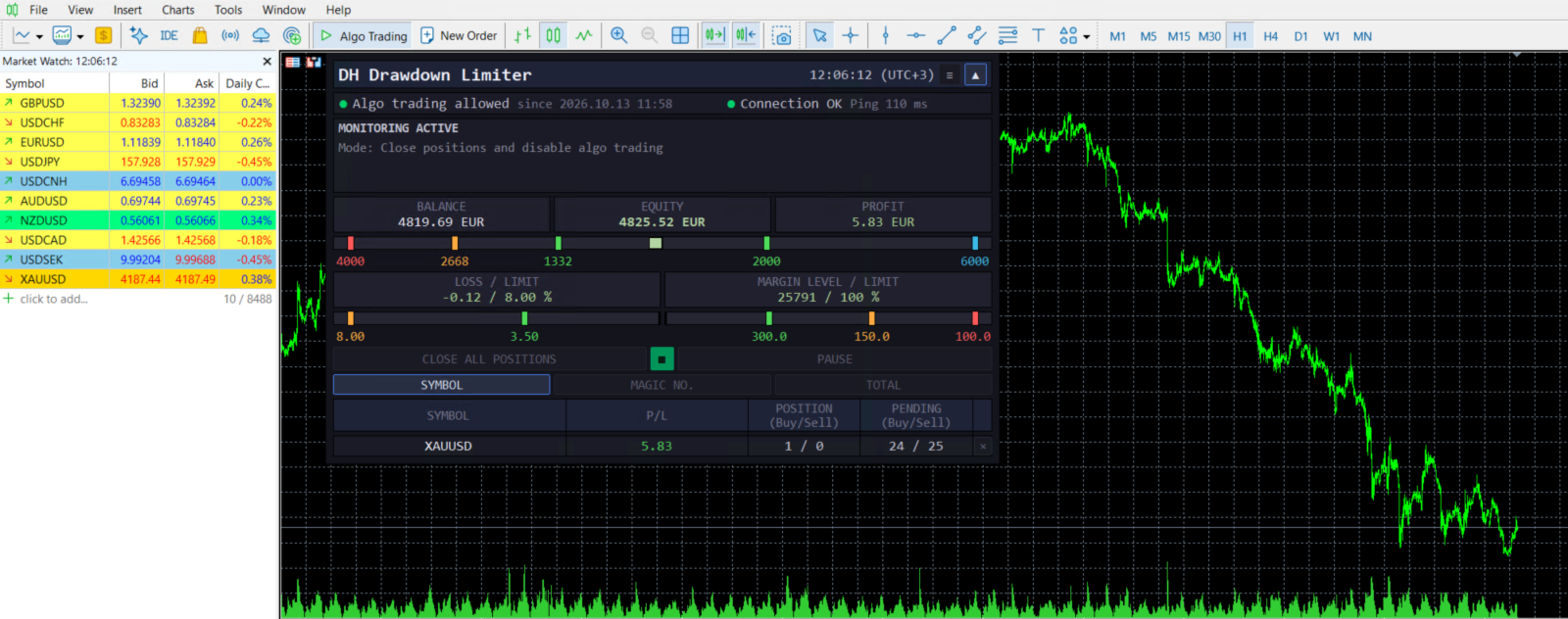
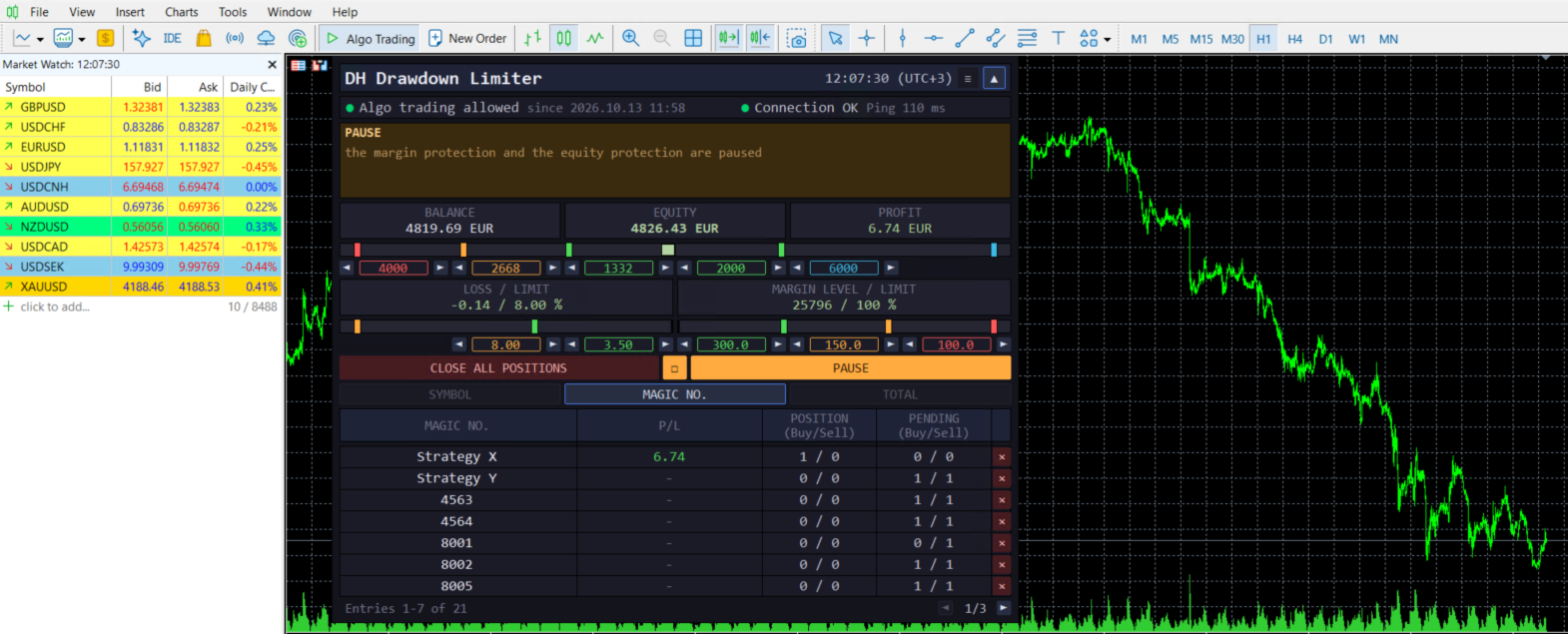
The dashboard is displayed on the chart and contains:
- Tiles for loss, equity and margin with the current values
- Scales showing the distance of the account from the configured limits
- Thresholds changeable directly: by entering a value, with the arrows (hold down for faster changes) or by moving the markers on the scale. A change only takes effect after “Apply”.
- Position table for positions and pending orders, sortable by symbol, magic number or total, with a button for closing each row
- Manual interventions: pause, close positions by symbol or magic number, close everything at once
- Names for magic numbers: you assign the name of the Expert Advisor to a number, and the table then shows the name
- Freely movable and collapsible to a narrow header bar
- Language of dashboard and messages is configurable (default English, German is available)
Testing in the strategy tester
In the visual strategy tester, two additional buttons appear that open a small demo position. This fills the tiles and scales and lets you observe the trigger. The dashboard’s buttons can be used in the tester. Moving markers and entering values are not possible there (a MetaTrader limitation).
Getting started
- Place the Drawdown Limiter on any chart. Symbol and timeframe are irrelevant.
- Allow algo trading in the terminal and for the Expert Advisor, otherwise it cannot close positions.
- Set at least one trigger from “Off” to “Warn only” or “React” and enter the limit.
- Optionally adjust the filter, rollover window and messages.
- Check in the dashboard that tiles and scales show the expected values.
Recommendation: Before activating a reaction, first test in the strategy tester or with “Warn only”.
Difference from the direct version
The MQL5 Market version contains three of the five reaction models. Not included is the automatic switching off of the Algo Trading button in MetaTrader. This requires a DLL, which the MQL5 rules do not permit in the Market. If you need this, please contact me, and you will receive the direct version.