ATS Trade Manager
- Utilità
- Andrea Michelon
- Versione: 1.0
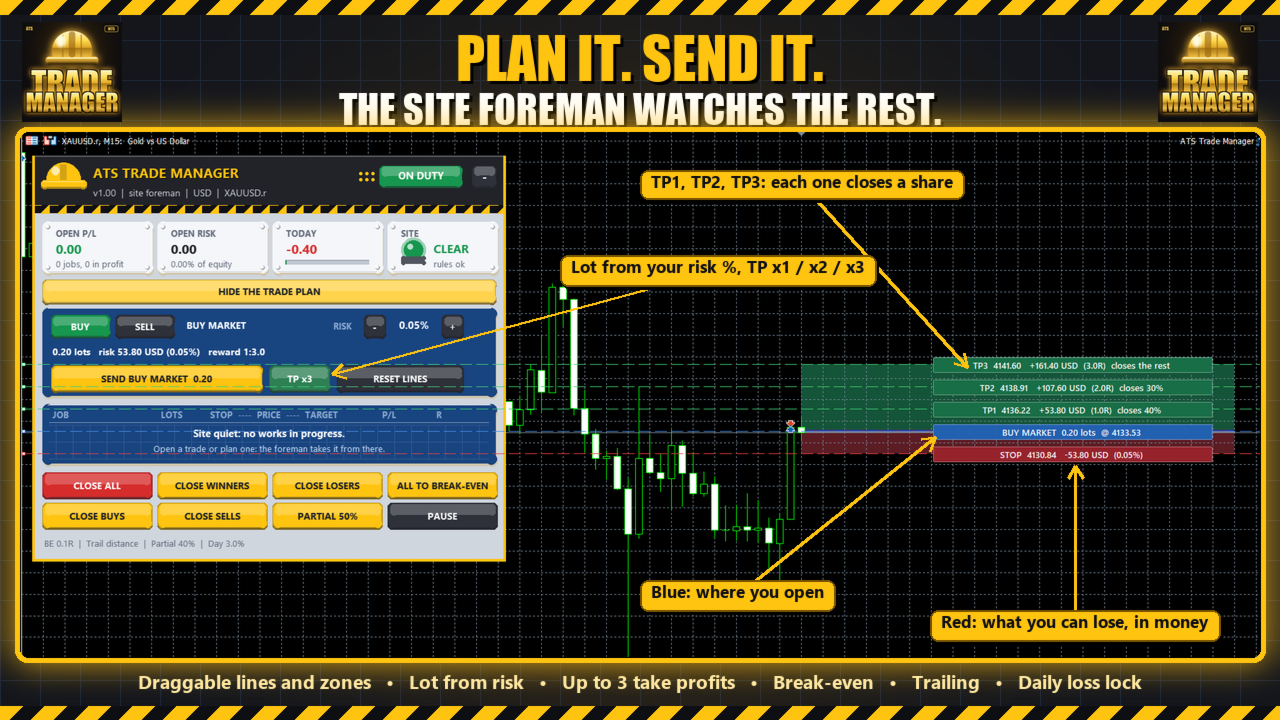
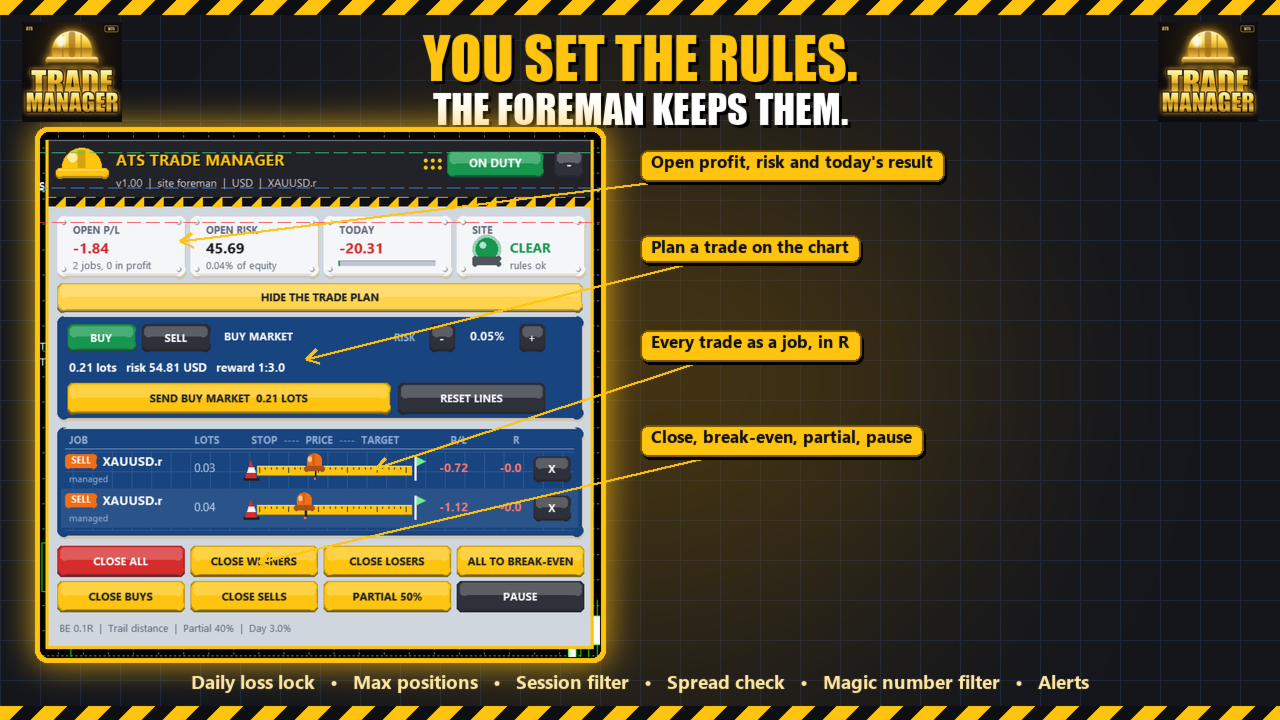
ATS Trade Manager is the site foreman of your trades. Plan a trade on the chart with draggable lines and coloured zones, send it with the lot size worked out from your risk, and let the foreman look after it: break-even, trailing stop, up to three take-profit levels with a partial close at each, a daily loss lock and one panel to close groups of trades. It trades only when you press SEND.
PLAN A TRADE ON THE CHART
Press PLAN and the chart shows the trade before you take it: a blue line and zone where you open, a red zone down to the stop, a green zone up to the targets. Drag any line, and the numbers follow. Every line carries a tag with what it means in money: the loss at the stop, the profit at each target, the result in R.
- Lot size from your risk: you choose the % of the balance, the panel works out the lot from the stop distance. The lot is never rounded up: if the broker's minimum lot would risk more than you chose, the panel tells you how much it would risk and lets you take it with one click (never above 10% of the balance).
- One, two or three take-profit levels, chosen with the TP button on the panel. At the first two the manager closes the share you set (for example 40% and 30%), the broker's own take profit closes the rest. After the first level the stop can move to break-even.
- Market or pending: leave the blue line on the price for a market order, drag it away and the order becomes a limit or a stop order by itself. With a market entry the whole plan moves with the price, so the distances stay the same.
- Before it sends: the stop and the targets must be on the right side and far enough for your broker, there must be free margin, the spread must be inside your limit, and the daily lock, the maximum positions and the trading session are checked.
- Every send needs a second click within 4 seconds.
LOOK AFTER THE TRADES
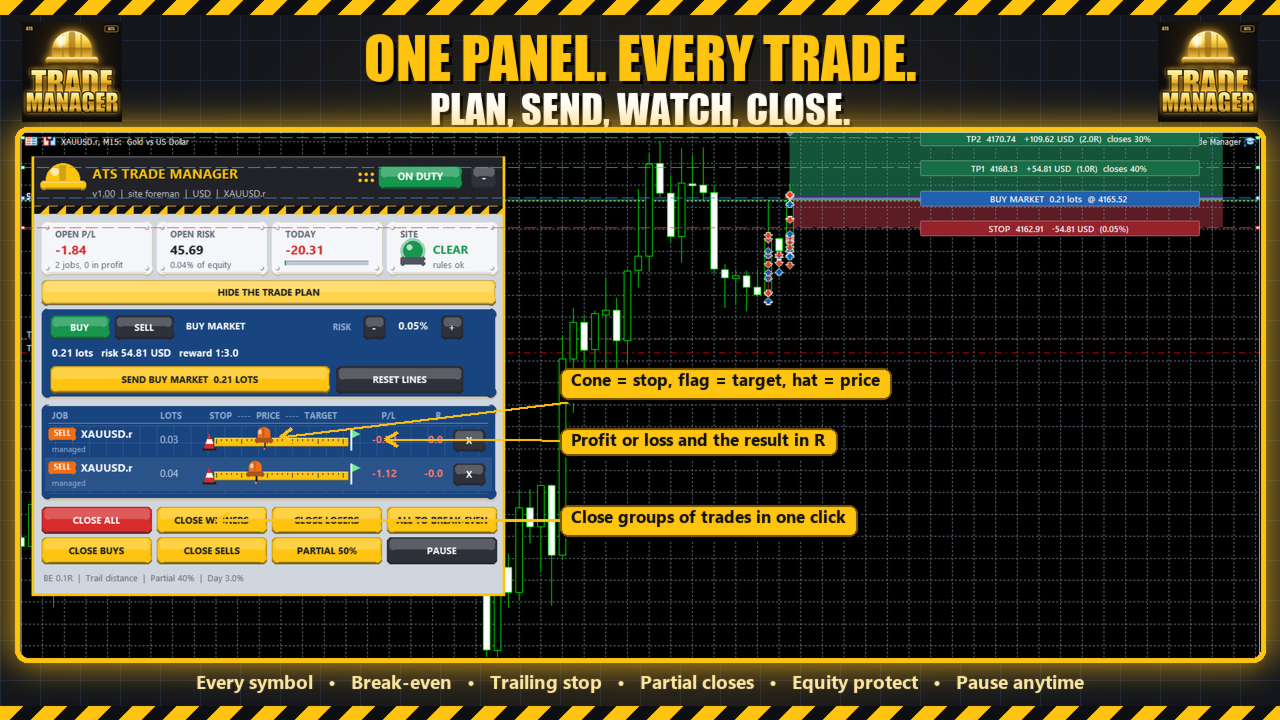
Every trade is a job on a blueprint board: a measuring tape from the red cone (stop) to the green flag (target), a hard hat where the price is now, a stake where the trade was opened, lots, profit or loss, the result in R, and a mark for what the manager has already done (BE, TRAIL, P1, P2).
- Break-even: moves the stop to the entry (plus an offset) once the trade is far enough in profit. The distance is set in R (multiples of the initial stop), in ATR or in points.
- Trailing stop: a fixed distance behind the price, or behind the lowest low / highest high of the last candles on the timeframe you pick. It only moves the stop in your favour.
- Two partial closes by distance, for trades that were not planned on the chart.
- Stop and target for trades that have none (for example trades opened from your phone): a stop at an ATR multiple or a number of points, a target at a number of R.
- Daily loss lock: a limit in % of the day's opening balance, open trades included. At the limit you get an alert, and if you wish every managed trade is closed.
- Equity protect: close everything when the open profit or the open loss reaches a % of the balance.
- Maximum open positions and a trading session for new trades: a trade that breaks a rule is flagged, or closed if you switch the enforcement on.
- Panel buttons: close all, winners, losers, buys or sells, all stops to break-even, a partial close of every trade, pause. Every button asks for a second click.
- Drag the panel by its header, collapse it with one click.
WHICH TRADES
Every symbol or only the chart's symbol, and every magic number or a list (0 = trades opened by hand). Your other EAs keep their own logic: the manager only moves stops and closes.
GOOD TO KNOW (honest limits)
- It gives no signals and promises no result. A stop can be filled at a worse price in a fast market or over a gap, as with any stop.
- The terminal and the EA must be running when the price moves, so a VPS is the right place for it. It needs algorithmic trading switched on.
- The trade plan works on the symbol of the chart you attach it to. The risk is a % of the balance. R is measured from the stop the trade had when the manager first saw it: a trade without a stop has no R, the rules set in R skip it and the panel flags it as NO STOP.
- Stops too close to the price for your broker's stop level are not sent; the manager tries again on the next pass.
- The rules for new trades (daily lock, maximum positions, session) apply to trades that appear while the manager is running. Trades already open when you attach it are managed but not closed by those rules.
- The daily loss counts the whole account (closed trades of the day plus open ones).
- The partial closes of a planned trade are done by the manager, so they need the terminal running. The stop and the final target are kept by the broker.
- The state of every trade is saved and survives a restart of the terminal.
- Screenshots show sample trades on a demo account, not a result.
SETTINGS
Which trades | New trade plan (risk %, default stop in ATR, 1 to 3 target levels in R, % to close at each, lot cap, spread limit, magic number) | Automatic stop and target | Break-even | Trailing | Partial closes | Account protection | Alerts | Panel.
Andy Trading Solutions