Smart Risk Position Sizer
- Utilità
- Versione: 1.0
- Attivazioni: 5

Smart Risk Position Sizer — Order Execution and Risk Management on the Chart
Short description (one line)
Click the chart to set entry and stop. The lot size is calculated from your risk, and the stop-loss is attached automatically.
Full description
Smart Risk Position Sizer is a trade execution and risk management tool for MetaTrader 5. You choose your risk once, then place every trade with two clicks on the chart. The tool calculates the position size for you.
How it works
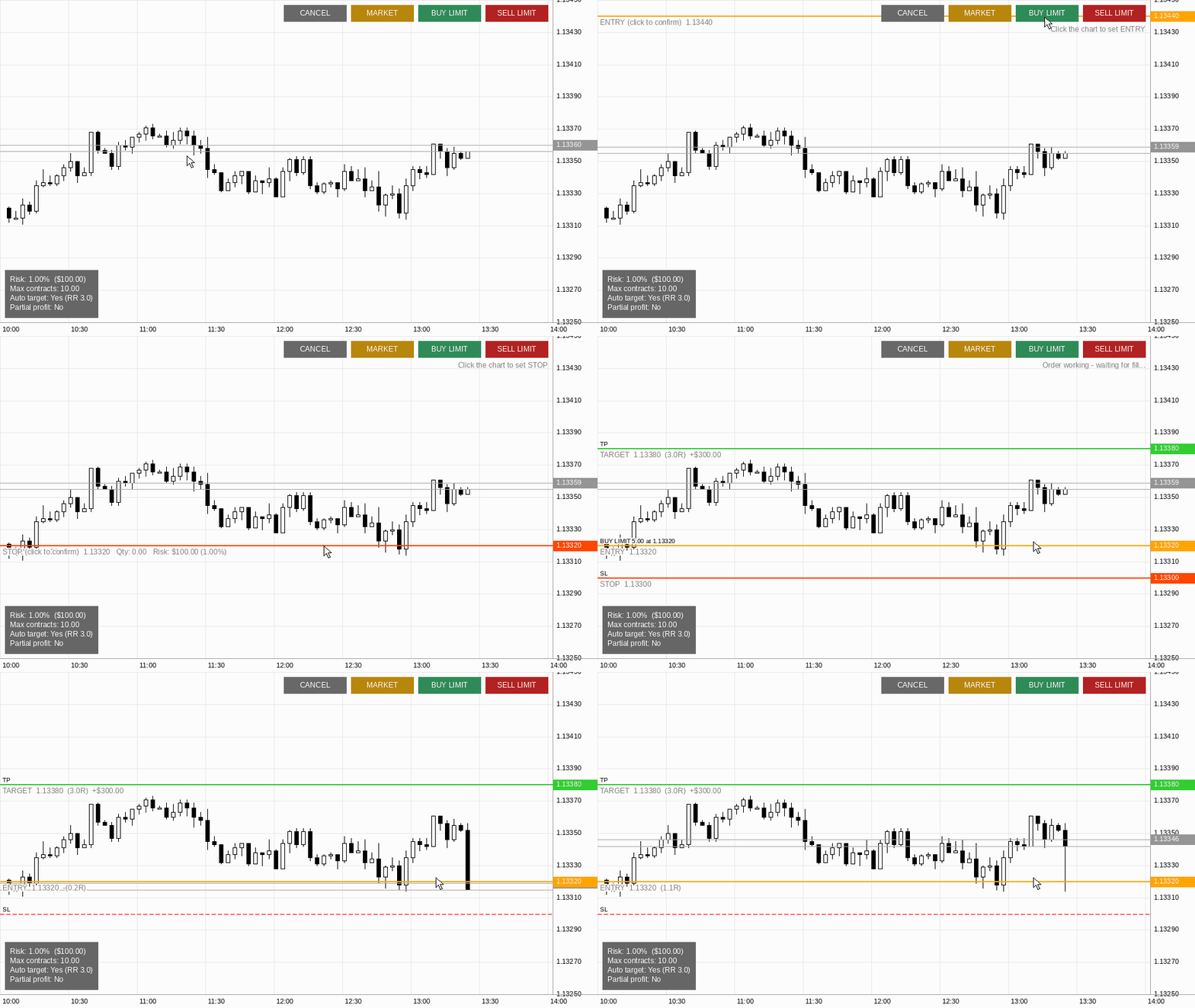
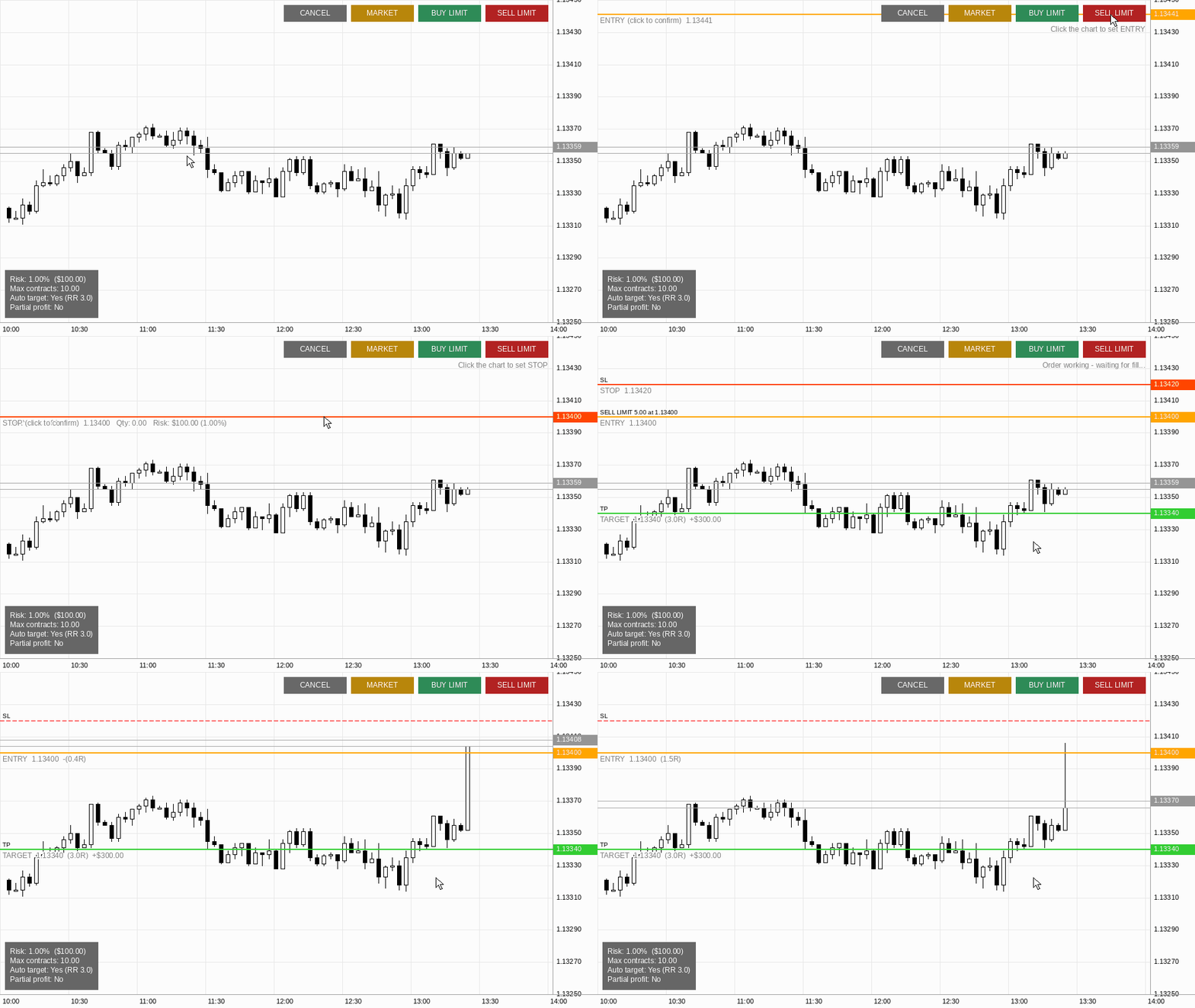
Limit orders (BUY LIMIT / SELL LIMIT)
1. Click the button.
2. Click the chart where you want to enter.
3. Click the chart where you want your stop.
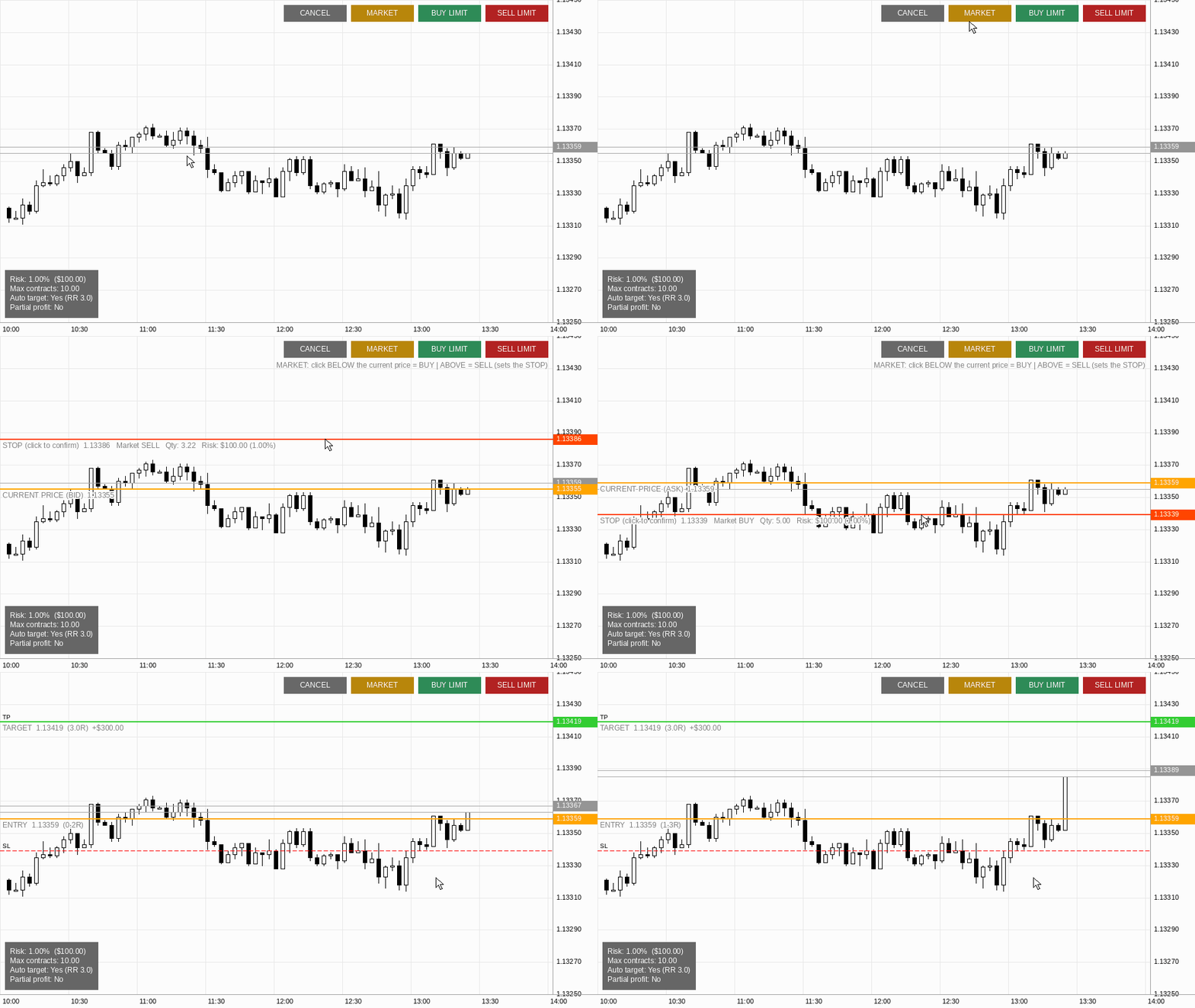
Market orders (MARKET)
1. Click the button.
2. Click the chart at your stop level. Click below the current price for a BUY, above it for a SELL.
The lot size is calculated from the distance between entry and stop, using the tick value and tick size of the symbol. If you enable the automatic target, the take-profit is placed at your chosen Risk:Reward ratio.
Supported markets
The tool is not tied to any symbol. It works on any instrument available in your MetaTrader 5 terminal:
• Forex: majors, minors and exotic pairs
• Indices: for example US30, US500, NAS100, DAX and the Brazilian mini index (WIN), depending on your broker
• Commodities and metals: gold, silver, oil and others
• Crypto CFDs and stocks: when offered by your broker
How it adapts to each instrument
• Lot size: calculated from the symbol's tick size and tick value, and rounded to the symbol's minimum, maximum and step. It can be whole lots (for example WIN) or fractional lots (for example 0.01 in forex).
• Account currency: risk and money values are shown in your account currency, whatever it is. The label shows R$ for BRL accounts, $ for USD accounts, and the currency code (for example EUR or GBP) for the others.
• Price format: decimals and tick size are read from the symbol automatically.
Features
• Risk defined as a fixed amount in your account currency or as a % of equity
• Lot size respects each symbol's minimum, maximum and step. If your risk is smaller than the minimum lot, the minimum lot is used, so the real risk can be higher than configured
• Optional automatic take-profit by Risk:Reward ratio (for example 2:1 or 3:1)
• Optional partial profit at a configurable multiple of your risk (R)
• Entry, stop and target lines with live risk multiple (R) and money values
• Configurable maximum lot size
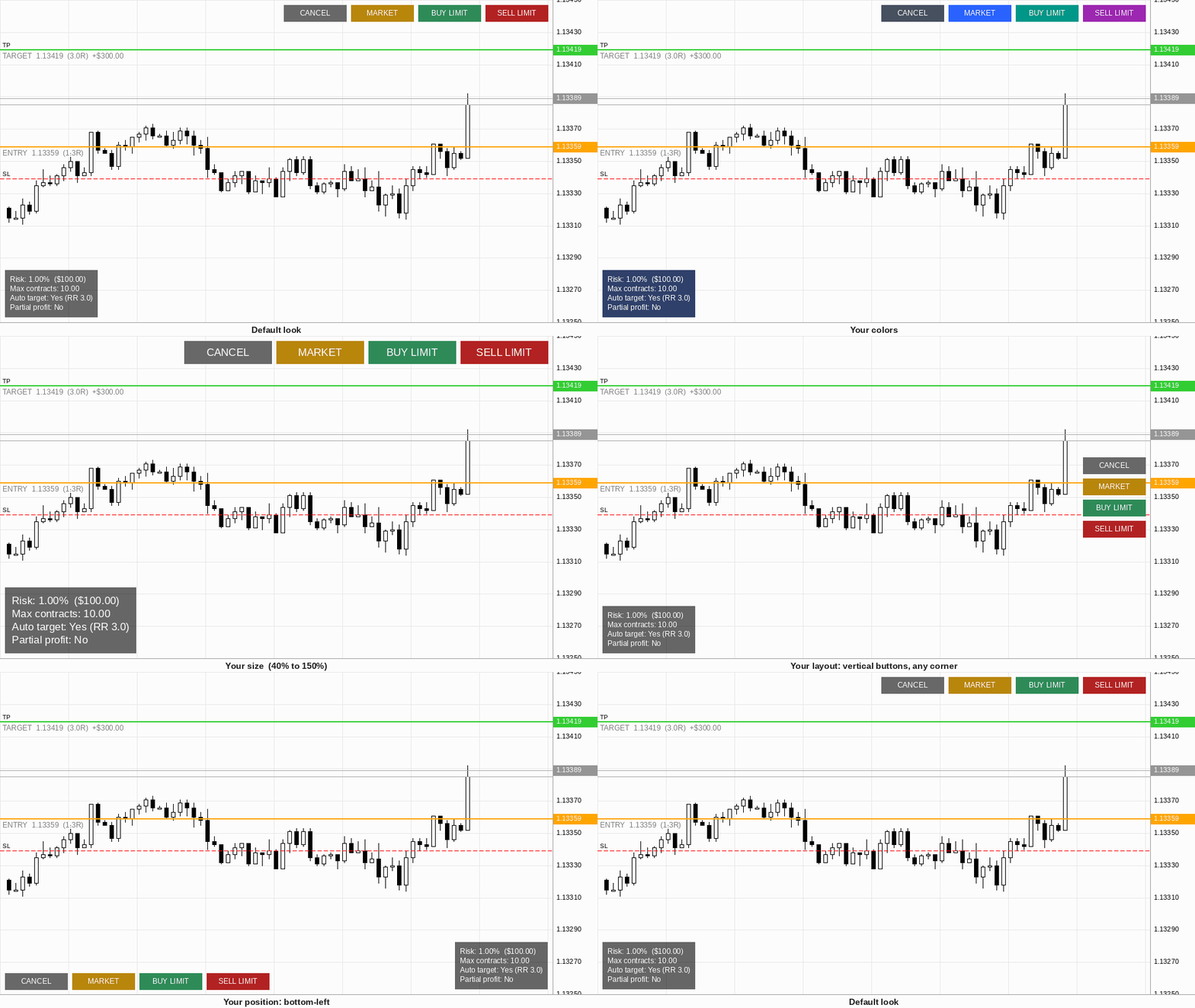
• Buttons can be placed in any corner or edge, scaled, and laid out horizontally or vertically
• Info panel with adjustable colors, opacity and size
• Breakeven hotkey: press one key (default B) to move the stop of your open positions to the entry price, with an optional offset in ticks to cover costs
• Live info panel with your risk, maximum lots, automatic target and partial profit settings
Customization
• Colors: entry, stop and target lines, line labels, and every button (Buy Limit, Sell Limit, Market, Cancel and button text)
• Sizes: buttons and info panel scale from 40% to 150%
• Position: place the buttons and the info panel in any corner or edge of the chart
• Layout: buttons side by side or stacked vertically, with Limit buttons shown or hidden
• Info panel: background and font colors, opacity, size and position, or turn it off
Inputs
Risk: Fixed amount (default) or % of equity, maximum lots
Target: Enable/disable automatic target (off by default), Risk:Reward ratio
Partial Profit: Enable/disable, multiple of your risk (R), % of position to close
Visual: Line colors, label color, button colors
Buttons: Position, size, layout, show/hide Limit buttons
Info Panel: Show/hide, colors, opacity, size, position
Breakeven: Enable/disable hotkey, key, offset in ticks
Trading: Magic number, maximum slippage
Requirements and limitations
• Algo Trading must be enabled in the terminal and in the Expert Advisor properties ("Allow Algo Trading").
• On hedging accounts, each trade keeps its own stop and target. On netting accounts there is a single position per symbol, so a new entry on the same symbol replaces the stop and target of the previous one.
• BUY LIMIT entries must be below the ask, and SELL LIMIT entries above the bid. Otherwise the tool warns you and does not send the order.
• Limit orders are valid until the end of the trading day.
• Breakeven moves the stop only if price is already beyond the new stop level. Otherwise the broker would reject it, and the tool tells you.
• Partial profit is closed at market when price touches the level, so a small slippage may occur.
• The lot size depends on the tick value reported by your broker. On cross pairs and exotic symbols, or when the symbol currency differs from the account currency, some brokers report this value incorrectly. Check the lot and risk shown on the chart before your first trades.
• Your broker's minimum stop distance (Stops Level) is not checked. If you click too close to the price, the broker may reject the order.
• Available margin is not checked before an order is sent.
Important notes
• This is an execution and risk-management tool. It does not generate trading signals and it does not trade by itself.
• You place every order manually. The trading decision is always yours.
• The tool does not guarantee profits. Trading involves substantial risk of loss.
• Test on a demo account before using it on a live account.
• The images and animations show the interface with simulated prices. They are not trading results.
Support
Questions and bug reports: please use the Comments tab of this product or send a private message on MQL5.