TradeMansgerBeast
- Utilità
-
Rizwan Ahmed
 I work for an airline as a captain. I am doing trading for last 20 years.
 - Versione: 1.1
Overview
Trade Manager Beast is a trade management utility for MetaTrader 5. It does not decide when to trade. It takes positions that already exist — opened by you manually, or by any other Expert Advisor — and applies stop loss, take profit, breakeven, a profit-triggered trailing stop and partial close to them automatically, on every tick.
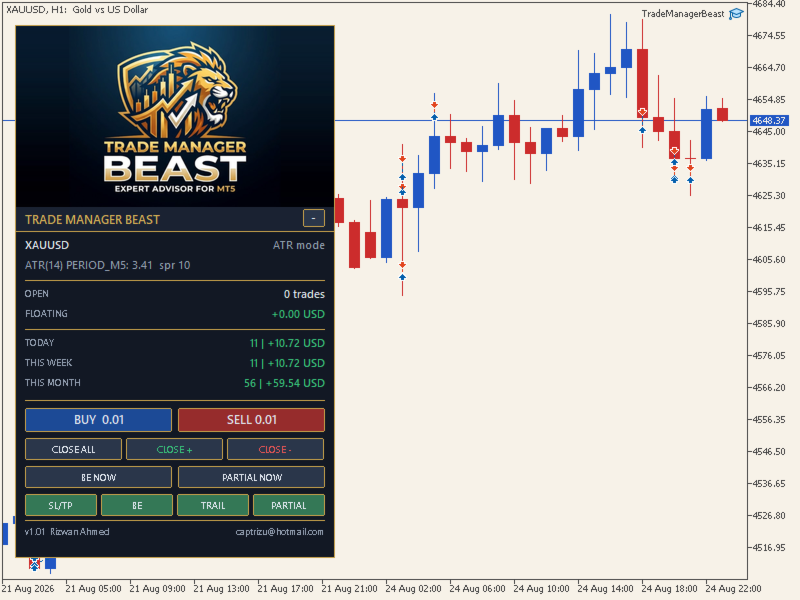
Distances are either derived from ATR, so the tool scales itself to whatever instrument and volatility it finds, or set as fixed points if you prefer exact numbers. A panel on the chart shows what is being managed, what it is worth, and gives you one-click control over each function.
What it does
• Applies a stop loss and take profit to any position that is missing them.
• Moves the stop to breakeven with a configurable lock once a profit trigger is reached.
• Trails the stop behind price after a separate profit trigger, with a minimum step so the broker is not sent a modify request on every tick.
• Closes a chosen percentage of a position at a profit trigger and lets the rest run.
• Manages manual trades, another EA’s trades, or only a specific magic number.
• Lets you exclude chosen magic numbers so it never touches your other EAs’ positions.
• Draws entry, stop and target lines on the chart for every managed position.
• Opens market orders from the panel with the stop and target already attached, using a fixed lot or a percentage of account equity.
• Closes all positions, only the winners, or only the losers, from one button.
• Shows open trade count, floating result, and realised results for today, this week and this month.
What it does not do
• It does not generate trading signals and will not open a position on its own. The only orders it places are the ones you create by pressing BUY or SELL on the panel.
• It does not manage positions on other symbols. One chart manages one symbol; run a copy on each chart you need.
• It does not widen a stop loss. A stop can only ever be tightened towards profit, never moved further away.
• It does not use DLL calls, web requests or external files.
• It does not promise profit. It manages risk on trades you have already decided to take.
Requirements
• MetaTrader 5. Not compatible with MetaTrader 4.
• Any broker, any account currency, hedging or netting.
• Any symbol: metals, forex majors and minors, indices, crypto. It reads the symbol’s own digits, point size, tick value, stop level and lot limits at startup.
• Any chart timeframe. The chart timeframe does not affect the calculations — ATR is read from its own timeframe setting, M5 by default, independently of the chart you attach it to.
• The terminal must be running for management to occur. Stops and targets sit on the broker’s server and remain in force regardless, but breakeven, trailing and partial close require an active terminal. A VPS is recommended if you leave positions open overnight.
Distance engine
There are two modes.
ATR mode is the default. You set a multiplier and the tool calculates the distance from the current ATR value. Because ATR is measured in the instrument’s own price, the same multiplier gives a sensible distance on gold, on EURUSD and on an index without any change from you. On slower instruments such as forex majors, raise the ATR timeframe from M5 to M15 or H1.
Fixed points mode does exactly what you type. Points are not a unit of money and their value differs on every symbol, so recalculate them when you change instrument. On two-digit gold, one point is 0.01, so a 300 point stop is three dollars. On a five-digit forex pair, ten points make one pip. The tool prints a warning at startup if it detects a three-digit gold feed running on fixed points.
The panel
The panel shows the symbol, the active mode, the live ATR and spread, open trade count and floating result, and realised results by day, week and month. Buttons cover manual entry, closing by result, forcing breakeven, forcing a partial close, and switching each of the four management functions on or off while the tool is running.
Inputs
Inputs are grouped by function — scope, distance engine, stop loss and take profit, breakeven, trailing, partial close, execution guards, manual entry, appearance and diagnostics — and each one is named in plain language, so most users will not need documentation to configure it. The defaults are tuned for XAUUSD in ATR mode and work as delivered.
Recommended setup
Attach it to the chart of the symbol you want managed. Set the scope, choose your distance mode, and check the ATR and spread readings on the panel before trading. Set the log level to errors and actions while you are learning the tool; the Experts tab reports every action it takes.
Testing
Trading carries risk. This tool acts directly on live positions according to your settings, so test it on a demo account first. Open a minimum lot trade by hand and watch a full cycle — the stop and target appearing, breakeven firing, the trail following — so you know exactly what your configuration does before it handles real money.
Free utility
Trade Manager Beast is free and fully functional, with no time limit, account limit or restricted features.
Support and manual request
A complete illustrated user manual is available. If you would like a copy, or need help with configuration, magic number routing or per-instrument settings, send me a message through MQL5 and I will reply.