Global Order Manager Pro
- Experts
-
Renan Moraes Bistratini Costa
 Trader algoritmico e creatore di strumenti affidabili per MetaTrader.
Sviluppo Expert Advisor (robot), indicatori e segnali per MetaTrader con un unico obiettivo: performance costante con gestione del rischio.
Cosa offro - Versione: 2.50
- Attivazioni: 5
Professional Global Trade Management & Risk Protection for MetaTrader 4
One EA. One control center. Total control over your open trades.
Global Order Manager PRO is a pure trade-management and protection EA designed for traders who want centralized control over their existing positions.
IT DOES NOT OPEN TRADES.
The EA does not generate entries, does not use trading signals and does not open new positions.
Its job is simple:
MANAGE • PROTECT • MONITOR • CLOSE
You can use your favorite trading strategy, indicator or Expert Advisor to open trades — and let Global Order Manager PRO take care of the global management of those positions.
🚀 ONE EA TO MANAGE YOUR ENTIRE TRADING ACCOUNTGlobal Order Manager PRO can be attached to any chart and can manage positions according to your selected filters.
For example, you can attach it to:
EURUSD H1
while managing positions on:
- EURUSD
- GBPUSD
- XAUUSD
- BTCUSD
- ETHUSD
- USDJPY
- or multiple other symbols
You don't need to attach the EA to every symbol you want to manage when using the All Symbols configuration.
This makes it an ideal centralized management layer for accounts running multiple strategies.
💰 GLOBAL FIXED PROFIT CLOSURESet a monetary profit target for the positions being managed.
For example:
Global Target = $100
The EA continuously monitors the combined floating result.
When the configured global profit target is reached, the EA can automatically close the managed positions.
Instead of waiting for every individual trade to reach its own Take Profit, you can manage the combined basket result.
Perfect for:
- Basket strategies
- Multiple entries
- Grid systems
- Hedging strategies
- Manual trading
- Multiple EAs
- Portfolio-style trading
Don't simply set a profit target and walk away.
Use the global trailing mechanism to allow the basket to continue growing while protecting accumulated profit.
The EA monitors the highest global floating profit reached and adjusts the protection according to your configured parameters.
Example:
Profit reaches:
+$50
Protection becomes active.
Profit increases to:
+$80
The protection follows the accumulated profit.
If the basket subsequently retraces to the protected level, the EA can automatically close the managed positions.
LET PROFITS RUN.
PROTECT WHAT YOU HAVE ALREADY EARNED.
🔴 GLOBAL DRAWDOWN PROTECTIONProfit management is only half of the equation.
Global Order Manager PRO also provides global drawdown protection.
You can define the maximum floating loss that the managed basket is allowed to reach.
Example:
Maximum Global DD = -$100
If the combined floating result reaches the configured DD threshold, the EA can automatically close the managed positions.
This creates a second layer of protection for strategies that operate with multiple simultaneous positions.
CONTROL THE DOWNSIDE BEFORE IT CONTROLS YOU.
🛡️ A DEDICATED RISK-MANAGEMENT LAYERYour entry strategy can concentrate on finding trades.
Global Order Manager PRO can concentrate on what happens after those trades are already open.
Think of it as an independent management layer:
YOUR STRATEGY → OPENS TRADES
↓
GLOBAL ORDER MANAGER PRO → MONITORS
↓
PROFIT / TRAILING / DD CONDITION
↓
GLOBAL CLOSURE
This makes it particularly useful for traders running several different EAs on the same account.
🎯 MAGIC NUMBER MANAGEMENTYou decide which trades the EA should manage.
Use Magic Number filtering to target specific strategies.
For example:
EA A → Magic 1001
EA B → Magic 2001
EA C → Magic 3001
You can configure Global Order Manager PRO to manage the desired Magic Number instead of indiscriminately managing every position.
This gives you much greater control in multi-strategy accounts.
🌎 ALL SYMBOLS OR CURRENT SYMBOLThe EA gives you flexibility over the scope of management.
ALL SYMBOLS
Manage qualifying positions across the account, regardless of which chart they belong to.
CURRENT SYMBOL
Restrict management to the symbol where the EA is running.
This means you can choose between:
CENTRALIZED ACCOUNT MANAGEMENT
or
INDIVIDUAL SYMBOL MANAGEMENT
according to your strategy.
📋 PENDING ORDER MANAGEMENTWhen a global management condition is triggered, the EA can also handle pending orders according to the configured option.
This can prevent pending entries from remaining active after the basket has already reached its global protection or profit condition.
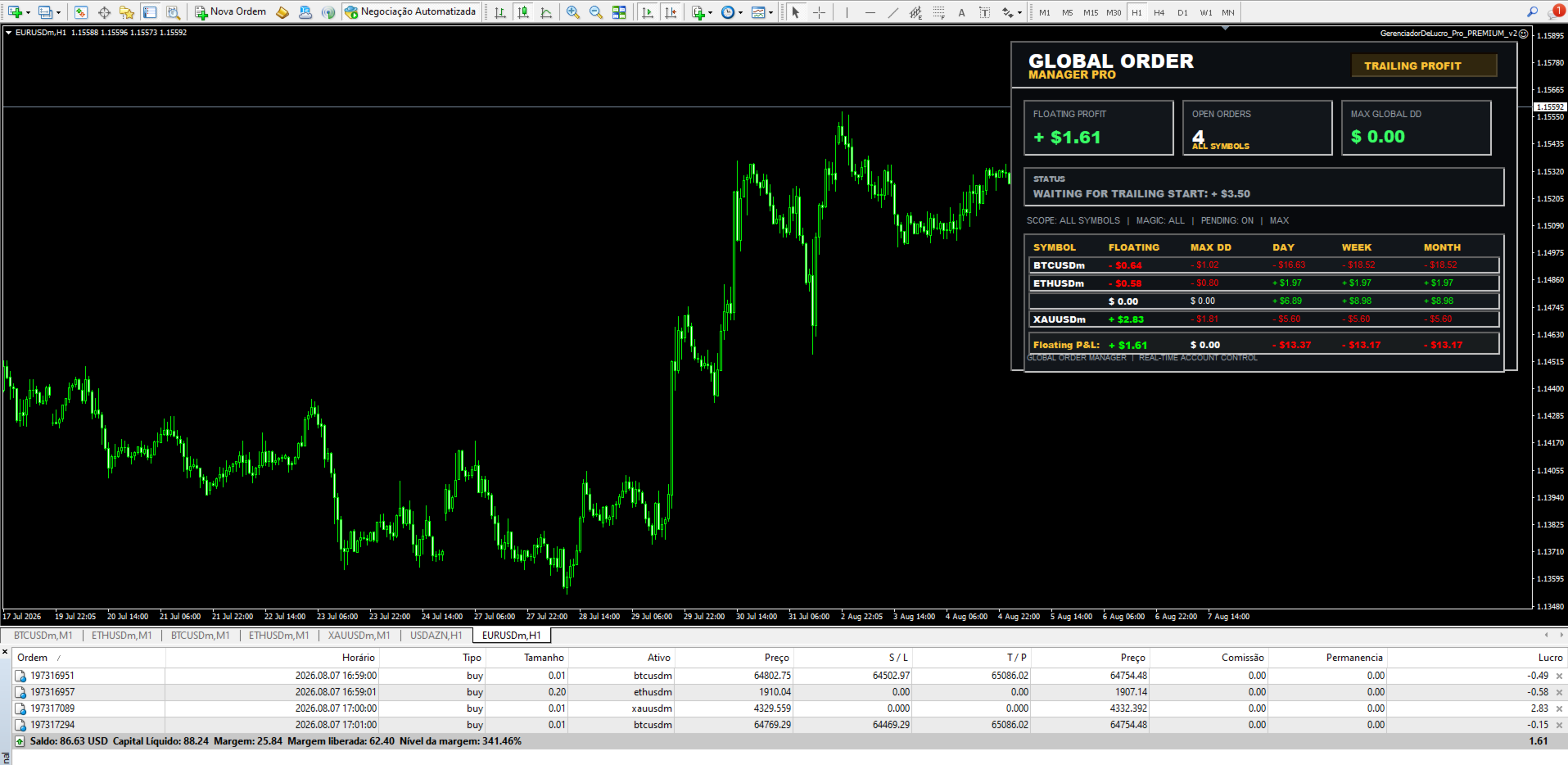
📊 PROFESSIONAL REAL-TIME DASHBOARDThe EA includes a dedicated dashboard directly on the MT4 chart.
You can monitor your account management without constantly opening the Terminal or navigating through multiple windows.
Dashboard information includes:
FLOATING PROFIT
Current combined floating result.
OPEN ORDERS
Number of positions currently being managed.
MAX GLOBAL DD
Maximum global drawdown recorded by the management system.
STATUS
Current management/protection state.
DAILY RESULT
Daily performance.
WEEKLY RESULT
Weekly performance.
MONTHLY RESULT
Monthly performance.
📈 PERFORMANCE BY SYMBOLThe dashboard also provides a breakdown of the managed instruments.
Depending on the positions being monitored, you can see information such as:
| INFORMATION | DESCRIPTION |
|---|---|
| Symbol | Managed instrument |
| Floating | Current floating result |
| Max DD | Maximum recorded drawdown |
| Day | Daily result |
| Week | Weekly result |
| Month | Monthly result |
This gives you a quick visual overview of where your account's current performance is coming from.
⚡ REAL-TIME MONITORINGThe EA continuously monitors the positions under its management.
You don't have to manually calculate:
- Total floating profit
- Basket result
- Global drawdown
- Profit protection
- Number of open trades
- Results by symbol
The EA does the monitoring for you.
🔥 BUILT FOR MULTIPLE TRADING STRATEGIESGlobal Order Manager PRO is not tied to one specific trading strategy.
It doesn't care whether your trades came from:
- A scalping EA
- A trend-following EA
- A grid system
- A hedging system
- A manual strategy
- An indicator
- Another Expert Advisor
- Multiple EAs simultaneously
It manages the trades that meet your configured criteria.
That's what makes it a powerful addition to an existing MT4 setup.
💎 THE BIG DIFFERENCEMost trading EAs are designed to find entries and open trades.
Global Order Manager PRO is different.
IT DOES NOT TRADE FOR YOU.
It doesn't try to predict the market.
It doesn't generate buy signals.
It doesn't generate sell signals.
It doesn't open positions.
Instead, it provides a dedicated management and protection system for trades that are already open.
Your strategy decides WHEN TO ENTER.
Global Order Manager PRO helps decide WHEN TO PROTECT AND WHEN TO CLOSE.
🖥️ ATTACH IT TO ANY CHARTOne of the biggest advantages is the freedom to place the EA on the chart you prefer.
For centralized management, you could have:
Global Order Manager PRO
running on:
EURUSD M15
while managing qualifying trades from several other instruments.
The chart used to host the EA doesn't necessarily have to be the chart of every position being managed.
⚙️ FLEXIBLE MANAGEMENTConfigure the EA according to your account and strategy.
Management capabilities include:
💰 Global Fixed Profit
Automatically close the managed basket when the configured profit target is reached.
📈 Global Trailing Profit
Protect accumulated floating profit while allowing the basket to continue increasing.
🔴 Global Drawdown
Automatically protect against a configured maximum floating drawdown.
🎯 Magic Number Filter
Choose which strategy's trades should be managed.
🌎 Symbol Scope
Manage the current symbol or qualifying positions across the account.
📋 Pending Orders
Control pending orders when a global closure event occurs.
📊 Real-Time Dashboard
Monitor profit, DD, orders and performance directly from the chart.
🧠 PERFECT FOR EA USERSImagine you have several Expert Advisors operating simultaneously.
Instead of adding another complicated management system to each EA, you can use a dedicated management layer.
For example:
Strategy 1
→ Opens trades
Strategy 2
→ Opens trades
Strategy 3
→ Opens trades
Global Order Manager PRO
→ Monitors the selected positions
→ Calculates the global result
→ Protects profit
→ Controls drawdown
→ Closes the basket when conditions are reached
This provides a much cleaner and more centralized approach to account management.
🚨 IMPORTANT: IT DOES NOT OPEN ORDERSGlobal Order Manager PRO is NOT an entry EA.
It will not:
❌ Open Buy orders
❌ Open Sell orders
❌ Generate trading signals
❌ Predict market direction
❌ Replace your trading strategy
It is designed to:
✅ Manage existing positions
✅ Monitor global floating profit
✅ Protect accumulated profit
✅ Monitor global drawdown
✅ Close managed positions
✅ Manage selected Magic Numbers
✅ Manage selected symbols
✅ Monitor pending orders according to configuration
✅ Display real-time account information
Whether you are a manual trader or run multiple Expert Advisors, Global Order Manager PRO gives you a centralized command center for your open positions.
You choose the strategy.
You choose the Magic Number.
You choose the symbols.
You choose the profit target.
You choose the trailing parameters.
You choose the maximum DD.
The EA handles the monitoring and execution of the management rules.
🔥 GLOBAL ORDER MANAGER PROMANAGE YOUR TRADES.
PROTECT YOUR PROFITS.
CONTROL YOUR DRAWDOWN.
CLOSE YOUR BASKET.
WITHOUT OPENING A SINGLE TRADE.
One EA. Any chart. Multiple strategies. Centralized control.
⚠️ Risk Disclaimer
Global Order Manager PRO is a trade-management and risk-control tool. It does not guarantee profits or eliminate trading risk. Market gaps, slippage, execution delays, broker conditions and other technical factors may affect order execution. Always test the EA in the Strategy Tester and/or demo environment before using it on a live account.