Quantum Trader Panel

QuantumTraderPanel — MQL5 Market Product Page


1. Short Description (Tagline)

QuantumTraderPanel is your all-in-one trade management cockpit — risk-based lot sizing, automatic break-even and trailing, and full basket protection, all in one panel.

Alternates:
- *"Stop managing trades by hand. QuantumTraderPanel calculates your lot size, protects your profit, and guards your whole basket — automatically."*
- *"One panel. Every trade sized right, every position protected, every basket under control."*

---

Product Overview
QuantumTraderPanel is a comprehensive, all-in-one trade management cockpit designed specifically for MetaTrader 5. It completely eliminates manual calculations by offering an advanced risk-based lot sizing tool. Traders can automatically define their position sizes based on equity percentage or fixed monetary risk, ensuring consistent money management.

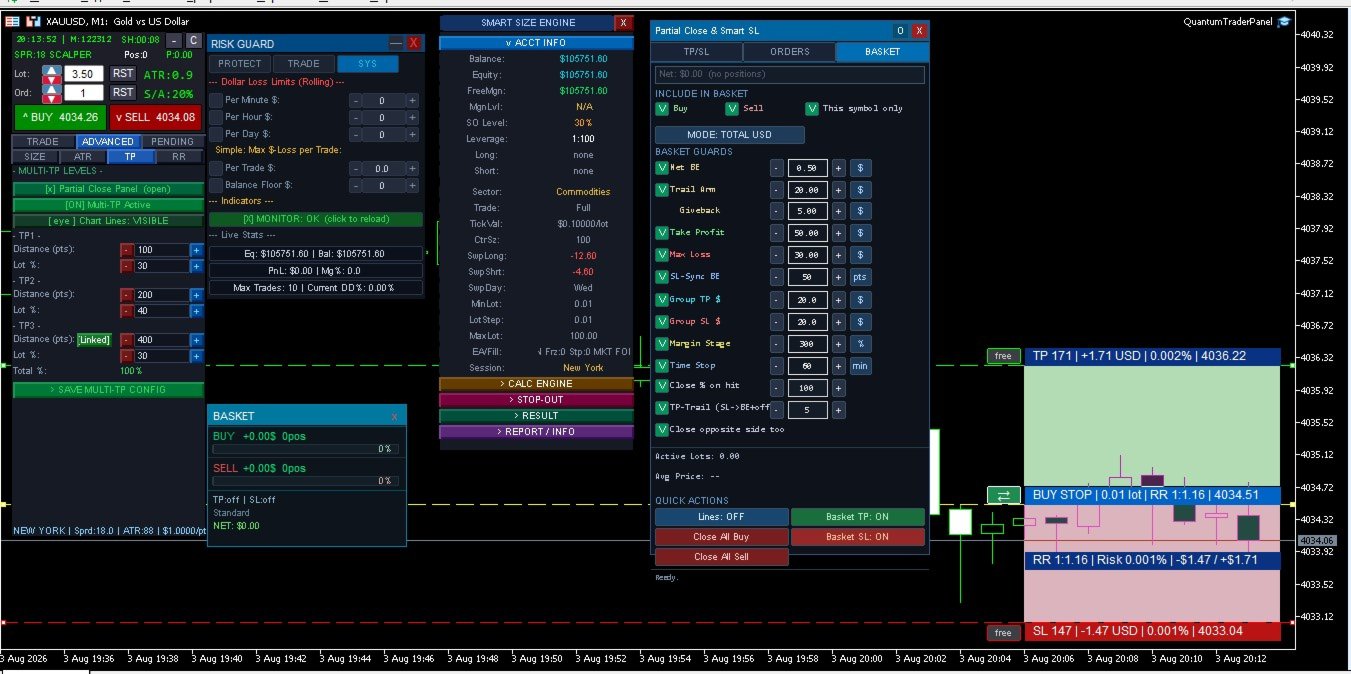
The panel features an automated break-even assistant with six distinct execution modes and an adaptive trailing stop system operating on eight different technical methods, including ATR and price structure. For multi-position strategies, the built-in Basket Manager provides collective take-profit and stop-loss guards in account currency, alongside a staged margin protection mechanism to prevent unexpected margin calls. 

Additionally, QuantumTraderPanel includes proprietary prop-firm protection tools such as hard daily loss limits and maximum drawdown caps. It is optimized for scalpers, day traders, and swing traders who demand rapid execution, tight risk control, and absolute flexibility over their manual trading operations.

---

2. Who Is This Product For?

- **Manual and discretionary traders** who enter trades themselves and want every position sized and managed consistently.
- **Scalpers** who need a fast one-click lot/SL/TP workflow without slowing down to do math.
- **Swing and basket traders** running several positions at once who need combined profit/loss control across the whole basket, not just single trades.
- **Traders managing funded accounts or strict risk-limited accounts** who need hard daily-loss limits and drawdown caps to stay inside firm rules.

---

3. Main Problems It Solves

- **"What lot size should I use?"** — calculated automatically from your risk %, so you never oversize a trade or reach for a calculator.
- **"Did I move my stop to break-even in time?"** — done automatically, the moment your trade qualifies.
- **"Should I tighten my stop now?"** — trailing stops follow the market for you, locking in profit while letting winners run.
- **"What happens to my account if margin drops?"** — a staged safety system starts reducing exposure before a margin call happens.
- **"How do I manage five open positions without missing one?"** — the basket panel treats your whole position group as a single, protected unit.

---

4. Key Features

**Risk-Based Lot Calculator**
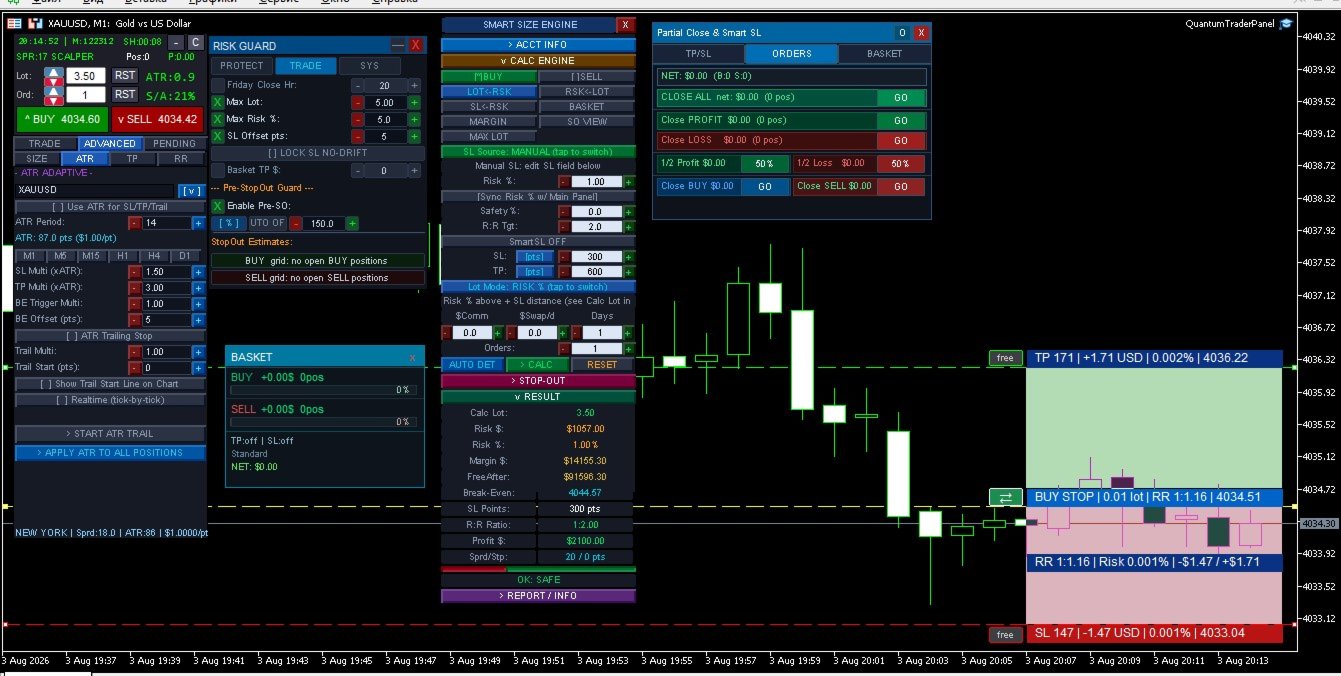
Enter your risk % (or a fixed $ amount) and QuantumTraderPanel works out the exact lot size from your stop-loss distance and account balance — rounded correctly to your broker's lot rules. One click applies it to your trade.

**Automatic Break-Even**
Six ways to move a trade to break-even — from a simple fixed trigger to cost-aware, partial-close, and structure-based logic. Set it once; every position is covered without watching the chart.

**Adaptive Trailing Stop**
Eight trailing methods, including ATR-based, Parabolic SAR, price-structure, and multi-step trailing. Profits are locked in as price moves in your favor, without cutting winning trades short.

**Basket Manager**
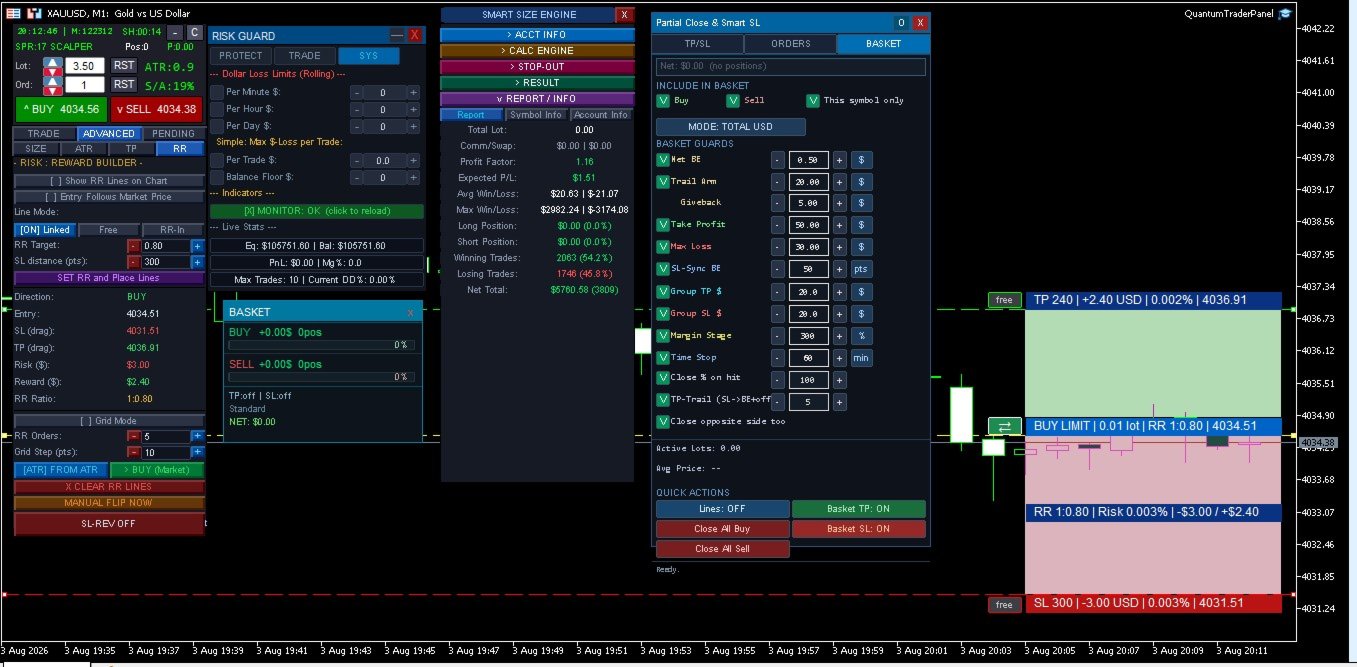
Set a combined take-profit or stop-loss in dollars across a whole group of trades. A staged margin-protection system automatically starts closing the weakest position if your margin level drops, and a time-stop closes baskets that go nowhere.

**Partial Close & Multi-Level TP**
Close positions in stages at multiple profit targets, with each level tracked and managed automatically — no manual close-outs required.

**Drawdown & Daily-Loss Protection**
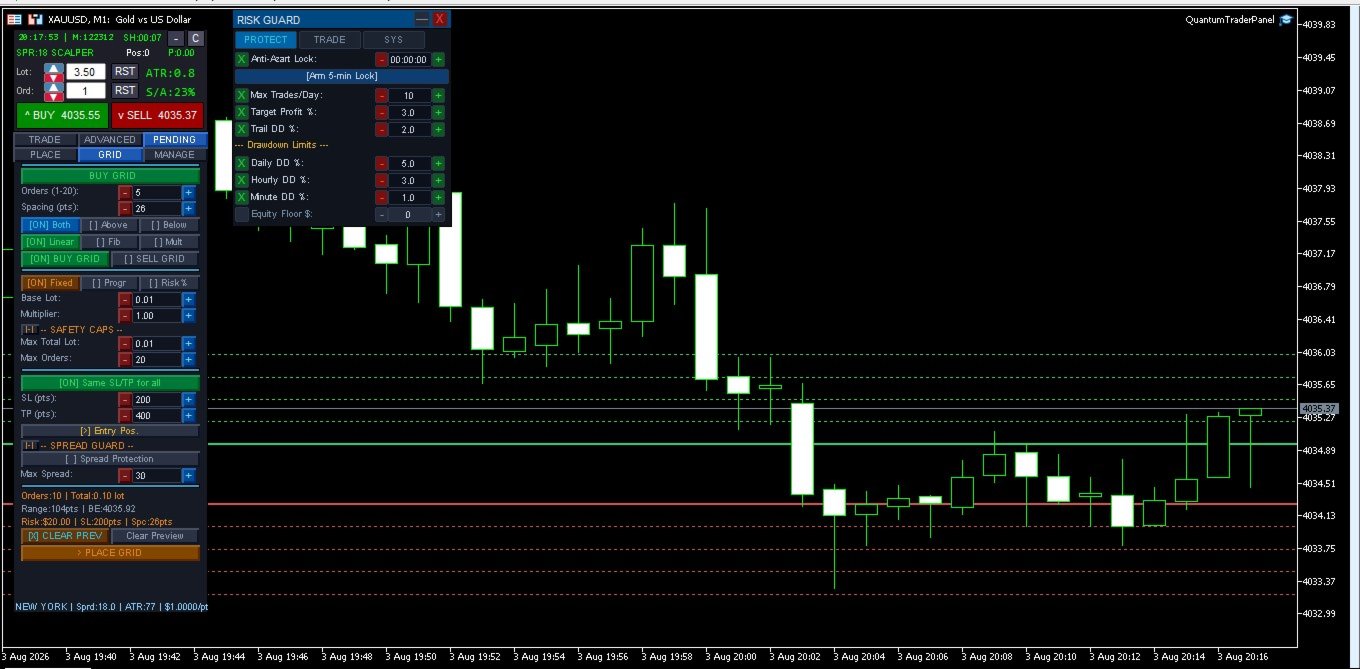
A hard daily loss limit locks trading for the day once hit. Account-wide drawdown protection and a minimum free-margin buffer keep risk in check before a trade is ever opened.

**Visual Risk/Reward Tool**
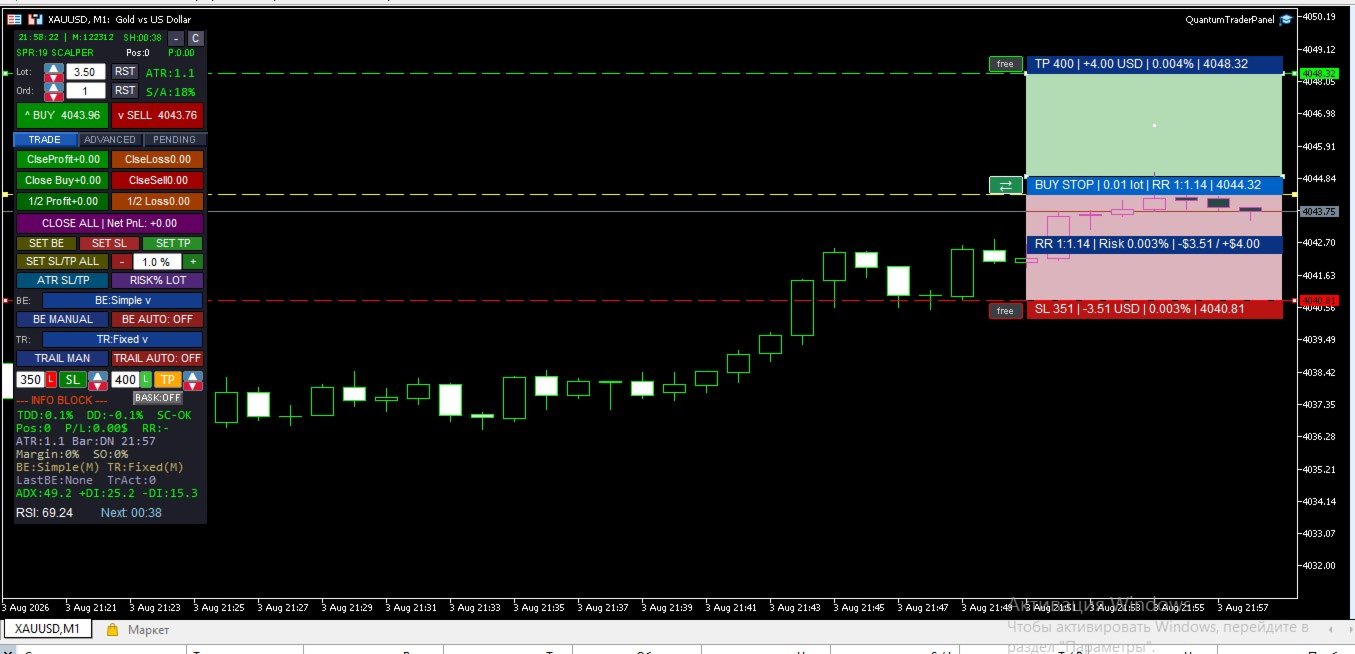
A TradingView-style visual on your chart shows your risk and reward zones anchored to real price and time, so you can see the trade before you take it.

**Average-Price Lines**
When managing multiple entries, live average buy/sell price lines keep your basket's real breakeven point visible at all times.

**Pending Orders & Grid Placement**
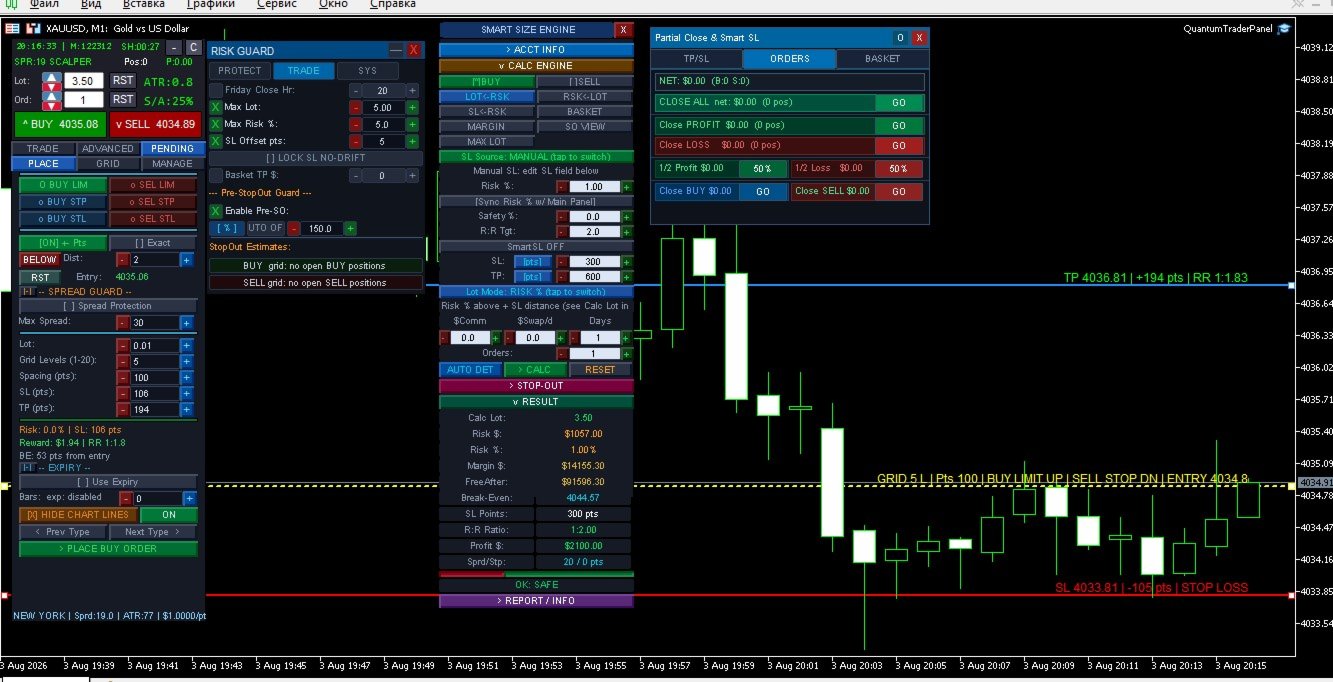
Place single pending orders or full grids (buy/sell, stop/limit) directly from the panel, with built-in spread and margin checks before anything is sent.

**Broker-Safe Execution**
Automatic fallback between execution modes and order-send timing controls reduce rejected orders on brokers with strict trading rules — so your orders go through the first time.

---

5. How It Works

1. **Size your trade** — pick Fixed Lot or Risk % mode; the panel calculates the correct lot size from your real stop distance and account risk.
2. **Set your management rules once** — choose your break-even and trailing modes; QuantumTraderPanel applies them to every open position automatically from then on.
3. **Protect the basket** — set a combined TP/SL, margin-safety stages, and a time-stop for the whole group of trades, not just one position at a time.
4. **Trade with a protection layer running underneath** — spread, margin, drawdown, and session checks run before every action, so mistakes are caught before they cost you.
5. **Everything stays in sync** — whichever panel you use, your settings, active trades, and risk state are always the same across the whole interface.

---

6. Panel Overview

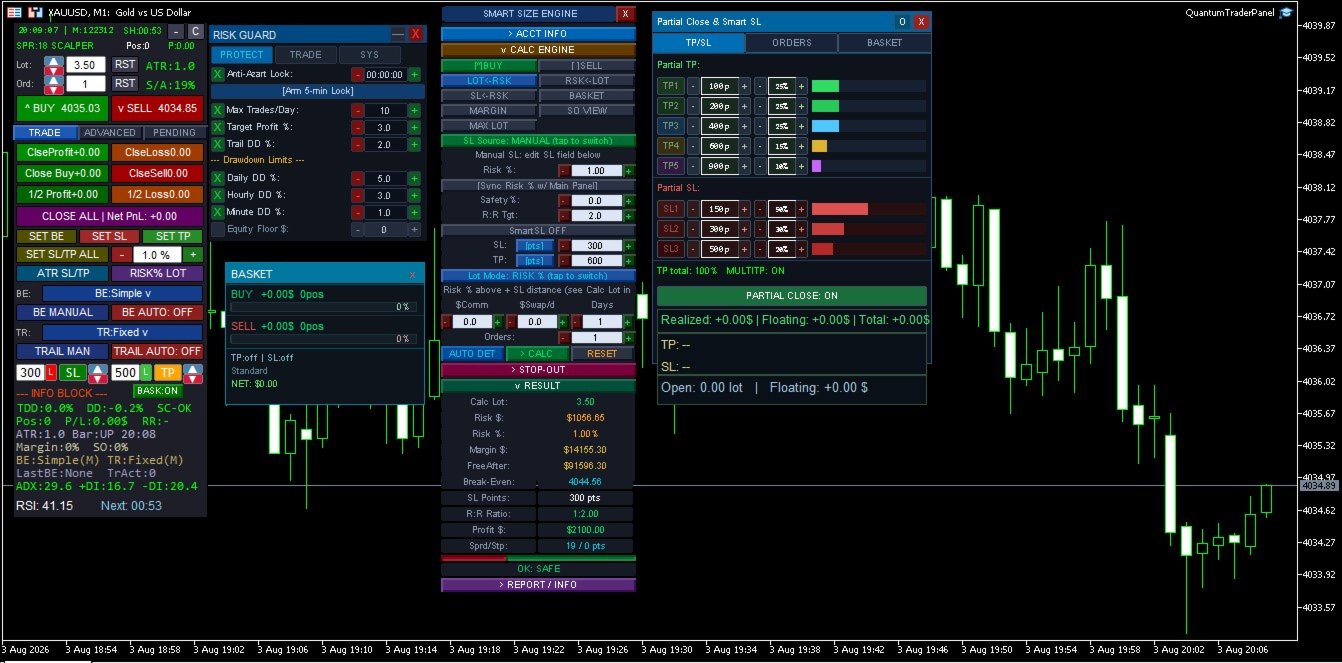
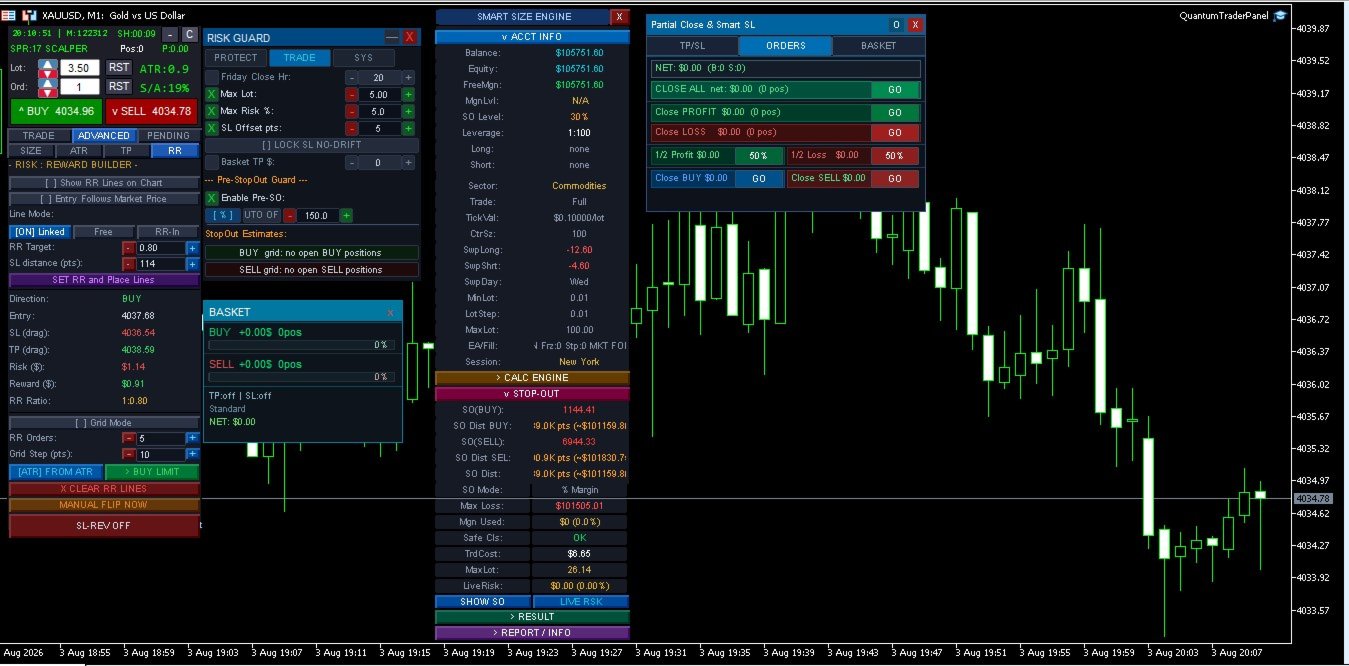
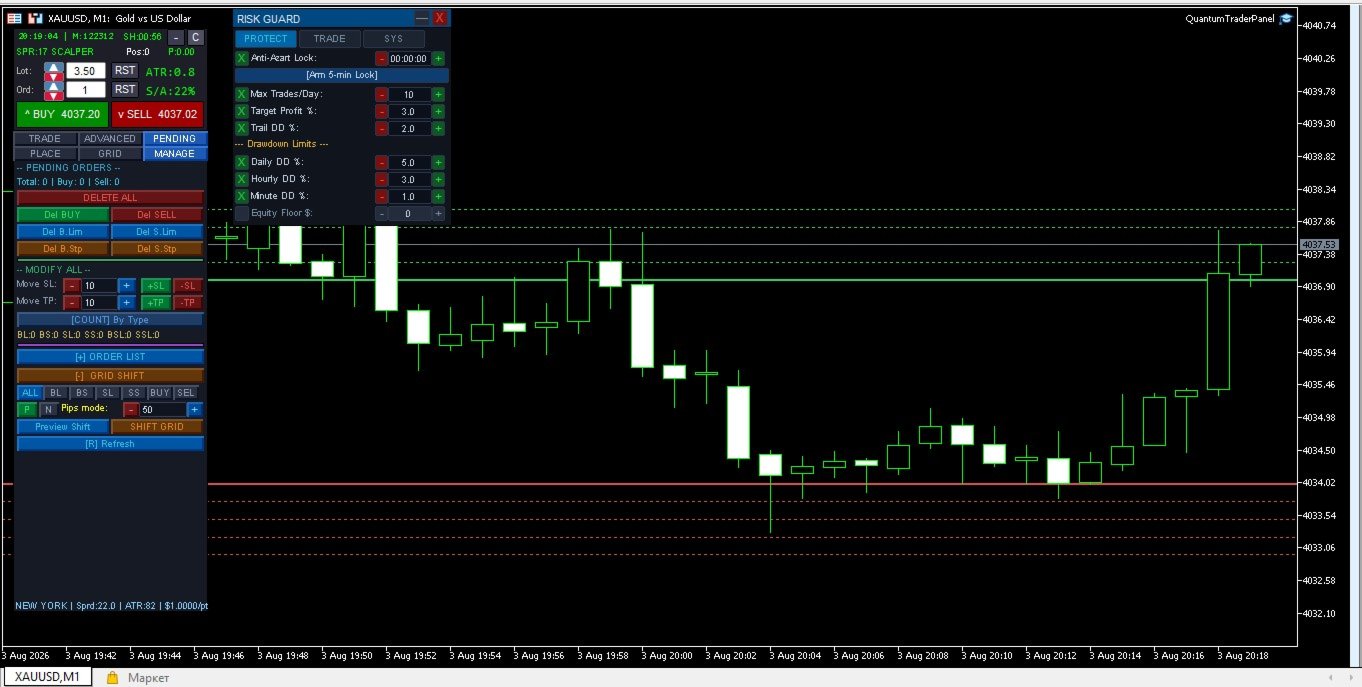
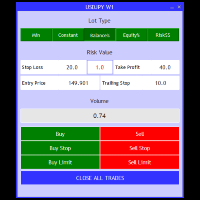
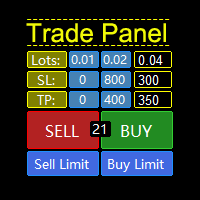
- **Advanced Panel** — the main command center: trade entry, position sizing, break-even/trailing setup, pending orders, and grid placement, organized into clear tabs.
- **Mini Risk Panel** — a compact, always-on-top guard showing your dollar-loss limits (per minute/hour/day) and a live equity monitor.
- **Partial Close Panel** — dedicated controls for staged take-profits, basket-wide guards, and the average-price line display.

*(Screenshots of each panel with sample trades and live values go here.)*

---

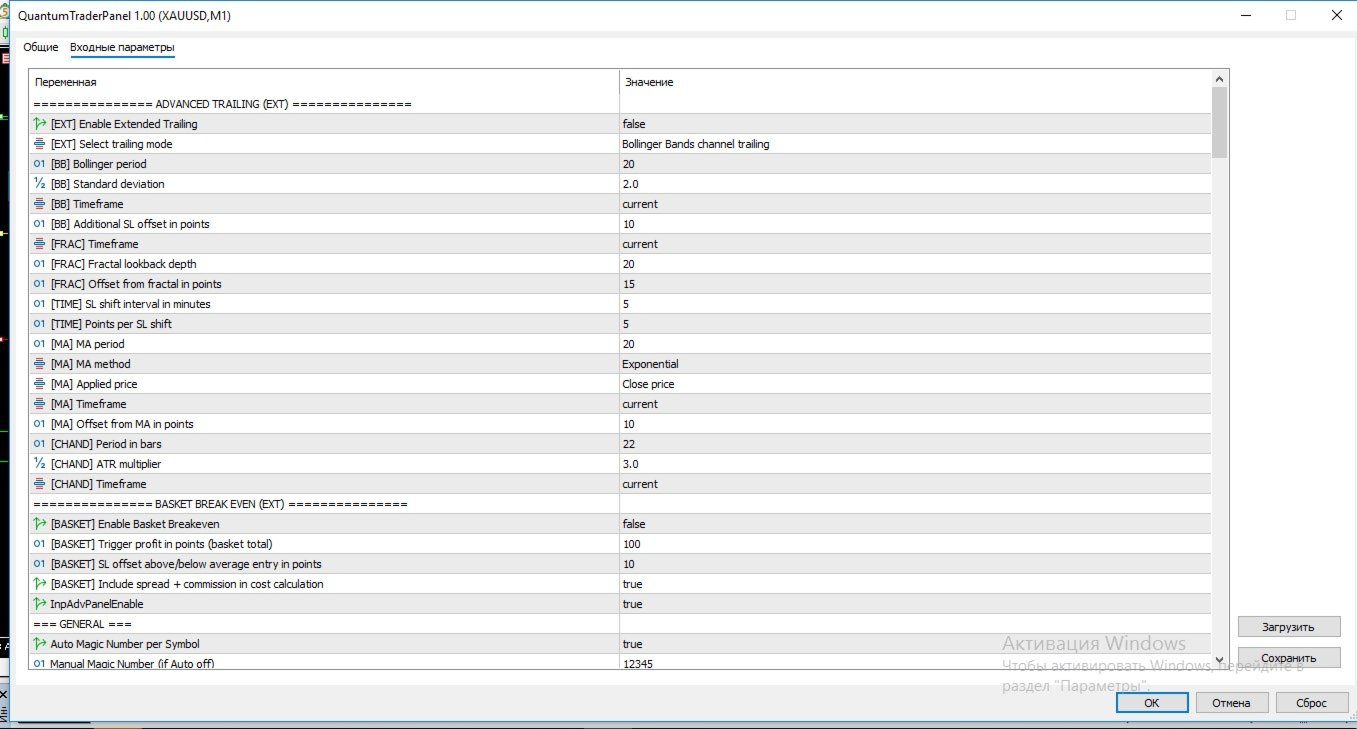
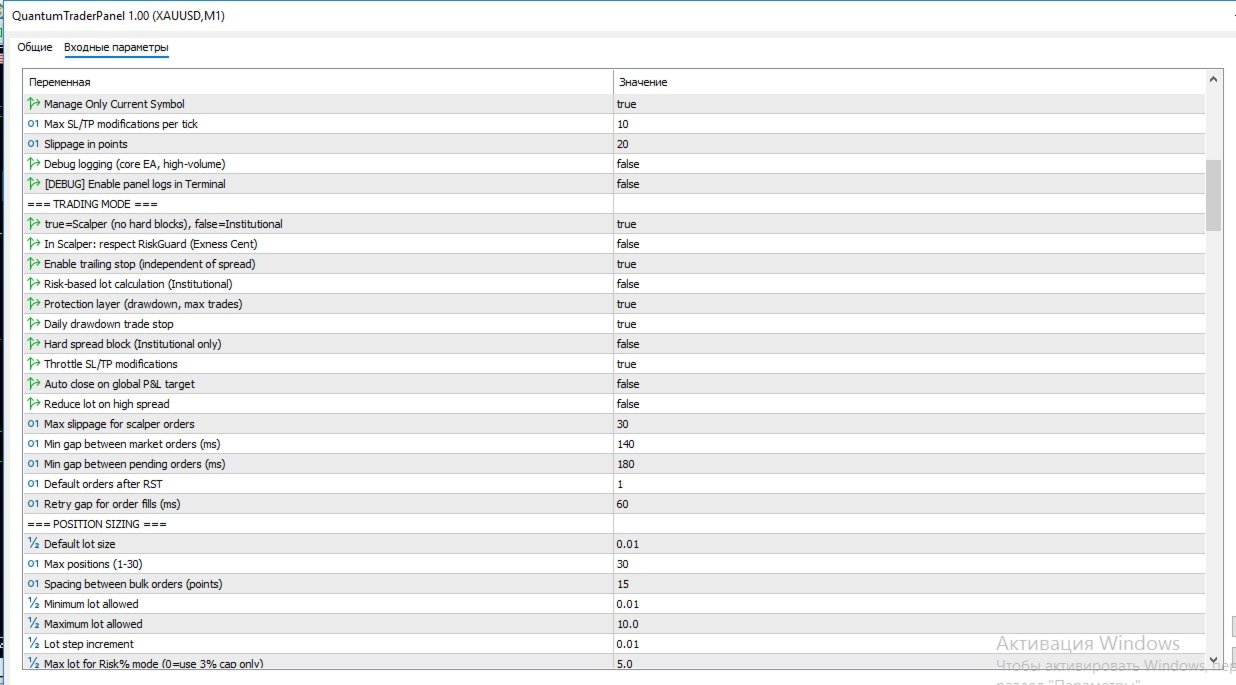
7. Input Groups

QuantumTraderPanel has an extensive settings list, organized into logical groups so you only configure what you need:

| Group | What You Control |
|---|---|
| **Execution & Magic Number** | Order slippage, symbol filtering, and multi-chart conflict protection |
| **Position Sizing** | Lot mode, risk %, and min/max lot safety caps |
| **Break-Even** | Which of the 6 modes runs, and its trigger distance |
| **Trailing Stop** | Which of the 8 modes runs, and its step/trigger settings |
| **Basket Guards** | Combined TP/SL, margin-safety stages, and time-stop rules |
| **Pending Orders & Grid** | Order type, spacing, and grid-specific risk checks |
| **Drawdown & Daily Loss** | Daily loss lock, drawdown cap, and margin buffer |
| **Sessions & Filters** | Trading session windows and optional Friday auto-close |
| **Display** | Panel size, position, and colors |
| **Visual RR Tool** | Colors for the on-chart risk/reward visualization |

*(Full per-parameter list is auto-generated by MQL5 in the Inputs tab of the product page.)*

---

8. FAQ

**Does this open trades automatically?**
No. QuantumTraderPanel manages trades you open — manually or via signal — it does not generate its own entries.

**Can I use it on multiple symbols at once?**
Yes, each chart instance manages its own symbol and magic number independently.

**Does it work with prop-firm accounts?**
Yes — the daily-loss lock and drawdown cap are designed for staying inside firm-imposed limits.

**What if my broker restricts stop-loss distance?**
A virtual SL/TP mode is available for brokers with minimum stop-level restrictions.

**Will it slow down my terminal?**
No — execution and risk checks are lightweight and optimized for real-time use.

---

9. System Requirements

- MetaTrader 5, hedging or netting account
- Any broker/symbol; tested extensively on XAUUSD
- VPS recommended for 24/5 basket management, not required for manual session use

---

10. Premium Advanced Feature: Interactive Slanted Virtual Lines QuantumTraderPanel features a cutting-edge, highly precise visual charting layer designed to revolutionize how you calculate risk and manage virtual levels directly on your workspace. - **Dynamic Angle Control (Slanted Lines):** Unlike rigid horizontal tools, our virtual Stop-Loss (SL) and Take-Profit (TP) lines can be rotated, tilted, and stretched at any custom angle. This allows you to lock risk parameters perfectly along diagonal trendlines, support/resistance channels, or complex price formations. - **On-Line Risk Intelligence:** As you stretch, drag, or change the slope of the lines, the panel performs live, microsecond-level mathematical calculations. The exact point distance, projected dollar risk/reward, and account equity percentage update dynamically right on the line's label. - **True Hidden Protection:** These lines operate purely within the virtual execution environment. Your broker never sees your real stop levels, protecting your capital from spread spikes and stop-hunting, while giving you complete diagonal freedom.


---

11. Version Notes


- Current build unifies position sizing, trade management, and basket protection into a single synchronized panel system.
- Recent updates: expanded multi-level take-profit/stop-loss tracking, improved basket break-even logic, and interactive edit fields across all panels.

Prodotti consigliati
AssistantPRO500
Saniyat Nabiyeva
1) modalità Assistente per il trading manuale con più di 870 funzioni di gestione delle posizioni, 2) 45 tipi di stop-loss + trailing SL, 3) 10 tipi di take-profit + trailing profit, 4) il PANNELLO DI CONTROLLO esterno funziona sia nel trading reale sia nel Tester, 5) 3 modalità di money management, 6) 5 varianti per aumentare il volume delle posizioni, 7) 15 modalità di gestione delle posizioni, 8) 8 filtri di protezione, 9) 9 varianti di conferma del segnale, 10) Gestore Visuale delle Posizion
Turbo Close All
Phami Thanh Hoang
Turbo Close All is a powerful and versatile script designed to help traders quickly and efficiently manage their trading positions and pending orders on MetaTrader 5. With its advanced features and customizable settings, this script is an essential tool for traders who want to streamline their trading process and maintain control over their positions and orders. Key Features: Comprehensive Closing Options: Turbo Close All allows you to close all market positions and/or delete pending orders bas
Trade Copier Professional — Soluzione di Copia Locale   Trade Copier Professional è un sistema affidabile di copia locale delle operazioni per MetaTrader 4/5. Consente ai trader di replicare istantaneamente posizioni su più conti nello stesso computer, con controlli di sicurezza integrati e un pannello professionale.   Panoramica   L’EA funziona sia in modalità Master che Slave da un unico file, con passaggio fluido tra le due. Le operazioni possono essere copiate tra terminali MT4 e MT5 senza
NVR Trade Manager is a professional manual trade management panel for MetaTrader 5. It combines risk calculation, order preparation, visual Entry / Stop Loss / Take Profit management and open-position management in one compact interface. The product is designed for traders who make their own trading decisions and want to execute them faster and more precisely in MetaTrader 5. Main Features • Market orders: Buy Market and Sell Market • Pending orders: Buy Limit, Sell Limit, Buy Stop and Sell Sto
Lot calculator tool MT5
Ernestas Kvedaras
3.67 (3)
More stable MetaTrader 4 version is available here:  Lot Calculator Tool . This tool helps you to automatically calculate and manage risk, conveniently place orders visually, schedule orders, trail stops, move them to break-even and more. Features Place market or pending orders using draggable lines Schedule orders Calculate and limit risk using various methods See current spread See time till next candle Set custom order comments Trail stops Move stops to break-even See order profit/loss in p
SmartEA Trade Manager is a supervisor for accounts that run several Expert Advisors at once. It enforces an EXCLUSIVE TRADING LOCK: the first EA to open a position trades alone, all other managed EAs are removed from their charts, and they are restored with their exact original settings once the account is flat again. You keep the diversification of many EAs without ever stacking their risk. The manager does NOT open trades of its own. It manages the EAs you already run. EAs not in your list a
Overview Harmonic Patterns MT5 is a technical analysis indicator designed for the MetaTrader 5 platform. It identifies and displays harmonic price patterns, such as Butterfly, Cypher, Crab, Bat, Shark, and Gartley, in both bullish and bearish directions. The indicator calculates key price levels, including entry, stop loss, and three take-profit levels, to assist traders in analyzing market movements. Visual elements and customizable alerts enhance usability on the chart. Features Detects six ha
Monitor Dashboard
Johann Dominique Carnevali
Clear EA & Internal Strategy Performance Separation The core purpose of MONIT Dashboard MT5 is to help traders clearly identify where their real performance comes from . On a MetaTrader 5 account, the global balance result is often not enough. A profitable account can hide a weak EA, an overactive strategy, a manual trading loss, or one specific Magic Number group generating most of the drawdown. This becomes even more important when several Expert Advisors are running on the same account, or w
Capital Manager
Pham Cong Chinh
Capital Management EA – Smart Risk Management & Profit Optimization for MT5 Take control of your trading capital with smart, automated strategies — fully optimized for MetaTrader 5 (MT5). Looking to protect your capital and maximize profits through automated money management strategies ? Capital Management EA is the all-in-one Expert Advisor for MetaTrader 5 (MT5) that helps you trade smarter, not harder. Core Features: 5-in-1 Capital Management Strategies – Built-in versatility Gr
GENESIS SYNDICATE PRIME — The 3-in-1 Institutional Algo "Trade like the Banks. Don't become their Liquidity." > Engineered to simulate institutional trading footprints using Advanced Smart Money Concepts (SMC). Are you tired of retail strategies that get hunted by institutional players? Genesis Syndicate Prime- is a revolutionary 3-in-1 algorithm designed to track, identify, and trade alongside the "Smart Money." It features three independent, powerful trading engines built into a single, hi
Professional Opening Range Breakout (ORB) indicator designed for precision session trading with automatic time handling, breakout alerts, and advanced target levels. This indicator automatically identifies the Opening Range for any configurable session, plots the High, Low, and Midpoint levels, and extends them across the trading day. Built-in breakout detection and alerts, range measurements, and extension targets provide traders with clear structure and actionable levels. Ideal for traders usi

DR Trade and Risk Manager: The Foundational Algorithmic Risk Console for MT5 For the discretionary trader, the greatest adversary is not the market; it is the undisciplined self. You have a solid strategy, but in moments of high pressure, do you follow your rules with perfect consistency? Do you cut losses without hesitation? Do you let winners run without cutting them short out of fear? For most, the answer is no. This gap between strategy and execution is where profits are lost. DR Trade and R
Trades Management
Bright Lance Soli
The Trade Manager is a visual trade panel that makes it simple to place and manage trades, preventing human errors and enhancing your trading activity. - Very Easy to use - Trade easily from the chart - Trade with precise risk management - Offers different risk management options to calculate appropriate lot size. - A powerful risk and position management approach
Product introduction : Trade Manager Tool for MT5 Trade Manager Tool will help trader calculate almost exactly the risk based on your account automatically. Along with that, there are features to support capital preservation with Trailing Stop, BreakEven, Risk Limit such as Daily Limit Profit/Loss,etc.. helps you avoid overtrading.In particular, the panel is simply designed with many interactive buttons inside the panel and outside the chart to help trader interact more easily.These features re
DeepTrade Risk Guard
Yasir Mohammed Sachit Sachit
DeepTrade Risk Guard is an automatic account protector that enforces your trading discipline for you. Most traders don't blow accounts because of bad entries — they blow them by over-trading after a loss and ignoring their daily limits. This tool removes that risk by locking trading the moment your rules are broken.   KEY FEATURES - Daily loss limit (as % of start-of-day balance, or fixed money) - Daily profit target — stop while you are ahead - Maximum trades per day cap - One-click protection

Trading Panel SL TP
Sirojiddin Sobitov
MQL5 Trading Panel SL TP — это мощный инструмент, призванный помочь трейдерам эффективно управлять своими позициями на платформе MetaTrader 5. Эта торговая панель предоставляет простой в использовании интерфейс для установки уровней Stop Loss (SL) и Take Profit (TP) для открытых позиций. MQL5 Trading Panel SL TP обладает широкими возможностями настройки и может быть адаптирована к конкретным потребностям отдельных трейдеров. Панель можно изменять в размере, перемещать и настраивать с помощью ра
TradePilotmt5
Hossein Khalil Alishir
TradePilot Expert Advisor (EA) for MetaTrader 5 TradePilot is a professional and user-friendly Expert Advisor (EA) for MetaTrader 5 (MT5) . It simplifies automated trading , risk management , and trade execution with a smart trading panel . Perfect for beginners and experienced traders looking for a reliable trade manager EA with automated lot size calculation and smart position management. Key Advantages User-Friendly Trading Panel: Customizable panel with buttons and hotkeys for fast ex
Margin Call Shield – Defend Your Margin on Your Terms Margin Call Shield is a tool for MetaTrader 5 traders who want to decide for themselves which open positions are closed during margin call situations before the platform does so automatically based on its internal rules. By default, the broker or platform decides which positions to close, often using undisclosed algorithms. Margin Call Shield lets you set this order according to your own strategy. Why Was Margin Call Shield Created? In a mar
Bastion is a monitor-and-close-only risk manager for prop-firm traders. It watches your account against your firm's daily-loss and maximum-drawdown limits in real time and force-closes your open positions BEFORE you cross a line. It never opens a trade of its own, so it stays fully within the tools allowed by FTMO, FundedNext, The5ers, FTUK and FXIFY. Why traders fail challenges A large share of failed evaluations end on a single daily-loss breach: a moment of inattention, a news spike, one tra
HedgeSafe Trade Assistant Un pannello per il trading manuale su MetaTrader 5 orientato al controllo del rischio. HedgeSafe aiuta a preparare, verificare e gestire un'operazione direttamente sul grafico prima di premere BUY o SELL. HedgeSafe non è un servizio di segnali, uno strumento di previsione, un bot AI o una strategia automatica. Non sceglie la direzione e non promette profitti. Ogni decisione resta sotto il controllo del trader. Funzioni principali Calcolo del lotto da una percentuale del
Timeframe Trading Limiter
AL MOOSAWI ABDULLAH JAFFER BAQER
Timeframe Trading Limiter is a professional risk management and trade discipline utility designed for MetaTrader 5. It empowers traders to enforce strict, automated limits on the number of trades and the maximum allowable drawdown within each trading period, based directly on the chart timeframe selected. Whether you are a discretionary trader prone to overtrading, a prop firm challenge participant needing to adhere to strict rules, or an algorithmic trader running multiple strategies, this tool
Heikin Ashi candlesticks are a powerful tool for traders, offering a clear and smooth visualization of market trends. Unlike traditional candlesticks, they filter out market noise, providing a cleaner view of the market's direction and strength, which helps traders make more informed decisions. The Hull Heikin Ashi Smoothed indicator from Minions Labs takes this a step further by integrating the Hull Moving Average for enhanced smoothing and precision. This indicator not only simplifies trend id
Trading Utility for Forex Currency Pairs Only not for Gold  Functions Auto Lot Calculation based on Risk Auto stoploss  Auto TakeProfit Breakeven Auto Close Half % Close in percentage with respect to the PIPs Pending Orders BuyLimit Sell Limit with distances BuyStop Sell Stop    with distances Trading Informations Risk in percentage For Multiple trades Combine Takeprofit and Combine Stoplosses
ShikaaTraders Gold Grid Pro
Thiagarajan A L Segaran
Headline ShikaaTraders Gold Grid Pro is a high-performance trade management utility designed specifically for XAUUSD (Gold) and high-volatility pairs. It allows traders to execute complex grid-layering strategies with a single click, ensuring you never miss an entry during fast market moves. Why Choose Gold Grid Pro? Manual trading on Gold requires speed. Manually calculating distances and opening multiple positions takes too much time. This utility automates the "Scaling-In" process, allowing y
Mine Farm
Maryna Kauzova
Mine Farm is one of the most classic and time-tested scalping strategies based on the breakdown of strong price levels. Mine Farm is the author's modification of the system for determining entry and exit points into the market... Mine Farm - is the combination of great potential with reliability and safety. Why Mine Farm?! - each order has a short dynamic Stop Loss - the advisor does not use any risky methods (averaging, martingale, grid, locking, etc.) - the advisor tries to get the most
DYJ BoS EA uses the DYJ BoS indicator as a fundamental strategy to identify changes in market structure trends. Once the upward and downward trend lines break through these UN or DN lines, the corresponding varieties will be automatically opened from the market. Usually, in order to improve the accuracy of closing, it is recommended not to set stop loss and take profit. The end position is usually closed at the next breakthrough point in the same direction, or at the breakthrough point in the o
Veyra Monitor
Fisokuhle Ntokozo Mthembu
Veyra Monitor is an automated risk-management and trade-monitoring utility for MetaTrader 5, designed to help traders maintain disciplined risk controls while trading.  Veyra Monitor continuously monitors trading activity and applies predefined risk-management rules to help traders manage exposure, positions, and account-level risk. Key Features: Automated Trade Monitoring — Continuously monitors active positions and trading activity. Risk Management Controls — Helps enforce predefined risk p
Fibonacci Auto
Makarii Gubaydullin
Traccia automaticamente i livelli di Fibonacci, basati sui prezzi Massimo e Minimo del timeframe specificato Più barre   possono essere unite: ad esempio, puoi ottenere un Fibonacci basato sui Massimi e Minimi di 10 giorni Il mio   #1   Strumento : 66+ funzionalità, incluso questo indicatore  |   Contattami  per qualsiasi domanda  |    Versione MT4 Aiuta a identificare potenziali livelli di inversione; I pattern formati ai livelli di Fibonacci tendono a essere più forti; Riduce   notevolmente  
Welcome to the Ultimate Harmonic Patterns recognition indicator that is focused to detect advanced patterns. The Gartley pattern, Bat pattern, and Cypher pattern  are popular technical analysis tools used by traders to identify potential reversal points in the market. Our Ultimate Harmonic Patterns recognition Indicator is a powerful tool that uses advanced algorithms to scan the markets and identify these patterns in real-time. With our Ultimate Harmonic Patterns recognition Indicator, you ca
Risk-o-meter is a Risk calculator Panel designed to help people who are new to trading, better understand how much they are risking for potential profit or loss. Inputs: 1. Enter your Risk in % or currency 2. Enter your Return Ratio 3. Enter your Lot Size Results: 1. SL line 2. TP Line Features: 1. By moving the SL line, lot size will adjust to keep Risk fixed. 2. By moving the TP line, Risk Ration will adjust to keep Risk fixed.  
Gli utenti di questo prodotto hanno anche acquistato
Trade Assistant MT5
Evgeniy Kravchenko
4.43 (216)
It helps to calculate the risk per trade, the easy installation of a new order, order management with partial closing functions, trailing stop of 7 types and other useful functions. Additional materials and instructions Installation instructions - Application instructions - Trial version of the application for a demo account Line function -   shows on the chart the Opening line, Stop Loss, Take Profit. With this function it is easy to set a new order and see its additional characteristics bef
Forex Trade Manager MT5
InvestSoft
4.98 (685)
Benvenuto a Trade Manager EA, lo strumento definitivo per la gestione del rischio , progettato per rendere il trading più intuitivo, preciso ed efficiente. Non è solo uno strumento per l'esecuzione degli ordini, ma una soluzione completa per la pianificazione delle operazioni, la gestione delle posizioni e il controllo del rischio. Che tu sia un principiante, un trader avanzato o uno scalper che necessita di esecuzioni rapide, Trade Manager EA si adatta alle tue esigenze, offrendo flessibilità s
Local Trade Copier EA MT5
Juvenille Emperor Limited
4.94 (149)
Local Trade Copier EA MT5 è un trade copier rapido e flessibile per copiare e gestire operazioni tra più conti MetaTrader 5 sullo stesso computer Windows o Windows VPS. Combina la sincronizzazione locale delle operazioni con controlli lato Receiver per dimensione del lotto, gestione del rischio, filtraggio delle operazioni, mappatura dei simboli, gestione delle operazioni e protezione del conto. Configura i terminali Transmitter e Receiver in circa 1 minuto e copia operazioni manuali o aperte d
================================================================================ POC BREAKOUT - V20.72. Full Professional Grade Toolkit ================================================================================ POC Breakout is a full MetaTrader 5 trading dashboard for discretionary traders who want breakout signals, Point of Control (POC) context, volume profiles, order flow, market structure, news, alerts, and advanced trade planning in one professional workspace. Attached directly to you
Telegram to MT5 MultiChannel Copier
Sergio Marquez Uroz
4.61 (18)
Telegram to MT5 Multi-Channel Copier   copia automaticamente i segnali di trading dai tuoi canali Telegram direttamente su MetaTrader 5. Niente bot, niente estensioni del browser, niente copia manuale. Il segnale arriva su Telegram e l'EA apre l'operazione nel tuo terminale in pochi secondi. E prima di copiare un canale, il backtester integrato ti mostra cosa avrebbe fatto quel canale sul tuo conto. Il prodotto include due componenti: un'applicazione Windows che ascolta i tuoi canali Telegram, e
TradePanel MT5
Alfiya Fazylova
4.88 (170)
Trade Panel è un assistente commerciale multifunzionale. L'applicazione contiene più di 50 funzioni di trading per il trading manuale e permette di automatizzare la maggior parte delle attività commerciali. Istruzioni per l'applicazione: https://www.mql5.com/it/blogs/post/762331 Versione di prova dell'applicazione per un conto demo: https://www.mql5.com/it/blogs/post/762419 Come installare l'applicazione: https://www.mql5.com/it/blogs/post/762362 Come testare l'applicazione in modalità visuale:
Copia i segnali Telegram con le tue regole di trading Telegram to MT5 Signal Trader copia automaticamente i segnali di trading testuali dai canali e gruppi Telegram pubblici e privati in MetaTrader 5. Gestisci più fornitori e conti MT5 da un'unica applicazione desktop, con impostazioni di rischio e di trading specifiche per ogni fornitore . Per copiare i segnali non servono bot Telegram né configurazioni API. Accedi semplicemente con il tuo account Telegram tramite numero di telefono o codice QR
Footprint Chart Pro — Professional OrderFlow EA for MetaTrader 5 Version 6.34 | Professional tool for real traders | Institutional-Grade Visualization DEMO USERS - PLEASE SELECT EVERY TICK / REAL TICK WHEN TESTING AND YOU HAVE DOWNLOADED HISTORICAL DATA. IF YOU SEE A WAITING SCREEN AND IT IS NOT DOWNLOADING, IT MEANS YOU HAVE LOW HISTORICAL DATA. TRY 1 MIN AND 5 MIN FIRST ON 1 DAY DATA. ONE DAY DATA SHOULD BE THE NEWEST AND MOST CURRENT DATE. PLEASE WAIT UNTIL THE MARKET HAS ROLLED OVER PERIOD.
Exp COPYLOT CLIENT for MT5
Vladislav Andruschenko
3.97 (35)
Copiatore professionale di trade per MetaTrader 5 Un copiatore di trade veloce, professionale e affidabile per MetaTrader . COPYLOT consente di copiare operazioni Forex tra terminali MT4 e MT5 con supporto per conti Hedge e Netting . La versione MT5 di COPYLOT supporta: - MT5 Hedge → MT5 Hedge - MT5 Hedge → MT5 Netting - MT5 Netting → MT5 Hedge - MT5 Netting → MT5 Netting - MT4 → MT5 Hedge - MT4 → MT5 Netting Versione MT4 Descrizione completa + DEMO + PDF Come acquistare Come installare Come ot
FarmedHedge Pair Trading Dashboard
Tanapisit Tepawarapruek
5 (5)
Farmed Hedge Yield Farming | All Markets (Manual - Hybrid - Semi/Automated EA) VERIFIED TRADING RESULTS - Farmed Hedge Yield Axi Copy:  https://www.mql5.com/en/signals/2356376 - Farmed Hedge Yield Exn Copy:   https://www.mql5.com/en/signals/2356404 - Farmed Hedge Yield V Copy:  https://www.mql5.com/en/signals/2357156 IMPORTANT NOTICE: FarmedHedge is a MANUAL-FOCUSED TRADING UTILITY ,not a fully automated EA. Results shown on this Signal include manual trades and overall strategic management.
Grid Manual MT5
Alfiya Fazylova
4.73 (22)
Grid Manual è un pannello di trading per lavorare con una griglia di ordini. L'utilità è universale, ha impostazioni flessibili e un'interfaccia intuitiva. Funziona con una griglia di ordini non solo nella direzione delle perdite, ma anche nella direzione dell'aumento dei profitti. Il trader non ha bisogno di creare e mantenere una griglia di ordini, lo farà l'utilità. È sufficiente aprire un ordine e il manuale di Grid creerà automaticamente una griglia di ordini per esso e lo accompagnerà fino
Power Candles Strategy Scanner - Strumento di ricerca configurazioni multi-simbolo con ottimizzazione automatica Power Candles Strategy Scanner utilizza lo stesso motore di auto-ottimizzazione che alimenta l'indicatore Power Candles, applicandolo a tutti i simboli presenti nel tuo Market Watch, uno accanto all'altro. Un unico pannello ti indica quali simboli sono statisticamente negoziabili in questo momento, quale strategia è vincente su ciascuno di essi, la coppia ottimale di Stop Loss / Take
HINN MagicEntry Extra
ALGOFLOW OÜ
4.74 (19)
HINN MAGIC ENTRY – the ultimate tool for entry and position management! SIMPLE. FASTEST. INTUITIVE. MAX AUTOMATED. Place orders by selecting a level directly on the chart! full description   ::  demo-version  :: 60-sec-video-description Key features: - Market, limit, and pending orders - Automatic lot size calculation - Automatic spread and commission accounting - Unlimited partitial take-profits  - Breakeven and trailing stop-loss and take-profit  functions - Invalidation leves - Intuitive, a
MT5 to Telegram Signal Provider è un'utilità facile da usare e completamente personalizzabile che consente l'invio di segnali specificati a una chat, canale o gruppo Telegram, rendendo il tuo account un fornitore di segnali. A differenza della maggior parte dei prodotti concorrenti, non utilizza importazioni DLL. [ Dimostrativo ] [ Manuale ] [ Versione MT4 ] [ Versione Discord ] [ Canale Telegram ]  New: [ Telegram To MT5 ] Configurazione Una guida utente passo-passo è disponibile. Nessuna cono
Anchor Trade Manager
Kalinskie Gilliam
5 (9)
Your EAs cannot see each other, but Anchor can. Anchor gives you one place to coordinate your EAs, manage risk, and decide when trading is allowed. It works alongside the trading bots you already use without any changes to them. The Problem One EA opens a trade. Then another starts trading. The next thing you know, you wake up to multiple grids built across your account. Each EA may be doing exactly what it was designed to do, but together they can place far more risk on your account than you in
Copy your MT5 trades to Interactive Brokers You keep using MT5. Every order you open or close is sent to your IB account. In real time. No coding. No changes to your strategy or EA. Try it first Rent 1 month: $30. Test on a live or paper account. What it does Real-time copying: same direction, reverse, or one side only. Map any MT5 symbol to any IB symbol. Set a lot ratio for each. Forex, Futures, Stocks, CFDs, Metals and Crypto. Position sync: both accounts checked, any difference fixed. Optio
Signal Trading View to MT5 Pro
Mirel Daniel Gheonu
4.5 (2)
Signal TradingView to MT5 Pro Automator Esecuzione professionale istantanea tra TradingView e MetaTrader 5 Automatizza la tua strategia di trading con il ponte di comunicazione più robusto tra gli alert di TradingView e l'esecuzione reale in MT5. Progettato per i trader che richiedono velocità, flessibilità e una gestione del rischio impeccabile, questo Expert Advisor trasforma qualsiasi messaggio di avviso in un preciso ordine a mercato o limite. PUNTI DI FORZA E VANTAGGI Motore di Parsing Univ
The News Filter MT5
Leolouiski Gan
4.78 (23)
Questo prodotto filtra tutti gli esperti consulenti e i grafici manuali durante il periodo delle notizie, così non dovrai preoccuparti di improvvisi picchi di prezzo che potrebbero distruggere le tue impostazioni di trading manuali o le negoziazioni effettuate da altri esperti consulenti. Questo prodotto viene fornito anche con un sistema completo di gestione degli ordini che può gestire le tue posizioni aperte e gli ordini in sospeso prima della pubblicazione di qualsiasi notizia. Una volta che
Trade Copier Ultimate
Janitha Sandaruwan Amaradasa Wickramasingha Arachchilage
5 (5)
Trade Copier Ultimate - Telegram to MT5 Signal Copier Trade Copier Ultimate automatically copies Telegram trading signals into MetaTrader 5. The EA can read signal messages, detect the symbol, order type, entry price, Stop Loss, Take Profit levels and selected update commands, then execute or manage the trade in MT5 using your lot and risk settings. It is more than a basic Telegram to MT5 copier. TCU also supports Bot API and user-account Bridge workflows, Discord signal routing, local MT5 to MT
Welcome to ENTRY IN THE ZONE AND SMC MULTI TIMEFRAME  SPECIAL BENEFIT / FOR OUR MQL5 CUSTOMERS FREE ACCESS TO THE NEW TOOL  — COMING SOON — Learn more on our official website  : https://www.fableedge.net Entry In The Zone and SMC Multi Timeframe is a real-time market analysis tool based on Smart Money Concepts (SMC), designed to analyze market structure, price direction, and key trading zones. It supports both Single-Timeframe Analysis and Multi-Timeframe Analysis, providing a clearer view of th
Continua a usare l'indicatore di cui ti fidi. Automatizza il lavoro che gli sta intorno. Hai già un indicatore MT5 di cui ti fidi, ma devi ancora controllare il grafico, attendere un segnale, calcolare i lotti, inviare l'ordine e gestire manualmente ogni posizione? Stratiora Signal Engine MT5 collega queste attività. Può trasformare i segnali Buy e Sell dei buffer compatibili in un flusso automatizzato completo: ingresso, calcolo del volume, Stop Loss, Take Profit, filtri, gestione delle posizi
Premium Trade Manager - Il pannello di trading con un coach integrato Premium Trade Manager porta un coach di trading direttamente nel tuo grafico, con un motore di esecuzione completo al di sotto. Imposta il trade come fai sempre, poi lascia che Max, il tuo coach di trading IA, legga esattamente quel setup rispetto al tuo conto live e ti dia un verdetto chiaro prima che tu confermi: lo stop rispetta un approccio disciplinato, il rischio è ragionevole, c'è un evento ad alto impatto tra pochi min
YuClusters
Yury Kulikov
4.93 (43)
Attention: You can view the program operation in the free version  YuClusters DEMO .  YuClusters is a professional market analysis system. The trader has unique opportunities to analyze the flow of orders, trade volumes, price movements using various charts, profiles, indicators, and graphical objects. YuClusters operates on data based on Time&Sales or ticks information, depending on what is available in the quotes of a financial instrument. YuClusters allows you to build graphs by combining da
EA Overfitter
Stephen J Martret
5 (1)
That backtest looks great. But will it still be making money tomorrow, next week, next month? EA Overfitter re-runs your EA on 100 price histories it has never seen. One score tells you if the edge is real. A backtest tells you what an EA did on one price history — the one that happened to occur. What you cannot tell from it is how much of that result was the strategy and how much was the particular path. EA Overfitter answers that. It builds up to 100 synthetic price histories your EA has n
Trade Indicator Assistant   is a powerful MT5 utility designed to turn indicators into automated trading systems. Its main feature is the ability to automatically detect an indicator’s   BUY and SELL signal buffers , without requiring you to know the buffer numbers, search through indicator settings, or modify the indicator source code. Bonus Indicator:   After purchasing Trade Indicator Assistant, contact me to receive   Trade Signal Pro   completely free as a bonus indicator. [Download Demo V
Trade Manager Panel Pro MT5
VividMind Digital Solutions
5 (6)
Scrivimi dopo l’acquisto per ricevere il kit completo del manuale + 3 giorni di prova dell’API OpenAI per testare le funzionalità AI + un altro regalo bonus Il prezzo attuale è uno sconto limitato per l’aggiornamento del rilancio di agosto — assicurati subito la tua edizione prima che il prezzo aumenti. Prossimo prezzo: $340 È completamente diverso da qualsiasi pannello di trading tu abbia mai provato o visto sul mercato. È uno dei pannelli di trading basati sull’IA più innovativi attualmente d
Quant Panel
Kevin Craig E Gittins
QUANT PANEL Independent per-algo analytics, protected MT5 history and professional PDF reporting Quant Panel is built for traders who run several Expert Advisors or strategies on one MT5 account and need to know how each algo is actually performing. Instead of treating the terminal as one combined portfolio, Quant Panel groups closed positions by EA comment or magic number and calculates every strategy independently. It gives you one clear dashboard for comparing algos, finding weak systems and
Trade Dashboard MT5
Fatemeh Ameri
4.94 (135)
Trade Dashboard simplifies how you open, manage, and control your trades, with built-in lot size calculation. It allows you to execute trades, manage risk, and control positions directly on the chart, with tools such as partial close, breakeven, and trailing stop. Designed to reduce manual work and help you stay focused on your trading decisions. A demo version is available for testing. Detailed explanations of features are provided within the MQL5 platform. Installation instructions are include
VirtualTradePad One Click Trading Panel
Vladislav Andruschenko
4.59 (74)
Pannello di trading per MetaTrader 5 — controllo professionale del trading in un clic dal grafico e dalla tastiera Un pannello di trading avanzato progettato per trader attivi, pensato per aprire, gestire e chiudere operazioni molto più velocemente rispetto all’interfaccia standard di MetaTrader. Questa soluzione è dedicata a chi desidera controllare posizioni, ordini pendenti, profitto totale ed esecuzione da un unico spazio di lavoro professionale. Non si tratta di un semplice utilitario. È u
Smart Stop Scanner – Analisi multi-asset degli stop-loss basata sulla reale struttura di mercato Panoramica Smart Stop Scanner offre un monitoraggio professionale dei livelli di stop-loss su più mercati. Il sistema identifica automaticamente le zone di stop più rilevanti basandosi sulla reale struttura di mercato, sulle rotture significative e sulla logica del price action, presentando tutte le informazioni in un pannello chiaro, coerente e ottimizzato per schermi ad alta risoluzione (DPI-awar
Filtro:
Nessuna recensione
Rispondi alla recensione