Session Inversion EA
- Experts
-
Noel Anjao Alube
 Dedicated to developing smart, data-driven trading solutions with a strong focus on performance, risk management, and innovation. Committed to transforming trading ideas into automated strategies.
 - Versione: 1.28
- Attivazioni: 5
Session Inversion EA is a fully automated Expert Advisor for MetaTrader 5 that trades a structured, rule-based strategy combining session range analysis with Inverted Fair Value Gap (iFVG) entry logic. The strategy is drawn directly from Smart Money Concepts and ICT methodology and executes without any manual intervention from chart setup to trade close.
How the Strategy Works
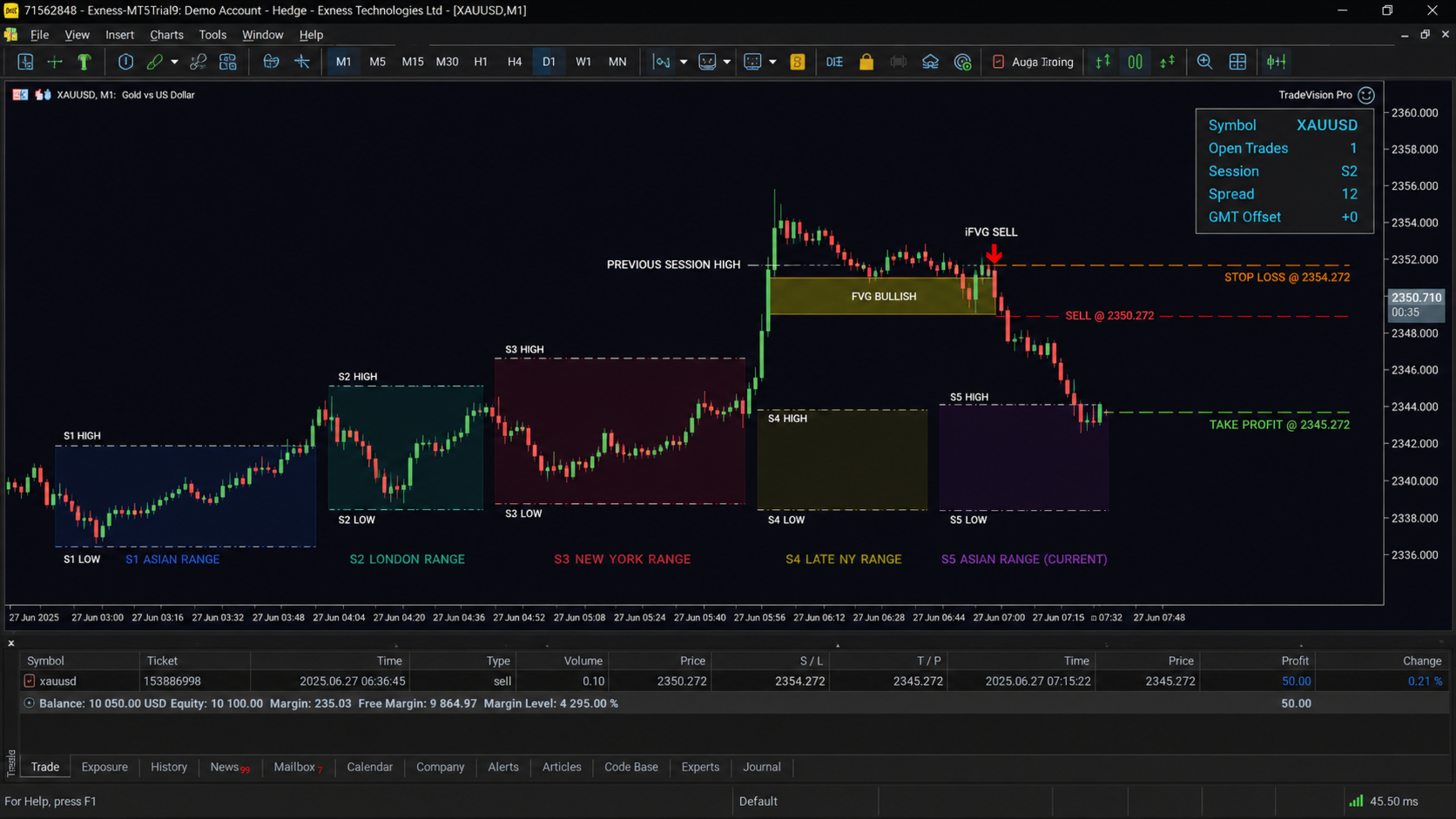
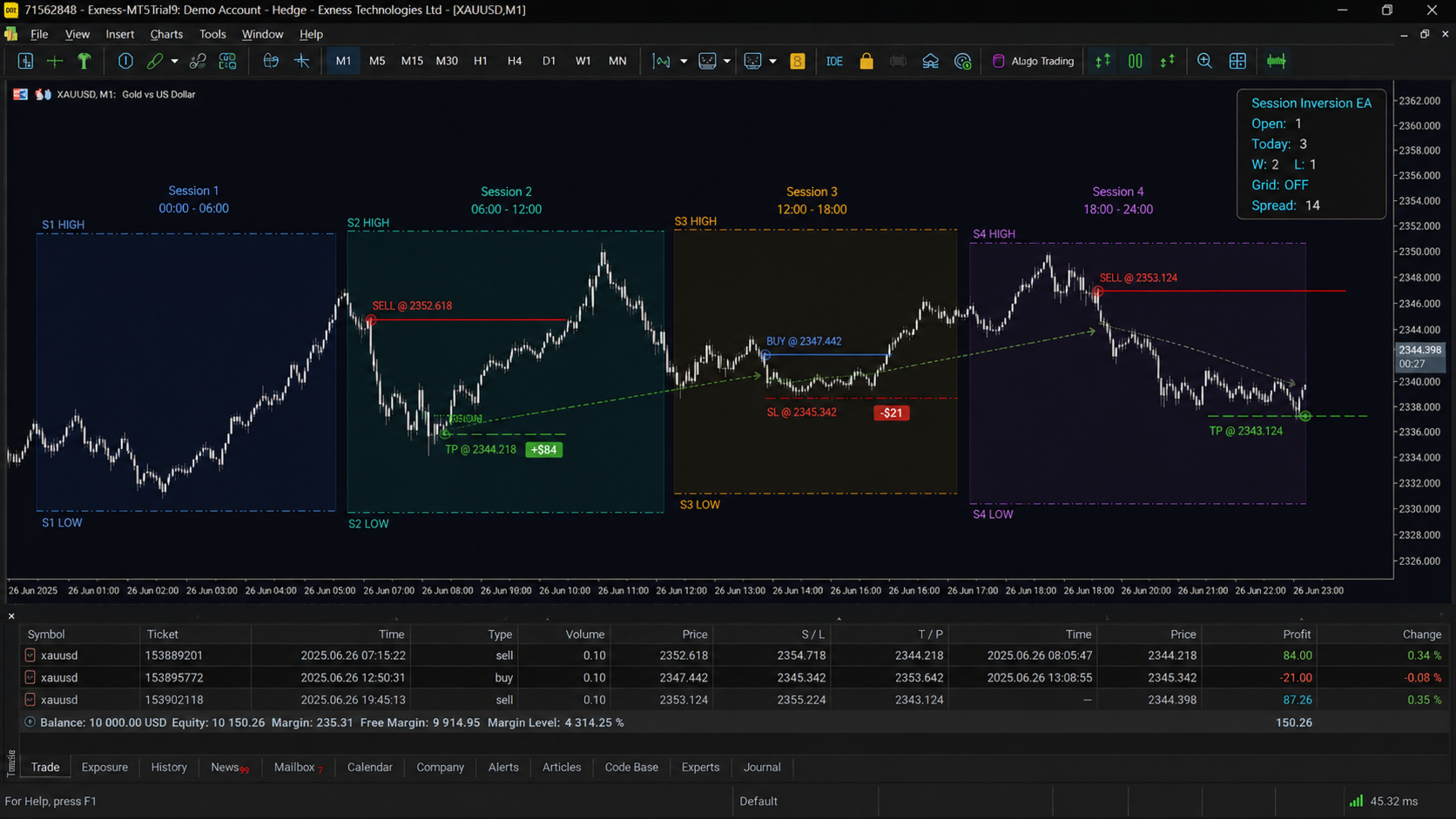
The EA tracks four configurable trading sessions across the day using UTC-based time detection, which means session times remain accurate regardless of your broker server timezone. At the start of each new session, the EA records the high and low of the previous session as a reference range.
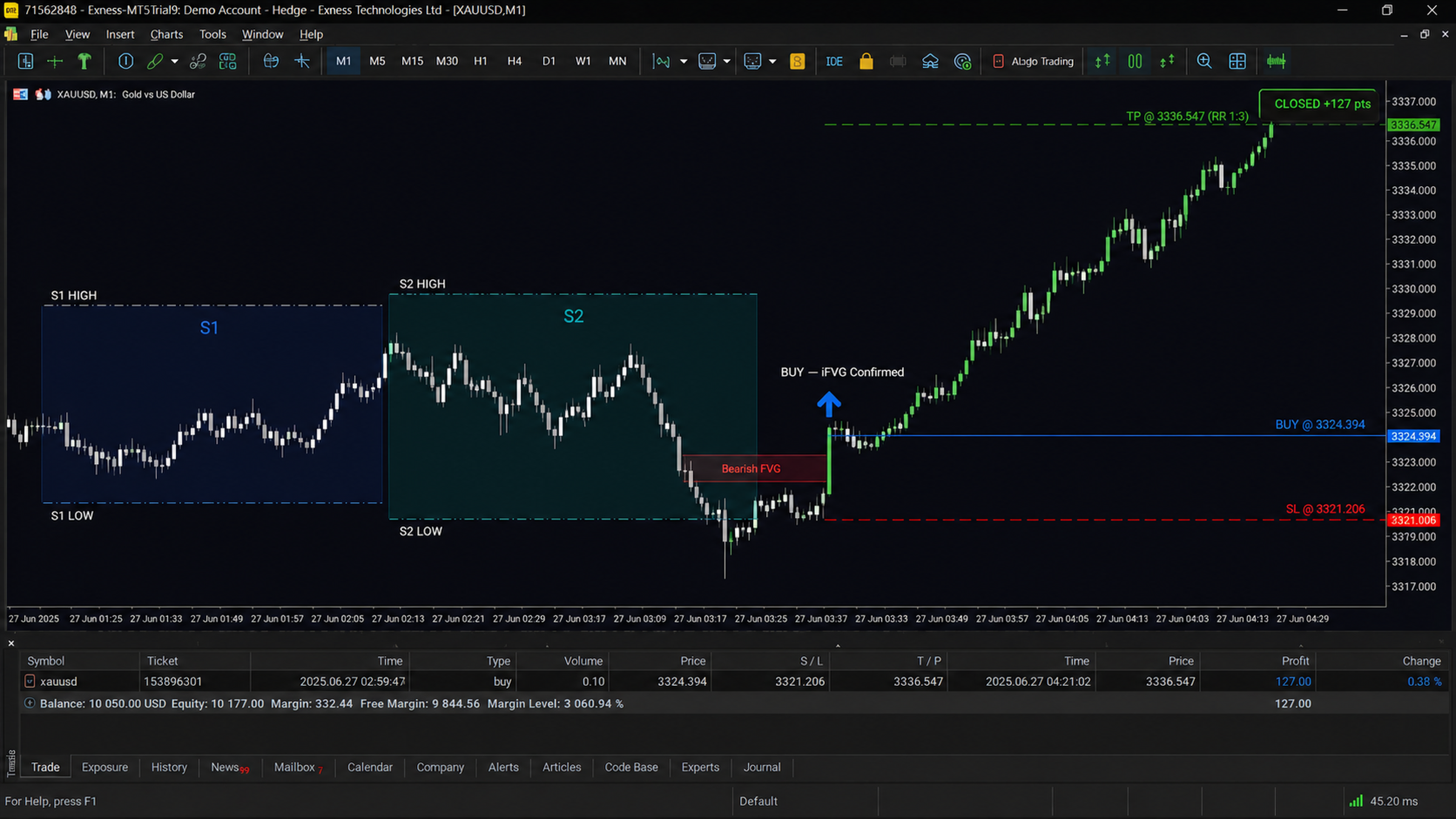
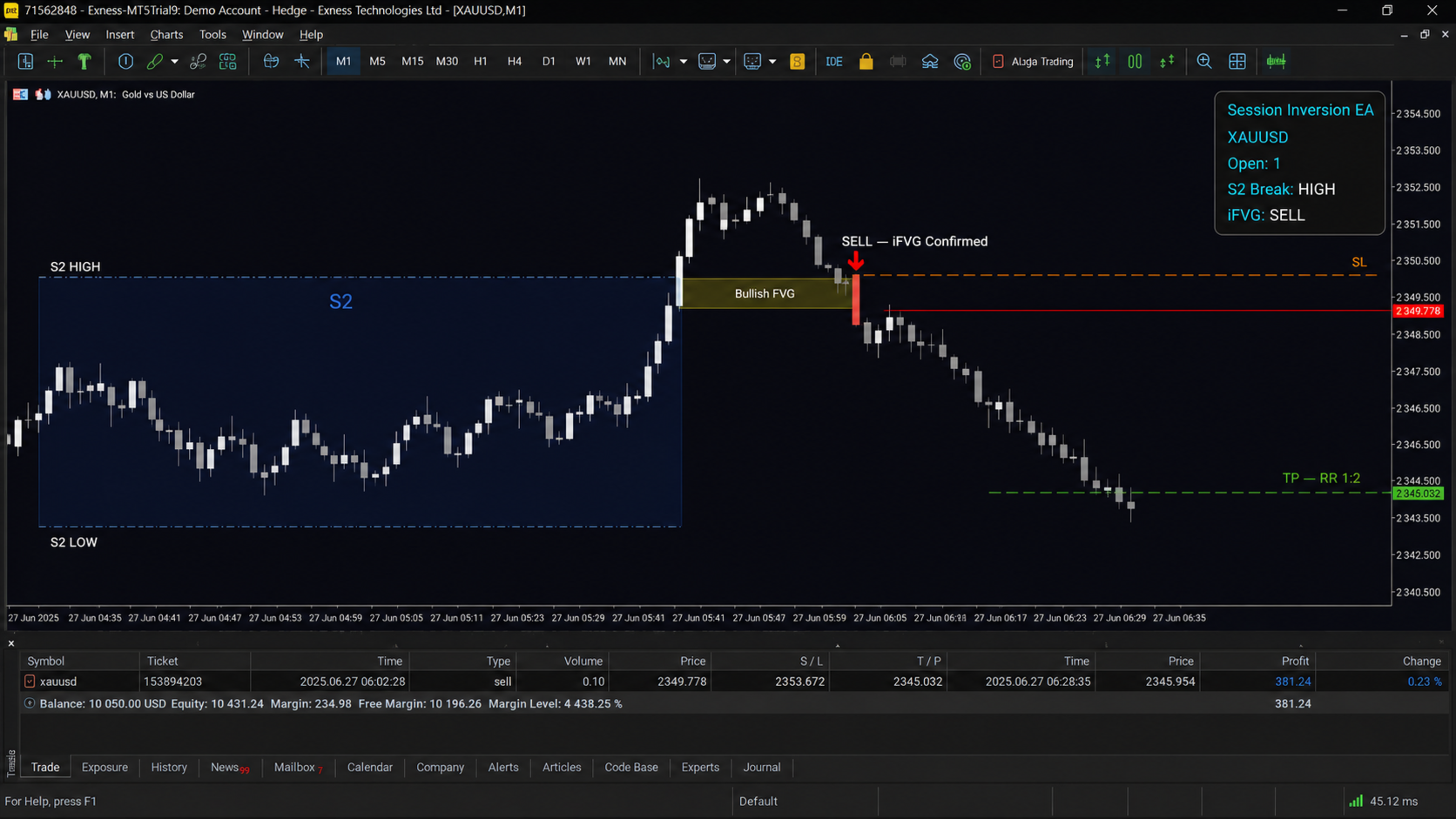
When price breaks through the previous session high or low, a directional bias is established for that session. A break of the previous session high opens a bearish bias, and a break of the previous session low opens a bullish bias. This break can be confirmed by a wick through the level, a candle close through the level, or both, depending on your settings.
Once a directional bias exists, the EA scans for a Fair Value Gap on the current chart timeframe. A Fair Value Gap is a three-candle price imbalance where the first candle and third candle do not overlap. For a bearish setup, the EA looks for a Bullish FVG that formed after the session break. When price subsequently closes back through that FVG, the imbalance is considered inverted and the EA enters a trade at the close of that candle. The same logic applies in reverse for bullish setups.
Entry always occurs at candle close. There is no tick-level entry and no pending order guessing. This keeps the logic clean and reproducible in backtesting.
Sessions
The EA supports four independent sessions with fully editable start and end times defined in UTC. Session 4 crosses midnight and this is handled correctly by the EA without any manual adjustment. Each session can be independently enabled for chart display and for trading. The EA draws session boxes, high lines, low lines, and labels directly on the chart. All drawing can be hidden if you prefer a clean chart.
Default UTC session times are as follows. Session 1 runs from 02:00 to 07:00. Session 2 runs from 07:00 to 15:00. Session 3 runs from 15:00 to 20:00. Session 4 runs from 20:00 to 02:00.
Trade Limits
The EA includes three independent trade limit controls. You can set a maximum number of open trades at one time, a maximum number of trades per session, and a maximum number of trades per day. Once any limit is reached, the EA will not open new positions until the condition resets. The daily counter resets automatically at the start of each new trading day.
Stop Loss Options
Three stop loss methods are available. The session-based stop places the stop loss beyond the high or low of the current session with an additional buffer in points. The fixed stop loss places the stop at a user-defined distance from entry in points. The FVG-based stop places the stop above or below the Fair Value Gap that triggered the entry, again with an adjustable buffer. All stop loss values are validated against the broker minimum stop distance before the order is placed.
Take Profit Options
Take profit can be set as a risk-to-reward ratio relative to the stop loss, for example 1:2 or 1:3, or as a fixed number of points from the entry price.
Grid Recovery System
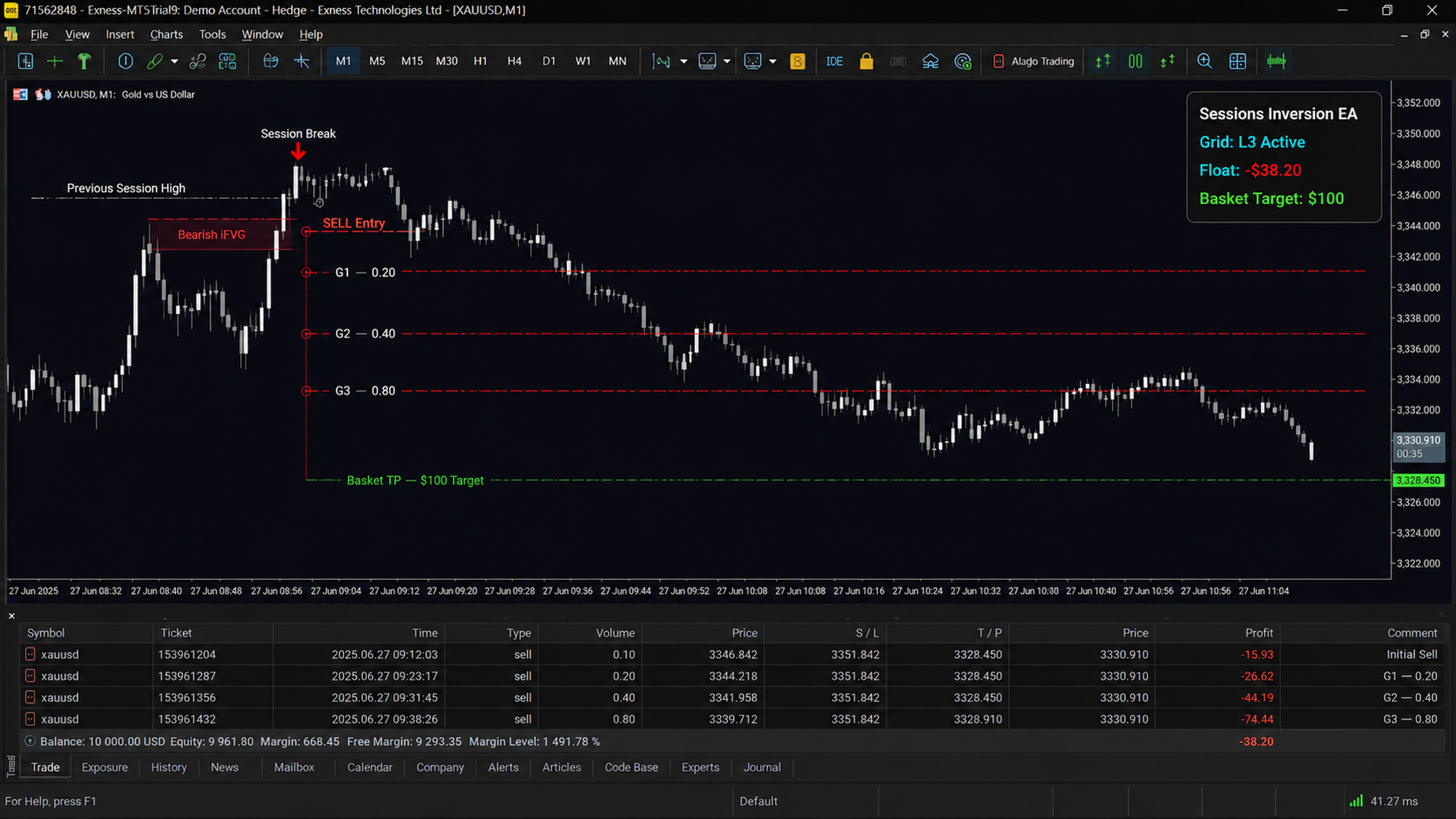
The grid system is optional and disabled by default. When enabled, the EA opens additional positions if price moves against the first trade. The distance between grid levels is calculated as a multiple of the original take profit distance. Each new grid position uses a volume multiplier applied to the previous grid level lot size. The maximum number of grid levels is configurable.
When a new grid position opens, the EA recalculates a single shared take profit for all open positions in the basket. The shared take profit is placed so that the total closed profit of the entire basket equals the original target profit of the first trade only, not the combined target of all trades. This means the basket needs less total recovery distance than a naive grid approach.
Trailing Stop
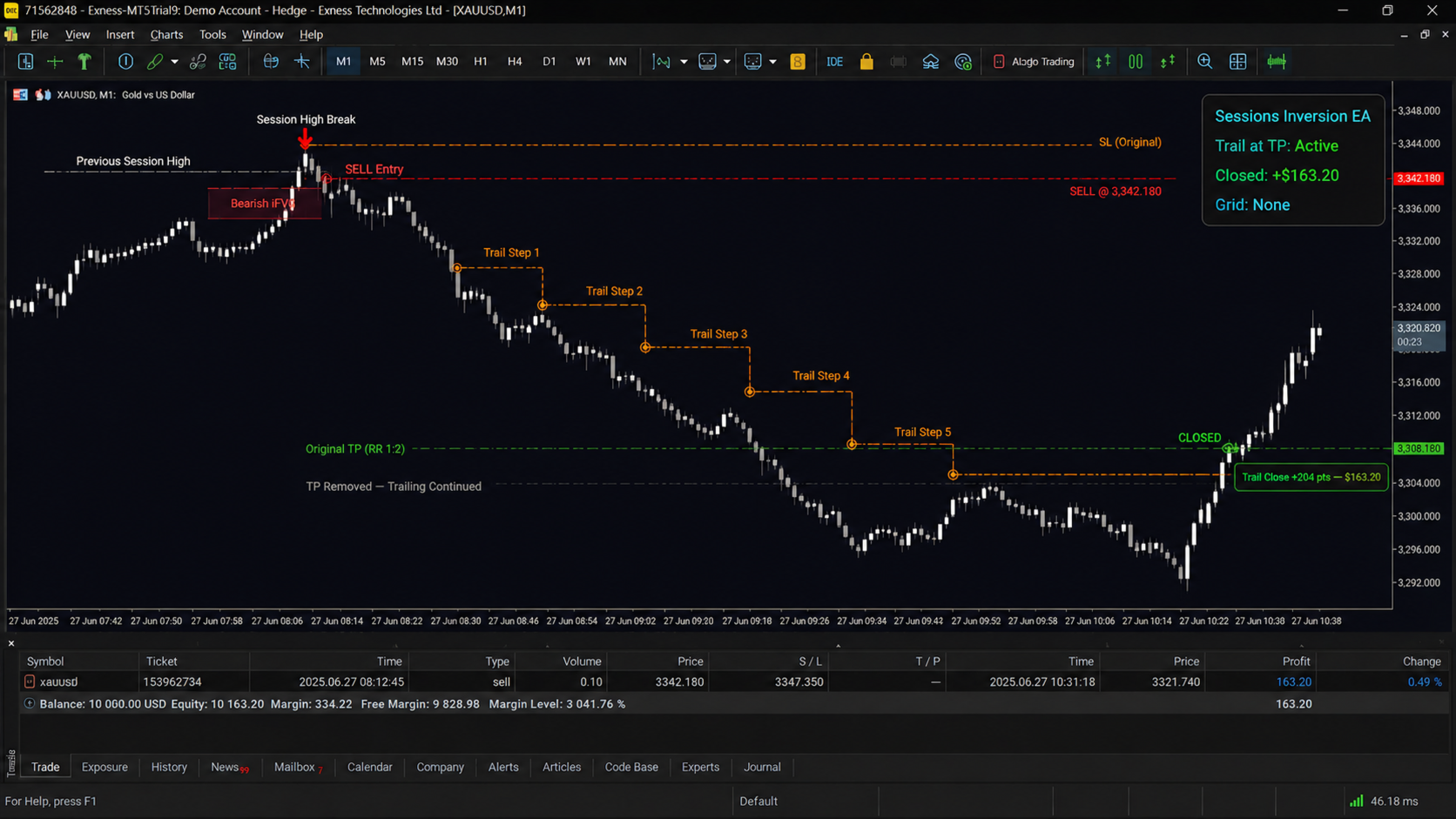
The EA supports a standard trailing stop that activates when the trade reaches a configurable profit threshold. The threshold can be set in points or as a percentage of the original take profit distance. The trailing stop size is set as a percentage of the take profit distance, and the trail moves only after price advances by the step size.
A separate trail-at-TP feature is also available. If price reaches the original take profit without any grid trades having been opened, the EA can remove the take profit and begin trailing instead of closing the trade. This feature is disabled automatically if a grid position has been opened on that trade, because in that case the basket TP logic takes over.
Money Management
Lot size can be calculated in two ways. The risk percentage mode calculates the correct lot size based on your stop loss distance, account balance, and the risk percentage you define. The fixed lot mode uses a static lot size for every trade. In both modes, the EA validates the result against the broker minimum lot, maximum lot, and lot step before placing the order.
Filters
EMA trend filter: An optional exponential moving average filter prevents trades against the trend. You define the period and timeframe. Buy trades are blocked if price is below the EMA, and sell trades are blocked if price is above it.
Spread filter: You can set a maximum allowed spread in points. If the current spread exceeds this value, the EA will not open a trade.
Day filter: Each day of the week can be individually enabled or disabled. Saturday and Sunday are disabled by default.
News filter: The news filter architecture is included and can be configured to block trading for the affected session only or for the entire trading day when high-impact events are detected. Integration with a news data source is required for this filter to function.
Maximum drawdown filter: You can set a maximum floating drawdown percentage calculated against current account balance. If the drawdown exceeds the limit, the EA closes all open positions and stops trading until the condition is cleared.
Broker Authentication
An optional broker lock is included. When enabled, the EA checks the broker company name or server name against a value you define. If the broker does not match, the EA stops loading and prints an error message to the journal. This is useful if you are developing for a specific client or protecting a custom build.
Dashboard
A compact information panel is drawn in the upper right corner of the chart. It shows the current symbol, number of open trades, trades opened today, current spread, GMT offset, and grid status. The panel can be hidden from the inputs.
Compatibility
The EA works on any symbol and any timeframe. The FVG scan always uses the current chart timeframe. It has been built and tested to function correctly in both the MetaTrader 5 Strategy Tester and in visual backtest mode. It supports both hedging and netting account types. It uses a magic number to identify its own trades and will not interfere with manually placed trades or other EAs running on the same terminal.
Recommended Setup
Symbol: XAUUSD or any liquid instrument with defined session structure. Timeframe: M1 or M5 for precision entries. Higher timeframes reduce trade frequency and increase stop distances. Account type: Hedging preferred for full grid functionality. Netting is supported. Minimum balance: Depends on risk settings. At 1% risk and a 50-point stop loss on XAUUSD, a balance of 500 USD is sufficient to open a minimum lot.
Notes
Past backtest results do not guarantee future performance. All trading involves risk. Test the EA on a demo account before running it on a live account. Use position sizing and drawdown limits appropriate for your account size and risk tolerance.