Meridian Blaster EA
- Experts
- Versione: 1.51
- Attivazioni: 10

SUMMER SALE 50% off during summer months - Grab it whilst its cheap
Overview
Most grid EAs open blindly — fixed intervals, no regard for where price actually is or where it's likely to go. Meridian Blaster EA is different. Every initial entry is anchored to a confirmed swing point: a Higher Low for buys, a Lower High for sells. The grid (optional) only activates when you're already in a trade that needs recovery, keeping average exposure low on the trades that matter and concentrating grid capital where structure supports it.
The result is a system that behaves like a disciplined swing trader on entry, and a systematic recovery engine when the market moves against you.
How It Works
1. Swing Structure Detection
The EA continuously monitors your chosen timeframe for confirmed Higher Highs, Higher Lows, Lower Highs, and Lower Lows. Each swing point requires a configurable number of bars either side to qualify, plus a confirmation buffer so you're never entering on a point that could be revised. Labels are drawn directly on the chart — HH/HL in green, LH/LL in red — so you can see exactly what the EA is seeing.
- A Higher Low confirms bullish continuation → BUY.
- A Lower High confirms bearish continuation → SELL.
2. Grid Recovery
When price extends against an open position, the grid adds recovery orders at a configurable step distance. Lot sizes scale with a multiplier per level so later orders carry more weight and pull the basket break-even toward price. A dedicated basket take-profit closes all positions in a direction the moment the weighted-average entry reaches profit — visualised at all times as a live TP line on the chart.
3. Smart Grid
If the swing structure flips while a recovery basket is open — confirming the original thesis was wrong — Smart Grid can open a counter-trade instead of doubling down on the losing direction. It fights with the market only as long as structure supports it, then pivots.
Signal Filters — Layer Your Edge
The EA ships with a full filter stack, each independently configurable. Enable only what suits your strategy. Filters that block an entry log the reason so you can see exactly what stopped a signal from firing.
| Filter | Purpose |
|---|---|
| EMA trend filter | Buys only above EMA, sells only below — keeps you on the right side of momentum. |
| RSI ceiling / floor | Avoids buying overbought conditions or selling oversold extremes. |
| ADX minimum | Skips entries when the market is ranging and structure signals are less reliable. |
| ATR window | Enforces a volatility band — trade only when conditions are neither too dead nor too wild. |
| Spread guard | Cuts off entries when spread widens beyond an acceptable threshold. |
| HTF structure confirm | Requires the same directional structure on a higher timeframe before a trade fires. |
| News filter | Uses the MT5 built-in economic calendar to pause new entries before and after high-impact events — configurable minutes either side. |
LLM Signal Validation
Meridian Blaster EA includes a native connection to large language model APIs. Before each entry, the EA can query an AI model (OpenAI or Anthropic) with a real-time snapshot of current market structure, indicator readings, open positions, and HTF context. The model returns a directional bias, a confidence score (0–100), and a brief reason.
You set the minimum confidence threshold. Below it, entries are blocked. Above it, they proceed as normal. The LLM bias and score are always visible on the chart panel. Note: The filter never blocks grid recovery — only new initial signals.
- Supported OpenAI models: gpt-4o-mini, gpt-4o, gpt-4-turbo, o3-mini
- Supported Anthropic models: claude-haiku-4-5, claude-sonnet-4-6, claude-opus-4-8
Interface & Feature Panels
Control Panel
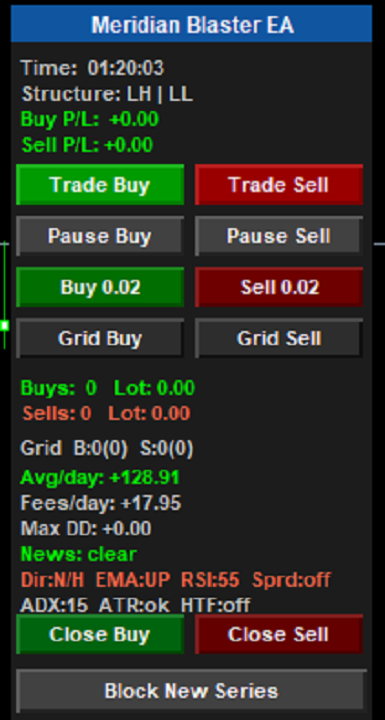
A compact panel gives you full manual control without touching EA settings:
- Trade Buy / Trade Sell: Enable or disable new signals per direction.
- Pause Buy / Pause Sell: Temporarily suspend a direction while recovery continues.
- Buy / Sell: Open a manual position at the calculated lot size, counted in the series.
- Grid Buy / Grid Sell: Manually trigger the next grid step at the correct multiplied lot (greyed out when no positions are open or max grid is reached).
- Close Buy / Close Sell: Close all positions in a direction.
- Block New Series: Freeze the EA from opening any new initial signals; current recovery baskets continue to completion.
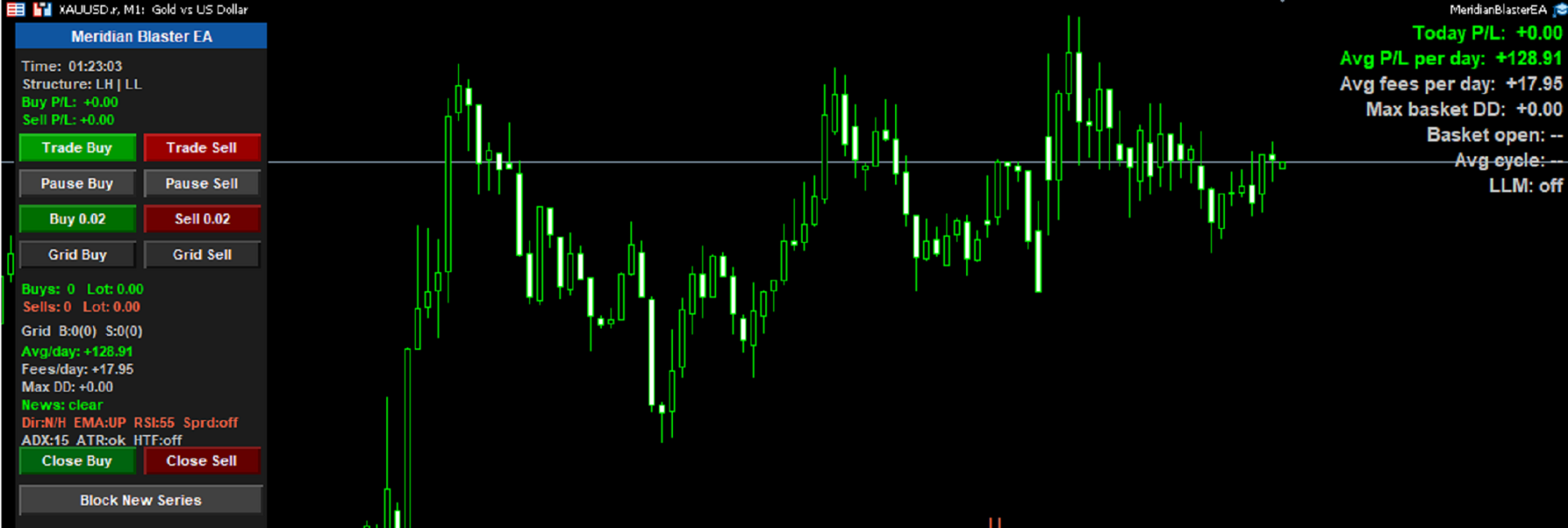
Also displays real-time position counts, total lot exposure, per-direction P&L, grid counters, filter status, news pause state, and basket open duration.
Statistics Panel (Top-Right Corner)
Always-visible statistics show the health of your account at a glance:
- Today's P&L: Closed profit/loss for the current calendar day.
- Average P&L per day: Across all historical closed deals for this EA.
- Average fees per day: Swap and commission cost averaged over trading days.
- Max basket drawdown: The deepest floating loss the open baskets have ever reached.
- Basket open time: How long the oldest open position has been running.
- Average cycle time: Mean duration of completed basket cycles, updated each time a basket closes.
- LLM status: Current bias, confidence score, and time since last call.
Chart Visualisation
- Swing labels: Drawn at every confirmed swing point, colour-coded by structure type.
- Breakeven lines (dashed): At the weighted-average entry for each open basket, updating as grid orders are added.
- Basket TP lines (dotted): Showing the exact price where the basket closes, shifting in real time.
- Tooltips: On each line showing price, points distance, position count, and total lot.
Scheduling
Full weekly schedule with per-day open and close hours. Each day can be independently open, closed, or set to an overnight window that wraps across midnight. Grid recovery always runs regardless of schedule — it never stops until a basket is closed.
Key Inputs at a Glance
| Group | Highlights |
|---|---|
| Market Structure | Timeframe, swing bars each side, confirmation bars |
| Trade Settings | Initial lot, TP, SL, auto-lot from free margin |
| Grid Recovery | Step distance, max levels, lot multiplier, basket TP |
| Smart Grid | Enable/disable, minimum positions before check fires |
| Signal Filters | EMA, RSI, ADX, ATR, spread, HTF confirm |
| News Filter | Minutes before/after high-impact events |
| LLM Filter | Model, API key, confidence threshold, refresh interval |
| Schedule | Per-day start/end hours, overnight session support |
| Panel | Show/hide, X/Y position |
What Makes This Different
Most grid systems are entry-agnostic — they open on a timer or a fixed pip interval and hope for mean reversion. This EA only enters when the market has provided evidence of directional intent in the form of a confirmed swing structure. The grid is a recovery mechanism, not the strategy itself. Combined with the filter stack and optional AI validation, you have multiple independent reasons to enter before a position opens — and automatic evidence-based management once it does.
Requirements
- MetaTrader 5 platform.
- For the news filter: No additional setup — natively uses the MT5 built-in economic calendar.
- For LLM validation: An OpenAI or Anthropic API key, and the relevant API URL whitelisted in MT5 Tools → Options → Expert Advisors.
Recommended Account Setup
1. Leverage
A leverage range of 1:100 to 1:500 is recommended. The grid multiplies exposure as levels are added, so sufficient margin headroom is essential to let recovery baskets breathe before the basket TP closes them out.
- 1:100 – 1:200: Conservative choice; suits larger accounts where the initial lot is sized small relative to balance. Provides a meaningful safety margin if the grid reaches its maximum depth.
- 1:200 – 1:500: The practical sweet spot for most users. Allows the auto-lot function to size entries relative to free margin without requiring a large deposit to run meaningful lot sizes through multiple grid levels.
- Above 1:500: Usable, but offers diminishing benefit. The built-in max-grid cap and basket TP already limit drawdown; very high leverage with aggressive lot sizing removes that protection.
Rule of thumb: With default settings (0.01 initial lot, 1.5× multiplier, 5 max grid levels), allow at least $200–$300 free margin per 0.01 of initial lot to comfortably absorb a full grid without hitting a margin call.
2. Account Type
An ECN or Raw Spread account is strongly recommended. The spread filter can protect against entering on wide quotes, but a naturally tight spread means more entries qualify cleanly, grid orders execute at better prices, and the basket TP is reached sooner.
| Account Type | Suitability | Notes |
|---|---|---|
| ECN / Raw Spread | ★★★★★ | Optimal. Tight variable spreads, full market depth, commission offset by better fills. |
| STP / No-Dealing-Desk | ★★★★☆ | Good. Generally tight spreads, no requotes. |
| Standard (Market Maker) | ★★★☆☆ | Acceptable with the spread guard enabled. Watch for spread widening around news events. |
| Fixed Spread | ★★☆☆☆ | Not recommended. Spreads are artificially wide during volatile periods, which are often the highest-probability windows. |
| FIFO accounts (US NFA) | ★★☆☆☆ | Grid recovery relies on holding multiple positions in the same direction; FIFO rules impose hedging restrictions that may interfere. |
3. Minimum Deposit
There is no hard minimum — the EA scales to any account size via the auto-lot feature. As a practical starting point:
- $500: Micro lot trading (0.01 initial), up to 5 grid levels, conservative multiplier of 1.0–1.2.
- $2,000: Standard lot trading with room for a full grid at 1.5× multiplier without margin pressure.
- $5,000+: Comfortable for running both buy and sell baskets simultaneously at meaningful lot sizes.
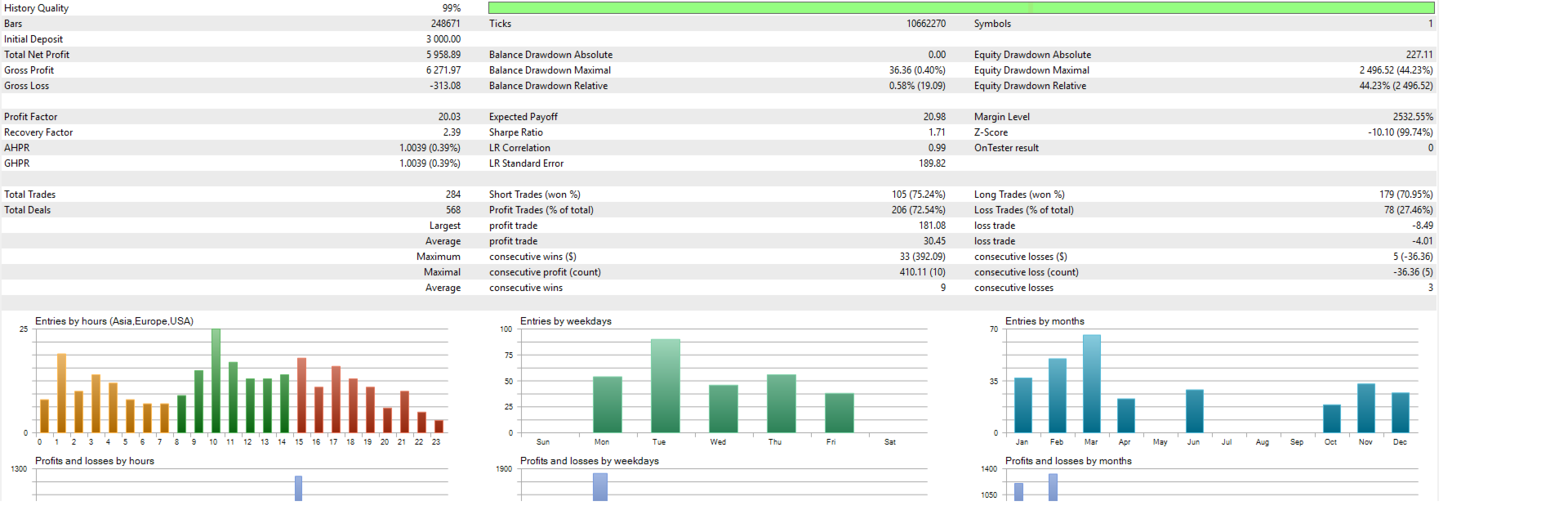
When in doubt, backtest your chosen symbol and settings, note the maximum basket drawdown figure shown in the statistics panel, and ensure your live account balance exceeds that figure with margin to spare.