Bitcoin Whale
- Experts
-
Sugianto
 My product recommendation :
1. Neo Gold, trades gold, no grid, no martingale, tight stoploss.
2. Super Gold Trend, which has a revenge system; every time a loss occurs, it opens an order with a larger lot size. - Versione: 1.28
- Aggiornato: 22 luglio 2026
- Attivazioni: 8
Launch promo!
Exclusive offer, availabe 9/10 spots at current price!
Next Price 149$
About This Bot
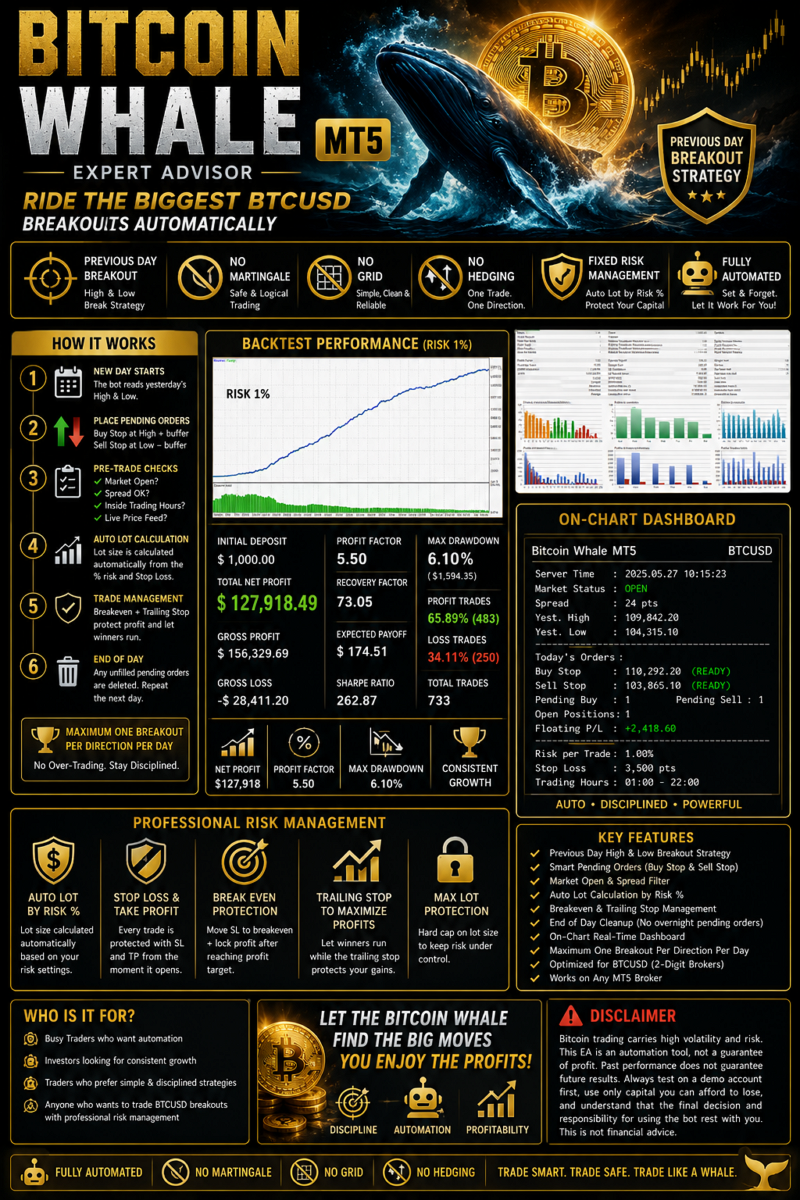
Bitcoin Whale is a professional breakout Expert Advisor for MetaTrader 5, designed to capture strong BTCUSD momentum using multi-range high/low breakout logic.
The EA works by identifying important price ranges such as previous day high/low, multi-hour blocks, and major trading sessions, then placing Buy Stop and Sell Stop pending orders beyond those levels. This allows the robot to enter only when price confirms a breakout instead of guessing market direction.
Input Parameter Manual Guide | Setfile
Key Features
- Multi-range breakout strategy for BTCUSD
- Previous day, 12H, 8H, 6H, 4H, 2H, Asia, Europe, and US session breakout options
- Pending order execution for clean breakout entries
- Automatic risk-based lot calculation
- Stop Loss and Take Profit on every trade
- Breakeven and trailing stop for trade protection
- Spread spike guard and slippage protection
- Broker stop-level protection
- MT5 economic calendar news filter
- Automatic pending order cleanup
- On-chart dashboard for monitoring market status, spread, guard, news, and active strategies
- Each strategy uses its own magic number for clean order management
Why Bitcoin Whale?
Bitcoin Whale is built for traders who want a disciplined BTC breakout system with strong risk control. It does not rely on random entries. It waits for price to break important market levels and manages trades with Stop Loss, Take Profit, breakeven, trailing stop, spread protection, and news filtering.
The EA can run one breakout model or combine multiple independent strategies at the same time. Each strategy is isolated with its own magic number, so orders and positions remain organized and easy to manage.
Risk Management
Bitcoin Whale includes professional protection features such as:
- Risk per trade based on account balance
- Maximum lot cap
- Minimum SL distance based on spread and price percentage
- Protection against invalid stops
- Spread spike pause
- Slippage cooldown
- News window protection
- Fresh quote and market-live check
Recommended Use
- Platform: MetaTrader 5
- Symbol: BTCUSD
- Account type: Hedging
- VPS: Recommended
- Broker: Low spread and stable execution recommended
- Test first in Strategy Tester and demo account before live trading
Bitcoin Whale is designed for traders who prefer breakout trading, disciplined execution, and strong protection logic in the highly volatile Bitcoin market.
Tips Before Going Live
- Test first in the Strategy Tester and on a demo account for at least a few weeks.
- Adjust InpStartHour / InpEndHour to your broker's server time zone (check the top-right of Market Watch).
- Since this is bitcoin, note that the points value depends on your broker's digits (BTCUSD is usually 2 digits; the default parameters are tuned for that scale).
- Start with a small InpRiskPercent (0.5–1%) until you're comfortable with its behavior.
Important / Disclaimer
Note: This Expert Advisor is a trading tool, not a guarantee of profit. Market conditions can change, and all trading involves risk. Always test settings carefully before using on a live account.