Alpha Equity Manager
- Utilità
- Versione: 1.3
- Aggiornato: 13 giugno 2026
- Attivazioni: 10

🚨 INTRODUCTORY OFFER: Price is currently $59 for the first 50 buyers to build reviews. After 50 copies are sold, the price will permanently increase to $499. (38/50 Sold)"
Alpha Equity Manager is a risk management and trade control terminal for MetaTrader 5. It helps traders apply and enforce defined limits on account performance, position exposure, and trade execution. The terminal supports disciplined trading by monitoring account equity in real-time and taking action when user-defined thresholds are reached.
The terminal is designed for manual traders who need consistent application of risk rules, including those participating in prop-firm evaluations or managing accounts with strict drawdown requirements.
The utility provides an on-chart interface for manual execution while actively monitoring and enforcing user-defined risk parameters in the background. It does not execute trades automatically based on technical indicators.
1. CORE UTILITY FEATURES
The Time-Locked Vault System
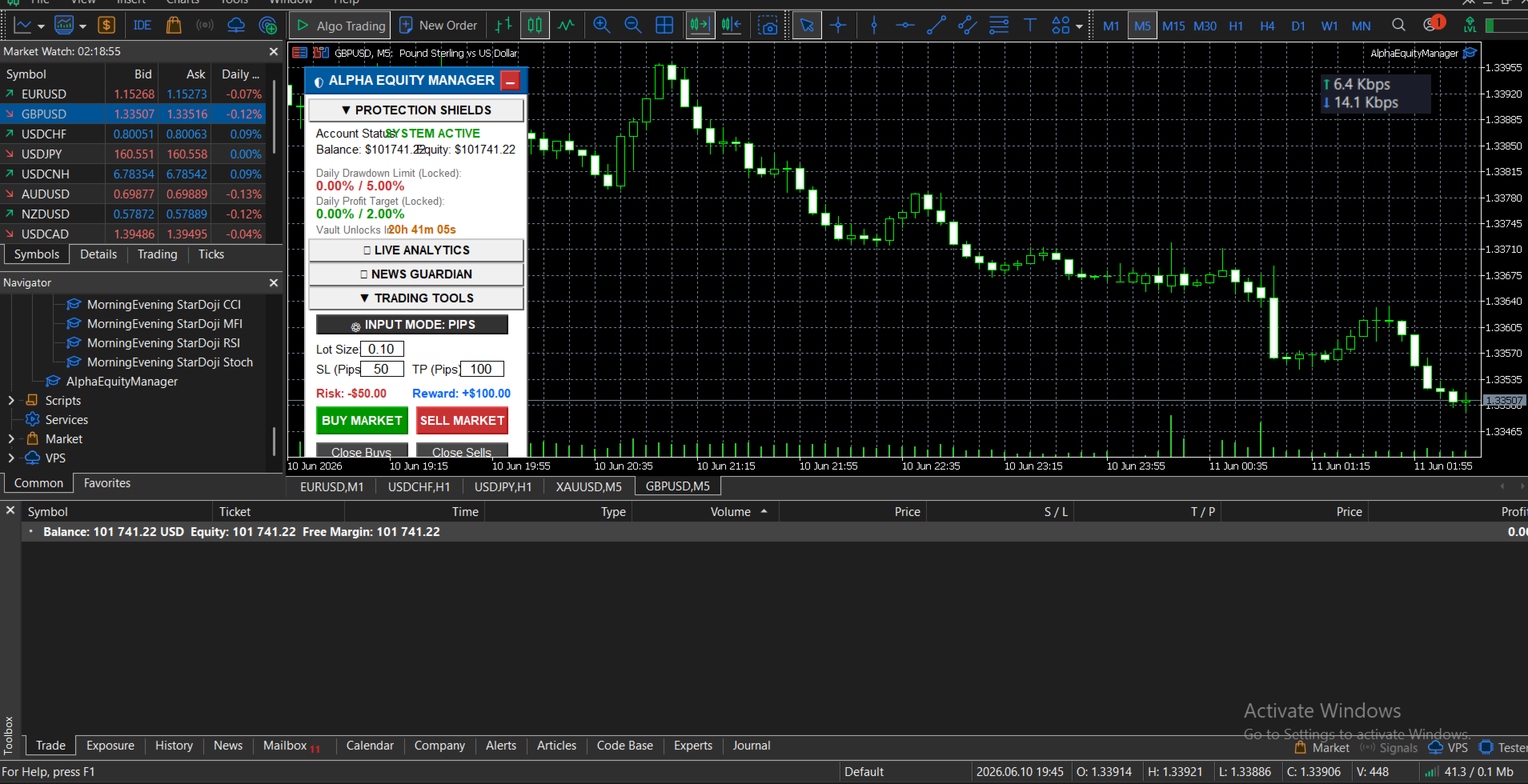
To prevent impulsive parameter changes during active trading, the EA locks its own settings. If a user attempts to change their drawdown or lot limits outside of their defined "Unlock Window", the utility ignores the input and instantly reverts the settings back to their locked state using the terminal's global memory. This survives terminal restarts and chart changes.
Active Rule Enforcement
The utility automatically hides default MT5 one-click trading panels to route all execution through its risk filters. If a user opens a trade that violates the defined maximum lot or position limits, the utility immediately detects the violation and automatically closes the newest illegal position to restore compliance.
Interactive Command Center
- Pip vs. Price Input: Switch the interface between Pip-based inputs (e.g., 50 pips) and Exact Price inputs (e.g., 1.10500).
- Pre-Trade Calculator: Analyzes the inputted Lot, Stop-Loss, and Take-Profit values to display the exact monetary Risk ( ) a n d R e w a r d ( )andReward() before execution.
- Execution & Management: Dedicated buttons for Market Buy, Market Sell, Close Buys, Close Sells, Close Winners, Close Losers, and a Panic Close All button. The panel can be minimized to keep the chart clean.
2. INPUT PARAMETERS & TRIGGER ACTIONS
Below is the detailed explanation of each customizable input and the exact action the utility takes when a parameter is triggered.
CORE ACCOUNT SETTINGS
- CoreAccountSize: The baseline monetary value (e.g., 100000) used to calculate the Total Drawdown percentage.
THE ANTI-CHEAT VAULT
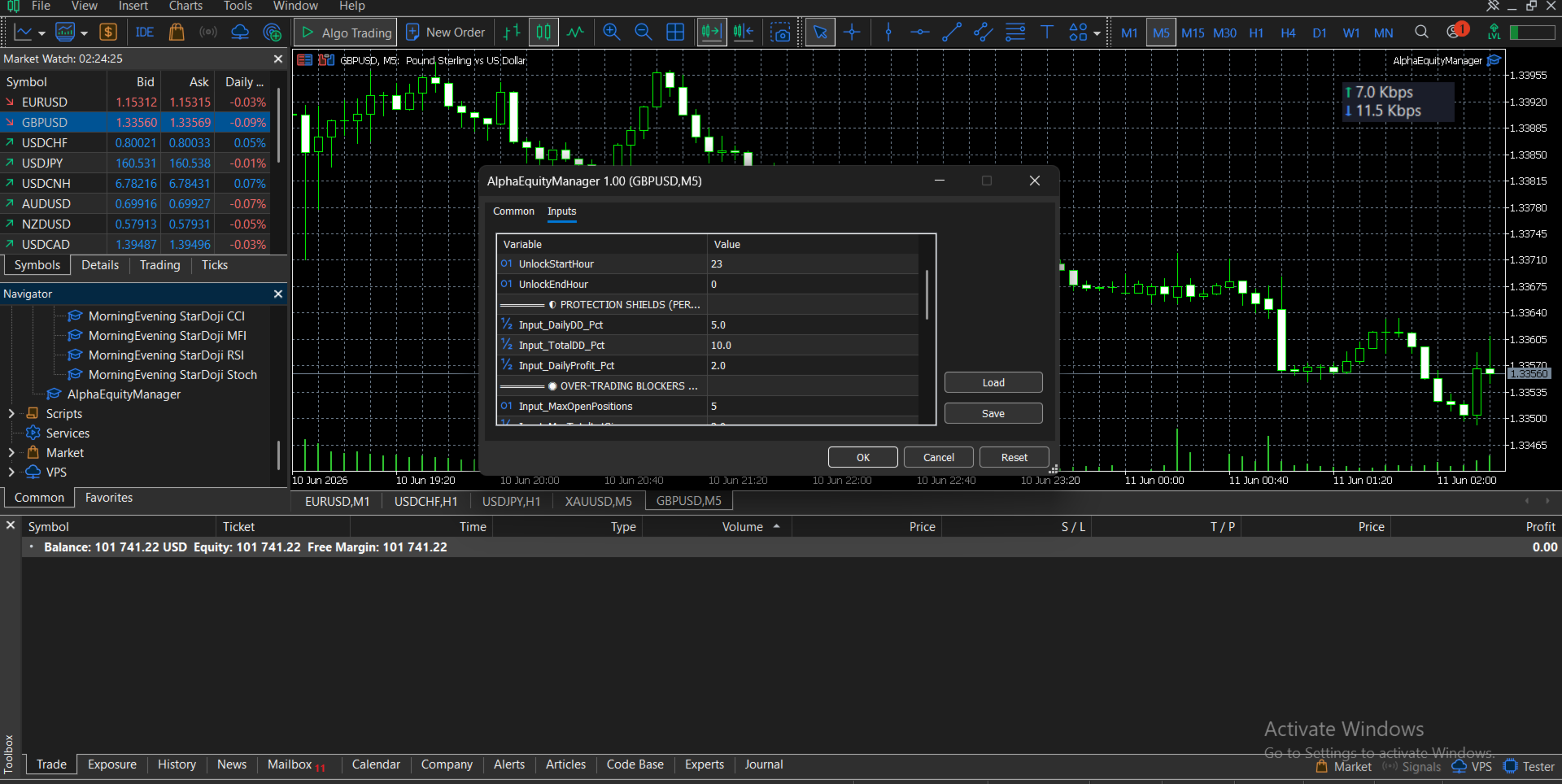
- UnlockStartHour & UnlockEndHour: Defines the specific server hours (e.g., 23 to 0) when the user is permitted to modify the EA's settings. Modification attempts outside these hours are rejected.
PROTECTION SHIELDS (PERCENT)
- Input_DailyDD_Pct: The maximum allowed floating daily loss, calculated against the account's midnight balance. If attained, the EA instantly closes all open positions and disables the Buy/Sell buttons for the remainder of the day.
- Input_TotalDD_Pct: The maximum allowed floating loss against the CoreAccountSize. If attained, all positions are closed, and execution is locked.
- Input_DailyProfit_Pct: The target daily floating profit. If attained, the EA closes all positions to secure the funds and disables the execution buttons until the next daily reset.
OVER-TRADING BLOCKERS
- Input_MaxOpenPositions: The maximum number of concurrent open trades allowed. Execution is blocked if the limit is reached.
- Input_MaxTotalLotSize: The absolute maximum combined volume (Buy lots + Sell lots) allowed at one time. Execution of new volume is blocked if this is exceeded.
- Input_MaxCurrencyExposureLots: The maximum volume allowed on a single currency (e.g., total lots involving USD). If the limit is reached, new trades involving that specific currency are blocked.
SMART STOP-LOSS REDUCTION
- EnableSLReduction: Toggles the automated Stop-Loss management feature on or off.
- SLReduction_TriggerPct: The percentage of the distance to the Take Profit that the current price must travel to activate the reduction.
- SLReduction_ReducePct: When triggered, the utility automatically moves the Stop-Loss closer to the entry price by this exact percentage, reducing capital risk. This action only occurs once per position.
THE STOP-LOSS POLICE
- EnableSLEnforcer: Toggles the missing Stop-Loss detection system.
- SLGracePeriodSeconds: The amount of time (in seconds) the user has to manually attach a Stop-Loss to a newly opened trade. If the timer reaches zero and no Stop-Loss is found, the EA automatically closes the unprotected position.
THE NEWS GUARDIAN
- EnableNewsFilter: Toggles the native MT5 high-impact economic calendar filter (No DLLs required).
- MinutesBeforeNews & MinutesAfterNews: Defines the restricted time window before and after a high-impact event. During this window, the execution panel is disabled, and the user will be unable to open new positions.
- CloseTradesBeforeNews: If set to true, the EA will automatically close all active positions immediately before the restricted pre-news window begins.
Important Notice:
This product is a manual trade execution and risk management utility. It does not contain an automated trading strategy and does not generate trading signals.