Precision Strike Arrows PRO MT5 by MoonPipz
- Indicatori
-
Sarvaddnya Pathrabe
 Hello, We are creator of MoonPipz.
After years of manual trading, revenge entries, and chasing holy grails that didn't exist, we started coding indicators that solve real problems like:
Seeing clear trends without drowning in noise
Catching high-probability divergences early - Versione: 3.0
- Aggiornato: 6 luglio 2026
- Attivazioni: 10
Precision Strike Arrows PRO
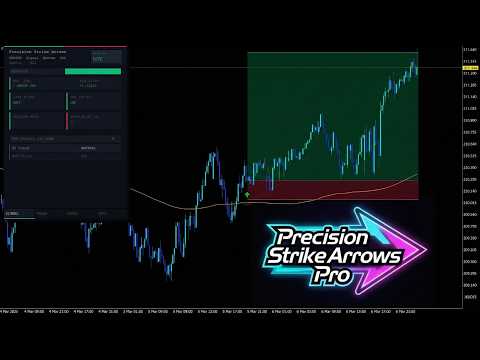
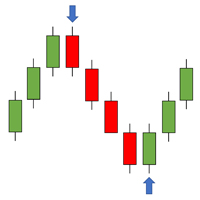
Precision Strike Arrows PRO is a professional-grade signal indicator for MetaTrader 5 that plots precise buy and sell arrows directly on the price chart. Unlike most arrow indicators that repaint signals or flood the chart with entries on every minor price movement, Precision Strike Arrows PRO is built around a philosophy of signal quality over signal quantity. Every arrow that appears on the chart has passed through multiple internal conditions before being displayed. The indicator is designed for traders who want clear, actionable signals without the noise.
The PRO version includes a fully integrated Trade Manager that automatically calculates and draws Stop Loss, Take Profit, Break Even, and Trailing Stop levels on the chart the moment a signal fires. All levels are displayed as draggable lines that can be adjusted in real time with the mouse. Works on all symbols and all timeframes.
Signal Logic
The indicator runs a continuous background assessment of market conditions on every bar and every tick. Signals are only produced when a precise set of internal conditions align simultaneously across volatility, momentum, and trend direction. This multi-condition requirement is what keeps the signal count low and the quality high. A trader using this indicator should expect to see a small number of well-placed arrows per session rather than a chart covered in signals.
The built-in 200 period SMA serves as the primary directional filter. When this filter is active, buy signals are only produced when price is positioned bullishly relative to the SMA, and sell signals are only produced when price is positioned bearishly. This single filter eliminates a large portion of counter-trend entries that would otherwise reduce overall win rate. The SMA line is displayed on the chart and can be hidden if preferred. The filter itself can also be disabled entirely for traders who prefer to receive signals in both directions regardless of the broader trend.
Signal Quality Rating System
One of the features that separates the PRO version from other arrow indicators is the built-in signal quality scoring system. Every signal that fires is immediately evaluated and assigned a quality score displayed as 1, 2, or 3 stars directly on the chart next to the arrow. The score is calculated in real time based on multiple internal factors including signal strength, trend alignment, and higher timeframe agreement. A 3 star signal indicates the strongest possible confluence across all scoring factors. A 1 star signal still meets the minimum requirements to fire but with lower confluence.
The star rating gives traders an immediate read on signal confidence without requiring them to manually check additional charts or conditions. The current signal quality score is also displayed in the dashboard header so it is always visible regardless of which tab is active.
Multi-Timeframe Confirmation
The indicator includes a built-in multi-timeframe confirmation system that reads the trend direction on a user-selected higher timeframe and displays the result live in the dashboard. The higher timeframe can be set to any standard timeframe from M1 to Monthly. The dashboard clearly shows whether the higher timeframe trend is bullish, bearish, or neutral, and whether it agrees or conflicts with the direction of the most recent signal.
When a conflict is detected between the current signal and the higher timeframe trend, the dashboard displays a visible conflict warning so the trader can decide whether to act on the signal or wait. An optional MTF Filter mode can be enabled to automatically block signals when the higher timeframe disagrees with the signal direction. This mode is off by default to give traders full control, but enabling it effectively adds a second layer of trend filtering on top of the 200 SMA.
Trade Manager
The Trade Manager is a fully integrated position planning system that activates automatically on every signal. The moment a buy or sell arrow appears on the chart, the Trade Manager calculates the appropriate Stop Loss, Take Profit, and Break Even levels based on the selected calculation mode and draws them directly on the chart as clearly labeled price lines. A green zone highlights the potential profit area between entry and Take Profit. A red zone highlights the risk area between entry and Stop Loss. Both zones extend forward from the signal bar in real time.
All three lines — Entry, Stop Loss, and Take Profit — are fully draggable with the mouse. Clicking and dragging any line recalculates all dependent values instantly. Dragging the Stop Loss adjusts the lot size calculation to maintain the configured risk percentage. Dragging the Entry line moves the entire trade setup while preserving the relative distances. Every change is reflected immediately in the Trade tab of the dashboard.
Stop Loss calculation supports three modes. Fixed Pips places the SL at a set distance from entry. ATR Multiplier places the SL based on recent volatility measured by Average True Range, which automatically adapts to market conditions across different pairs and timeframes. Swing mode places the SL behind the most recent swing high or low within a configurable lookback period.
Take Profit calculation also supports three modes. RR Ratio sets the TP at a multiple of the SL distance, ensuring a consistent risk to reward structure on every trade. ATR Multiplier sets the TP based on volatility. Fixed Pips sets the TP at a fixed distance.
Break Even can be enabled with a configurable trigger distance and buffer. When price reaches the trigger level, the Stop Loss is moved to entry plus the buffer, locking in a protected position. The Break Even level is displayed on the chart as a separate labeled line.
Trailing Stop supports two modes. Fixed Pips trails the Stop Loss at a set distance behind price. ATR mode trails based on a multiple of Average True Range, keeping the trail distance proportional to current volatility.
Automatic Lot Size Calculation
The Trade Manager calculates the correct lot size for every trade based on the configured risk percentage and the current Stop Loss distance. The calculation accounts for account balance, symbol tick value, tick size, and pip size, making it accurate across forex pairs, metals, indices, crypto, and commodities. The suggested lot size is displayed in real time on the Trade tab and updates whenever the Stop Loss line is moved.
Risk Monitor
The dashboard Trade tab includes a live risk monitor that tracks three key metrics throughout the session. Risk per trade shows the configured risk percentage and the maximum daily loss threshold. Daily P and L shows the combined realised and floating profit and loss for the current trading day as a percentage of account balance, colour coded green when positive, amber when approaching the daily limit, and red when the limit has been reached. Open Trades shows the number of currently open positions on the active symbol.
When the daily loss limit is reached, the indicator enters a locked state and stops producing new signals for the remainder of the trading day. The dashboard header displays a visible locked warning. The lock resets automatically at the start of the next trading day. This feature is particularly useful for prop firm traders who need to enforce strict daily drawdown rules.
Dashboard Panel
The dashboard is a professional multi-tab panel that sits in the top left corner of the chart and provides a complete read on market conditions, signal status, and trade management in one place. The panel is built with a DPI-aware layout system that scales correctly on all screen resolutions and monitor sizes.
The Signal tab displays a live momentum direction bar that fills left or right depending on current momentum state, the current SMA position relative to price, the last signal direction, SMA filter status, session buy and sell counts, and higher timeframe trend confirmation with conflict detection.
The Trade tab displays the current SL mode and TP mode, all calculated distances in pips, the actual risk to reward ratio, the suggested lot size, the absolute entry price, Stop Loss price, Take Profit price, and Break Even price, the live ATR reading, trailing stop configuration, risk percentage, daily P and L, and open trade count.
The Stats tab displays all active indicator settings and live momentum readings including the current momentum value, momentum direction, SMA position, session signal activity, and the full multi-timeframe confirmation breakdown.
The Info tab displays product information and support details.
Alerts
The indicator fires alerts on every new signal with three delivery options that can be enabled independently. Pop-up alert displays a notification window in MetaTrader 5. Push notification sends an alert to the MetaTrader mobile app. Email alert sends a message to the configured email address. Every alert message includes the symbol, timeframe, signal direction, star quality rating, entry price, Stop Loss price, and Take Profit price.
Signal Filters
Four additional signal filters can be configured independently of the main signal logic. Minimum Momentum Strength sets a threshold below which signals are suppressed, filtering out weak momentum crossovers. Cooldown Bars sets a minimum number of bars that must pass between consecutive signals of the same type, preventing cluster entries in fast-moving markets. Maximum Spread blocks signals when the current spread exceeds the configured threshold, protecting against entries during high spread conditions. MTF Filter blocks signals when the higher timeframe trend disagrees with the signal direction.
Input Parameters
Indicator section: SMA Length, Use True Range, Show SMA Line, Show Arrows, Use SMA Filter, Max Signals Per Side, Show Dashboard. Alerts section: Pop-up Alert, Push Notification, Email Alert. Multi-Timeframe section: Enable MTF, Higher Timeframe, MTF Filter Mode. Signal Filters section: Minimum Momentum Strength, Cooldown Bars, Maximum Spread. Trade Manager Stop Loss section: SL Mode, Fixed SL Pips, ATR Period, ATR SL Multiplier, Swing Lookback Bars. Trade Manager Take Profit section: TP Mode, RR Ratio, ATR TP Multiplier, Fixed TP Pips. Break Even section: Enable Break Even, BE Trigger, BE Buffer. Trailing Stop section: Enable Trailing Stop, Trail Mode, Trail Pips, ATR Trail Multiplier. Risk section: Risk Percentage, Max Daily Loss Percentage, Show Chart Lines.
Recommended Use
Best results on the 15-minute timeframe. Performs consistently on XAUUSD, major forex pairs, and Bitcoin. Compatible with all brokers and all account types. Can be tested on any symbol in the MetaTrader 5 Strategy Tester.