Support nd resistance
- Indicatori
- Versione: 1.0
- Attivazioni: 15

Indicator Description: Support & Resistance Rectangles
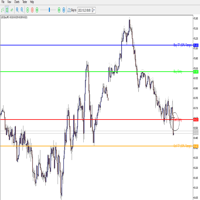
This custom indicator for MetaTrader 5 automatically draws support and resistance zones on your chart. It does not use buffers or plots; instead, it creates filled rectangle objects to visually highlight price areas where the market has previously reversed or stalled.
How It Works
The indicator divides the chart history into consecutive blocks of Lookback bars. For each block, it:
-
Finds the lowest low and highest high within that block.
-
Draws a support rectangle around the lowest low, with a vertical padding of ZoneWidth points above and below that level.
-
Draws a resistance rectangle around the highest high, also padded by ZoneWidth .
The rectangles extend horizontally across the entire time span of the block, giving you a clear visual reference of where price might encounter support or resistance in the future.
Input Parameters
-
Lookback (default 50): Number of bars used to calculate each support/resistance zone.
-
ZoneWidth (default 5): Vertical padding in points added above/below the high/low to create the rectangle thickness.
-
SupportColor (default clrBlue ): Color of the support rectangle.
-
ResistanceColor (default clrRed ): Color of the resistance rectangle.
-
Transparency (not used): The code notes that transparency is not supported in MT5 rectangles.
Key Features
-
Rectangles are placed behind the price candles ( OBJPROP_BACK = true ) so they don’t obscure the chart.
-
Rectangles are only created once and are not redrawn every tick, reducing CPU load.
-
When you remove the indicator from the chart, all its rectangles are automatically deleted.
Example Use Case
With Lookback = 50 and ZoneWidth = 5 , the indicator will scan every 50‑bar segment, mark the low and high of that segment, and draw a filled blue rectangle around the low (support) and a filled red rectangle around the high (resistance). This helps you quickly identify key price levels that might act as future turning points.
Notes & Limitations
-
The indicator works on the current chart timeframe only.
-
The ZoneWidth value is in points (the smallest price increment). Adjust it according to the instrument you are trading.
-
Because the indicator uses ObjectFind and creates objects only once, you may need to refresh the chart (or reload the indicator) after changing inputs to see updated rectangles.
-
The rectangles are non‑overlapping consecutive blocks; they do not slide with each new bar. For a rolling window approach, you would need a different algorithm.