TradingLab Trade Panel Pro
- Utilità
- Versione: 1.0
- Attivazioni: 10

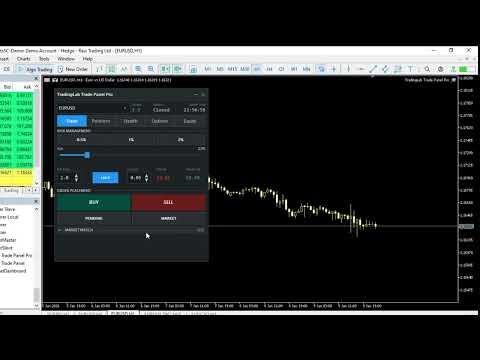
TradingLab Trade Panel Pro is a comprehensive, all-in-one trading companion designed to streamline your MetaTrader 5 experience. Whether you're a day trader, swing trader, or position trader, this powerful Expert Advisor provides the tools you need to execute trades faster, manage risk more effectively, and protect your capital from excessive drawdowns.
Read user instructions HERE
Key Features
Visual Order Placement
Place orders directly on your chart with an intuitive drag-and-drop interface. Simply drag the entry, stop loss, and take profit lines to set your trade parameters. Watch in real-time as lot sizes, risk amounts, and potential reward calculations update instantly.
Advanced Risk Management
- Percentage-Based Risk Sizing - Automatically calculate lot sizes based on your risk tolerance
- Quick Risk Presets - One-click access to 0.5%, 1%, and 2% risk settings
- R:R Ratio Calculator - Set your reward-to-risk ratio and lock it for consistent position sizing
- Real-Time Risk Display - See your potential profit and loss in dollars before placing trades
Position Management
- Partial Position Closing - Close 25%, 50%, or 75% of your position to secure profits
- Break-Even Function - Move stop loss to entry price with one click
- Position Reversal - Close and reverse positions instantly
- Bulk Close Operations - Close all winners, losers, or all positions at once
- Exposure Dashboard - View aggregated position data across all symbols
Stealth Mode (Hidden SL/TP)
Protect your trading strategy from broker observation with virtual orders that hide your stop loss and take profit levels until the position is opened. Features include:
- Hidden pending orders
- OCO (One-Cancels-Other) order support
- Visual order management interface
Smart Trailing Stops
Four trailing stop modes to fit any trading strategy:
- Simple Mode - Fixed distance trailing with activation level
- Candle High/Low - Trail to recent candle extremes
- ATR-Based - Dynamic trailing based on market volatility
- On/Off Toggle - Control trailing independently for each trade
Drawdown Protection
Protect your account from catastrophic losses with automated drawdown limits:
- Daily Loss Limit - Automatic position closure when daily loss threshold is reached
- Equity Floor - Absolute equity level trigger for additional protection
- Visual Warnings - Color-coded alerts as you approach limits
Automated Rollover Management
Set it and forget it. Automatically close positions before weekend swaps and reopen them when the market resumes. Perfect for traders who want to avoid swap charges without abandoning their positions.
Economic Calendar Integration
Stay informed about market-moving events with built-in ForexFactory calendar integration:
- High-impact news events displayed on your chart
- Vertical lines marking news times
- Configurable alerts before major announcements
Customizable Sound Alerts
Never miss a critical trading event:
- Order fill notifications
- Spread warnings
- Trailing stop activations
- Order rejections
- Break-even hits
- Volume control for each alert type
Professional UI
- Dark/Light Theme - Choose the appearance that suits your trading environment
- Collapsible Sections - Keep your workspace clean and focused
- Five Intuitive Tabs - Trade, Positions, Stealth, Options, Equity - organized for efficiency
- Hotkey Support - Execute trades with keyboard shortcuts
Who Should Use This Panel
| Trader Type | Benefits |
|---|---|
| Day Traders | Fast execution, one-click risk management, trailing stops |
| Swing Traders | OCO orders, rollover management, clean visual interface |
| Scalpers | Quick partial closes, spread alerts, hotkey support |
| Algorithmic Traders | Virtual orders, drawdown protection, multi-pair management |
| Manual Traders | Visual order placement, risk calculators, chart integration |
Technical Requirements
- Platform: MetaTrader 5
- Build: 2000 or higher
- Operating System: Windows 10/11
- Internet: Required for economic calendar features
Installation
- Copy the EA file to your MQL5/Experts folder
- Copy the Include libraries to your MQL5/Include/TradingPanel folder
- Compile in MetaTrader 5
- Drag and drop the EA onto any chart
- Enable AutoTrading
What's Included
- Expert Advisor file (.mq5)
- Complete library of include files
- Detailed user manual
- Configuration guide
Why Choose TradingLab Trade Panel Pro?
✓ All-in-One Solution - No need for multiple indicators and EAs ✓ Professional Grade - Designed for serious traders ✓ Risk Focused - Built-in protections to preserve your capital ✓ Easy to Use - Intuitive interface requires minimal learning curve ✓ Fully Customizable - Configure every aspect to match your strategy ✓ Regular Updates - Continuous improvements and feature additions
Risk Disclosure
Trading financial instruments involves substantial risk of loss. This product is a tool to assist with trade management and does not guarantee profits. Always practice proper risk management and test on a demo account before live trading.
TradingLab Trade Panel Pro - Trade Smarter, Not Harder