Milos EA
- Experts
- Versione: 3.20
- Attivazioni: 5

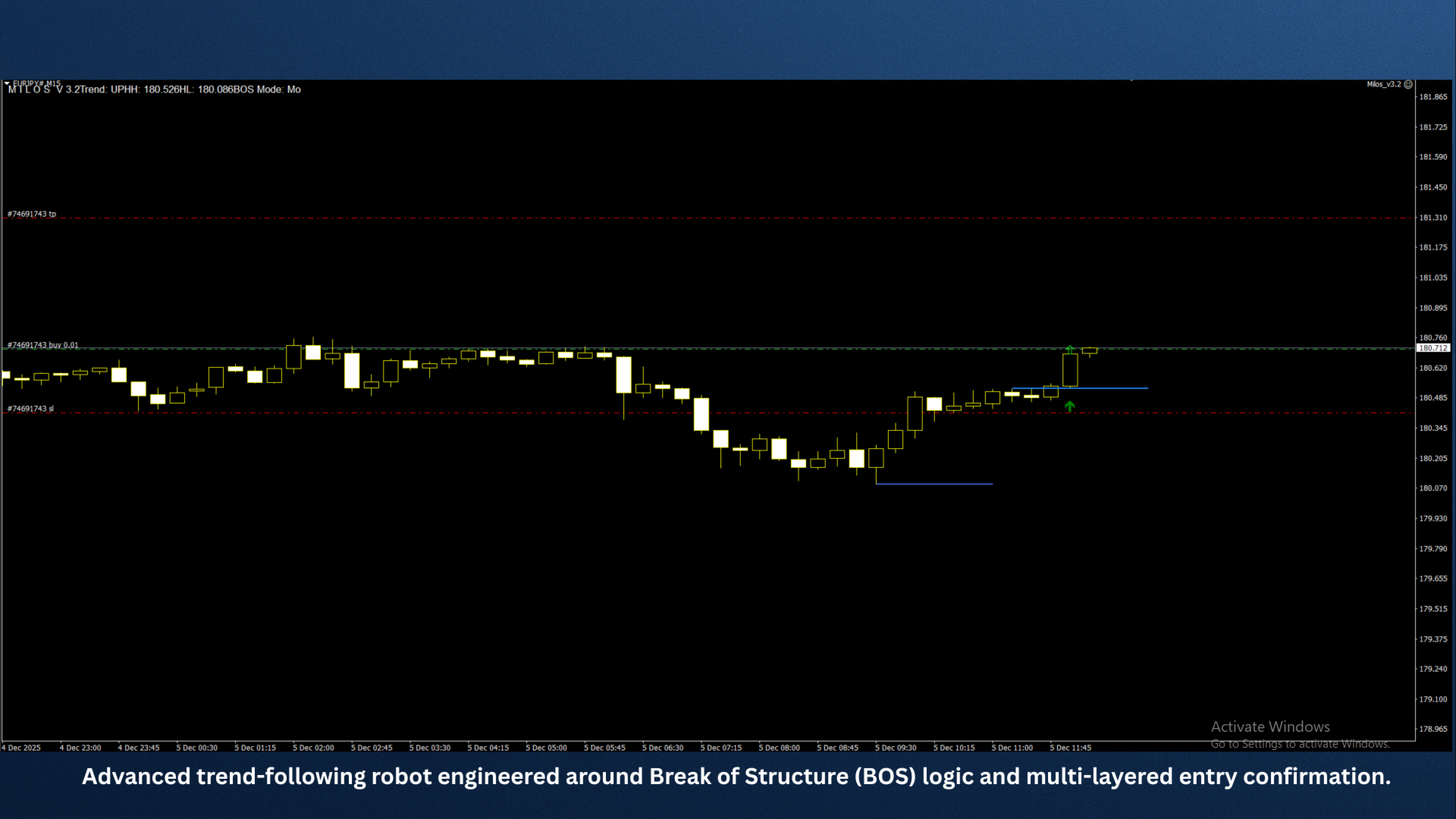
Milos v3.2 is an advanced trend-following robot engineered around Break of Structure (BOS) logic and multi-layered entry confirmation.
Designed for precision and robustness, Milos detects structural highs/lows, identifies valid trend direction, and executes trades only when the market confirms strength via a clean BOS event.
Once in a valid trend, Milos opens a primary position on the first BOS breakout. If price retraces without violating the overall structure, the EA executes a smart second-entry at the 50% retracement level, allowing deeper trend participation while keeping risk controlled.
The EA uses automatic magic numbering, works on all digit brokers, and is fully compliant with MQL Market validation requirements.
Ideal for traders who want a clean, structure-based algorithm that follows market flow without repainting and without unnecessary indicators.
Input Parameters (Descriptions)Below is a structured and professional list of all typical inputs for Milos v3.2.
If your EA has additional inputs, tell me and I’ll tailor the description exactly.
General Settings
Auto Magic Number
Automatically generates a unique Magic Number for each chart/symbol combination.
Magic Number (if manual mode is enabled)
Allows manual override of the magic number (optional).
Comments
Sets the trade comment label for all orders placed by the EA.
Trend & Structure Settings
Swing Look back
Number of bars used to detect HH, HL, LH, LL structures.
Use BOS Trading
Enables BOS-based entry logic (true/false).
BreakBufferPoints
Small price buffer to confirm clean break of structure and avoid false BOS triggers.
Entry Settings
UseSecondEntry
Enables the second 50% retracement entry logic.
Retrace Percentage (default 50)
Percentage retracement required after initial BOS to activate the second trade.
Max Spread
Maximum allowed spread to permit opening a trade.
Slippage
Acceptable slippage in points for order execution.
Money Management
Lot Size Mode
-
Fixed
-
Auto
-
Risk-based
Fixed Lots
Lot size used when LotSizeMode = Fixed.
Risk Percent
Percentage of account balance to risk per trade when in risk-based mode.
ATR Risk Saling
Stop Loss & Take Profit
Use Stop Loss
Enable/disable stop loss.
Stop Loss
Stop loss distance in pip
ATR and Swing SL
Use Take Profit
Enable/disable take profit.
Take Profit
Take profit distance in Pips
TSL_Activate
Enables trailing stop functionality.
TSL_Pips and ATR
Distance in points for trailing stop movement.
Break even
Filters
UseTimeFilter
Activates trading only during specified hours.
StartHour / EndHour
Trading window.
Use Market Filter
Choose between New York London and Tokyo
Trend Filters
Higher time frame confluence
Visual Settings
Show HUD
Turns on/off the on-screen information panel.
HUD_Color / HUD_Corner
Customization for display.
DrawStructureLines
Shows HH, HL, LL, LH lines and BOS markers on chart.