Modify and update SL or TP
- Utilità
- Versione: 1.0

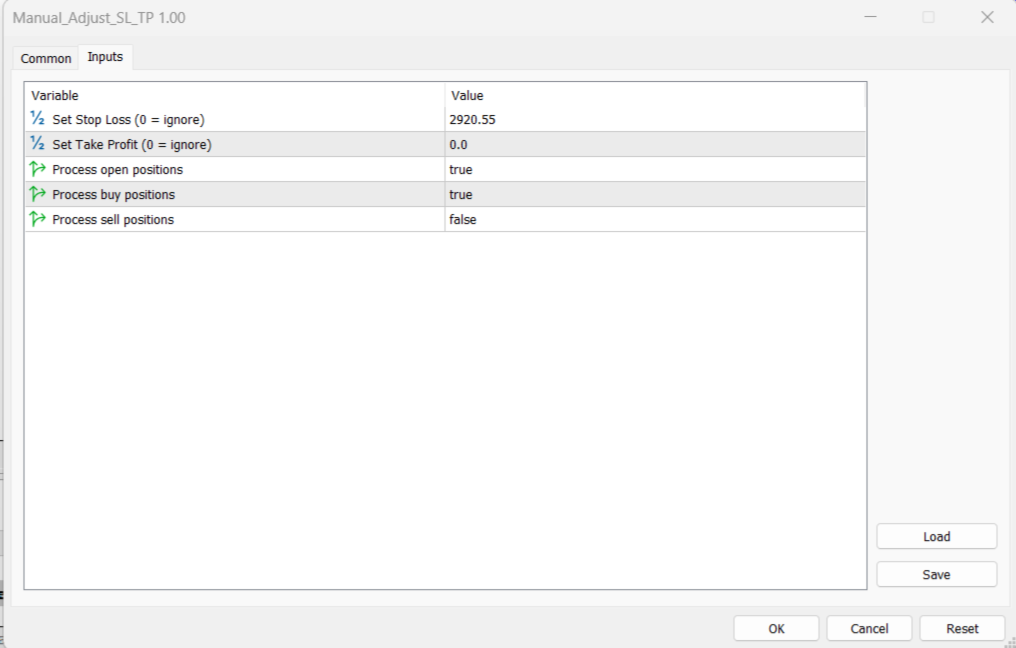
The Manual Adjust SL/TP EA streamlines your risk management by enabling you to manually specify new SL and TP price levels for your open positions. The Levels is Price value and is NOT a pips or points distance from the Entry Levels. The EA automatically validates your inputs against the broker’s stop-level requirements (minimum distance) to prevent order adjustment rejections. It offers filtering options so you can choose to apply adjustments only to Buy orders, Sell orders, or both.
Key Features:
- Automated Adjustments: On every tick, the EA checks open positions and applies your specified SL/TP price values if they meet the broker’s minimum distance criteria.
- Built-In Validation: Ensures that your manual SL/TP price levels are valid relative to the current market price (using BID for Buy positions and ASK for Sell positions).
- Order Filtering: Choose to process only Buy positions, Sell positions, or both.
- Easy to Stop any Adjustments: it offers flexibility to quickly disable open order processing without removing the EA, which can be useful during testing or if you want to pause updates, by setting 'process open position' to false at any time.
- Robust Error Handling: Provides clear feedback in the Journal, helping you identify and resolve any issues quickly.
Usage Instructions:
- Installation:
- Copy the EA file into your MQL5/Experts folder.
- Open MetaTrader 5 and refresh your Navigator panel.
- Setup:
- Attach the EA to the chart of the symbol you need to Adjust opened trades.
- In the EA’s input parameters, enter your desired Manual SL and Manual TP price values.
- Configure the filters by selecting whether to process Buy and/or Sell orders.
- Operation:
- The EA runs on every tick, checking all open positions on the attached chart.
- If the manual values are valid (i.e., they meet the broker's minimum stop distance), the EA will update the SL/TP accordingly.
- any new trade will be adjusted to the price values either to SL and/or TP that the user predefined in the EA inputs; to switch this option off you have to set 'process open positions' to false.
- Check the Journal tab for detailed logs of any adjustments or validation errors.
- Disclaimer:
- Always test the EA on a demo account before applying it to live trades.
- The EA is provided "as is" with no warranties. Use it at your own risk.