Panel Anywhere

5
[Description]

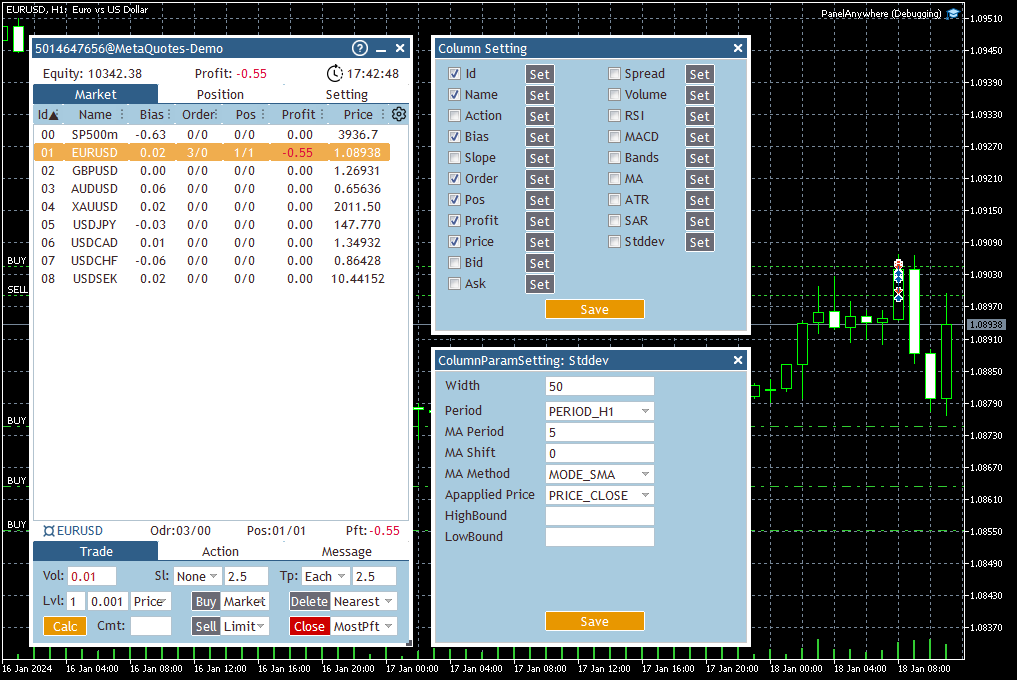
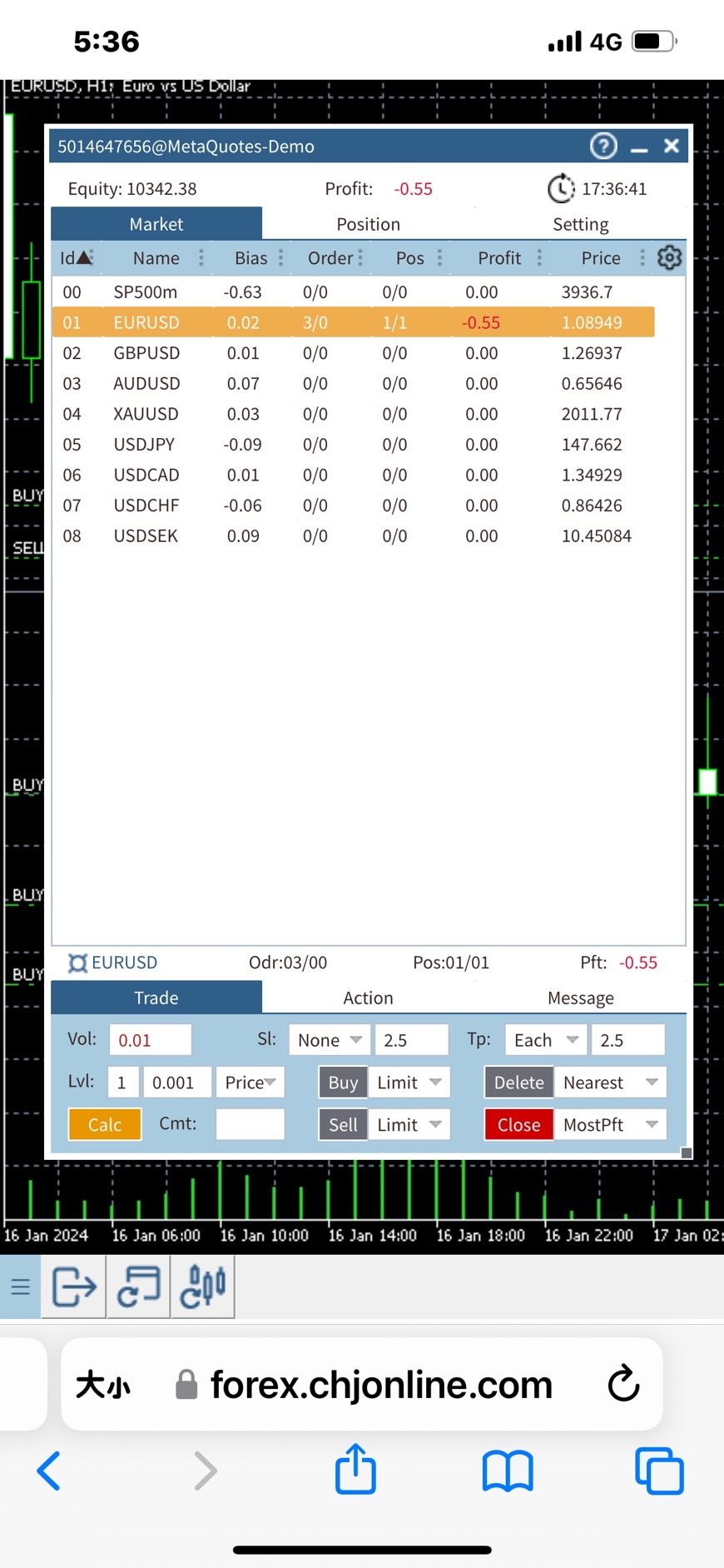
Panel Anywhere is a groundbreaking EA panel, being the first in the market to support browser operations. It addresses a pain point for all MT5 traders, offering a solution that has been lacking in the past. Additionally, the EA itself provides a comprehensive interface to meet all regular operational needs.


[Features]
  • Browser Support:
  •   - View EA panel information from the browser, allowing you to manage your account anywhere, unrestricted by a computer or RDP.
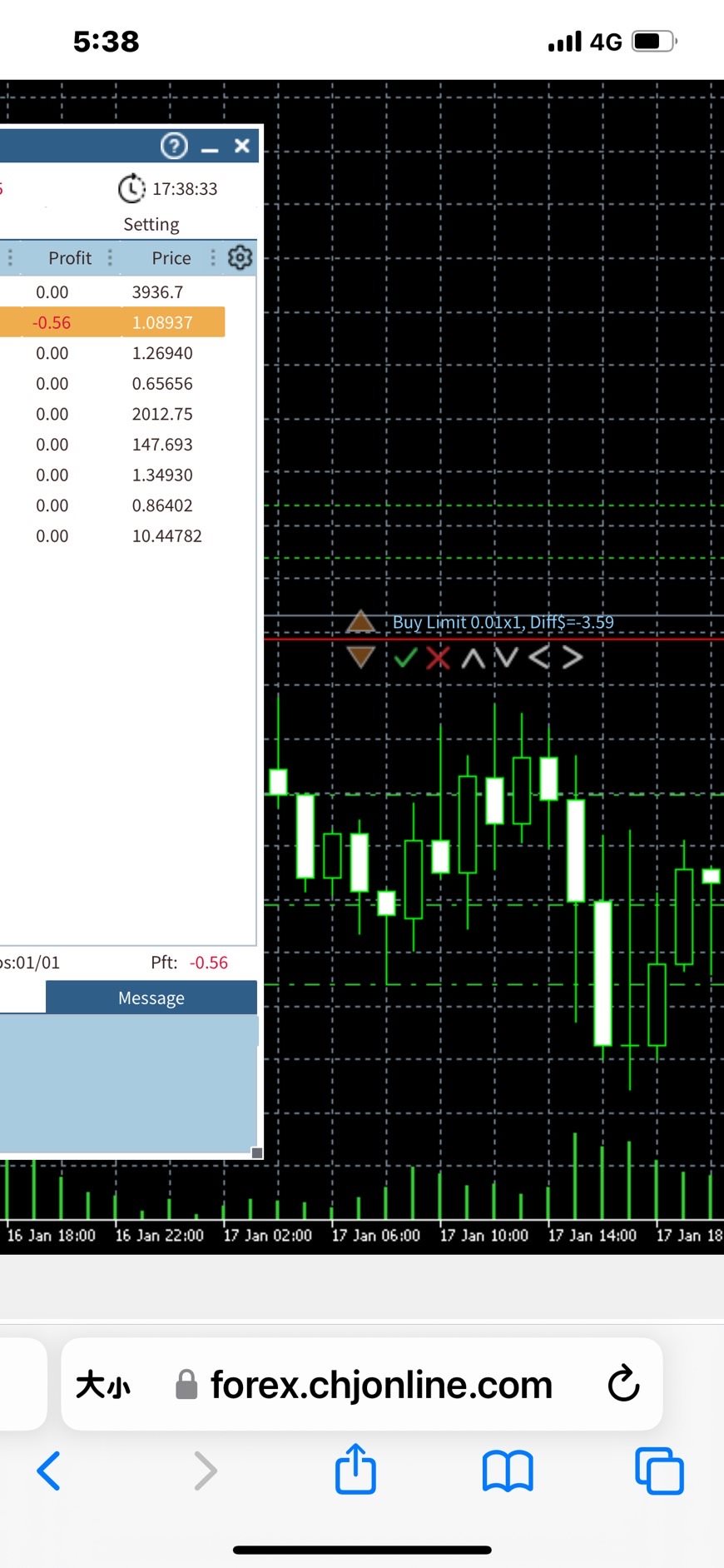
      - This EA can fully operate from a mobile browser, including checkboxes, input edits, combo boxes, dialogs, objects, notifications, and even mouse drag-and-drop.
      - Secure SSL connection using HTTPS and WSS protocols, with the option to set a password.
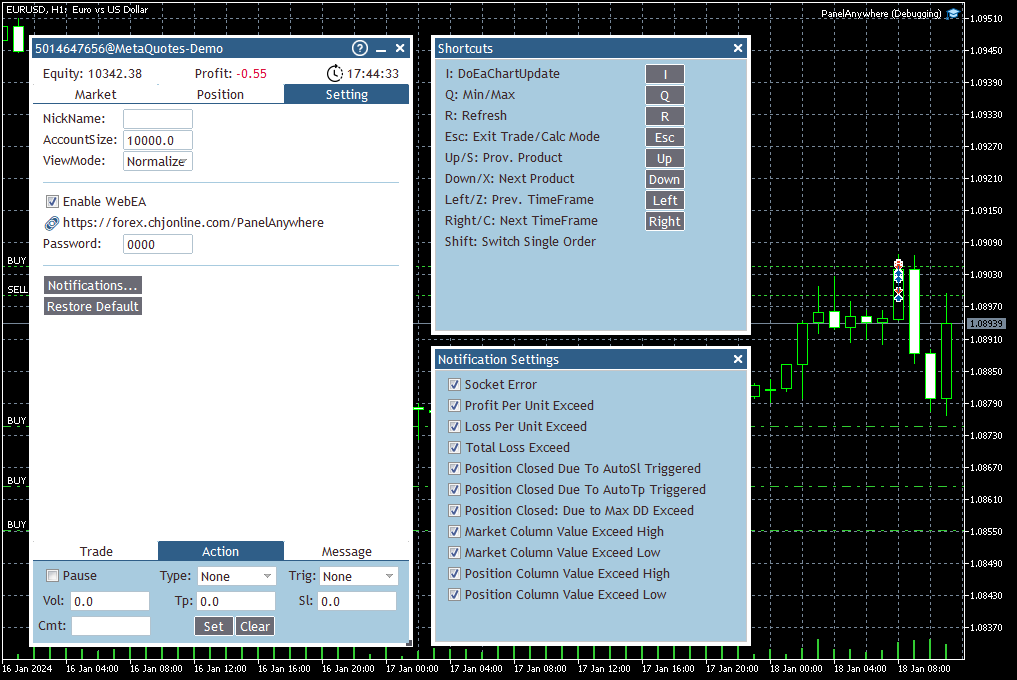
      - Shortcut key bar for quick EA control.
      - Dynamically adjust window size and position by dragging the header and the border.
      - Window docking on the left side.
      - Utilizes WebSocket for real-time network responsiveness, making it an optimal solution for web applications.
      - Supports desktop mouse and mobile touch operations, including drag-and-drop.
      - Enhanced market information to eliminate the need for built-in market views.
      - User-configurable UI and background size and ratio.

  • Market Information:
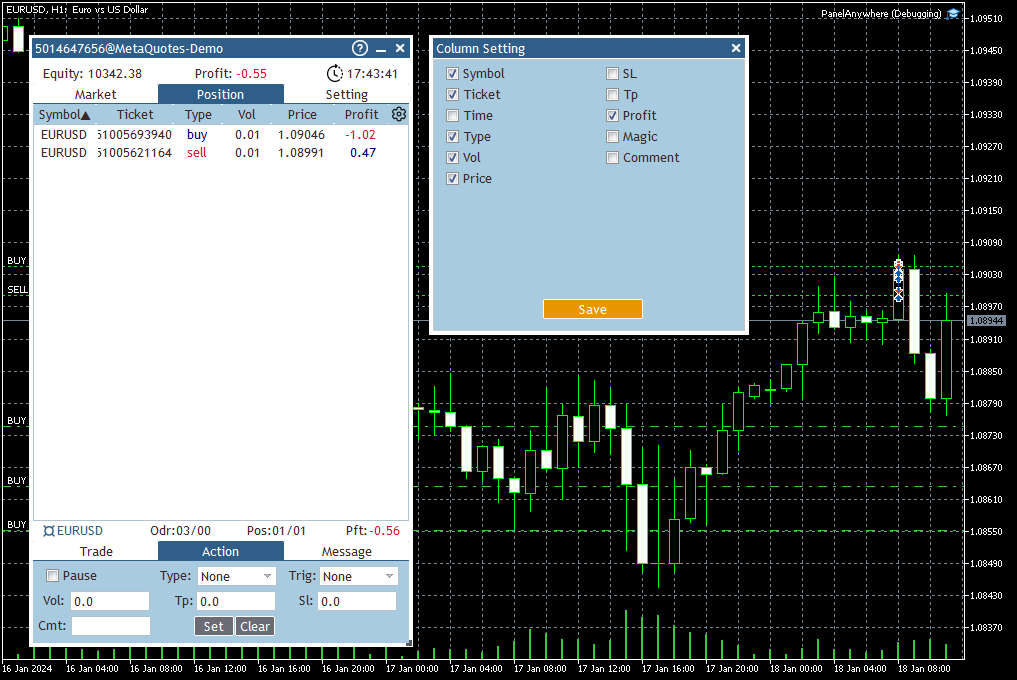
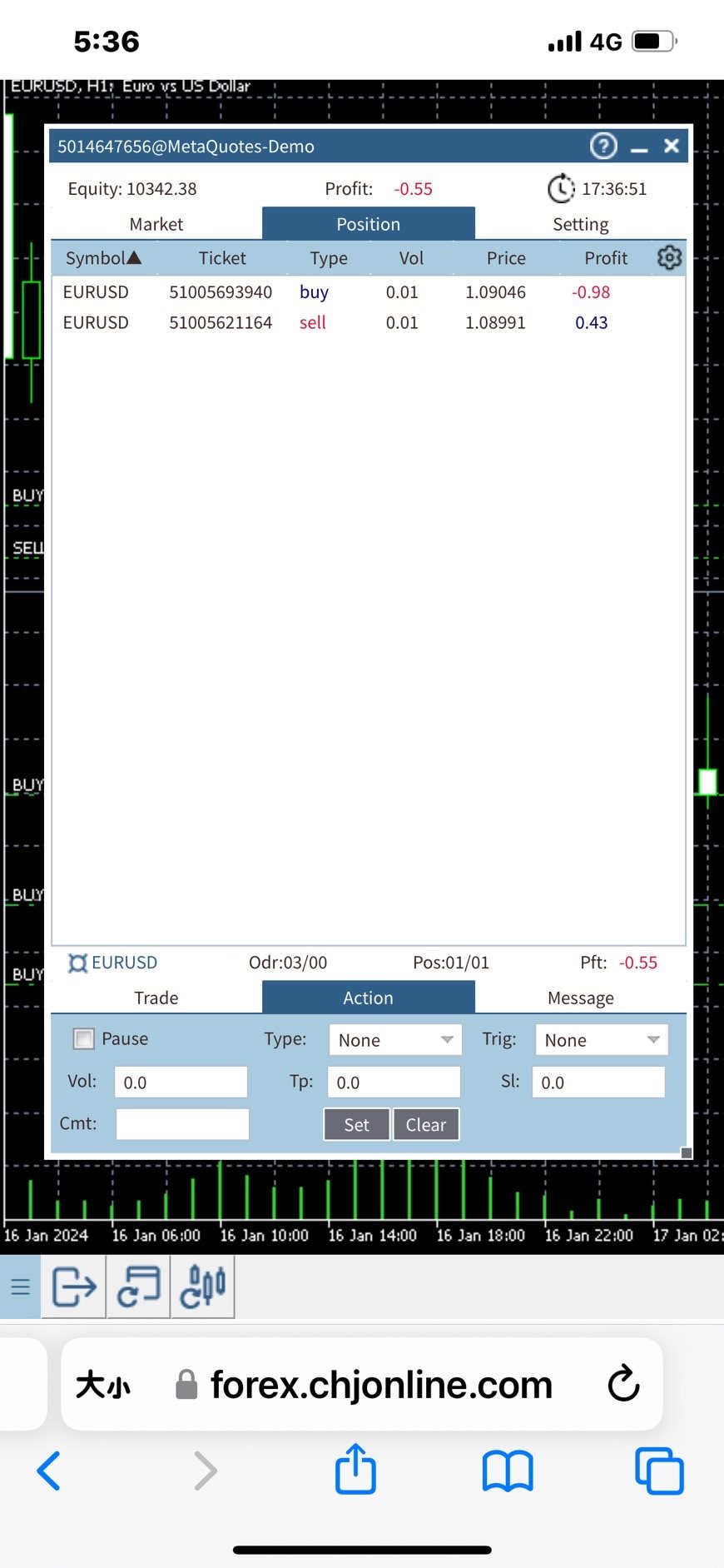
  •   - MarketView/PositionView for easy portfolio management.
      - GridView for simultaneous monitoring of multiple products, enabling quick switching of commodities and timeframes using arrow keys.
      - Enhanced Market View offers flexible information, sorting, and filtering.
      - Multiple columns with configurable indicators like Bias/RSI/MACD/Bands/MA/ATR/Sar/Stddev, with adjustable parameters for each indicator.
      - Set NotifyHigh/Low with different color displays and notification settings.
      - Trigger actions such as Buy/Sell/Delete/Close orders when conditions are met.

  • Trading:
  •   - Multiple reminder mechanisms and notification settings, including browser notification support.
      - Various automatic operations for Buy/Sell/Delete/Close.
      - Multiple order modes for Market/Limit/Stop, with customizable order quantity and distance settings, supporting arrow keys for quick switches.
      - Quick order mode for simultaneously placing multiple orders, with arrow keys for quick adjustments.
      - Multiple take profit and stop loss modes, with options for Each/Average and automatic unit conversion for Price/USD/EUR.
      - Account balance display modes: Money/Percentage.
      - Calculation functions, including profit and bias.


    [How To Start]

    1. Before starting the EA, ensure that the URL "forex.chjonline.com" is added in the allowed URL list. (Attention! This action may involve the transmission of sensitive data to the specified URL.)
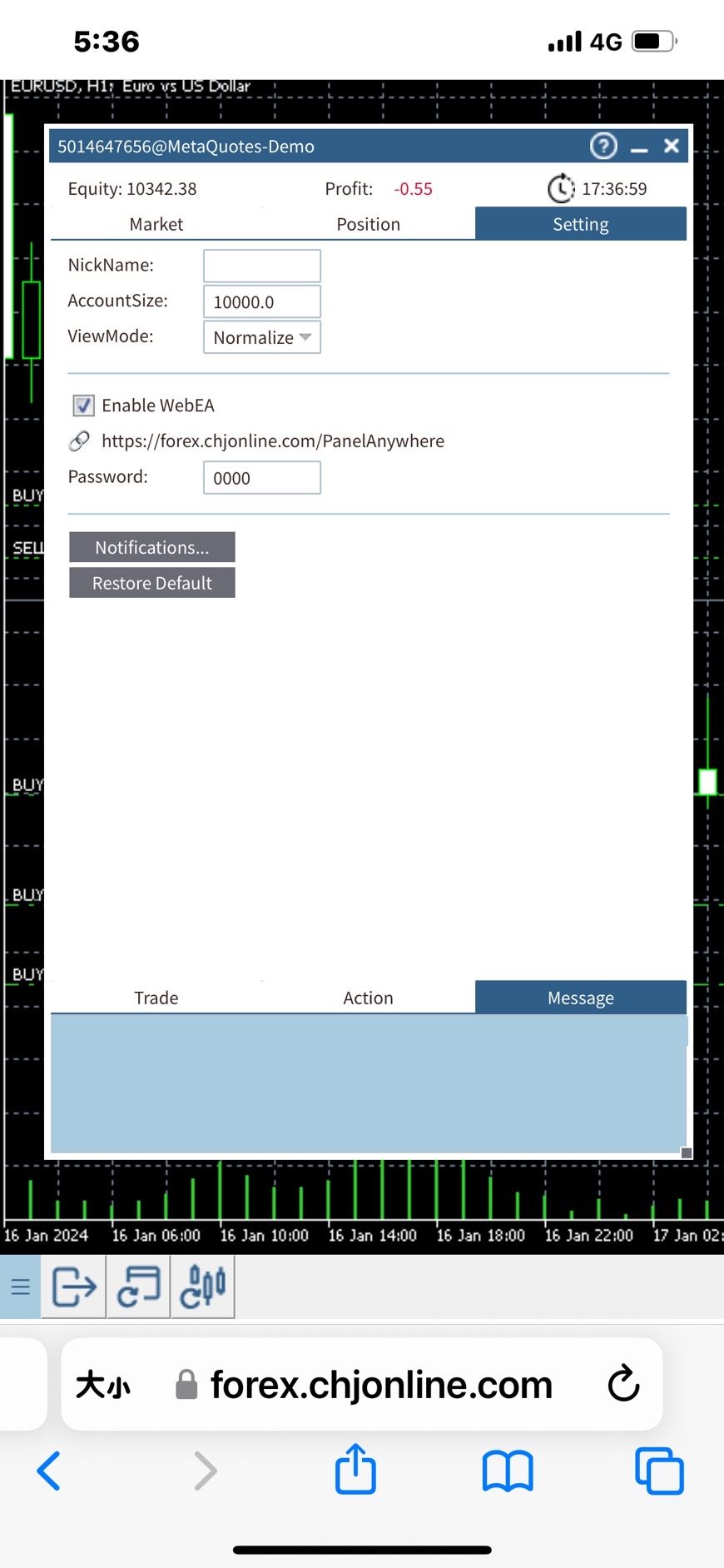
    2. Start the EA and navigate to the settings tab. Enable the WebEA checkbox.
    3. To prevent others from viewing your EA screen, please change the default password from "0000" to any string of your choice, or leaving it empty is also acceptable. (Attention! Please do not use your trade account password here due to security concerns.)

    4. Open a browser and go to "https://forex.chjonline.com/PanelAnywhere/". Enter your trade account number and the password set in step 3, then click login. You will then be able to view your EA's screen.


    [Cautions]

    - Due to system bugs, the EA may not auto restart while switching the chart if the system is too busy. To address this, a script is provided to periodically check if the EA is running. Contact us if needed.
    - This version does not work in tester mode.

    #tags: Web Panel, Web EA, Browser EA

    Thank you for your purchase. We always strive to provide quality service.


    [What's next]
    - Copy Anywhere EA will be introduced, allowing signal copying through a browser and integration with this interface, providing all functions in one EA.

    - Browser plugin support and real-time background updates, better integration with web terminal.


    [Disclaimer]
    PanelAnywhere is not responsible for any losses, damages, or liabilities arising from the use of our tools or reliance on any provided information. Remember, all trading and investment activities involve risks, and past performance is not indicative of future results. By using PanelAnywhere tools and information, you agree to take full responsibility for any and all gains or losses, whether financial, emotional, or otherwise.
    Recensioni 2
    Calogero Vella
    2457
    Calogero Vella 2024.04.16 09:27 
     

    Vielen Dank, funktioniert gut!

    Prodotti consigliati
    Free Global Stop Loss and Take Profit Setter with Break Even Free one click Stop Loss and Take Profit tool for manual trading. Apply a fixed SL and TP to every open position on the symbol, or move them all to break even, with a single button. It only modifies Stop Loss and Take Profit levels — it never opens or closes a trade. Set your SL and TP distance in points, click once, and every position on the current symbol is protected. The break even button moves stops to entry (or a configurable num
    FREE
    This utility automates Take Profit (TP) and Stop Loss (SL) levels for your trades, calculated in Money (Example : if you type 10, it means 10USD) . It ensures consistent risk management for all your positions. Crucial Note for Manual Traders: If you intend to use this utility on trades opened manually (without an Expert Advisor), you must change the 'Magic Number' setting to 0 (zero) . This allows the utility to correctly identify and manage your manual orders.
    FREE
    Stamina HUD
    Michele Todesco
    STAMINA HUD – Advanced Market & Trend Dashboard (MT5) STAMINA HUD   is a professional   market information panel   designed for traders who want   clarity, speed, and control   directly on the chart. It provides a   clean heads-up display (HUD)   with essential market data and   multi-timeframe trend direction , without cluttering the chart or generating trading signals. What STAMINA HUD Shows   Current Price   Spread (in real pips)   Today High–Low range (pips)   Average D
    FREE
    FiT Panel Pro
    Thonglak Janyakorn
    Overview FiT Panel Pro is a professional-grade trade management panel designed for MetaTrader 5 traders who demand speed, precision, and full control over their trades. Built with a modern dark-theme UI, it combines one-click execution with advanced risk management, visual SL/TP drag lines, automatic Fibonacci-based levels, and comprehensive order management — all in a single, compact panel. Whether you are a scalper, day trader, or swing trader, FiT Panel Pro gives you the edge you need to exec
    FREE
    GOM Trade Manager
    Wannapach Chinnaprapa
    GOM Trade Manager helps you execute trades the way you want it. Works on all instruments Forex, Commodities, & Crypto. It helps you with lot calculations, spread addition and balance calculations so you can just focus on actual trading. For full automatic planned management, stackable triggers and spread widening protection >> check out GOM Trade Manager Pro . ------------------------------------------NOTABLE FEATURES------------------------------------------ You set everything based on bid
    FREE
    MT5 AccountInfoEA
    Nikolaos Pantzos
    Account Info EA It is a tool that presents on the graph all the positions of the account, and specific information concerning the positions, but also the account. It enables the user to have an image of his account at a glance. Use like any expert advisor. You can't attach it in the same chart with other expert advisor. It does not have the ability to open or manage positions. You can attach it on any chart and any timeframe.
    FREE
    This utility keeps a watchful eye on your trading terminals and ensures that you are notified if any of them are disconnected. Simply attach the utility to a chart and connect to a monitoring service who can notify you. We use UptimeRobot for both VPS and terminal monitoring; however, any service supporting heartbeat monitoring can be employed. Many such services offer free plans and various notification methods, such as Cronitor.io
    FREE
    ================================================================ MATRIX CONDITION MONITOR Live Trade Condition Panel for MetaTrader 5 Fully Automatic -- Works with ALL Matrix EAs ================================================================ NEVER MISS A TRADE SETUP AGAIN Matrix Condition Monitor is a free utility that attaches to any chart and automatically checks all 10 trade conditions in real time -- showing you exactly why a trade will or will not open, and alerting you the moment ever
    FREE
    Trade assistant pro v8
    Ahmed Mohammed Bakr Bakr
    FREE FREE FREE Trade Assistant MT5 – Professional Trading & Risk Management Panel Trade Assistant MT5 is an advanced trading panel designed to help traders execute orders faster, safer, and more professionally . It simplifies manual trading by combining smart order management , precise risk control , and one-click execution , making it ideal for both beginners and advanced traders. This tool does not trade automatically . Instead, it empowers you with full control while applying professional-gra
    FREE
    Ninja MT5 Doctor
    Atsushi Katayama
    NINJA MT5 DOCTOR PANORAMICA NINJA MT5 Doctor è un'utility MT5 gratuita e di sola lettura che acquisisce un'istantanea diagnostica una tantum del terminale, del conto, dei grafici aperti, dello storico selezionato e del simbolo del grafico host corrente. È un'utility in formato Expert Advisor, non un EA di trading né un indicatore. I nomi del pannello e dei parametri di input sono in inglese. COSA CONTROLLA Verifica la connessione al server del broker, le autorizzazioni al trading del terminale e
    FREE
    Core function Intelligent transaction management one-click opening and closing operation, which supports user-defined lots to set multiple closing modes: all closing, closing by direction and closing by profit and loss status. Professional risk control, real-time risk monitoring and spread control to avoid high-cost trading environment. Visual control panel has an intuitive graphical interface, and all functions can be operated with one button to display position information, profit and loss sta
    FREE
    Copy Trade PRO - Slave EA (FREE with Master EA) Receive Trades Automatically from Your Master Account Copy Trade PRO - Slave EA is a professional trade receiver designed for MetaTrader 5. It automatically mirrors trades from the Copy Trade PRO Master EA with fast execution, intelligent symbol matching, and flexible risk management.    Telegram Support Link :   @GoldBotXSupport Need help or have questions? Contact me on WhatsApp:      https://wa.me/447378910922 This Slave EA is complete
    FREE
    GDS RiskLab TradeDesk Free Manual Trading Desk and Risk-Control Utility for MetaTrader 5 GDS RiskLab TradeDesk is a free chart-based utility for traders who want a cleaner manual trading workspace in MetaTrader 5. It is designed as a simple execution-support and risk-control panel. The goal is to keep the trading process more organized: review the chart, plan the trade, keep risk visible and execute manually with more structure. This tool does not generate buy or sell signals. It does not predic


    FREE
    RULEBOOK — The Ultimate Trading Dashboard & AI Coach (NEW UPDATE) Before you read everything below, let me tell you in one sentence what Rulebook is: It's a comprehensive MetaTrader trading dashboard and journal platform, but unlike TradeZella or other journal services, there are absolutely no monthly fees — you pay once and use it for a lifetime. Transform your MetaTrader 5 into a professional, data-driven trading cockpit! Rulebook is the bridge between your MetaTrader and a state-of-the-art we
    FREE
    Manual position management. Missing SL. Price moves against you. No protection. Trade Manager Lite automates Stop Loss, Take Profit, Trailing Stop, and Break-Even for your open positions. Attach to one chart. Configure your default SL/TP distance. Let it manage your positions automatically. What's Included (FREE Version) Auto SL/TP: Applies missing Stop Loss and Take Profit to positions based on your configured distance in points Trailing Stop: Adjusts SL dynamically as price moves in your favor
    FREE
    Signalator Trade Summary Panel MT5 is a free local MetaTrader 5 utility that gives traders a clear account and open-trade overview directly on the chart. It is part of the Signalator Trading and Analysis Ecosystem — a growing set of practical MetaTrader tools for account monitoring, market analysis, symbol scanning, alerts and trader workflow improvement. This panel focuses on the account and position side of the workflow. It helps you quickly understand floating profit or loss, account status,
    FREE
    Copy your MT5 trades to accounts anywhere in the world with the   MetaToolsLab Slave EA . Unlike local copiers that only work between terminals on the   same   PC or VPS, MetaToolsLab uses a secure cloud relay — so you can broadcast your trades to followers across   different computers, VPS providers, brokers, and continents , with   sub-second delivery   and   no broker passwords . Whether you're a signal provider, a multi-account trader, or an account manager, the Slave EA installs in about a
    FREE
    Total Closed Trades – MT5 Indicator The Total Closed Trades indicator for MetaTrader 5 provides a quick, visual overview of your trading performance by displaying a simple and intuitive 3-value breakdown : Total Trades – The total number of closed trades. Winning Trades – Number of profitable trades. Losing Trades – Number of losing trades. Instead of digging through reports, traders can instantly monitor their historical performance with a compact and elegant pie chart-style widget. Key
    FREE
    Professional Trading Dashboard Un pannello professionale di monitoraggio del conto per MetaTrader 5 che consolida dati del conto in tempo reale, storico giornaliero delle operazioni e statistiche mensili in un'unica visualizzazione direttamente sul grafico. Professional Trading Dashboard è un indicatore utilitario per MetaTrader 5 progettato per offrire ai trader una visione chiara e strutturata del proprio conto in qualsiasi momento. Invece di navigare tra più finestre del terminale, tutte le i
    FREE
    Copy your MT5 trades to accounts anywhere in the world with the   MetaToolsLab Master EA . Unlike local copiers that only work between terminals on the   same   PC or VPS, MetaToolsLab uses a secure cloud relay — so you can broadcast your trades to followers across   different computers, VPS providers, brokers, and continents , with   sub-second delivery   and   no broker passwords . Whether you're a signal provider, a multi-account trader, or an account manager, the Master EA installs in about
    FREE
    Free MetaTrader 5 indicator that displays "CALL IT A DAY" when London & New York sessions close. Customizable alerts, session tracking, and a guilt-free reminder to log off. Perfect for workaholic traders! Tired of staring at charts when the market’s already clocked out? Session Guardian   is your sassy trading assistant that slaps a giant   "CALL IT A DAY"   on your screen when both London   and   New York sessions are closed—because even traders deserve happy hour. Key Features:   Big, Bo
    FREE
    Important Lines
    Terence Gronowski
    4.88 (24)
    This indicator displays Pivot-Lines, preday high and low, preday close and the minimum and maximum of the previous hour. You just have to put this single indicator to the chart to have all these important lines, no need to setup many single indicators. Why certain lines are important Preday high and low : These are watched by traders who trade in a daily chart. Very often, if price climbs over or falls under a preday low/high there is an acceleration in buying/selling. It is a breakout out of a
    FREE
    Trade management panel for MetaTrader 5. It lets you place orders and manage open positions from a panel on the chart, without opening separate order windows. It works on any symbol and timeframe, on hedging and netting accounts. Layout and display The panel has two layouts. Single shows all controls in one view. Tabs splits the controls into separate tabs for a smaller footprint. You can hide the panel to see the chart behind it and restore it when needed. The panel scales with the screen res
    FREE
    Trade Dispensary Connect è un'utility EA per MT5 progettata per inviare operazioni in formato JSON al Trade Dispensary Trade Copyr tramite Webhook. Se Trade Dispensary è in esecuzione sul tuo computer locale, utilizza semplicemente http://127.0.0.1 :5000/webhook/mt5/[ACCOUNT_ID] come URL del webhook. Se Trade Dispensary è in esecuzione su un altro PC, ottieni l'indirizzo/dominio del computer. In questo caso, si consiglia un servizio di tunneling come Pinggy o Ngrok. Questo EA per MT5 è specifi
    FREE
    BuntuFx Copier
    Muhammad Syahrul
    First 10 Copies is Free BuntuFx Copier Pro is a fast and reliable trade copier for synchronizing orders between Master and Slave accounts on MetaTrader 4 and MetaTrader 5. Main Features MT4 and MT5 cross-platform copying Market and pending order synchronization Automatic SL, TP, partial close, and order close copying Multiple lot modes: multiplier, fixed lot, risk percentage, and lot sequence Symbol mapping and suffix support Magic number, symbol, direction, and comment filters Reverse trading
    FREE
    Position Size Caculator
    Nguyen Van Chien
    5 (3)
    Calculating the volume of orders every time you create an order is an extremely important thing in risk management Let this tool simplify your work! ----------------------------------------------------- How to use? Attach the indicator to the chart and set its parameters:  Risk size in %  or money and Risk Reward Ratio. Click on the ON button and locate the horizontal line to your would-be StopLoss level. Options: Click on the Pending/Instant button to locate the horizontal line  to your would-b
    FREE
    SmartRisk Trade Tool — One-Click Risk-Based Trade Panel SmartRisk Trade Tool is a manual trading panel for MetaTrader 5 built around position sizing and risk control rather than signal generation. It does not analyze the market or suggest trade direction — it exists so that every order sent from the chart already has a calculated lot size, stop loss, and take profit consistent with a risk value the trader chooses, removing the manual arithmetic that normally happens between deciding to trade and
    FREE
    BlueEdge Trading Manager (MT5) BlueEdge Trading Manager is a clean, fast manual trade manager panel for MetaTrader 5. It helps you open trades quickly (BUY/SELL), manage up to 5 take-profits , and automatically handle partial closes while drawing clear SL/TP lines directly on the chart. This product is NOT a trading strategy and does not generate entry signals. It is a trade execution + position management tool for scalpers and manual traders. Main Features One-click BUY / SELL from a compact pa
    FREE
    MQT Lot Size Calculator MT5
    Josue Fernando Servellon Fuentes
    MQT Lot Size Calculator calcola la dimensione esatta del lotto per il rischio che scegli — una percentuale del capitale o un importo fisso — usando tre linee trascinabili sul grafico: Ingresso, Stop Loss e Take Profit. Gratuito, leggero e solo di calcolo: non apre, modifica o chiude mai posizioni. Come funziona (riepilogo della logica): La direzione è dedotta dalla posizione dello Stop Loss (sotto l'ingresso = acquisto, sopra = vendita). Importo di rischio = capitale x percentuale di rischio (o
    FREE
    Kiwi Multi Pairs Indicator MT5 v1.01 Kiwi Multi Pairs Indicator MT5 is a multi-market and multi-timeframe confirmation dashboard for MetaTrader 5. Instead of opening many charts and checking indicators individually, Kiwi Multi Pairs Indicator brings 9 markets, 5 technical indicators and 7 timeframes together in one easy-to-read dashboard. The indicator is designed to help traders quickly identify bullish, bearish and mixed market conditions and compare confirmation across different symbols and t
    FREE
    Gli utenti di questo prodotto hanno anche acquistato
    Trade Assistant MT5
    Evgeniy Kravchenko
    4.41 (216)
    It helps to calculate the risk per trade, the easy installation of a new order, order management with partial closing functions, trailing stop of 7 types and other useful functions. Additional materials and instructions Installation instructions - Application instructions - Trial version of the application for a demo account Line function -   shows on the chart the Opening line, Stop Loss, Take Profit. With this function it is easy to set a new order and see its additional characteristics bef
    Forex Trade Manager MT5
    InvestSoft
    4.98 (673)
    Benvenuto a Trade Manager EA, lo strumento definitivo per la gestione del rischio , progettato per rendere il trading più intuitivo, preciso ed efficiente. Non è solo uno strumento per l'esecuzione degli ordini, ma una soluzione completa per la pianificazione delle operazioni, la gestione delle posizioni e il controllo del rischio. Che tu sia un principiante, un trader avanzato o uno scalper che necessita di esecuzioni rapide, Trade Manager EA si adatta alle tue esigenze, offrendo flessibilità s
    Astro Trade MT5
    Indra Maulana
    5 (2)
    25% discount due to the launch of AstroTrade : 100$ >>> 75$ (Only for the first 10 purchases) AstroTrade Trading Assistant AstroTrade is a comprehensive multi-functional trading utility developed for the MetaTrader 5 platform. It integrates essential tools for trade execution, risk management, and technical monitoring into a single unified interface. The application is designed to assist traders in managing their daily operations through a visual and structured environment. Visual Trade Execu
    TradePanel MT5
    Alfiya Fazylova
    4.88 (167)
    Trade Panel è un assistente commerciale multifunzionale. L'applicazione contiene più di 50 funzioni di trading per il trading manuale e permette di automatizzare la maggior parte delle attività commerciali. Prima dell'acquisto, è possibile testare la versione dimostrativa su un conto demo. Scaricare la versione di prova dell'applicazione per un account dimostrativo: https://www.mql5.com/it/blogs/post/762419 . Istruzioni complete qui . Commercio. Consente di effettuare operazioni di trading con u
    Local Trade Copier EA MT5
    Juvenille Emperor Limited
    4.97 (146)
    Sperimenta una copia di trading eccezionalmente veloce con il   Local Trade Copier EA MT5 . Con la sua facile configurazione in 1 minuto, questo copiatore di trading ti consente di copiare i trades tra diversi terminali di MetaTrader sullo stesso computer Windows o su Windows VPS con velocità di copia ultra veloci inferiori a 0.5 secondi. Che tu sia un trader principiante o professionista,   Local Trade Copier EA MT5   offre una vasta gamma di opzioni per personalizzarlo alle tue esigenze speci
    ================================================================================ POC BREAKOUT - V20.72. Full Professional Grade Toolkit ================================================================================ POC Breakout is a full MetaTrader 5 trading dashboard for discretionary traders who want breakout signals, Point of Control (POC) context, volume profiles, order flow, market structure, news, alerts, and advanced trade planning in one professional workspace. Attached directly to you
    Versione Beta Telegram to MT5 Signal Trader è quasi pronto per il rilascio ufficiale in versione alpha. Alcune funzionalità sono ancora in fase di sviluppo e potresti riscontrare piccoli bug. Se riscontri problemi, ti preghiamo di segnalarli, il tuo feedback aiuta a migliorare il software per tutti. Telegram to MT5 Signal Trader è uno strumento potente che copia automaticamente segnali di trading da canali o gruppi Telegram al tuo account MetaTrader 5 . Supporta canali pubblici e privati e cons
    Telegram to MT5 MultiChannel Copier
    Sergio Marquez Uroz
    4.33 (6)
    Telegram to MT5 Multi-Channel Copier copia automaticamente i segnali di trading dai tuoi canali Telegram direttamente in MetaTrader 5. Nessun bot, nessuna estensione del browser, nessuna copia manuale. Ricevi un segnale su Telegram e l'EA apre l'operazione sul tuo terminale in pochi secondi. Il prodotto include due componenti: un'applicazione Windows che ascolta i tuoi canali Telegram, e questo Expert Advisor che esegue i segnali sul tuo terminale MT5. È disponibile anche una versione per MT4. G
    Grid Manual MT5
    Alfiya Fazylova
    4.73 (22)
    Grid Manual è un pannello di trading per lavorare con una griglia di ordini. L'utilità è universale, ha impostazioni flessibili e un'interfaccia intuitiva. Funziona con una griglia di ordini non solo nella direzione delle perdite, ma anche nella direzione dell'aumento dei profitti. Il trader non ha bisogno di creare e mantenere una griglia di ordini, lo farà l'utilità. È sufficiente aprire un ordine e il manuale di Grid creerà automaticamente una griglia di ordini per esso e lo accompagnerà fino
    Trade copier MT5
    Alfiya Fazylova
    4.58 (52)
    Trade Copier è un'utilità professionale progettata per copiare e sincronizzare le transazioni tra conti di trading. La copiatura avviene dal conto/terminale del fornitore al conto/terminale del destinatario, che sono installati sullo stesso computer o vps. PROMOZIONE - Se avete già acquistato il "Trade copier MT5", potete ottenere gratuitamente il "Trade copier MT4" (per la copia MT4 > MT5 e MT4 < MT5). Per maggiori informazioni sulle condizioni, vi preghiamo di contattarci tramite messaggi priv
    Exp COPYLOT CLIENT for MT5
    Vladislav Andruschenko
    3.97 (35)
    Copiatore professionale di trade per MetaTrader 5 Un copiatore di trade veloce, professionale e affidabile per MetaTrader . COPYLOT consente di copiare operazioni Forex tra terminali MT4 e MT5 con supporto per conti Hedge e Netting . La versione MT5 di COPYLOT supporta: - MT5 Hedge → MT5 Hedge - MT5 Hedge → MT5 Netting - MT5 Netting → MT5 Hedge - MT5 Netting → MT5 Netting - MT4 → MT5 Hedge - MT4 → MT5 Netting Versione MT4 Descrizione completa + DEMO + PDF Come acquistare Come installare Come ot
    HINN MagicEntry Extra
    ALGOFLOW OÜ
    4.71 (17)
    LIMITED SUMMER SALE -40% !   ONLY $30 insead of $50!  Maximum real discount!  ONLY UNTIL 08/22 HINN MAGIC ENTRY – the ultimate tool for entry and position management! SIMPLE. FASTEST. INTUITIVE. MAX AUTOMATED. Place orders by selecting a level directly on the chart! full description   ::  demo-version  :: 60-sec-video-description Key features: - Market, limit, and pending orders - Automatic lot size calculation - Automatic spread and commission accounting - Unlimited partitial take-profits  -
    Telegram To MT5 Ultra
    Mirel Daniel Gheonu
    5 (4)
    Telegram To MT5 — Copiatore di segnali Trasforma le indicazioni di trading dei tuoi canali Telegram in veri ordini MT5 — automaticamente, su quanti account vuoi, con rischio e regole totalmente sotto il tuo controllo. Telegram To MT5 collega i canali VIP / di segnali che già segui su Telegram al tuo terminale MetaTrader 5. Un'app desktop companion gratuita legge i messaggi (anche dai canali che bloccano i bot), e questo Expert Advisor li esegue sul tuo conto — applicando le tue impostazioni di r
    Power Candles Strategy Scanner - Strumento di ricerca configurazioni multi-simbolo con ottimizzazione automatica Power Candles Strategy Scanner utilizza lo stesso motore di auto-ottimizzazione che alimenta l'indicatore Power Candles, applicandolo a tutti i simboli presenti nel tuo Market Watch, uno accanto all'altro. Un unico pannello ti indica quali simboli sono statisticamente negoziabili in questo momento, quale strategia è vincente su ciascuno di essi, la coppia ottimale di Stop Loss / Take
    Premium Trade Manager - Il pannello di trading con un coach integrato Premium Trade Manager porta un coach di trading direttamente nel tuo grafico, con un motore di esecuzione completo al di sotto. Imposta il trade come fai sempre, poi lascia che Max, il tuo coach di trading IA, legga esattamente quel setup rispetto al tuo conto live e ti dia un verdetto chiaro prima che tu confermi: lo stop rispetta un approccio disciplinato, il rischio è ragionevole, c'è un evento ad alto impatto tra pochi min
    Timeless Charts
    Samuel Manoel De Souza
    5 (8)
    Timeless Charts è un'utilità di trading completa progettata per trader professionisti. Combina tipi di grafici personalizzati come Grafici a Secondi e Renko con analisi avanzata del flusso ordini tramite Footprints , Clusters , Profili di Volume , studi VWAP e strumenti di analisi ancorata per una visione più approfondita del mercato. Il trading e la gestione delle posizioni vengono eseguiti direttamente dal grafico tramite un pannello integrato di gestione delle operazioni , mentre Market Repla
    Footprint Chart Pro — Professional OrderFlow EA for MetaTrader 5 Version 6.34 | Professional tool for real traders | Institutional-Grade Visualization DEMO USERS - PLEASE SELECT EVERY TICK / REAL TICK WHEN TESTING AND YOU HAVE DOWNLOADED HISTORICAL DATA. IF YOU SEE A WAITING SCREEN AND IT IS NOT DOWNLOADING, IT MEANS YOU HAVE LOW HISTORICAL DATA. TRY 1 MIN AND 5 MIN FIRST ON 1 DAY DATA. ONE DAY DATA SHOULD BE THE NEWEST AND MOST CURRENT DATE. PLEASE WAIT UNTIL THE MARKET HAS ROLLED OVER PERIOD.
    FarmedHedge Pair Trading Dashboard
    Tanapisit Tepawarapruek
    5 (3)
    Farmed Hedge Yield Farming | All Markets (Manual - Hybrid - Semi/Automated EA) VERIFIED TRADING RESULTS - Farmed Hedge Yield Axi Copy:  https://www.mql5.com/en/signals/2356376 - Farmed Hedge Yield Exn Copy:   https://www.mql5.com/en/signals/2356404 - Farmed Hedge Yield V Copy:  https://www.mql5.com/en/signals/2357156 * Before purchasing, please feel free to send me a message if you have any questions about the product or setup. ** After purchase,  Contact me via private message to receive t
    Trade Copier Ultimate
    Janitha Sandaruwan Amaradasa Wickramasingha Arachchilage
    5 (4)
    Trade Copier Ultimate - Telegram to MT5 Signal Copier Trade Copier Ultimate automatically copies Telegram trading signals into MetaTrader 5. The EA can read signal messages, detect the symbol, order type, entry price, Stop Loss, Take Profit levels and selected update commands, then execute or manage the trade in MT5 using your lot and risk settings. It is more than a basic Telegram to MT5 copier. TCU also supports Bot API and user-account Bridge workflows, Discord signal routing, local MT5 to MT
    Trade Dashboard MT5
    Fatemeh Ameri
    4.95 (132)
    Trade Dashboard simplifies how you open, manage, and control your trades, with built-in lot size calculation. It allows you to execute trades, manage risk, and control positions directly on the chart, with tools such as partial close, breakeven, and trailing stop. Designed to reduce manual work and help you stay focused on your trading decisions. A demo version is available for testing. Detailed explanations of features are provided within the MQL5 platform. Installation instructions are include
    Trading Chaos Expert
    Gennadiy Stanilevych
    5 (11)
    This software has no equals in the world and represents a universal trade "console" covering trading signals, automated market entry, setting of Stop Loss and Take Profit, as well as Trailing Profit for multiple trades at the same time in a single open window. Intuitive control of the Expert Advisor in "three clicks" ensures a comprehensive use of all its functions on different computers, including tablets PCs. Interacting with additional signal indicators that mark the chart to give a real mark
    YuClusters
    Yury Kulikov
    4.93 (43)
    Attention: You can view the program operation in the free version  YuClusters DEMO .  YuClusters is a professional market analysis system. The trader has unique opportunities to analyze the flow of orders, trade volumes, price movements using various charts, profiles, indicators, and graphical objects. YuClusters operates on data based on Time&Sales or ticks information, depending on what is available in the quotes of a financial instrument. YuClusters allows you to build graphs by combining da
    Custom Alerts AIO: Monitora tutti i mercati — senza alcuna configurazione Panoramica Custom Alerts AIO è una soluzione di monitoraggio dei mercati pronta all’uso che non richiede alcuna configurazione. Tutti gli indicatori necessari — FX Power, FX Volume, FX Dynamic, FX Levels, IX Power — sono integrati internamente. Non vengono mostrati grafici, rendendolo ideale per generare alert in tempo reale in modo discreto ed efficiente. Supporta tutte le classi di asset offerte dal tuo broker: Forex,
    Welcome to ENTRY IN THE ZONE WITH SMC MULTI TIMEFRAME Entry In The Zone and SMC Multi Timeframe is a real-time market analysis tool based on Smart Money Concepts (SMC), designed to analyze market structure, price direction, and key trading zones. It supports both Single-Timeframe Analysis and Multi-Timeframe Analysis, providing a clearer view of the overall market structure across multiple timeframes, with real-time BUY / SELL signals that do not repaint. It is designed to help filter trading op
    Signal Trading View to MT5 Pro
    Mirel Daniel Gheonu
    4.5 (2)
    Signal TradingView to MT5 Pro Automator Esecuzione professionale istantanea tra TradingView e MetaTrader 5 Automatizza la tua strategia di trading con il ponte di comunicazione più robusto tra gli alert di TradingView e l'esecuzione reale in MT5. Progettato per i trader che richiedono velocità, flessibilità e una gestione del rischio impeccabile, questo Expert Advisor trasforma qualsiasi messaggio di avviso in un preciso ordine a mercato o limite. PUNTI DI FORZA E VANTAGGI Motore di Parsing Univ
    Seconds Chart MT5
    Boris Sedov
    4.61 (18)
    Seconds Chart - uno strumento unico per creare grafici in secondi su MetaTrader 5 . Con Seconds Chart , puoi generare grafici con timeframe definiti in secondi, ottenendo una flessibilità e una precisione d'analisi ideali, non disponibili nei grafici standard in minuti o ore. Ad esempio, il timeframe S15 indica un grafico con candele di 15 secondi. Puoi utilizzare qualsiasi indicatore e Expert Advisor con supporto per simboli personalizzati. Lavorare con loro è comodo quanto operare sui grafici
    Trade Manager DaneTrades
    Levi Dane Benjamin
    4.23 (30)
    Trade Manager per aiutarti a entrare e uscire rapidamente dalle operazioni calcolando automaticamente il tuo rischio. Incluse funzionalità che ti aiutano a prevenire l'eccessivo trading, il vendetta trading e il trading emotivo. Le operazioni possono essere gestite automaticamente e i parametri di performance del conto possono essere visualizzati in un grafico. Queste caratteristiche rendono questo pannello ideale per tutti i trader manuali e aiuta a migliorare la piattaforma MetaTrader 5. Suppo
    Anchor Trade Manager
    Kalinskie Gilliam
    5 (7)
    Anchor: The EA Manager Your EAs manage their own trades. Anchor manages the account around them. Anchor gives you one place to control your EAs, manage risk and decide when trading is allowed. Any EA, any vendor, any broker or symbol. No source-code changes required. The Problem Most EAs only know what they are doing. They cannot see when another EA is already trading, when several EAs open and are stacking risk or when the account has reached your loss limit. Even using just one EA, it may not
    Scarica la demo funzionante Copy Cat More (Gatto Copione) — Copiatore di Trade (Trade Copier) MT5 è un copiatore locale di trade e un framework completo di gestione del rischio e di esecuzione, progettato per le sfide di trading di oggi. Dalle challenge delle prop firm alla gestione di portafogli personali, si adatta a ogni situazione con una combinazione di esecuzione robusta, protezione del capitale, configurazione flessibile e gestione avanzata dei trade. Il copiatore funziona in entrambe l
    Exp5 VirtualTradePad PRO SE for MT5
    Vladislav Andruschenko
    5 (1)
    VirtualTradePad PRO SE MT5 — centro di controllo professionale per il trading su MetaTrader 5 VirtualTradePad PRO SE è un pannello di trading premium basato sul grafico e un ambiente di gestione delle operazioni per MetaTrader 5 . È progettato per i trader che desiderano esecuzione più rapida, controllo più chiaro delle posizioni, gestione strutturata delle operazioni, pianificazione visiva dei livelli e un workflow professionale direttamente dal grafico. Non è soltanto un semplice pannello BUY
    Altri dall’autore
    Signal Anywhere is an advanced version of Panel Anywhere , featuring an additional panel called Signal panel. This panel allows you to copy trades from a Signal Anywhere Provider to a Signal Anywhere Subscriber seamlessly. With Signal Anywhere , you can view market symbols and copy signals simultaneously without the need to switch between Expert Advisors (EAs). Features of the Signal panel: Local and internet-based trade copying Searchable, request, and acceptance functionalities Support for mu
    FREE
    Signal Anywhere is an advanced version of Panel Anywhere , featuring an additional panel called Signal panel. This panel allows you to copy trades from a Signal Anywhere Provider to a Signal Anywhere Subscriber seamlessly. With Signal Anywhere , you can view market symbols and copy signals simultaneously without the need to switch between Expert Advisors (EAs). Features of the Signal panel: Local and internet-based trade copying Searchable, request, and acceptance functionalities Support for mu
    Panel Anywhere with Server is similar to the free version of Panel Anywhere but includes server files and allows you to edit the host URL. In the free version, the host URL is set to "forex.chjonline.com" and cannot be changed. With this version, you can build a complete client-server system in your local environment without worrying about data being sent elsewhere. Additionally, you’ll experience faster internet response times since you won’t be connecting to a server on the other side of the
    Signal Anywhere is an advanced version of Panel Anywhere , featuring an additional panel called Signal panel. This panel allows you to copy trades from a Signal Anywhere Provider to a Signal Anywhere Subscriber seamlessly. With Signal Anywhere , you can view market symbols and copy signals simultaneously without the need to switch between Expert Advisors (EAs). Features of the Signal panel: Local and internet-based trade copying Searchable, request, and acceptance functionalities Support for mu
    Filtro:
    Calogero Vella
    2457
    Calogero Vella 2024.04.16 09:27 
     

    Vielen Dank, funktioniert gut!

    gigi_712
    14
    gigi_712 2024.01.28 10:23 
     

    L'utente non ha lasciato alcun commento sulla valutazione.

    Rispondi alla recensione