Trade Order Manager

Trade Order Manager – Order Panel & TP/SL Manager for MetaTrader 5

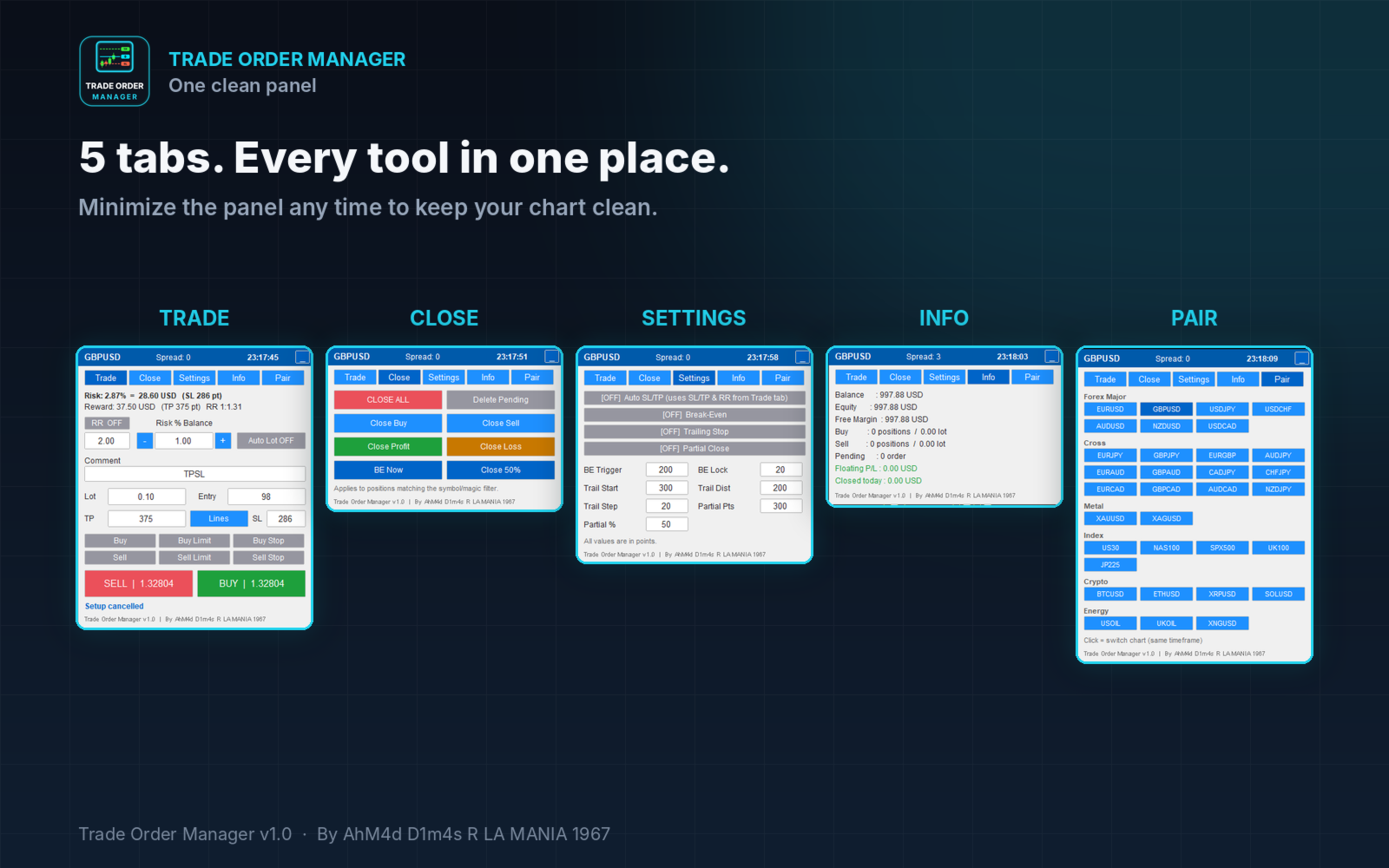
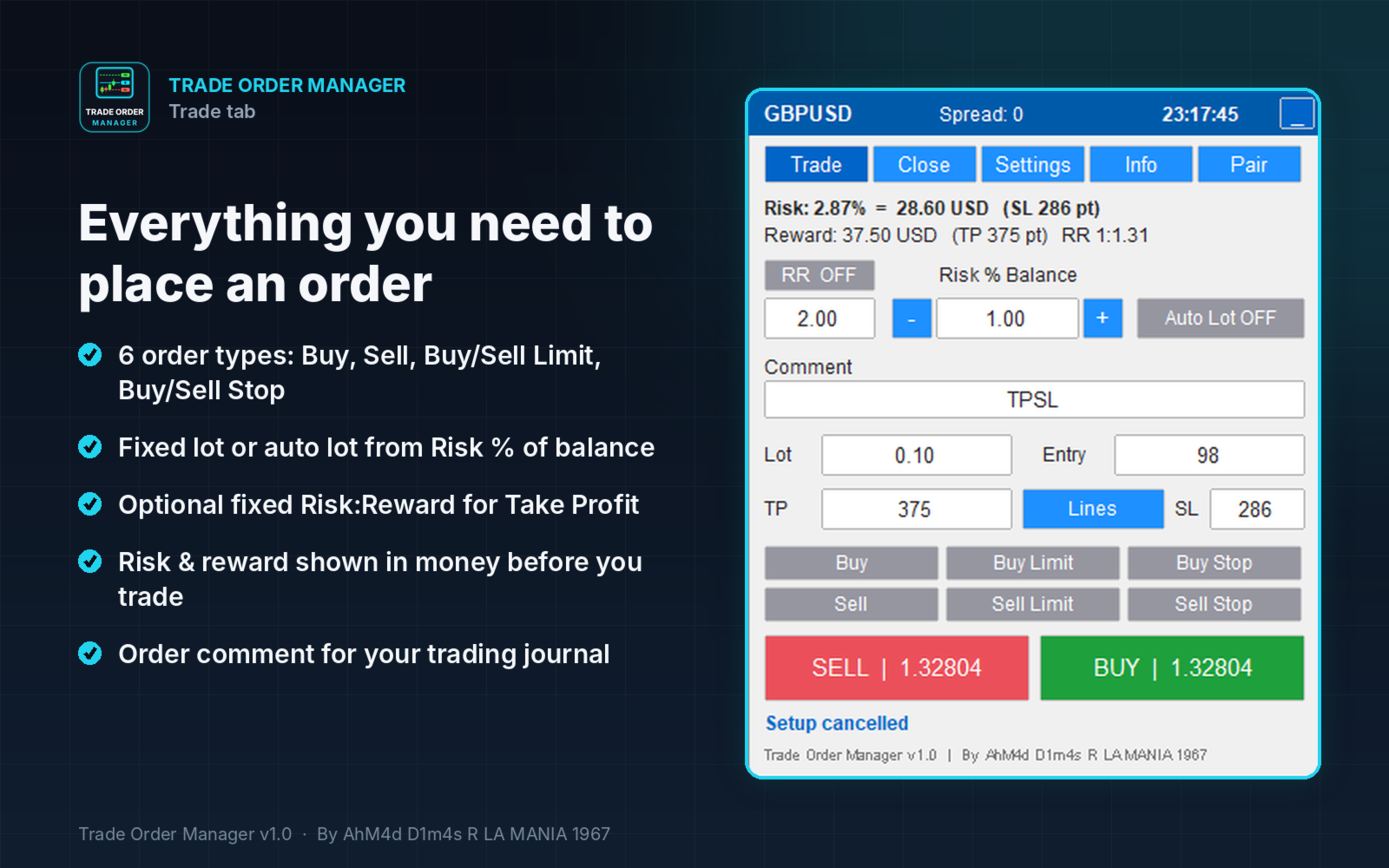
Trade Order Manager is an on-chart trading panel that helps you place, plan and manage orders faster and with clear risk control. Set your Entry, Stop Loss and Take Profit visually by dragging lines on the chart, see your risk and reward in money before you trade, then execute with one click.

The tool does not open trades on its own. Every order is placed by you. It only automates the management rules you choose to enable.

KEY FEATURES

Visual order placement 

  • Choose the order type: Buy, Buy Limit, Buy Stop, Sell, Sell Limit, Sell Stop.
  • Entry, SL and TP lines appear on the chart instantly. Drag them to the levels you want.
  • Pending entry lines always stay on the valid side of the price. For example, a Buy Limit line cannot be dragged above the current price.
  • Live labels show the distance in points, risk and profit in account currency, risk as a % of balance, and the RR ratio.
  • Click EXECUTE to place the order, or CANCEL to discard it.

Manage open positions and pending orders directly on the chart

  • Drag out from a position’s entry line to create a new SL or TP.
  • Drag existing SL/TP lines to modify them.
  • Drag a pending order line to move the order. SL and TP move with it.
  • Ctrl + drag a pending order line to add SL or TP.

Risk management

  • Optional auto lot calculation from Risk % of balance.
  • Optional auto TP from a fixed Risk:Reward ratio.
  • Risk and reward are displayed in money and percentage before you execute.

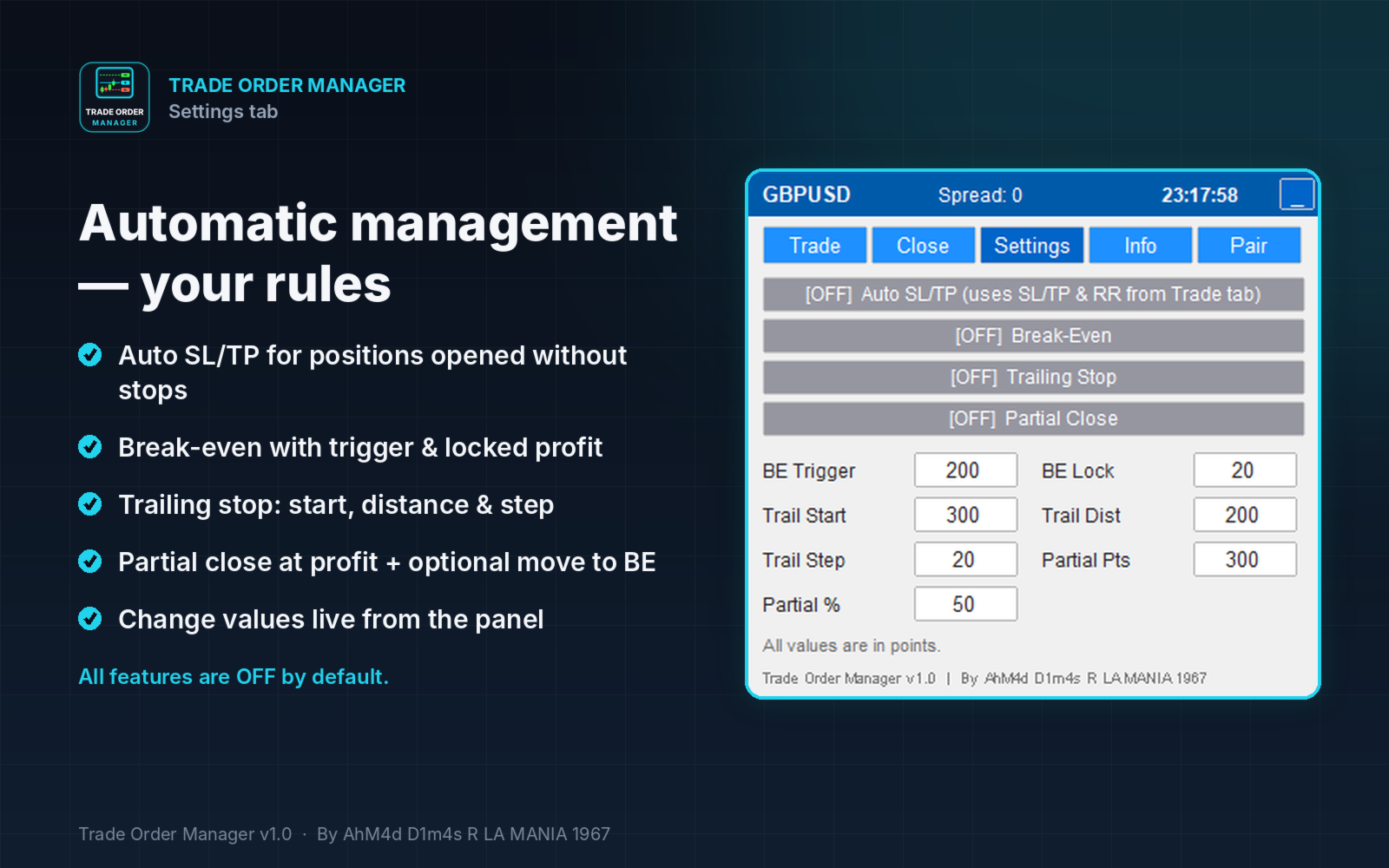
Automatic management (all optional, OFF by default)

  • Auto SL/TP for positions opened without SL/TP.
  • Break-even with an adjustable trigger and locked profit.
  • Trailing stop with adjustable start, distance and step.
  • Partial close at a set profit, with an option to move SL to break-even afterwards.

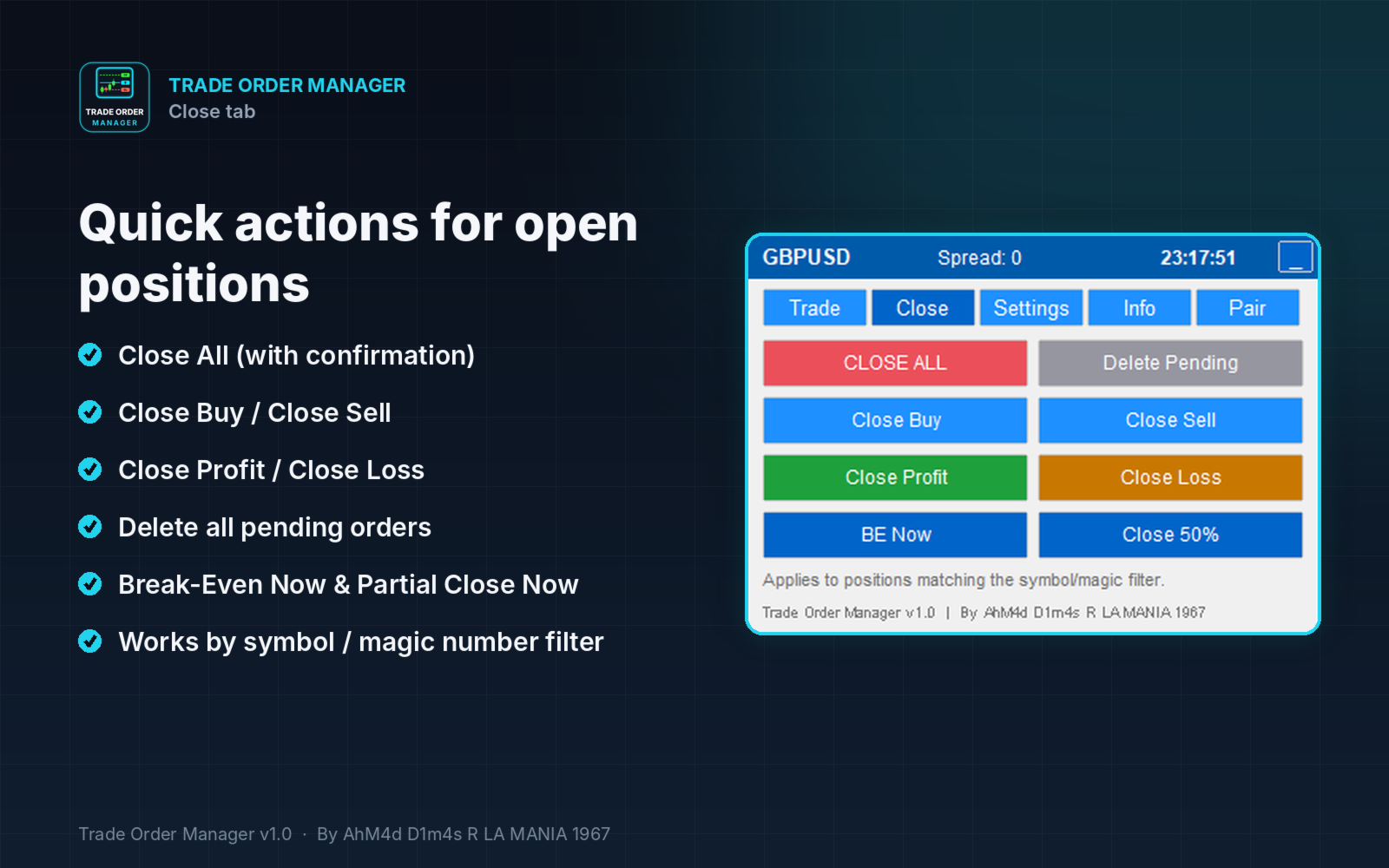
Quick actions (Close tab)

  • Close All, Close Buy, Close Sell, Close Profit, Close Loss.
  • Delete Pending, Break-Even Now, Partial Close Now.

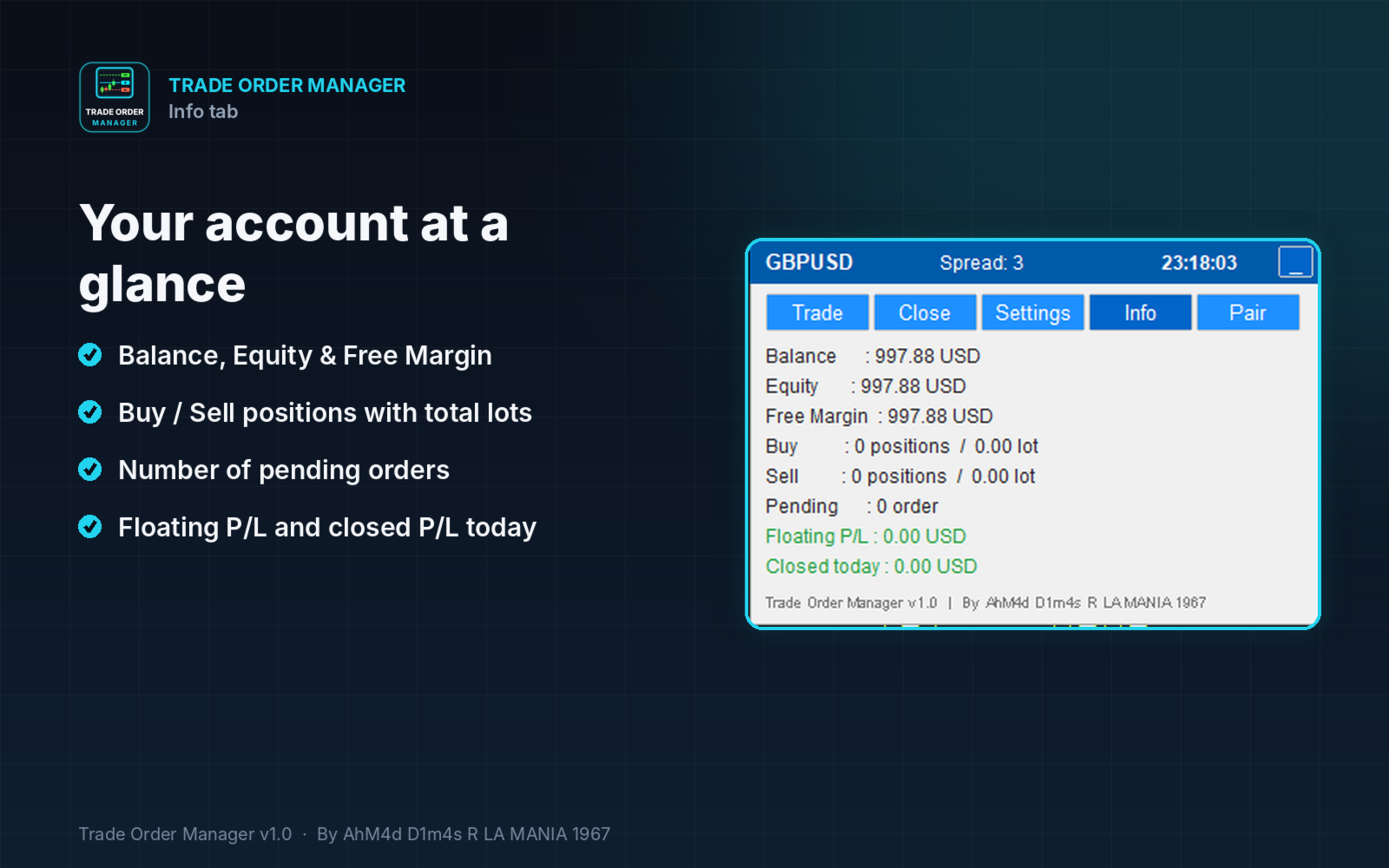
Account information (Info tab)

  • Balance, Equity, Free Margin.
  • Buy and Sell positions with total lots, number of pending orders.
  • Floating P/L and closed P/L for today.

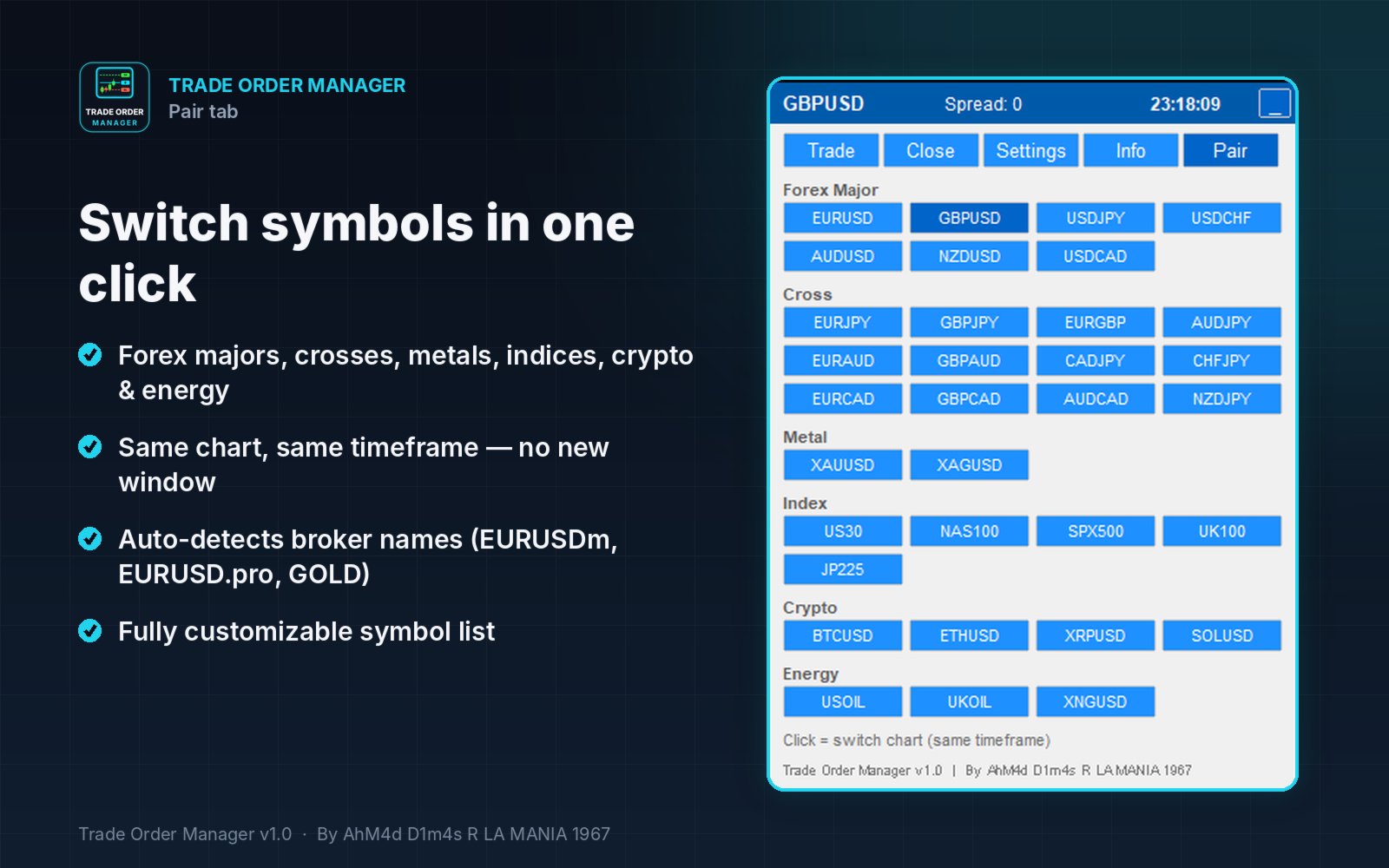
One-click symbol switching (Pair tab)

  • Switch the current chart to Forex majors, crosses, metals, indices, crypto and energy without opening a new chart.
  • Broker symbol names with suffixes or prefixes are detected automatically (for example EURUSDm, EURUSD.pro, GOLD).
  • Symbols added to Market Watch by the tool are removed again when you switch away.

Convenient panel

  • Five tabs: Trade, Close, Settings, Info, Pair.
  • Minimize button to keep the chart clean.
  • All panel settings are kept when you change timeframe or symbol.
  • Line colors are customizable. Defaults: Entry Aqua, TP Lime, SL Tomato.

HOW TO USE

  1. Attach Trade Order Manager to a chart and enable Algo Trading.
  2. In the Trade tab, set your lot (or Risk %), then choose an order type.
  3. Drag the Entry, SL and TP lines to your levels.
  4. Click EXECUTE.

MAIN INPUTS

  • Position filter: current symbol only or all symbols, plus a magic number filter.
  • Default lot, Risk %, SL/TP in points, RR, pending distance, magic number and comment.
  • Auto management settings: Auto SL/TP, Break-even, Trailing, Partial close.
  • Display settings: line colors, optional colored zones, panel position.
  • Pair list for the Pair tab, customizable with aliases.

NOTES

  • This is an Expert Advisor, so Algo Trading must be enabled for it to place or modify orders.
  • Works on hedging and netting accounts.
  • All distances are in points.
  • Stop level, freeze level and filling mode requirements of your broker are respected automatically.

Produits recommandés
Trade assistant pro v8
Ahmed Mohammed Bakr Bakr
2 (1)
FREE FREE FREE Trade Assistant MT5 – Professional Trading & Risk Management Panel Trade Assistant MT5 is an advanced trading panel designed to help traders execute orders faster, safer, and more professionally . It simplifies manual trading by combining smart order management , precise risk control , and one-click execution , making it ideal for both beginners and advanced traders. This tool does not trade automatically . Instead, it empowers you with full control while applying professional-gra
FREE
Click Trading
Jawad Tauheed
5 (3)
One Click Trading – Auto TP SL Developer TraderLinkz Version 1.00 Category Utility What it does Adds missing TP and SL to your manual trades and pending orders Sets them once per ticket Lets you move TP and SL afterward Works on hedging and netting accounts Scans on every tick and reacts on trade events Why you want it You place faster entries You get consistent risk and exit targets You reduce fat finger errors You keep full manual control Quick start Attach the EA to any chart Keep TP and SL e
FREE
TradeStats Pro – Lot & Risk Analytics Panel for MT5 TradeStats Pro is an analytics panel for MetaTrader 5 that displays trading history and account statistics in a structured, readable format directly on the chart. Account Overview The panel shows real-time account data including balance, equity, margin, free margin, floating profit/loss, win rate, profit factor, and maximum drawdown in both value and percentage. Lot Exposure Tracking Total buy lot, sell lot, and net lot exposure from open posi
FREE
Objectif: Ouvre automatiquement les graphiques de tous les symboles du Market Watch avec le modèle default.tpl sur le timeframe actuel (TF) , en fermant tous les autres graphiques (sauf l’actif). Idéal pour analyser rapidement plusieurs instruments sans effort manuel! Fonctionnalités: Automatisation: Ouvre des dizaines de graphiques en un clic. Sécurité: Ferme les graphiques inutiles, en conservant l’actif. Flexibilité: Utilise votre modèle default.tpl (configurez-le à l’avance!).
FREE
EmaRsi robot
Deepak Saini
https://youtu.be/KHhg88fXWTk?si=ZoVtpc-wpfTVImSL 5-Minute Trading Strategy | Quick & Effective for Beginners Welcome to our trading channel- the deepak trading In this video, we'll be exploring a simple 5-minute trading strategy that can help you capture quick market movements and make profitable trades. Whether you're a beginner or an experienced trader, this strategy is designed to give you clear entry and exit points using technical indicators like EMA, RSI, and Stochastic Oscillator.
FREE
Trading Panel is an on-chart control panel for MetaTrader 5. You attach it to a chart and get a compact dark-themed window for placing market orders and closing groups of trades in one click. Features Instant Buy and Sell: Two large buttons show the live Ask and Bid prices and place a market order immediately. Order size control: It starts at your broker’s minimum lot automatically, or you can set your own size. Whatever you type is corrected to fit the broker’s minimum, maximum and step, so ord
FREE
GDS RiskLab TradeDesk Free Manual Trading Desk and Risk-Control Utility for MetaTrader 5 GDS RiskLab TradeDesk is a free chart-based utility for traders who want a cleaner manual trading workspace in MetaTrader 5. It is designed as a simple execution-support and risk-control panel. The goal is to keep the trading process more organized: review the chart, plan the trade, keep risk visible and execute manually with more structure. This tool does not generate buy or sell signals. It does not predic
FREE
Trade management panel for MetaTrader 5. It lets you place orders and manage open positions from a panel on the chart, without opening separate order windows. It works on any symbol and timeframe, on hedging and netting accounts. Layout and display The panel has two layouts. Single shows all controls in one view. Tabs splits the controls into separate tabs for a smaller footprint. You can hide the panel to see the chart behind it and restore it when needed. The panel scales with the screen res
FREE
Gap Catcher
Mikita Kurnevich
5 (5)
Read more about my products Gap Cather - is a fully automated trading algorithm based on the GAP (price gap) trading strategy. This phenomenon does not occur often, but on some currency pairs, such as AUDNZD, it happens more often than others. The strategy is based on the GAP pullback pattern. Recommendations:  AUDNZD  TF M1  leverage 1:100 or higher  minimum deposit 10 USD Parameters:  MinDistancePoints - minimum height of GAP  PercentProfit - percentage of profit relative to GAP level
FREE
Панель облегчает работу трейдера во время постановки стоп лоссов и тейк профитов. Отображает информацию о потенциальных профитах и лоссах.  Удобно работать когда требуется массовая установка стопов и профитов. Создавалось как инструмент плавного набора позиции на m1 и быстрого перевода стопов в безубыток. Выглядит эстетично, вписывается в родной интерфейс MT5 идеально. Рекомендуемый брокер ByBit MT5. описание кнопок панели и функций: BE SELL - перевод в безубыток всех Sell сделок открытых на
FREE
SmartRisk Trade Tool — One-Click Risk-Based Trade Panel SmartRisk Trade Tool is a manual trading panel for MetaTrader 5 built around position sizing and risk control rather than signal generation. It does not analyze the market or suggest trade direction — it exists so that every order sent from the chart already has a calculated lot size, stop loss, and take profit consistent with a risk value the trader chooses, removing the manual arithmetic that normally happens between deciding to trade and
FREE
This indicator allows to hide Bill Williams Alligator (on all MT5 timeframes) from a date define by the user with a vertical line (Alone) or a panel (with "Hidden Candles"). Indicator Inputs: Jaws Period Jaws Shift Teeth Period Teeth Shift Lips Period Lips Shift Method Apply To Information on "Alligator" indicator is available here:   https://www.metatrader4.com/en/trading-platform/help/analytics/tech_indicators/alligator ************************************************************* Hey traders!
FREE
Close All – Fast Trade Manager for MetaTrader 5 Close All is a fast, simple trade manager built for scalpers, news traders, and manual traders. Instead of closing trades one by one, it sends close orders to your broker all at the same time in milliseconds. What It Does Close ALL: Closes every open trade immediately with one click. Winners Only: Closes only profitable trades so you can bank your profit instantly. Losers Only: Closes only trades in loss to cut drawdown and protect your accou
FREE
Automatic Trade Protection EA For MT5 Overview Trade Equity Guardian is a lightweight, always-on Expert Advisor that continuously monitors all open positions on your account and automatically closes any trade that breaches your predefined risk thresholds. It acts as a safety net — protecting your account from oversized positions, runaway losses, or locking in profits when targets are hit. Attach it to any chart and let it run in the background. It works alongside your other EAs and manual trades
FREE
Bundle Risk Manager Pro EA "Risk Manager Pro EA is an all-in-one trading utility that combines advanced risk management tools, ensuring full control over your trading account while protecting your capital and complying with trading regulations. By bundling Limit Positions , Concurrent Risk Capital , and the newly added Limit Profit , this EA is the ultimate solution for disciplined trading and achieving evaluation goals. Key Features: 1. Limit Positions : Enforces a maximum number of open posi
FREE
Core function Intelligent transaction management one-click opening and closing operation, which supports user-defined lots to set multiple closing modes: all closing, closing by direction and closing by profit and loss status. Professional risk control, real-time risk monitoring and spread control to avoid high-cost trading environment. Visual control panel has an intuitive graphical interface, and all functions can be operated with one button to display position information, profit and loss sta
FREE
IMPORTANT NOTE: This is a professional Trade Management Utility and on-chart assistant. It is NOT an automated trading robot. It does not open trades on its own. The UltraFast Trade Manager MT5 is the ultimate execution and risk-management suite designed to give you absolute control over your manual and algorithmic trades. When managing multiple positions, calculating complex net break-even points, or constantly monitoring the economic calendar, hesitation can lead to costly mistakes. This utili
FREE
La gestion manuelle des positions entraîne fréquemment des sorties tardives, des hésitations psychologiques et des positions ouvertes sans protection adéquate. Trade Manager Lite est un utilitaire performant pour MetaTrader 5 conçu pour automatiser les tâches essentielles de gestion du risque : Stop Loss, Take Profit, Break-Even (seuil de rentabilité), Trailing Stop (stop suiveur) et Clôture Partielle (Partial Close). Que vous ouvriez vos ordres manuellement sur votre ordinateur, via l'applicati
FREE
Chart Only Trading Panel MT5 Chart Only Trading Panel MT5 is a practical manual trading and position-management utility for MetaTrader 5. The panel is attached directly to a chart and manages only the symbol of that chart . This allows traders to control several instruments independently without affecting positions on other symbols. Main Features Open market Buy and Sell positions Place Buy Stop, Buy Limit, Sell Stop and Sell Limit orders Open multiple orders with adjustable lot size, number and
FREE
Révolutionnez votre trading avec notre Gestionnaire de Trades Avancé pour MT4 et MT5 Mt4 Version : https://www.mql5.com/en/market/product/107249 Dynamisez votre stratégie de trading avec l'outil ultime de précision et de contrôle – notre Gestionnaire de Trades Avancé pour MT4 et MT5. Contrairement aux gestionnaires de trades classiques, le nôtre s’adapte dynamiquement aux conditions de marché et définit automatiquement des niveaux de stop-loss et take-profit dès l’entrée en position. Caractéri
FREE
Un tableau de bord en lecture seule pour l'Expert Advisor CC Cent. Faites tourner l'EA sur votre VPS et suivez chaque panier depuis votre portable, le PC du bureau ou un second terminal, avec le même panneau au thème de la vache. Compagnon gratuit pour CC Cent (Cash Cow Cent). Lecture seule. Il n'ouvre, ne ferme et ne modifie jamais de trade. Nécessite l'EA CC Cent: obtenir CC Cent sur le Market Monitor for CC Cent : surveillez la vache de n'importe où. Le Monitor se contente de lire. Il ne peu
FREE
(New and experimental testing phase) King Automation EA is a free utility built to work together with the Reversion King indicator . On its own it does nothing, it simply listens to the signals that Reversion King produces and opens the trades for you automatically, so you no longer have to sit and watch the chart to catch every entry. It reads the entry, stop loss and the three take profit levels straight from the indicator and places the trades exactly as they appear. You can choose to run on
FREE
Signalator Lot Size Evaluator MT5 est un utilitaire local gratuit pour MetaTrader 5 destiné aux traders manuels qui souhaitent calculer une taille de position estimée avant de passer un ordre. Il permet de préparer une transaction à partir du symbole sélectionné, de la direction BUY ou SELL, du prix d'entrée prévu, du Stop Loss, d'un Take Profit facultatif et du pourcentage de risque. Le calculateur utilise les informations actuelles du compte ainsi que les spécifications du symbole fournies par
FREE
FiT Panel Pro
Thonglak Janyakorn
Overview FiT Panel Pro is a professional-grade trade management panel designed for MetaTrader 5 traders who demand speed, precision, and full control over their trades. Built with a modern dark-theme UI, it combines one-click execution with advanced risk management, visual SL/TP drag lines, automatic Fibonacci-based levels, and comprehensive order management — all in a single, compact panel. Whether you are a scalper, day trader, or swing trader, FiT Panel Pro gives you the edge you need to exec
FREE
DynamicTrader 1
Markus Christer Ekengren
Smart Trade Manager EA – Simple, Visual, and Risk-Based Trading Take control of your trades with ease! This free Expert Advisor is designed for traders who want a fast, intuitive, and risk-based way to manage entries directly from the chart. Risk-Based Position Sizing – Just set your preferred % risk in the EA settings, and lot size is calculated automatically. One-Click Trading – Place trades instantly with two simple buttons: BUY or SELL . Interactive SL & TP Lines – Drag and drop stop-
FREE
TradeGacha
Phongsphat Chanswat
## Version 2.50 I created this EA with the intention of making it free for everyone to use. It serves as a tool to assist in trading with money management, entering order lots according to a percentage of the account balance, and automatically setting TP/SL based on high/low prices. In Version 2.50, The Auto TP/SL feature adjusts from the Line In (entry point), and Auto price in this version only shifts the entry line to the current price. Input settings: Ato update SL/TP Line >>> In version
FREE
Account Info EA It is a tool that presents on the graph all the positions of the account, and specific information concerning the positions, but also the account. It enables the user to have an image of his account at a glance. Use like any expert advisor. You can't attach it in the same chart with other expert advisor. It does not have the ability to open or manage positions. You can attach it on any chart and any timeframe.
FREE
All-in-One Visual Trading Panel, Risk & Partial Close Manager,  Smart Charting Toolkit (LBT), R: R Lock, Virtual TP, Multi-Chart Sync, and Telegram Zone Alerts. TradingPanel With Tool Box is a complete trading workstation and smart charting assistant for MetaTrader 5. Designed for precision-focused scalpers, day traders, and Smart Money Concepts (SMC / ICT / Price Action) traders, it combines fast trade execution , multi-mode partial close management , and an advanced object styling & synchroniz
FREE
The simplest and most useful trading panel for every manual trader! Are you tired of closing trades one by one during news? Do you want to protect your profit with one click? This panel does exactly that: CLOSE ALL - Instantly closes ALL open positions with one click. You can choose to close all symbols or only current symbol. Essential for scalpers and news traders. BREAKEVEN ALL - Instantly moves Stop Loss to entry price (breakeven) for all profitable trades. Protect your profits and
FREE
Fibomathe
Almaquio Ferreira De Souza Junior
Fibomathe Indicator: Support and Resistance Tool for MT5 The Fibomathe Indicator is a technical analysis tool designed for MetaTrader 5 (MT5) that assists traders in identifying support and resistance levels, take-profit zones, and additional price projection areas. It is suitable for traders who use structured approaches to analyze price action and manage trades. Key Features Support and Resistance Levels: Allows users to define and adjust support and resistance levels directly on the chart.
FREE
Les acheteurs de ce produit ont également acheté
Trade Assistant MT5
Evgeniy Kravchenko
4.43 (216)
It helps to calculate the risk per trade, the easy installation of a new order, order management with partial closing functions, trailing stop of 7 types and other useful functions. Additional materials and instructions Installation instructions - Application instructions Line function -   shows on the chart the Opening line, Stop Loss, Take Profit. With this function it is easy to set a new order and see its additional characteristics before opening.   Risk management  - The risk calculation
Farmed Hedge Yield Farming | All Markets (Manual - Hybrid - Semi/Automated EA) VERIFIED TRADING RESULTS - Farmed Hedge Yield Axi Copy:  https://www.mql5.com/en/signals/2356376 - Farmed Hedge Yield Exn Copy:   https://www.mql5.com/en/signals/2356404 - Farmed Hedge Yield V Copy:  https://www.mql5.com/en/signals/2357156 IMPORTANT NOTICE: FarmedHedge is a MANUAL-FOCUSED TRADING UTILITY ,not a fully automated EA. Results shown on this Signal include manual trades and overall strategic management.
Bienvenue sur Trade Manager EA, l’outil ultime de gestion des risques conçu pour rendre le trading plus intuitif, précis et efficace. Ce n’est pas seulement un outil d’exécution d’ordres ; c’est une solution complète pour la planification des trades, la gestion des positions et le contrôle des risques. Que vous soyez débutant, trader expérimenté ou scalpeur ayant besoin d’une exécution rapide, Trade Manager EA s’adapte à vos besoins, offrant une flexibilité sur tous les marchés, des devises et i
Telegram to MT5 Multi-Channel Copier   copie automatiquement les signaux de trading de vos canaux Telegram et Discord directement vers MetaTrader 5. Pas de bots, pas d'extensions de navigateur, pas de copie manuelle. Un signal arrive sur Telegram ou Discord et l'EA ouvre le trade dans votre terminal en quelques secondes. Et avant de copier un canal, le backtester intégré vous montre ce que ce canal aurait fait sur votre compte. Le produit comprend deux composants : une application Windows qui éc
Local Trade Copier EA MT5
Juvenille Emperor Limited
4.94 (150)
Local Trade Copier EA MT5 est un copieur de trades rapide et flexible permettant de copier et de gérer des trades entre plusieurs comptes MetaTrader 5 sur le même ordinateur Windows ou Windows VPS. Il combine la synchronisation locale des trades avec des contrôles côté Receiver pour la taille des lots, la gestion du risque, le filtrage des trades, le mappage des symboles, la gestion des trades et la protection du compte. Configurez vos terminaux Transmitter et Receiver en environ 1 minute et co
TradePanel MT5
Alfiya Fazylova
4.88 (173)
Trade Panel est un assistant commercial multifonction. L'application contient plus de 50 fonctions de trading pour le trading manuel et permet d'automatiser la plupart des tâches commerciales. Instructions d'utilisation : https://www.mql5.com/fr/blogs/post/762589 Version d'essai de l'application pour un compte démo : https://www.mql5.com/fr/blogs/post/762644 Comment installer l'application : https://www.mql5.com/fr/blogs/post/762645 Comment tester l'application en mode visuel : https://www.mql5.
News Trade EA MT5
Konstantin Kulikov
4.55 (11)
Je voudrais vous présenter un robot efficace que j'utilise depuis plusieurs années. Il peut être utilisé en mode semi-automatique, comme en mode totalement automatique. >>> Chat <<< Le programme comporte des paramètres souples pour le commerce sur les nouvelles du calendrier économique. Il est impossible de le vérifier dans le testeur des stratégies. Ce qu’il faut, c’est le travail réel. Téléchargez la dernière archive des paramètres : https://www.mql5.com/en/blogs/post/747929 Surveillance des
Copiez les signaux Telegram avec vos propres règles de trading Telegram to MT5 Signal Trader copie automatiquement les signaux de trading au format texte provenant de canaux et de groupes Telegram publics et privés vers MetaTrader 5. Gérez plusieurs fournisseurs et comptes MT5 depuis une seule application de bureau, avec des paramètres de risque et de trading propres à chaque fournisseur . Aucun bot Telegram ni configuration d'API n'est nécessaire pour copier les signaux. Connectez-vous simpleme
Exp COPYLOT CLIENT for MT5
Vladislav Andruschenko
3.97 (35)
Copieur professionnel de trades pour MetaTrader 5 Un copieur de trades rapide, professionnel et fiable pour MetaTrader . COPYLOT permet de copier des trades Forex entre les terminaux MT4 et MT5 avec prise en charge des comptes Hedge et Netting . La version MT5 de COPYLOT prend en charge : - MT5 Hedge → MT5 Hedge - MT5 Hedge → MT5 Netting - MT5 Netting → MT5 Hedge - MT5 Netting → MT5 Netting - MT4 → MT5 Hedge - MT4 → MT5 Netting Version MT4 Description complète + DEMO + PDF Comment acheter Comme
Strategy Ledger Pro
Abdullah Uygar Tuna
5 (14)
Désormais disponible en français. Strategy Ledger Pro est un panneau d'analyse de compte en lecture seule pour MetaTrader 5. Il sépare les résultats du compte par Expert Advisor, stratégie, symbole et numéro magic, pour que vous voyiez ce que chacun apporte réellement. Le panneau est disponible en 11 langues : English, Français, Deutsch, Español, Italiano, Português, Русский, Türkçe, 中文, 日本語 et 한국어. Avant de télécharger la démo. Le Market exécute la démo de tout produit payant uniquement dans l
EA Overfitter
Stephen J Martret
5 (3)
That backtest looks great. But will it still be making money tomorrow, next week, next month? EA Overfitter re-runs your EA on 100 price histories it has never seen. One score tells you if the edge is real. A backtest tells you what an EA did on one price history — the one that happened to occur. What you cannot tell from it is how much of that result was the strategy and how much was the particular path. EA Overfitter answers that. It builds up to 100 synthetic price histories your EA has n
================================================================================ POC BREAKOUT - V20.72. Full Professional Grade Toolkit ================================================================================ POC Breakout is a full MetaTrader 5 trading dashboard for discretionary traders who want breakout signals, Point of Control (POC) context, volume profiles, order flow, market structure, news, alerts, and advanced trade planning in one professional workspace. Attached directly to you
The product will copy all telegram signal to MT5 ( which you are member) , also it can work as remote copier.  Easy to set up, copy order instant, can work with almost signal formats, image signal,  s upport to translate other language to English Work with all type of channel or group, even channel have "Restrict Saving Content", work with  multi channel, multi MT5 Work as remote copier: with signal have ticket number, it will copy exactly via ticket number. Support to backtest signal. How to s
Power Candles Strategy Scanner : détecteur de setups multi-symboles auto-optimisé Un scanner qui sonne au moindre frémissement vous apprend à l'ignorer. Une clôture de bougie agitée, alerte après alerte, et le seul setup que vous tradez vraiment se noie dans le bruit. Power Candles Strategy Scanner fait tourner le moteur auto-optimisé de Power Candles sur chaque symbole de votre Market Watch et ne vous alerte que sur ce qui passe vos propres filtres : la force de la dernière bougie clôturée, le
Telegram to MT5 Coppy
Sergey Batudayev
5 (10)
Télégramme vers MT5 :   la solution ultime pour copier des signaux Simplifiez votre trading avec Telegram vers MT5, l'outil moderne qui copie les signaux de trading directement des canaux et chats Telegram vers votre plateforme MetaTrader 5, sans DLL. Cette solution puissante garantit une exécution précise des signaux, de nombreuses options de personnalisation, un gain de temps et une efficacité accrue. [ Instructions and DEMO ] Caractéristiques principales Intégration directe de l'API Telegram
HINN MagicEntry Extra
ALGOFLOW OÜ
4.74 (19)
HINN MAGIC ENTRY – the ultimate tool for entry and position management! SIMPLE. FASTEST. INTUITIVE. MAX AUTOMATED. Place orders by selecting a level directly on the chart! full description   ::  demo-version  :: 60-sec-video-description Key features: - Market, limit, and pending orders - Automatic lot size calculation - Automatic spread and commission accounting - Unlimited partitial take-profits  - Breakeven and trailing stop-loss and take-profit  functions - Invalidation leves - Intuitive, a
Timeless Charts
Samuel Manoel De Souza
5 (9)
Timeless Charts est un utilitaire de trading tout-en-un destiné aux traders professionnels. Il combine des types de graphiques personnalisés tels que les graphiques en secondes et Renko avec une analyse avancée du flux d’ordre s utilisant Footprints , Clusters , Profils de Volume , études VWAP et outils d’analyse ancrés pour une compréhension plus approfondie du marché. Le trading et la gestion des positions sont effectués directement depuis le graphique via un panneau intégré de gestion des ord
Prochaine mise à jour — Version 2.52 bientôt disponible ! [NOUVEAU] Préparez-vous à découvrir 4 nouvelles fonctionnalités majeures conçues pour améliorer votre analyse du marché et votre flux de travail de trading Nous faisons passer l’analyse du marché au niveau supérieur avec 4 nouvelles fonctionnalités conçues pour répondre à vos besoins en trading. Découvrez : 1. TRADE OVERVIEW DASHBOARD 2. CONFLUENCE AT ZONE 3. STRONG & WEAK HIGH/LOW 4. OTE 1. TRADE OVERVIEW DASHBOARD Un tableau de bord qu
Telegram To MT5 Ultra
Mirel Daniel Gheonu
5 (5)
Telegram To MT5 — Copieur de signaux Transformez les appels de trading de vos canaux Telegram en véritables ordres MT5 — automatiquement, sur autant de comptes que vous le souhaitez, avec le risque et les règles entièrement sous votre contrôle. Telegram To MT5 relie les canaux VIP / de signaux que vous suivez déjà sur Telegram à votre terminal MetaTrader 5. Une application de bureau compagnon gratuite lit les messages (même des canaux qui bloquent les bots), et cet Expert Advisor les exécute sur
Anchor Trade Manager
Kalinskie Gilliam
5 (8)
Your EAs cannot see each other, but Anchor can. Anchor gives you one place to coordinate your EAs, manage risk, and decide when trading is allowed. It works alongside the trading bots you already use without any changes to them. The Problem One EA opens a trade. Then another starts trading. The next thing you know, you wake up to multiple grids built across your account. Each EA may be doing exactly what it was designed to do, but together they can place far more risk on your account than you in
EA Auditor
Stephen J Martret
5 (7)
EA Auditor is an independent analysis tool for traders evaluating Expert Advisors and trading signals on MetaTrader 5. It audits backtest reports, reviews posted developer signals, and cross-verifies the two against each other to help traders assess strategies before committing capital. The MQL5 market offers a wide range of Expert Advisors from many developers, with varying approaches, quality, and transparency. EA Auditor provides a consistent, data-driven framework for reviewing them, answer

Trade Dashboard MT5
Fatemeh Ameri
4.94 (135)
Trade Dashboard simplifies how you open, manage, and control your trades, with built-in lot size calculation. It allows you to execute trades, manage risk, and control positions directly on the chart, with tools such as partial close, breakeven, and trailing stop. Designed to reduce manual work and help you stay focused on your trading decisions. A demo version is available for testing. Detailed explanations of features are provided within the MQL5 platform. Installation instructions are include
MT5 to Telegram Signal Provider est un utilitaire facile à utiliser et entièrement personnalisable qui permet l'envoi de signaux spécifiés vers un chat, un canal ou un groupe Telegram, transformant ainsi votre compte en fournisseur de signaux. Contrairement à la plupart des produits concurrents, il n'utilise pas d'importations DLL. [ Démonstration ] [ Manuel ] [ Version MT4 ] [ Version Discord ] [ Canal Telegram ]  New: [ Telegram To MT5 ] Configuration Un guide utilisateur étape par étape est
RETAILBERG FOOTPRINT CHART PRO — Order-Flow Workspace for MetaTrader 5 Version 7.00  |  Professional System  |  31 tools  |  One chart A full 150-page illustrated User Manual is included. Please read the full manual to understand this feature packed footprint chart elements and ui. https://www.mql5.com/en/blogs/post/777982 DEMO / STRATEGY TESTER — PLEASE READ FIRST
VirtualTradePad PRO SE MT5 — centre de contrôle de trading professionnel pour MetaTrader 5 VirtualTradePad PRO SE est un panneau de trading premium basé sur le graphique et un espace de gestion des trades pour MetaTrader 5 . Il est conçu pour les traders qui souhaitent une exécution plus rapide, un contrôle plus clair des positions, une gestion structurée des trades, une planification visuelle des niveaux et un flux de travail professionnel directement depuis le graphique. Ce n’est pas seulement
Trader Evolution
Siarhei Vashchylka
5 (7)
" Trader Evolution " - A utility designed for traders who use wave and technical analysis in their work. One tab of the utility is capable of money management and opening orders, and the other can help in making Elliott wave and technical analysis. Manual (Be sure to read before purchasing) | Version for MT4 Advantages 1. Trading in a few clicks. Immediate and pending orders are available in the panel 2. Money management. The program automatically selects the appropriate lot size 3. Simplifies
Trade copier MT5
Alfiya Fazylova
4.61 (57)
Trade Copier est un utilitaire professionnel conçu pour copier et synchroniser les commandesentre les comptes de trading. Les commandes sont copiées du compte/terminal du fournisseur vers le compte/terminal du destinataire, qui sont installés sur le même ordinateur ou vps. Avant d'acheter, vous pouvez tester la version démo sur un compte démo. Version démo ici . Instructions complètes ici . Principales fonctionnalités et avantages: Prend en charge la copie des commandes MT5> MT5, MT4> MT5, MT5>
AW Trade Manager
AW Trading Software Limited
AW Trade Manager est un panneau de trading pour MetaTrader 5 doté d'un outil risque/rendement sur le graphique. Le trade se planifie avec les lignes Entry, Stop Loss et Take Profit que l'on déplace à la souris : les étiquettes affichent le prix, la distance et le montant en argent, les zones montrent le gain et la perte, et le volume se calcule à partir du risque. Avant l'envoi, la fenêtre de confirmation présente le trade dans son ensemble avec le risque, la marge et les règles de la position.
Panneau de trading pour MetaTrader 5 — contrôle professionnel du trading en un clic depuis le graphique et le clavier Un panneau de trading avancé conçu pour les traders actifs, afin d’ouvrir, gérer et clôturer des positions bien plus rapidement qu’avec l’interface standard de MetaTrader. Cette solution s’adresse à ceux qui veulent contrôler positions, ordres en attente, profit global et exécution depuis un seul espace de travail professionnel. Il ne s’agit pas d’un simple utilitaire. C’est un
COPYLATOR – MT5 Trade Copier Key Highlights Multi-Sender / Multi-Receiver Trade Replication – supports one-to-many, many-to-one, and many-to-many configurations, with complete real-time copying of market orders, pending orders, SL, and TP. Advanced drawdown protection – closing, blocking, pending-order deletion, manual and automatic reset mechanisms. Automatic symbol mapping – finds correct symbols, alerts if missing, allows manual override. Hedging & Netting support – auto-detected, no manual s
Plus de l'auteur
SMC ICT Multi Timeframe Higher-timeframe structure, all on the chart you are trading. SMC ICT Multi Timeframe maps Smart Money Concepts from seven timeframes (M3 to H4) onto a single chart, so you can see where price is likely to react without switching charts. What You Get Market Structure : BOS and CHoCH across multiple timeframes, with swing points (HH, HL, LH, LL). Order Blocks : key institutional zones from each timeframe, removed automatically once they are no longer valid. Fair Value Gaps
FREE
Support Resistance MRF Zone Support Resistance MTF Zone finds the key support and resistance levels on your chart automatically, from four timeframes at once: H1, H4, D1 and W1. You don’t need to switch charts or draw lines by hand. Attach it to any symbol and any timeframe, and the important levels are ready. Main features Multi-timeframe levels. H1, H4, D1 and W1 levels on one chart. No clutter. Levels that sit close together are combined into one clean line, so your chart stays readable. Cle
FREE
Currency Strength Meter Flow See in seconds which currencies are strong, which are weak, which way each one is moving, and whether a move is starting to tire, all in one compact panel that leaves your chart free for trading. WHAT IT SHOWS 1. Currency strength The 8 major currencies (EUR, GBP, AUD, NZD, USD, CAD, CHF, JPY) plus gold and silver. A colored strength bar for each: green = strong, gold = neutral, red = weak. Sorted from the strongest to the weakest, so the extremes are always at the t
FREE
Trading Opportunity Scanner Stop flipping through dozens of charts. Trading Opportunity Scanner watches forex pairs, indices, gold, silver, oil and crypto at the same time, and shows on one screen which markets are at a support or resistance zone right now and how strong the momentum behind them is. It is built for traders who use support & resistance (SNR) with multi-timeframe market structure , from swing and intraday down to scalping. WHAT IT SHOWS 1. Currency Strength & Flow Strength of the
FREE
Backtest Replay Simulator For Metatrader 5 Practice and backtest your trading strategy manually, candle by candle. Backtest Replay Simulator turns any chart into a replay chart. Future candles are hidden, so you can analyze the market, place trades and manage them as if the market were live. It’s built for discretionary traders, price action, SMC/ICT and supply & demand traders who want to train their eye and test their edge without waiting for the live market. HOW IT WORKS The utility creates
FREE
Filtrer:
Aucun avis
Répondre à l'avis