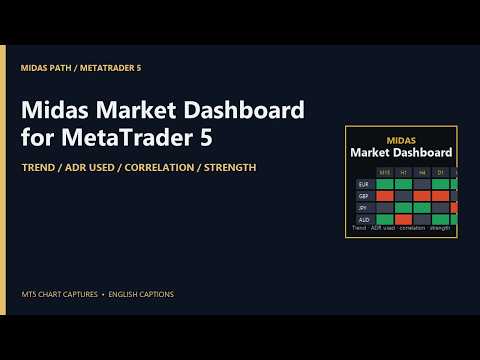
Midas Market Dashboard

Your watchlist in one grid, drawn over a chart: a row per symbol, the trend on each timeframe you choose, how much of its average daily range today has used, its correlation to the chart's symbol, and the strength of its two currencies. Everything in it is a state, not a signal, and every column says which rule produced it.

The columns

  • Trend on each timeframe (M15, H1, H4, D1 and W1 by default, up to six): Up when the last closed bar is above its EMA and the EMA is higher than it was a few bars ago; Down for the mirror; Flat otherwise. Closed bars only, so a cell changes when a bar closes, never mid-bar.
  • ADR used: today's range as a share of the average daily range of the last 14 days (adjustable), drawn as a bar in the cell. Over 100% is marked in red, over 70% in amber, so you can see a day that has already done its usual work.
  • Correlation: the correlation of bar-to-bar returns between each symbol and the chart's symbol, on the chart's timeframe, over the last 100 closed bars (adjustable), bars matched by time. Green moves together, red moves opposite, and the shade follows the strength. Change the chart's symbol or period and the column follows; or name a reference symbol in the inputs.
  • Strength: the rank and percentage move of the pair's two currencies across the 28 pairs between the eight majors, over the last 24 hourly bars (adjustable). 1 is the strongest. If your broker adds a suffix to symbol names, put it in the inputs and the pairs are found.
  • Net: how many timeframes are Up minus how many are Down.

Working with it

  • Click a column header to sort, again to reverse. Click a symbol to bring its chart to the front, or open one if none is open.
  • Filter pills pick rows: Up or Down on H4, on D1, on both; ADR used under 50% or over 100%; correlation above +0.7 or below -0.7.
  • Up to 40 symbols. Symbols your broker does not offer are listed under the grid, never shown as numbers.
  • The sort and the filter are kept per account. The panel takes the whole chart it is on, so drop it on a spare chart; the chart's own scales come back when you remove it. Scroll with the mouse wheel or the arrow keys when the list is long.

What it is not

  • It does not forecast, score, or say buy or sell. A row that is Up on every timeframe is a description of closed bars, and the next bar can change it.
  • Correlation describes the period measured and changes over time; it does not mean two symbols will keep moving together.

Inputs

  • Watchlist: symbols (comma separated, up to 40); trend timeframes (up to six); the suffix your broker adds to the majors, for the strength pairs.
  • Rules: EMA period; EMA slope look-back in bars; correlation period in closed bars; ADR period in days; strength period in H1 bars; the symbol the correlation is against (blank: the chart's symbol).
  • Display: font size; refresh interval in seconds.

Tested

The four rules were checked in a backtest over a month on eight symbols and five timeframes: the trend state against the platform's own EMA and the rule written out, the correlation of returns against a two-pass Pearson with bars matched by time, the ADR and today's share of it against a plain average, and the strength of the eight majors against a recomputation from the 28 pairs: 2,191 checks, 0 violations. The MetaTrader build carries the same arithmetic, with its own check script over the EMA recursion, the matching of bars by time, known correlations, the ADR and a known set of pairs.

Notes

  • Closed bars only; the grid refreshes every five seconds (adjustable) and the cells move only when bars close. The EMA is computed over the last 200 bars of each timeframe (or four EMA periods, whichever is longer).
  • It never trades on a live or demo chart, needs no internet and reads no file. In the Strategy Tester only, it makes one minimum-volume buy and closes it, after checking margin and volume limits, because the Market's automatic check requires an Expert to trade there.
  • This is not financial advice and no result is promised.
Produits recommandés
Order Flow Footprint Workspace est un espace de travail d'analyse de l'order flow et de la microstructure de marché pour MetaTrader 5, entièrement en lecture seule. Il transforme les données de ticks fournies par votre broker en une représentation footprint interactive par session avec activité par niveau de prix, profils, navigation historique et outils de diagnostic. Le workspace s'adapte automatiquement aux informations réellement disponibles dans le flux du broker et n'invente pas de direc
Spread Costs refers to the amount of the loss caused by the spread, and Swap Benefits refers to the amount of the income gained by overnight positions. Spread Costs is an important indicator for short-term traders, especially for scalping traders, and Swap Benefits is an important indicator for long-term traders. Since the spreads and swaps on the MetaTrader 5 platform are all expressed in points, we need to convert it into the amount expressed in the account currency. This tool can display the
La Master Edition est un outil d'analyse de qualité professionnelle conçu pour visualiser la structure du marché à travers le prisme du volume et du flux monétaire. Contrairement aux indicateurs de volume standard, cet outil affiche un Profil de Volume Quotidien directement sur votre graphique, vous permettant de voir exactement où la découverte des prix a eu lieu et où est positionné "l'argent intelligent". Cette Master Edition est conçue pour la clarté et la rapidité, dotée d'un système unique
================================================================================ POC BREAKOUT - V20.72. Full Professional Grade Toolkit ================================================================================ POC Breakout is a full MetaTrader 5 trading dashboard for discretionary traders who want breakout signals, Point of Control (POC) context, volume profiles, order flow, market structure, news, alerts, and advanced trade planning in one professional workspace. Attached directly to you
Advanced PolyLines
Felipe Monteiro Rodrigues
N'oubliez pas de laisser un commentaire et d'évaluer le produit si vous l'avez aimé ! Advanced PolyLines est un outil permettant de créer et de modifier des polylignes directement sur le graphique MetaTrader 5. Plusieurs segments peuvent être reliés dans une seule structure, ce qui facilite la création et la gestion des lignes utilisées pour l’analyse graphique. L’outil a été conçu pour simplifier le travail avec des structures composées de plusieurs segments. Les points connectés peuvent être
FREE
Blahtech VWAP MT5
Blahtech Limited
5 (1)
Blahtech VWAP - Volume Weighted Average Price (VWAP) is the ratio of price to total volume. It provides an average price over a specified time interval.  Links [  Install  |  Update  |  Documentation   ] Feature Highlights Configurable VWAP Line Sessions, intervals, anchored or continuous Previous day settlement line Standard Deviation bands Alerts at bar close or real time Automatic Broker or Tick volumes Significantly reduced CPU usage Input Parameters Expert Advisor Mode  - Reserved for iCu
FREE
The AZT Profit Locker is an advanced automated risk-management utility designed specifically for MetaTrader 5 (MT5) traders who want to remove emotional interference and protect their hard-earned profits. Traders aren't just fighting the Forex market, they're fighting their own biology. Fear, Greed and Anxiety lead to holding losers too long and cutting winners too early. The utility flips the script by removing emotion from risk management. Operating as a dedicated automated risk manager, this
Atlas Trade Desk
Bernhard Wurzlbauer
Atlas Trade Desk MT5 Atlas Trade Desk MT5 est un panneau de trading visuel, un gestionnaire de risque et un calculateur de lots pour les traders manuels sur MetaTrader 5. Planifiez des ordres au marché et des ordres en attente directement sur le graphique, calculez la taille de position selon le risque choisi, ajustez Entry, Stop Loss et Take Profit visuellement, puis gérez vos positions ouvertes depuis un tableau de bord clair. L’outil est conçu pour les traders discrétionnaires qui souhaitent
Salah Guard
AL MOOSAWI ABDULLAH JAFFER BAQER
Salah Guard Prayer times, Hijri calendar, and optional trade protection for Muslim traders — calculated entirely inside MetaTrader 5. Salah Guard is a MetaTrader 5 utility designed for Muslim traders. It combines daily prayer time calculation, an integrated Hijri calendar, and an optional Trade Guard system that helps you manage your trading activity around prayer times. Trading can be demanding, and it is easy to lose track of time when watching the markets. Salah Guard provides timely reminder
FREE
Pattern Recognition EA
Claudiu-georgian Zavera
Pattern Recognition EA - From Learn to Earn. The market repeats itself. This EA finds every past repeat of the current candle sequence - and lets history vote the direction. ONE SHAPE. EVERY REPEAT IN HISTORY VOTES. The last N candles on your signal timeframe form a shape. The EA scans the history you choose - a fixed number of bars or everything your broker provides - for the SAME shape, and checks what happened next, every single time. Only when enough repeats exist AND a clear majority of t
Ultra Prokit Tool
Francis Muchai Waweru
ULTRA PRO TOOLKIT EA Draw it. Size it. Execute it. Most charts are buried under tools that refuse to talk to each other. You mark a level in one place, work out your lot size somewhere else, then hand-type an order and hope you remembered the stop. Ultra Pro Toolkit EA puts the entire workflow on one panel: sketch your market structure, tell it how many dollars you are willing to lose, and let it handle the arithmetic and the order routing. ️ This is a manual trading cockpit, not a signal
RADAH Dashboard is an advanced performance analytics utility for MetaTrader 5, designed to transform your account history into a clear, organized and interactive trading performance overview. It does not open, modify or close trades. Its purpose is exclusively analytical, allowing you to review the performance of the entire account, a specific symbol, or a strategy identified by its Magic Number. Chart View Visualize your trading performance through an integrated balance/equity performance c
FREE
VTB High Watermark Drawdown Lock EA for MT5 Advanced Equity Protection & Drawdown Management System VTB High Watermark Drawdown Lock is a professional risk management Expert Advisor designed to protect trading accounts, funded accounts, and proprietary trading challenges from excessive drawdown. Unlike traditional drawdown protection systems that calculate risk from the initial account balance, this EA uses a dynamic High Watermark (HWM) model that continuously protects both your original capita
ConsistencyGuard
Vanessa Cristina Ribeiro Dos Anjos
Version 7.04 Mise à jour majeure axée sur le renforcement de la discipline en day trading et la protection du compte. • Mode Post-Session Review avec une durée configurable de 0 à 60 minutes. • Après avoir effectué le nombre d'opérations autorisé, le trader peut laisser MetaTrader 5 ouvert afin d'analyser les graphiques, prendre des captures d'écran et compléter son journal de trading. • Toute tentative d'effectuer une nouvelle opération après avoir atteint la limite quotidienne déclenche la pro
FREE
Risk rules are easiest to define before a trading session and hardest to follow when pressure rises. UTrade Risk Guard was created by a trader with more than five years of live trading experience. Over time, I learned that discipline and psychology influence almost every trading decision. At the same time, constantly checking daily limits, entry counts, position exposure, Stop Losses and the moment when trading should stop consumes attention, energy and focus. I used to believe that trading
GOM Trade Manager
Wannapach Chinnaprapa
GOM Trade Manager helps you execute trades the way you want it. Works on all instruments Forex, Commodities, & Crypto. It helps you with lot calculations, spread addition and balance calculations so you can just focus on actual trading. For full automatic planned management, stackable triggers and spread widening protection >> check out GOM Trade Manager Pro . ------------------------------------------NOTABLE FEATURES------------------------------------------ You set everything based on bid
FREE
ApeX Journal MT5
Korakot Santithammarak
View User Manual       ApeX Trade Manager MT5  →     ApeX Journal MT5  →     ApeX Indicator SMC MT5  →     ApeX Indicator ICT Concepts MT5  →     ApeX Indicator Volume Profile MT5  →    ApeX Indicator ICT Macros MT5  → Your broker keeps a list of your trades. It does not keep a record of your trading. ApeX Journal turns the history already sitting in MetaTrader into the journal you keep meaning to write. Powered by ApeX Journal A complete trading journal, built directly inside MetaTrader 5.
RMT Visual Trade Planner
Denis David Garcia Camejo
RMT Visual Trade Planner is a lot size calculator, position size calculator and order planner for MetaTrader 5: you plan a trade with three lines on the chart. Drag the stop loss and take profit, and it shows the lot size for your risk, the money at risk, the reward and the margin. The order is sent only after you press SEND and then CONFIRM. The problem it solves Working out the lot size for a given stop and a given risk takes a calculator, and a mistake there costs more than a bad entry. The o
KS SuperTrend With OrderBlock Indicateur technique hybride Supertrend classique basé sur l'ATR (suivi de tendance avec filtre de volatilité) Méthodologie Smart Money Concepts (SMC) / ICT (Inner Circle Trader), incluant les Order Blocks, la structure de marché, les Fair Value Gaps, et plus encore. Il est conçu pour les traders souhaitant utiliser la confirmation de tendance fournie par le Supertrend, conjointement avec une structure de marché de niveau institutionnel (BOS, CHoCH, Order Blocks
ONE PANEL. COMPLETE CONTROL OF YOUR MT5 TRADING. Plan → Calculate Risk → Price Alert   →   Execute → Protect → Copy   →  Notification ( Telegram/Pushover/ntfy/webhook ) Everything a manual MT5 trader needs in one utility Risk-based lot sizing • R:R planning • Auto BE • Trailing SL • Partial TP • Basket protection • Price alerts • Telegram/Pushover/ntfy notifications • Scheduled trades • Local Copy Trading Trade Manager Ultimate is an on-chart trading utility for discretionary traders who want
Auto Equity Protector & Profit Locker EA Ne risquez plus votre capital inutilement : sécurisez vos gains et votre équité. Vue d'ensemble L'Auto Equity Protector & Profit Locker EA est un utilitaire conçu pour automatiser la gestion des risques sur votre compte MetaTrader 5. Que vous fassiez du trading manuel, exécutiez plusieurs Expert Advisors en simultané ou gériez un compte de Prop Firm, cet EA protège votre équité contre les drawdowns massifs et verrouille vos profits latents au bon moment.
Stop juggling a lot-size calculator, a trade manager, and a fistful of indicators. Smart Risk Manager combines precise risk-based execution, complete position management, and a professional Market Structure toolkit in one clean, draggable panel — built for Forex, Metals, Indices, Crypto and CFDs. Plan a trade visually, see your exact lot size, risk and reward before you click, and manage every position straight from the chart with a single tap. Utility for MetaTrader 5. Trades manual entries
Position Sizer Trade Panel — Trade Like on TradingView The fastest way to place precise, risk-managed trades on MetaTrader 5. Drag your Entry, Stop Loss and Take Profit lines directly on the chart, type your risk amount, and execute with one click — exactly like TradingView. HOW IT WORKS Attach the EA to any chart Drag the blue Entry line to your desired entry price Drag the red SL line to your stop loss level Drag the green TP line to your take profit level Type your risk amount ($ or %) in the
The indicator calculates ZigZag using the classic algorithm with three parameters: Depth, Deviation, and Backstep. Its main function is detecting and visualizing repaints — moments when the last ZigZag point shifts to a new bar. Upon loading, the indicator performs a simulation over the specified history depth. The algorithm sequentially recalculates ZigZag for each bar, comparing the current position of the last point with the previous one. If a shift is detected, a repaint line appears on the
FREE
NeuroExt
Dmytryi Voitukhov
4 (11)
https://t.me/mql5_neuroExt   actual version Signal https://www.mql5.com/ru/signals/1511461 You can use any tool. The bases will be automatically created at the start of the Learn. If you need to start learning from 0 - just delete the base files. Initial deposit - from 200 ye. Options: DO NOT ATTEMPT TO TEST WITHOUT NEURAL NETWORK TRAINING! it is enough for the balance graph after training to be horizontal. generating a training base is extremely simple.  there is a ready-made training for U
FREE
Delta Profile Volume
Teresinha Moraes Correia
Technical Description of the Indicator – Delta Profile for MetaTrader 5 The Delta Profile is an indicator developed for MetaTrader 5 focused on detailed analysis of volume flow within a defined range of candles. It organizes and displays information about the imbalance of positive volumes (associated with upward movements) and negative volumes (associated with downward movements) at different price levels. The result is a clear view of the chart points where the highest concentration of trades o
RiskFrame Account Guard for MetaTrader 5 Account-wide daily loss, drawdown and exposure protection — for every symbol, every magic, manual trades and other EAs. RiskFrame Account Guard monitors the whole trading account and applies the selected protective response when a configured rule is tripped. It works with manual trading, third-party Expert Advisors, trade panels and other order sources. It does not open positions or generate signals. Manual: Open the full RiskFrame Account Guard MT5 user
Automated Timeframe cycling with Symbols centered.  Force every timeframe onto one clock window, so the story you see on Daily is the same story you are slicing on H4, H1, and M1.  Traders usually flip timeframes and lose the span. A Daily chart shows a few weeks, then M15 shows a few hours, and the eye treats them as different markets. This indicator locks the window to N bars of the highest enabled timeframe — default 10 Daily — and maps every lower timeframe to that same stretch. You stay ins
FREE
Telegram2MT5 Signal Copier — Automatisez la copie de vos signaux Telegram directement dans MetaTrader 5 Avec Telegram2MT5 Signal Copier, chaque signal que vous recevez sur Telegram est exécuté instantanément et automatiquement sur votre compte MetaTrader 5. Rapide, fiable et entièrement personnalisable. Téléchargez le fichier Windows Bridge APP et le tutoriel   Le fichier bridge est nécessaire pour connecter le panneau Web local à l’EA MT5  Compatible avec Windows 10 & Windows 11 — 64 bits — ai
Les acheteurs de ce produit ont également acheté
Trade Assistant MT5
Evgeniy Kravchenko
4.43 (216)
It helps to calculate the risk per trade, the easy installation of a new order, order management with partial closing functions, trailing stop of 7 types and other useful functions. Additional materials and instructions Installation instructions - Application instructions Line function -   shows on the chart the Opening line, Stop Loss, Take Profit. With this function it is easy to set a new order and see its additional characteristics before opening.   Risk management  - The risk calculation
Bienvenue sur Trade Manager EA, l’outil ultime de gestion des risques conçu pour rendre le trading plus intuitif, précis et efficace. Ce n’est pas seulement un outil d’exécution d’ordres ; c’est une solution complète pour la planification des trades, la gestion des positions et le contrôle des risques. Que vous soyez débutant, trader expérimenté ou scalpeur ayant besoin d’une exécution rapide, Trade Manager EA s’adapte à vos besoins, offrant une flexibilité sur tous les marchés, des devises et i
Local Trade Copier EA MT5
Juvenille Emperor Limited
4.94 (149)
Local Trade Copier EA MT5 est un copieur de trades rapide et flexible permettant de copier et de gérer des trades entre plusieurs comptes MetaTrader 5 sur le même ordinateur Windows ou Windows VPS. Il combine la synchronisation locale des trades avec des contrôles côté Receiver pour la taille des lots, la gestion du risque, le filtrage des trades, le mappage des symboles, la gestion des trades et la protection du compte. Configurez vos terminaux Transmitter et Receiver en environ 1 minute et co
Telegram to MT5 Multi-Channel Copier   copie automatiquement les signaux de trading de vos canaux Telegram et Discord directement vers MetaTrader 5. Pas de bots, pas d'extensions de navigateur, pas de copie manuelle. Un signal arrive sur Telegram ou Discord et l'EA ouvre le trade dans votre terminal en quelques secondes. Et avant de copier un canal, le backtester intégré vous montre ce que ce canal aurait fait sur votre compte. Le produit comprend deux composants : une application Windows qui éc
TradePanel MT5
Alfiya Fazylova
4.88 (170)
Trade Panel est un assistant commercial multifonction. L'application contient plus de 50 fonctions de trading pour le trading manuel et permet d'automatiser la plupart des tâches commerciales. Instructions d'utilisation : https://www.mql5.com/fr/blogs/post/762589 Version d'essai de l'application pour un compte démo : https://www.mql5.com/fr/blogs/post/762644 Comment installer l'application : https://www.mql5.com/fr/blogs/post/762645 Comment tester l'application en mode visuel : https://www.mql5.
Copiez les signaux Telegram avec vos propres règles de trading Telegram to MT5 Signal Trader copie automatiquement les signaux de trading au format texte provenant de canaux et de groupes Telegram publics et privés vers MetaTrader 5. Gérez plusieurs fournisseurs et comptes MT5 depuis une seule application de bureau, avec des paramètres de risque et de trading propres à chaque fournisseur . Aucun bot Telegram ni configuration d'API n'est nécessaire pour copier les signaux. Connectez-vous simpleme
News Trade EA MT5
Konstantin Kulikov
4.55 (11)
Je voudrais vous présenter un robot efficace que j'utilise depuis plusieurs années. Il peut être utilisé en mode semi-automatique, comme en mode totalement automatique. >>> Chat <<< Le programme comporte des paramètres souples pour le commerce sur les nouvelles du calendrier économique. Il est impossible de le vérifier dans le testeur des stratégies. Ce qu’il faut, c’est le travail réel. Il faut ajouter à la liste des URL autorisées, dans les paramètres du terminal, un site d'actualités. Cliqu
Dealer Panel
Mian Rameez Ali
Dealer's Panel No signal decides anything here — a hand does. One click, and the panel calculates what's underneath: lot size from risk, target from a 30-step balance ladder that remembers exactly how far an account has climbed. Toggle between market and pending without touching an input field. Set a stop, and the take-profit can write itself — a fixed share of the balance, translated into price with no arithmetic left for the trader to get wrong. One trade live at a time; it won't let a seco
Farmed Hedge Yield Farming | All Markets (Manual - Hybrid - Semi/Automated EA) VERIFIED TRADING RESULTS - Farmed Hedge Yield Axi Copy:  https://www.mql5.com/en/signals/2356376 - Farmed Hedge Yield Exn Copy:   https://www.mql5.com/en/signals/2356404 - Farmed Hedge Yield V Copy:  https://www.mql5.com/en/signals/2357156 IMPORTANT NOTICE: FarmedHedge is a MANUAL-FOCUSED TRADING UTILITY ,not a fully automated EA. Results shown on this Signal include manual trades and overall strategic management.
MT5 to Telegram Signal Provider est un utilitaire facile à utiliser et entièrement personnalisable qui permet l'envoi de signaux spécifiés vers un chat, un canal ou un groupe Telegram, transformant ainsi votre compte en fournisseur de signaux. Contrairement à la plupart des produits concurrents, il n'utilise pas d'importations DLL. [ Démonstration ] [ Manuel ] [ Version MT4 ] [ Version Discord ] [ Canal Telegram ]  New: [ Telegram To MT5 ] Configuration Un guide utilisateur étape par étape est
Prochaine mise à jour — Version 2.52 bientôt disponible ! [NOUVEAU] Préparez-vous à découvrir 4 nouvelles fonctionnalités majeures conçues pour améliorer votre analyse du marché et votre flux de travail de trading Nous faisons passer l’analyse du marché au niveau supérieur avec 4 nouvelles fonctionnalités conçues pour répondre à vos besoins en trading. Découvrez : 1. TRADE OVERVIEW DASHBOARD 2. CONFLUENCE AT ZONE 3. STRONG & WEAK HIGH/LOW 4. OTE 1. TRADE OVERVIEW DASHBOARD Un tableau de bord qu
VirtualTradePad PRO SE MT5 — centre de contrôle de trading professionnel pour MetaTrader 5 VirtualTradePad PRO SE est un panneau de trading premium basé sur le graphique et un espace de gestion des trades pour MetaTrader 5 . Il est conçu pour les traders qui souhaitent une exécution plus rapide, un contrôle plus clair des positions, une gestion structurée des trades, une planification visuelle des niveaux et un flux de travail professionnel directement depuis le graphique. Ce n’est pas seulement
RETAILBERG FOOTPRINT CHART PRO — Order-Flow Workspace for MetaTrader 5 Version 7.00  |  Professional System  |  31 tools  |  One chart A full 150-page illustrated User Manual is included. Please read the full manual to understand this feature packed footprint chart elements and ui. https://www.mql5.com/en/blogs/post/777982 DEMO / STRATEGY TESTER — PLEASE READ FIRST
Exp COPYLOT CLIENT for MT5
Vladislav Andruschenko
3.97 (35)
Copieur professionnel de trades pour MetaTrader 5 Un copieur de trades rapide, professionnel et fiable pour MetaTrader . COPYLOT permet de copier des trades Forex entre les terminaux MT4 et MT5 avec prise en charge des comptes Hedge et Netting . La version MT5 de COPYLOT prend en charge : - MT5 Hedge → MT5 Hedge - MT5 Hedge → MT5 Netting - MT5 Netting → MT5 Hedge - MT5 Netting → MT5 Netting - MT4 → MT5 Hedge - MT4 → MT5 Netting Version MT4 Description complète + DEMO + PDF Comment acheter Comme
Grid Manual MT5
Alfiya Fazylova
4.73 (22)
Grid Manual est un panneau de trading permettant de travailler avec une grille d'ordres. L'utilitaire est universel, possède des paramètres flexibles et une interface intuitive. Il fonctionne avec une grille d'ordres non seulement dans le sens des pertes, mais aussi dans le sens de l'augmentation des profits. Le commerçant n'a pas besoin de créer et de maintenir une grille d'ordres, l'utilitaire le fera. Il suffit d'ouvrir une ordre et "Grid Manual" créera automatiquement une grille de ordres po
Anchor Trade Manager
Kalinskie Gilliam
5 (9)
Your EAs cannot see each other, but Anchor can. Anchor gives you one place to coordinate your EAs, manage risk, and decide when trading is allowed. It works alongside the trading bots you already use without any changes to them. The Problem One EA opens a trade. Then another starts trading. The next thing you know, you wake up to multiple grids built across your account. Each EA may be doing exactly what it was designed to do, but together they can place far more risk on your account than you in
The Patch
Mian Rameez Ali
The Patch It never opens a trade. It walks behind the ones that did. Every open position, every pending order — checked twice a second for the one thing that's easy to forget: a stop, a target. Found bare, it doesn't ask. It writes the missing number in, measured in points from wherever the position began, and moves on to the next. No strategy, no opinion on direction. Just the quiet assumption that nothing should ever sit on the market unprotected — not because someone decided it shouldn't,
RS Trade Copier - le copieur de trades local ultra-rapide avec une véritable interface graphique. Arrêtez de saisir les numéros de compte manuellement. Fini les listes interminables de 200+ paramètres dans l'onglet Inputs. Un outil fiable et flexible pour copier les opérations de trading entre plusieurs terminaux MT5 et MT4. Il convient aux traders expérimentés, aux services de signaux ainsi qu'aux investisseurs privés. Il permet la synchronisation du trading d'un ou plusieurs Providers vers un
Power Candles Strategy Scanner - Outil de recherche de configurations multi-symboles à optimisation automatique Le Power Candles Strategy Scanner utilise le même moteur d'auto-optimisation que celui qui alimente l'indicateur Power Candles, pour chaque symbole de votre Market Watch, en parallèle. Un panneau vous indique quels symboles sont statistiquement négociables à l'instant, quelle stratégie est la plus performante pour chacun, la paire Stop Loss / Take Profit optimale, et vous alerte dès qu
Trader Evolution
Siarhei Vashchylka
5 (7)
" Trader Evolution " - A utility designed for traders who use wave and technical analysis in their work. One tab of the utility is capable of money management and opening orders, and the other can help in making Elliott wave and technical analysis. Manual (Be sure to read before purchasing) | Version for MT4 Advantages 1. Trading in a few clicks. Immediate and pending orders are available in the panel 2. Money management. The program automatically selects the appropriate lot size 3. Simplifies
YuClusters
Yury Kulikov
4.93 (43)
Attention: You can view the program operation in the free version  YuClusters DEMO .  YuClusters is a professional market analysis system. The trader has unique opportunities to analyze the flow of orders, trade volumes, price movements using various charts, profiles, indicators, and graphical objects. YuClusters operates on data based on Time&Sales or ticks information, depending on what is available in the quotes of a financial instrument. YuClusters allows you to build graphs by combining da
Prop Guardian Risk Manager MT5 – Drawdown, Risk & Hedge Protection for Prop Firm and Managed Accounts Prop Guardian Risk Manager is a professional risk-control utility for MetaTrader 5, designed for prop firm traders, money managers and anyone who wants strict account-level risk protection. It does not generate trading signals, strategy entries or trading decisions. Instead, it runs in the background, monitors your account risk and can automatically block new exposure, close managed positions or
The product will copy all telegram signal to MT5 ( which you are member) , also it can work as remote copier.  Easy to set up, copy order instant, can work with almost signal formats, image signal,  s upport to translate other language to English Work with all type of channel or group, even channel have "Restrict Saving Content", work with  multi channel, multi MT5 Work as remote copier: with signal have ticket number, it will copy exactly via ticket number. Support to backtest signal. How to s
Floor Watch
Syed Tauqeer Hussain Shah
Floor Watch One number, watched every thirty seconds: how far equity has fallen since the day began — or since its highest point, if it's told to trail the peak instead of the open. Cross the line and it doesn't argue. Every open position closes, every pending order vanishes, and anything that slips through afterward gets shut the moment it appears. Not asked. Removed. The floor holds until the clock turns 5 AM Pakistan time — then, and only then, does the day start over. One rule. No except
EA Auditor
Stephen J Martret
5 (6)
EA Auditor is an independent analysis tool for traders evaluating Expert Advisors and trading signals on MetaTrader 5. It audits backtest reports, reviews posted developer signals, and cross-verifies the two against each other to help traders assess strategies before committing capital. The MQL5 market offers a wide range of Expert Advisors from many developers, with varying approaches, quality, and transparency. EA Auditor provides a consistent, data-driven framework for reviewing them, answer
Telegram to MT5 Coppy
Sergey Batudayev
5 (10)
Télégramme vers MT5 :   la solution ultime pour copier des signaux Simplifiez votre trading avec Telegram vers MT5, l'outil moderne qui copie les signaux de trading directement des canaux et chats Telegram vers votre plateforme MetaTrader 5, sans DLL. Cette solution puissante garantit une exécution précise des signaux, de nombreuses options de personnalisation, un gain de temps et une efficacité accrue. [ Instructions and DEMO ] Caractéristiques principales Intégration directe de l'API Telegram
Trade Manager DashPlus
Henry Lyubomir Wallace
4.85 (13)
DashPlus est un outil de gestion de trading avancé conçu pour améliorer l'efficacité et la performance de vos transactions sur la plateforme MetaTrader 5. Il offre un ensemble complet de fonctionnalités, incluant le calcul des risques, la gestion des ordres, des systèmes de grilles avancés, des outils basés sur les graphiques et des analyses de performance. Fonctionnalités principales 1. Grille de récupération Implémente un système de grille flexible et de moyenne pour gérer les transactions dan
Trade Copier Ultimate
Janitha Sandaruwan Amaradasa Wickramasingha Arachchilage
5 (5)
Trade Copier Ultimate - Telegram to MT5 Signal Copier Trade Copier Ultimate automatically copies Telegram trading signals into MetaTrader 5. The EA can read signal messages, detect the symbol, order type, entry price, Stop Loss, Take Profit levels and selected update commands, then execute or manage the trade in MT5 using your lot and risk settings. It is more than a basic Telegram to MT5 copier. TCU also supports Bot API and user-account Bridge workflows, Discord signal routing, local MT5 to MT
Un seul achat. Tous mes indicateurs et robots de trading (EA) pour MT4 et MT5, disponibles aujourd’hui et publiés à l’avenir, sans frais supplémentaires. Contactez-moi après l’achat pour connaître la procédure de réception. Il est prévu d’augmenter le prix de 50$ toutes les 10 ventes, jusqu’à 999$. Le prix du Market au moment du paiement fait foi. Gardez l’indicateur auquel vous faites confiance. Automatisez les tâches qui l’entourent. Votre signal. Vos règles. Votre exécution. Vous utilisez dé
Signal Trading View to MT5 Pro
Mirel Daniel Gheonu
4.5 (2)
Signal TradingView to MT5 Pro Automator Exécution professionnelle instantanée entre TradingView et MetaTrader 5 Automatisez votre stratégie de trading avec le pont de communication le plus robuste entre les alertes TradingView et l'exécution réelle sur MT5. Conçu pour les traders qui exigent vitesse, flexibilité et une gestion des risques impeccable, cet Expert Advisor transforme tout message d'alerte en un ordre au marché ou à cours limité précis. POINTS FORTS ET AVANTAGES Moteur d'analyse univ
Plus de l'auteur
Midas Volume Profile
Timothy Teye Asigbey
Midas Volume Profile shows where volume traded in each day or week, drawn as a histogram at the start of the session, with the levels profile traders use, and the session and anchored VWAPs that go with them. All volume is tick volume from a lower timeframe; VWAP from tick volume is not exchange VWAP. Profiles A volume histogram for each session, with the value area highlighted. POC (point of control): the price row with the most volume, drawn across the session. Value area high and low (VAH and
Midas Key Levels
Timothy Teye Asigbey
Midas Key Levels draws the levels most traders mark by hand every morning, and follows each one until price takes it. The levels Previous day, week and month high and low (PDH/PDL, PWH/PWL, PMH/PML), labelled with the day, week or month they come from. The day, week and month opens (DO, WO, MO), as dashed reference lines for their period. The Asia, London and New York sessions as boxes, with their high and low as levels when the session ends. Equal highs and equal lows : two confirmed swing poin
Midas Trade Copier
Timothy Teye Asigbey
Trade one account and have the same trades follow on your other accounts, across brokers: for example from your broker's MetaTrader 5 to a prop firm's MetaTrader 5 on the same computer. Midas Trade Copier runs inside the terminals: no server, no internet, no account passwords shared. How it works Attach it in Master mode to a chart on the account you trade, and in Receiver mode on each account that should copy, each in its own terminal. Use the same channel name; use different channel names for
Midas EventLens
Timothy Teye Asigbey
Midas EventLens is an economic-event research desk for MetaTrader 5. Select past releases from the terminal's built-in economic calendar, or import your own UTC event list, and inspect the surrounding one-minute candles from your broker. Compare reactions and replay a window one minute at a time. This indicator never opens, changes or closes trades. Study past reactions Choose a currency and event name, a start date, a symbol and an importance filter. Exact event-name matches take priority; a pa
Midas AI Trade Coach
Timothy Teye Asigbey
Midas AI Trade Coach Review your closed MT5 trades with a statistical map and optional AI explanations. The utility reads account history and displays its findings on your chart. It never places, changes or closes orders, including in the Strategy Tester. Your History, Eight Views Explore results by UTC hour block, weekday, session, symbol, direction, holding time, trade size, and whether a trade followed a win or loss. Filter by look-back period, symbol and magic number, including manual trades
Filtrer:
Aucun avis
Répondre à l'avis














