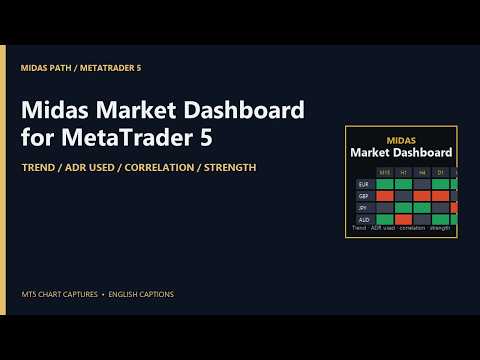
Midas Market Dashboard
- Utilities
- Version: 1.1
- Activations: 5

Your watchlist in one grid, drawn over a chart: a row per symbol, the trend on each timeframe you choose, how much of its average daily range today has used, its correlation to the chart's symbol, and the strength of its two currencies. Everything in it is a state, not a signal, and every column says which rule produced it.
The columns
- Trend on each timeframe (M15, H1, H4, D1 and W1 by default, up to six): Up when the last closed bar is above its EMA and the EMA is higher than it was a few bars ago; Down for the mirror; Flat otherwise. Closed bars only, so a cell changes when a bar closes, never mid-bar.
- ADR used: today's range as a share of the average daily range of the last 14 days (adjustable), drawn as a bar in the cell. Over 100% is marked in red, over 70% in amber, so you can see a day that has already done its usual work.
- Correlation: the correlation of bar-to-bar returns between each symbol and the chart's symbol, on the chart's timeframe, over the last 100 closed bars (adjustable), bars matched by time. Green moves together, red moves opposite, and the shade follows the strength. Change the chart's symbol or period and the column follows; or name a reference symbol in the inputs.
- Strength: the rank and percentage move of the pair's two currencies across the 28 pairs between the eight majors, over the last 24 hourly bars (adjustable). 1 is the strongest. If your broker adds a suffix to symbol names, put it in the inputs and the pairs are found.
- Net: how many timeframes are Up minus how many are Down.
Working with it
- Click a column header to sort, again to reverse. Click a symbol to bring its chart to the front, or open one if none is open.
- Filter pills pick rows: Up or Down on H4, on D1, on both; ADR used under 50% or over 100%; correlation above +0.7 or below -0.7.
- Up to 40 symbols. Symbols your broker does not offer are listed under the grid, never shown as numbers.
- The sort and the filter are kept per account. The panel takes the whole chart it is on, so drop it on a spare chart; the chart's own scales come back when you remove it. Scroll with the mouse wheel or the arrow keys when the list is long.
What it is not
- It does not forecast, score, or say buy or sell. A row that is Up on every timeframe is a description of closed bars, and the next bar can change it.
- Correlation describes the period measured and changes over time; it does not mean two symbols will keep moving together.
Inputs
- Watchlist: symbols (comma separated, up to 40); trend timeframes (up to six); the suffix your broker adds to the majors, for the strength pairs.
- Rules: EMA period; EMA slope look-back in bars; correlation period in closed bars; ADR period in days; strength period in H1 bars; the symbol the correlation is against (blank: the chart's symbol).
- Display: font size; refresh interval in seconds.
Tested
The four rules were checked in a backtest over a month on eight symbols and five timeframes: the trend state against the platform's own EMA and the rule written out, the correlation of returns against a two-pass Pearson with bars matched by time, the ADR and today's share of it against a plain average, and the strength of the eight majors against a recomputation from the 28 pairs: 2,191 checks, 0 violations. The MetaTrader build carries the same arithmetic, with its own check script over the EMA recursion, the matching of bars by time, known correlations, the ADR and a known set of pairs.
Notes
- Closed bars only; the grid refreshes every five seconds (adjustable) and the cells move only when bars close. The EMA is computed over the last 200 bars of each timeframe (or four EMA periods, whichever is longer).
- It never trades on a live or demo chart, needs no internet and reads no file. In the Strategy Tester only, it makes one minimum-volume buy and closes it, after checking margin and volume limits, because the Market's automatic check requires an Expert to trade there.
- This is not financial advice and no result is promised.