Dawnraptor
- Experts
-
Alex Amuyunzu Raymond
 I’m an experienced MQL5 developer and software engineer specializing in building robust, high-performance algorithmic trading systems for MetaTrader 5. My work goes beyond standard EA development — I design intelligent, scalable solutions that combine market logic, automation, and external
 - Version: 1.1
- Activations: 5
Dawn Raptor: Strike the Opening Range. Scalp the Rest. Protected by Design.
Dawn Raptor is a complete MetaTrader 5 Expert Advisor that runs two independent, rule-based strategies under one shared capital-protection engine. The first is an Opening Range Breakout (ORB) engine for the London and New York sessions. The second is an active M5 scalper that looks for short, controlled trades inside the session hours you choose. Both use ATR-based stops, a fixed lot size, and a strict one-position-at-a-time policy.
It is built for traders who want clear logic, hard risk limits, and a clean view of what the robot is doing. It is not built for hype, grids, or martingale.
What makes Dawn Raptor different
- Two strategies in one EA. Each has its own switch, its own trade tag, and its own profit-protection settings.
- Sessions are calculated from the real London and New York open times. UK and US daylight saving are handled automatically, and the broker GMT offset is detected or set manually.
- Every protection feature is optional, independently switchable, and reversible.
- Daily loss limit, cumulative drawdown limit, and a mandatory stop loss are built in, not bolted on.
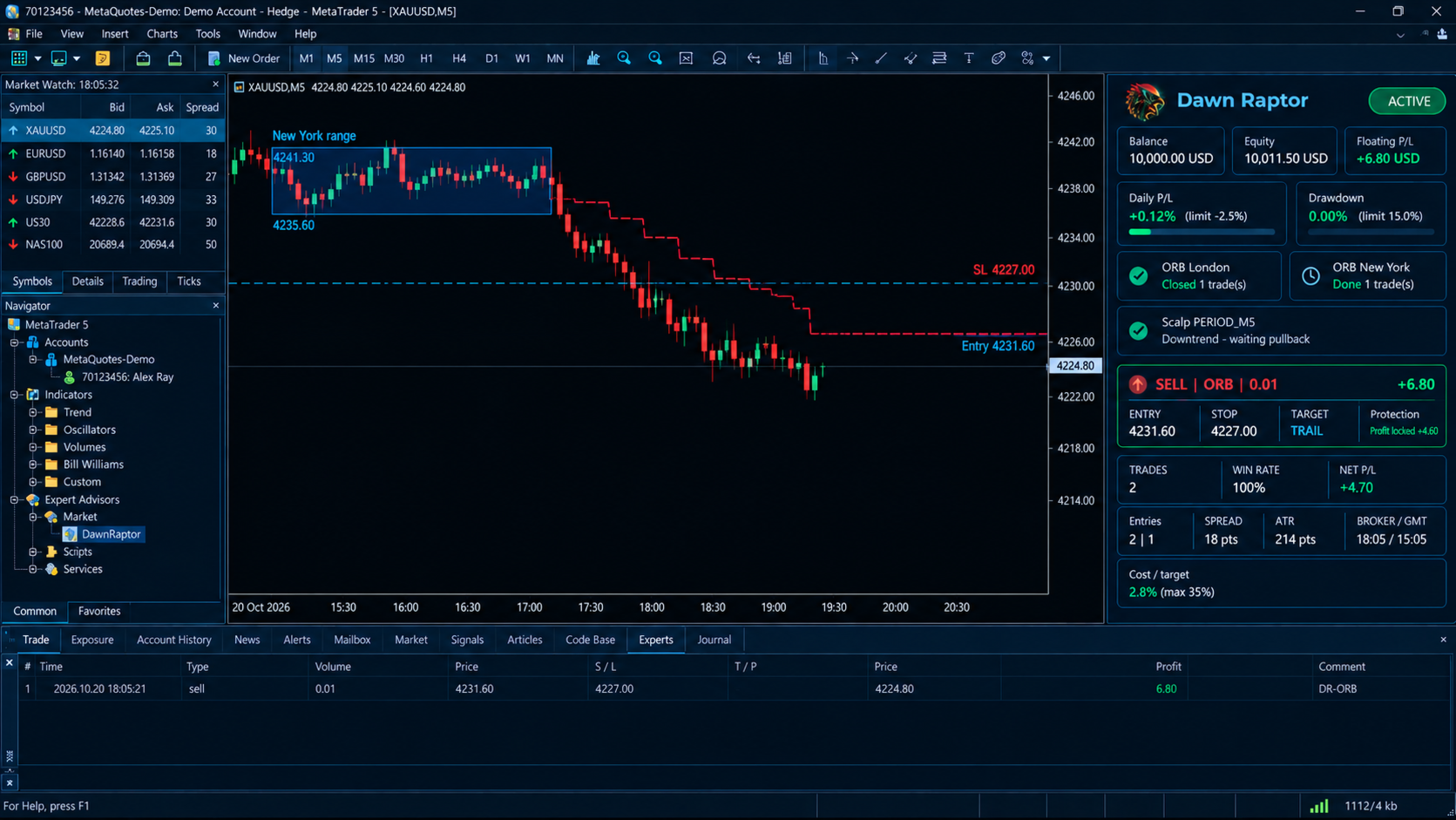
- A professional on-chart dashboard shows the account, risk, strategies, active trade, daily statistics, and market conditions in real time.
- No grid, no martingale, no averaging down, no risk escalation. Ever.
Strategy 1: Opening Range Breakout (London and New York)
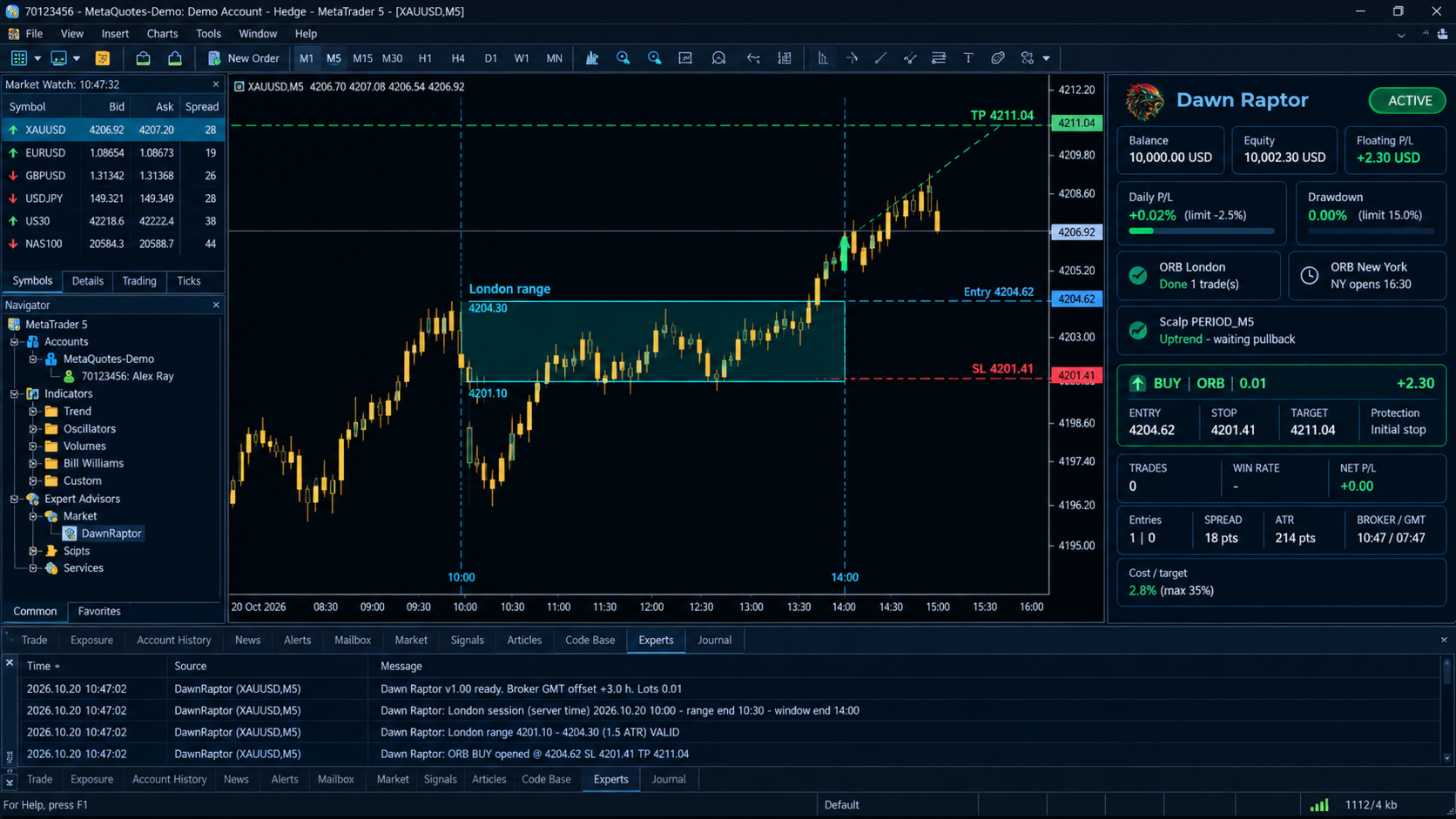
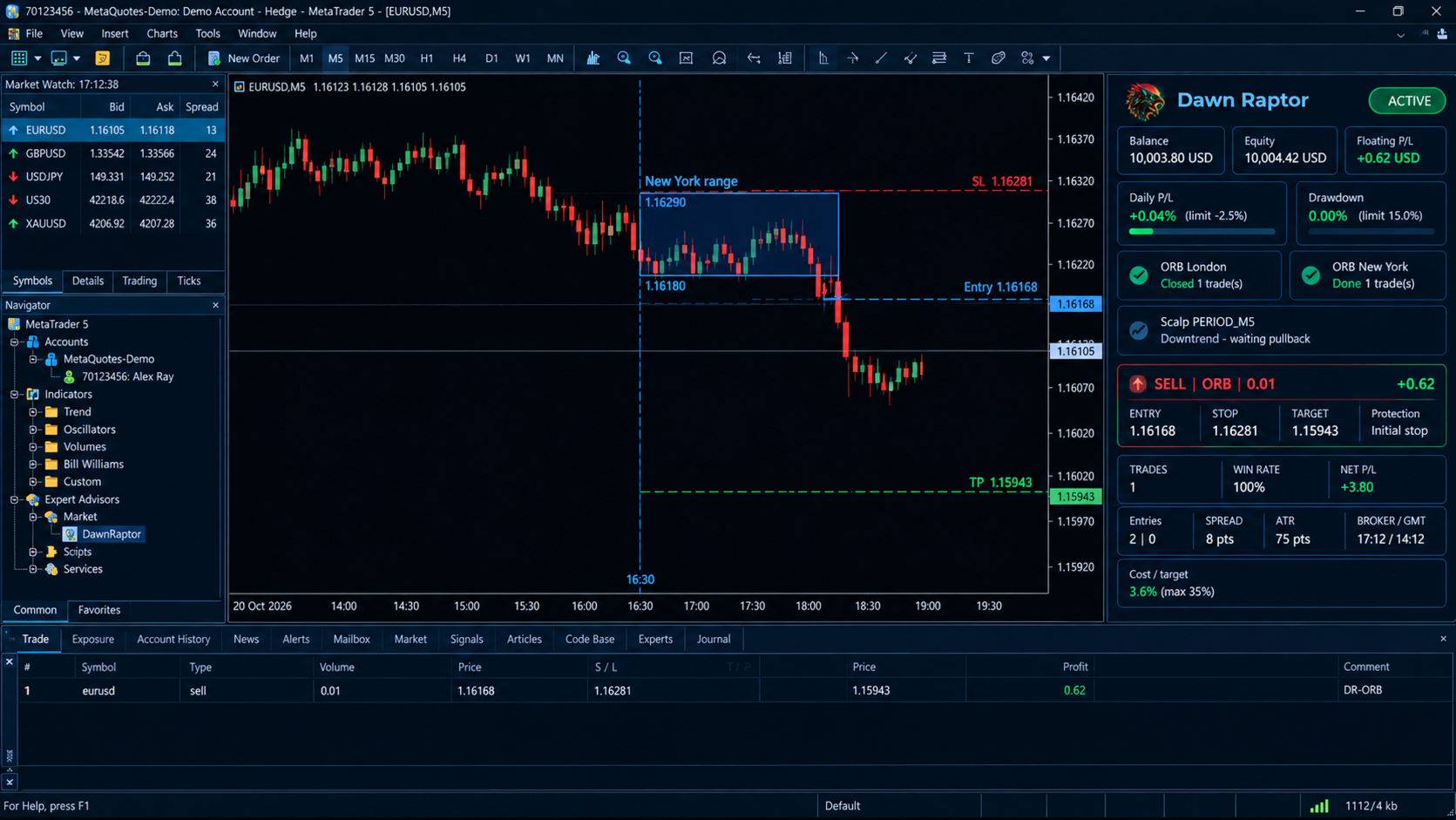
At the session open, Dawn Raptor measures the high and low of the opening range (30 minutes by default) from M1 data. That range is drawn on your chart as a shaded box so you can see exactly what the robot sees.
The range is validated against ATR. A range that is too narrow (noise) or too wide (already exhausted) is filtered out and the session is skipped.
Two entry modes are available:
- Breakout: enters when a closed candle breaks the range by a configurable ATR buffer. It does not chase. If the breakout is already stretched beyond your limit, it stays out.
- Retest: waits for the breakout, then waits for price to pull back to the broken edge and confirm. If price closes back inside the range, the move is treated as a false breakout and the setup resets.
Stop loss can be ATR-based or range-based, and the range-based stop is capped so it can never be wider than your ATR limit. Take profit can be ATR-based or a multiple of the range width. You can limit the number of trades per session per day, and you can choose London only, New York only, or both.
Strategy 2: Active Scalper
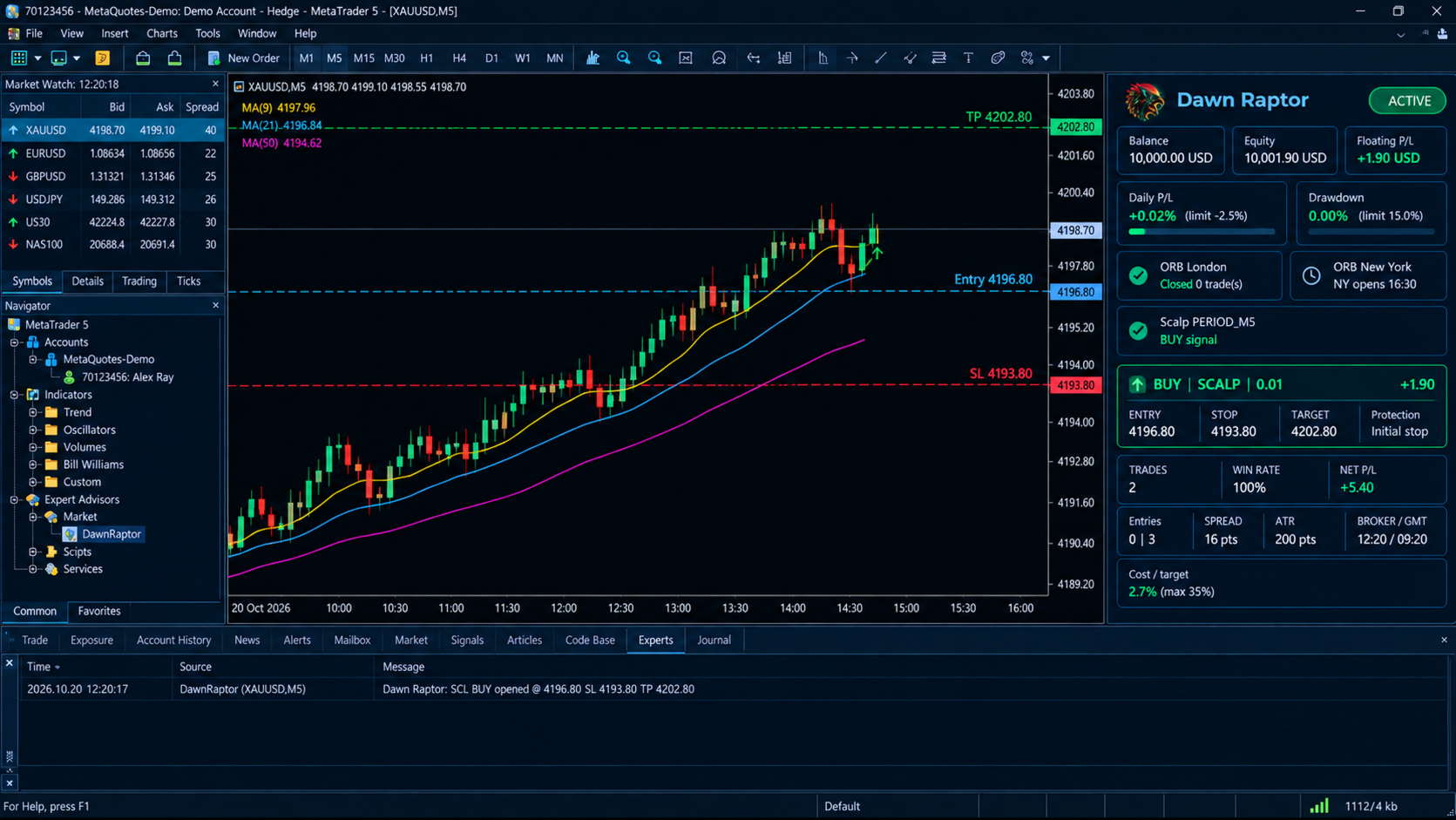
The scalper works on its own timeframe (M5 by default), independent of the chart you attach it to. It reads three things:
- Trend: fast EMA over slow EMA and price on the right side of the trend EMA.
- Pullback and reclaim: price dips to the fast EMA and then closes back through it in the direction of the trend.
- Momentum band: RSI must sit inside a configurable healthy range, so entries are not taken when momentum is already exhausted.
It trades only inside your chosen GMT hours, and a daily trade cap keeps activity under control. It never forces trades. If conditions are not there, it does nothing.
Take profit can be set in two ways:
- ATR mode: a multiple of ATR (3 ATR by default).
- Money mode: a net money target such as $3, $5, $7, or $10 per trade, with commission and spread added so the target is net.
Smart trade management (all OFF by default)
Each of these can be enabled separately for ORB and for Scalp.
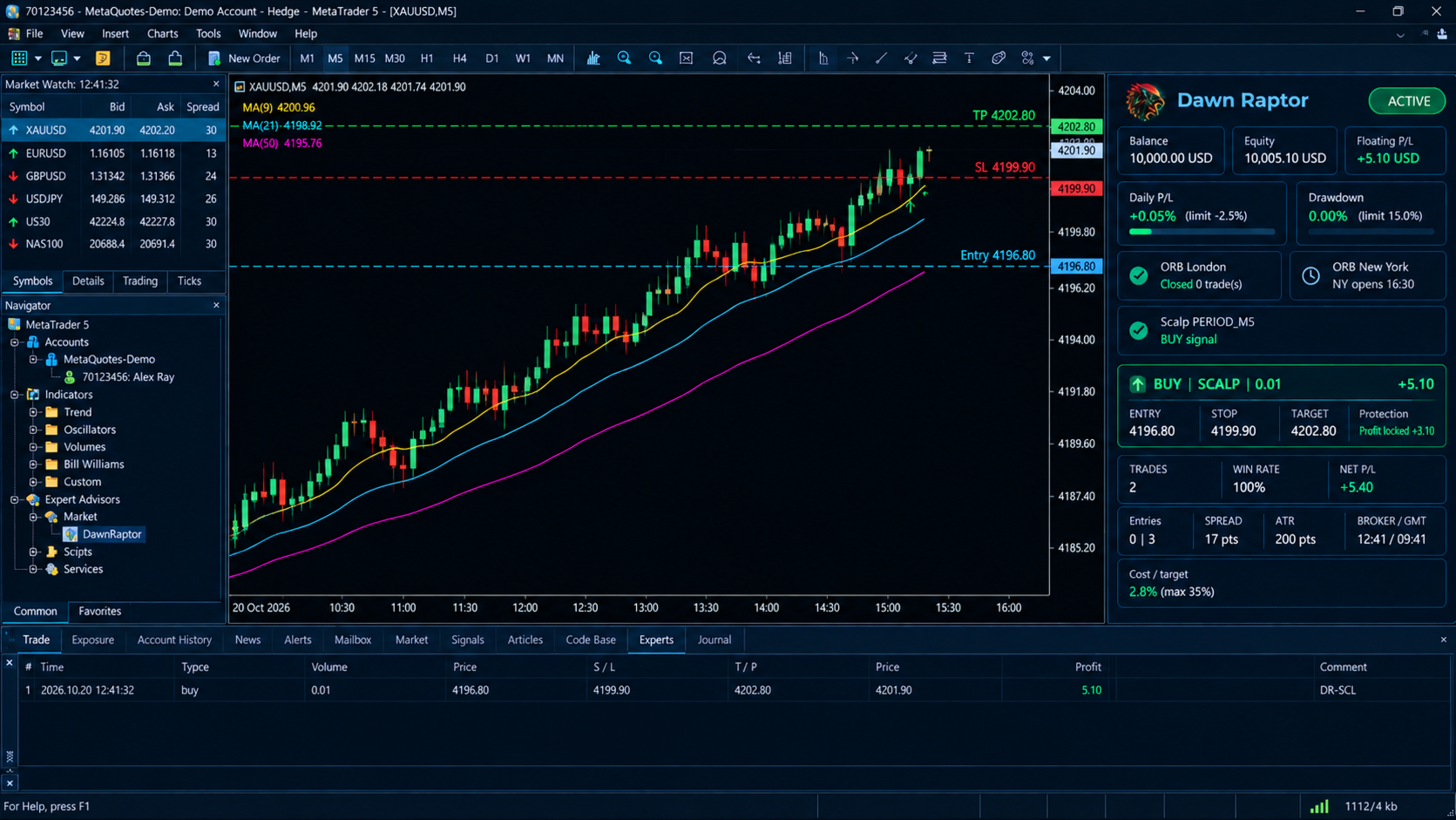
- Profit Lock: once floating profit reaches your trigger, the stop moves to protect a set amount. For example, at $5 floating it can protect $3. As profit keeps rising, the protected amount rises with it.
- Break-even: moves the stop to entry plus costs once your trigger is reached.
- ATR trailing stop: starts after a profit threshold and trails at an ATR distance. You can remove the fixed take profit while trailing is active, so a runner is not cut short.
- Time-based exit: closes a trade after a maximum holding time.
The stop never moves backward. Modifications respect the broker stop level and freeze level, enforce a minimum step to avoid spamming the server, and handle errors without flooding the journal.
Smart cooldown and cost protection
- Cooldown: blocks repeat entries on the same signal. You set one cooldown for the same direction and another for any direction. The last entry time is restored from account history after a restart.
- Cost filter: skips a trade when spread plus commission is too large relative to the take-profit distance. A hard spread cap in points is also available.
Capital protection
- Fixed lot size, 0.01 by default. There is no lot escalation.
- Reference risk: ATR(14), stop loss 1.5 ATR, take profit 3 ATR. These are defaults you can change.
- Daily loss limit: 2.5% of the day-start balance by default. Floating loss counts. A new trade is also refused if its stop distance would push the day past the limit.
- Cumulative drawdown limit: 15% from the equity peak by default. When it is hit, trading halts and the halt survives terminal restarts. A one-time input clears it deliberately.
- Mandatory stop loss: any open position without a stop gets one immediately.
- One position at a time across both strategies, with sequential trades through the day.
- Optional close-on-limit: closes the open trade when a limit is hit.
Professional dashboard
A dark, high-contrast panel sits on your chart and updates every second:
- Status pill: ACTIVE, DAILY LIMIT, DD HALT, or TRADE OFF.
- Account: balance, equity, floating P/L, plus live progress bars for daily loss and drawdown against their limits.
- Strategies: the live state of London ORB, New York ORB, and Scalp (building range, armed with range levels, done, closed, or signal).
- Active trade: direction, strategy, lot size, entry, stop, target, floating profit, and protection status (initial stop, or profit locked).
- Today: closed trades, win rate, net P/L, and entries per strategy.
- Market: spread, ATR, broker and GMT time, and current cost versus your cost limit.
Position and scale are adjustable. The opening-range boxes are drawn directly on the chart.
Execution safety
- The filling mode is detected automatically (FOK, IOC, or Return).
- Every order is validated with OrderCheck before it is sent, and margin is verified first.
- Volume is normalized to the broker’s minimum, step, and maximum.
- Requotes and price changes are retried with fresh prices.
- Stops and targets are adjusted to the broker’s minimum distance.
- The EA works on hedging and netting accounts.
Recommended use
- Symbols: XAUUSD, major FX pairs, and indices. Low-spread or ECN-type accounts are preferred.
- Chart: any timeframe. The EA uses its own M5 timeframes internally.
- Account: any size that fits the stop distance of the symbol you trade.
- Start: run ORB alone, then Scalp alone, on a demo account. Combine them only after you are satisfied with each.
- Parameters: begin with defaults, change one thing at a time, and test the Profit Lock, break-even, and trailing options separately.
Trade tagging
ORB trades use the base magic number and the comment “DR-ORB”. Scalp trades use magic plus one and the comment “DR-SCL”. This keeps the two strategies identifiable in your history.
Support
You get updates and support from the author: YUNZUHALEX.
Risk warning
Trading leveraged products carries a high level of risk and can result in the loss of your capital. Dawn Raptor does not guarantee profit. Past or simulated performance does not predict future results. Test on a demo account and use only money you can afford to lose.