Grid Manager Manual Multi Order

Grid Manager — Manual Multi-Basket Grid Assistant for MT5

Grid Manager is a hands-on control panel for building and managing grid "baskets" directly on your chart. You decide the direction and the moment; the tool opens the grid, manages every leg, and protects the position with money-based risk controls, on-chart breakeven/SL/TP lines, and one-click actions. It is an execution and management assistant — fast, visual, and fully under your control.

What it is — and what it is not

Grid Manager is a manual assistant. It does not generate signals, does not decide entries for you, and is not a "set-and-forget" robot. There is no hidden strategy predicting the market. You choose when and which way to trade; Grid Manager handles the rest: placing the base order, distributing the grid legs, tracking floating P/L in your account currency, and closing on your terms.

If you want a disciplined, visual way to run grid/averaging setups by hand — including firing entries from your phone while the terminal runs on a VPS — this tool was built for you.

Key features

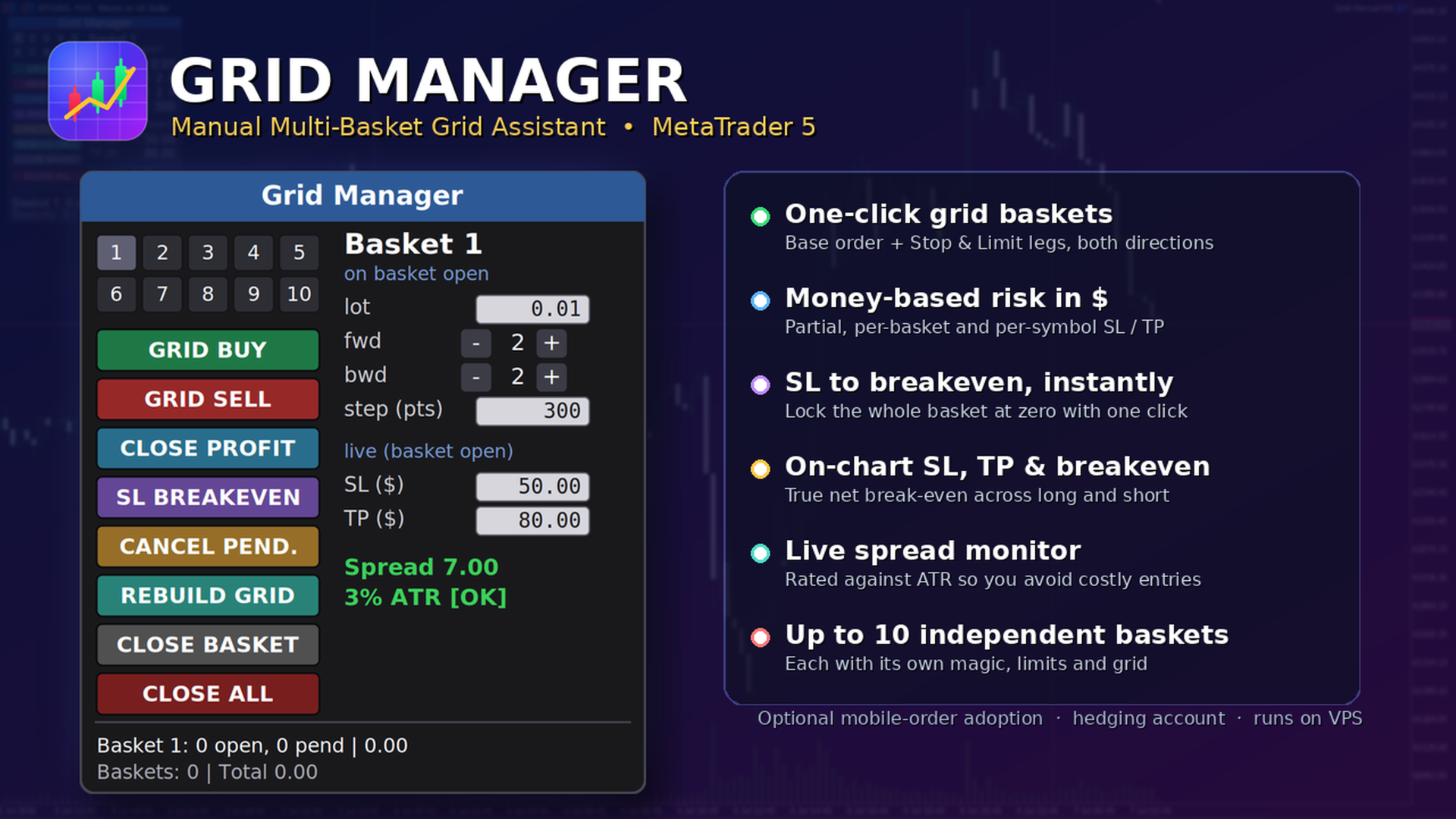
  • Multi-basket management — run several independent baskets at once (up to 10 by default), each with its own magic number, its own parameters, and its own risk limits.
  • One-click grid — a single button opens a full basket: a base market order plus forward Stop legs (continuation) and backward Limit legs (averaging), in either direction.
  • Live per-basket editor — change lot, forward/backward counts, grid step and SL/TP on the fly. Add or remove pending legs from an open basket with +/− buttons.
  • Money-based risk (in $) — partial SL/TP per order, per-basket SL/TP, and a per-symbol "kill switch". No point math — you set the dollars you are willing to risk or take.
  • Protective one-click actions — Close Profit, move SL to Breakeven, Rebuild Grid, Cancel Pendings, Close Basket, Close All.
  • On-chart lines — SL (red), TP (green) and a break-even line (gold) that reflect the current positions in real time. The account break-even line correctly accounts for both long and short exposure.
  • Spread monitor — current spread in points plus an ATR-relative rating (OK / HIGH), so you know when the cost of entry is unusually large.
  • Optional manual-order adoption — when enabled, an entry you fire manually (e.g., from the MT5 mobile app) is automatically wrapped in a grid by the EA running on your VPS.
  • Persistent state — basket metadata and SL/TP survive recompile and timeframe changes; state is isolated per symbol.
  • Flexible floating panel — dock it to any corner, edge-center, or a manual position; it follows the edge when you resize the chart.

How it works

  1. Attach Grid Manager to the chart of the symbol you want to trade and set your default parameters.
  2. Select a basket slot (1–10) and set its lot, forward/backward legs, step and SL/TP.
  3. Click GRID BUY or GRID SELL. The base order fills at market and the pending legs are placed around it.
  4. Manage as it runs: add or remove legs, move the stop to break-even once in profit, rebuild the grid if closing winners left gaps, or close the basket.
  5. Let the risk limits watch it for you — the per-basket and per-symbol dollar limits close positions when hit.

The panel, in detail

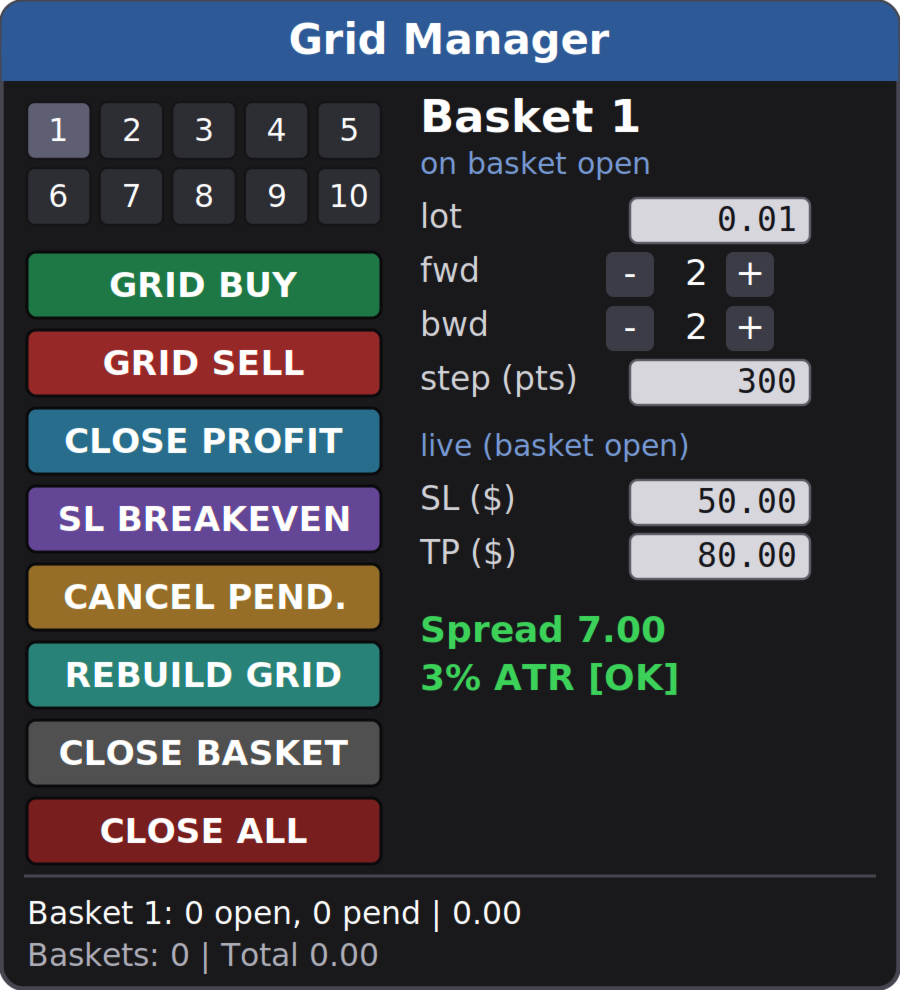
Numbered basket selector (1–10). Color-coded so you always know the state: blue = a buy basket, red = a sell basket, gray = empty; the selected slot is highlighted. Click a number to make it the active basket.

Parameter column. For an empty slot the fields set how the basket will open. For an open basket they switch to live control: forward/backward show the current pending legs (adjust with +/−), and SL/TP edit the live dollar thresholds.

Action buttons:

  • GRID BUY / GRID SELL — open a new basket (base order + forward stops + backward limits).
  • CLOSE PROFIT — close every position currently in profit across all baskets.
  • SL BREAKEVEN — move the stop of the selected basket to its break-even price (only when the basket is in profit).
  • CANCEL PEND. — cancel the pending orders of the selected basket, keeping the filled positions.
  • REBUILD GRID — cancel the pendings and re-lay the configured legs of the selected basket, filling the gaps left by closed positions, without duplicating levels that still hold a position.
  • CLOSE BASKET — close the selected basket (all its positions and pendings).
  • CLOSE ALL — global kill switch: close every basket on the symbol.

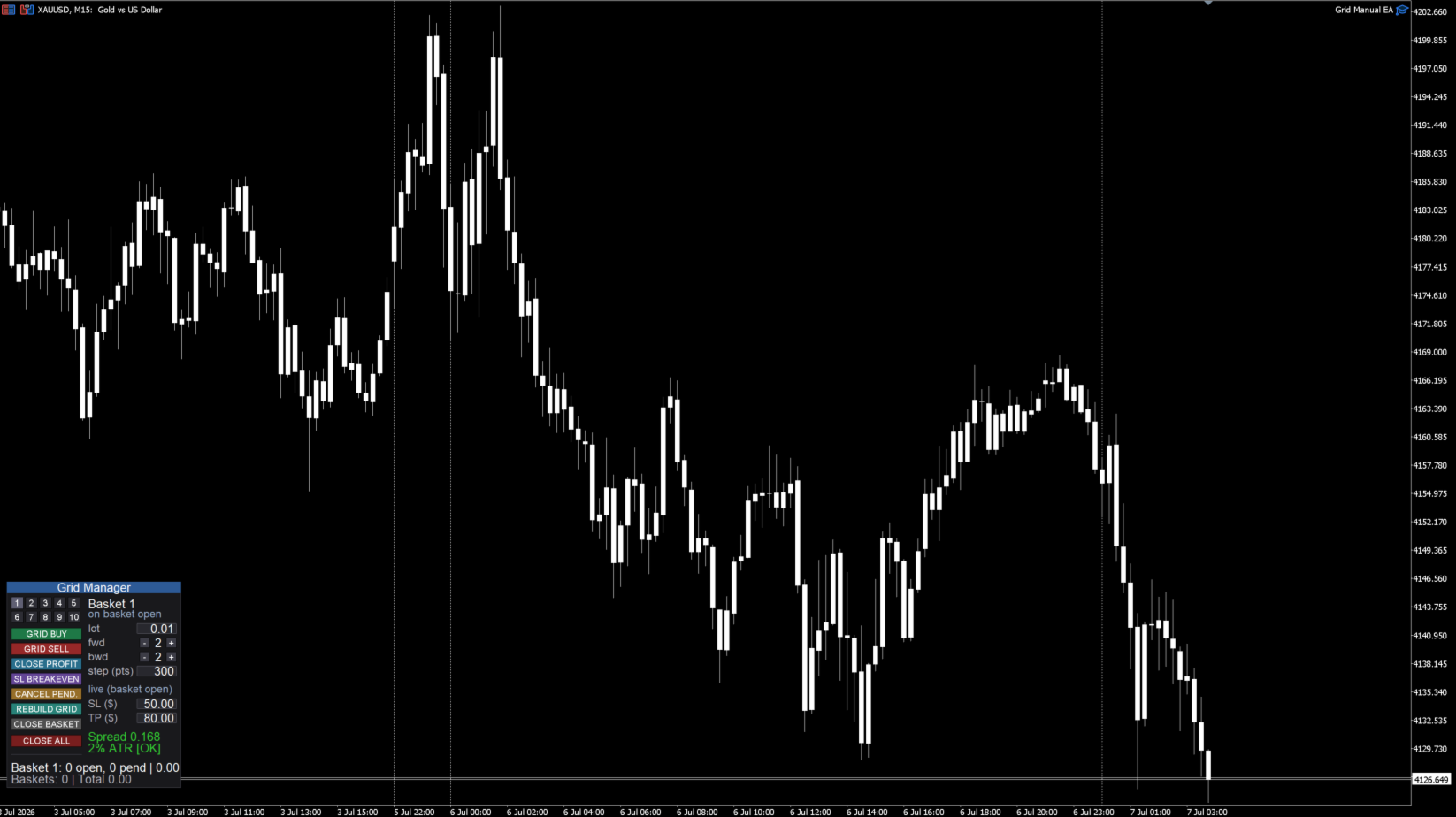
Status & spread. A live status line shows the selected basket (open positions, pending orders, floating P/L) and the symbol total, plus the spread monitor. The panel title turns red and shows [AUTOTRADING OFF] whenever trading is not permitted, so a click never fails silently.

Risk management — hard stops vs. soft stops

Please read this carefully; it is the most important thing to understand about the tool.

Hard (broker-side) stops — active even if your terminal is offline:

  • Partial SL/TP per order — a real Stop Loss / Take Profit attached to each order at the broker.
  • SL BREAKEVEN button — sets a real broker-side stop at the basket break-even price.

Soft (EA-monitored) stops — require the terminal/VPS to be running:

  • Per-basket SL/TP ($) and the per-symbol kill switch ($) are monitored by the EA on every tick and closed at market when hit. They are not broker-guaranteed stops: in a fast move price can travel past the level before the close executes, and if the terminal is closed or disconnected they will not fire. Run the EA on a VPS if you rely on them.

This is by design for money-based, multi-position basket risk — but you should know the difference.

On-chart visualization

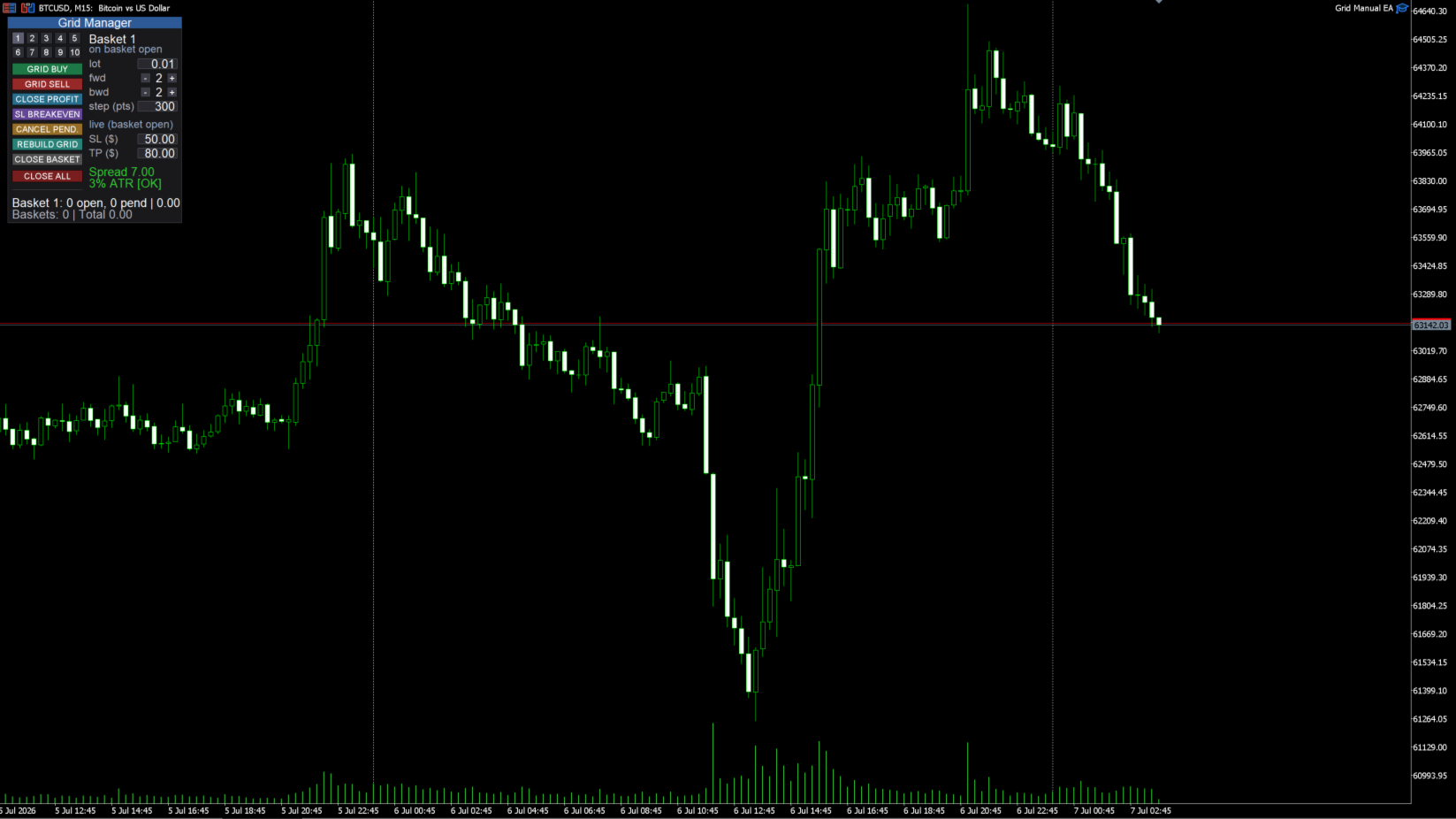
  • SL / TP lines per basket, drawn at the price where the basket would hit your dollar SL or TP, recalculated as legs fill.
  • Break-even line — either a single account line (net of long and short exposure) or one line per basket, selectable. The account line shows the true price where the combined position is flat, so it stays correct even when you hold buy and sell baskets at the same time.

Manual / mobile order adoption (optional)

Turn on Adopt manual orders and Grid Manager will watch for a manual position on the symbol whose volume matches your configured lot. When one appears, it opens a grid basket around it automatically. The intended workflow: keep the EA running on a VPS, fire an entry from the MT5 mobile app, and the grid is built for you. Only executed positions are adopted (never resting pending orders), and only those matching the configured lot — so your other manual trades are left alone.

Inputs (overview)

  • New basket defaults — lot per order, forward orders (Stop), backward orders (Limit), grid step (points).
  • Partial SL/TP (per order, $) — real broker-side stops on each order (0 = off).
  • Per-basket SL/TP ($) — soft basket limits (0 = off).
  • Symbol SL/TP ($, kill switch) — soft limit that closes everything on the symbol (0 = off).
  • Panel — title, position (9 anchors + manual), size, font, buttons per row, show SL/TP lines, average-line mode (Account / Basket / Off), ATR period and max spread-to-ATR ratio.
  • General — adopt manual orders (on/off), base magic number, max baskets, slippage (points).

Requirements

  • MetaTrader 5, hedging account (baskets use multiple positions and can hold both directions).
  • Autotrading enabled.
  • Works on any symbol; set the SL/TP dollar values and grid step to suit that symbol's volatility.
  • One instance per symbol (running two copies on the same symbol is not supported).
  • A VPS is strongly recommended so the soft (EA-monitored) risk limits and manual-order adoption keep working when your computer is off.

Important notes

  • Grid Manager is a manual execution and management tool. It does not predict the market or place trades on its own.
  • Grid / averaging approaches carry real risk: exposure grows as the market moves against a basket. Size your lots and dollar limits conservatively.
  • No profit is promised or implied. Test thoroughly on a demo account and understand every button before trading live.

Questions or feature requests are welcome — leave a comment and I'll respond.

Produits recommandés
Visual Dolphin Indicator
AL MOOSAWI ABDULLAH JAFFER BAQER
Visual Dolphin Indicator Unlock the rhythm of the market with the Visual Dolphin Indicator, your ultimate tool for identifying and capitalizing on market trends with clarity and confidence. Designed for both novice and experienced traders, this indicator eliminates the noise and guesswork, providing crystal-clear buy and sell signals directly on your chart. The Logic Behind the Waves The core of the Visual Dolphin Indicator is a sophisticated yet intuitive dual-wave system based on moving avera
Auto Stop Loss MT5
Nabil Oukhouma
5 (1)
Le Gestionnaire de Risque "Set & Forget" pour le Trading Multi-Actifs ️ Ne laissez jamais un trade sans protection. Auto Stop Loss (MT5 Manager) est l'utilitaire d'arrière-plan ultime pour les traders qui privilégient la sécurité. Contrairement aux panneaux standard, cet outil travaille sans relâche en coulisse pour sécuriser instantanément chaque trade que vous placez. Que vous ouvriez des trades manuellement ou via un autre EA, ce gestionnaire s'assure que chaque position dispose immédiateme
Size Bars
Viktor Loginov
Size Bars – индикатор отображает на графике максимальный, минимальный, текущий и средний размер баров (свечей) за выбранный период. Отображаемые параметры индикатора Size Bars: 1)       Текущий размер бара в писах (по максимум/минимум, тело бара). 2)       Максимальный, минимальный и средний размер свечей BUY . 3)       Максимальный, минимальный, средний размер свечей SELL . 4)       Количество свечей BUY и количество свечей SELL . 5)       Среднее количество свечей подряд BUY и SELL . 6)     
Symbol Manager for MT5
Taras Slobodyanik
5 (3)
Symbol Manager or Grid Manager, designed to group orders into one position (by Symbol or by Magic Number). This utility will be useful to multi-currency traders (many EAs), who can have multiple orders on several pairs. You will be able to see the total number of lots, the total profit, and set virtual stop loss and virtual take profit. To set a real TP (or SL), you must first set the virtual value, and then enter the command in this cell: "set". If you want to set real TP/SL for all orders at
HedgeSafe Trade Assistant Un panneau de trading manuel pour MetaTrader 5 centré sur la maîtrise du risque. HedgeSafe aide à préparer, valider et gérer une opération directement sur le graphique avant de cliquer sur BUY ou SELL. HedgeSafe n'est ni un service de signaux, ni un outil de prévision, ni un robot IA, ni une stratégie automatique. Il ne choisit pas la direction et ne promet aucun profit. Chaque décision reste sous le contrôle du trader. Fonctions principales Calcul du lot selon un pourc
CCI Fixed Dual
Edoardo Centorame
Qu est ce que CCI FIXED DUAL CCI FIXED DUAL est un Trend Direction Filter professionnel, conçu pour identifier avec précision : la direction dominante du marché la qualité structurelle du mouvement la cohérence entre la tendance principale et les phases d accélération Ce n est pas un indicateur d entrée directe. Ce n est pas un oscillateur classique. C est un outil de contexte, conçu pour aider le trader à décider quand opérer et quand NE PAS opérer, en réduisant drastiquement le bruit de marché
VegaXLR Manual Backtest Helper
Anderson Luiz Toledo Dos Santos
VegaXLR Manual Backtest Helper pour MetaTrader 5 est un assistant visuel de backtesting conçu pour les traders qui souhaitent tester, revoir et organiser des stratégies discrétionnaires directement sur le graphique MT5. Au lieu d’utiliser des feuilles de calcul ou de noter les résultats manuellement, vous pouvez dessiner des opérations sur l’historique des prix, simuler des entrées et sorties, calculer des métriques de performance et inspecter chaque opération dans un panneau clair directement s
Execution Guard
Joao Matheus Melo Soares
Execution Guard  "Place orders directly on the chart with a single click.” A professional risk and execution management tool designed for traders who value precision, discipline, and operational safety. Instead of focusing on signals or strategies, Execution Guard acts as a protective layer over your trading process, helping you maintain control over executions, reduce human error, and enforce predefined trading rules — especially during faster or volatile market conditions. What is Execution G
Présentation Candle Timer Countdown Pro affiche un compte à rebours fluide et précis jusqu’à la clôture de la bougie en cours, avec un arc circulaire de progression en temps réel. Fonctionnalités Compte à rebours précis Arc circulaire (anneau ou secteur rempli) 6 positions d’affichage 3 modes de couleur Mise en évidence finale Détection de connexion Alertes nouvelle bougie Faible utilisation CPU Installation Télécharger depuis MQL5 Market Ajouter au graphique Configurer les paramètres Compatibil
CosmiCLab SMC FIBO CosmiCLab SMC FIBO is a professional trading indicator designed for traders who use Smart Money Concepts (SMC), market structure analysis and Fibonacci retracement levels. The indicator automatically detects market swings and builds Fibonacci levels based on the latest impulse movement. It also identifies market structure changes such as BOS (Break of Structure) and CHOCH (Change of Character), helping traders understand the current market direction. CosmiCLab SMC FIBO also pr
BulkOp Trade Manager
Ahmed Jumaa Saif Ali Almheiri
BulkOp Trade Manager Trade faster. Manage smarter. Close with confidence. BulkOp Trade Manager is a powerful MT5 utility EA built for traders who need speed, control, and clean execution directly from the chart. It is designed for active manual traders, scalpers, gold traders, and anyone who wants to manage multiple positions with less delay and fewer clicks. Why BulkOp? Ultra-fast Buy and Sell execution One-click Bulk Close Profit One-click Bulk Close Loss Keyboard trading control Bulk order e
DDKiller Pro
Njaratahiry Michael Randrianiaina
Arrête de faire sauter ton compte. Une bonne fois pour toutes. DDKiller Pro est le gardien du risque MT5 qui tourne silencieusement sur ton graphique et coupe le trading dès qu'une limite est atteinte — que tu passes un challenge prop firm ou que tu gères ton propre compte CFD. Le problème que tout trader connaît : Tu fixes tes règles. Tu les enfreins quand même. Un trade de vengeance. Une position surleviéragée. Une session qui efface un mois de gains. DDKiller Pro retire cette décision de tes
TheRealPrice v3.0 | Ultimate Spread & Ask Visualizer TheRealPrice is a high-precision utility for MetaTrader 5 designed to expose the hidden cost of every trade: The Spread . While standard charts only display the Bid price, professional traders know that buy orders and short-exits happen at the Ask price. TheRealPrice bridges this gap by drawing a dynamic, real-time horizontal line that tracks the exact Ask level, providing a clear visual representation of the current market spread. Why do you
Target Smart Order
Markeysuel De Sousa Ferreira
TARGET SMART ORDER Indicator Custom indicator for MetaTrader 5 that displays detailed information about each trade directly on the chart, showing real-time profit/loss, Take Profit and Stop Loss levels for each active order. Main Features: Real Profit Display Real-Time Profit/Loss: Shows the current value of each position. Continuous Update: Values ​​are updated tick by tick Dynamic Colors: Green for profit, red for loss. TP/SL Lines: Draws horizontal targets at Take Profit and Stop Loss l
RiskCopilot
Carlos Adrian Feged Zapata
FRANÇAIS RiskCopilot Utility - Votre Assistant de Trading Intelligent "Voyez Votre Risque. Maîtrisez Votre Trading." RiskCopilot Utility est la solution ultime de gestion des risques et de dimensionnement des positions pour MetaTrader 5. Cet assistant de trading complet fournit des calculs en temps réel, des outils d'évaluation des risques avancés et des analyses professionnelles sans contrôler vos décisions de trading. Parfait pour les traders débutants et professionnels recherchant une g
DR Trade and Risk Manager: The Foundational Algorithmic Risk Console for MT5 For the discretionary trader, the greatest adversary is not the market; it is the undisciplined self. You have a solid strategy, but in moments of high pressure, do you follow your rules with perfect consistency? Do you cut losses without hesitation? Do you let winners run without cutting them short out of fear? For most, the answer is no. This gap between strategy and execution is where profits are lost. DR Trade and R
Non-Repainting. Non-Redrawing. Non-Lagging. Signals appear only on confirmed bars. What you see on history is exactly what appeared in real time. Built specifically for Gold (XAUUSD) traders. Gold ML Supertrend MT5 is the only Supertrend indicator on MQL5 that learns. Instead of using a fixed multiplier, it runs a K-means clustering algorithm on recent price data to find the optimal band width. Then it adapts that width per trading session (Asia/London/NY) based on what actually worked. The resu
Trading Utility for Forex Currency Pairs Only not for Gold  Functions Auto Lot Calculation based on Risk Auto stoploss  Auto TakeProfit Breakeven Auto Close Half % Close in percentage with respect to the PIPs Pending Orders BuyLimit Sell Limit with distances BuyStop Sell Stop    with distances Trading Informations Risk in percentage For Multiple trades Combine Takeprofit and Combine Stoplosses
Trade Panel by RWBTradeLab — The Ultimate Trade & Risk Management Utility Take full control of your MetaTrader 5 trading with the   Trade Panel by RWBTradeLab ! Designed by RWBTradeLab, this all-in-one utility is built for both professional and beginner traders who want to execute trades faster, manage risk perfectly, and analyse their account performance in real-time. Say goodbye to manual lot calculations and slow trade execution. With a sleek, draggable, and highly intuitive User Interfa
KMB Smart Pattern Analyzer PRO
Karwan Msto Mohammed Mohammed
Présentation du produit KMB Smart Pattern Analyzer PRO est un indicateur avancé d'analyse technique conçu pour détecter et classer les configurations de marché présentant un fort niveau de correspondance dans une zone du graphique définie par l'utilisateur. L'indicateur combine plusieurs moteurs d'analyse dans un seul outil professionnel : Analyse des configurations de chandeliers Reconnaissance des figures chartistes classiques Détection des structures harmoniques Analyse de structure de marché
Easy Trade Executor est un outil de calcul rapide de la taille de position, d’exécution des ordres et de gestion des trades pour MT5. Placez les niveaux Open Price, Stop Loss et Take Profit directement sur le graphique, obtenez automatiquement la taille de position appropriée et ouvrez des trades avec un risque maîtrisé en seulement quelques clics. Pourquoi choisir Easy Trade Executor ? Easy Trade Executor a été conçu pour les traders qui veulent aller au-delà du simple calcul du risque et gére
Expert TP SL v04 - Professional Trading Assistant with AI Motivation System Advanced manual trading tool with automatic risk management, overtrading protection, and intelligent psychological support for disciplined trading. PRODUCT OVERVIEW Expert TP SL v04 is a comprehensive trading assistant designed for manual traders who want to maintain emotional discipline while automating risk calculations. This isn't just another order placement tool - it's a complete trading psychology system that pr
Volatility SL TP
Arturs Kveps
5 (1)
Volatility SL TP est un indicateur affiché sur le graphique pour MetaTrader 5 qui utilise la volatilité actuelle du marché afin de calculer et d’afficher les niveaux possibles de Stop Loss et de Take Profit directement sur le graphique. En cliquant sur une bougie, l’indicateur affiche le prix d’Entry, le Stop Loss, le Take Profit et le calcul de la taille du lot basé sur le risque dans un format visuel clair. 1. Fonctionnement Le prix d’Entry est pris à partir de la clôture de la bougie sélectio
Indicateur Crypto_Forex « WPR avec 2 Moyennes Mobiles » pour MT5, sans repeint. - Le WPR est l'un des meilleurs oscillateurs pour le scalping. - L'indicateur « WPR et 2 Moyennes Mobiles » permet de visualiser les moyennes mobiles rapide et lente de l'oscillateur WPR. - Cet indicateur permet d'anticiper les corrections de prix. - Très facile à configurer via ses paramètres, il est utilisable sur toutes les unités de temps. - Les conditions d'entrée à l'achat et à la vente sont illustrées. - Ave
Shield Zone MT5
Thushara Dissanayake
Le       Zone de protection       L'indicateur est un       outil de trading quotidien       conçu pour mettre en évidence les points clés       niveaux de prise de profit       dérivé de deux       périodes d'étendue       calculé sur le       Période D1   . En identifiant automatiquement le jour       zones de résistance à la hausse       et       Zones de support à la baisse  : cet indicateur offre aux traders une représentation visuelle claire des zones où le prix est susceptible de rencontr
You can change the time period of the chart at the touch of a button. You can also change multiple charts at the touch of a button. You can also change multiple charts at the touch of a button,   saving you the trouble of changing time periods. We are live-streaming the actual operation of the system. Please check for yourself if it is usable. Please check it out for yourself. https://www.youtube.com/@ganesha_forex We do not guarantee your investment results. Investments should be made at you
BerelzBridge
Barend Willem Van Den Berg
BerelzBridge Pro Pont de données MT5 vers JSON pour toutes les périodes avec informations sur le compte. Aperçu BerelzBridge Pro est un indicateur MT5 qui exporte les données de marché en direct vers un fichier JSON sur le disque. Il écrit les prix d'achat et de vente, le spread, le volume tick, les statistiques quotidiennes, les informations du compte et les barres OHLCV pour les 9 périodes. Le fichier est mis à jour à un intervalle configurable avec une valeur par défaut de 2 secondes. L'indi
Order Book, known also as Market Book, market depth, Level 2, - is a dynamically updated table with current volumes of orders to buy and to sell specific financial instument at price levels near Bid and Ask. MetaTrader 5 provides the means for receiving market book from your broker, but in real time only, without access to its history. The indicator OrderBook Cumulative Indicator accumulates market book data online and visualizes them on the chart. In addition, the indicator can show the market
Candlestick Pattern Scanner is a multi-timeframe and multi-symbol dashboard and alert system that checks all timeframes and currency pairs for different candlestick patterns that are formed in them. Scanner is integrated   with support and resistance zones so you can check the candlestick patterns in most important areas of the chart to find breakout and reversal patterns in the price chart. Download demo version   (works on M4,M6,M12,H3,H8 timeframes and 20 symbols of Market Watch window) Read
SlopeChannelB MT5
MIKHAIL VINOGRADOV
SlopeChannelB – un outil d'analyse technique qui construit un canal de évolution des prix incliné, offrant des opportunités uniques pour évaluer la situation actuelle du marché et trouver des signaux de trading. Caractéristiques principales de l'indicateur : Canal de mouvement des prix incliné : L'indicateur aide à visualiser les niveaux de support et de résistance, qui peuvent indiquer des points de retournement potentiels ou des continuations de tendance. Couleurs variées des lignes et mi
Les acheteurs de ce produit ont également acheté
Trade Assistant MT5
Evgeniy Kravchenko
4.41 (216)
It helps to calculate the risk per trade, the easy installation of a new order, order management with partial closing functions, trailing stop of 7 types and other useful functions. Additional materials and instructions Installation instructions - Application instructions - Trial version of the application for a demo account Line function -   shows on the chart the Opening line, Stop Loss, Take Profit. With this function it is easy to set a new order and see its additional characteristics bef
Bienvenue sur Trade Manager EA, l’outil ultime de gestion des risques conçu pour rendre le trading plus intuitif, précis et efficace. Ce n’est pas seulement un outil d’exécution d’ordres ; c’est une solution complète pour la planification des trades, la gestion des positions et le contrôle des risques. Que vous soyez débutant, trader expérimenté ou scalpeur ayant besoin d’une exécution rapide, Trade Manager EA s’adapte à vos besoins, offrant une flexibilité sur tous les marchés, des devises et i
================================================================================ POC BREAKOUT - V20.72. Full Professional Grade Toolkit ================================================================================ POC Breakout is a full MetaTrader 5 trading dashboard for discretionary traders who want breakout signals, Point of Control (POC) context, volume profiles, order flow, market structure, news, alerts, and advanced trade planning in one professional workspace. Attached directly to you
TradePanel MT5
Alfiya Fazylova
4.88 (167)
Trade Panel est un assistant commercial multifonction. L'application contient plus de 50 fonctions de trading pour le trading manuel et permet d'automatiser la plupart des tâches commerciales. Instructions d'utilisation + tutoriel vidéo : https://www.mql5.com/fr/blogs/post/762589 Version d'essai de l'application pour un compte démo : https://www.mql5.com/fr/blogs/post/762644 Comment installer l'application : https://www.mql5.com/fr/blogs/post/762645 Comment tester l'application en mode visuel :
Local Trade Copier EA MT5
Juvenille Emperor Limited
4.94 (148)
Découvrez une expérience exceptionnellement rapide de copie de trades avec le   Local Trade Copier EA MT5 . Avec sa configuration facile en 1 minute, ce copieur de trades vous permet de copier des trades entre plusieurs terminaux MetaTrader sur le même ordinateur Windows ou Windows VPS avec des vitesses de copie ultra-rapides de moins de 0.5 seconde. Que vous soyez un trader débutant ou professionnel, le   Local Trade Copier EA MT5   offre une large gamme d'options pour le personnaliser en fonc
Version Bêta Le Telegram to MT5 Signal Trader est presque prêt pour la sortie officielle en version alpha. Certaines fonctionnalités sont encore en développement et vous pourriez rencontrer de petits bugs. Si vous rencontrez des problèmes, merci de les signaler, vos retours aident à améliorer le logiciel pour tout le monde. Telegram to MT5 Signal Trader est un outil puissant qui copie automatiquement les signaux de trading depuis des chaînes ou groupes Telegram vers votre compte MetaTrader 5 .
Telegram to MT5 Multi-Channel Copier   copie automatiquement les signaux de trading de vos canaux Telegram directement vers MetaTrader 5. Pas de bots, pas d'extensions de navigateur, pas de copie manuelle. Un signal arrive sur Telegram et l'EA ouvre le trade dans votre terminal en quelques secondes. Le produit comprend deux composants : une application Windows qui écoute vos canaux Telegram, et cet Expert Advisor qui exécute les signaux dans votre terminal MT5. Une version MT4 est également disp
Astro Trade MT5
Indra Maulana
5 (3)
25% discount on the release of the tool: only for the next 3 buyers Send a message to receive a demo version. AstroTrade Trading Assistant AstroTrade is a comprehensive multi-functional trading utility developed for the MetaTrader 5 platform. It integrates essential tools for trade execution, risk management, and technical monitoring into a single unified interface. The application is designed to assist traders in managing their daily operations through a visual and structured environment. Vi
Telegram To MT5 Ultra
Mirel Daniel Gheonu
5 (4)
Telegram To MT5 — Copieur de signaux Transformez les appels de trading de vos canaux Telegram en véritables ordres MT5 — automatiquement, sur autant de comptes que vous le souhaitez, avec le risque et les règles entièrement sous votre contrôle. Telegram To MT5 relie les canaux VIP / de signaux que vous suivez déjà sur Telegram à votre terminal MetaTrader 5. Une application de bureau compagnon gratuite lit les messages (même des canaux qui bloquent les bots), et cet Expert Advisor les exécute sur
Exp COPYLOT CLIENT for MT5
Vladislav Andruschenko
3.97 (35)
Copieur professionnel de trades pour MetaTrader 5 Un copieur de trades rapide, professionnel et fiable pour MetaTrader . COPYLOT permet de copier des trades Forex entre les terminaux MT4 et MT5 avec prise en charge des comptes Hedge et Netting . La version MT5 de COPYLOT prend en charge : - MT5 Hedge → MT5 Hedge - MT5 Hedge → MT5 Netting - MT5 Netting → MT5 Hedge - MT5 Netting → MT5 Netting - MT4 → MT5 Hedge - MT4 → MT5 Netting Version MT4 Description complète + DEMO + PDF Comment acheter Comme
Anchor Trade Manager
Kalinskie Gilliam
5 (8)
Anchor: The EA Manager Your EAs manage their own trades. Anchor manages the account around them. Anchor gives you one place to control your EAs, manage risk and decide when trading is allowed. Any EA, any vendor, any broker or symbol. No source-code changes required. The Problem Most EAs only know what they are doing. They cannot see when another EA is already trading, when several EAs open and are stacking risk or when the account has reached your loss limit. Even using just one EA, it may not
HINN MagicEntry Extra
ALGOFLOW OÜ
4.72 (18)
HINN MAGIC ENTRY – the ultimate tool for entry and position management! SIMPLE. FASTEST. INTUITIVE. MAX AUTOMATED. Place orders by selecting a level directly on the chart! full description   ::  demo-version  :: 60-sec-video-description Key features: - Market, limit, and pending orders - Automatic lot size calculation - Automatic spread and commission accounting - Unlimited partitial take-profits  - Breakeven and trailing stop-loss and take-profit  functions - Invalidation leves - Intuitive, a
Trade copier MT5
Alfiya Fazylova
4.58 (52)
Trade Copier est un utilitaire professionnel conçu pour copier et synchroniser les commandesentre les comptes de trading. Les commandes sont copiées du compte/terminal du fournisseur vers le compte/terminal du destinataire, qui sont installés sur le même ordinateur ou vps. PROMOTION - Si vous avez déjà acquis le "Trade copier MT5", vous pouvez obtenir le "Trade copier MT4" gratuitement (pour la copie MT4 > MT5 et MT4 < MT5). Pour obtenir des informations plus détaillées sur les conditions, veuil
The product will copy all telegram signal to MT5 ( which you are member) , also it can work as remote copier.  Easy to set up, copy order instant, can work with almost signal formats, image signal,  s upport to translate other language to English Work with all type of channel or group, even channel have "Restrict Saving Content", work with  multi channel, multi MT5 Work as remote copier: with signal have ticket number, it will copy exactly via ticket number. Support to backtest signal. How to s
Ultimate Extractor
Clifton Creath
5 (8)
Ultimate Extractor - Professional Trading Analytics for MT5 *****this is the local HTML version of Ultimate Extractor. !!!!!it is not compatible with Cloud!!!! For the online version please reach out to me directly****** Ultimate EA manager also now available when you use cloud pro and above for free!! Ultimate Extractor transforms your MetaTrader 5 trading history into actionable insights with comprehensive analytics, interactive charts, and real-time performance tracking. What It Does Automa
Signal Trading View to MT5 Pro
Mirel Daniel Gheonu
4.5 (2)
Signal TradingView to MT5 Pro Automator Exécution professionnelle instantanée entre TradingView et MetaTrader 5 Automatisez votre stratégie de trading avec le pont de communication le plus robuste entre les alertes TradingView et l'exécution réelle sur MT5. Conçu pour les traders qui exigent vitesse, flexibilité et une gestion des risques impeccable, cet Expert Advisor transforme tout message d'alerte en un ordre au marché ou à cours limité précis. POINTS FORTS ET AVANTAGES Moteur d'analyse univ
Trade Dashboard MT5
Fatemeh Ameri
4.95 (132)
Trade Dashboard simplifies how you open, manage, and control your trades, with built-in lot size calculation. It allows you to execute trades, manage risk, and control positions directly on the chart, with tools such as partial close, breakeven, and trailing stop. Designed to reduce manual work and help you stay focused on your trading decisions. A demo version is available for testing. Detailed explanations of features are provided within the MQL5 platform. Installation instructions are include
Power Candles Strategy Scanner - Outil de recherche de configurations multi-symboles à optimisation automatique Le Power Candles Strategy Scanner utilise le même moteur d'auto-optimisation que celui qui alimente l'indicateur Power Candles, pour chaque symbole de votre Market Watch, en parallèle. Un panneau vous indique quels symboles sont statistiquement négociables à l'instant, quelle stratégie est la plus performante pour chacun, la paire Stop Loss / Take Profit optimale, et vous alerte dès qu
Farmed Hedge Yield Farming | All Markets (Manual - Hybrid - Semi/Automated EA) VERIFIED TRADING RESULTS - Farmed Hedge Yield Axi Copy:  https://www.mql5.com/en/signals/2356376 - Farmed Hedge Yield Exn Copy:   https://www.mql5.com/en/signals/2356404 - Farmed Hedge Yield V Copy:  https://www.mql5.com/en/signals/2357156 * Before purchasing, please feel free to send me a message if you have any questions about the product or setup. ** After purchase,  Contact me via private message to receive t
Timeless Charts
Samuel Manoel De Souza
5 (8)
Timeless Charts est un utilitaire de trading tout-en-un destiné aux traders professionnels. Il combine des types de graphiques personnalisés tels que les graphiques en secondes et Renko avec une analyse avancée du flux d’ordre s utilisant Footprints , Clusters , Profils de Volume , études VWAP et outils d’analyse ancrés pour une compréhension plus approfondie du marché. Le trading et la gestion des positions sont effectués directement depuis le graphique via un panneau intégré de gestion des ord
Premium Trade Manager - Le panneau de trading avec un coach intégré Premium Trade Manager intègre un coach de trading directement dans votre graphique, avec un moteur d'exécution complet en dessous. Configurez le trade comme vous le faites toujours, puis laissez Max, votre coach de trading IA, analyser ce setup exact par rapport à votre compte en direct et vous donner un verdict clair avant de vous engager : le stop est-il discipliné, le risque est-il raisonnable, une publication à fort impact e
Trading View ToMT5
Mirel Daniel Gheonu
The Ultimate TradingView to MT5 Bridge Automation Arrêtez le trading manuel et les problèmes de latence. TradingView to MT5 Copier PRO est la passerelle (bridge) la plus rapide et la plus fiable pour exécuter vos alertes TradingView directement sur MetaTrader 5. Que vous utilisiez des indicateurs personnalisés, des scripts du Testeur de Stratégie ou des dessins manuels, cet Expert Advisor (EA) exécute vos trades instantanément grâce à la technologie WebSocket Haute Vitesse . Contrairement aux co
Seconds Chart MT5
Boris Sedov
4.61 (18)
Seconds Chart - un outil unique pour créer des graphiques en secondes dans MetaTrader 5 . Grâce à Seconds Chart , vous pouvez créer un graphique avec une période définie en secondes, offrant une flexibilité et une précision idéales pour l'analyse, indisponibles sur les graphiques standards en minutes ou en heures. Par exemple, la période S15 indique un graphique avec des bougies d'une durée de 15 secondes. Vous pouvez utiliser n'importe quels indicateurs et experts advisors compatibles avec les
Panneau de trading pour MetaTrader 5 — contrôle professionnel du trading en un clic depuis le graphique et le clavier Un panneau de trading avancé conçu pour les traders actifs, afin d’ouvrir, gérer et clôturer des positions bien plus rapidement qu’avec l’interface standard de MetaTrader. Cette solution s’adresse à ceux qui veulent contrôler positions, ordres en attente, profit global et exécution depuis un seul espace de travail professionnel. Il ne s’agit pas d’un simple utilitaire. C’est un
Quant AI Agents
Ho Tuan Thang
5 (1)
Quant AI Agents are independent trading Expert Advisors. Instead of trading using a fixed strategy like other conventional EAs, Quant AI Agents   is a   multi-agent AI trading framework   that turns natural-language strategy prompts into live.  WANT THE SAME RESULTS AS MY LIVE SIGNAL?   Use the exact same brokers I do:   IC MARKETS , IC TRADING   .  Unlike the centralized stock market, Forex has no single, unified price feed.  Every broker sources liquidity from different providers, creating un
Trade Copier Ultimate
Janitha Sandaruwan Amaradasa Wickramasingha Arachchilage
5 (5)
Trade Copier Ultimate - Telegram to MT5 Signal Copier Trade Copier Ultimate automatically copies Telegram trading signals into MetaTrader 5. The EA can read signal messages, detect the symbol, order type, entry price, Stop Loss, Take Profit levels and selected update commands, then execute or manage the trade in MT5 using your lot and risk settings. It is more than a basic Telegram to MT5 copier. TCU also supports Bot API and user-account Bridge workflows, Discord signal routing, local MT5 to MT
News Filter EA
Rashed Samir
5 (1)
News Filter EA: Advanced Algo Trading Assistant News Filter EA is an advanced algo trading assistant designed to enhance your trading experience. By using the News Filter EA , you can integrate a Forex economic news filter into your existing expert advisor, even if you do not have access to its source code. In addition to the news filter, you can also specify trading days and hours for your expert. The News Filter EA also includes risk management  and equity protection features. MT4 Version Ma
Footprint Chart Pro — Professional OrderFlow EA for MetaTrader 5 Version 6.34 | Professional tool for real traders | Institutional-Grade Visualization DEMO USERS - PLEASE SELECT EVERY TICK / REAL TICK WHEN TESTING AND YOU HAVE DOWNLOADED HISTORICAL DATA. IF YOU SEE A WAITING SCREEN AND IT IS NOT DOWNLOADING, IT MEANS YOU HAVE LOW HISTORICAL DATA. TRY 1 MIN AND 5 MIN FIRST ON 1 DAY DATA. ONE DAY DATA SHOULD BE THE NEWEST AND MOST CURRENT DATE. PLEASE WAIT UNTIL THE MARKET HAS ROLLED OVER PERIOD.
Bots Builder Pro MT5
Andrey Barinov
4.17 (6)
This is exactly what the name says. Visual strategy builder . One of a kind. Turn your trading strategies and ideas into Expert Advisors without writing single line of code. Generate mql source code files with a few clicks and get your fully functional Expert Advisors, which are ready for live execution, strategy tester and cloud optimization. There are very few options for those who have no programming skills and can not create their trading solutions in the MQL language. Now, with Bots Builde

The News Filter MT5
Leolouiski Gan
4.78 (23)
Ce produit filtre tous les conseillers experts et les graphiques manuels pendant les heures de publication des actualités, de sorte que vous n'avez pas à vous soucier des pics de prix soudains qui pourraient détruire vos configurations de trading manuelles ou les transactions entrées par d'autres conseillers experts. Ce produit est également livré avec un système de gestion des ordres complet qui peut gérer vos positions ouvertes et vos ordres en attente avant la publication de toute actualité.
Plus de l'auteur
TrendSync Heikin Ashi — Trend, Structure & Confluence in One Indicator A color change is not a signal. Most Heikin Ashi tools flip color and call it a trade. TrendSync Heikin Ashi is built on a different idea: a signal only appears when short-term context, long-term structure and a genuine point of interest all line up. The result is a clean, low-noise chart that shows you where a setup forms, where your stop belongs, and when momentum is fading — without the clutter of generic arrows. TrendSync
FREE
Session boxes with automatic GMT offset & DST, a global world-clock panel, and a personal Trading Window that alerts you the second a trade slips outside your plan. Set it once — never adjust for daylight saving again. TrendSync Sessions — Trade the Right Hours, on Any Broker Every session indicator dies twice a year: daylight saving changes, the boxes shift, and you are left re-entering GMT offsets by hand. TrendSync Sessions was built to end that. Sessions are defined in each exchange's LOCA
FREE
TrendSync Risk Calculator
Juliano Guzlinki Pacheco
Stop guessing your lot size. Risk the same amount on every trade. Most traders blow accounts not because of bad entries, but because of inconsistent position sizing: fixed lots with variable stops means every trade risks a different — and unknown — amount of money. TrendSync Risk Calculator solves this in one drag. How it works Attach the indicator. It automatically anchors three draggable lines at the current price: Entry , SL at N×ATR and TP at your chosen R:R . Drag any line — or type a new A
FREE
TrendSync MTF Dashboard
Juliano Guzlinki Pacheco
Trend direction of up to 10 timeframes of your choice, in one panel — non-repainting, with configurable sync alerts. 100% free. TrendSync MTF Dashboard shows you the trend direction of up to 10 timeframes of your choice — from M1 to MN1 — in a single clean panel on your chart, so you always know whether the timeframes agree before you take a trade. Trading against the higher timeframe is one of the most common (and most expensive) mistakes in manual trading. This dashboard makes multi-timeframe
FREE
TrendSync MACD Pro
Juliano Guzlinki Pacheco
TrendSync MACD Pro Earlier, cleaner MACD crossovers — synchronized with the higher-timeframe trend, non-repainting, with a full alert system. For MetaTrader 5. Overview The classic MACD is a great momentum tool, but it lags — its crossovers often arrive after the move has already started. TrendSync MACD Pro rebuilds the MACD with a zero-lag smoothing technique, so crossovers are earlier and cleaner, and then synchronizes them with the higher-timeframe trend — the decision layer most traders actu
TrendSync MACD Pro EA
Juliano Guzlinki Pacheco
TrendSync MACD Pro EA Multi-timeframe Zero Lag MACD trend-following Expert Advisor — transparent logic, no black box, with a full suite of built-in risk controls. Overview TrendSync MACD Pro EA is a rule-based trend-following Expert Advisor for MetaTrader 5. It trades crossovers of a Zero Lag MACD on a fast signal timeframe, but only in the direction confirmed by a higher timeframe trend — so entries are aligned with the dominant move instead of fighting it. Every rule is transparent and fully c
TrendSync Assistant — Prop Firm Guardian + Trade Panel ======================================================== Most prop firm challenges do not die from a bad strategy. They die from ONE bad day — a losing streak, a news spike, a moment of revenge trading that crosses the daily loss line. Once equity touches the limit, the account is gone, no matter how good the previous weeks were. TrendSync Assistant is an on-chart trade panel with an account-level risk guardian built specifically around p
Filtrer:
Aucun avis
Répondre à l'avis