Deposit defender MT5

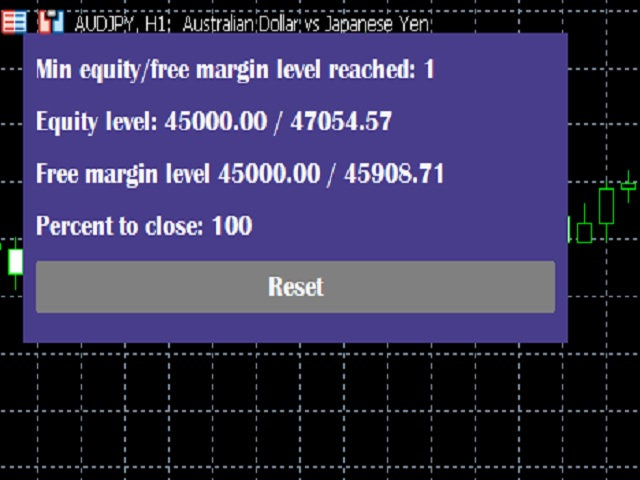
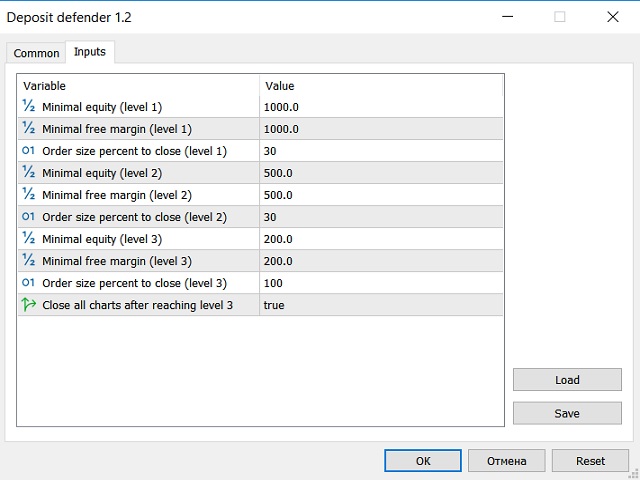
The utility is designed to save funds on your trading account. There is support for three levels of minimum equity and free margin. For each level, you can set partial (by a certain percentage) or complete closing of all market orders. The partial close percentage is applied for each order separately based on its current size (i.e. the size at the time the equity or free margin reaches the appropriate level). Upon reaching the last third level, the utility can close all charts, which will make it impossible to open new orders by Expert Advisors running on the terminal. Thus, you can always keep a certain level of funds on your deposit. It is better to set the equity or free margin in descending order for each subsequent level (see screenshot). If you want any level not to apply, set the equity and free margin to zero (or set "Order size percent to close" to zero).

MT4 version of the utility - https://www.mql5.com/en/market/product/78876
Produits recommandés
Product Name: Anchor auto TP and SL Trade Manager Pro MT5 The ultimate manual assistant. Turns trades into auto-grids with Hedging, Zero-Loss Breakeven & Spread Detection. Your manual trade will be managed automatically. Anchor Auto TP and SL Trade Manager MT5 Pro is the advanced edition of our popular trade assistant. It transforms simple manual trades into sophisticated, professional-grade recovery grids. Unlike the free version, this PRO edition fully supports Hedging (simultaneous Buy & Sell
Chart Link
David Gitau Gakunga
4.83 (12)
Chart Link  allows you to control multiple charts from one chart or multiple charts from multiple charts. Features 1. Synchronised Scrolling :     Scrolling the master chart also scrolls all linked sub charts to the same position.     Sub charts inherit offset and auto-scroll settings from the master chart. 2. Synchronised Timeframe :     Switching the master chart timeframe also switches all linked sub charts. 3. Synchronised   Symbol   :     Switching the master chart symbol also switches all
FREE
Indicateur Crypto_Forex « WPR avec 2 Moyennes Mobiles » pour MT5, sans repeint. - Le WPR est l'un des meilleurs oscillateurs pour le scalping. - L'indicateur « WPR et 2 Moyennes Mobiles » permet de visualiser les moyennes mobiles rapide et lente de l'oscillateur WPR. - Cet indicateur permet d'anticiper les corrections de prix. - Très facile à configurer via ses paramètres, il est utilisable sur toutes les unités de temps. - Les conditions d'entrée à l'achat et à la vente sont illustrées. - Ave
CosmiCLab SMC FIBO CosmiCLab SMC FIBO is a professional trading indicator designed for traders who use Smart Money Concepts (SMC), market structure analysis and Fibonacci retracement levels. The indicator automatically detects market swings and builds Fibonacci levels based on the latest impulse movement. It also identifies market structure changes such as BOS (Break of Structure) and CHOCH (Change of Character), helping traders understand the current market direction. CosmiCLab SMC FIBO also pr
S7 v77
Joel Oxley
This is the best strategy EA I have ever made. Recommended symbol below and make sure to select the BEST SETTINGS INPUT Recommended symbol: XAUUSD (Gold) Best performance and intended use is on XAUUSD. The EA works on other instruments but was designed and optimized primarily for Gold 5m timeframe. It has a rare strategy that is crafted well over time. Account sizes over 3000 USD minimum. The strategy is top secret, and the code is private so that it can keep going without issues. This strategy
Prop Max Daily Loss Manager — Assistant de Gestion de Risque Quotidien pour les Entreprises de Trading Propriétaire Prop Max Daily Loss Manager est un utilitaire MetaTrader 5 conçu pour les traders participant à des Challenges ou tradant sur des comptes financés avec des entreprises prop (comme FTMO). L'outil surveille automatiquement le risque quotidien et aide à éviter de violer la limite maximale de perte quotidienne établie. Fonctionnalités Principales Fermeture automatique de tous les trade
This indicator is especially for the binary trading. Time frame is 1 minutes and exp time 5 or 3 minutes only. You must be use martingale 3 step. So you must put lots size is 10 % at most. You should use Mt2 trading platform to connect with my indicator to get more signal without human working. This indicator wining rate is over 80% but you may get 100% of profit by using martingale 3 step. You should use MT2 Trading Platform to connect meta trader platform and binary platform . You can get mt2
FREE
Introducing   Order Blocks Breaker , a brand-new way to identify and leverage order blocks in your trading strategy. After developing multiple order block tools with unique concepts, I’m proud to present this tool that takes things to the next level. Unlike previous tools,   Order Blocks Breaker   not only identifies order blocks but also highlights   Breaker Order Blocks —key areas where the price is likely to retest after a breakout. MT4 -  https://www.mql5.com/en/market/product/124101/ This t
Trade Panel EA – Smart Manual Trading with Professional Risk Management Trade Panel EA is a powerful and user-friendly trading assistant for MetaTrader 5, designed for traders who prefer manual execution while benefiting from advanced trade management and automated risk control. Built with speed, simplicity, and precision in mind, this EA helps traders execute positions efficiently, manage risk consistently, and reduce emotional trading mistakes through an intuitive on-chart trading panel. Trad
Trade Panel by RWBTradeLab — The Ultimate Trade & Risk Management Utility Take full control of your MetaTrader 5 trading with the   Trade Panel by RWBTradeLab ! Designed by RWBTradeLab, this all-in-one utility is built for both professional and beginner traders who want to execute trades faster, manage risk perfectly, and analyse their account performance in real-time. Say goodbye to manual lot calculations and slow trade execution. With a sleek, draggable, and highly intuitive User Interfa
Risk Control Utility MT5 designed for manual trading. It helps to calculate and control your risks, transfer transactions to breakeven and accompany positions with trailing stop. Easy to set up and use. It can be used for calculating a trading lot, calculating stop loss and take profit levels. Works with currency pairs, CFDs, stocks, indices, futures, cryptocurrencies Displays   volume,   potential loss and profit before   placing an order Ability to set the expiration time of a pending order Tr
Présentation Candle Timer Countdown Pro affiche un compte à rebours fluide et précis jusqu’à la clôture de la bougie en cours, avec un arc circulaire de progression en temps réel. Fonctionnalités Compte à rebours précis Arc circulaire (anneau ou secteur rempli) 6 positions d’affichage 3 modes de couleur Mise en évidence finale Détection de connexion Alertes nouvelle bougie Faible utilisation CPU Installation Télécharger depuis MQL5 Market Ajouter au graphique Configurer les paramètres Compatibil
KMB Smart Pattern Analyzer PRO
Karwan Msto Mohammed Mohammed
Présentation du produit KMB Smart Pattern Analyzer PRO est un indicateur avancé d'analyse technique conçu pour détecter et classer les configurations de marché présentant un fort niveau de correspondance dans une zone du graphique définie par l'utilisateur. L'indicateur combine plusieurs moteurs d'analyse dans un seul outil professionnel : Analyse des configurations de chandeliers Reconnaissance des figures chartistes classiques Détection des structures harmoniques Analyse de structure de marché
À propos de l'indicateur Ce indicateur est basé sur des simulations de Monte Carlo des prix de clôture d'un instrument financier. Par définition, Monte Carlo est une technique statistique utilisée pour modéliser la probabilité de différents résultats dans un processus impliquant des nombres aléatoires basés sur des résultats observés précédemment. Comment cela fonctionne-t-il ? Ce indicateur génère plusieurs scénarios de prix pour un actif en modélisant les variations de prix aléatoires au fil
Camarilla Pivot
Philip Thakadiyil George
Camarilla Pivot Pro EA is a fully automated trading robot built around the powerful Camarilla Pivot Point formula. The EA calculates intraday pivot levels (H1–H6 & L1–L6) and trades based on price reactions at major Camarilla reversal and breakout zones. It is designed for traders who want a clean, mechanical, and proven pivot-based strategy without repainting signals or complicated indicators.
Auto SL TP MT5
KEENBASE SOFTWARE SOLUTIONS
5 (2)
Auto SL TP place automatiquement des niveaux de Stop Loss et de Take Profit sur les positions ouvertes manuellement et les ordres en attente. Définissez une fois les distances de SL et de TP souhaitées, puis l'utilitaire les appliquera lorsqu'il détectera une opération correspondant à la portée choisie. Depuis un seul graphique, vous pouvez gérer le symbole actuel ou tous les symboles, choisir les positions, les ordres en attente ou les deux, et utiliser le trailing stop configurable lorsque cel
Auto Fib Retracements
Ross Adam Langlands Nelson
4.2 (5)
Automatic Fibonacci Retracement Line Indicator. This indicator takes the current trend and if possible draws Fibonacci retracement lines from the swing until the current price. The Fibonacci levels used are: 0%, 23.6%, 38.2%, 50%, 61.8%, 76.4%, 100%. This indicator works for all charts over all timeframes. The Fibonacci levels are also recorded in buffers for use by other trading bots. Any comments, concerns or additional feature requirements are welcome and will be addressed promptly. 
FREE
Visual Dolphin Indicator
AL MOOSAWI ABDULLAH JAFFER BAQER
Visual Dolphin Indicator Unlock the rhythm of the market with the Visual Dolphin Indicator, your ultimate tool for identifying and capitalizing on market trends with clarity and confidence. Designed for both novice and experienced traders, this indicator eliminates the noise and guesswork, providing crystal-clear buy and sell signals directly on your chart. The Logic Behind the Waves The core of the Visual Dolphin Indicator is a sophisticated yet intuitive dual-wave system based on moving avera
Telegram Utility EA est lié à n'importe quel bot privé/public et peut vous aider à : Fermez toutes les commandes instantanément par commande. La commande est codée avec votre mot de passe personnalisé et vous seul le savez. Le bot Telegram vous dira quand toutes les commandes sont fermées et mettra même en pause tous les autres EA en cours d'exécution dans votre terminal MT5. Mettez en pause/reprenez tout autre EA en cours d'exécution dans le terminal en un seul clic ! Rapport sur le commerce
The indicator detects and displays М. Gartley's Butterfly pattern. The pattern is plotted by the extreme values of the ZigZag indicator (included in the resources, no need to install). After detecting the pattern, the indicator notifies of that by the pop-up window, a mobile notification and an email. The pattern and wave parameters are displayed on the screenshots. The default parameters are used for demonstration purposes only in order to increase the amount of detected patterns. Parameters z
FoxterAII
Serhii Shal
FoxterAI — Robot de Trading en Grid avec Pas ATR-Adaptatif et Panneau de Contrôle Interactif FoxterAI est un robot de trading en grid automatisé pour MetaTrader 5. Le pas de grille est calculé via l'ATR, pas un nombre fixe de pips. Gère deux séries BUY et SELL simultanément. Caractéristique Clé Le panneau interactif fonctionne entièrement en mode visuel du Testeur de Stratégie. Modifiez les paramètres pendant le backtest sans l'arrêter. Architecture Fonctions principales: DetectTrend(), CheckNew
Margin Call Shield – Defend Your Margin on Your Terms Margin Call Shield is a tool for MetaTrader 5 traders who want to decide for themselves which open positions are closed during margin call situations before the platform does so automatically based on its internal rules. By default, the broker or platform decides which positions to close, often using undisclosed algorithms. Margin Call Shield lets you set this order according to your own strategy. Why Was Margin Call Shield Created? In a mar
VirtualStopsMT5
Viktor Shpakovskiy
A utility for managing open positions using virtual (invisible to the broker) stops. Virtual stop loss and virtual take profit can be freely moved around the chart. If the price touches the virtual stop line (TP, SL, TS), the EA will close all orders of the same direction on the current chart. Closing orders by virtual take profit is possible only if there is a profit. With the help of the built-in trading simulator, you can, in the strategy tester, see how the adviser works. Parameters Block
Overview Harmonic Patterns MT5 is a technical analysis indicator designed for the MetaTrader 5 platform. It identifies and displays harmonic price patterns, such as Butterfly, Cypher, Crab, Bat, Shark, and Gartley, in both bullish and bearish directions. The indicator calculates key price levels, including entry, stop loss, and three take-profit levels, to assist traders in analyzing market movements. Visual elements and customizable alerts enhance usability on the chart. Features Detects six ha
Short Description Swing Timing Breakout EA is a smart Expert Advisor for MetaTrader 5 that combines trend filtering, momentum timing, and dynamic risk management to capture high-probability swing and breakout opportunities. Full Description Swing Timing Breakout EA is a professional trading robot designed for MetaTrader 5, suitable for traders who want a balance between automation, control, and disciplined risk management. This EA uses a trend-following and momentum confirmation approach ,
CCI Fixed Dual
Edoardo Centorame
Qu est ce que CCI FIXED DUAL CCI FIXED DUAL est un Trend Direction Filter professionnel, conçu pour identifier avec précision : la direction dominante du marché la qualité structurelle du mouvement la cohérence entre la tendance principale et les phases d accélération Ce n est pas un indicateur d entrée directe. Ce n est pas un oscillateur classique. C est un outil de contexte, conçu pour aider le trader à décider quand opérer et quand NE PAS opérer, en réduisant drastiquement le bruit de marché
MAFX Trading Manager
Mark Anthony Noblefranca Nazarrea
5 (1)
MAFX Trading Manager Panneau professionnel de gestion manuelle des trades pour MetaTrader 5 Présentation du produit MAFX Trading Manager est un panneau professionnel de gestion manuelle des trades pour MetaTrader 5, conçu pour aider les traders à exécuter et gérer leurs positions plus efficacement. Il offre une exécution rapide des ordres et des outils essentiels de gestion dans une interface compacte et conviviale. Ce produit s’adresse aux traders manuels souhaitant davantage de contrôle, de ra
FREE
Advanced MT5 Indicator: Precision-Powered with Pivot Points, MAs & Multi-Timeframe Logic Unlock the full potential of your trading strategy with this precision-engineered MetaTrader 5 indicator —an advanced tool that intelligently blends Pivot Points , Adaptive Moving Averages , and Multi-Timeframe Analysis to generate real-time Buy and Sell signals with high accuracy.    If you want to test on Real Market, Let me know. I will give the Demo file to run on Real Account.    Whether you're a scal
Force Trade X MT5 is an EA based on Force Index. Force Index parameters such as Period, BuyShift, BuyValue, SellShift, and SellValue can be adjusted. Force Trade X MT5 applies BTN TECHNOLOGY's state-of-the-art intelligent technology to help you create optimal results for your trades. May your dreams come true through Force Trade X MT5. Good luck. === Inquiries === E-Mail:support@btntechfx.com
Rainbow EA MT5
Jamal El Alama
Description : Rainbow EA MT5 is a simple Expert advisor based on   Rainbow MT5 indicator witch is based on Moving average with period 34. The indicator is incorporated in the EA, therefore, it is not required for the EA to operate, but if you wish, you can download it from   my product page . The Expert Advisor settings are as follows : Suitable for Timeframes up to H1 The parameters below can be set according to your trading rules. StopLoss ( Stop Loss in pips) TakeProfit ( Take Profit in pips
Les acheteurs de ce produit ont également acheté
Trade Assistant MT5
Evgeniy Kravchenko
4.41 (216)
It helps to calculate the risk per trade, the easy installation of a new order, order management with partial closing functions, trailing stop of 7 types and other useful functions. Additional materials and instructions Installation instructions - Application instructions - Trial version of the application for a demo account Line function -   shows on the chart the Opening line, Stop Loss, Take Profit. With this function it is easy to set a new order and see its additional characteristics bef
Bienvenue sur Trade Manager EA, l’outil ultime de gestion des risques conçu pour rendre le trading plus intuitif, précis et efficace. Ce n’est pas seulement un outil d’exécution d’ordres ; c’est une solution complète pour la planification des trades, la gestion des positions et le contrôle des risques. Que vous soyez débutant, trader expérimenté ou scalpeur ayant besoin d’une exécution rapide, Trade Manager EA s’adapte à vos besoins, offrant une flexibilité sur tous les marchés, des devises et i
TradePanel MT5
Alfiya Fazylova
4.88 (167)
Trade Panel est un assistant commercial multifonction. L'application contient plus de 50 fonctions de trading pour le trading manuel et permet d'automatiser la plupart des tâches commerciales. Avant l'achat, vous pouvez tester la version de démonstration sur un compte de démonstration. Télécharger la version d'essai de l'application pour un compte de démonstration : https://www.mql5.com/fr/blogs/post/762644 . Instructions complètes ici . Commerce. Permet d'effectuer des opérations commerciales e
Local Trade Copier EA MT5
Juvenille Emperor Limited
4.97 (146)
Découvrez une expérience exceptionnellement rapide de copie de trades avec le   Local Trade Copier EA MT5 . Avec sa configuration facile en 1 minute, ce copieur de trades vous permet de copier des trades entre plusieurs terminaux MetaTrader sur le même ordinateur Windows ou Windows VPS avec des vitesses de copie ultra-rapides de moins de 0.5 seconde. Que vous soyez un trader débutant ou professionnel, le   Local Trade Copier EA MT5   offre une large gamme d'options pour le personnaliser en fonc
Astro Trade MT5
Indra Maulana
5 (2)
25% discount due to the launch of AstroTrade : 100$ >>> 75$ (Only for the first 10 purchases) AstroTrade Trading Assistant AstroTrade is a comprehensive multi-functional trading utility developed for the MetaTrader 5 platform. It integrates essential tools for trade execution, risk management, and technical monitoring into a single unified interface. The application is designed to assist traders in managing their daily operations through a visual and structured environment. Visual Trade Execu
================================================================================ POC BREAKOUT - V20.72. Full Professional Grade Toolkit ================================================================================ POC Breakout is a full MetaTrader 5 trading dashboard for discretionary traders who want breakout signals, Point of Control (POC) context, volume profiles, order flow, market structure, news, alerts, and advanced trade planning in one professional workspace. Attached directly to you
Version Bêta Le Telegram to MT5 Signal Trader est presque prêt pour la sortie officielle en version alpha. Certaines fonctionnalités sont encore en développement et vous pourriez rencontrer de petits bugs. Si vous rencontrez des problèmes, merci de les signaler, vos retours aident à améliorer le logiciel pour tout le monde. Telegram to MT5 Signal Trader est un outil puissant qui copie automatiquement les signaux de trading depuis des chaînes ou groupes Telegram vers votre compte MetaTrader 5 .
Telegram to MT5 Multi-Channel Copier copie automatiquement les signaux de trading de vos canaux Telegram directement vers MetaTrader 5. Pas de bots, pas d'extensions de navigateur, pas de copie manuelle. Vous recevez un signal sur Telegram et l'EA ouvre l'opération sur votre terminal en quelques secondes. Le produit comprend deux composants : une application Windows qui écoute vos canaux Telegram, et cet Expert Advisor qui exécute les signaux sur votre terminal MT5. Une version MT4 est également
Grid Manual MT5
Alfiya Fazylova
4.73 (22)
Grid Manual est un panneau de trading permettant de travailler avec une grille d'ordres. L'utilitaire est universel, possède des paramètres flexibles et une interface intuitive. Il fonctionne avec une grille d'ordres non seulement dans le sens des pertes, mais aussi dans le sens de l'augmentation des profits. Le commerçant n'a pas besoin de créer et de maintenir une grille d'ordres, l'utilitaire le fera. Il suffit d'ouvrir une ordre et "Grid Manual" créera automatiquement une grille de ordres po
Trade copier MT5
Alfiya Fazylova
4.58 (52)
Trade Copier est un utilitaire professionnel conçu pour copier et synchroniser les commandesentre les comptes de trading. Les commandes sont copiées du compte/terminal du fournisseur vers le compte/terminal du destinataire, qui sont installés sur le même ordinateur ou vps. PROMOTION - Si vous avez déjà acquis le "Trade copier MT5", vous pouvez obtenir le "Trade copier MT4" gratuitement (pour la copie MT4 > MT5 et MT4 < MT5). Pour obtenir des informations plus détaillées sur les conditions, veuil
Exp COPYLOT CLIENT for MT5
Vladislav Andruschenko
3.97 (35)
Copieur professionnel de trades pour MetaTrader 5 Un copieur de trades rapide, professionnel et fiable pour MetaTrader . COPYLOT permet de copier des trades Forex entre les terminaux MT4 et MT5 avec prise en charge des comptes Hedge et Netting . La version MT5 de COPYLOT prend en charge : - MT5 Hedge → MT5 Hedge - MT5 Hedge → MT5 Netting - MT5 Netting → MT5 Hedge - MT5 Netting → MT5 Netting - MT4 → MT5 Hedge - MT4 → MT5 Netting Version MT4 Description complète + DEMO + PDF Comment acheter Comme
Telegram To MT5 Ultra
Mirel Daniel Gheonu
5 (4)
Telegram To MT5 — Copieur de signaux Transformez les appels de trading de vos canaux Telegram en véritables ordres MT5 — automatiquement, sur autant de comptes que vous le souhaitez, avec le risque et les règles entièrement sous votre contrôle. Telegram To MT5 relie les canaux VIP / de signaux que vous suivez déjà sur Telegram à votre terminal MetaTrader 5. Une application de bureau compagnon gratuite lit les messages (même des canaux qui bloquent les bots), et cet Expert Advisor les exécute sur
Premium Trade Manager - Le panneau de trading avec un coach intégré Premium Trade Manager intègre un coach de trading directement dans votre graphique, avec un moteur d'exécution complet en dessous. Configurez le trade comme vous le faites toujours, puis laissez Max, votre coach de trading IA, analyser ce setup exact par rapport à votre compte en direct et vous donner un verdict clair avant de vous engager : le stop est-il discipliné, le risque est-il raisonnable, une publication à fort impact e
Timeless Charts
Samuel Manoel De Souza
5 (8)
Timeless Charts est un utilitaire de trading tout-en-un destiné aux traders professionnels. Il combine des types de graphiques personnalisés tels que les graphiques en secondes et Renko avec une analyse avancée du flux d’ordre s utilisant Footprints , Clusters , Profils de Volume , études VWAP et outils d’analyse ancrés pour une compréhension plus approfondie du marché. Le trading et la gestion des positions sont effectués directement depuis le graphique via un panneau intégré de gestion des ord
Footprint Chart Pro — Professional OrderFlow EA for MetaTrader 5 Version 6.34 | Professional tool for real traders | Institutional-Grade Visualization DEMO USERS - PLEASE SELECT EVERY TICK / REAL TICK WHEN TESTING AND YOU HAVE DOWNLOADED HISTORICAL DATA. IF YOU SEE A WAITING SCREEN AND IT IS NOT DOWNLOADING, IT MEANS YOU HAVE LOW HISTORICAL DATA. TRY 1 MIN AND 5 MIN FIRST ON 1 DAY DATA. ONE DAY DATA SHOULD BE THE NEWEST AND MOST CURRENT DATE. PLEASE WAIT UNTIL THE MARKET HAS ROLLED OVER PERIOD.
Trade Copier Ultimate
Janitha Sandaruwan Amaradasa Wickramasingha Arachchilage
5 (4)
Trade Copier Ultimate - Telegram to MT5 Signal Copier Trade Copier Ultimate automatically copies Telegram trading signals into MetaTrader 5. The EA can read signal messages, detect the symbol, order type, entry price, Stop Loss, Take Profit levels and selected update commands, then execute or manage the trade in MT5 using your lot and risk settings. It is more than a basic Telegram to MT5 copier. TCU also supports Bot API and user-account Bridge workflows, Discord signal routing, local MT5 to MT
Farmed Hedge Yield Farming | All Markets (Manual - Hybrid - Semi/Automated EA) VERIFIED TRADING RESULTS - Farmed Hedge Yield Axi Copy:  https://www.mql5.com/en/signals/2356376 - Farmed Hedge Yield Exn Copy:   https://www.mql5.com/en/signals/2356404 - Farmed Hedge Yield V Copy:  https://www.mql5.com/en/signals/2357156 * Before purchasing, please feel free to send me a message if you have any questions about the product or setup. ** After purchase,  Contact me via private message to receive t
Global Investing FX Terminal
Santiago Nicolas Pla Casuriaga
Le Global Investing FX Terminal est un dashboard FX tout-en-un pour MetaTrader 5 — taux directeurs des banques centrales, positionnement COT du CFTC, classements carry, surprises économiques, skew d'options, sentiment retail et corrélations, treize panneaux au total — restitué sur un unique canvas sans scintillement et mis à jour toutes les 10 secondes depuis un seul EA attaché. Aucun logiciel externe requis. L'analyse FX professionnelle nécessite un accès simultané à des données normalement rép
Signal Trading View to MT5 Pro
Mirel Daniel Gheonu
4.5 (2)
Signal TradingView to MT5 Pro Automator Exécution professionnelle instantanée entre TradingView et MetaTrader 5 Automatisez votre stratégie de trading avec le pont de communication le plus robuste entre les alertes TradingView et l'exécution réelle sur MT5. Conçu pour les traders qui exigent vitesse, flexibilité et une gestion des risques impeccable, cet Expert Advisor transforme tout message d'alerte en un ordre au marché ou à cours limité précis. POINTS FORTS ET AVANTAGES Moteur d'analyse univ
Trading Chaos Expert
Gennadiy Stanilevych
5 (11)
This software has no equals in the world and represents a universal trade "console" covering trading signals, automated market entry, setting of Stop Loss and Take Profit, as well as Trailing Profit for multiple trades at the same time in a single open window. Intuitive control of the Expert Advisor in "three clicks" ensures a comprehensive use of all its functions on different computers, including tablets PCs. Interacting with additional signal indicators that mark the chart to give a real mark
Power Candles Strategy Scanner - Outil de recherche de configurations multi-symboles à optimisation automatique Le Power Candles Strategy Scanner utilise le même moteur d'auto-optimisation que celui qui alimente l'indicateur Power Candles, pour chaque symbole de votre Market Watch, en parallèle. Un panneau vous indique quels symboles sont statistiquement négociables à l'instant, quelle stratégie est la plus performante pour chacun, la paire Stop Loss / Take Profit optimale, et vous alerte dès qu
MT5 to Telegram Signal Provider est un utilitaire facile à utiliser et entièrement personnalisable qui permet l'envoi de signaux spécifiés vers un chat, un canal ou un groupe Telegram, transformant ainsi votre compte en fournisseur de signaux. Contrairement à la plupart des produits concurrents, il n'utilise pas d'importations DLL. [ Démonstration ] [ Manuel ] [ Version MT4 ] [ Version Discord ] [ Canal Telegram ]  New: [ Telegram To MT5 ] Configuration Un guide utilisateur étape par étape est
Custom Alerts AIO : Surveillez tous les marchés à la fois — sans aucune configuration Présentation Custom Alerts AIO est une solution de surveillance du marché prête à l’emploi, sans configuration nécessaire. Tous les indicateurs requis — FX Power, FX Volume, FX Dynamic, FX Levels, IX Power — sont directement intégrés. Aucun graphique n’est affiché, ce qui rend cet outil idéal pour la génération d’alertes en temps réel. Il prend en charge toutes les classes d’actifs proposées par votre courtie
Welcome to ENTRY IN THE ZONE WITH SMC MULTI TIMEFRAME Entry In The Zone and SMC Multi Timeframe is a real-time market analysis tool based on Smart Money Concepts (SMC), designed to analyze market structure, price direction, and key trading zones. It supports both Single-Timeframe Analysis and Multi-Timeframe Analysis, providing a clearer view of the overall market structure across multiple timeframes, with real-time BUY / SELL signals that do not repaint. It is designed to help filter trading op
Trade Dashboard MT5
Fatemeh Ameri
4.95 (132)
Trade Dashboard simplifies how you open, manage, and control your trades, with built-in lot size calculation. It allows you to execute trades, manage risk, and control positions directly on the chart, with tools such as partial close, breakeven, and trailing stop. Designed to reduce manual work and help you stay focused on your trading decisions. A demo version is available for testing. Detailed explanations of features are provided within the MQL5 platform. Installation instructions are include
Trade Manager DaneTrades
Levi Dane Benjamin
4.23 (30)
Trade Manager pour vous aider à entrer et sortir rapidement des transactions tout en calculant automatiquement votre risque. Y compris des fonctionnalités pour vous aider à éviter le sur-trading, le trading de vengeance et le trading émotionnel. Les transactions peuvent être gérées automatiquement et les mesures de performances du compte peuvent être visualisées dans un graphique. Ces fonctionnalités rendent ce panneau idéal pour tous les traders manuels et contribuent à améliorer la plateforme
Anchor Trade Manager
Kalinskie Gilliam
5 (7)
Anchor: The EA Manager Your EAs manage their own trades. Anchor manages the account around them. Anchor gives you one place to control your EAs, manage risk and decide when trading is allowed. Any EA, any vendor, any broker or symbol. No source-code changes required. The Problem Most EAs only know what they are doing. They cannot see when another EA is already trading, when several EAs open and are stacking risk or when the account has reached your loss limit. Even using just one EA, it may not
Télécharger la démo fonctionnelle Copy Cat More (Chat Copieur) — Copieur de Trades (Trade Copier) MT5 est un copieur de trades local et un cadre complet de gestion du risque et d'exécution, conçu pour les défis du trading d'aujourd'hui. Des challenges de prop firm à la gestion de portefeuille personnel, il s'adapte à chaque situation grâce à une combinaison d'exécution robuste, de protection du capital, de configuration flexible et de gestion avancée des trades. Le copieur fonctionne dans les
VirtualTradePad PRO SE MT5 — centre de contrôle de trading professionnel pour MetaTrader 5 VirtualTradePad PRO SE est un panneau de trading premium basé sur le graphique et un espace de gestion des trades pour MetaTrader 5 . Il est conçu pour les traders qui souhaitent une exécution plus rapide, un contrôle plus clair des positions, une gestion structurée des trades, une planification visuelle des niveaux et un flux de travail professionnel directement depuis le graphique. Ce n’est pas seulement
YuClusters
Yury Kulikov
4.93 (43)
Attention: You can view the program operation in the free version  YuClusters DEMO .  YuClusters is a professional market analysis system. The trader has unique opportunities to analyze the flow of orders, trade volumes, price movements using various charts, profiles, indicators, and graphical objects. YuClusters operates on data based on Time&Sales or ticks information, depending on what is available in the quotes of a financial instrument. YuClusters allows you to build graphs by combining da
Plus de l'auteur
EasyGRID MT5
Nina Yermolenko
5 (1)
The utility places a grid of pending orders . You can select the number of orders in the grid, the step between orders, multiplier for the order size, SL and TP levels, magic number etc. If you use a profit bucket , please note that it applies to all orders on the current currency pair with the current magic. If you want to use several grids with independent profit buckets at the same time, run several copies of the utility and specify different magics in the settings. MT4 version of the utility
FREE
EasyReverse MT5
Nina Yermolenko
5 (1)
Utility for order reversal. Closes orders on the chart on which it is launched and opens orders with the opposite direction instead of them. Has a simple and intuitive graphical interface. It is also possible to automatically reverse newly opened orders. MT4 version of the utility-  https://www.mql5.com/en/market/product/74771 If you like this utility, take a look at my other products - https://www.mql5.com/en/users/nina_yermolenko/seller
FREE
EasyClose MT4
Nina Yermolenko
4 (1)
A simple and convenient utility for closing orders. It can close both all orders together as well as buy, sell or pending orders separately. Has an intuitive graphical interface. MT5 version of the utility -  https://www.mql5.com/en/market/product/78599 If you like this utility, take a look at my other products -   https://www.mql5.com/en/users/nina_yermolenko/seller
FREE
EasyGRID MT4
Nina Yermolenko
5 (8)
The utility places a grid of pending orders. You can select the number of orders in the grid, the step between orders, multiplier for the order size, SL and TP levels and the magic number. If you use a   profit bucket , please note that it applies to all orders on the current currency pair with the current magic. If you want to use several grids with independent profit buckets at the same time, run several copies of the utility and specify different magics in the settings. MT5 version of the ut
FREE
Utility for order reversal. Closes orders on the chart on which it is launched and opens orders with the opposite direction instead of them. Has a simple and intuitive graphical interface. It is also possible to automatically reverse newly opened orders. MT5 version of the utility -  https://www.mql5.com/en/market/product/74770 If you like this utility, take a look at my other products -   https://www.mql5.com/en/users/nina_yermolenko/seller
FREE
EasyClose MT5
Nina Yermolenko
5 (1)
A simple and convenient utility for closing orders. It can close both all orders together as well as buy, sell or pending orders separately. Has an intuitive graphical interface. MT4 version of the utility -  https://www.mql5.com/en/market/product/78601 If you like this utility, take a look at my other products -   https://www.mql5.com/en/users/nina_yermolenko/seller
FREE
Trading panel for manual trading. Has a fairly wide functionality. Allows you to automatically calculate the order size, open both market and pending orders. It has a wide range of options for closing orders, it is possible to partially close orders, close orders after reaching a certain profit or loss, separately close profitable and unprofitable, buy and sell, as well as pending orders. The panel also contains a simple implementation of a grid of pending orders, reverse and lock functions, tr
FREE
Trading panel for manual trading. Has a fairly wide functionality. Allows you to automatically calculate the order size, open both market and pending orders. It has a wide range of options for closing orders, it is possible to partially close orders, close orders after reaching a certain profit or loss, separately close profitable and unprofitable, buy and sell, as well as pending orders. The panel also contains a simple implementation of a grid of pending orders, reverse and lock functions, tr
FREE
This utility is a graphical shell for other Expert Advisors that do not have their own graphical shell or whose graphical shell you do not like. Just run the utility on a free chart of any currency pair, specify in the input parameters the "Magic Number" of the advisor to which you want to connect the utility, and a graphical shell will appear on the graph, containing information about the traded currency pairs, current positions and trading results of your advisor. If you like this utility, tak
FREE
EasyLock MT5
Nina Yermolenko
The utility opens an order in the opposite direction from already open positions on the currency pair on which it is launched, creating a lock of orders. The utility has a simple interface and is easy to use. MT4 version of the utility -  https://www.mql5.com/en/market/product/78127 If you like this utility, take a look at my other products -   https://www.mql5.com/en/users/nina_yermolenko/seller
FREE
Skin for EA MT4
Nina Yermolenko
5 (1)
This utility is a graphical shell for other Expert Advisors that do not have their own graphical shell or whose graphical shell you do not like. Just run the utility on a free chart of any currency pair, specify in the input parameters the "Magic Number" of the advisor to which you want to connect the utility, and a graphical shell will appear on the graph, containing information about the traded currency pairs, current positions and trading results of your advisor. If you like this utility, ta
FREE
Account Info Manager (AIM)   is a utility designed to view information on the results of the work of advisors on a trading account. The utility can group orders by their magics or comments, thereby making it possible to analyze separately the results of the work of each Expert Advisor that traded on the account. Using this utility, you can view information on the number of orders opened by the advisor, percentage of winning orders, profit value, profit factor, average order size, maximum drawdo
Lucky Trade Panel MT4
Nina Yermolenko
5 (1)
Trading panel for manual trading. Has a fairly wide functionality. Allows you to automatically calculate the order size, open both market and pending orders. It has a wide range of options for closing orders, it is possible to partially close orders, close orders after reaching a certain profit or loss, separately close profitable and unprofitable, buy and sell, as well as pending orders. The panel also contains a simple implementation of a grid of pending orders, reverse and lock functions, tr
Brainstorm MT4
Nina Yermolenko
The EA is based on artificial intelligence that you can train to trade using eight standard indicators. The EA is very flexible - all training and trading parameters used in the EA are available to the user. The EA has a news filter to reduce the risk of high currency fluctuations when big news is released, virtual stop loss and take profit levels allow you to hide these values ​​from your broker, high spread and slippage filters allow you to avoid losses when opening orders. During the first pa
EasyLock MT4
Nina Yermolenko
5 (1)
The utility opens an order in the opposite direction from already open positions on the currency pair on which it is launched, creating a lock of orders. The utility has a simple interface and is easy to use. MT5 version of the utility -  https://www.mql5.com/en/market/product/78126 If you like this utility, take a look at my other products -   https://www.mql5.com/en/users/nina_yermolenko/seller
FREE
The utility is designed to save funds on your trading account. There is support for three levels of minimum equity and free margin. For each level, you can set partial (by a certain percentage) or complete closing of all market orders. The partial close percentage is applied for each order separately based on its current size (i.e. the size at the time the equity or free margin reaches the appropriate level). Upon reaching the last third level, the utility can close all charts, which will make i
The utility displays in a convenient form the historical trades made on the account. You can filter trades by magic or comcent, display only profitable or losing trades, and only buy or sell trades. Using this utility, you can see trade entry and exit points, stop loss and take profit levels, trade profit, magic number and comment, order ticket and order size - you only need to run the utility on the chart of the currency pair you want information on get and customize the input parameters. MT5
Account Info Manager (AIM) is a utility designed to view information on the results of the work of advisors on a trading account. The utility can group orders by their magics or comments, thereby making it possible to analyze separately the results of the work of each Expert Advisor that traded on the account. Using this utility, you can view information on the number of orders opened by the advisor, percentage of winning orders, profit value, profit factor, average order size, maximum drawdown
Trading panel for manual trading. Has a fairly wide functionality. Allows you to automatically calculate the order size, open both market and pending orders. It has a wide range of options for closing orders, it is possible to partially close orders, close orders after reaching a certain profit or loss, separately close profitable and unprofitable, buy and sell, as well as pending orders. The panel also contains a simple implementation of a grid of pending orders, reverse and lock functions, tr
Brainstorm MT5
Nina Yermolenko
The EA is based on artificial intelligence that you can train to trade using eight standard indicators. The EA is very flexible - all training and trading parameters used in the EA are available to the user. The EA has a news filter to reduce the risk of high currency fluctuations when big news is released, virtual stop loss and take profit levels allow you to hide these values ​​from your broker, high spread and slippage filters allow you to avoid losses when opening orders. During the first pa
The utility displays in a convenient form the historical trades made on the account. You can filter trades by magic or comcent, display only profitable or losing trades, and only buy or sell trades. Using this utility, you can see trade entry and exit points, stop loss and take profit levels, trade profit, magic number and comment, order ticket and order size - you only need to run the utility on the chart of the currency pair you want information on get and customize the input parameters. MT4
Filtrer:
Aucun avis
Répondre à l'avis