 MetaTrader 5
 Experts
 Indicateurs
 Bibliothèque
 Utilitaires
 Widgets
 Règles
Regardez les tutoriels vidéo de Market sur YouTube
Comment acheter un robot de trading ou un indicateur
Exécutez votre EA sur
hébergement virtuel
hébergement virtuel
Test un indicateur/robot de trading avant d'acheter
Vous voulez gagner de l'argent sur Market ?
Comment présenter un produit pour qu'il se vende bien
Bibliothèques de trading pour MetaTrader 5
 Un ensemble de bibliothèques de trading utiles accélère le développement d'applications de trading.
CLIQUEZ ICI POUR VOIR TOUS MES PRODUITS GRATUITS
SignalXpert a été développé par moi pour offrir aux traders utilisant l’indicateur RangeXpert un outil d’analyse puissant. RangeXpert sert de base au système : il détecte des zones de marché précises et fournit les données que SignalXpert analyse en temps réel pour générer des signaux clairs et exploitables. Cela permet la surveillance simultanée de jusqu’à 25 actifs différents sur plusieurs unités de temps , tout en détectant les mouvements de
FREE

Le script UZFX - Set Stop Loss to Breakeven Instantly pour MetaTrader 5 (MT5) est un outil puissant qui permet aux traders de déplacer rapidement le stop loss de toutes les positions ouvertes vers leur prix d'entrée, sécurisant ainsi les trades sans risque. Ce script est particulièrement utile pour gérer efficacement les transactions actives, en s'assurant qu'une fois qu'une position évolue favorablement, le trader est protégé contre les pertes potentielles.
(Visitez le profil et consultez to
FREE
Le script UZFX - Close All Open Buy & Sell Orders Instantly pour MetaTrader 5 (MT5) est un outil puissant qui permet aux traders de fermer immédiatement toutes les positions actives sur le marché avec une seule exécution. Ce script est idéal pour la gestion des transactions d'urgence, aidant les traders à sortir rapidement du marché en cas de forte volatilité, d'événements d'actualité ou d'ajustements de stratégie.
Caractéristiques : Clôture toutes les positions ouvertes d'achat et de vente s
FREE

EAPADPRO Library for MetaTrader 5 est une bibliothèque d’interface professionnelle gratuite permettant d’ajouter un panneau d’information moderne à votre Expert Advisor. Cette bibliothèque est destinée aux développeurs MQL5 qui souhaitent donner à leurs programmes de trading une présentation visuelle plus propre, plus informative et plus professionnelle directement sur le graphique de MetaTrader 5. Les Expert Advisors pour MetaTrader 5 contiennent souvent une logique plus complexe, de nombreux p
FREE

Modern Dark Chart Theme for MT5 Upgrade your MetaTrader 5 chart into a clean, dark, professional trading workspace. Your chart is your trading office. It is where you analyze the market, test Expert Advisors, review setups, record videos, share screenshots, and make trading decisions. If your MT5 chart looks old, bright, noisy, or unprofessional, your trading environment can feel distracted before you even start your analysis. Modern Dark Chart Theme for MT5 helps you create a cleaner, darker,
FREE

NATS (Niguru Automatic Trailing Stop) will help you achieve more profits, by setting the trailing stop automatically. Pair this NATS application with EA, or can also be used as a complement to manual trading.
A trailing stop is a powerful tool in trading that combines risk management and profit optimization.
A trailing stop is a type of market order that sets a stop-loss at a percentage below the market price of an asset, rather than a fixed number. It dynamically adjusts as the asset’s pric
FREE

MT5 to Delta Exchange API Bridge EA Connector allows your expert advisor with mq5 file to integrate and communicate with Delta Exchange using API Keys You can place order, check balance and other order managements using Delta Exchange API - Place Limit, SL Limit and Take Profit Limit Orders - Place Market, SL-Market, TP-Market orders - Cancel Order - Query Orders - Change Leverage, margin - Get Position info and many more, details available at demo script Script Documentation
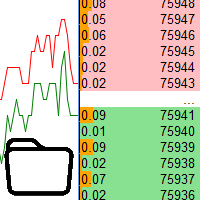
Using data from the order book in the strategy tester Key features: Simultaneous use of several symbols, up to 7 pieces DOM visualization With the visualization of order books, real-time simulation is available, as well as acceleration or deceleration Working with the library: This product also requires a utility to save data: https://www.mql5.com/en/market/product/71642 Speed control utility: https://www.mql5.com/en/market/product/81409 Include file: https://c.mql5.com/31/735/Market_book_s
FREE

Bibliothèque ModernUI pour MetaTrader 5 ModernUI est une bibliothèque d’interface utilisateur hébergée sur le graphique pour MetaTrader 5. Elle aide les développeurs MQL5 à créer des panneaux d’EA plus propres, des tableaux de bord, des fenêtres de paramètres, des formulaires, des tableaux, des boîtes de dialogue, des drawers et des interfaces compactes de style trading directement dans l’environnement graphique de MT5. Elle est conçue pour les développeurs qui veulent une couche d’interface plu
Le script UZFX - Margin Required and Max Lot Size pour MetaTrader 5 (MT5) est conçu pour aider les traders à déterminer rapidement la marge requise pour ouvrir une position à 1 lot et à calculer la taille de lot maximale qu'ils peuvent négocier en fonction de l'équité actuelle de leur compte. Cet outil est essentiel pour la gestion des risques et le dimensionnement des positions, permettant aux traders de planifier efficacement leurs transactions.
Caractéristiques :
Calcule la marge requise
FREE

Simple program i created, to help close all your orders instantly when you are busy scalping the market or if you want to avoid news days but still have a lot of orders and pending orders open and can't close them in time.. with this script all you're problems will be solved.
Simple drag and drop and the script automatically does it's thing, quick and easy
also a very good tool to use when scalping
Update!!!!!!
this now only closes the positions on the chart you have open with a fail safe
FREE

WalkForwardOptimizer library allows you to perform rolling and cluster walk-forward optimization of expert advisers (EA) in MetaTrader 5. To use the library include its header file WalkForwardOptimizer.mqh into your EA source code, add call provided functions as appropriate. Once the library is embedded into EA, you may start optimization according to the procedure described in the User guide . When it's finished, intermediate results are saved into a CSV file and some special global variables.

Key Features: 200+ Fully Implemented Patterns across all categories Advanced Market Structure Analysis Smart Money Integration (Wyckoff, Order Blocks, Liquidity) Professional Risk Management Multi-Timeframe Analysis AI-Powered Confidence Scoring Advanced Visualization Real-time Alerts Pattern Categories: Single Candle Patterns (Hammer, Doji, Marubozu, etc.) Multi-Candle Patterns (Engulfing, Stars, Harami, etc.) Chart Patterns (Head & Shoulders, Cup & Handle, Triangles, etc.) Harmonic Pattern
FREE

Le script UZFX - Delete All Drawing and Objects on Chart Instantly est un script MetaTrader 5 (MT5) simple mais puissant conçu pour supprimer instantanément tous les objets de dessin du graphique actif. Ce script est utile pour les traders qui ont besoin de nettoyer rapidement leurs graphiques des dessins d'analyse technique, des lignes de tendance, des outils de Fibonacci, des étiquettes de texte et d'autres objets sans les supprimer manuellement un par un.
Caractéristiques :
Supprime tous
FREE

Bibliothèque EX5 Signal Copier — Moteur professionnel d'événements de trading pour MT
Transformez n'importe quel Expert Advisor en un puissant copieur de transactions, processeur de signaux ou moteur d'automatisation, sans avoir à écrire de logique complexe de suivi des transactions.
La bibliothèque EX5 Signal Copier est un système événementiel haute performance qui capture chaque activité de trading dans MetaTrader 5 et la convertit en signaux structurés. Vous pouvez ainsi créer :
Des copieu

This library allows you to automatically filter events by symbol. Additionally, it requires the use of "flags" to classify events based on their importance (high, low, etc.). Properties: Our library is simple and only requires the export of four functions to work properly. Requirements: The library uses OnTimer , so it is not compatible with programs that also use this event. If your bot utilizes OnTimer , this may interfere with the library’s functionality and prevent event filtering. We recomm
FREE
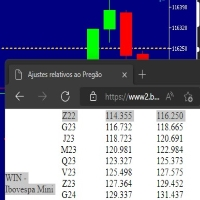
Este script marca no gráfico do ativo BRA50 da active trades o ponto de ajuste do contrato futuro do Mini Índice Brasileiro (WIN),
***ATENÇÃO*** para este script funcionar é necessário autorizar a URL da BMF Bovespa no Meta Trader. passo a passo: MetaTrader 5 -> Ferramentas -> Opções -> Expert Adivisors * Marque a opção "Relacione no quadro abaixo as URL que deseja permitir a função WebRequest" e no quadro abaixo adicione a URL: https://www2.bmf.com.br/ este indicador usa a seguinte página par
FREE
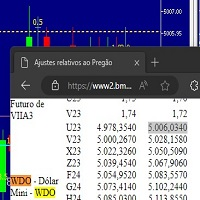
Este script marca no gráfico do ativo MINDOL da activ trades o ponto de ajuste do contrato futuro do Mini Dolar (WDO),
***ATENÇÃO*** para este script funcionar é necessário autorizar a URL da BMF Bovespa no Meta Trader. passo a passo: MetaTrader 5 -> Ferramentas -> Opções -> Expert Adivisors * Marque a opção "Relacione no quadro abaixo as URL que deseja permitir a função WebRequest" e no quadro abaixo adicione a URL: https://www2.bmf.com.br/ este indicador usa a seguinte página para buscar o a
FREE

Trading Notes is an innovative tool designed for traders to streamline their decision-making process by allowing them to write and display important reminders or short details directly over their trading charts. This essential feature ensures that traders have quick access to their personalized checklist before opening any positions, enhancing their trading efficiency and accuracy. MT4 Version - https://www.mql5.com/en/market/product/120613 Join To Learn Market Depth - https://www.mql5.co
FREE

Start earning profits by copying All trades are sent by our successful Forex trader & are extremely profitable. You can earn profits by copying trades daily Trial Period included You'll also get access to extremely powerful trading education which is designed in a simple way for you to become a profitable trader, even if you have no trading experience. https://ec137gsj1wp5tp7dbjkdkxfr4x.hop.clickbank.net/?cbpage=vip
FREE

Affichage de texte statique est un Expert Advisor (EA) léger et convivial pour MetaTrader 5, conçu pour inspirer et éduquer les traders en affichant des conseils de trading motivants directement sur votre graphique. Avec un fond noir élégant centré et un texte blanc dans une police à espacement fixe, cet EA propose des conseils concis et exploitables en segments rotatifs pour vous maintenir concentré sur un trading discipliné. Parfait pour les débutants comme pour les traders expérimentés, il pr
FREE

Universal MarketInfo Service Library for MT4 & MT5
Bring simplicity and power to your trading projects with the Universal MarketInfo Service — a professional library that exposes a unified API for both MetaTrader 4 and MetaTrader 5.
No more rewriting code for each platform. With this library, you can: Access symbol data, OHLC prices, spreads, and volatility with a single call. Query account balance, free margin, stop levels, and lot constraints. Work with currency precision, pip values, and n
FREE

Overview AlgoNLP.mqh is a standalone MQL5 library that converts human-written trading instructions into structured trade intents that your Expert Advisor (EA) or indicator can understand. Do leave a review if you like :D
Also check out my new Indicator : ALGOCHAMP v3 Plus Example input: Buy gold at 2370 with TP 0.3% and SL 1% Output intent: Side: BUY | Type: LIMIT | Symbol: XAUUSD | Entry: 2370 | TP: 0.3% | SL: 1% | Lot: 0.00 This enables you to build chat-controlled or Telegr
FREE

Le script UZFX - Delete Only Pending Orders pour MetaTrader 5 (MT5) est un outil simple mais efficace qui supprime automatiquement tous les ordres en attente (Buy Limit, Sell Limit, Buy Stop, Sell Stop) du compte de trading. Ce script est idéal pour les traders qui veulent effacer leurs ordres en attente instantanément sans affecter les positions actives sur le marché.
Consultez mes autres indicateurs et EAs MT4/MT5 >> ICI Caractéristiques : Supprime tous les ordres en attente (Buy Limit, Sel
FREE

An easy to use, fast, asynchronous WebSocket library for MQL5. It supports: ws:// and wss:// (Secure "TLS" WebSocket) text and binary data It handles: fragmented message automatically (large data transfer) ping-pong frames automatically (keep-alive handshake) Benefits: No DLL required. No OpenSSL installation required. Up to 128 Web Socket Connections from a single program. Various Log Levels for error tracing Can be synchronized to MQL5 Virtual Hosting . Completely native t

CRingBuffer - Numeric ring buffer with lightweight high-performance statistics engine
CRingBuffer is a powerful MQL5 library for numeric rolling-window analysis. After each insertion it immediately provides mean, variance, standard deviation, percentiles, z-scores, min/max tracking and normalized values - all in O(1) to O(n log n). Table of contents: Application area
Two operating modes Basic statistics Welford statistics (numerically stable, recommended for large price levels) Percentiles Z-s
FREE

This library will allow you to send your trades using your MT5 EA bot and its very easy to integrate on any EA which you can do yourself with the script code which is mentioned in documentation. This product allows trading operations via API For MEXC chart : Renting Crypto Charting for OHLC data or Crypto Ticks with Order Book Depth is optional - Supports MEXC API calls - Place Limit, SL Limit and Take Profit Limit Orders - Place Market, SL-Market, TP-Market orders - Modify Limit order - C

MT4/5通用交易库( 一份代码通用4和5 ) #import "K Trade Lib5.ex5" //简单开单 long OrderOpen( int type, double volume, int magic, string symbol= "" , string comment= "" , double opprice= 0 , double sl= 0 , double tp= 0 , int expiration= 0 , bool slsetmode= false , bool tpsetmode= false ); //复杂开单 void SetMagic( int magic, int magic_plus= 0 ); void SetLotsAddMode(int mode=0,double lotsadd=0); long OrderOpenAdvance( int mode, int type, double volume, int step, int magic, string symbol= "" , string comm
FREE

INTRODUCING MML Data Bridge The demand for bridging external data and machine learning with trading platforms is higher than ever. MetaTrader 5 is a powerful environment for trading and back testing, but without a data bridge, MT5 is largely isolated from using any external data. MML Bridge is a developer tool that allows users to bridge external data into MT5 for back testing, live trading, and optimization. It's built for ease of use, providing users with a simple function API that drip-feeds
FREE

GW News Filter Filter trading around high-impact news. Avoid entries/exits during risky time windows using MetaTrader’s Calendar API or your own CSV files. Works in live, demo and Strategy Tester · Source: API or CSV · Per-currency files · Entry/Exit flags · Diagnostics (0–4)
Features
Works in real accounts, demo, and Strategy Tester Choose between: 0 = Auto (API for live/demo, CSV for Strategy Tester) 1 = API (MetaTrader’s built-in calendar) 2 = CSV (per-currency files, e.g. EUR.csv, USD.csv,
FREE

Turn your manual trades into fully automated profit machines! This powerful MT5 EA takes over the moment you open a position — no delays, no stress. It instantly places Stop Loss and Take Profit, activates customizable trailing, and locks in profits while protecting your capital
Perfect for scalpers: Every trade is immediately secured, giving you the freedom to focus on sniping the best entries while the EA handles all the management work in the background.
Auto SL/TP Full trailin
FREE

Scan a fixed list of assets (Ibovespa) in the chosen timeframe (TimeFrame). For each pair and for various periods. Calculate a regression model between the two assets (and, if desired, using the bova11 index as a normalizer). Generate the spread of this relationship, its mean, standard deviation, speculative deviation, and betas (B1 and B2). Apply an ADF test without exclusion (cointegration/stationarity). Calculate the Z-score of the current exclusion (how many standard deviations are away from
FREE

Friends, join us!
Ask questions and connect with like-minded traders: MetaCOT Public Group
MetaCOT Information Channel: news, CFTC reports, and signals: MetaCOT Channel
Here’s to successful trading and new profitable signals for us all! Attention! Recently, certain countries have been blocking access to the cftc.gov website. As a result, users in these countries are giving the product low ratings. MetaCOT has always adhered to the highest quality standards and is in no way associated with th
FREE

This simple logging library is designed to provide clear and contextual log output with minimal hassle. It exposes five methods: LogError Message (message) LogWarn Message (message) LogInfo Message (message) LogDebug Message (message) LogTrace Message (message) Each method prints the provided message to the console only if the severity level meets or exceeds the current threshold set by a global variable logLevel. This means you control the verbosity of your application's logs by adjusting logL
FREE

This lightweight utility library provides essential functions for MQL5 developers to streamline and simplify expert advisor (EA) and indicator development. Whether you’re building trading algorithms or managing chart resources dynamically, this library offers clean and reusable building blocks to enhance your code quality and reduce repetition. Key Features Price Access Functions ASK(string symbol) – Get the current Ask price. BID(string symbol) – Get the current Bid price. Account Information
FREE

The library is dedicated to help manage your trades, calculate lot, trailing, partial close and other functions.
Lot Calculation Mode 0: Fixed Lot. Mode 1: Martingale Lot (1,3,5,8,13) you can use it in different way calculate when loss=1 ,when profit=0. Mode 2: Multiplier Lot (1,2,4,8,16) you can use it in different way calculate when loss=1 ,when profit=0. Mode 3: Plus Lot (1,2,3,4,5) you can use it in different way calculate when loss=1 ,when profit=0. Mode 4: SL/Risk Lot calculate based on s

Friends, join us!
Ask questions and connect with like-minded traders: MetaCOT Public Group
MetaCOT Information Channel: news, CFTC reports, and signals: MetaCOT Channel
Here’s to successful trading and new profitable signals for us all! Attention! Recently, certain countries have been blocking access to the cftc.gov website. As a result, users in these countries are giving the product low ratings. MetaCOT has always adhered to the highest quality standards and is in no way associated with th

This is a simplified and effective version of the library for walk forward analysis of trading experts. It collects data about the expert's trade during the optimization process in the MetaTrader tester and stores them in intermediate files in the "MQL5\Files" directory. Then it uses these files to automatically build a cluster walk forward report and rolling walk forward reports that refine it (all of them in one HTML file). Using the WalkForwardBuilder MT5 auxiliary script allows building othe

Order Book, known also as Market Book, market depth, Level 2, - is a dynamically updated table with current volumes of orders to buy and to sell specific financial instument at price levels near Bid and Ask. MetaTrader 5 provides the means for receiving market book from your broker, but in real time only, without access to its history. The library OrderBook History Library reads market book state in the past from archive files, created by OrderBook Recorder . The library can be embedded into you

Cryptocurrency analysis has never been easier with Crypto Charts for MetaTrader 5. Now, trading on BitMEX has never been easier with BitMEX Trading API for MetaTrader 5. BitMEX Trading API library was built to be as easy to use as possible. Just include the library into your Expert Advisor or Script, call the corresponding methods and start trading! Features
Trade on BitMEX and BitMEX Testnet. Build and automate your strategies. Concern more with the trading strategy logic and less with the co

Teclado trader, é uma BIBLIOTECA que você pode chamar no OnChartEvent para abrir posição de compra/venda/zerar, os botões padrões são: V = venda C = compra Z = zerar posições a mercado S = zerar posições opostas e depois a mercado X = zerar posições opostas
Além da função de teclado, é possível mostrar os estados do ExpertAdvisor usando o MagicId, com informação de:
lucro mensal, semanal, diario, e posição aberta, para isto use o OnTick, ou qualquer outro evento (OnTimer / OnTrade / OnBookEven

Goliath MT5 - scalper fully automated Expert Advisor for medium-volatile forex markets
P roperties: The Library trades 10 currency pairs (USDCHF, EURCHF, EURGBP, AUDUSD, USDCAD, GBPUSD, EURUSD, NZDUSD, CADCHF, EURAUD, EURCAD, AUDJPY) The Library does not use martingale The Library sets a fixed stop loss and take profit for all orders The Library only trades a user input volume The Library can be installed on any currency pair and any timeframe Recommendations: Before using on a real account, t

The library is used to develop automatic trading on Binance Spot Market from MT5 platform. Support all order types: Limit, Market, StopLimit and StopMarket Support Testnet mode Automatically display the chart on the screen Usage:
1. Open MQL5 demo account 2. Download Header file and EA sample https://drive.google.com/uc?export=download&id=1kjUX7Hyy02EiwTLgVi8qdaCNvNzazjln Copy Binance.mqh to folder \MQL5\Include Copy BinanceEA-Sample.mq5 to folder \MQL5\Experts 3. Allow WebRequest from MT5

Gold plucking machine Gold plucking machine is an Expert Advisor designed specifically for trading gold. The operation is based on opening orders using the Fast and Slow lines indicator, thus the EA works according to the "Trend Follow" strategy, which means following the trend. Use grid strategy to place orders without stop loss operation, so please make sure the account has sufficient funds. magic number - is a special number that the EA assigns to its orders.
Lot Multiplier -

The library is used to develop automatic trading on Binance Futures Market from MT5 platform. Support Binance Futures USD-M and COIN-M Support Testnet mode Support all order types: Limit, Market, StopLimit, StopMarket, StopLoss and TakeProfit Automatically display the chart on the screen Usage:
1. Open MQL5 demo account 2. Download Header file and EA sample https://drive.google.com/uc?export=download&id=17fWrZFeMZoSvH9-2iv4WDJhcyxG2eW17
Copy BinanceFutures.mqh to folder \MQL5\Include Copy Bina

MT4/5通用交易库( 一份代码通用4和5 ) #ifdef __MQL5__ #define KOD_TICKET ulong #define KOD_MAGIC long #else #define KOD_TICKET long #define KOD_MAGIC int #endif class ODLIST; #import "K Trade Lib Pro 5.ex5" //祝有个美好开始,运行首行加入 void StartGood() ; //简单开单 long OrderOpen( int type, double volume, int magic, string symbol= "" , string comment= "" , double opprice= 0 , double sl= 0 , double tp= 0 , int expiration= 0 , bool slsetmode= false , bool tpsetmode= false ); //复杂开单

Binance Library MetaTrader 5 connects your Expert Advisors, indicators, and scripts to Binance.com and Binance.US directly from MetaTrader 5. It is a developer library for building custom Binance integrations inside MT5, not a standalone trading robot or copier. The library helps you add Binance instruments to Market Watch, read symbol specifications, load current and historical market data, check wallet balances, manage orders, and track open positions. It supports Spot, USD-M futures, and COI

1. What is this The MT5 system comes with very few optimization results. Sometimes we need to study more results. This library allows you to output more results during backtest optimization. It also supports printing more strategy results in a single backtest. 2. Product Features The results of the optimized output are quite numerous. CustomMax can be customized. The output is in the Common folder. It is automatically named according to the name of the EA, and the name of the same EA will be au

T5L Library is necessary to use the EAs from TSU Investimentos, IAtrader and others. It contains all the functions framework needed to Expert Advisors working properly. ツ
- The Expert Advisors from TSU Investimentos does not work without this library, the T5L library can have updates during the year - At this Library you will find several funcionalities like order sends, buy and sell, trigger entry points check, candlestick analyses, supply and demmand marking and lines, and much more.

AO Core is the core of the optimization algorithm, it is a library built on the author's HMA (hybrid metaheuristic algorithm) algorithm. Pay attention to the MT5 Optimization Booster product , which makes it very easy to manage the regular MT5 optimizer . An example of using AO Core is described in the article: https://www.mql5.com/ru/articles/14183 https://www.mql5.com/en/blogs/post/756510
This hybrid algorithm is based on a genetic algorithm and contains the best qualities and properties of p

EA Toolkit is a library that allows any developer to quickly and easily program Advisor experts. It includes many functions and enumerations such as trailing stop, lot, stop loss management, market trading authorisations, price table updates, trading conditions and many more.
Installation + Documentation : You will find all the information to install this library and the documentation of its functions on this GitHub : https://github.com/Venon282/Expert-Advisor-Toolkit WARNING : The installatio

Want to get all events like Previous/Forecast/Actual values for each news to analyze/predict it? By this simple library you can do it easily,Just import/integrate the library into your system,then get all possible values for each news Even In Strategy Tester . Note: Please add the address " https://www.forexfactory.com/ " of news feed at your MT5 tab > Tools > Options > Expert Advisors > Check Allow web request for listed URL. Since the WebRequest() function can't be called from indicator ba
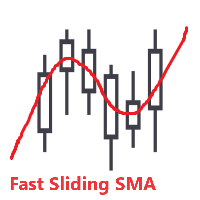
A Simple Moving Average (SMA) is a statistical indicator used in time series analysis. This indicator represents the arithmetic mean of a sequence of values over a specific period of time. SMA is used to smooth short-term fluctuations in data, helping to highlight the overall trend or direction of changes. This aids analysts and traders in better understanding the general dynamics of the time series and identifying potential trends or changes in direction. More information you can find in Wiki

Cette bibliothèque vous permettra de gérer les transactions en utilisant n'importe lequel de vos EA et elle est très facile à intégrer sur n'importe quel EA que vous pouvez faire vous-même avec le code de script mentionné dans la description ainsi que des exemples de démonstration en vidéo qui montrent le processus complet.
- Placer des ordres Limit, SL Limit et Take Profit Limit
- Placer les ordres Market, SL-Market, TP-Market
- Modifier l'ordre limite
- Annuler la commande
- Commandes de

Hello everyone! I am a professional MQL programmer , Making EAs, Indicators and Trading Tools for my clients all over the world. I build 3-7 programs every week but I seldomly sell any ready-made Robots. Because I am fastidious and good strategy is so few... this EA is the only one so far I think its good enough to be published here.
As we all know, the Ichimoku indicator has become world popular for decades, but still, only few people knows the right way of using it, and if we check the clo

Applying these methods, I managed to arrive at a nuanced conclusion that is crucial to understanding the importance of unique strategies in contemporary trading. Although the neural network advisor showed impressive efficiency in the initial stages, it proved to be highly unstable in the long run. Various factors such as market fluctuations, trend changes, external events, etc. cause its operation to be chaotic and eventually lead to instability. With these experiences, I accepted the challenge

Introducing "TG Risk Service Manager" — your comprehensive toolkit for swift and precise risk management and lot size calculations in the dynamic world of trading. Designed to streamline development processes and enhance trading strategies, this indispensable library equips developers with essential tools for optimizing risk assessment and trade profitability. Metatrader4 Version | All Products | Contact Key Features:
Efficient Lot Size Calculation : Harness the power of precise lot size c

Introducing "TG Trade Service Manager" — your all-in-one solution for seamless trade management in both MQL4 and MQL5 environments. With a focus on speed, reliability, and convenience, this powerful library simplifies the complexities of trade execution and management, empowering developers with a single interface for enhanced efficiency. Metatrader4 Version | All Products | Contact Key Features:
Unified Interface : TG Trade Service Manager" provides a unified interface for MQL4 an

Cette bibliothèque est proposée comme un moyen d'utiliser directement les API d'OpenAI sur MetaTrader de la manière la plus simple possible. Pour plus d'informations sur les capacités de la bibliothèque, lisez l'article suivant : https://www.mql5.com/en/blogs/post/756098 The files needed to use the library can be found here: Manual IMPORTANT : Pour utiliser l'EA, vous devez ajouter l'URL suivante pour permettre l'accès à l'API OpenAI : comme montré sur les images ci-jointes Pour utiliser la bibl

This trailing stop application will helping trader to set the trailing stop value for many open positions, that apply a grid or martingale strategy as a solution.
So if you apply a grid or martingale strategy (either using an EA or trading manually), and you don't have an application to set a trailing stop, then this application is the solution.
For EAs with a single shot strategy, just use the FREE trailing stop application which I have also shared on this forum.

KP TRADE PANEL EA is an EA MT5 facilitates various menus. KP TRADE PANEL EA is an EA skin care in MT5 is an EA that puts the system automatically in download EA MT5 to test with demo account from my profile page while some Trailing Stop Stop Loss require more than 0 features EA determines lot or money management calculates lot from known and Stop loss TS = Trailing stop with separate stop loss order Buy more AVR TS = Trailing stop plus

Here is the English translation of your description for the EA (Expert Advisor): --- This is a time -based automatic trading EA . It allows you to set the exact time for trading , down to the second , and specify the maximum number of orders . You can choose to place either buy or sell orders . It is possible to set take profit and stop loss points . Additionally , you can specify how long after placing
Une bibliothèque facile à utiliser qui offre aux développeurs un accès simplifié aux statistiques clés du trading pour leurs EAs en MQL5. Méthodes disponibles dans la bibliothèque : Données du compte et bénéfices : GetAccountBalance() : Renvoie le solde actuel du compte. GetProfit() : Renvoie le bénéfice net de toutes les transactions. GetDeposit() : Renvoie le montant total des dépôts. GetWithdrawal() : Renvoie le montant total des retraits. Analyse des transactions : GetProfitTrades() : Renvoi

Trading Forex with our platform offers several key advantages and features: Real-time Data : Stay updated with live market data to make informed decisions. User-Friendly Interface : Easy-to-navigate design for both beginners and experienced traders. Advanced Charting Tools : Visualize trends with interactive charts and technical indicators. Risk Management : Set stop-loss and take-profit levels to manage your risk. Multiple Currency Pairs : Access a wide range of forex pairs to diversify your tr

The Hybrid Metaheuristic Algorithm (HMA) is a cutting-edge optimization approach that combines the strengths of genetic algorithms with the best features of population-based algorithms. Its high-speed computation ensures unparalleled accuracy and efficient search capabilities, significantly reducing the total time required for optimization while identifying optimal solutions in fewer iterations. HMA outperforms all known population optimization algorithms in both speed and accuracy. Use Cases AO

* * * * Trading principal xauusd, si le moment du test, il est recommandé d'ajuster à xauusd, les autres sous - jacents de Trading ne garantissent pas l'effet rentable * * * * *
S'il vous plaît laissez un message pour le test (la première réponse sera donnée après l'avoir vu), afin de protéger les résultats du travail, vous devez entrer des paramètres spécifiques, les paramètres par défaut du système ne peuvent pas atteindre l'effet indiqué par le retrait de capture d'écran!
S'il vous plaît l

Ce produit est en développement depuis 3 ans. C'est la base de code la plus avancée pour travailler avec tous types de codes en intelligence artificielle et apprentissage automatique dans le langage de programmation MQL5. Il a été utilisé pour créer de nombreux robots de trading et indicateurs basés sur l'IA dans MetaTrader 5. Il s'agit d'une version premium du projet open source et gratuit sur l'apprentissage automatique pour MQL5, disponible ici : https://github.com/MegaJoctan/MALE5 . La vers

This Pine Script implements a Gaussian Channel + Stochastic RSI Strategy for TradingView . It calculates a Gaussian Weighted Moving Average (GWMA) and its standard deviation to form an upper and lower channel. A Stochastic RSI is also computed to determine momentum. A long position is entered when the price closes above the upper Gaussian band and the Stoch RSI K-line crosses above D-line . The position is exited when the price falls back below the upper band. The script includes commission, cap

Pionex API EA Connector pour MT5 – Intégration transparente avec MT5 Aperçu Le Pionex API EA Connector pour MT5 permet une intégration fluide entre MetaTrader 5 (MT5) et l’ API Pionex . Cet outil puissant permet aux traders d’exécuter et de gérer des ordres, d’obtenir des informations sur le solde et de suivre l’historique des transactions, le tout directement depuis MT5 . Principales fonctionnalités Gestion du compte et du solde Get_Balance(); – Récupère le solde actuel du compte sur Pionex

Bookeepr is an advanced MQL5 trading bookkeeping software that automates trade logging, tracks real-time P&L, and integrates a ledger-style financial system for deposits, withdrawals, and expenses. It supports multi-currency assets , generates detailed performance reports , and provides risk management tools to help traders optimize their strategies. With secure cloud storage, exportable reports, and seamless MetaTrader 5 integration , Bookeepr ensures accurate, transparent, and hassle-free fina
Savez-vous pourquoi MetaTrader Market est le meilleur endroit pour vendre des stratégies de trading et des indicateurs techniques ? Pas besoin de publicité ou de protection logicielle, pas de problèmes de paiement. Tout est fourni dans le MetaTrader Market.

Vous manquez des opportunités de trading :
- Applications de trading gratuites
- Plus de 8 000 signaux à copier
- Actualités économiques pour explorer les marchés financiers
Inscription
Se connecter
Vous acceptez la politique du site Web et les conditions d'utilisation
Si vous n'avez pas de compte, veuillez vous inscrire