MyTradingHistory

Une bibliothèque facile à utiliser qui offre aux développeurs un accès simplifié aux statistiques clés du trading pour leurs EAs en MQL5.

Méthodes disponibles dans la bibliothèque :

Données du compte et bénéfices :

  • GetAccountBalance() : Renvoie le solde actuel du compte.
  • GetProfit() : Renvoie le bénéfice net de toutes les transactions.
  • GetDeposit() : Renvoie le montant total des dépôts.
  • GetWithdrawal() : Renvoie le montant total des retraits.

Analyse des transactions :

  • GetProfitTrades() : Renvoie le nombre de transactions profitables.
  • GetLossTrades() : Renvoie le nombre de transactions déficitaires.
  • GetTotalTrades() : Renvoie le nombre total de transactions exécutées.
  • GetShortTrades() : Renvoie le nombre de transactions à découvert.
  • GetLongTrades() : Renvoie le nombre de transactions à la hausse.
  • GetWinLossRatio() : Renvoie le ratio entre transactions gagnantes et perdantes.
  • GetAverageProfitTrade() : Renvoie le profit moyen par transaction rentable.
  • GetAverageLossTrade() : Renvoie la perte moyenne par transaction déficitaire.
  • GetROI() : Calcule le retour sur investissement.
  • GetLargestProfitTrade() : Renvoie le plus grand profit d’une transaction unique.
  • GetLargestLossTrade() : Renvoie la plus grande perte d’une transaction unique.
  • GetShortTradesWon() : Renvoie le pourcentage de transactions à découvert réussies.
  • GetLongTradesWon() : Renvoie le pourcentage de transactions à la hausse réussies.

Tableau des profits des transactions :

  • GetTradeProfitArray(double &outputArray[]) : Renvoie un tableau contenant les profits de chaque transaction individuelle pour une analyse détaillée.


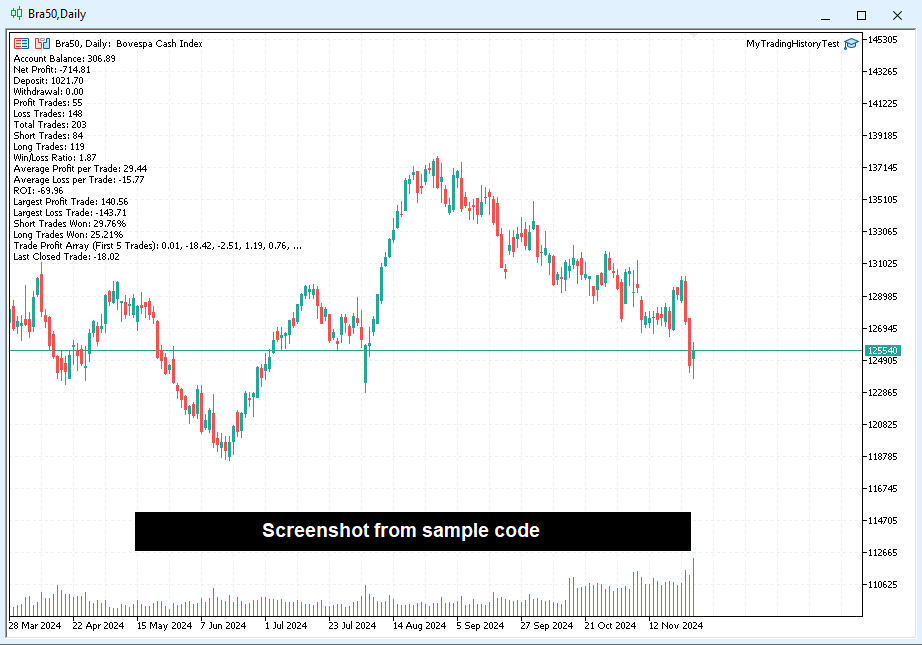
Exemple de code ci-dessous :

// Import the external MyTradingHistory.ex5 module
#import "MyTradingHistory.ex5"
   void UpdateValues(void);                         // Updates the trading data from the MyTradingHistory library. EXECUTE THIS EVERY TIME YOU WANT TO UPDATE THE VALUES, e.g. after closing a trade or before retreiving the value for the first time.
   void GetTradeProfitArray(double &outputArray[]); // Retrieves an array of profits from closed trades
   double GetAccountBalance(void);                 // Returns the current account balance
   double GetProfit(void);                         // Returns the net profit
   double GetDeposit(void);                        // Returns the total deposit amount
   double GetWithdrawal(void);                     // Returns the total withdrawal amount
   int GetProfitTrades(void);                      // Returns the number of profitable trades
   int GetLossTrades(void);                        // Returns the number of loss trades
   int GetTotalTrades(void);                       // Returns the total number of trades
   int GetShortTrades(void);                       // Returns the number of short trades
   int GetLongTrades(void);                        // Returns the number of long trades
   double GetWinLossRatio(void);                   // Returns the win-to-loss ratio
   double GetAverageProfitTrade(void);             // Returns the average profit per trade
   double GetAverageLossTrade(void);               // Returns the average loss per trade
   double GetROI(void);                            // Returns the return on investment (ROI)
   double GetLargestProfitTrade(void);             // Returns the largest profit from a single trade
   double GetLargestLossTrade(void);               // Returns the largest loss from a single trade
   double GetShortTradesWon(void);                 // Returns the percentage of short trades won
   double GetLongTradesWon(void);                  // Returns the percentage of long trades won
#import

// OnInit is executed when the script starts
int OnInit()
{
   // Update internal data from the imported module
   UpdateValues();

   // Prepare a string to display account and trade summary
   string output = "Account Balance: " + DoubleToString(GetAccountBalance(), 2) + "\n" +
                   "Net Profit: " + DoubleToString(GetProfit(), 2) + "\n" +
                   "Deposit: " + DoubleToString(GetDeposit(), 2) + "\n" +
                   "Withdrawal: " + DoubleToString(GetWithdrawal(), 2) + "\n" +
                   "Profit Trades: " + IntegerToString(GetProfitTrades()) + "\n" +
                   "Loss Trades: " + IntegerToString(GetLossTrades()) + "\n" +
                   "Total Trades: " + IntegerToString(GetTotalTrades()) + "\n" +
                   "Short Trades: " + IntegerToString(GetShortTrades()) + "\n" +
                   "Long Trades: " + IntegerToString(GetLongTrades()) + "\n" +
                   "Win/Loss Ratio: " + DoubleToString(GetWinLossRatio(), 2) + "\n" +
                   "Average Profit per Trade: " + DoubleToString(GetAverageProfitTrade(), 2) + "\n" +
                   "Average Loss per Trade: " + DoubleToString(GetAverageLossTrade(), 2) + "\n" +
                   "ROI: " + DoubleToString(GetROI(), 2) + "\n" +
                   "Largest Profit Trade: " + DoubleToString(GetLargestProfitTrade(), 2) + "\n" +
                   "Largest Loss Trade: " + DoubleToString(GetLargestLossTrade(), 2) + "\n" +
                   "Short Trades Won: " + DoubleToString(GetShortTradesWon(), 2) + "%\n" +
                   "Long Trades Won: " + DoubleToString(GetLongTradesWon(), 2) + "%\n";

   // Add trade profit array data to the output
   output += "Trade Profit Array (First 5 Trades): ";
   double tradeProfitArray[]; // Declare an array to store trade profit data
   GetTradeProfitArray(tradeProfitArray); // Fetch trade profit data

   // Loop through the first 5 trades and append their profit values to the output
   for (int i = 0; i < MathMin(5, ArraySize(tradeProfitArray)); i++)
   {
      output += DoubleToString(tradeProfitArray[i], 2) + ", ";
   }

   // Append the last trade's profit value
   output += "...\nLast Closed Trade: ";
   int size = ArraySize(tradeProfitArray); // Get the size of the trade profit array
   if (size > 0)
      output += DoubleToString(tradeProfitArray[size - 1], 2); // Append the last trade's profit
   else
      output += "No trades available."; // Handle the case where no trades exist

   // Display the summary as a comment on the chart
   Comment(output);

   // Signal successful initialization
   return(INIT_SUCCEEDED);
}


Vos commentaires sont les bienvenus et appréciés. N'hésitez pas à partager vos idées et questions avant et après l'achat.

https://www.mql5.com/en/users/maxsonm

Produits recommandés
Here   is   the   English translation   of   your   description   for   the EA   (Expert   Advisor): --- This   is a   time -based   automatic trading   EA . It allows   you   to   set the   exact   time   for trading , down   to   the   second , and   specify the   maximum number   of   orders . You   can choose   to   place   either   buy   or   sell   orders . It   is possible to   set take   profit and   stop   loss   points . Additionally , you can   specify   how   long after   placing  

Molo kumalo
James Ngunyi Githemo
Trading Forex with our platform offers several key advantages and features: Real-time Data : Stay updated with live market data to make informed decisions. User-Friendly Interface : Easy-to-navigate design for both beginners and experienced traders. Advanced Charting Tools : Visualize trends with interactive charts and technical indicators. Risk Management : Set stop-loss and take-profit levels to manage your risk. Multiple Currency Pairs : Access a wide range of forex pairs to diversify your tr
Ajuste BRA50
Claudio Rodrigues Alexandre
4.33 (6)
Este script marca no gráfico do ativo BRA50 da active trades o ponto de ajuste do contrato futuro do Mini Índice Brasileiro (WIN), ***ATENÇÃO***  para este script funcionar é necessário autorizar a URL da BMF Bovespa no Meta Trader. passo a passo: MetaTrader 5 -> Ferramentas -> Opções -> Expert Adivisors * Marque a opção "Relacione no quadro abaixo as URL que deseja permitir a função WebRequest" e no quadro abaixo adicione a URL: https://www2.bmf.com.br/ este indicador usa a seguinte página par
FREE
Introducing "TG Risk Service Manager" — your comprehensive toolkit for swift and precise risk management and lot size calculations in the dynamic world of trading. Designed to streamline development processes and enhance trading strategies, this indispensable library equips developers with essential tools for optimizing risk assessment and trade profitability. Metatrader4 Version |  All Products  |  Contact   Key Features: Efficient Lot Size Calculation : Harness the power of precise lot size c
Important: This product is a Library for developers . It is suitable only for users who can write/modify MQL5 code and integrate a compiled library into their own EA/Script. It is not a “drag & run” notifier. Telegram SDK helps you send Telegram messages and photos from MetaTrader 5 in a simple and reliable way. Use it when you want Telegram notifications inside your own automation tools. If you need the MetaTrader 4 version, it is available separately in the Market:   Telegram SDK M T4 . Main f
SimpleLotCalculator
Itumeleng Mohlouwa Kgotso Tladi
SimpleLotCalculator: Professional Multi-Symbol Risk Manager Library Stop guessing your lot sizes and start trading with institutional precision. SimpleLotLogic is a high-performance MQL5 developer library designed to solve the number one problem for algorithmic and manual traders: Risk Management. Instead of writing complex math for every new EA, simply plug in this library to calculate the perfect lot size based on your account equity and stop-loss distance. Why Choose SimpleLotLogic? Precis
Binance Library
Hadil Mutaqin SE
5 (1)
The library is used to develop automatic trading on Binance Spot Market from MT5 platform. Support all order types: Limit, Market, StopLimit and StopMarket Support Testnet mode Automatically display the chart on the screen Usage: 1. Open MQL5 demo account 2. Download Header   file and EA sample   https://drive.google.com/uc?export=download&id=1kjUX7Hyy02EiwTLgVi8qdaCNvNzazjln Copy Binance.mqh to folder \MQL5\Include Copy  BinanceEA-Sample.mq5 to folder \MQL5\Experts 3. Allow WebRequest from MT5
This lightweight utility library provides essential functions for MQL5 developers to streamline and simplify expert advisor (EA) and indicator development. Whether you’re building trading algorithms or managing chart resources dynamically, this library offers clean and reusable building blocks to enhance your code quality and reduce repetition. Key Features Price Access Functions ASK(string symbol) – Get the current Ask price. BID(string symbol) – Get the current Bid price. Account Information
FREE
TeleSignal
Vincent Jean Robert Trolard
TeleSignal EA is an intelligent Expert Advisor designed to automatically send Telegram notifications whenever a position is opened, closed, or modified in MetaTrader 5 . It allows you to monitor your trades in real time , wherever you are — no need to keep your trading platform open. Through its direct integration with the Telegram API, you’ll receive clear and instant messages showing: Trade opened (symbol, lot size, order type, entry price) Trade closed (exit price, profit/loss, trade du
LSTM Library
Thalles Nascimento De Carvalho
LSTM Library - Réseaux de Neurones Avancés pour MetaTrader 5 Bibliothèque Professionnelle de Réseaux de Neurones pour le Trading Algorithmique LSTM Library apporte la puissance des réseaux neuronaux récurrents à vos stratégies de trading en MQL5. Cette implémentation de niveau professionnel comprend des réseaux LSTM, BiLSTM et GRU avec des fonctionnalités avancées généralement disponibles uniquement dans des frameworks spécialisés d'apprentissage automatique. "Le secret du succès dans l'apprenti
Friends, join us! Ask questions and connect with like-minded traders: MetaCOT Public Group MetaCOT Information Channel: news, CFTC reports, and signals: MetaCOT Channel Here’s to successful trading and new profitable signals for us all! Attention! Recently, certain countries have been blocking access to the cftc.gov website. As a result, users in these countries are giving the product low ratings. MetaCOT has always adhered to the highest quality standards and is in no way associated with th
Cryptocurrency analysis has never been easier with Crypto Charts for MetaTrader 5. Now, trading on BitMEX has never been easier with BitMEX Trading API for MetaTrader 5. BitMEX Trading API library was built to be as easy to use as possible. Just include the library into your Expert Advisor or Script, call the corresponding methods and start trading! Features Trade on BitMEX and BitMEX Testnet. Build and automate your strategies. Concern more with the trading strategy logic and less with the co
TradeGate
Alex Amuyunzu Raymond
TradeGate – Product Description / Brand Story “The gatekeeper for your trading success.” Overview: TradeGate is a professional MT5 validation and environment guard library designed for serious traders and EA developers who demand safety, reliability, and market-ready performance . In today’s fast-moving markets, even a small misconfiguration can cause EAs to fail initialization, skip trades, or be rejected by MQL5 Market. TradeGate acts as a smart gatekeeper , ensuring your EA only operates un
The Quantitative Qualitative Estimation (QQE) indicator is derived from Wilder’s famous Relative Strength Index (RSI). In essence, the QQE is a heavily smoothed RSI. Modification of this version: ( converted from tradingview script by Mihkell00, original from Glaz, 100% identical output) So there are Two QQEs. One that is shown on the chart as columns, and the other "hidden" in the background which also has a 50 MA   bollinger band   acting as a zero line. When both of them agree - you get a b
The library is dedicated to help manage your trades, calculate lot, trailing, partial close and other functions. Lot Calculation Mode 0: Fixed Lot. Mode 1: Martingale Lot (1,3,5,8,13) you can use it in different way calculate when loss=1 ,when profit=0. Mode 2: Multiplier Lot (1,2,4,8,16) you can use it in different way calculate when loss=1 ,when profit=0. Mode 3: Plus Lot (1,2,3,4,5) you can use it in different way calculate when loss=1 ,when profit=0. Mode 4: SL/Risk Lot calculate based on s
Automatic Replenishment Trading Within a Defined Range The EA operates   only within the predefined price range . When an order is   closed, filled, or cancelled   (reducing the total number of orders), the EA will   automatically place new orders   to maintain the continuous operation of the trading strategy. This EA is   designed for ranging / sideways market conditions . You can control the total number of orders using   Max Orders . Example: Max Orders:   8 Active trades:   2 Pending Sell L
Market book tester
Aliaksandr Hryshyn
3 (2)
Using data from the order book in the strategy tester Key features: Simultaneous use of several symbols, up to 7 pieces DOM visualization With the visualization of order books, real-time simulation is available, as well as acceleration or deceleration Working with the library: This product also requires a utility to save data:  https://www.mql5.com/en/market/product/71642 Speed control utility:  https://www.mql5.com/en/market/product/81409 Include file:   https://c.mql5.com/31/735/Market_book_s
FREE
Terminator Genisys
Itumeleng Mohlouwa Kgotso Tladi
TERMINATOR GENISYS HFT (High Frequency Trading - Ai Algorithm Robot) Extreme-design for EURUSD on the 5Min charts for max profit. (other pairs incluse GBPUSD, EURJPY and other pairs with similar time-frames ) Introducing the ' Terminator Genisys ' Expert Advisor   The   Terminator Genisys  expert advisor stands at the pinnacle of automated trading systems, designed to deliver great performance in today's dynamic financial markets. Developed by a team of experienced traders and algorithmic expe
L'EA (Expert Advisor) ouvre une position lorsque le marché commence à bouger pendant la session de New York (volume accru). De cette manière, l'élan est soutenu par le volume, et nous pouvons atteindre le Take Profit avec une forte probabilité instantanément. Signal  https://www.mql5.com/en/blogs/post/764450 Entrée basée sur l'élan pendant la session de New York L'EA détecte l'élan caché via les FVG (Fair Value Gaps) sur des unités de temps inférieures. Lorsque l'élan est détecté peu avant ou p
Teclado trader, é uma BIBLIOTECA que você pode chamar no OnChartEvent para abrir posição de compra/venda/zerar, os botões padrões são: V = venda C = compra Z = zerar posições a mercado S = zerar posições opostas e depois a mercado X = zerar posições opostas Além da função de teclado, é possível mostrar os estados do ExpertAdvisor usando o MagicId, com informação de: lucro mensal, semanal, diario, e posição aberta, para isto use o OnTick, ou qualquer outro evento (OnTimer / OnTrade / OnBookEven
Automatic Replenishment Trading Within a Defined Range The EA operates only within the predefined price range . When an order is closed, filled, or cancelled (reducing the total number of orders), the EA will automatically place new orders to maintain the continuous operation of the trading strategy. This EA is designed for ranging / sideways market conditions . You can control the total number of orders using Max Orders . Example: Max Orders: 8 Active trades: 2 Pending Buy Limit orders: 6 In t
Goliath Mt5
Nicolokondwani Biscaldi
Goliath MT5 - scalper fully automated Expert Advisor for medium-volatile forex markets P roperties: The Library trades 10 currency pairs (USDCHF, EURCHF, EURGBP, AUDUSD, USDCAD, GBPUSD, EURUSD, NZDUSD, CADCHF, EURAUD, EURCAD, AUDJPY) The Library does not use martingale The Library sets a fixed stop loss and take profit for all orders The Library only trades a user input volume The Library can be installed on any currency pair and any timeframe Recommendations: Before using on a real account, t
License Manager EA
Timothy Chuma Ifiora
License Panel Integration Guide This EA uses a license panel system to verify usage before running trading logic. File Placement Place LICENSE_SINGLE.mqh in the same folder as your EA .mq5 file. If using a subfolder, update the #include path in the EA file. Integration Steps Include the License File #include "LICENSE_SINGLE.mqh" Initialization (OnInit) Call the license check when the EA starts: VerifyLicense(); Deinitialization (OnDeinit) Clean up license resources when EA is removed: HandleLi
Shawrie
Kevin Kipkoech
This Pine Script implements a Gaussian Channel + Stochastic RSI Strategy for TradingView . It calculates a Gaussian Weighted Moving Average (GWMA) and its standard deviation to form an upper and lower channel. A Stochastic RSI is also computed to determine momentum. A long position is entered when the price closes above the upper Gaussian band and the Stoch RSI K-line crosses above D-line . The position is exited when the price falls back below the upper band. The script includes commission, cap
Trading Session Dashboard
Marwan Bin Mohammed Al Eid Bin Mohammed Carpenter
Le Trading Sessions Dashboard est un indicateur MT5 puissant et convivial conçu pour fournir aux traders des informations en temps réel sur les principales sessions de trading forex. Il affiche le statut de chaque session (Active ou Closed) ainsi que le temps restant jusqu'à la clôture ou la prochaine ouverture, vous aidant à aligner votre stratégie de trading avec les heures de marché. Conçu pour la clarté et le professionnalisme, cet indicateur est idéal pour les débutants comme pour les trade
MA Horizon MTF
Bunsatoru Kikuchi
This indicator allows you to display specified Moving Averages (MAs) across multiple timeframes on a single chart. By defining your desired MAs in the settings, they will be consistently displayed in multi-timeframe (MTF) regardless of the current chart timeframe you switch to. You can freely customize the timeframe for each MA and toggle their visibility individually via the settings. When an MA goes off-screen, its label is pinned to the top or bottom edge of the chart. This allows you to ins
Affichage de texte statique est un Expert Advisor (EA) léger et convivial pour MetaTrader 5, conçu pour inspirer et éduquer les traders en affichant des conseils de trading motivants directement sur votre graphique. Avec un fond noir élégant centré et un texte blanc dans une police à espacement fixe, cet EA propose des conseils concis et exploitables en segments rotatifs pour vous maintenir concentré sur un trading discipliné. Parfait pour les débutants comme pour les traders expérimentés, il pr
FREE
A complete PostgreSQL client implemented in pure MQL5 over native MetaTrader 5 TCP sockets. The library implements the PostgreSQL client with MD5 and SCRAM-SHA-256 authentication, SSL/TLS, the Simple Query Protocol, and explicit transactions. No DLLs, no external dependencies, no third-party services. Features Direct TCP connection to any PostgreSQL-compatible database MD5 and SCRAM-SHA-256 authentication, auto-detected SSL/TLS via PostgreSQL's SSLRequest flow Full transaction support Typed res
Turn your manual trades into fully automated profit machines! This powerful MT5 EA takes over the moment you open a position — no delays, no stress. It instantly places Stop Loss and Take Profit, activates customizable trailing, and locks in profits while protecting your capital Perfect for scalpers: Every trade is immediately secured, giving you the freedom to focus on sniping the best entries while the EA handles all the management work in the background. Auto SL/TP Full trailin
Tim Trend
Oleksii Ferbei
Due to the fact that at each separate period of time, trading and exchange platforms from different parts of the planet are connected to the trading process, the Forex market operates around the clock. Depending on which continent trading activity takes place during a certain period, the entire daily routine is divided into several trading sessions. There are 4 main trading sessions: Pacific. European. American Asian This indicator allows you to see the session on the price chart. You can also
Les acheteurs de ce produit ont également acheté
WalkForwardOptimizer MT5
Stanislav Korotky
3.78 (9)
WalkForwardOptimizer library allows you to perform rolling and cluster walk-forward optimization of expert advisers (EA) in MetaTrader 5. To use the library include its header file WalkForwardOptimizer.mqh into your EA source code, add call provided functions as appropriate. Once the library is embedded into EA, you may start optimization according to the procedure described in the User guide . When it's finished, intermediate results are saved into a CSV file and some special global variables.
Bibliothèque ModernUI pour MetaTrader 5 ModernUI est une bibliothèque d’interface utilisateur hébergée sur le graphique pour MetaTrader 5. Elle aide les développeurs MQL5 à créer des panneaux d’EA plus propres, des tableaux de bord, des fenêtres de paramètres, des formulaires, des tableaux, des boîtes de dialogue, des drawers et des interfaces compactes de style trading directement dans l’environnement graphique de MT5. Elle est conçue pour les développeurs qui veulent une couche d’interface plu
Binance Library MetaTrader 5 connects your Expert Advisors, indicators, and scripts to Binance.com and Binance.US directly from MetaTrader 5. It is a developer library for building custom Binance integrations inside MT5, not a standalone trading robot or copier. The library helps you add Binance instruments to Market Watch, read symbol specifications, load current and historical market data, check wallet balances, manage orders, and track open positions. It supports Spot, USD-M futures, and COI
This is a simplified and effective version of the library for walk forward analysis of trading experts. It collects data about the expert's trade during the optimization process in the MetaTrader tester and stores them in intermediate files in the "MQL5\Files" directory. Then it uses these files to automatically build a cluster walk forward report and rolling walk forward reports that refine it (all of them in one HTML file). Using the WalkForwardBuilder MT5 auxiliary script allows building othe
Order Book, known also as Market Book, market depth, Level 2, - is a dynamically updated table with current volumes of orders to buy and to sell specific financial instument at price levels near Bid and Ask. MetaTrader 5 provides the means for receiving market book from your broker, but in real time only, without access to its history. The library OrderBook History Library reads market book state in the past from archive files, created by OrderBook Recorder . The library can be embedded into you
Gold plucking machine   Gold plucking machine is an Expert Advisor designed specifically for trading gold. The operation is based on opening orders using the Fast and Slow lines indicator, thus the EA works according to the "Trend Follow" strategy, which means following the trend. Use grid strategy to place orders without stop loss operation, so please make sure the account has sufficient funds. magic number      -  is a special number that the EA assigns to its orders. Lot Multiplier        - 
The library is used to develop automatic trading on Binance Futures Market from MT5 platform. Support Binance Futures USD-M and COIN-M Support Testnet mode Support all order types: Limit, Market, StopLimit, StopMarket, StopLoss and TakeProfit Automatically display the chart on the screen Usage: 1. Open MQL5 demo account 2. Download Header file and EA sample https://drive.google.com/uc?export=download&id=17fWrZFeMZoSvH9-2iv4WDJhcyxG2eW17 Copy BinanceFutures.mqh to folder \MQL5\Include Copy  Bina
MT4/5通用交易库(  一份代码通用4和5 ) #ifdef __MQL5__      #define KOD_TICKET ulong      #define KOD_MAGIC   long #else        #define KOD_TICKET long      #define KOD_MAGIC   int #endif class ODLIST; #import "K Trade Lib Pro 5.ex5"       //祝有个美好开始,运行首行加入    void StartGood() ;    //简单开单    long OrderOpen( int type, double volume, int magic, string symbol= "" , string comment= "" , double opprice= 0 , double sl= 0 , double tp= 0 , int expiration= 0 , bool slsetmode= false , bool tpsetmode= false );    //复杂开单
1. What is this The MT5 system comes with very few optimization results. Sometimes we need to study more results. This library allows you to output more results during backtest optimization. It also supports printing more strategy results in a single backtest. 2. Product Features The results of the optimized output are quite numerous. CustomMax can be customized. The output is in the Common folder. It is automatically named according to the name of the EA, and the name of the same EA will be au
AO Core
Andrey Dik
3.67 (3)
AO Core is the core of the optimization algorithm, it is a library built on the author's HMA (hybrid metaheuristic algorithm) algorithm. Pay attention to the MT5 Optimization Booster product , which makes it very easy to manage the regular MT5 optimizer . An example of using AO Core is described in the article: https://www.mql5.com/ru/articles/14183 https://www.mql5.com/en/blogs/post/756510 This hybrid algorithm is based on a genetic algorithm and contains the best qualities and properties of p
EA Toolkit
Esteban Thevenon
EA Toolkit is a library that allows any developer to quickly and easily program Advisor experts. It includes many functions and enumerations such as trailing stop, lot, stop loss management, market trading authorisations, price table updates, trading conditions and many more. Installation + Documentation : You will find all the information to install this library and the documentation of its functions on this GitHub : https://github.com/Venon282/Expert-Advisor-Toolkit WARNING : The installatio
Cette bibliothèque vous permettra de gérer les transactions en utilisant n'importe lequel de vos EA et elle est très facile à intégrer sur n'importe quel EA que vous pouvez faire vous-même avec le code de script mentionné dans la description ainsi que des exemples de démonstration en vidéo qui montrent le processus complet. - Placer des ordres Limit, SL Limit et Take Profit Limit - Placer les ordres Market, SL-Market, TP-Market - Modifier l'ordre limite - Annuler la commande - Commandes de
Hello everyone! I am a professional MQL programmer , Making EAs, Indicators and Trading Tools for my clients all over the world. I build 3-7 programs every week but I seldomly sell any ready-made Robots. Because I am fastidious and good strategy is so few...  this EA is the only one so far I think its good enough to be published here.  As we all know, the Ichimoku indicator has become world popular for decades, but still, only few people knows the right way of using it, and if we check the clo
Applying these methods, I managed to arrive at a nuanced conclusion that is crucial to understanding the importance of unique strategies in contemporary trading. Although the neural network advisor showed impressive efficiency in the initial stages, it proved to be highly unstable in the long run. Various factors such as market fluctuations, trend changes, external events, etc. cause its operation to be chaotic and eventually lead to instability. With these experiences, I accepted the challenge
Introducing "TG Trade Service Manager" — your all-in-one solution for seamless trade management in both MQL4 and MQL5 environments. With a focus on speed, reliability, and convenience, this powerful library simplifies the complexities of trade execution and management, empowering developers with a single interface for enhanced efficiency. Metatrader4 Version   |   All Products   |   Contact   Key Features: Unified Interface : TG Trade Service Manager" provides a unified interface for   MQL4   an
Cette bibliothèque est proposée comme un moyen d'utiliser directement les API d'OpenAI sur MetaTrader de la manière la plus simple possible. Pour plus d'informations sur les capacités de la bibliothèque, lisez l'article suivant : https://www.mql5.com/en/blogs/post/756098 The files needed to use the library can be found here: Manual IMPORTANT : Pour utiliser l'EA, vous devez ajouter l'URL suivante pour permettre l'accès à l'API OpenAI : comme montré sur les images ci-jointes Pour utiliser la bibl
Kaseki
Ben Mati Mulatya
The Hybrid Metaheuristic Algorithm (HMA) is a cutting-edge optimization approach that combines the strengths of genetic algorithms with the best features of population-based algorithms. Its high-speed computation ensures unparalleled accuracy and efficient search capabilities, significantly reducing the total time required for optimization while identifying optimal solutions in fewer iterations. HMA outperforms all known population optimization algorithms in both speed and accuracy. Use Cases AO
* * * * Trading principal xauusd, si le moment du test, il est recommandé d'ajuster à xauusd, les autres sous - jacents de Trading ne garantissent pas l'effet rentable * * * * * S'il vous plaît laissez un message pour le test (la première réponse sera donnée après l'avoir vu), afin de protéger les résultats du travail, vous devez entrer des paramètres spécifiques, les paramètres par défaut du système ne peuvent pas atteindre l'effet indiqué par le retrait de capture d'écran! S'il vous plaît l
Ce produit est en développement depuis 3 ans. C'est la base de code la plus avancée pour travailler avec tous types de codes en intelligence artificielle et apprentissage automatique dans le langage de programmation MQL5. Il a été utilisé pour créer de nombreux robots de trading et indicateurs basés sur l'IA dans MetaTrader 5. Il s'agit d'une version premium du projet open source et gratuit sur l'apprentissage automatique pour MQL5, disponible ici :  https://github.com/MegaJoctan/MALE5 . La vers
Pionex API EA Connector pour MT5 – Intégration transparente avec MT5 Aperçu Le Pionex API EA Connector pour MT5 permet une intégration fluide entre MetaTrader 5 (MT5) et l’ API Pionex . Cet outil puissant permet aux traders d’exécuter et de gérer des ordres, d’obtenir des informations sur le solde et de suivre l’historique des transactions, le tout directement depuis MT5 . Principales fonctionnalités Gestion du compte et du solde Get_Balance(); – Récupère le solde actuel du compte sur Pionex
Bookeepr
Marvellous Peace Kiragu
Bookeepr is an advanced MQL5 trading bookkeeping software that automates trade logging, tracks real-time P&L, and integrates a ledger-style financial system for deposits, withdrawals, and expenses. It supports multi-currency assets , generates detailed performance reports , and provides risk management tools to help traders optimize their strategies. With secure cloud storage, exportable reports, and seamless MetaTrader 5 integration , Bookeepr ensures accurate, transparent, and hassle-free fina
A free indicator for those who purchase the full version This indicator is created by this Ai, with your desired settings Artificial Intelligence at your service Have a complete artificial intelligence and use it in your codes This artificial intelligence is trained to tell you on each candle whether the market is moving up or down. In general, artificial intelligence can be used in all markets, all timeframes and all symbols However, due to the increasing complexity and decreasing accuracy of
快速关仓,无需任何操作。 当前版本的一键关仓主要针对的是来不及手动关仓的情况,目前是不分交易标的类别,是对所有的持仓进行关仓。 未来可能升级的方向: 1、分类别、分标的关仓。 适用场景:开了多个标的的仓位,并且波动不一,快速频繁的波动影响了整体的判断。 2、增加只关闭盈利仓位、只关闭亏损仓位。 适用场景:持仓较多,趋势发生变化。 个人建议:一般建议选择一键全部关仓,因为如果行情与持仓方向一致,只关闭盈利仓位无形就是扩大了亏损。如果行情方向与持仓方向相反,只关闭亏损仓位,当前已盈利的后面又会变为亏损,盈利无法变现。 3、按照仓位顺序由大到小关仓、按照仓位顺序由小到大关仓。 适用 场景:行情发生波动,对于未来行情判断把握不确定的,可根据自己需求选择仓位关仓顺序,由大到小关仓的话,可以避免亏损的进一步扩大。 4、减小仓位量,保持绝对的安全距离。 适用 场景:对未来趋势相对确定,不想错过当前行情,但是认为当前持仓体量又有点大,想降低仓位。
BlitzGeist Telegram Notifier – Stay Connected to Your Trades Anywhere! BlitzGeist Telegram Notifier is a powerful tool that instantly connects your MetaTrader 5 account with Telegram . No matter where you are – you will always receive real-time notifications about your trading activity directly on your phone, PC, or any device with Telegram installed. Perfect for traders who want professional trade reporting, transparency, and risk management monitoring . ️ Key Features Easy Configuratio
Close All Trades - MT5 UI Tool Features - Trading Executions Simplified! One-Click Buy/Sell Buttons : Instantly place buy or sell orders for trades with a single click, streamlining order execution from the desktop. Customizable Lot Size & Parameters : Enter desired lot size, stop-loss (in decimal places e.g. 7 SL Units for 0.7 below or above for buy or sell), take-profit ( in decimal places ), and the number of trades before submitting (1,2,3,4,5 etc.), allowing precise control over each trade
突破交易策略:智能风控系统升级版‌ 当价格突破关键阻力位时,往往意味着趋势的质变时刻。我们的突破交易策略通过三重智能系统——‌动态阈值识别‌、‌量能验证机制‌和‌自适应止损算法‌,帮助交易者精准捕捉这些跃迁机会。 ‌核心优势‌: ‌智能预警‌:实时监测200+技术指标,自动标记潜在突破位 ‌风险对冲‌:突破失败时自动触发0.5秒内止损,保护本金安全 ‌多周期验证‌:结合日线/4小时/1小时数据过滤假信号 ‌实战案例‌: 2025年第二季度,该策略在现货黄金市场实现连续23次有效突破,平均持仓周期缩短至4.7小时,收益率达传统趋势策略的3.2倍。 ‌智能风控系统‌: ‌动态止盈‌:根据ATR指标自动调整止盈位,锁定利润的同时保留上行空间 ‌分级止损‌:首次突破失败后自动切换至1:1盈亏比保护模式,二次突破确认后恢复原策略 本EA依下图设置做黄金1小时图线,经长时期实盘验证年利润达到30多倍,修改参数可以用作比特币和纳斯达克指数都有很好的收益。
[Gold Intelligent Trading EA | Risk Control is Steady, Profit Breakthrough] The intelligent trading EA, which is customized for the fluctuation characteristics of gold, takes the hard-core trading system as the core, and each order is derived from the accurate judgment of market trends and supporting pressures by quantitative models, so as to eliminate subjective interference and make trading decisions more objective and efficient. Equipped with multi-dimensional risk control system, dynamic s
Questo Expert Advisor (EA) è stato progettato per offrire un'esperienza di trading automatizzata di alto livello, adatta sia ai trader principianti che a quelli esperti. Utilizzando algoritmi avanzati e tecniche di analisi del mercato, l'EA è in grado di identificare opportunità di trading redditizie con precisione e velocità. L'EA è configurabile per operare su vari strumenti finanziari, tra cui forex, indici e materie prime, garantendo una flessibilità senza pari. Le caratteristiche princip
Sniper Utility Rimani sempre aggiornato sui tuoi trade, ovunque tu sia. Sniper Utility invia notifiche immediate ogni volta che uno dei tuoi ordini raggiunge il Take Profit o lo Stop Loss . Perfetta per trader attivi che desiderano monitorare le proprie operazioni senza dover controllare costantemente il terminale. ️ Funzionalità principali Notifica istantanea alla chiusura dell’ordine (TP o SL) Compatibile con notifiche push su dispositivi mobili Supporto per ordini manuali, EA e p
Cette bibliothèque vous permet de gérer les transactions à l’aide de n’importe lequel de vos EA et elle est très facile à intégrer dans tout EA. Vous pouvez effectuer l’intégration vous-même à l’aide du code du script mentionné dans la description, ainsi que grâce aux vidéos de démonstration montrant le processus complet. Ce produit permet d’effectuer des opérations de trading sur la plateforme Bybit via API. Pour les graphiques : la location de graphiques crypto pour les données OHLC ou les tic
Plus de l'auteur
My Trading Journal
Max Timur Soenmez
5 (2)
Marre des rapports encombrants et complexes dans MetaTrader ? Découvrez une manière plus claire et simplifiée de suivre vos transactions. Mon nouvel utilitaire/expert-conseil est conçu pour vous offrir une vue minimaliste et facile à lire de vos performances de trading. Cet EA est actuellement disponible gratuitement pendant que je recueille des commentaires et continue d'améliorer ses fonctionnalités. Bien que je sois ouvert aux suggestions, veuillez comprendre que le développement se fait par
FREE
Filtrer:
Aucun avis
Répondre à l'avis