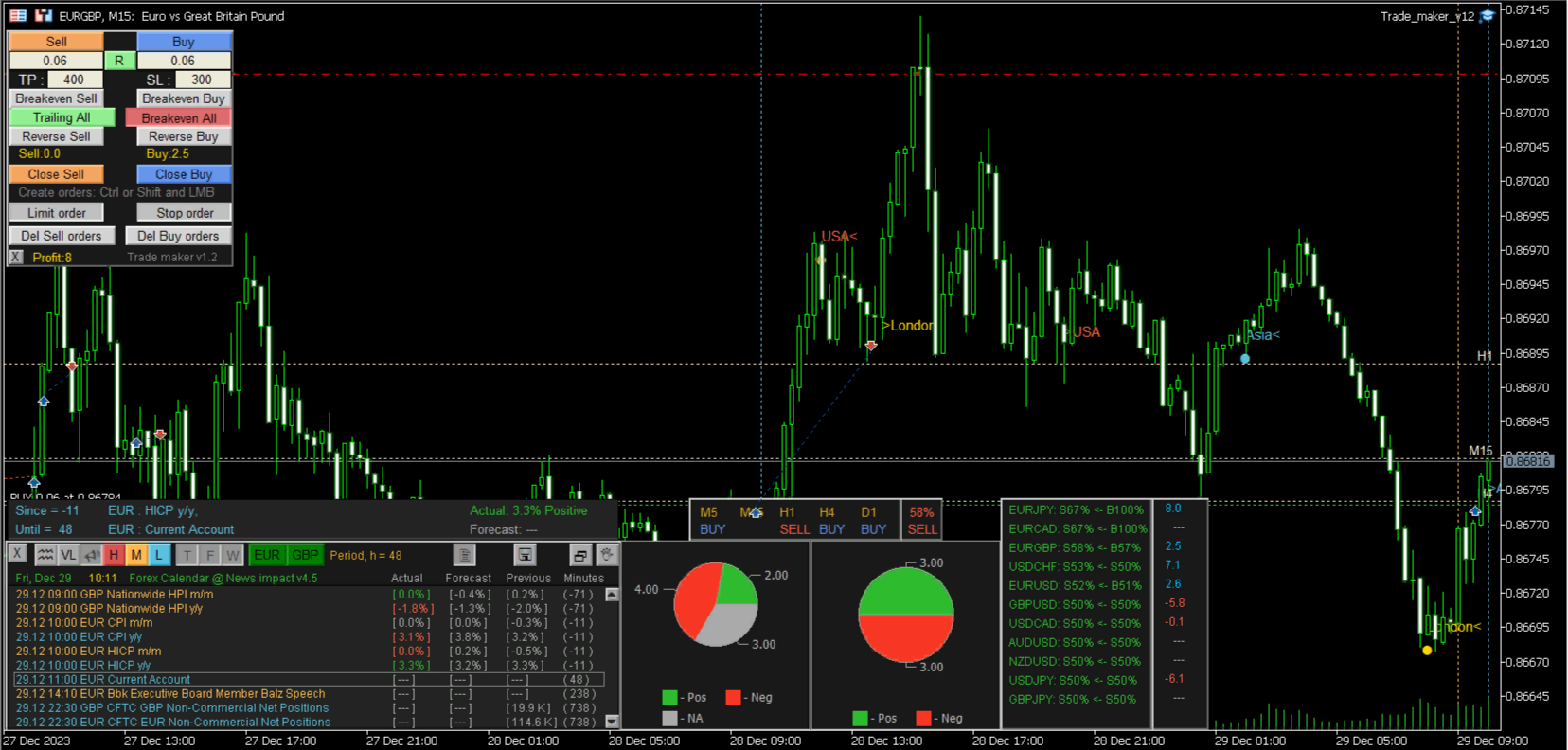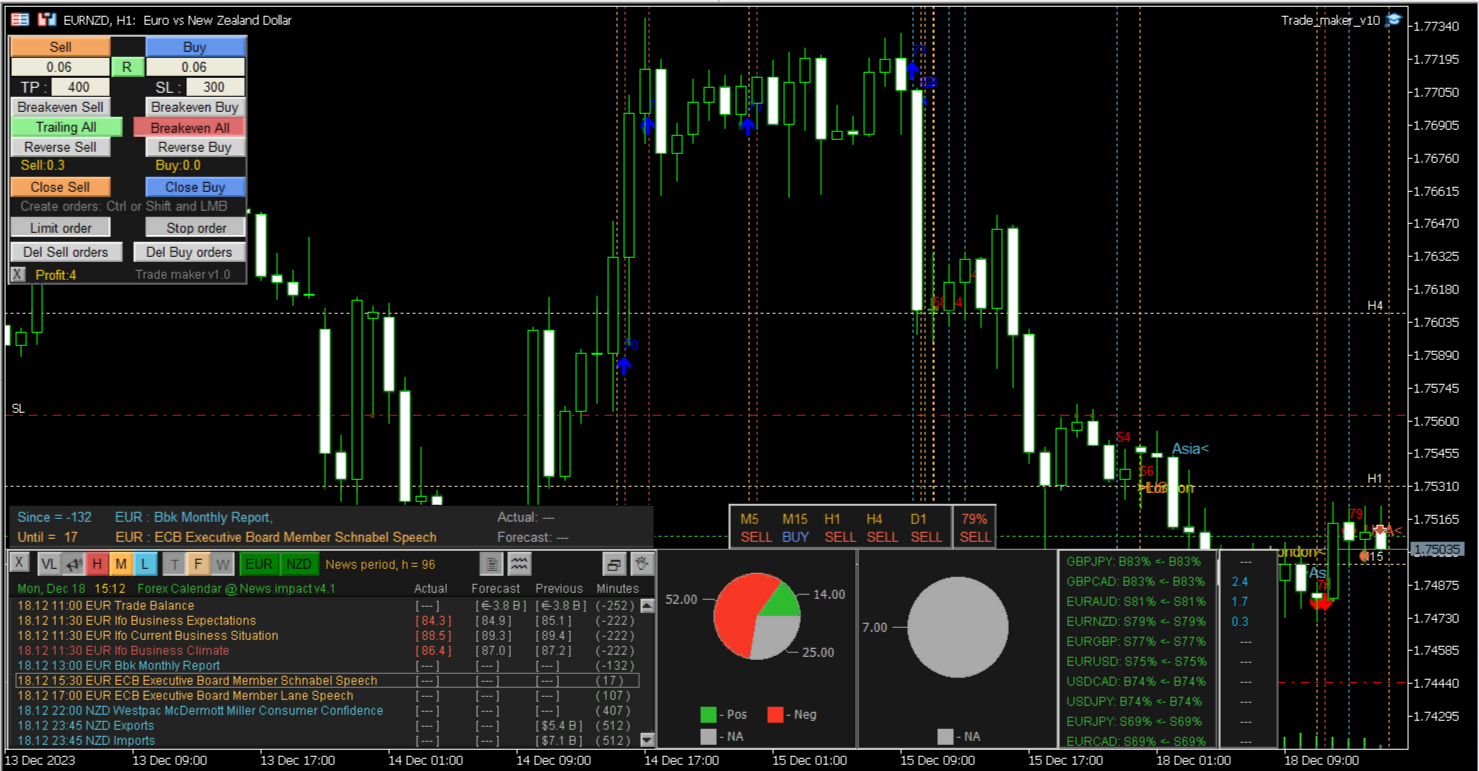
Trade maker

Multi-currency trading on one chart!

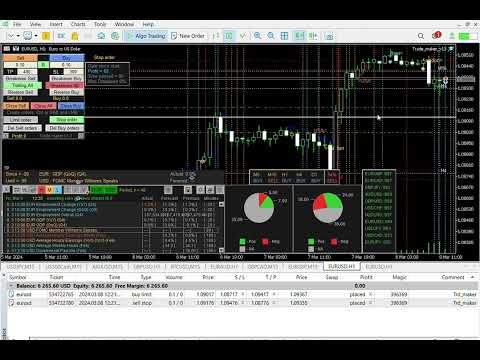
Creation and management of positions with trailing and breakeven, risk management and other useful functions.

To fix profits, the Target profit parameter is provided; if it is greater than zero, all positions will be closed if the set value is exceeded.

All positions and orders have set Stop Loss and Take profit.

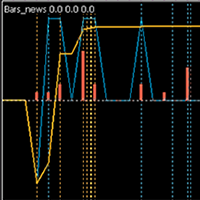
For multi-currency trading, taking into account the impact of news and switching symbols on the chart, it is useful to use the News impact indicator.

The News impact indicator displays a list of symbols with preferred trading conditions and allows you to switch between them on one chart.

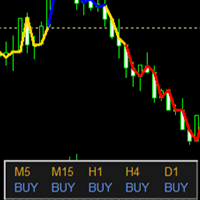
The value of the News impact index and the direction of the trend on 5 indicators tell you in which direction SELL or BUY to open a position.

Trade maker supports market and pending orders with separate management of Sell and Buy groups.

Using a horizontal mouse cursor allows you to accurately place a pending order.

Using "hot keys" allows you to hide the utility panels and create pending orders with the entire chart in front of your eyes:

  • Ctrl - creating a Limit order
  • Shift - creating a Stop order
  • Esc - cancel the mode of creating pending orders
Position and order management:
  • Opening Sell or Buy positions with Take Profit and Stop Loss set.
  • Breakeven - transfer of Take profit of open positions to a level without loss separately for Sell or Buy.
  • Reverse positions of Sell or Buy type.
  • Closing Sell or Buy positions.
  • Creating pending orders using the mouse and the Ctrl (Limit order) or Shift (Stop order) keys and Buy stop limit,  Sell stop limit . Sell or Buy is determined automatically by the position of the mouse cursor relative to the current price.
  • Deleting pending orders of the Sell or Buy type.

The application uses a Magic number to identify its positions from other positions.

Operating procedure

  1. Open a position or create a pending order.
  2. If the Set SL positions to Breakeven parameter is set, the utility monitors the possibility of changing the SL of each position to breakeven with subsequent trailing.
  3. If a group of Sell (or Buy) orders is already open, which are far from profit, you can use the Breakeven Sell (Breakeven Buy) button to set a TP for all positions in the group, which will ensure the overall breakeven of the group
  4. The Reverse Sell (Reverse Buy) button will close each open position and instead open a new one in the opposite direction.
  5. To create a pending order, you must press the corresponding button or the Ctrl (or Shift) key, a horizontal mouse cursor and a line marking the Ask price will appear. Having moved the mouse cursor to the required price level, press the left mouse button (LMB), which will create a new pending order, determining its type by the position of the cursor relative to the current price.
  6. The corresponding buttons close positions or orders.
Attention: the application does not work in the strategy tester, as it does not automatically open positions or create orders.
Produits recommandés
Product Name: Anchor auto TP and SL Trade Manager Pro MT5 The ultimate manual assistant. Turns trades into auto-grids with Hedging, Zero-Loss Breakeven & Spread Detection. Your manual trade will be managed automatically. Anchor Auto TP and SL Trade Manager MT5 Pro is the advanced edition of our popular trade assistant. It transforms simple manual trades into sophisticated, professional-grade recovery grids. Unlike the free version, this PRO edition fully supports Hedging (simultaneous Buy & Sell
Bneu Prop Firm Pass System
Marvinson Salavia Caballero
Compacted conversationBneu Prop Firm Pass System v2.25 — Prop Firm Risk Management Utility for MetaTrader 5 Bneu Prop Firm Pass System is a professional on-chart risk management utility for MetaTrader 5. It is designed to help traders monitor prop firm challenge rules, funded-account restrictions, account risk, news exposure, pending orders, session restrictions, and trade management from one clean dashboard. The system includes a 5-tab premium dashboard, prop firm rule presets, custom rule c
Lot calculator tool MT5
Ernestas Kvedaras
3.67 (3)
More stable MetaTrader 4 version is available here:  Lot Calculator Tool . This tool helps you to automatically calculate and manage risk, conveniently place orders visually, schedule orders, trail stops, move them to break-even and more. Features Place market or pending orders using draggable lines Schedule orders Calculate and limit risk using various methods See current spread See time till next candle Set custom order comments Trail stops Move stops to break-even See order profit/loss in p
L'indicateur SMC Venom Model BPR est un outil professionnel pour les traders travaillant dans le concept Smart Money (SMC). Il identifie automatiquement deux modèles clés sur le graphique des prix: FVG   (Fair Value Gap) est une combinaison de trois bougies, dans laquelle il y a un écart entre la première et la troisième bougie. Forme une zone entre les niveaux où il n'y a pas de support de volume, ce qui conduit souvent à une correction des prix. BPR   (Balanced Price Range) est une combinaiso
RRtoolBox
David Ruiz Moreno
RRtoolbox - Professional Tools: Risk:Reward Trading Tool (SL/TP Horizontals + Pending orders + Diagonals), Alerts set on trend lines (for alerts on diagonal levels), SelfManagement (BE, partials...), close/cancelling by time, Statistics, Info and trading on chart. One-Click Trading with Visual Risk:Reward Management RRtoolbox is a comprehensive trading panel that combines one-click order execution,  statistics and  powerful visual Risk:Reward tools, alerts set with trendlines, on chart butt
Talents ATR Scalper Utility (MT5) The Talents ATR Scalper Utility is a professional-grade trade execution and management tool built for MetaTrader 5. Inspired by the Biblical Parable of the Talents , this utility is designed to help traders multiply their potential with precision risk control, one-click simplicity, and advanced automation. Whether you’re scalping forex, gold, or indices, this tool delivers speed, consistency, and confidence. Key Features One-Click Trade Preview Click below price
Capital Management EA – Smart Risk Management & Profit Optimization for MT5 Take control of your trading capital with smart, automated strategies — fully optimized for MetaTrader 5 (MT5). Looking to protect your capital and maximize profits through automated money management strategies ? Capital Management EA is the all-in-one Expert Advisor for MetaTrader 5 (MT5) that helps you trade smarter, not harder. Core Features: 5-in-1 Capital Management Strategies – Built-in versatility Gr
Rule Plotter Expert
Francisco Gomes Da Silva
5 (3)
Cet Expert Advisor a été conçu pour tester et exécuter vos stratégies créées à l'intérieur de l'indicateur Rule Plotter . Comment utiliser : Téléchargez gratuitement l'indicateur Rule Plotter - outil de création de tradesystem sans connaissance en programmation . Ensuite, développez vos stratégies à l'intérieur de l'indicateur Rule Plotter. Enfin, exécutez vos stratégies créées en utilisant cet Expert Advisor. Paramètres : Strategy Votre tradesystem créé à l'intérieur de l'indicateur Rule Plotte
This is a common, simple and easy to use but effective tool to manage trading risks for all traders. It also help trader places stop loss and take profit levels at the same time the order is filled. How to set the expert advisor's parameters to support your trading style? Lots size. Fixed lots size - For traders who prefered to trade with fixed lots size, they can input the lots size in 'User lots' menu in the expert advisor's properties. The input value should be from the 'Minimum Volume' to th
Account Risk Hedge Bot                                                                                  ...hedge your trades with confidence. Safeguard Your Investments with Account Risk Hedge Bot, stay ahead of market volatility with our cutting-edge risk management solution. Account Risk Hedge Bot is designed to safeguard your investments with automated precision, helping you navigate market uncertainty, ensuring you minimize losses and maximize returns. Note: Account Risk Hedge Bot does
A capital management and trade execution software is designed to help traders control risk and optimize their performance. It allows users to set clear money management rules such as risk per trade, position sizing, and stop-loss/take-profit levels automatically. At the same time, the software assists in identifying entry points based on predefined strategies or technical signals, reducing emotional decision-making. This enables traders to stay disciplined, consistent, and improve their long-ter
Définir TP et SL par Prix – Modificateur automatique d’ordres pour MT5 Définissez automatiquement des niveaux de TP et SL précis sur toute opération ️ Fonctionne avec toutes les paires et tous les EAs, filtrage par symbole ou Magic Number Cet Expert Advisor vous permet de définir et d’appliquer des niveaux exacts de Take Profit (TP) et Stop Loss (SL) à l’aide de valeurs de prix directes (ex. : 1.12345 sur EURUSD). Aucun point, aucun pip. Une gestion de trade propre et précise, sur toutes l
SwiftEdge Scalper EA Professionnel de Scalping avec Contrôle Manuel Complet Le scalping exige des décisions en une fraction de seconde, une gestion précise des risques et une exécution parfaite des ordres. Gérer les calculs de breakeven, les trailing stops et plusieurs positions tout en surveillant l'action des prix est accablant sans les bons outils. SwiftEdge Scalper est votre assistant de trading professionnel conçu pour les scalpers actifs et les day traders. Exécutez des trades en un clic o
Auto SL/TP Manager Ne laissez plus jamais un trade manuel sans protection ! Avez-vous déjà ouvert une position dans la précipitation et oublié de définir votre Stop Loss ou votre Take Profit ? L'"Auto SL/TP Manager" est votre filet de sécurité indispensable. Cet Expert Advisor surveille votre compte 24/7 et applique automatiquement vos niveaux de risque (SL) et de profit (TP) prédéfinis à toutes les positions ouvertes qui n'en ont pas. C'est l'outil parfait pour les traders manuels , les scalper
Golden Gestion TP SL No Limit MT5
Matthias Hubert Patrick Snidaro
Auto SL/TP Manager EA – Gestion Automatique Intelligente Auto SL/TP Manager EA est un Expert Advisor conçu pour automatiser la gestion des commandes avec une efficacité maximale et une grande discrétion. Il gère automatiquement : Le Stop Loss (SL) et le Take Profit (TP) Le Profit Lock (verrouillage progressif des bénéfices) Le Trailing Stop avec plusieurs méthodes avancées L' affichage masqué du SL et du TP pour plus de discrétion (non visible par le courtisan) C'est l'outil idéal pour les
Gold grid Manager
Eslam Mohamed Hassanein Hassan Aly
Grid Profit Manager PRO is a powerful MT5 Expert Advisor designed to intelligently manage your grid trading positions with precision and control. This tool automatically calculates and applies Take Profit and Stop Loss levels in USD, allowing traders to control their risk and lock in profits efficiently. With independent management for Buy and Sell positions, you gain full flexibility to handle complex grid strategies without manual intervention. Key Features: Separate Buy & Sell position ma
This tool will perform Trailing stop loss and Break even management for orders. Helps you limit or reduce the time spend watching orders on the screen, especially when you need to go to sleep. Just add this EA to 1 chart, you can manage all pairs. You can filter orders by comment, magic number, symbol and order ticket number. When Breakeven it can add shift/offset pips (to cover the commission...). You can try in strategy tester before purchase. The EA will add Buy and Sell alternately, so you
AutoTrade NASDAQ
Amirhossein Bakhtiari
AutoTradeBot++ – Ordres en attente basés sur des lignes & EA risk-free multi-niveaux Tracez vos lignes. Définissez votre risque. Laissez le robot faire le reste. AutoTradeBot++   est un Expert Advisor professionnel d’exécution et de gestion du risque, conçu pour les traders qui veulent des graphiques propres, un risque fixe en dollars et un système de risk-free automatisé, sans perdre le contrôle de leur stratégie. Vous décidez   où   entrer en position, l’EA gère   comment   l’ordre est exécuté
Prop Firm Lot Size Calculator
Christian Paul Anasco
5 (1)
Now, you have your very own  PROP FIRM LOT SIZE CALCULATOR ! It now has BREAKEVEN and PARTIAL CLOSURE features! There's no need to go to other websites just to compute for the exact lot size. It also opens the trade with a click of a button. All inputs on the calculator can be edited. So if you want to change the SL or TP or the lot size, you can do so before placing an order. ========================================== INPUTS (Please see screenshot for reference): 1. SL PRICE TEXT . This is clic
BTC Master Pro
Farzad Saadatinia
4.58 (12)
BTC Master Pro — votre partenaire de confiance pour un trading discipliné du Bitcoin. La nouvelle version est désormais renforcée par l’intelligence artificielle OpenAI , offrant une exécution plus intelligente et un filtrage optimisé des transactions dans des conditions de forte volatilité du marché crypto. Ce robot de trading professionnel (Expert Advisor) est spécialement conçu pour le trading du Bitcoin (BTCUSD) sur la plateforme MetaTrader 5 , en mettant l’accent sur une exécution structuré
BossFXTradePanelEA (MT5)  [First 10 copies sold at 50 USD price will increase to 99USD] BossFXTradePanelEA is a fully interactive trade management panel designed for MetaTrader 5, providing traders with an easy-to-use, one-click interface to execute and manage trades. This EA simplifies trade execution , risk management, and position control by combining market orders, stop loss, take profit, trailing stops, and breakeven functionalities into a single, intuitive panel.  Key features include: On
Viking Alpha DAX Ivar Edition
Valdeci Carlos Dos Passos Albuquerque
Viking Alpha DAX — Germany 40 Expert Advisor for MetaTrader 5 LAUNCH PROMO Only 10 copies at launch price. Price increases with each sale. Launch price: $297 Next price: $497 Final price: $997 Live Performance: FX Blue — Vikingtradingbots What Makes Viking Alpha DAX Different Most DAX robots fail for one simple reason: they treat the Germany 40 like a forex pair. It isn't. The DAX has a heartbeat — a specific rhythm tied to the Frankfurt Stock Exchange opening, the European session structure, an
The only EA for TRADING PSYCHOLOGY:Discipline, Mindset Training & Risk Control  Checklist-Enforced Trading (No trades allowed until  strategy checklist is met)  1-Click Revenge Trade Blocker (Auto-freezes account after losses)  Overtrading Circuit Breaker (Hard daily trade limits enforced)  Neuroplasticity Training (Rewires retail habits into institutional discipline)  Institutional Risk Protocols (Auto SL/TP, position sizing, daily loss cutoffs)  Prop Firm  and account Safeguard (Preve
"Simplify Your Trade, Manage Your Risk." Automated Utility & Risk Assistant (AURA)   is the ultimate trading utility for MetaTrader 5, engineered for traders who demand precision, discipline, and total control. This is not just an order placement tool; it is a comprehensive   Risk Infrastructure   designed to eliminate emotional decision-making, automate complex risk calculations, and safeguard your account against execution errors. Whether you are a retail trader, a scalper, or a swing trader,
Secura Trade Manager
KINGSLEY IFEANYI IWUFRED
Secura Trade Manager Risk Management, Position Sizing, All Markets, Trailing Stops, Break Even, Forex-Gold-Crypto-Indices Overview Secura Trade Manager  is the most complete risk management and trade execution panel available for MetaTrader 5. Designed for serious traders who refuse to leave money on the table, it transforms the way you plan, enter, manage, and close trades — across every asset class from Forex and Gold to Indices, Commodities, and Cryptocurrency. Stop guessing lot sizes. Stop m
Lock Bot
Artem Alekseev
This utility is designed to automatically maintain a "locking" position and reopen it when necessary, which is suitable for position maintenance and protection strategies. A simple utility (hereinafter referred to as the bot) that implements a locking strategy with an infinitely reloadable locking trade. How the bot works: - When launched, select a buy or sell order with a specified TP - Set the SL parameter for the locking trade - The bot monitors the distance between the opening price of the f
UTrailingMinMT5
Viktor Shpakovskiy
The EA for manual trading to manage open positions.The built-in trailing stop has five modes and seven instruments. There is a virtual stop loss and a virtual take profit, which can be freely moved around the chart. With the help of the built-in trading simulator, you can check how the EA works in the strategy tester. Guide to UTrailingMinMT5 can be found in the "Comments" section. In the MT5 strategy tester, manual movement of virtual SL and TP lines according to the schedule does not work! Ben
Equity Shield Pro
Saad Janah
4.5 (2)
Equity Shield Pro 1.1 NEW VERSION  Equity Shield Pro 1.1 is a powerful utility EA designed to safeguard your trading account by actively monitoring and enforcing equity protection and profit management rules. Whether you’re trading personal accounts or working through proprietary firm challenges, this EA ensures strict adherence to risk and profit targets, enabling you to maintain discipline and consistency. Fully compatible with all challenge types, Equity Shield Pro 1.1 is specifically craft
FX Auto Risk Management TP SL and Out Stop v3.10 Strengths of the Script 1. Comprehensive Risk Management Automated Take Profit and Stop Loss   with customizable percentage-based settings Trailing Stop   with two adjustable modes (Normal and Aggressive) Stop Out   based on floating loss/profit percentage 2. Advanced Features Multi-mode trailing stop   with different parameters for each mode Slippage control   for more realistic order execution API request limit   to prevent server overload 3.
Drawing Assistant Tool for MT5 This is an assistant tool that allows you to create drawing objects with a single click from an on-chart panel, using settings independent of the standard MT5 objects. Dual Presets: You can draw two distinct styles for each object type, labeled "1" and "2", simply by clicking the respective buttons. Three Styles Available: Since these presets function independently from the standard MT5 toolbar objects, you effectively have access to three different object styles (
Les acheteurs de ce produit ont également acheté
Trade Assistant MT5
Evgeniy Kravchenko
4.42 (211)
It helps to calculate the risk per trade, the easy installation of a new order, order management with partial closing functions, trailing stop of 7 types and other useful functions. Additional materials and instructions Installation instructions - Application instructions - Trial version of the application for a demo account Line function -   shows on the chart the Opening line, Stop Loss, Take Profit. With this function it is easy to set a new order and see its additional characteristics bef
Bienvenue sur Trade Manager EA, l’outil ultime de gestion des risques conçu pour rendre le trading plus intuitif, précis et efficace. Ce n’est pas seulement un outil d’exécution d’ordres ; c’est une solution complète pour la planification des trades, la gestion des positions et le contrôle des risques. Que vous soyez débutant, trader expérimenté ou scalpeur ayant besoin d’une exécution rapide, Trade Manager EA s’adapte à vos besoins, offrant une flexibilité sur tous les marchés, des devises et i
Quant AI Agents is NOT AN Expert Advisor. Quant AI Agents   is a   multi-agent AI trading framework   that turns natural-language strategy prompts into live.  WANT THE SAME RESULTS AS MY LIVE SIGNAL?   Use the exact same brokers I do:   IC MARKETS , IC TRADING   .  Unlike the centralized stock market, Forex has no single, unified price feed.  Every broker sources liquidity from different providers, creating unique data streams. Other brokers can only achieve trading performance equivalent to 60
Local Trade Copier EA MT5
Juvenille Emperor Limited
4.96 (138)
Découvrez une expérience exceptionnellement rapide de copie de trades avec le   Local Trade Copier EA MT5 . Avec sa configuration facile en 1 minute, ce copieur de trades vous permet de copier des trades entre plusieurs terminaux MetaTrader sur le même ordinateur Windows ou Windows VPS avec des vitesses de copie ultra-rapides de moins de 0.5 seconde. Que vous soyez un trader débutant ou professionnel, le   Local Trade Copier EA MT5   offre une large gamme d'options pour le personnaliser en fonc
TradePanel MT5
Alfiya Fazylova
4.87 (155)
Trade Panel est un assistant commercial multifonction. L'application contient plus de 50 fonctions de trading pour le trading manuel et permet d'automatiser la plupart des tâches commerciales. Avant l'achat, vous pouvez tester la version de démonstration sur un compte de démonstration. Télécharger la version d'essai de l'application pour un compte de démonstration : https://www.mql5.com/fr/blogs/post/762644 . Instructions complètes ici . Commerce. Permet d'effectuer des opérations commerciales e
Version Bêta Le Telegram to MT5 Signal Trader est presque prêt pour la sortie officielle en version alpha. Certaines fonctionnalités sont encore en développement et vous pourriez rencontrer de petits bugs. Si vous rencontrez des problèmes, merci de les signaler, vos retours aident à améliorer le logiciel pour tout le monde. Telegram to MT5 Signal Trader est un outil puissant qui copie automatiquement les signaux de trading depuis des chaînes ou groupes Telegram vers votre compte MetaTrader 5 .
Farmed Hedge Yield Farming | All Markets (Manual - Hybrid - Semi/Automated EA) MULTI-ASSET SUPPORT Trade any asset available on your broker - Forex: Major, Minor, Exotic pairs - Crypto: BTC, ETH, XRP, SOL, BNB - Stocks: Apple, Tesla, Amazon, Google, etc. - Commodities: Gold, Silver, Oil, Gas - Indices: US30, NAS100, SPX500, DAX40 - Any CFD your broker offers VERIFIED TRADING RESULTS - Farmed Hedge Yield Axi Copy:  https://www.mql5.com/en/signals/2356376 - Farmed Hedge Yield Exn Copy:   https:/
Premium Trade Manager - Gestion de trades rapide et disciplinée pour MetaTrader 5 Premium Trade Manager est un panneau rapide sur le graphique pour MetaTrader 5 qui prend en charge tout le travail mécanique à chaque trade. Vous décidez de la direction, du symbole et du moment - le panneau calcule la taille de la position selon votre risque, place l'ordre avec son stop et son objectif, réduit en partiels, déplace le stop et surveille le calendrier économique à votre place. Son intelligence de new
Power Candles Strategy Scanner - Outil de recherche de configurations multi-symboles à optimisation automatique Le Power Candles Strategy Scanner utilise le même moteur d'auto-optimisation que celui qui alimente l'indicateur Power Candles, pour chaque symbole de votre Market Watch, en parallèle. Un panneau vous indique quels symboles sont statistiquement négociables à l'instant, quelle stratégie est la plus performante pour chacun, la paire Stop Loss / Take Profit optimale, et vous alerte dès qu
YuClusters
Yury Kulikov
4.93 (43)
Attention: You can view the program operation in the free version  YuClusters DEMO .  YuClusters is a professional market analysis system. The trader has unique opportunities to analyze the flow of orders, trade volumes, price movements using various charts, profiles, indicators, and graphical objects. YuClusters operates on data based on Time&Sales or ticks information, depending on what is available in the quotes of a financial instrument. YuClusters allows you to build graphs by combining da
Exp COPYLOT CLIENT for MT5
Vladislav Andruschenko
3.91 (33)
Copieur professionnel de trades pour MetaTrader 5 Un copieur de trades rapide, professionnel et fiable pour MetaTrader . COPYLOT permet de copier des trades Forex entre les terminaux MT4 et MT5 avec prise en charge des comptes Hedge et Netting . La version MT5 de COPYLOT prend en charge : - MT5 Hedge → MT5 Hedge - MT5 Hedge → MT5 Netting - MT5 Netting → MT5 Hedge - MT5 Netting → MT5 Netting - MT4 → MT5 Hedge - MT4 → MT5 Netting Version MT4 Description complète + DEMO + PDF Comment acheter Comme
Trade Dashboard MT5
Fatemeh Ameri
4.94 (125)
Trade Dashboard simplifies how you open, manage, and control your trades, with built-in lot size calculation. It allows you to execute trades, manage risk, and control positions directly on the chart, with tools such as partial close, breakeven, and trailing stop. Designed to reduce manual work and help you stay focused on your trading decisions. A demo version is available for testing. Detailed explanations of features are provided within the MQL5 platform. Installation instructions are include
AntiOverfit PRO MT5
Enrique Enguix
5 (5)
Avant d’acheter un EA, vérifiez s’il tient vraiment la route ou s’il a simplement eu de la chance en backtest. La plupart des robots se vendent avec un beau backtest. Une courbe qui monte. Un bon profit factor. Très peu de doutes. Et pourtant, beaucoup de ces EA s’effondrent dès que le marché cesse de se comporter comme dans cet historique précis. Pourquoi ? Parce qu’un backtest ne prouve qu’une seule chose : que cette stratégie a fonctionné sur un parcours de prix bien précis. Il ne prouve pas
MT5 to Telegram Signal Provider est un utilitaire facile à utiliser et entièrement personnalisable qui permet l'envoi de signaux spécifiés vers un chat, un canal ou un groupe Telegram, transformant ainsi votre compte en fournisseur de signaux. Contrairement à la plupart des produits concurrents, il n'utilise pas d'importations DLL. [ Démonstration ] [ Manuel ] [ Version MT4 ] [ Version Discord ] [ Canal Telegram ]  New: [ Telegram To MT5 ] Configuration Un guide utilisateur étape par étape est
Ultimate Extractor
Clifton Creath
5 (9)
Ultimate Extractor - Professional Trading Analytics for MT5 *****this is the local HTML version of Ultimate Extractor. !!!!!it is not compatible with Cloud!!!! For the online version please reach out to me directly****** Ultimate Extractor transforms your MetaTrader 5 trading history into actionable insights with comprehensive analytics, interactive charts, and real-time performance tracking. What It Does Automatically analyzes your MT5 trading history across all Expert Advisors and generates
Copy Cat More Trade Copier MT5 (Chat Copieur MT5) est un copieur de trades local et un framework complet de gestion des risques et d'exécution conçu pour les défis commerciaux d'aujourd'hui. Des défis de prop firms à la gestion de portefeuille personnel, il s'adapte à chaque situation avec une combinaison d'exécution robuste, de protection du capital, de configuration flexible et de gestion avancée des trades. Le copieur fonctionne à la fois en mode Master (expéditeur) et Slave (récepteur), avec
Panneau de trading pour MetaTrader 5 — contrôle professionnel du trading en un clic depuis le graphique et le clavier Un panneau de trading avancé conçu pour les traders actifs, afin d’ouvrir, gérer et clôturer des positions bien plus rapidement qu’avec l’interface standard de MetaTrader. Cette solution s’adresse à ceux qui veulent contrôler positions, ordres en attente, profit global et exécution depuis un seul espace de travail professionnel. Il ne s’agit pas d’un simple utilitaire. C’est un
Custom Alerts AIO : Surveillez tous les marchés à la fois — sans aucune configuration Présentation Custom Alerts AIO est une solution de surveillance du marché prête à l’emploi, sans configuration nécessaire. Tous les indicateurs requis — FX Power, FX Volume, FX Dynamic, FX Levels, IX Power — sont directement intégrés. Aucun graphique n’est affiché, ce qui rend cet outil idéal pour la génération d’alertes en temps réel. Il prend en charge toutes les classes d’actifs proposées par votre courtie
Poc Breakout Signal: The Ultimate Institutional Order Flow & Price Action System Elevate your trading with Poc Breakout, a comprehensive technical analysis tool designed to bridge the gap between retail trading and institutional market understanding. This all-in-one system combines powerful Buy/Sell signals, advanced Volume Profile analysis, real-time Order Flow (Depth of Market), and critical macroeconomic data to give you a clear, unambiguous edge in the markets. Poc Breakout Signal decodes c
Timeless Charts
Samuel Manoel De Souza
5 (5)
Timeless Charts est un utilitaire de trading tout-en-un destiné aux traders professionnels. Il combine des types de graphiques personnalisés tels que les graphiques en secondes et Renko avec une analyse avancée du flux d’ordre s utilisant Footprints , Clusters , Profils de Volume , études VWAP et outils d’analyse ancrés pour une compréhension plus approfondie du marché. Le trading et la gestion des positions sont effectués directement depuis le graphique via un panneau intégré de gestion des ord
The News Filter MT5
Leolouiski Gan
4.77 (22)
Ce produit filtre tous les conseillers experts et les graphiques manuels pendant les heures de publication des actualités, de sorte que vous n'avez pas à vous soucier des pics de prix soudains qui pourraient détruire vos configurations de trading manuelles ou les transactions entrées par d'autres conseillers experts. Ce produit est également livré avec un système de gestion des ordres complet qui peut gérer vos positions ouvertes et vos ordres en attente avant la publication de toute actualité.
HINN MagicEntry Extra
ALGOFLOW OÜ
4.71 (14)
HINN MAGIC ENTRY – the ultimate tool for entry and position management! Place orders by selecting a level directly on the chart! full description   ::  demo-version  :: 60-sec-video-description Key features: - Market, limit, and pending orders - Automatic lot size calculation - Automatic spread and commission accounting - Unlimited partitial take-profits  - Breakeven and trailing stop-loss and take-profit  functions - Invalidation leves - Intuitive, adaptive, and customizable interface - Works
Seconds Chart MT5
Boris Sedov
4.59 (17)
Seconds Chart - un outil unique pour créer des graphiques en secondes dans MetaTrader 5 . Grâce à Seconds Chart , vous pouvez créer un graphique avec une période définie en secondes, offrant une flexibilité et une précision idéales pour l'analyse, indisponibles sur les graphiques standards en minutes ou en heures. Par exemple, la période S15 indique un graphique avec des bougies d'une durée de 15 secondes. Vous pouvez utiliser n'importe quels indicateurs et experts advisors compatibles avec les
Footprint Chart Pro — Professional OrderFlow EA for MetaTrader 5 Version 6.34 | Professional tool for real traders | Institutional-Grade Visualization DEMO USERS - PLEASE SELECT EVERY TICK / REAL TICK WHEN TESTING AND YOU HAVE DOWNLOADED HISTORICAL DATA. IF YOU SEE A WAITING SCREEN AND IT IS NOT DOWNLOADING, IT MEANS YOU HAVE LOW HISTORICAL DATA. TRY 1 MIN AND 5 MIN FIRST ON 1 DAY DATA. ONE DAY DATA SHOULD BE THE NEWEST AND MOST CURRENT DATE. PLEASE WAIT UNTIL THE MARKET HAS ROLLED OVER PERIOD.
AlgoRadar
Stephen J Martret
5 (4)
AlgoRadar is an on-chart analytics dashboard for MT5 that aggregates Expert Advisor performance across multiple accounts, brokers, and platforms, including both MT4 and MT5 data, into a single live view on your MT5 chart. All analysis runs from the chart interface, with no external applications or manual report processing required. EA Analysis and Ranking For traders running multiple Expert Advisors, AlgoRadar provides a consolidated view of each EA's performance across accounts. Active EAs a
Anchor Trade Manager
Kalinskie Gilliam
5 (2)
Anchor: The EA Manager Run your full EA portfolio without conflicts, without stacked risk, and without watching every chart yourself. Anchor coordinates up to 64 Expert Advisors on a single account so only one trades at a time. Attach Anchor to any chart. Type your EA names and magic numbers in one line. Anchor handles the rest. Built for portfolios. Built for discipline. Built for prop firms. The Problem Running multiple EAs on the same account creates risk. Two gold EAs can open opposite posit
Advanced Dashboard Ultra
Mirel Daniel Gheonu
5 (2)
Stats Dashboard & Journal ULTRA pour MT5 Le Centre de Commandement de Trading Complet : Analytique, Automatisation & Intelligence des Actualités. Stats Dashboard ULTRA est l'évolution ultime de l'outil d'analyse Pro. Il transforme MetaTrader 5 en une station de trading professionnelle, combinant une analyse de performance de niveau institutionnel avec une protection automatisée contre les actualités et des métriques psychologiques avancées. Conçu pour les traders manuels et les gestionnaires de
Trade Manager DaneTrades
Levi Dane Benjamin
4.28 (29)
Trade Manager pour vous aider à entrer et sortir rapidement des transactions tout en calculant automatiquement votre risque. Y compris des fonctionnalités pour vous aider à éviter le sur-trading, le trading de vengeance et le trading émotionnel. Les transactions peuvent être gérées automatiquement et les mesures de performances du compte peuvent être visualisées dans un graphique. Ces fonctionnalités rendent ce panneau idéal pour tous les traders manuels et contribuent à améliorer la plateforme
Telegram to MT5 Coppy
Sergey Batudayev
5 (9)
Télégramme vers MT5 :   la solution ultime pour copier des signaux Simplifiez votre trading avec Telegram vers MT5, l'outil moderne qui copie les signaux de trading directement des canaux et chats Telegram vers votre plateforme MetaTrader 5, sans DLL. Cette solution puissante garantit une exécution précise des signaux, de nombreuses options de personnalisation, un gain de temps et une efficacité accrue. [ Instructions and DEMO ] Caractéristiques principales Intégration directe de l'API Telegram
Trading View ToMT5
Mirel Daniel Gheonu
The Ultimate TradingView to MT5 Bridge Automation Arrêtez le trading manuel et les problèmes de latence. TradingView to MT5 Copier PRO est la passerelle (bridge) la plus rapide et la plus fiable pour exécuter vos alertes TradingView directement sur MetaTrader 5. Que vous utilisiez des indicateurs personnalisés, des scripts du Testeur de Stratégie ou des dessins manuels, cet Expert Advisor (EA) exécute vos trades instantanément grâce à la technologie WebSocket Haute Vitesse . Contrairement aux co
Plus de l'auteur
GS smart5
Aleksander Gladkov
5 (6)
Best price Advanced grid algorithm,includes trend accounting, news, hedging and Risk manager. Can close the loss in case of market reversal and wait for the trend. For hedging, the following are used: Limit drawdown for Hedge zone parameter, pending orders and/or opening a position opposite to the loss. Can take into account not only the moment of news publication, but also the current accumulated index of the impact of news of a currency pair. Traders who purchase GS smart5 receive a persona
Get news
Aleksander Gladkov
5 (1)
Utility for reading news from investing.com To access the site, you need to add WebRequest in the Options terminal menu on the Expert Advisors tab: https://sslecal2.investing.com If reading is successful, a message about writing the file is displayed. The INV_week_this.txt file is written to the MQL4\Files folder of the terminal and is kept up to date, updating data according to its own timer. The  INV_week_last.txt   file is recorded on Saturday and saves the news data of the previous week .
FREE
GS spread
Aleksander Gladkov
The indicator calculates the current spread for each tick using the formula Spread=(ASK-BID)/Point. Schedule of changes in the boundaries spread over the timeframe displayed in a separate window from the date of accession of the indicator. Two lines corresponding to the minimum and maximum spread values are displayed. The indicator window is self-adjusted according to the minimum and maximum values from the moment of launch. The minimum and maximum values for the entire period of the indicator o
FREE
GS grid
Aleksander Gladkov
5 (4)
Uses an advanced grid algorithm with no martingale or limited Martingale (default) (version for MT5: GS grid5 ) . Defines and control the current trend; It switches himself its parameters in accordance with the current market conditions ; Flexible customizable grid algorithm with or without martingale; Drawdown reduction algorithm (DD Reduction Algoritm); Hedge algorithm; Interactive trade control buttons; The ability to open / close orders manually; News filter to prevent trading during news
GS target
Aleksander Gladkov
5 (2)
The automatic adviser of the new generation with parameters: Target profit per month (10%, 25%, 50%, 75%, 100%) - choice of strategy Stop Loss Limit, USD Filter News Forex Factory (true, false) Parameters for setting the lot size Uses the news feed from Forex Factory to prevent trading during news releases. Set up to work on EURUSD timeframe M15. Works on USD accounts with a leverage from 1:500 and a Deposit from 500USD.   Enough for work: Decide on the size of the deposit that you can trust h
GS smart
Aleksander Gladkov
5 (1)
Best price, read GS smart channel ! Sale! Advanced grid algorithm,includes news and trend accounting and hedging. Can close the loss in case of market reversal and wait for the trend. For hedging, the following are used: Limit drawdown for Hedge zone parameter, pending orders and/or opening a position opposite to the loss. Can take into account not only the moment of news publication, but also the current accumulated index of the impact of news of a currency pair. Traders who purchase GS smar
GS trendS
Aleksander Gladkov
GS trendS is a trend indicator that can be used for any Forex financial instrument. The indicator does not redraw and does not lag. Recommended timeframe H1. It is possible to select the trend algorithm settings {Only Open, Average Open/Close, Average High/Low} The color indicates the direction of the trend: yellow - direction can be SELL or BUY (S_B) blue - uptrend (BUY) red - downward trend (SELL) The indicator panel displays trend values of 5 timeframes for the current price level. The va
ATR RSI i4
Aleksander Gladkov
Composition of ATR and RSI indicators. The ATR RSI indicator compares two calculations of the ATR indicator with the Fast and Slow periods on one chart, plus the line of the average and the overbought and oversold zones of the RSI indicator. ATR shows the values of the volatility change in the currency pair in points, taking into account the period specified as a parameter. The entry points provided by the RSI indicator show a very good risk-reward ratio in volatile and trending markets. ATR RS
ATR RSI x4
Aleksander Gladkov
The Expert Advisor implements a trading strategy based on overbought and oversold zones of ATR RSI i4 indicator signals, which is included in the code . Trend Following, Counter Trend system , DD reduction Algoritm and Level Trading algoritm are used. To start trading, simply attach the EA to the chart, preferably EURUSD H1 timeframe. Live results can be viewed here . To trade with the new Forex instrument (EURUSD H1 by default), it is recommended to set up the parameter values by testing, initi
Gain since start
Aleksander Gladkov
It will perfectly complement your working Expert Advisor or manual trading with up-to-date information. There is a sound notification of exceeding the established profit and loss limits of open SELL and BUY orders. Moreover, for each currency pair EURUSD, GBPUSD, XAUUSD, and others, various sound alerts are activated in English. Results are displayed on a special panel on the chart from the moment the indicator is activated: Elapsed time Fixed profit Current profit SELL Current profit BUY Maximu
Trends and News
Aleksander Gladkov
5 (1)
With the Trend and News indicator you will always be up to date : News + Trends + Forecast News Displayed on the chart as vertical lines with a description in the form of a tooltip The text displays two news: the previous published and the next expected They have filters: by importance (High, Medium, Low) and time period (Day, 4 days, Week) Full table of news for a given period (T button) Controlling the display of vertical lines on the chart and the sound signal before and after the publicati
GS Trend5
Aleksander Gladkov
The advisor is designed for autonomous automatic round-the-clock trading on the EUR/USD pair, timeframe M15. There is a protection of the deposit from significant drawdown and a mode for saving a profitable transaction. Trades one deal. With the set parameters, it turns out to be one per day on average. How it works Uses the author's algorithm for analyzing three indicators and the direction of market movement to make a decision to open a deal. RSI Stochastic Bands market direction Opens an orde
GS grid5
Aleksander Gladkov
F ully automated Expert Advisor using the advanced grid algorithm and constrained Martingale (MT4 version: GS grid ). Set up to work on EURUSD timeframe M15. Test 2021 shows a high percentage of winning orders: more than 98%. Works on HEDGING accounts with a leverage of 1:500 and a Deposit from 1000USD. Can use the news feed from Forex Factory to prevent trading during news release (Filter News Forex Factory=true;). To access the options terminal menu on the Expert Advisors tab, you must enable
GS target5
Aleksander Gladkov
The revolutionary automatic adviser of the new generation with three parameters: Target profit per month (from 10% to 100%) Degree of risk (SuperLow, Low, Medium, High) Stop Loss Limit, USD Set up to work on EURUSD timeframe M15. Works on HEDGING accounts with a leverage of 1:500 and a Deposit from 500USD.   Enough for work: Decide on the size of the deposit that you can trust him Set the value of the desired profit per month (from 10 to 100 percent) Select the degree of risk (Low, Medium,
It will perfectly complement your working Expert Advisor or manual trading with up-to-date information. There is a sound notification of exceeding the established profit and loss limits of open SELL and BUY orders. Moreover, for each currency pair EURUSD, GBPUSD, XAUUSD, and others, various sound alerts are activated in English. Indicators are displayed on a special panel on the chart from the moment the indicator is activated: Elapsed time Fixed profit Current profit Maximum drawdown Current d

GS trade report
Aleksander Gladkov
5 (1)
3 in 1 : Report + monitoring + sending messages (Telegram, ...) to optimize trading and use of advisors. Monitoring: Panel on the chart Sending messages to Telegram Sending messages to Email Sending Notifications Sending pop-up messages Sound notifications when the established Profit/Loss levels are exceeded Monitoring is activated by pressing the Start button. Profit for the period by currency pairs, hours and Magic number for the current account. Forms four tables: by symbols, by magic number
A professional tool for real-time monitoring of the account status and the work of Expert Advisors. Information about the account status can be sent to Telegram chats automatically at a specified interval or upon request. From the screenshots of the open charts of the terminal, you receive upon request from your Telegram bot. Account information includes: 13:02 Trade monitoring by Telegram v.1.0 (headline) Account : 6802ххх RoboForex-Pro (account information) Profit start: 2661 USD (profit earne
News impact L
Aleksander Gladkov
Uses the built-in news calendar of the MT5 terminal or the Investing.com website (in the latter case, the Get news5 utility is required) Has the Scale parameter={100%, 110%, 125%, ...} to adjust the comfortable size of the text and control elements Tells you in which direction it is safer to open positions 3 in 1: News + Trends + Forecast News for the selected period: current and in tabular form Actual trends for 5 customizable timeframes and trend reversal levels Forecast of exchange rate mo
Bars news
Aleksander Gladkov
Indicator of news linked to a bar. The published current value of the news has a characteristic impact on the currency it relates to: positive, negative, neutral . The indicator summarizes all these values for the selected period, taking into account the importance of the news: high, medium, low . As a result, a percentage is calculated for the currency pair, which shows the news of which currency is dominant. If the value is positive, then the pair has news pressure towards BUY, if negative - S
Get news5
Aleksander Gladkov
Utility for reading news from investing.com To access the site, you need to add WebRequest in the Options terminal menu on the Expert Advisors tab: https://sslecal2.investing.com If reading is successful, a message about writing the file is displayed. The INV_week_this.txt file is written to the MQL5\Files folder of the terminal and is kept up to date, updating data according to its own timer. The  INV_week_last.txt   file is recorded on Saturday and saves the news data of the previous week .
GS trend I
Aleksander Gladkov
The trend indicator has the ability to adjust the viewing depth and sensitivity, does not repaint and does not lag. In addition to the current trend, the chart displays trends for 5 more periods with zero trend levels for them. This allows for a comprehensive assessment of the nature of the trend movement. There is a possibility to choose the trend algorithm settings {Only Open, Average Open/Close, Average High/Low} The trend indicator can be used for any Forex financial instruments. The color s
Filtrer:
[Supprimé] 2024.03.07 10:15 
 

L'utilisateur n'a laissé aucun commentaire sur la note

Répondre à l'avis