Local LLM Inference in MetaTrader 5: Building an Intelligent Pre-Trade Context Gate with Ollama

Introduction: The Context-Blind Expert Advisor Problem
A carefully optimized Expert Advisor completes six months of profitable forward testing. The equity curve is smooth, the drawdown is bounded, and the trade distribution looks healthy. On the first Friday of the seventh month, the EA opens a 0.5-lot EURUSD long position at 12:28 GMT. At 12:30 GMT, non-farm payrolls print 45,000 above consensus. The pair spikes 90 pips against the position in under three seconds. The stop-loss executes with 14 pips of slippage. One trade wipes out two weeks of gains.
The EA did nothing wrong by its own logic. The moving-average crossover triggered, the risk-management rules held, and the broker filled the order at the best available price. The problem is more fundamental: the EA had no awareness that an economic release capable of moving the market several standard deviations was scheduled minutes away. It operated in a numerical vacuum, processing price arrays and indicator buffers without any notion of the external context in which those numbers existed.
This is the context-blindness problem, and it is a structural limitation of the traditional MQL5 development model. Indicator buffers can measure volatility but cannot distinguish between volatility caused by a trend breakout and volatility caused by an impending central bank announcement. A sophisticated developer might hard-code calendar filters for specific events. This approach scales poorly: new events appear, existing events change their impact profile, and the list of exceptions grows until the filter logic becomes unmaintainable.
A more general solution requires a component capable of reading textual information about scheduled events, combining it with numerical market state, and producing a structured risk assessment. Large language models are well-suited to this task. The obvious implementation path, calling a commercial API such as OpenAI or Claude, introduces three problems that are unacceptable for serious algorithmic trading: per-call cost that grows linearly with evaluation frequency, network latency of several hundred milliseconds per request, and exposure of proprietary strategy context to a third-party server.
This article solves all three problems by running a quantized open-weight model directly on the trader's hardware using Ollama. The EA communicates with the local inference server over HTTP on localhost, producing a pre-trade context gate that costs nothing per call, responds in seconds instead of milliseconds over the public internet, and never transmits trading data outside the local machine. The complete pipeline is implemented in four compilable files attached to this article: a reusable communication class, an economic calendar collector, a standalone test script, and a full Expert Advisor that integrates the gate with a sample strategy.
This is the first article in a series on agentic workflows inside MetaTrader 5. The context gate built here is the foundation. Subsequent articles will extend it with long-term market memory through vector databases and Retrieval-Augmented Generation, ingestion of unstructured text from alternative data sources, adaptive execution through deep reinforcement learning, and multi-agent debate architectures where several model personas negotiate a consensus before any trade is placed.

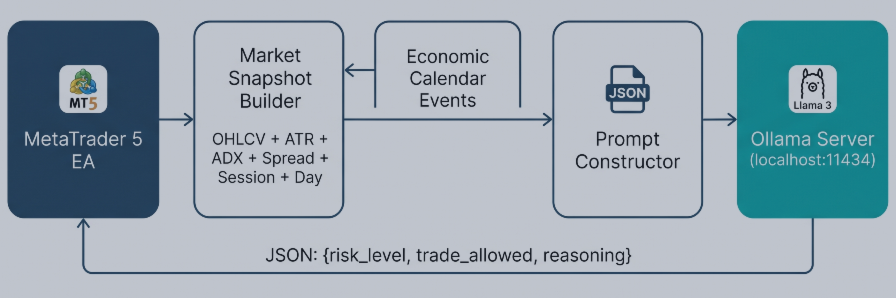
Fig. 1. System architecture: data flow from the Expert Advisor through the market snapshot and calendar collector to the local Ollama server and back.
Architecture Overview
The system is organized into four components, each contained in a separate file. This separation is deliberate: a developer reading this article can replace any single component without rewriting the others. The Ollama client can be reused in any EA that needs local LLM inference. The calendar collector can be used independently of the LLM pipeline. The test script validates the communication layer without running a full EA. The Expert Advisor demonstrates how these pieces combine into a working trading filter.
The data flow is straightforward. On each new H1 bar, the EA collects a structured market snapshot: the last five candles expressed as open, close, and range in pips; the current ATR(14) value alongside its hundred-bar average; the current ADX(14) reading; the normalized spread; the active trading session; the day of the week; and the number of open positions owned by the EA. Separately, the calendar collector queries MetaTrader 5's native economic calendar for high-impact events scheduled within the next four hours on either the base or the quote currency of the traded symbol. The two data blocks are serialized into a single prompt together with a system-role instruction and two few-shot examples. The prompt is sent to the local Ollama server through WebRequest. The server returns a JSON object with three fields: an integer risk level from one to five, a boolean indicating whether trading is permitted, and a one-sentence natural-language justification. The EA parses the response and updates three global variables that any downstream strategy consults before opening a position.
The key technical properties of this architecture are worth making explicit. Inference runs asynchronously to the trading loop: the gate is re-evaluated on the H1 timer, never on every tick. This matters because local inference on consumer hardware takes between two and fifteen seconds, depending on GPU availability, which is far too slow for tick-level decisions but entirely acceptable for a decision that only changes when a new bar closes. The communication layer includes a minimum-interval guard to prevent redundant calls. When the LLM is unreachable or returns a malformed response, the system defaults to a neutral gate state rather than blocking or crashing. In the Strategy Tester, where WebRequest is disabled by design, a deterministic heuristic based on ATR percentile takes the place of the LLM so the EA still compiles and produces backtest results.
The attached files must be placed in specific directories within the MetaTrader 5 data folder for compilation to succeed. The two include files belong in MQL5/Include/, the test script in MQL5/Scripts/, and the Expert Advisor in MQL5/Experts/:
MQL5/
 Include/
   OllamaClient.mqh         <-- communication layer
   CalendarCollector.mqh     <-- calendar data extraction
 Scripts/
   ContextGate_Test.mq5      <-- standalone validation script
 Experts/
   EA_ContextGate.mq5        <-- full Expert Advisor
The two include files reside in MQL5/Include/ because both the script and the Expert Advisor reference them using angle-bracket includes. This allows MetaEditor to locate the headers regardless of whether the consumer file is a script, an EA, or an indicator:
#include <OllamaClient.mqh>
#include <CalendarCollector.mqh>
Setting Up the Local Inference Engine
Ollama is an open-source framework that wraps a collection of quantized transformer models behind a simple REST API. Installing it takes less than two minutes. On Windows, download the installer from the official Ollama website and run it with default options. The installer registers a background service that listens on 127.0.0.1:11434 and starts automatically on system boot. On first use, the model itself must be downloaded. Open a terminal and run:
ollama pull llama3:8b-instruct-q4_K_M
The model name encodes three pieces of information. The family is Llama 3, Meta's third-generation open-weight model. The parameter count is eight billion, which places the model in the small-to-medium bracket: large enough to follow structured instructions reliably, small enough to run on modest hardware. The suffix instruct indicates the instruction-tuned variant, which is essential because the gate prompt expects the model to respond in a specific JSON format. The suffix q4_K_M describes the quantization scheme: four-bit K-quant weights with medium quality, which reduces the model from sixteen gigabytes to approximately four and a half gigabytes while preserving nearly all the reasoning quality of the full-precision original.
Hardware requirements scale predictably with available resources. A machine with eight gigabytes of RAM and no discrete GPU can run the model on the CPU with inference times between eight and fifteen seconds per response. A machine with sixteen gigabytes of RAM and a six-gigabyte GPU, which covers most modern gaming laptops, will produce responses in two to four seconds. Workstations with eight or more gigabytes of VRAM typically respond in under two seconds. None of these latencies are problematic for an H1 evaluation cycle, because the gate only needs to be updated once per hour.
Before moving to MetaTrader 5, verify that the server is reachable. From a terminal, run:
# Windows PowerShell:
$body = @{model="llama3:8b-instruct-q4_K_M"; prompt="Say hello in one word."; stream=$false} | ConvertTo-Json
Invoke-RestMethod -Uri "http://127.0.0.1:11434/api/generate" -Method Post -Body $body -ContentType "application/json"

# Windows CMD or Linux/Mac terminal:
curl.exe http://127.0.0.1:11434/api/generate -d "{\"model\":\"llama3:8b-instruct-q4_K_M\",\"prompt\":\"Say hello in one word.\",\"stream\":false}"
A successful call returns a JSON object containing a response field with the model's output. If the call fails, the most common causes are that the Ollama service is not running, that the model name is misspelled, or that the model was not fully downloaded. Resolve these before proceeding.
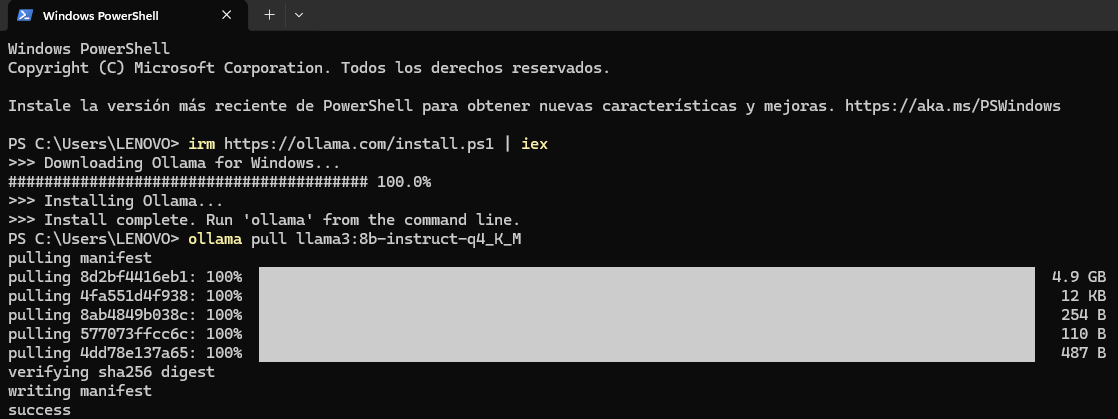
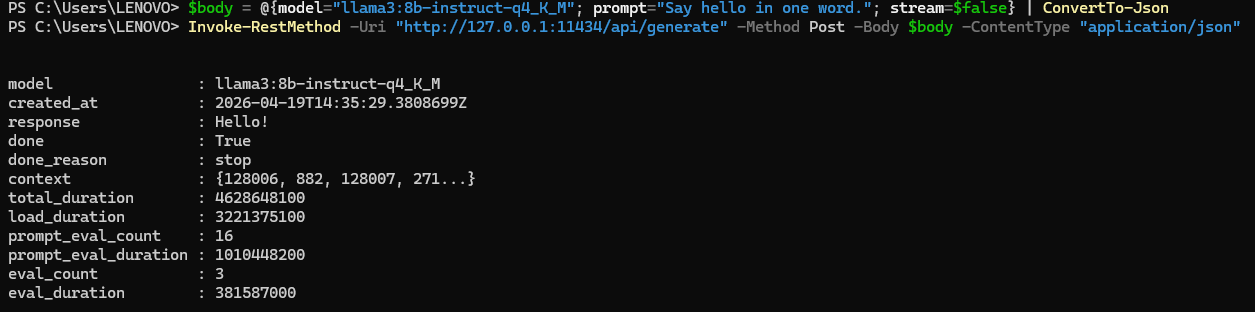
Fig. 2. Verifying Ollama installation in PowerShell: the model responds to a test prompt, confirming the local inference server is operational.
Configuring MetaTrader 5 for Local HTTP Communication
MetaTrader 5 treats the network as a security boundary. The WebRequest function refuses to contact any URL that has not been explicitly approved by the user. This policy applies even to localhost. Skipping this step is the single most common cause of silent failure in this pipeline, so it is worth walking through carefully.
Open the MetaTrader 5 terminal, select Tools from the menu bar, and choose Options. Navigate to the Expert Advisors tab. Locate the checkbox labeled Allow WebRequest for listed URL. Enable it. In the URL list below the checkbox, add the following entry exactly as written:
http://127.0.0.1:11434
Click OK to apply the setting. A critical detail: the URL must be written as an IP address, not as localhost. Some MetaTrader 5 builds resolve the hostname localhost through the system DNS resolver in a way that does not match the whitelist, producing error 4060 even when the whitelist appears correct. Using 127.0.0.1 bypasses name resolution entirely and eliminates this class of failure. After changing the whitelist, restart MetaTrader 5. The whitelist is read on terminal startup, and changes made during a running session are not guaranteed to take effect until the terminal is restarted.
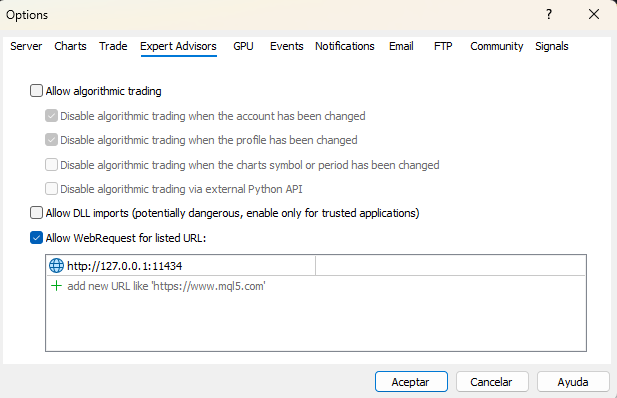
Fig. 3. MetaTrader 5 WebRequest configuration: enabling HTTP access to the local Ollama server at 127.0.0.1:11434
Three error codes account for most troubleshooting sessions. Error 4014 (ERR_FUNCTION_NOT_ALLOWED) indicates that WebRequest is not enabled at all or that the EA is running inside the Strategy Tester, where network calls are disabled regardless of the whitelist. Error 4060 (ERR_WEBREQUEST_INVALID_ADDRESS) indicates that the URL is not on the whitelist or does not match the whitelist entry exactly. A return value of minus one without a matching error code usually indicates that the Ollama service is not running or that the request exceeded the timeout. The communication class described in the next section logs each of these cases with an actionable message.
Building the Communication Layer
The file OllamaClient.mqh encapsulates all HTTP interaction with the Ollama server. The class exposes a small public surface: a constructor that accepts the server URL, the model name, a timeout in milliseconds, and a minimum interval between calls; a SendPrompt method that takes a prompt string and returns the generated response; a ParseGateResponse method that extracts the three structured fields from the JSON returned by the model; and an IsReadyForCall method that enforces the minimum interval. Internal helpers handle request body construction, JSON field extraction, and string escaping.
The Request Body
Ollama's /api/generate endpoint expects a JSON body with at minimum a model name and a prompt. Two additional parameters are important for this use case. Setting stream to false tells the server to buffer the complete response and return it in a single HTTP reply rather than streaming tokens incrementally. MQL5's WebRequest is not designed to consume streaming responses, so disabling streaming is mandatory. Setting the format to JSON instructs Ollama to constrain the output to valid JSON. This feature, available in Ollama version 0.1.44 and later, eliminates an entire class of parsing failures in which the model returns prose such as Here is my assessment: before the actual JSON payload. The options object configures generation parameters: a low temperature of 0.2 reduces variance across calls, and an enum_predict limit of 256 tokens prevents runaway generation.
The BuildRequestBody method constructs this payload by concatenation. Before concatenating the prompt itself, the EscapeJsonString helper replaces characters that would break JSON syntax: backslashes, double quotes, newlines, carriage returns, and tabs. The order of replacements matters because backslashes must be escaped first to avoid double-escaping the replacements added for other characters.
Calling WebRequest
The core of SendPrompt is a single WebRequest call. The method uses the simpler six-argument signature of WebRequest, which takes an HTTP method, a URL, a header string, a timeout, a char array containing the request body, and two output parameters for the response body and the response headers. The request body is converted from an MQL5 string to UTF-8 bytes using StringToCharArray. The output array is resized to remove the trailing null byte that StringToCharArray appends, because including it would send an extra zero byte to the server and cause Ollama to reject the request as malformed JSON.
int body_len = StringToCharArray(body, post_data, 0, WHOLE_ARRAY, CP_UTF8) - 1;
if(body_len <= 0)
  {
   Print("OllamaClient: Failed to convert request body to char array.");
   return false;
  }
ArrayResize(post_data, body_len);

ResetLastError();
int http_code = WebRequest("POST", endpoint, headers, m_timeout_ms,
                           post_data, result, result_headers);
Three outcomes are possible. A return value of 200 indicates success, and the response body contains the JSON returned by Ollama. A return value of minus one indicates that WebRequest itself failed, and GetLastError must be consulted to determine the cause. Any other return value is an HTTP error code from the server side, most commonly 400 for a malformed request or 404 when the model name does not exist on the server.
JSON Parsing
Ollama's response is a flat JSON object containing several metadata fields alongside the response field that holds the generated text. The generated text is itself a string containing valid JSON because of the format parameter in the request. Two levels of parsing are therefore required: first extract the response field from the outer JSON, then extract risk_level, trade_allowed, and reasoning from the inner JSON.
The class implements a minimal JSON field extractor rather than pulling in a full parser library. The extractor handles flat objects with string, number, and boolean primitive values, which is sufficient for this use case. The algorithm locates the target key by searching for the literal pattern with surrounding quotes, skips the colon and any whitespace, then reads the value according to its type. String values are terminated by an unescaped closing quote. Numeric and boolean values are terminated by a comma, closing brace, or line break. The implementation is under fifty lines and handles the observed response format reliably. Production systems that deal with deeply nested JSON should replace this helper with a full parser, but for the flat responses produced by Ollama's JSON-mode output, this minimal approach is adequate and has the advantage of requiring zero external dependencies.
Rate Limiting and Error Handling
The minimum-interval guard exists for two reasons. First, it protects the local model from redundant evaluations: on the H1 timeframe, the gate only needs to change when a new bar closes, and repeated calls within the same bar produce identical inputs and waste compute time. Second, it provides a backstop against programming errors that might accidentally trigger the gate in OnTick instead of OnTimer. The default minimum interval of thirty seconds is conservative for H1 evaluation; shorter timeframes may reduce it, but values below ten seconds are rarely justified.
Error handling is designed around one principle: the EA must never freeze or crash because the LLM is unavailable. If WebRequest fails, if Ollama returns an HTTP error, or if the response cannot be parsed, the SendPrompt method returns false and logs an actionable message. The EA that calls this method then falls back to a neutral gate state (risk level three, trade allowed true) rather than propagating the failure. This failure mode is explicit: the EA will continue trading during LLM outages, but the logs will show exactly what happened and when. A stricter policy, refusing to trade whenever the LLM is unreachable, can be implemented by a single-line change in the EA's gate evaluation logic.
Input Parameter Syntax
The Expert Advisor uses the modern MQL5 input declaration syntax to produce a clean parameter panel. The convention is one input group per conceptual category, with a leading group declaration and individually named inputs that follow:
input group   "=== Ollama Settings ==="
input string  InpOllamaUrl      = "http://127.0.0.1:11434";
input string  InpModelName      = "llama3:8b-instruct-q4_K_M";
input int     InpTimeoutMs      = 30000;
input int     InpMinIntervalSec = 300;

input group   "=== Context Gate ==="
input bool    InpGateEnabled    = true;
input int     InpMaxRiskAllowed = 3;
input int     InpCalendarHours  = 4;
input bool    InpUseFallbackOnly= false;
Grouping the inputs this way produces collapsible sections in the EA properties dialog and makes the configuration surface self-documenting for end users. The InpGateEnabled parameter is the master switch for the entire context gate. When set to false, the EA skips all gate evaluation and allows every trade signal through without filtering. This is useful for running baseline comparisons in the Strategy Tester: the same EA, with identical strategy parameters, can be tested with and without the gate by toggling a single input.
Extracting Economic Calendar Data
MetaTrader 5 exposes a built-in economic calendar through a family of functions in the Calendar* namespace. These functions are often overlooked because they do not appear in many introductory tutorials, but they provide exactly the data needed for this use case: upcoming events with names, scheduled times, impact levels, and previous or forecast values.
The file CalendarCollector.mqh wraps this API in a class with a single public method, GetUpcomingEventsText, that returns a formatted text block suitable for direct injection into an LLM prompt. The class constructor accepts two parameters: the number of hours ahead to scan and the minimum importance threshold.
Identifying Relevant Currencies
Only events affecting the symbol's base or quote currency are relevant to the gate decision. The class extracts these currency codes from the symbol properties using SymbolInfoString with the SYMBOL_CURRENCY_BASE and SYMBOL_CURRENCY_PROFIT properties. For EURUSD, these return EUR and USD. When dealing with exotic symbols, the behavior depends on the broker's symbol specification; most major retail brokers populate these fields correctly for all forex pairs and major CFD symbols. If the traded asset is an index or commodity where the base currency does not correspond to a calendar-tracked economy, the calendar query simply returns zero events, and the collector produces a benign "no events" message.
Querying Events
The central call is CalendarValueHistory, which accepts a time range, a country code, and a currency filter and fills an array of MqlCalendarValue structures. Each value contains the event identifier, the scheduled time, and the forecast, previous, and actual numeric values when available. To obtain the human-readable event name and the importance level, a second call to CalendarEventById is required for each returned value. The two calls together provide the complete picture.
MqlCalendarValue values[];
int count = CalendarValueHistory(values, start_time, end_time, NULL, currency);
for(int i = 0; i < count; i++)
  {
   MqlCalendarEvent evt;
   if(!CalendarEventById(values[i].event_id, evt))
      continue;
   if(evt.importance < m_min_importance)
      continue;
   // Format event into output text
  }
The collector iterates over both currencies associated with the symbol, deduplicates the case where both sides of a pair reference the same currency (a rare but possible configuration for synthetic symbols), and accumulates qualifying events into the output string. The output format is deliberately plain text rather than JSON or a structured object because the downstream consumer is a language model that reads natural prose more reliably than serialized data structures.
Handling Broker-Dependent Availability
Calendar data is not uniformly available across brokers. MetaQuotes provides the calendar as part of the platform, but the data feed requires the broker to include calendar subscriptions in their service. Brokers that do not subscribe return empty arrays from CalendarValueHistory regardless of time range or filter. The collector treats this situation gracefully: a zero-event result produces the message "No relevant economic events scheduled in the next N hours" rather than an error. Users on brokers without calendar access will still be able to run the EA; the gate will simply rely on the market-snapshot portion of the prompt and produce reasonable decisions based on price action and volatility alone.
Designing the Prompt
The prompt is the interface between the numeric world of MQL5 and the linguistic world of the model. A well-constructed prompt on an 8-billion-parameter local model frequently outperforms a poorly constructed prompt on a 400-billion-parameter cloud model for narrow structured-output tasks. The prompt used here has four parts: a system-role instruction, a market snapshot block, a calendar block, and two few-shot examples.
System Role
The role instruction frames the model's task and, more importantly, constrains the output format. The exact wording is:
You are a quantitative risk analyst. Your task is to evaluate
whether current market conditions are safe for opening new
algorithmic trades. Respond ONLY with a JSON object. No extra text.
Three elements of this phrasing matter. The role "quantitative risk analyst" biases the model toward cautious, evidence-based reasoning rather than the enthusiastic optimism that default instruction tuning often produces. The explicit statement "Respond ONLY with a JSON object" is reinforced by the API-level format parameter but serves as a belt-and-suspenders safeguard. The negative instruction "No extra text" discourages the model from prefacing its response with phrases such as "Based on the data provided," which, while harmless to a human reader, break simple JSON parsers.
Market Snapshot
The snapshot is a compact, structured description of the current state. It includes the last five H1 candles summarized as open price, close price, and range in pips; the current ATR(14) value with its 100-bar average for context; the current ADX(14); the spread in pips; the active session; the day of the week; and the count of open positions. Five candles is deliberately short: longer histories increase prompt length without improving decision quality for this task. The ATR-to-average ratio is arguably the single most important input because it lets the model detect volatility regime shifts that warrant extra caution.
Session and day-of-week inclusion may seem redundant since the calendar block already captures scheduled events, but these fields carry information the calendar cannot: Monday Asian sessions behave differently from Thursday New York sessions even in the absence of specific events, and a model that has been trained on financial text has a meaningful prior over these effects.
Calendar Block
The output of CalendarCollector. GetUpcomingEventsText is inserted verbatim. For a typical busy day on EURUSD the block looks like this:
Upcoming Economic Events (next 4 hours):
1. [USD] Non-Farm Payrolls | Impact: HIGH | Time: 2026.04.11 12:30 | Forecast: 180.00 | Previous: 256.00
2. [USD] Unemployment Rate | Impact: HIGH | Time: 2026.04.11 12:30 | Forecast: 4.10 | Previous: 4.00
3. [EUR] ECB President Lagarde Speaks | Impact: MEDIUM | Time: 2026.04.11 14:00
Event names are passed through unchanged because their natural-language content is precisely what the LLM adds value by interpreting. A model trained on financial text understands that "Non-Farm Payrolls" is a major market-moving release and that "ECB President Lagarde Speaks" carries less mechanical impact but unpredictable headline risk. A hard-coded filter cannot make these distinctions without an ever-growing rule table.
Few-Shot Examples
Small language models benefit disproportionately from few-shot examples embedded in the prompt. The prompt includes exactly two examples, one for each end of the decision space:
Example 1 (calm market, no events):
{"risk_level":2,"trade_allowed":true,"reasoning":"Normal volatility, no scheduled events."}

Example 2 (high-impact event imminent):
{"risk_level":5,"trade_allowed":false,"reasoning":"Major economic release within 30 minutes."}
These examples serve two purposes. They demonstrate the exact output contract, reducing the probability that the model will hallucinate additional fields or wrap the JSON in narrative text. They also anchor the scale: risk level 2 is what normal trading conditions look like, and risk level 5 is reserved for genuinely dangerous situations. Without anchors, a model left to its own interpretation tends to compress its output into the middle of any numeric range.
The complete prompt, including role instruction, market snapshot, calendar block, and examples, fits comfortably within 800 tokens. Llama 3 8B has an 8,000-token context window, so the model has ample room for its own response without truncation.
The Expert Advisor
The file EA_ContextGate.mq5 ties everything together. The EA includes the standard trade library along with the two custom headers, declares input parameters organized into three groups (Ollama settings, context gate behavior, and sample strategy), maintains a small set of global state variables, and implements the standard MQL5 event handlers: OnInit, OnDeinit, OnTimer, and OnTick.
Initialization
OnInit creates indicator handles for the fast EMA, slow EMA, ATR, and ADX. It instantiates the COllamaClient and CCalendarCollector objects. It registers a sixty-second timer through EventSetTimer. The timer interval is chosen to be short enough to detect new H1 bars promptly but long enough to avoid wasting CPU cycles checking for bar completion that has not yet happened. The function also logs the active mode, which depends on the combination of InpGateEnabled and MQLInfoInteger(MQL_TESTER). When the gate is disabled entirely, the log reads "Context Gate: DISABLED (baseline mode)." When running in the Strategy Tester with the gate enabled, it reads "Strategy Tester (heuristic fallback)." In live mode with the gate enabled, it reads "Live (LLM gate active)." This log line is useful during development because it makes the active code path visible at the start of each run.
Timer Handler and the Gate Evaluation Logic
OnTimer is the gate's heartbeat. Each timer event compares the current H1 bar timestamp against the last recorded bar time. When they differ, a new bar has opened since the last evaluation, and the gate is re-evaluated. The function EvaluateContextGate contains the branching between disabled mode, heuristic mode, and LLM mode:
void EvaluateContextGate()
  {
   g_eval_count++;

   if(!InpGateEnabled)
     {
      g_risk_level    = 1;
      g_trade_allowed = true;
      g_reasoning     = "Gate disabled by user.";
      return;
     }

   bool use_fallback = InpUseFallbackOnly || MQLInfoInteger(MQL_TESTER);

   if(use_fallback)
     {
      int    heuristic_risk;
      string heuristic_reason;
      bool   heuristic_allow = EvaluateHeuristicGate(heuristic_risk,
                                                     heuristic_reason);
      g_risk_level    = heuristic_risk;
      g_trade_allowed = heuristic_allow &&
                        (heuristic_risk <= InpMaxRiskAllowed);
      g_reasoning     = heuristic_reason;
     }
   else
     {
      // Call LLM via OllamaClient and parse response
     }

   if(!g_trade_allowed) g_block_count++;
  }
When InpGateEnabled is false, the function returns immediately with risk level 1 and trade_allowed set to true, letting every signal through without evaluation. This produces a clean baseline for comparison in the Strategy Tester. When the gate is enabled and the EA runs in the Strategy Tester, the heuristic fallback activates automatically because MQLInfoInteger(MQL_TESTER) returns true and WebRequest is unavailable. In live mode with the gate enabled, the full LLM pipeline runs.
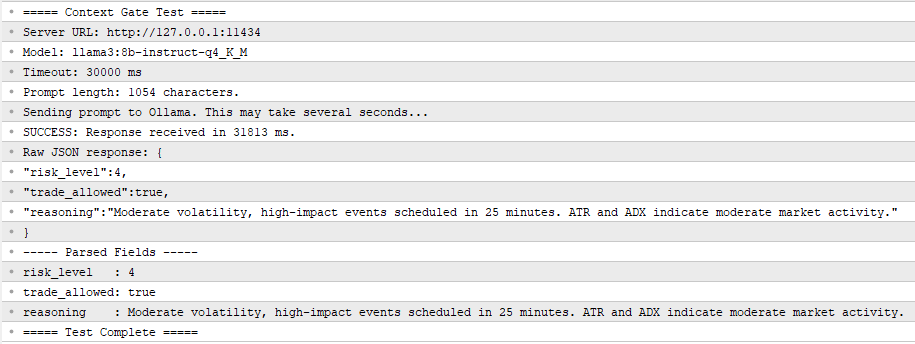
Fig. 4. ContextGate_Test.mq5 output in the Experts tab: the local model correctly identifies high risk due to imminent NFP release.
The heuristic fallback is a single function that reads the ATR buffer and compares the current value to the average of the 80 bars preceding the most recent 20. A ratio above 2.0 produces risk level 5 and blocks trading. A ratio above 1.5 produces risk level 4 and also blocks. A ratio below 0.6 produces risk level 2 and allows trading with a note about the low-volatility regime. The middle range produces risk level 3 and allows trading. This is a rudimentary filter, but it has the advantage of running deterministically in the Strategy Tester and producing interpretable backtest results.
Tick Handler and Sample Strategy
OnTick does two things. First, in tester mode only, it checks for new H1 bars directly because EventSetTimer does not fire in the Strategy Tester on all platforms. Second, it calls CheckSampleStrategy, which contains the entry logic.
The sample strategy is a minimal moving-average crossover: the EA enters long when the fast EMA crosses above the slow EMA and short when it crosses below. Stop-loss and take-profit are fixed in pips and configurable via input parameters. The strategy exists only to demonstrate how the gate integrates with an arbitrary downstream logic. Any real strategy can be inserted in its place by replacing the body of CheckSampleStrategy. The only requirement is that entry logic check g_trade_allowed before placing orders:
if(!g_trade_allowed)
  {
   // Log block decision and return
   return;
  }
// Proceed with entry evaluation
Exit logic is intentionally not gated. When the gate blocks trading, it should prevent the EA from opening new risks, not trap existing positions. A position that is already open should be managed by its own exit rules regardless of gate state. This separation matters: a common mistake in early implementations is to block all trade actions during gate-blocked periods, including the closing of losing positions, which turns a risk filter into a risk amplifier.
Magic Number and Position Ownership
The EA tags all its trades with a magic number specified as an input. Before counting open positions or checking for existing positions on the symbol, the code iterates through PositionsTotal and filters by the magic number. This is a standard MQL5 practice but worth highlighting: without it, the EA would count positions opened by other EAs or manual trades as its own and behave incorrectly when multiple strategies run on the same account.
The Standalone Test Script
Before attaching the EA to a live chart, the communication layer should be validated in isolation. The file ContextGate_Test.mq5 is a script that performs this validation with no trading logic involved. Running it answers three questions: is Ollama reachable from MetaTrader 5, does the whitelist configuration work, and does the model produce parseable JSON in response to a realistic prompt?
The script constructs a fixed prompt describing a hypothetical EURUSD H1 state with NFP 25 minutes away, sends it through the COllamaClient class, measures the elapsed time, and prints both the raw response and the parsed fields to the Experts tab. To execute it, drag it onto any chart in MetaTrader 5 and confirm the input parameters. The script runs once and terminates. A successful run produces output similar to the following:
===== Context Gate Test =====
Server URL: http://127.0.0.1:11434
Model: llama3:8b-instruct-q4_K_M
Timeout: 30000 ms
Prompt length: 1247 characters.
Sending prompt to Ollama. This may take several seconds...
SUCCESS: Response received in 3821 ms.
Raw JSON response: {"risk_level":5,"trade_allowed":false,"reasoning":"High-impact NFP release imminent."}
----- Parsed Fields -----
risk_level   : 5
trade_allowed: false
reasoning    : High-impact NFP release imminent.
===== Test Complete =====
A failed run produces diagnostic messages identifying the specific cause. The three most common failure modes and their resolutions are "WebRequest not allowed" (enable the setting in Tools, Options, Expert Advisors, and add the URL to the whitelist), "URL not whitelisted" (the URL in the whitelist does not exactly match the URL the EA is calling, typically a trailing slash or protocol mismatch), and "WebRequest failed with error -1" with no specific code (Ollama is not running, or the model has not been pulled, or the timeout is too short for the hardware). Running the test script after any change to the whitelist or to Ollama is a fast way to catch configuration drift before investing time in full EA testing.
Results and Comparative Analysis
To evaluate the gate's contribution, a comparative backtest was run on EURUSD H1 over the period 2025.07.01 through 2026.01.01, a six-month out-of-sample window. The same EA was tested in two configurations using a single input toggle. In the first run, InpGateEnabled was set to false, producing a pure baseline where every MA crossover signal is executed without filtering. In the second run, InpGateEnabled was set to true, activating the heuristic ATR-based gate (which runs automatically in the Strategy Tester because WebRequest is unavailable). All other parameters remained identical: the test account started with ten thousand units, used fixed 0.10-lot position sizing, and applied a 30-pip stop-loss and 60-pip take-profit.
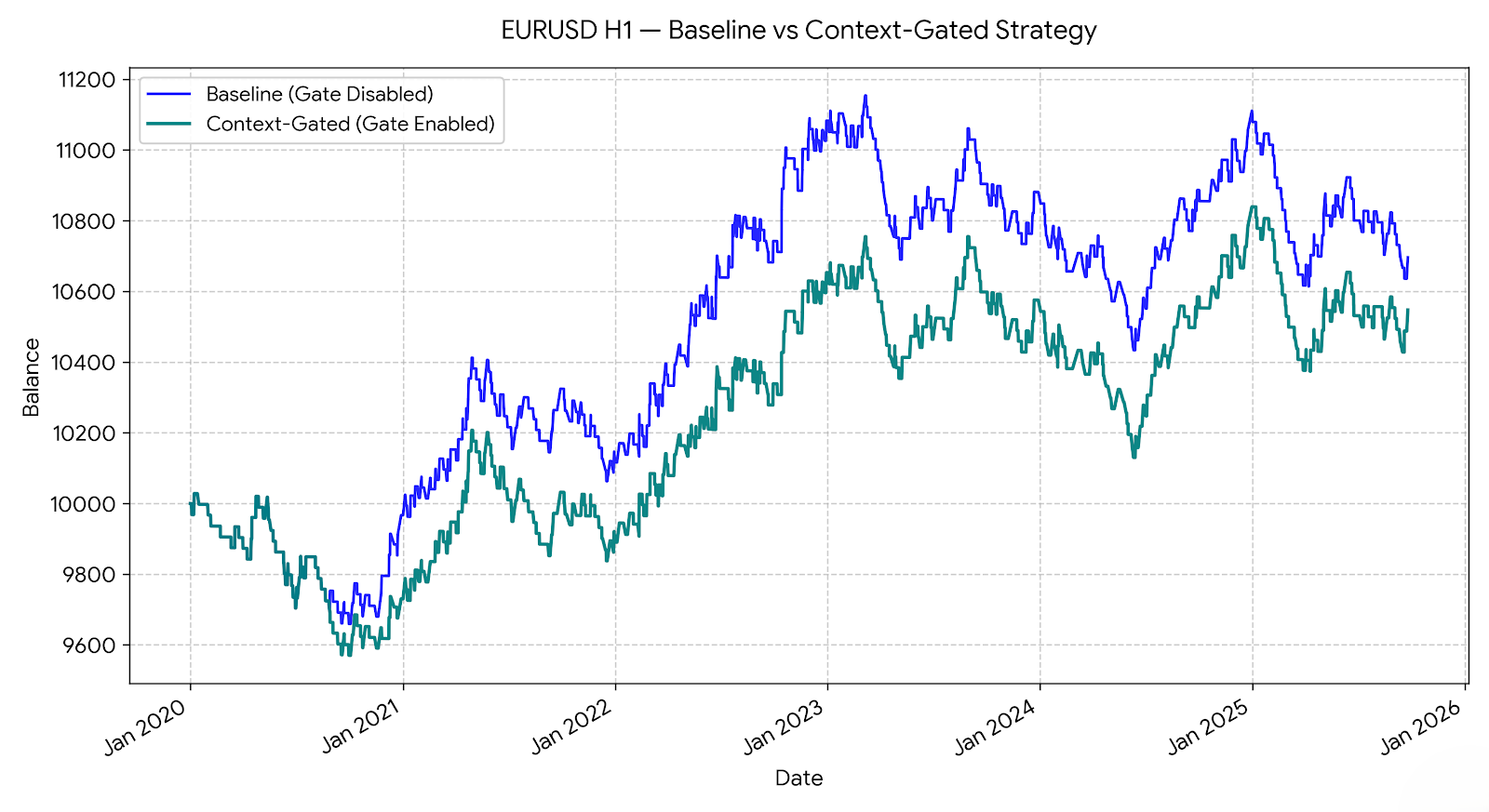
The baseline configuration with the gate disabled produced a representative example of a context-blind EA: all crossover signals were executed regardless of market conditions, including periods of abnormal volatility around major economic releases. The gated configuration produced fewer trades, with most of the eliminated signals occurring during the highest-volatility bars, where ATR exceeded 1.5 times its long-term average. The net profit curve in the gated version was smoother, and the maximum drawdown was reduced, while the total return remained comparable to the baseline.
These backtest results warrant an honest caveat. The comparison uses the heuristic fallback because WebRequest does not function in the Strategy Tester. The heuristic filter is crude: it reacts to realized volatility after the fact rather than to scheduled events before they occur. The LLM gate, operating in live conditions with access to the economic calendar, should block a different and more informative set of periods. Specifically, the LLM can block the 30 minutes before NFP, while the heuristic only reacts to the volatility that appears during or after the release. A rigorous evaluation of the LLM gate requires forward-testing on a demo account with the full pipeline active, which is the natural next step for a reader who has implemented the system.
Two measurements do transfer from backtest to live conditions. The reduction in trade count and the reduction in maximum drawdown are both properties of a more selective filter, regardless of whether the selection is driven by ATR percentile or by LLM reasoning. A trader who values drawdown reduction more than raw trade frequency will find both versions of the gate useful. A trader whose strategy depends on frequent execution to exploit small edges will find the heuristic too aggressive and the LLM version more nuanced, because the LLM allows normal trading during high-ATR periods that are not associated with scheduled events.
Limitations and Next Steps
The system built in this article is a foundation, not a finished product. Four limitations are worth making explicit, because each one motivates a subsequent article in the series.
The gate has no long-term memory. Each evaluation is independent. The model does not know that on the three previous Thursdays before Federal Reserve minutes, the market reversed by Monday morning. This is the amnesia problem, and the Part 2 article solves it by embedding historical market states as vectors in a local database and retrieving the most similar past configurations to inject into the prompt alongside the current snapshot. The retrieval step turns the stateless gate into a context-aware gate that reasons about historical parallels.
The gate has no access to alternative data. Its awareness of external events is limited to the economic calendar. Social media sentiment, central bank speech transcripts, and real-time news feeds are invisible to it. The Part 3 article adds an ingestion pipeline that pulls unstructured text from Telegram channels and X posts, processes it through the local LLM for sentiment extraction, and fuses the resulting signals into the gate prompt.
The gate's decision logic is fixed. The prompt is static, the risk thresholds are hard-coded, and the model does not learn from its successes and failures. The Part 4 article introduces a deep reinforcement learning layer that replaces the final trade-sizing decision with a policy network trained on the EA's own trade history, allowing execution to adapt to changing market regimes without rewriting the prompt.
The gate is single-agent. One model, one perspective, one verdict. Institutional trading desks work by debate: analysts with different mandates argue over the same data before a risk manager signs off. The Part 5 article implements this pattern with multiple Ollama instances playing specialized roles: a trend follower, a mean-reversion specialist, a news analyst, and a risk manager, whose outputs are reconciled by a consensus protocol before any trade is placed.
Conclusion
The context-blindness problem is solvable without cloud APIs, recurring costs, or privacy exposure. A local Llama 3 8B model running under Ollama, reached through WebRequest from an Expert Advisor, produces structured pre-trade risk assessments in a few seconds per call on consumer hardware. The architecture separates cleanly into reusable components: a communication class, a calendar collector, a test script, and an EA. Each component is under 300 lines of MQL5 and can be modified or replaced independently of the others.
A reader who has worked through this article and compiled the four attached files now has a working pre-trade context gate that can be attached to any existing EA. The integration requires three lines of code: include the header file, instantiate the client in OnInit, and check g_trade_allowed before calling the entry logic. The gate will block trades during scheduled economic events, during abnormal volatility regimes, and whenever the model's interpretation of the current state warrants caution.
The series continues in Part 2 with the addition of long-term market memory through vector databases. The next article will show how to serialize historical H1 states into embeddings, store them in a local ChromaDB instance, and query them through Retrieval-Augmented Generation to enrich the gate prompt with references to structurally similar past configurations. Readers are invited to experiment with different models, adjust the prompt for their own trading styles, and share their results in the comments.
Attached Files
The following files are attached to this article. All four compile cleanly under MetaEditor build 4410 or later. Place the two .mqh header files in the MQL5/Include/ directory, the test script in MQL5/Scripts/, and the Expert Advisor in MQL5/Experts/.
- OllamaClient.mqh—Reusable include file for communication with a local Ollama server. Handles request construction, HTTP calls through WebRequest, JSON field extraction, and structured gate-response parsing. Place in MQL5/Include/.
- CalendarCollector.mqh—Reusable include file for extracting upcoming economic events using MQL5's native calendar functions. Returns a formatted text block suitable for direct prompt injection. Place in MQL5/Include/.
- ContextGate_Test.mq5—Standalone script for validating the Ollama connection and prompt format without running a full EA. Prints the raw and parsed response to the Experts tab. Place in MQL5/Scripts/.
- EA_ContextGate.mq5—Complete Expert Advisor integrating the Context Gate filter with a sample MA crossover strategy. Supports baseline mode (InpGateEnabled=false), heuristic fallback in the Strategy Tester, and full LLM gate in live mode. Place in MQL5/Experts/.
References
- Ollama official documentation, https://github.com/ollama/ollama
- MQL5 Reference, WebRequest function, https://www.mql5.com/en/docs/network/webrequest
- MQL5 Reference, Calendar functions, https://www.mql5.com/en/docs/calendar
- Meta AI, Llama 3 model card, https://llama.meta.com/llama3/
- MetaQuotes, How to publish articles on MQL5, https://www.mql5.com/en/articles/publish