MetaTrader 5 Platform build 5326: Improvements and fixes
Thanks very
Luu Tuan Trung #: Please fix the "Scale fix" function in MT5 to make it smooth and seamless like it is in MT4.
Nice suggestion. Another thing I'ld like to suggest: give more increments in the X axis (currently only 5). For manual traders, the current scale limitation is far from ideal; other platforms allow for a far more customized/smooth configuration of how many bars are going to be shown.
Thanks!
Intellisense is sooo sloooow!
Maybe not only since this specific build, but since the last builds it got worse for sure.
Might be ok when you have just a few thousands lines of code in your project, but in my case the most of the time, when I am typing code, it just slows down the typing heavily, since it tries to show some help all the time. I always have to type kinda "blind", cuz the tooltip is hiding my actual input, and line after line I have to wait til its done with searching and suggesting and popping up and I have to watch the cursor moving column by column til its done showing what I typed seconds ago.
Furthermore, it never finds any methods or props of a local object which was declared within a function. Really never, without any exception. This issue I reported already years ago. Might also be related to the mass of code, but nonetheless, it is as it is.
Editor needs ages to open a specific file.
Since its possible to open a specific file via shell or command "MetaEditor.exe 'filename'", I see this issue since 1-2 years. The more files are opened within the editor, the longer it takes until the requested file pops out, no matter if it is already opened in the editor or not. Sometimes it takes up to 10-15 seconds and the whole editor freezes until its shown.
After closing the editor entirely and re-open it, all is fine again ... for a while.
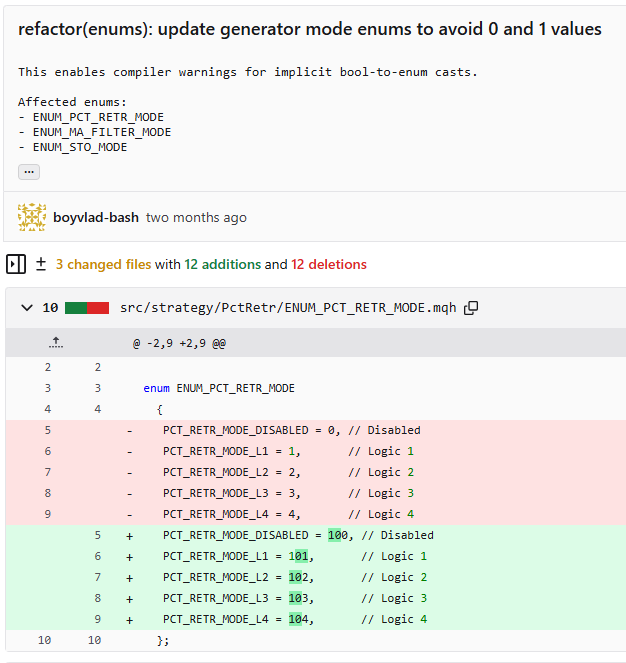
Bool type bug
When I define a property or method within a class like
enum ENUM_ANYTHING { First=0, Second =1 };

class Class
	{
        public: void Prop(ENUM_ANYTHING value) {}
	};
The compiler will not nag about a call like
Class obj;
obj.Prop(true);
But it should.
It seems that the "Scale Fix" function doesn’t really have much effect when I’m working with the chart. I can’t move or resize the chart to analyze the market properly. Please fix it so that I can interact with the chart more easily and comfortably.
Scroll the chart to left at least one screenful, then scroll back, and the vertical scroll functionality will be restored.

- Free trading apps
- Over 8,000 signals for copying
- Economic news for exploring financial markets
You agree to website policy and terms of use
On Friday, October 3, 2025, an updated version of the MetaTrader 5 desktop platform will be released.
This release provides the following bug fixes:
The update will be delivered through the Live Update system.