 MetaTrader 5
 Experts
 Indicators
 Scripts
 Libraries
 Storage
Watch how to download trading robots for free
Find us on Facebook!
Join our fan page
You liked the script? Try it in the MetaTrader 5 terminal

RequestAudit: Check the Trade Requests of an Unchanged EA in the Tester - library for MetaTrader 5
Rico Hehl

I'm a software architect based in Spain. I develop, fix, port and test Expert Advisors for MetaTrader 4 and MetaTrader 5 in MQL4 and MQL5.
- Views:
- 30
- Rating:
- Published:
-
 You are missing trading opportunities:
- Free trading apps
- Over 8,000 signals for copying
- Economic news for exploring financial markets
Registration Log inYou agree to website policy and terms of use
If you do not have an account, please register -
 Need a robot or indicator based on this code? Order it on Freelance
Go to Freelance
What it does
The Market and many brokers reject requests that a test run never questioned: a volume off the step, a stop loss inside the stops level, a modification within the freeze level, a lot size the free margin cannot carry. In the Strategy Tester such a request fails with a retcode in the log, mixed with all other lines, and the tester does not say which line of the code sent it. RequestAudit looks at every request before it goes out and keeps a record of the rules it breaks. It changes nothing: the request goes to the server exactly as the EA built it, and the server answers as before.
The library hooks in with three macros. After #include <RequestAudit\RequestAudit.mqh> as the first line of the EA, a call of OrderSend or OrderSendAsync is checked together with the file and the line it stands in, and every CTrade object of the EA becomes a CAuditTrade, which checks the requests of all CTrade methods (Buy, Sell, PositionModify, PositionClose, OrderOpen, OrderModify, OrderDelete and the others). A call trade.OrderSend(request, result) is checked with its file and line as well, and so are Expert Advisors built with the MQL5 Wizard, whose CExpertTrade derives from CTrade. Remove the line and the EA compiles as it was.
At the end of the run the global object g_request_audit prints a report to the Journal: how many requests were checked, how many broke a rule, and one line for each rule and place with the count, the tester time of the first violation and what was wrong with it. A CSV in the common Files folder holds one row per violation. The test script RequestAuditTest checks 28 cases with requests it builds itself and never sends. The demo EA RequestAuditDemo sends ten fixed requests in the Strategy Tester, eight of them faulty on purpose, and shows the report.
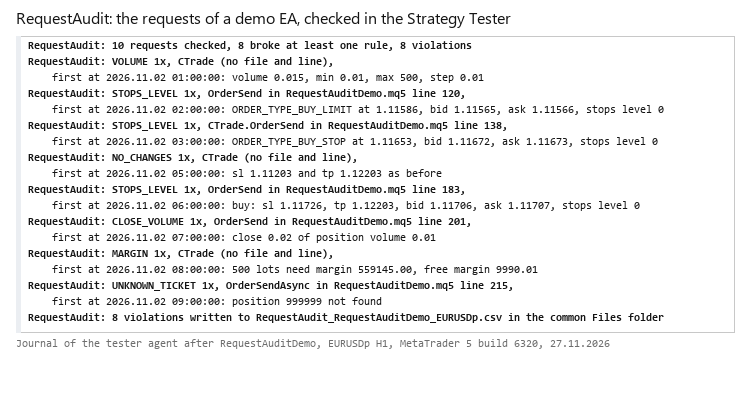
The report of RequestAudit in the tester journal after the demo EA: eight faulty requests with rule, place and first occurrence
Using it
Put the include line above everything else in the EA. It must come first, because it includes Trade\Trade.mqh before its macros exist; a later #include <Trade\Trade.mqh> of the EA is then skipped, because the compiler includes each file only once. The settings in OnInit are optional.
#include <RequestAudit\RequestAudit.mqh> // first line: every trade request of this EA is checked

#include <Trade\Trade.mqh>

CTrade trade; // the EA's own CTrade object; with the line above it is a CAuditTrade

int OnInit(void)
  {
   g_request_audit.SetCsv(true, "MyExpert_requests.csv"); // own file name in the common Files folder
   g_request_audit.SetMaxRows(5000);                      // keep at most 5000 violations for the CSV
   return INIT_SUCCEEDED;
  }

void OnTick(void)
  {
  }
Run the EA in the Strategy Tester as usual. After a run of the demo EA RequestAuditDemo, which sends ten fixed requests on EURUSD H1, eight of them faulty on purpose, the journal of the tester shows:
RequestAudit: 10 requests checked, 8 broke at least one rule, 8 violations
RequestAudit: VOLUME 1x, CTrade (no file and line), first at 2026.11.02 01:00:00: volume 0.015, min 0.01, max 500, step 0.01
RequestAudit: STOPS_LEVEL 1x, OrderSend in RequestAuditDemo.mq5 line 120, first at 2026.11.02 02:00:00: ORDER_TYPE_BUY_LIMIT at 1.11586, bid 1.11565, ask 1.11566, stops level 0
RequestAudit: STOPS_LEVEL 1x, CTrade.OrderSend in RequestAuditDemo.mq5 line 138, first at 2026.11.02 03:00:00: ORDER_TYPE_BUY_STOP at 1.11653, bid 1.11672, ask 1.11673, stops level 0
RequestAudit: NO_CHANGES 1x, CTrade (no file and line), first at 2026.11.02 05:00:00: sl 1.11203 and tp 1.12203 as before
RequestAudit: STOPS_LEVEL 1x, OrderSend in RequestAuditDemo.mq5 line 183, first at 2026.11.02 06:00:00: buy: sl 1.11726, tp 1.12203, bid 1.11706, ask 1.11707, stops level 0
RequestAudit: CLOSE_VOLUME 1x, OrderSend in RequestAuditDemo.mq5 line 201, first at 2026.11.02 07:00:00: close 0.02 of position volume 0.01
RequestAudit: MARGIN 1x, CTrade (no file and line), first at 2026.11.02 08:00:00: 500 lots need margin 559145.00, free margin 9990.01
RequestAudit: UNKNOWN_TICKET 1x, OrderSendAsync in RequestAuditDemo.mq5 line 215, first at 2026.11.02 09:00:00: position 999999 not found
RequestAudit: 8 violations written to RequestAudit_RequestAuditDemo_EURUSDp.csv in the common Files folder
The rules
Each request is checked against the symbol and the account at the moment it is sent. A rule is reported once per request; a request can break several rules. The level rules follow the article "The checks a trading robot must pass before publication in the Market".
| Rule | Requests | Reported when |
|---|---|---|
| UNKNOWN_TICKET | close, SLTP, CLOSE_BY, MODIFY, REMOVE | the position, the opposite position or the pending order of the request is not open; no other rule is checked for that request |
| TRADE_MODE | all | trade is disabled for the symbol, or the request opens volume while the symbol is close only, long only for a sell or short only for a buy |
| VOLUME | deal, pending order | the volume is below the minimum, above the maximum or off the step of the symbol |
| VOLUME_LIMIT | deal, pending order that opens | positions and pending orders of the symbol in the same direction, plus the request, exceed SYMBOL_VOLUME_LIMIT |
| CLOSE_VOLUME | close by ticket, hedging | the volume is above the volume of the position |
| STOPS_LEVEL | opening deal, pending order, SLTP, MODIFY | the price of a pending order, or a stop loss or take profit, is closer to the price than the stops level or on the wrong side, or a pending order has a price or a limit price of 0 |
| FREEZE_LEVEL | SLTP, MODIFY | the current stop loss or take profit of the position, or the current price of the pending order, lies within the freeze level |
| NO_CHANGES | SLTP, MODIFY | the request sets what the position or the order has already |
| MARGIN | opening deal | OrderCalcMargin for the opening volume asks for more than the free margin |
| ORDER_LIMIT | pending order | the account already has as many pending orders as ACCOUNT_LIMIT_ORDERS allows |
Distances are counted in points. For a position they are measured to the closing price, Bid for a buy and Ask for a sell; a distance equal to the stops level passes, and a distance equal to the freeze level blocks. A stops level of 0 still requires the stop to be on the right side of the price. The price of a buy limit is measured from Ask, of a sell limit from Bid, of a buy stop or buy stop limit from Ask and of a sell stop or sell stop limit from Bid; the stops of a pending order are measured from its open price, or from the limit price of a stop limit order. A new or modified pending order needs its price, and a stop limit order its limit price as well: the Strategy Tester rejects a price of 0 with 10015 "invalid price", also in a modification that changes only the stops. CTrade::OrderModify sends a limit price of 0 when its last argument is left out. On a netting account a deal against the open position opens only the volume above it, and only that volume is checked for margin, volume limit and levels. When the symbol cannot be read or has no quote, the checks that need it do not run; the total line counts them as checks that could not run instead of passing or failing them. It counts checks, not requests: an opening deal without a quote counts two, the levels and the margin.
The report
The Journal lines come from the destructor of g_request_audit after OnDeinit, so they stand at the end of the tester journal. Requests from CTrade methods show "CTrade (no file and line)" or "CTrade async": the override in CAuditTrade does not know the line of the EA that called the method. Without any request the report is the single line "RequestAudit: no trade request was sent". In an optimization only the total line is printed and no file is written.
The CSV RequestAudit_<program>_<symbol>.csv lies in the common Files folder of the terminals (File > Open Common Data Folder, then Files), also when the tester agent writes it. It is written after every run with at least one request, so a file of an earlier run is overwritten and never taken for this one. The columns are time, rule, source, file, line, action, type, symbol, volume, price, sl, tp, position, order and detail. Time is the time of the server or of the tester; prices have the digits of the symbol, and a field with the separator or a quote is put in quotes.
| Method or macro | What it does |
|---|---|
| void SetPrint(print) | Prints the report in the Journal (true, the default) or not. |
| void SetCsv(write, file_name) | Writes the CSV (true, the default) or not; an empty file_name keeps the default name. |
| void SetMaxRows(max_rows) | Most violations kept for the CSV; the rest are counted and named in the report. |
| bool Report() | Prints the report and writes the CSV now, false if the file could not be written. The destructor then does not report again. |
| void Totals(totals), bool GroupAt(index, group), bool RowAt(index, row) | The counters, the groups of the Journal and the rows of the CSV, for an EA that evaluates them itself. |
| RA_MAX_ROWS, RA_CSV_SEPARATOR | Define them before the include line to change the row limit (100000) or the separator (","). |
The test script
RequestAuditTest builds requests and market snapshots in memory and runs them through the same checks as the audit; it sends nothing. It has two inputs.
| Input | Default | Meaning |
|---|---|---|
| InpFileCase | true | Write, read back and delete a test CSV in the common Files folder |
| InpLiveCase | true | Read the chart symbol and the account through the terminal |
| Case | What it checks |
|---|---|
| 01 | Valid buy and sell with stops break no rule |
| 02 | VOLUME: below min, above max, off the step; 0.07 is on the step |
| 03 | STOPS_LEVEL buy: 10 points from Bid pass, 9 points fail |
| 04 | STOPS_LEVEL sell: 10 points from Ask pass, 9 points fail |
| 05 | STOPS_LEVEL 0: a stop at the price fails, one point away passes |
| 06 | MARGIN: need above free fails, equal passes, unknown need is skipped |
| 07 | TRADE_MODE: disabled, close only, long only, short only |
| 08 | Hedging close: CLOSE_VOLUME above the position, UNKNOWN_TICKET only |
| 09 | Netting: a close opens nothing, a reversal opens the excess |
| 10 | STOPS_LEVEL pending price: limits and stops at 10 and 9 points |
| 11 | STOPS_LEVEL pending stops: measured from the open price |
| 12 | STOPS_LEVEL stop limit: trigger from Ask, stops from the limit price |
| 13 | ORDER_LIMIT: 10 of 10 fails, 9 of 10 passes, limit 0 means none |
| 14 | VOLUME_LIMIT: buy side 0.9 of 1.0, buy 0.2 fails, sell 0.2 passes |
| 15 | SLTP: UNKNOWN_TICKET, NO_CHANGES, STOPS_LEVEL, FREEZE_LEVEL |
| 16 | MODIFY: UNKNOWN_TICKET, NO_CHANGES, STOPS_LEVEL, FREEZE_LEVEL |
| 17 | CLOSE_BY: both positions pass, a missing one is UNKNOWN_TICKET |
| 18 | REMOVE: an order passes, also near the price; a missing one fails |
| 19 | Several rules: each one reported once, in the order of the rules |
| 20 | No symbol data or no quote: the checks are skipped and counted |
| 21 | Bad symbol data: point 0 fails the stops, step 0 fails the volume |
| 22 | Auditor: counts requests, groups violations by rule and place |
| 23 | Row limit: 3 violations with a limit of 2 keep 2 rows, drop 1 |
| 24 | CSV: header and one quoted row per violation, nothing without requests |
| 25 | Helpers: volume text, CSV quoting, file names, rule names, places |
| 26 | Live read: chart symbol and account; the last error stays clear |
| 27 | Hook: CTrade objects and pointers are CAuditTrade; no request was sent |
| 28 | STOPS_LEVEL price 0 and stoplimit 0: new orders and a stop limit modify |
The last line of a run is "RequestAudit: no trade request was sent": the script includes the hook as well, and its own audit confirms that nothing went out. Three cases were checked against the code they guard: with the stops level of 0 treated as no limit, case 05 fails; with a distance equal to the freeze level allowed, case 15 fails; and without the check for a missing price, case 28 fails.
The demo EA
RequestAuditDemo is part of the download and runs in the Strategy Tester only; on a chart it stops in OnInit. It has no inputs, no signal and no strategy: on each new bar it sends the next request of a fixed list of ten, prints whether the request went out and the retcode of the server, and after the tenth it sends nothing more. Two days of EURUSD H1 with "1 minute OHLC" are enough. Its first line is the include line of RequestAudit; without that line the EA runs the same way and only the report is missing. Step 7 breaks CLOSE_VOLUME only on a hedging account.
In the Strategy Tester
The demo EA ran in the Strategy Tester of MetaTrader 5 build 6320 on a demo hedging account, EURUSD H1, "1 minute OHLC", with stops level 0 and freeze level 0. It sends one request per bar: a buy of 0.015 lots, a buy limit above Ask, a buy stop below Ask, a valid buy with stops, the same stops again, a stop loss above Bid, a close of twice the position volume, a buy of the largest volume, stops for a missing position with OrderSendAsync, and a valid close. The server rejected the eight faulty requests with 10014, 10015, 10015, 10016, 10016, 10014, 10019 and 10013, and RequestAudit reported each of them with the rule shown above. Run without the include line, the EA left the same 36 lines with tester time in the journal, word for word, from its first message to the last answer of the server; only the ten report lines of RequestAudit were missing.
How to use it
- Copy the seven .mqh files to MQL5\Include\RequestAudit\, RequestAuditTest.mq5 to MQL5\Scripts\RequestAudit\ and RequestAuditDemo.mq5 to MQL5\Experts\RequestAudit\, and compile the script and the demo EA.
- Run the script on any chart. It needs no permission to trade. The Experts tab shows one line per case and the summary.
- Run RequestAuditDemo in the Strategy Tester, for example on EURUSD H1 over two days with "1 minute OHLC". The report stands at the end of the journal, as shown above.
- Put #include <RequestAudit\RequestAudit.mqh> as the first line of your own EA, compile it and run it in the Strategy Tester. Read the report at the end of the journal and open the CSV in the common Files folder.
- Remove the line again before the EA goes anywhere else. The audit is meant for the tester; on a live chart it reports only when the EA is removed.
Related articles
The article "The checks a trading robot must pass before publication in the Market" (article 2555) explains the checks of volume, stops level, freeze level and margin and gives code for each, to be built into the EA before it sends. RequestAudit uses the same rules from the outside: it finds the places in an existing EA where a check is missing, with file and line, without touching the EA's code. It does not correct a request; the fix belongs in the EA, and the article shows how to write it.
Limits
- MetaTrader 5 only. The audit sees the requests that go through OrderSend, OrderSendAsync and CTrade in the files compiled after the include line. A request sent from a library (.ex5) or from code above the include line is not seen.
- An EA that declares its own function or method named OrderSend or OrderSendAsync, for example an override in a class derived from CTrade, does not compile with the include line, because the macros rename those declarations too. The same holds for include files that define an OrderSend of their own, such as MT4-style order functions.
- Requests of CTrade methods carry no file and line. Use trade.OrderSend or the direct functions where the line matters.
- The tick size grid is not checked, nor the limit price of a stop limit order against its trigger price, nor the freeze level for closing a position or removing a pending order. CLOSE_VOLUME is checked on hedging accounts only.
- A MODIFY of a pending order is checked with its price also when it changes only the stops. If the market has come closer to the order than the stops level since it was placed, the request is reported; whether a server then accepts new stops was not tested, because the demo account has a stops level of 0.
- MARGIN uses OrderCalcMargin, which does not count the open positions. On an account with hedged margin a request that the server accepts can be reported. The free margin is the one before the request.
- A server can apply limits that the terminal does not report, such as a floating stops level. A request without violations can still be rejected, and the retcode in the journal stays the final word.
- The audit reads the market for each request and selects positions and orders to do so; it selects the EA's position and order again afterwards and clears the last error if it was clear before. MQL5 has no call to undo the rest: if the EA had nothing selected, a position read by the audit stays selected, and a last error the EA had not reset may be replaced by another code.
- The optimization path (total line only, no rows, no file) is not covered by the test script.
 PantosAlgo Session Boxes (Asia / London / New York)
Draws the Asia, London and New York session ranges (high/low boxes) on the chart, so you can instantly see each session's range, breakouts and retests.
 Smart Trade Assistant - MTF Trend Scanner with One-Click Risk Trading
Scans the trend on M5, M15, H1, H4 and D1, shows market bias, volatility, session and previous-day levels in one clean panel, and opens trades with one click using a risk-based lot, ATR stop loss and R:R take profit.
Accelerator Oscillator (AC)
The Acceleration/Deceleration Indicator (AC) measures acceleration and deceleration of the current driving force.
MACD Signals
Indicator edition for new platform.