 MetaTrader 5
 Experts
 Indicators
 Scripts
 Libraries
 Storage
Watch how to download trading robots for free
Find us on Telegram!
Join our fan page
You liked the script? Try it in the MetaTrader 5 terminal

History Depth Check - how far back your EA can read on each timeframe - script for MetaTrader 5

- Views:
- 32
- Rating:
- Published:
-
 You are missing trading opportunities:
- Free trading apps
- Over 8,000 signals for copying
- Economic news for exploring financial markets
Registration Log inYou agree to website policy and terms of use
If you do not have an account, please register -
 Need a robot or indicator based on this code? Order it on Freelance
Go to Freelance

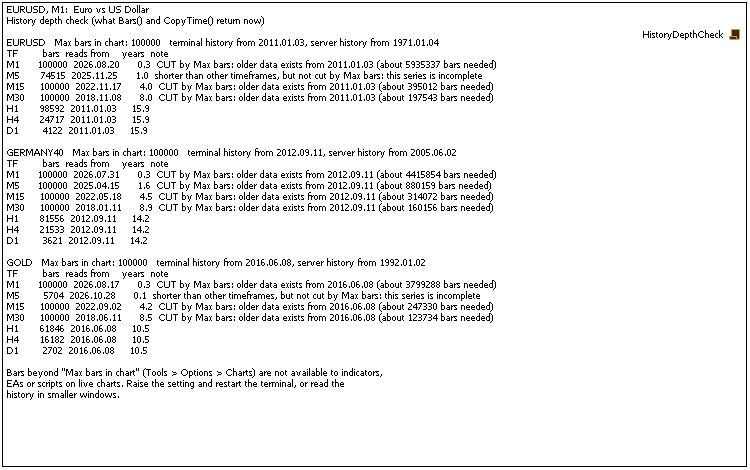
An EA that needs two years of M5 data, or a long moving average on M1, can silently work with less history than you think. On a live chart the terminal keeps at most "Max bars in chart" bars per timeframe (Tools > Options > Charts). With 100,000 bars, M1 reaches back about three to four months, M5 about one to one and a half years and M15 about four years (the exact span depends on the symbol's trading hours: FX trades about 24 hours a day, 5 days a week, indices fewer hours), even when the terminal holds many more years of history. Bars() and CopyTime() then return only the newest bars up to that limit.
This script prints a small table for each symbol you list:
- the number of bars available on M1, M5, M15, M30, H1, H4 and D1;
- the date of the oldest bar a program can read, and how many years that is;
- "CUT by Max bars" when a timeframe stops at the limit while older data (more than 7 days older) exists on another timeframe or in the terminal's M1 history, with an estimate of the bar count needed to reach it;
- a note when a series is more than 30 days shorter than the others but is not at the limit: the terminal holds less data for that series (not downloaded yet or not provided by the server).
Inputs:
- Symbols: comma-separated list, empty = the chart symbol;
- Show on chart: also writes the table with Comment(); the table is always printed in the Experts log.
How to read the example below: on this demo server EURUSD M30 stops in November 2018 because of the 100,000-bar limit, while H1 and D1 go back to 2011. An indicator that needs M30 data before November 2018 gets none. When a timeframe is cut, raise "Max bars in chart" and restart the terminal, or read the older history in smaller date windows.
On the first run the script may wait a few seconds per timeframe while the terminal builds the series. It does not trade, open charts or change any terminal setting. It only reads data, but it adds the listed symbols to Market Watch and may make the terminal download their history.
Export Closed Trades to CSV with a summary per magic number
Saves the closed trades of your MT5 account history to a CSV file, one row per trade, plus a second file with totals for each magic number.
 Account Recorder - balance, equity and day drawdown to CSV every minute (service)
A service that writes your balance, equity, floating result, margin and the drawdown from today's highest recorded equity to a CSV file every minute. Runs without a chart and never trades.
 Accelerator Oscillator (AC)
The Acceleration/Deceleration Indicator (AC) measures acceleration and deceleration of the current driving force.
MACD Signals
Indicator edition for new platform.