 MetaTrader 5
 Experts
 Indicators
 Scripts
 Libraries
 Storage
Watch how to download trading robots for free
Find us on Telegram!
Join our fan page
Join our fan page
You liked the script? Try it in the MetaTrader 5 terminal

Trade History Export to CSV with Summary (win rate, profit factor, drawdown) - script for MetaTrader 5
Gilberto Cardona Velez

Laboratorio de Estrategias - MQL4/MQL5 development with tested, honest results.
SMALL JOBS FROM 30 USD (MQL5 Freelance, usually delivered in 1-3 days):
- Fixes and changes to an existing EA or indicator (source code required)
- Adapting one of my free CodeBase tools to your own rules
SMALL JOBS FROM 30 USD (MQL5 Freelance, usually delivered in 1-3 days):
- Fixes and changes to an existing EA or indicator (source code required)
- Adapting one of my free CodeBase tools to your own rules
- Views:
- 22
- Published:
-
 You are missing trading opportunities:
- Free trading apps
- Over 8,000 signals for copying
- Economic news for exploring financial markets
Registration Log inYou agree to website policy and terms of use
If you do not have an account, please register -
 Need a robot or indicator based on this code? Order it on Freelance
Go to Freelance

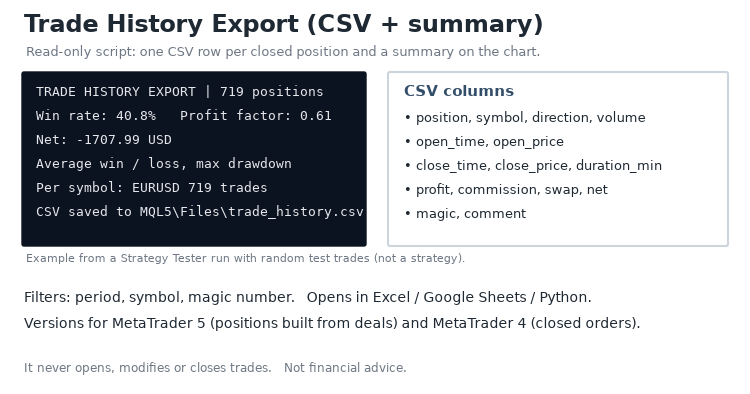
This script reads the account history and exports every closed position to a CSV file that opens in Excel, Google Sheets or Python. It also prints a short summary on the chart and in the Experts tab. It never opens, modifies or closes trades.
What it does
1. Builds one record per position from its deals: entry deals are merged with a volume-weighted entry price, and partial closes are added to the same position.
2. Writes the CSV: position, symbol, direction, volume, open and close time and price, duration in minutes, profit, commission, swap, net result, magic number and comment.
3. Shows a summary: number of closed positions, win rate, profit factor, net result, average win and loss, largest drawdown on closed trades and the net result per symbol.
Inputs
- Period start and end
- Only one symbol (empty = all symbols)
- Only one magic number (-1 = all, 0 = manual trades)
- CSV file name (saved in MQL5\Files) and whether to show the summary on the chart
How to use it
Drag the script onto any chart, set the period and filters, and press OK. Balance and credit operations are ignored. The image shows a Strategy Tester run with random test trades, used only to check that the export and the totals match the tester balance.
Also available for MetaTrader 4 in the CodeBase.
Not financial advice. Past results do not guarantee future results.
 Market Watch Mini Scanner: RSI Overbought/Oversold Across Symbols
A compact on-chart scanner that shows the RSI of the Market Watch symbols (or of a custom list) in a sorted, color-coded dashboard, marks overbought and oversold symbols, and can send alerts when a symbol enters one of these zones.
 Devil Trader AI Lite -Gold M30 and H1 Exclusive
Devil Trader AI Lite is an automated Smart Money & Liquidity Expert Advisor engineered exclusively for GOLD (XAUUSD) on M30 and H1 timeframes. It maps Major Demand and Supply Order Blocks, waits for confirmed rejection candles, and applies dynamic ATR Stop-Loss, auto-lot sizing, and trailing stop protection with zero Martingale.
Prop Firm Daily Loss and Drawdown Monitor
Free panel indicator for funded / prop-firm accounts: shows the room left before the daily loss limit and the static maximum drawdown, and alerts when you get close. Monitor only: it never opens, closes or blocks trades.
Net Currency Exposure and Hedged Margin Simulator Panel
A real-time CCanvas on-chart utility for MetaTrader 5 that calculates net lot exposure per currency across all open positions and simulates the exact margin, Margin Level (%), and Stop-Out buffer impact of a new Buy or Sell order—automatically accounting for your broker's hedged margin rules.