 MetaTrader 5
 Experts
 Indicators
 Scripts
 Libraries
 Storage
Watch how to download trading robots for free
Find us on Telegram!
Join our fan page
Join our fan page
You liked the script? Try it in the MetaTrader 5 terminal

Trade-Request Matrix: Regression Testing Invalid Stops, Volume and Close Errors with OrderCheck() - expert for MetaTrader 5

- Views:
- 20
- Published:
-
 You are missing trading opportunities:
- Free trading apps
- Over 8,000 signals for copying
- Economic news for exploring financial markets
Registration Log inYou agree to website policy and terms of use
If you do not have an account, please register -
 Need a robot or indicator based on this code? Order it on Freelance
Go to Freelance

Trade-Request Matrix: Regression Testing Invalid Stops, Volume and Close Errors with OrderCheck()
The idea
This is the fourth part of a series. Part 1 tests whether an incremental calculation matches a calculation from scratch. Part 2 measures how much history a recursive indicator needs. Part 3 checks that the value of a closed bar never changes when later bars arrive. Those three parts make sure the signal is right. This part tests what happens next: the Expert Advisor that consumes the signal has to turn it into a trade request, and a request that is wrong in a small detail is refused by the server. The usual refusals are 10016 (invalid stops), 10014 (invalid volume) and the close errors 10036 , 10038 and 10025 .
Indicators cannot call trade functions, so this part is an Expert Advisor. It does not need an indicator to test: it tests the order layer that every indicator-driven EA depends on, and it does it as a regression suite. The same 20 requests are built from the current symbol rules and checked with OrderCheck() , which validates a request on the server without sending it. No order is placed, no position is opened, closed or modified.
Every row has a prediction that comes from the documented rules and not from the server:
- Boundary rows. A stop placed exactly at the stops level is valid. The same stop one point closer is invalid. These pairs catch off-by-one errors, in your code and in the server's rules. For a BUY the distance of the stop loss and the take profit is measured from the Bid, for a SELL from the Ask.
- Wrong-side rows. A BUY stop loss above the price, or a SELL stop loss below it, is always invalid, whatever the stops level is.
- Volume rows. Volume below the minimum, above the maximum, or between two steps of the volume grid is invalid.
- Close and modify rows. These use the first open position of the tested symbol, read only. A full close is valid. A close larger than the position, a close of a ticket that does not exist, a modification that changes nothing and a modification with the stop on the wrong side must all be refused.
The verdict of a row compares the retcode of OrderCheck() with the prediction:
| Verdict | Meaning |
|---|---|
| PASS | A valid request was accepted (retcode 0 or 10009), or an invalid request was refused with one of the listed codes. |
| FAIL | A valid request was refused, an invalid request was accepted, or it was refused with a different code than predicted. Either your request builder or the server rules changed. |
| INCONCLUSIVE | The server could not judge the request: market closed (10018), trading disabled (10017), no money (10019), no quotes (10021), too many requests (10024), algo trading disabled (10026, 10027), frozen (10029) or no connection (10031). The row is neither good nor bad. |
| n/a | The row cannot be built for this symbol or account, for example the inside-the-limit rows when the stops level is 0, or the close rows when there is no open position. n/a rows are never counted as a pass. |
The 20 rows are fixed:
| # | Row | Prediction | What it catches |
|---|---|---|---|
| 1-2 | BUY and SELL market, no stops | accept | Controls. If these fail, the other rows say nothing (filling mode, account, symbol). |
| 3-6 | BUY SL, BUY TP, SELL SL, SELL TP exactly at the stops level | accept | Code that adds a safety point, or a server that treats the level as exclusive. |
| 7-10 | The same four stops one point inside the stops level | 10016 | Code that rounds the distance in the wrong direction. n/a when the stops level is 0. |
| 11-12 | BUY SL above the price, SELL SL below the price | 10016 | Swapped Bid and Ask, or a swapped sign for the order direction. |
| 13-15 | Volume below the minimum, above the maximum, off the step grid | 10014 | Lot normalization that is missing or uses the wrong step. Row 15 is n/a when the step is 0. |
| 16 | Close the position, full volume | accept | Control for the close path (opposite order type, position ticket, opposite price). |
| 17 | Close a volume larger than the position | 10038 or 10014 | Partial close arithmetic that is not limited to the open volume. |
| 18 | Close a ticket that does not exist | 10036 or 10013 | Stale tickets after the position was already closed. |
| 19 | Modify with the current stop loss and take profit | 10025 | Trailing code that sends a modification on every tick. |
| 20 | Modify with the stop loss on the wrong side | 10016 | Trailing code that moves the stop to the wrong side of the price. |
How to interpret it
- Result panel (top left). One line per row: number, title, prediction, the retcode returned by OrderCheck() , and the verdict. FAIL rows use InpFailColor . A prediction with two codes, such as 10038|10014 , is satisfied by either of them, because servers differ in which of the two they report.
- Header lines. The first lines show the symbol and the values the rows were built from: Bid, Ask, stops level, freeze level, the base volume and the volume limits and step.
- Summary line. Counts of pass, fail, n/a and inconclusive rows, and the overall verdict. FAIL if any row failed, otherwise INCONCLUSIVE if any row was inconclusive, otherwise PASS.
- Digest line. An 8-digit hexadecimal FNV-1a digest of the row numbers, verdicts and retcodes. Paste it into InpBaselineDigest after a known-good run. Later runs then print MATCH or CHANGED next to it, so a change in the server rules, the account or your build is visible in one glance. The digest depends on the symbol, the server and the open position, so compare only runs made in the same setup.
- Dashed and dotted lines on the chart. The four limits of the stops level around the current prices: Bid - level and Ask + level dashed (stop loss limits), Bid + level and Ask - level dotted (take profit limits). The lines are the boundary rows 3 to 6 and 7 to 10: a valid stop is on the outer side of its line. When the stops level is 0 the lines use InpFallbackStopPoints . Their descriptions are shown when "Show object descriptions" is enabled in the chart properties.
- Experts journal. With InpLogResults every row is printed as one line, followed by a summary line, so a run can be copied into a bug report.
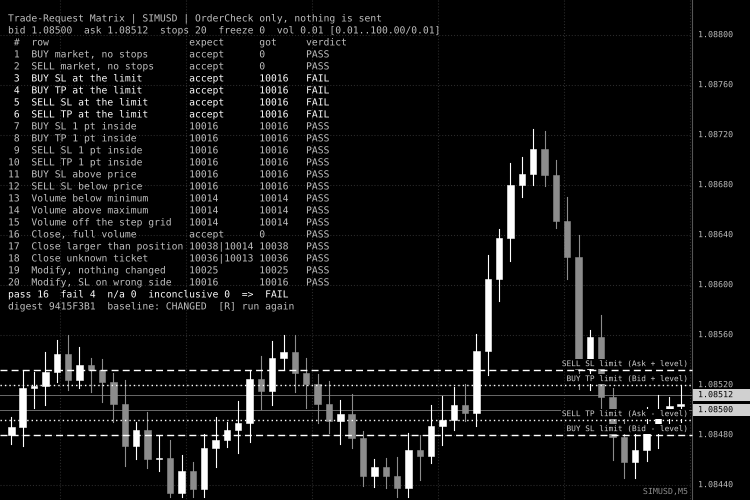
Fig. 1. Example result of a run in which the server refuses stops placed exactly at the stops level: rows 3 to 6 are FAIL (white), all other rows PASS, and the digest differs from the baseline. The dashed and dotted lines are the four stops-level limits. Black and white screenshot, per the Code Base image guidelines.
External variables (inputs)
| Input | Default | Purpose |
|---|---|---|
| InpSymbol | "" (chart symbol) | Symbol to test. The symbol is added to Market Watch if needed. |
| InpVolume | 0.0 | Base volume in lots for the rows that need a valid volume. 0 uses the symbol minimum. A value is moved onto the volume grid and limited to the minimum and maximum. |
| InpUsePosition | true | Use an open position for the close and modify rows (rows 16, 17, 19, 20). When false these rows are n/a. The position is only read. |
| InpPositionMagic | -1 | Only use a position with this magic number. -1 uses the first position of the symbol. |
| InpFallbackStopPoints | 50 | Distance in points used by the "at the limit" rows when the stops level is 0 (dynamic stops level). The "inside" rows are n/a in that case. |
| InpWrongSidePoints | 100 | How far the wrong-side stops of rows 11, 12 and 20 are placed from the price. |
| InpRunOnStart | true | Run the matrix when the EA starts (as soon as the symbol has quotes). When false it waits for the R key. |
| InpAutoRepeatSec | 0 | Repeat the matrix every N seconds. 0 turns it off, values from 1 to 4 are raised to 5. |
| InpLogResults | true | Print every row and the summary to the Experts journal. |
| InpBaselineDigest | "" (off) | Digest of a known-good run. The panel shows MATCH or CHANGED against it. Case is ignored. |
| InpShowPanel | true | Show the result panel. |
| InpShowLevels | true | Draw the four stops-level lines on the chart. |
| InpTextColor | clrSilver | Panel text color. |
| InpFailColor | clrWhite | Color of FAIL rows and of a failing summary line. Set it to a red color if you do not need black and white. |
| InpFontSize | 8 | Panel font size (Consolas). The line height follows the size. |
| InpPanelX , InpPanelY | 8, 14 | Panel offset from the upper left corner of the chart, in pixels. |
Recommended use
- Install. Copy the file to MQL5\Experts , compile it and attach it to a chart as an Expert Advisor. Press R on the chart to run the matrix again. Switch to a demo account for the first runs. OrderCheck() sends nothing, but a demo account is the safe place to learn the panel.
- Where to run it. On a live or demo chart of the broker you want to test. The strategy tester has its own simulated trade rules, so its answers say nothing about your broker's server. Run the matrix once per symbol type you trade (forex, metals, indices, stocks), because the stops level, the volume step and the filling modes differ.
- When to run it. After you change the order-building code of an EA, after a broker or server change, after a platform update, and when you start trading a new symbol. Keep the digest of the last good run in InpBaselineDigest .
- Market must be open. When the market is closed or trading is disabled the server answers 10018 or 10017 for almost every row and the overall verdict is INCONCLUSIVE. That is correct: nothing was tested. Run it again during trading hours. Algo trading that is switched off in the terminal can also make rows inconclusive.
- Retcodes differ between servers. The predictions follow the documented trade rules, but a server may report another code for the same refusal. Rows 17 and 18 therefore accept two codes. If a FAIL shows a refusal with a different code, look at the retcode in the panel before you assume a bug. The same request still would not have been accepted.
- Stops level 0. A stops level of 0 means the limit is dynamic and not fixed. The matrix then uses InpFallbackStopPoints for the rows at the limit and marks the inside rows n/a, because there is no fixed boundary to test. The freeze level is shown for information only. A modification that falls inside the freeze level is reported as inconclusive (10029).
- Position rows. Rows 16, 17, 19 and 20 need an open position on the tested symbol. Use a position of your own, or a minimum-volume position opened by hand on a demo account. The EA never opens, closes or modifies it. Row 18 does not need a position.
- Money and margin. OrderCheck() also checks the margin. On an account without free margin the valid rows come back as 10019 and are inconclusive. This is not a failure.
- What a PASS means. The server's answers to these 20 requests match the rules. It does not cover pending orders, expiration, stoplimit orders, close-by operations, trade time restrictions or the behavior of the real execution (slippage, requotes, partial fills). Those need their own rows or a real order test on a demo account.
- Account types. Netting and hedging accounts are both supported. On a netting account only one position per symbol exists, so the close and modify rows use that position.
Trailing Stop and Break-Even Manager (points or ATR)
Utility EA that moves the stop loss of positions you already have open: break-even with locked profit and trailing stop in points or ATR. It never opens trades.
Close All at Total Profit or Loss (money)
Utility EA that closes all positions (and optionally deletes pending orders) when the total floating profit reaches your target or the total floating loss reaches your limit, in account currency. It never opens trades.
 Accelerator Oscillator (AC)
The Acceleration/Deceleration Indicator (AC) measures acceleration and deceleration of the current driving force.
MACD Signals
Indicator edition for new platform.