 MetaTrader 5
 Experts
 Indicators
 Scripts
 Libraries
 Storage
Watch how to download trading robots for free
Find us on Twitter!
Join our fan page
Join our fan page
You liked the script? Try it in the MetaTrader 5 terminal

PassRecorder - library for MetaTrader 5
Rico Hehl

I'm a software architect based in Spain. I develop, fix, port and test Expert Advisors for MetaTrader 4 and MetaTrader 5 in MQL4 and MQL5.
- Views:
- 18
- Rating:
- Published:
-
 You are missing trading opportunities:
- Free trading apps
- Over 8,000 signals for copying
- Economic news for exploring financial markets
Registration Log inYou agree to website policy and terms of use
If you do not have an account, please register -
 Need a robot or indicator based on this code? Order it on Freelance
Go to Freelance
What it does
The Strategy Tester shows the passes of one optimization in its results table, and the XML export holds only the columns of that table. PassRecorder also writes each pass to a SQLite file. Each test agent sends the result of its pass, seven test statistics and up to 32 metrics of your own to the terminal with FrameAdd. The copy of the Expert Advisor in the terminal reads the frames, takes the inputs of the pass from FrameInputs and writes one row per pass into the file, which lies in the common Files folder of the terminals.
Every optimization gets its own row with a label, the start and end time and the number of passes, so several optimizations can live in one file and be compared with SQL. An existing file is never replaced: the library creates its tables only if they are missing and adds new rows. A single test records nothing; it only prints the values that an optimization would record, so the class can stay in an Expert Advisor that you also test and trade with.
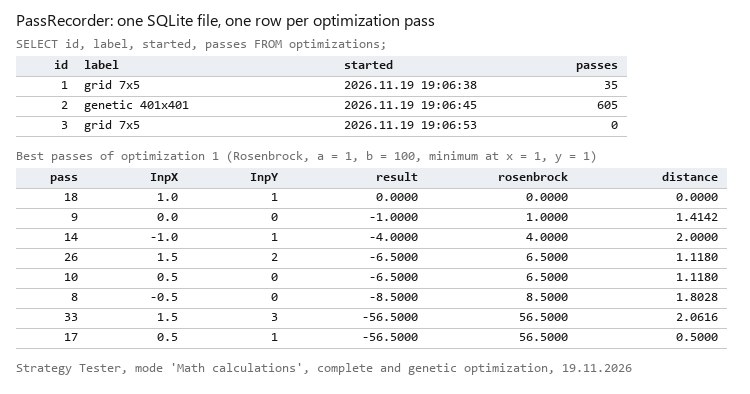
The optimizations table and the best passes of a complete optimization, read from the SQLite file
How to add it to your Expert Advisor
#include <PassRecorder\PassRecorder.mqh>

CPassRecorder g_recorder;

int OnInit()
  {
   if(!g_recorder.Init("MyEA.sqlite","first try",true))
      return INIT_PARAMETERS_INCORRECT;
   return INIT_SUCCEEDED;
  }

double OnTester()
  {
   double result=TesterStatistics(STAT_PROFIT);
   g_recorder.AddMetric("my_score",result/10.0);
   g_recorder.OnTester(result);
   return result;
  }

int  OnTesterInit()   { g_recorder.Init("MyEA.sqlite","first try",true); return g_recorder.OnTesterInit(); }
void OnTesterPass()   { g_recorder.OnTesterPass(); }
void OnTesterDeinit() { g_recorder.OnTesterDeinit(); }
Call Init twice: in OnInit for the copies on the test agents and in OnTesterInit for the copy in the terminal, which does not run OnInit. Both calls need the same file name.
| Method | What it does |
|---|---|
| bool Init(db_name, run_label, store_inputs) | Checks and stores the settings. db_name is a plain file name of up to 64 characters; without a dot ".sqlite" is added. run_label (up to 64 characters) names the optimization. store_inputs = false leaves out the inputs. Returns false and prints the reason if a value is invalid. |
| bool AddMetric(name, value) | Adds a metric of your own to the current pass. Call it in OnTester before OnTester of the class. Names have 1 to 32 characters of A-Z, a-z, 0-9 and _, at most 32 per pass; the same name again overwrites the value. |
| void OnTester(result) | On a test agent: sends the pass to the terminal as a frame. In a single test: prints the values and records nothing. |
| int OnTesterInit() | Opens or creates the file, creates the tables and the row of the optimization. Returns INIT_FAILED if that fails, and the tester then does not start the optimization. |
| void OnTesterPass() | Writes the frames that have arrived. |
| void OnTesterDeinit() | Writes the frames that are left, closes the row of the optimization and prints a summary with the full path of the file. |
| long OptimizationId(), int PassesWritten() | The id of the optimization row and the number of passes written. |
The tables
| Table | Columns |
|---|---|
| optimizations | id, label, expert, symbol, period, started, finished, passes |
| passes | optimization_id, pass, result, profit, trades, profit_factor, expected_payoff, equity_dd_percent, sharpe_ratio, recovery_factor |
| pass_metrics | optimization_id, pass, name, value |
| pass_inputs | optimization_id, pass, name, value, optimized |
result is the value that your Expert Advisor passed to OnTester of the class, usually the value of OnTester. The statistics come from TesterStatistics. In pass_inputs the value is stored as text, as FrameInputs delivers it; optimized is 1 for an input that the tester varies, 0 for a fixed one and -1 for a string input, whose state the tester does not report. NaN and infinity are stored as NULL. PRAGMA user_version is 1; a file with another version is not touched.
The demo
PassRecorderDemo never trades. It computes the Rosenbrock function f(x, y) = (a - x)² + b·(y - x²)², whose minimum f = 0 lies at x = a, y = a², and returns -f from OnTester. The optimization maximizes that value and so finds the minimum. It records two metrics, the value of the function and the distance of the point from the minimum.
| Input | Default | Meaning |
|---|---|---|
| InpDbName | PassRecorderDemo.sqlite | Database file in the common Files folder |
| InpRunLabel | Rosenbrock demo | Label of the optimization |
| InpStoreInputs | true | Store the inputs of every pass |
| InpX | 0.0 | X of the point; optimize it |
| InpY | 0.0 | Y of the point; optimize it |
| InpA | 1.0 | A: the minimum is at x = a, y = a * a |
| InpB | 100.0 | B: steepness of the valley, must be above 0 |
How to use it
- Copy PassRecorder.mqh to MQL5\Include\PassRecorder\ and PassRecorderDemo.mq5 to MQL5\Experts\PassRecorder\, and compile the demo.
- In the Strategy Tester choose PassRecorderDemo and the mode "Math calculations". The field of the optimization criterion is greyed out in this mode, because the tester always maximizes the value of OnTester. Symbol and dates do not matter either.
- On the Inputs tab tick "X of the point" (InpX) and "Y of the point" (InpY), for example X from -1 to 2 with step 0.5 and Y from -1 to 3 with step 1, which gives 35 passes, and start the complete optimization. The genetic algorithm works the same way with finer steps.
- The Experts tab of the Toolbox shows the path of the file and the number of passes written.
Reading the file with SQL
In MetaEditor open the Navigator (Ctrl+D) and switch to its "Database" tab at the bottom. Right-click the empty area, choose "Open" and pick the file from the folder Terminal\Common\Files in the data folder of the terminals (the path is printed at the end of each optimization). Double-click a table to see its rows, or open a query window and run SQL. Any other SQLite tool reads the file too. These queries were run on the file of the tests.
All optimizations in the file:
SELECT id, label, started, finished, passes FROM optimizations ORDER BY id;
The best value of each optimization:
SELECT o.id, o.label, COUNT(p.pass) AS passes, MAX(p.result) AS best
FROM optimizations o LEFT JOIN passes p ON p.optimization_id = o.id
GROUP BY o.id ORDER BY o.id;
The five best passes of optimization 2, with their inputs in columns:
SELECT p.pass,
       MAX(CASE WHEN i.name = 'InpX' THEN i.value END) AS x,
       MAX(CASE WHEN i.name = 'InpY' THEN i.value END) AS y,
       p.result
FROM passes p
JOIN pass_inputs i ON i.optimization_id = p.optimization_id AND i.pass = p.pass
WHERE p.optimization_id = 2
GROUP BY p.pass ORDER BY p.result DESC LIMIT 5;
Limits
- MetaTrader 5 only.
- The tester keeps the results of an optimization in its cache (folder Tester\cache). If you repeat an identical optimization, the passes do not run again, no frame arrives and the new row gets 0 passes; the library prints a warning. Delete the cache file or change a range to run it again. For the same reason a genetic optimization records only the passes that really ran, not those it took from its cache.
- In the mode "Math calculations" there are no trades, so all statistic columns are 0; the result, the metrics and the inputs carry the data there.
- If another program holds a write lock on the file, the library waits up to 5 seconds. If the lock lasts longer at the start, OnTesterInit fails and the optimization does not start. If it lasts longer during the optimization, the frames of that moment are lost and the summary counts them as "not written".
- The file grows by about 600 bytes per pass with seven inputs and two metrics (640 passes made 376 KB in the tests). Set store_inputs to false to keep it smaller.
 Spectar Lot Size From Stop and Daily Loss Room
A read-only script that works out a lot size from the cash you accept to lose and the stop distance, and shows how many such losses fit inside your own daily loss limit. Uses the symbol tick value, so it works for gold, FX and indices.
 Intraday Volatility Profile
Typical range of each time of day (median of the previous N days) versus the actual range of the bar. Shows when the market really moves. No look-ahead, no repainting. M1 to H1.
Accelerator Oscillator (AC)
The Acceleration/Deceleration Indicator (AC) measures acceleration and deceleration of the current driving force.
MACD Signals
Indicator edition for new platform.