 MetaTrader 5
 Experts
 Indicators
 Scripts
 Libraries
 Storage
Watch how to download trading robots for free
Find us on Twitter!
Join our fan page
Join our fan page
You liked the script? Try it in the MetaTrader 5 terminal

EventTracer - expert for MetaTrader 5
Rico Hehl

I'm a software architect based in Spain. I develop, fix, port and test Expert Advisors for MetaTrader 4 and MetaTrader 5 in MQL4 and MQL5.
- Views:
- 65
- Rating:
- Published:
-
 You are missing trading opportunities:
- Free trading apps
- Over 8,000 signals for copying
- Economic news for exploring financial markets
Registration Log inYou agree to website policy and terms of use
If you do not have an account, please register -
 Need a robot or indicator based on this code? Order it on Freelance
Go to Freelance
What it does
EventTracer contains every event handler an Expert Advisor can have: OnInit, OnDeinit, OnTick, OnTimer, OnTrade, OnTradeTransaction, OnBookEvent, OnChartEvent, OnTester, OnTesterInit, OnTesterPass and OnTesterDeinit. Each call gets a running number and writes one line to the Experts journal. Run it on a chart, in a single test, in a visual test and in an optimization, and the journals show side by side which handler runs where, in which order and how often.
It is a tool for learning the event model and for finding errors that come from it: an Expert Advisor that trades twice after a change of the timeframe, that behaves differently in the Strategy Tester than on a chart, or that loses its state after a restart. It never trades: it sends no orders, changes no positions and gives no signals. It works on any symbol and any timeframe and on netting and hedging accounts.
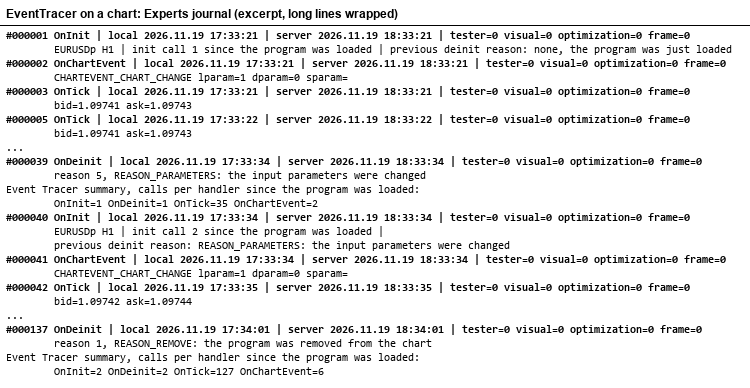
Experts journal of one chart run: an input is changed, then the Expert Advisor is removed
What one line shows
#000008 OnInit | local 2026.11.19 11:22:19 | server 2026.11.19 12:22:19 | tester=0 visual=0 optimization=0 frame=0 | EURUSD M15 | init call 2 since the program was loaded | previous deinit reason: REASON_CHARTCHANGE: symbol or timeframe of the chart was changed
| Part | Content |
|---|---|
| #000008 | Running number of the handler call. It counts every call, also those that are not printed, so a gap in the numbers shows how many calls were left out. |
| OnInit | The handler that ran. |
| local, server | TimeLocal and TimeTradeServer. In the Strategy Tester both show the simulated time, not the clock of the computer. |
| tester, visual, optimization, frame | MQL_TESTER, MQL_VISUAL_MODE, MQL_OPTIMIZATION and MQL_FRAME_MODE as 0 or 1. |
| details | Depends on the handler, see the next table. |
| Handler | Details |
|---|---|
| OnInit | Symbol, timeframe, the number of OnInit calls since the program was loaded, and the reason of the deinitialization before. |
| OnDeinit | The reason code and its meaning in plain text, for all ten reasons from REASON_PROGRAM to REASON_CLOSE. On a chart a second line sums up the calls per handler since the program was loaded. |
| OnTick | Bid and ask. |
| OnTimer | The timer period. |
| OnTrade | No details. |
| OnTradeTransaction | Type of the transaction, symbol and the order, deal and position tickets; for a request also the return code. |
| OnBookEvent | The symbol whose Depth of Market changed. |
| OnChartEvent | Name of the event, for example CHARTEVENT_CHART_CHANGE or CHARTEVENT_CUSTOM+7, and lparam, dparam, sparam. |
| OnTester | The calls per handler in this test run. |
| OnTesterInit, OnTesterPass, OnTesterDeinit | For every pass of an optimization its number, the total of events and the calls per handler, as sent from the test agent. |
Inputs
| Input | Default | Meaning |
|---|---|---|
| Timer period in seconds | 60 | Period of OnTimer, from 0 to 86400. 0 starts no timer. This input can be optimized, which gives a small optimization to watch. |
| Print every tick and book event | false | false: OnTick and OnBookEvent print only the first call in every second. true: every call is printed. |
| Subscribe to the Depth of Market of the chart symbol | false | true: the program calls MarketBookAdd for the chart symbol, so that OnBookEvent runs, and releases the subscription in OnDeinit. |
| Strategy Tester: printed lines per handler | 20 | In the Strategy Tester OnTick, OnTimer, OnTrade, OnTradeTransaction, OnBookEvent and OnChartEvent print at most this many lines each; the frames of an optimization are limited the same way. 0 means no limit. |
What you can see with it
On a chart, change the timeframe or the symbol. The journal shows OnDeinit with REASON_CHARTCHANGE and then OnInit again, but the running number goes on and the OnInit line says "init call 2". The program was not loaded again, so its global variables kept their values. The same happens when you change an input (REASON_PARAMETERS).
This matters for every Expert Advisor that keeps state in global variables. An Expert Advisor that fills a global variable only where it is declared therefore starts its second run with old values; it has to reset its state in OnInit, or it may act on what it remembered from the old symbol or timeframe. EventTracer does that for its own throttling state and leaves the counters alone on purpose, so that you can see them survive.
In a single test the order is OnInit, then OnTick and OnTimer in simulated time, then OnTester and only after it OnDeinit, with the reason REASON_REMOVE. OnTesterInit, OnTesterPass and OnTesterDeinit do not run in a single test.
In an optimization the terminal loads a second copy of the program on a chart, in frame mode (frame=1). Only this copy runs OnTesterInit, OnTesterPass and OnTesterDeinit, and it prints with the real time of the computer. OnInit and OnDeinit do not run in it; chart events do.
The copies on the test agents print nothing during an optimization, so each one sends its counters to the terminal with FrameAdd in OnTester, and the copy in the terminal reads them with FrameNext and prints one line per pass. This is a small working example of frames: data goes from the agent to the terminal without a file, and the summary of OnTesterDeinit adds up the counters of all passes.
OnTrade and OnTradeTransaction appear only when something happens on the account, for example when you place and close an order by hand on a demo account while EventTracer runs on a chart. The program only reads these events.
How to use it
- Attach EventTracer to any chart and open the Experts tab of the Toolbox.
- Change the timeframe, the symbol and an input, and remove the program again. Read the OnDeinit and OnInit lines.
- Open the Strategy Tester, choose EventTracer and run a single test over a few days. The lines are in the Journal tab of the tester.
- Tick the box of "Timer period in seconds" in the tester inputs, for example start 60, step 60, stop 180, and run an optimization with the slow complete algorithm. The lines of the copy in the terminal are in the Experts tab of the Toolbox. The OnTester value in the optimization results is the number of handler calls in the pass; it is a count of events and not a trading result.
Limits
- MetaTrader 5 only.
- In the Strategy Tester the local time is simulated like the server time, so the lines of a test do not show how long a pass really took.
- CHARTEVENT_MOUSE_MOVE, CHARTEVENT_MOUSE_WHEEL and the events for created and deleted objects arrive only when the matching chart property is switched on. EventTracer does not change the chart, so it does not switch them on.
- OnBookEvent needs a symbol with a Depth of Market. In a test on EURUSD with the subscription switched on, no book event arrived in the Strategy Tester.
- With "Print every tick and book event" on a liquid symbol the journal grows fast. The tester limit keeps a test journal small; set it to 0 only for short periods.
 Volume Profile with Naked POC - day, week, month or year profiles built from M1 bars
Volume profiles per day, week, month or year with POC, value area high and low (classic two-rows method), naked POC lines that stay until price trades through them, and a developing POC. Built from M1 bars. 8 buffers for EAs.
Gold Session Liquidity Free MT5 - XAUUSD Sessions, Sweeps and Risk Planner
Free XAUUSD MT5 indicator with Asian session High/Low, closed-bar liquidity sweeps, swing structure breaks, EMA trend context and a manual lot-size risk planner. No automatic trading or guaranteed profit.
Trailing Stop Manager - ATR, Chandelier, swing, SAR, MA, break-even with costs
Trails the stop loss of open positions with one of seven methods plus a break-even that includes the commission. Moves a stop only on a real improvement, never back, respects stop and freeze levels, limits requests. Restart-safe.
Rollover Cost Table - swap mode from the symbol, triple-swap day from the broker
An MQL5 indicator that draws a table on the chart with one row per open position and shows what one more night of holding it costs, in the deposit currency where the symbol's swap mode allows it. The swap mode and the two rates come from the symbol's own specification, and so does the triple-swap weekday; no rate is typed into the code. Where the symbol charges in points, a horizon column turns that night into the number of normal nights needed to repay one round turn, and a figure the terminal cannot supply is a dash with a reason, never a zero.