 MetaTrader 5
 Experts
 Indicators
 Scripts
 Libraries
 Storage
Watch how to download trading robots for free
Find us on Telegram!
Join our fan page
Join our fan page
You liked the script? Try it in the MetaTrader 5 terminal

Risk-Based Lot Size Calculator (script) - script for MetaTrader 5
Cesar De Los Reyes Sanchez

I design and develop expert advisors (EAs), indicators and trading utilities for MetaTrader 5. My focus is rule-based systems with clear logic and built-in risk management: fixed stop loss, risk per trade as a percentage of the account, daily loss limits and account protections. No martingale, no
- Views:
- 42
- Published:
-
 You are missing trading opportunities:
- Free trading apps
- Over 8,000 signals for copying
- Economic news for exploring financial markets
Registration Log inYou agree to website policy and terms of use
If you do not have an account, please register -
 Need a robot or indicator based on this code? Order it on Freelance
Go to Freelance

Many accounts are lost because the position size is random. This script removes the guesswork: you enter the percentage of your account you accept to lose if the stop loss is hit, and the distance of the stop loss in pips. It prints the lot size that matches, rounded down to the volume step of the symbol so that the real risk never goes above your target.
How it works
1. It reads the tick value, tick size and volume limits of the symbol from the broker.
2. It computes the money lost per 1.00 lot if the stop is hit: stop distance / tick size * tick value.
3. It divides the money at risk (account value * risk %) by that loss per lot and rounds the result down to the volume step.
Inputs
- Risk per trade (% of account): for example 1.0.
- Account value used: equity or balance.
- Stop loss distance (pips): a pip is 10 points on 3 and 5 digit symbols and 1 point on the others.
- Symbol: leave empty to use the symbol of the chart.
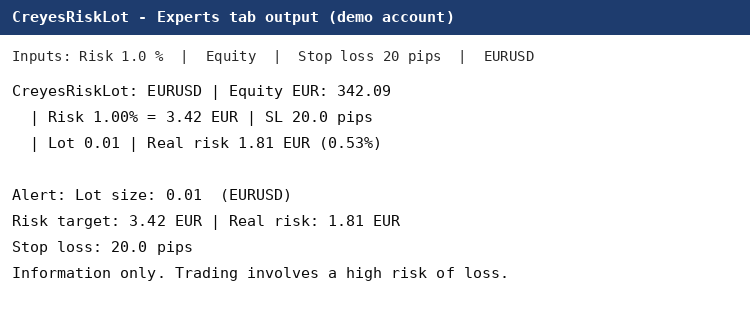
Script output on a demo account: EURUSD, risk 1%, stop loss 20 pips.
How to use it
Copy CreyesRiskLot.mq5 to the MQL5\Scripts folder, compile it in MetaEditor, drag it from the Navigator onto a chart and fill in the inputs. The result is shown in an alert and printed in the Experts tab (see the screenshot attached to the code).
Example on a demo account (equity 342.09 EUR, EURUSD, risk 1%, stop loss 20 pips): money at risk 3.42 EUR, the calculated lot is 0.01 (rounded down from 0.0189), real risk 1.81 EUR. If even the minimum lot risks more than your target, the script tells you instead of rounding up.
If you prefer a panel on the chart with buttons to place the order with this lot size already calculated, see my utility Creyes Trade Manager Pro: https://www.mql5.com/en/market/product/208367. A short article with the formula and a worked example is here: https://www.mql5.com/en/blogs/post/780474.
The script is for information only. Trading involves a high risk of loss; always check the result against your broker's contract specification before using it.
 ICT Session Boxes - four GMT windows, automatic broker offset, high and low lines
Session windows are quoted in GMT; the chart runs on the broker's clock. This indicator takes each window in GMT, applies your broker's offset, and draws the box over that window's bars. It adds the high and low lines to every enabled window unless you switch them off, prints the session name and range only on that session's newest box when there is room, and never trades.
 Risk Lot Calculator
Chart panel that calculates position size from risk % and stop-loss in points, with tick value, margin and money at risk. Does not place orders.
Session Range Box
Draw Asian, London and New York session ranges as chart boxes with high/low lines, labels and an optional London–New York overlap. Configure GMT or broker-server hours and review the latest session statistics in a panel.
Daily Drawdown Guard
An account-wide MetaTrader 5 utility that tracks daily loss from the chosen start-of-day equity and intraday equity peak. Shows warning and critical levels with optional money and percent limits plus terminal, sound or push alerts. It never places, modifies or closes trades.