 MetaTrader 5
 Experts
 Indicators
 Scripts
 Libraries
 Storage
Watch how to download trading robots for free
Find us on Twitter!
Join our fan page
Join our fan page
You liked the script? Try it in the MetaTrader 5 terminal

Repaint Checker - find out whether an indicator repaints - expert for MetaTrader 5

- Views:
- 65
- Rating:
- Published:
-
 You are missing trading opportunities:
- Free trading apps
- Over 8,000 signals for copying
- Economic news for exploring financial markets
Registration Log inYou agree to website policy and terms of use
If you do not have an account, please register -
 Need a robot or indicator based on this code? Order it on Freelance
Go to Freelance
Many indicators look perfect on history and fail live, because their values or signals change after the bar has closed. Repaint Checker tests any MT5 indicator and tells you whether it repaints, buffer by buffer, with example dates.
How it works
When each bar closes, the EA records the value that every buffer of the tested indicator shows at that moment, which is exactly what a trader would have seen live. At the end of the test (or continuously on a live chart) it reads the same bars again and compares them.
For each buffer it counts values that changed, signals that appeared late (empty when the bar closed, filled in later) and signals that vanished (shown when the bar closed, gone later). The verdict, NO REPAINTING FOUND or REPAINTS, is shown on a panel and in the journal with example dates, and a CSV report is written to the terminal Common\Files folder.
Inputs
Indicator to test: its path inside MQL5\Indicators, for example Examples\ZigZag; leave it empty for a demo on the built-in Fractals. Its inputs: comma-separated values, empty = the indicator defaults (each input group heading also counts as an input). Buffers to check: 0 = all, up to 32. Tolerance: relative change to ignore. Show the result panel. Write a CSV report.
Usage
Run the EA in the Strategy Tester on any symbol and timeframe for a few months of data; visual mode shows the panel. Any buffer reported as changed, late or vanished repaints. Some buffers hold internal values that may change; judge the buffers that draw lines or signals. The EA places no trades.
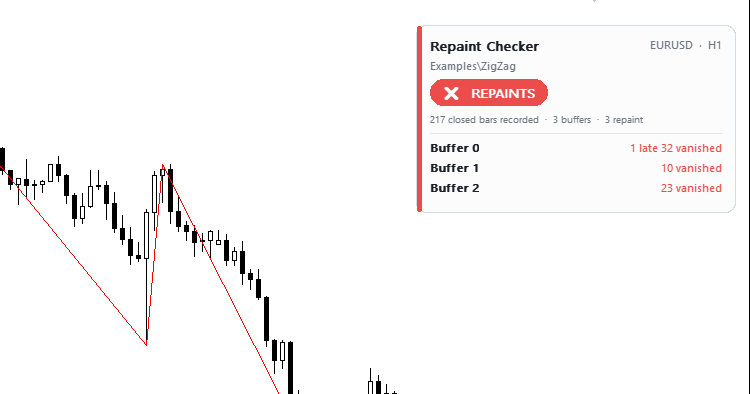
Examples: the built-in Fractals (the default demo) is reported as REPAINTS, because every fractal appears late: it is only confirmed two bars after the bar it is drawn on. The standard ZigZag (Examples\ZigZag) is also reported as REPAINTS, because its last leg is redrawn while the market moves. A non-repainting indicator shows no change on every buffer.
 Supertrend Gold Signals
Supertrend indicator for MT5 on Gold (XAUUSD), forex and indices: ATR trailing line in two colours, buy and sell arrows only on the closed candle of the flip, popup, push and sound alerts. Open source code.
London Breakout EA: simple and transparent/London Breakout Expert Advisor: simple and transparent
Free breakout EA: Asian range, London breakout, one trade a day, stop loss always set, lot size based on risk percentage. No grid, no martingale. / Free EA: Asian range breakout during the London session, one trade a day, stop loss always set, lot size based on risk percentage. No grid or martingale.
Prop Risk Guard - daily loss and drawdown protection
Protects your account from a prop-firm rule breach: daily loss limit, max drawdown (static or trailing) and profit-target lock. On a breach it closes all positions and pending orders, then blocks new trades until the lock resets.
MACD Signals
Indicator edition for new platform.