 MetaTrader 5
 Experts
 Indicators
 Scripts
 Libraries
 Storage
Watch how to download trading robots for free
Find us on Twitter!
Join our fan page
Join our fan page
You liked the script? Try it in the MetaTrader 5 terminal

Candle Timer with Spread and Swap Countdown MT4 - indicator for MetaTrader 4
Dragos Mihai Ofrim

DuoFX Labs: trading tools for MetaTrader 5 and MetaTrader 4
We build the tools we use ourselves: fast, clean and honest about what they do. Every product ships for both MT5 and MT4 from the same code, is tested on live charts before release, and gets updates when traders ask for something.
We build the tools we use ourselves: fast, clean and honest about what they do. Every product ships for both MT5 and MT4 from the same code, is tested on live charts before release, and gets updates when traders ask for something.
- Views:
- 88
- Rating:
- Published:
-
 You are missing trading opportunities:
- Free trading apps
- Over 8,000 signals for copying
- Economic news for exploring financial markets
Registration Log inYou agree to website policy and terms of use
If you do not have an account, please register -
 Need a robot or indicator based on this code? Order it on Freelance
Go to Freelance
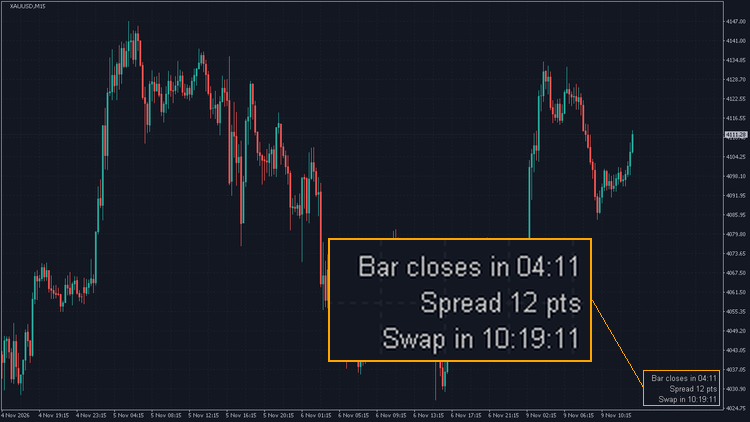
A small text block in the chart corner of your choice with three lines:
- Bar closes in: time left on the current bar, on any timeframe from M1 to MN1. It changes colour near the close (the last 10% of the bar).
- Spread: the current ask minus bid, in points.
- Swap in: time left until 00:00 server time, the usual rollover. "(x3)" is added on the day the broker charges triple swap for the symbol.
The block updates every second from a timer, so the countdown keeps running between ticks and on quiet symbols. When no tick has arrived for more than 5 minutes (market closed, weekend), the first line shows the time of the last tick instead of a countdown.
Notes:
- MT5 uses the terminal's estimate of the server clock. MT4 has no such function, so the MT4 version takes the server time from the last tick and keeps it running on the local clock. Until the first new tick after loading, the MT4 times can be off (for example at the weekend).
- Swap is charged at server midnight by most brokers, but check your broker's rollover time.
- The indicator only draws text labels and removes them when it is taken off the chart.
Inputs
| Input | Default | What it does |
|---|---|---|
| Corner | Right lower | Chart corner for the text block |
| Font size | 10 | Text size |
| Text colour | Silver | Colour of all lines |
| Countdown colour near the bar close | Orange | Colour of the countdown in the last 10% of the bar |
| Show spread | true | Show or hide the spread line |
TesterVsLive - match a Strategy Tester report against your real account, trade by trade
A free, read-only utility. It reads an MT4 Strategy Tester report (.htm) and matches every backtest trade with your account history. It then shows the match rate, missed and extra trades, entry and exit slippage, delay, real commission and swap, and how much of the backtest edge survives live.
UT Bot Alerts for MT4 - faithful port with signal statistics panel and daily session filter
An MT4 port of QuantNomad's "UT Bot Alerts", one of the most-used scripts on TradingView. It draws the ATR trailing stop, Buy/Sell signals and bar colors, and adds a panel that counts what the signals would have done, after costs, inside your trading hours.
Trading Session Boxes: Tokyo, London, New York MT4
Draws the Tokyo, London and New York sessions of the last few days as boxes from each session's high to its low, with the high and low printed on the chart. Session hours are set in server time.
Previous Day and Week High Low Levels MT4
Previous day high and low, previous week high and low and today's open as horizontal lines with small price labels, on any timeframe.